
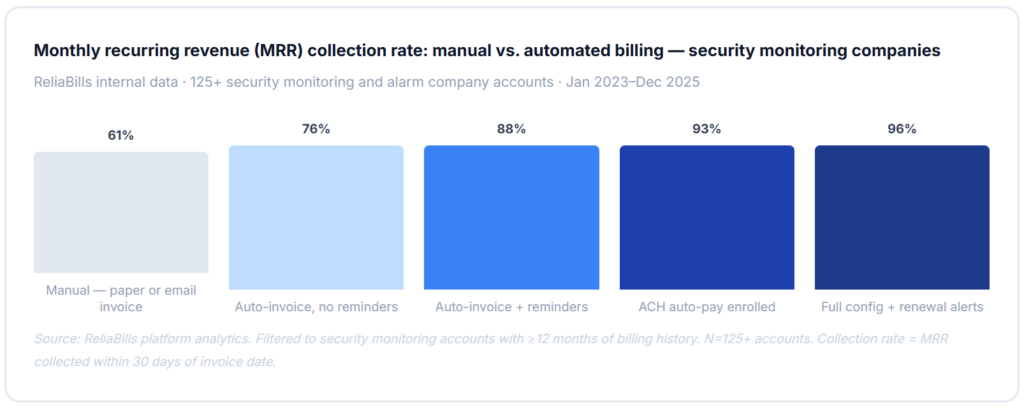
The right recurring billing setup for security monitoring contracts closes the three revenue gaps that cost monitoring companies the most money: monthly invoices that go out late or get skipped during busy install periods, contract renewals that auto-expire without generating a new billing cycle, and multi-site clients who receive separate invoices for 20 locations when they need one consolidated statement for AP. Configure those three correctly before you go live, and you will collect 90–96% of contract revenue on or before the due date every month.
What is Recurring Billing for Security Monitoring Contracts?
Recurring billing for security monitoring contracts is a configured billing system that automatically invoices clients for ongoing security services, alarm monitoring, video surveillance, access control, fire alarm inspection, and remote guarding on the schedule defined in each service agreement. Unlike manual invoicing, it runs without human intervention once configured: generating invoices on the correct date, applying the correct contract rate, sending payment reminders, and triggering renewal workflows when contracts approach expiration. Key terms include contract-based recurring billing, recurring billing automation, monitoring rate escalation, multi-site invoice consolidation, and customer management organized by account and site hierarchy. It is the billing infrastructure that converts signed monitoring agreements into collected monthly recurring revenue, reliably, every billing cycle, without manual re-entry.
The Security Monitoring Billing Calendar: Why Contract Timing Drives Everything
Security monitoring revenue is fundamentally different from project-based revenue: it should be perfectly predictable. Every active monitoring agreement generates the same invoice on the same date every month or quarter until the contract expires or renews. The only variables are rate escalations at defined intervals and add-on services that get layered onto the base monitoring fee. When billing is automated and contract terms are stored accurately, revenue forecasting is nearly exact. When billing is manual, the gap between what you should collect and what you actually collect is where companies lose 8–15% of their annual monitoring revenue.

The rate escalation problem that manual billing always misses
Most alarm monitoring contracts include an annual rate escalation clause, typically 3–5% per year, or a CPI adjustment. In a manual billing process, this clause exists in the contract but depends entirely on someone remembering to update the invoice amount before the anniversary date. Across a portfolio of 500 monitoring accounts, a 3% escalation that goes unapplied for an average of 60 days per account represents real revenue the company earned but never collected. Automated billing with scheduled rate changes applies the escalation on the exact contract anniversary date, with no calendar reminder, no manual update, and no lag.
Multi-site clients and the consolidated invoice requirement
Commercial and enterprise security monitoring clients, retail chains, office parks, hospital systems, and school districts are almost always multi-site. They have a single AP contact who needs one invoice showing monitoring fees for all 40 locations, broken down by site but consolidated to one payment. Sending 40 separate invoices to one AP department is not just inefficient; it frequently causes individual invoices to get lost, miscoded, or paid out of order. A properly configured billing system stores each site as a sub-account under the master client record and generates a consolidated invoice automatically on the billing date. Your customer management hierarchy makes this work cleanly.
How Automated Recurring Billing Works for Security Monitoring
The billing cycle for a security monitoring contract is one of the most automatable revenue streams in any service industry, because the variables (amount, date, and client) are fixed at contract signing and change only at defined intervals. Here is what a properly configured automated billing cycle looks like from signing to renewal:

Service add-ons and the variable line item challenge
The base monitoring fee is fixed and easy to automate. What’s harder is the layer of variable charges that security monitoring companies add throughout the year: a temporary camera added during a construction project, a cellular backup upgrade, a false alarm fine that needs to be passed through, or an additional door added to the access control system. These variable charges need to attach to the existing recurring invoice as add-on line items, not as separate invoices that fragment the billing relationship and confuse the client’s AP process. Billing systems that support variable line items on recurring invoices handle this cleanly; systems that treat each charge as a standalone invoice create billing noise that slows payment and generates reconciliation questions.
The contract expiration and revenue recognition gap
Security monitoring companies carry a specific accounting risk that few billing guides address: when a monitoring contract expires and billing stops, the monitoring service often continues while the renewal is being negotiated. The company is providing a service it’s not billing for, and revenue that should be recognized is being deferred, sometimes for weeks. A billing system with contract expiration alerts and auto-renewal workflows eliminates this gap by starting the renewal process 60 days before expiration and keeping billing continuous unless the client explicitly cancels. Companies that implement this report a near-zero gap between contract service periods and billed periods.
Real-World Use Cases by Security Company Type
Alarm monitoring companies
Monthly RMR (recurring monthly revenue) billed on the 1st. Annual rate escalation scheduled at contract setup. Cellular backup and extended service billed as recurring add-ons.
Video surveillance providers
Cloud storage fees are billed per camera per month. Monitoring service fees on a separate recurring schedule. Equipment lease billed via installment billing alongside the monitoring fee.
Access control integrators
Per-door or per-reader recurring fees. Software licensing billed annually. Hardware maintenance contracts on a separate annual recurring schedule.
Fire and life safety companies
Annual inspection fees billed quarterly in advance. Monitoring is billed monthly. Central station fees passed through as a separate line item on the consolidated invoice.
Commercial and enterprise clients
Multi-site consolidated invoicing across 10–200 locations. Single AP contact, one payment. Net-30 or net-60 terms with reminder cadences that match the client’s payment cycle.
Residential monitoring portfolios
High-volume, low-value accounts. Card-on-file auto-pay essential. ACH for clients with annual prepay discounts. Failed payment retry is critical at this volume.
Key Benefits of Automated Recurring Billing for Security Monitoring
The business case for recurring billing automation in security monitoring is unusually strong because the revenue should already be predictable, every monitoring agreement is a fixed-fee, fixed-schedule contract. The gap between what monitoring companies should collect and what they actually collect is almost entirely a billing infrastructure problem, not a client satisfaction problem. Companies that automate billing correctly aren’t getting more clients to pay; they’re stopping the leaks that let earned revenue escape collection.

MRR visibility as a business valuation driver
Security monitoring companies are frequently valued on a multiple of MRR, the rule of thumb has historically been 30–40x monthly recurring revenue for residential alarm monitoring portfolios. A company with clean, verifiable, automated MRR documentation commands a higher multiple than one with manually managed billing records where the actual collected vs. contracted MRR is hard to prove. Billing automation that generates a clean MRR audit trail, every invoice, every payment, every rate change, and every renewal is not just an operational benefit; it directly affects the company’s exit value.
Eliminating the invoice gap during busy installation periods
Security companies experience a well-known billing gap: during peak installation months, the operational team is overwhelmed with new system activations, and billing for newly activated monitoring agreements falls behind. New accounts go unbilled for 30–60 days while the install team catches up. Automated billing that triggers within 48 hours of contract activation, without requiring the billing staff to manually create the invoice, eliminates this gap entirely. The install team activates the account; billing starts automatically.
Risks and Configuration Pitfalls
The false alarm billing pass-through problem
Many jurisdictions charge monitoring companies for false alarm responses, and those charges are typically passed through to the client. The billing challenge is that false alarm fees arrive from municipalities on irregular schedules, in variable amounts, and often months after the triggering event. Your billing system needs to support one-time add-on charges on a recurring invoice, not just the fixed monthly fee. A system that can only handle fixed recurring amounts will require manual invoice creation for every false alarm pass-through, which reintroduces exactly the manual billing work that automation was supposed to eliminate.
Early termination and cancellation fee billing
Security monitoring contracts typically include early termination clauses, often 80–100% of remaining monthly fees. When a client cancels mid-contract, the billing system needs to: stop the recurring billing schedule, calculate the early termination fee based on the remaining contract months and the contract rate, generate a final termination invoice, and close the account in the billing system. This is a multi-step process that manual systems handle inconsistently and that automated systems need to be explicitly configured to support. Without this configuration, early termination fees go uncollected at a remarkably high rate.
Net terms and enterprise client billing cadences
Enterprise clients, national retailers, hospital systems, and government agencies often require net-30 or net-60 terms, specific invoice formats with PO numbers, and reminder sequences that respect their payment cycles rather than the standard net-15 sequence most billing platforms default to. Applying a residential monitoring reminder sequence to a net-60 enterprise client creates friction at exactly the moment you need to protect the relationship. Configure net terms and reminder cadences per client tier, not globally.
Billing Method Comparison for Security Monitoring Companies
| Method / tool | Contract rate storage | Multi-site consolidation | Rate escalation scheduling | Renewal alert automation | ETF billing support | Best for |
|---|---|---|---|---|---|---|
| Recurring billing software Best fit | ✓ | ✓ | ✓ | ✓ | ✓ | Any monitoring company, 50+ accounts |
| Generic invoicing software | ~ | ✗ | ✗ | ✗ | ✗ | Under 50 accounts; simple billing only |
| Security industry platforms (Bold, Securitas 360, Manitou) | ✓ | ✓ | ✓ | ✓ | ✓ | Large monitoring centers with full ops platform |
| Spreadsheet + manual invoicing | ✗ | ✗ | ✗ | ✗ | ✗ | Not recommended above 20 accounts |
| Accounting software only (QBO, Xero) | ~ | ✗ | ✗ | ✗ | ✗ | Back-office only, not a contract billing solution |
Common Mistakes and What We Got Wrong at First
1. Setting up billing accounts before verifying signed contract rates
This is the most common and most expensive first mistake. A salesperson closes a deal, enters a monitoring rate in the CRM, and hands it off to the billing team. The billing team sets up the recurring invoice based on the CRM record, which reflected the original proposal, not the final negotiated rate that was changed during contract signing. The client receives monthly invoices at the wrong amount for 6–12 months before anyone catches it. The correction requires a back-billing calculation, a client conversation, and potentially a credit or additional invoice. The fix is a mandatory cross-reference: every billing account setup must be verified against the signed contract PDF before going active. Not the CRM record. The signed contract.
2. Not configuring rate escalations at contract setup
The second most costly mistake: monitoring companies with annual CPI or fixed-percentage rate escalation clauses don’t enter the escalation schedule into the billing system at contract setup, they plan to update rates “at renewal time.” At renewal time, the team is processing dozens of renewals simultaneously, and some get missed. Others get applied in the wrong month. A 3% escalation on a $45/month residential account is $1.35/month, which sounds trivial. Across 800 accounts where the escalation was late by an average of 3 months, that’s $3,240 in revenue that should have arrived in Q1 and showed up (if at all) in Q3. Enter the escalation schedule in the billing system the same day the contract is set up.
3. Using the same billing date for all accounts
Normalizing all monitoring accounts to the 1st of the month feels like a simplification. In practice, it creates a massive batch of invoices, failed payments, and renewal tasks hitting simultaneously, overwhelming billing staff and creating a large single-day cash flow event instead of a steady monthly collection curve. Monitoring companies that bill on the contract activation anniversary date, or even distribute across the 1st, 10th, and 20th, see significantly fewer batch-day failures and more predictable weekly cash flow. The billing system handles this automatically once accounts are configured correctly; the only change is the date stored per account.
4. Treating multi-site clients as multiple separate accounts instead of a hierarchy
This mistake costs monitoring companies commercial clients. A retail chain with 35 locations that receives 35 separate invoices from its security monitoring vendor will eventually ask for consolidated billing. If the billing system can’t support account hierarchies, one master client record with site-level sub-accounts consolidated to one invoice, the company has to build a manual consolidation workaround that introduces errors and takes hours every month. Set up multi-site clients with the correct account hierarchy from day one. The sites are billing records within the master account, not independent accounts.
5. Letting contracts expire without automated renewal workflows
This is the revenue gap nobody talks about. A 36-month monitoring contract expires in February. The billing system stopped invoicing automatically, because the contract period ended. But nobody notified the client, nobody sent a renewal proposal, and monitoring service continues uninterrupted. Three months later, an account manager notices the account hasn’t generated revenue since January. The company has provided three months of free monitoring service. Billing systems with contract expiration alerts and renewal notification workflows prevent this by flagging expiring contracts 60 days out and maintaining billing continuity until the contract is explicitly closed or renewed.
Step-by-Step Setup Guide for Recurring Security Monitoring Billing
The phases below are built specifically for security monitoring companies, alarm dealers, video surveillance providers, access control integrators, and fire and life safety companies. Phase one’s contract verification step is the one most implementations skip, and it’s the one responsible for the majority of first-cycle billing errors.
1. Audit active contracts and verify billing records (week 1)
Before importing any account, pull every active monitoring contract and verify the monthly rate, billing date (or contract activation date), annual escalation clause and percentage, contract term and expiration date, number of sites (for multi-site accounts), net terms, and the correct AP contact email. Cross-reference every rate against the signed contract PDF, not the CRM, not the proposal. Also pull your AR aging: any monitoring account with an outstanding balance older than 30 days is your first collection priority once the billing system goes live. Build your customer management hierarchy at this stage, one master account per client company, with site sub-accounts for multi-site clients.
2. Configure contract billing records and escalation schedules (week 2)
Enter each account with the verified contract rate, billing date, contract term dates, and escalation schedule. For every account with an annual escalation clause, enter the escalation percentage and the first escalation date at setup, not as a future task. Configure multi-site accounts with the site hierarchy and consolidated invoice settings. Set up recurring billing schedules for every active account. Configure net terms and payment reminder cadences per client tier, residential accounts on net-15 with 3-day reminders, commercial accounts on net-30 with 7-day reminders, and enterprise accounts on net-60 with cadences that match their AP cycle. Set contract expiration alerts at 90 days and 60 days before the end date.
3. Configure payment methods and pilot with 20–30 accounts (week 3)
Enable ACH auto-pay enrollment for new accounts going forward, include the ACH authorization in the standard monitoring agreement so clients authorize payment at contract signing. For existing accounts, send an ACH enrollment email to residential accounts (expect 50–65% enrollment in 60 days) and a direct request to commercial AP contacts. For enterprise clients, work through ACH setup individually. Run one full billing cycle with 20–30 pilot accounts across different account types. Verify that rates match contracts, escalations are correctly dated, consolidated invoices generate correctly for multi-site accounts, and reminder sequences fire on the right schedule for each net-term tier. For equipment or installation costs that need to be spread over time, configure separate installment billing schedules distinct from the monitoring recurring invoice.
4. Full migration and contract renewal workflow activation (month 2+)
Migrate all remaining accounts to the billing system. As each account goes live, verify the first automated invoice matches the contract terms exactly before enabling auto-send. Enable contract renewal workflows, automated renewal notices at 90 and 60 days before expiration, with a digital renewal link if your contract flow supports it. ReliaBills supports the full monitoring contract billing workflow, including invoicing software with contract-based templates, multi-site account hierarchies, scheduled rate escalations, and ACH auto-pay. The platform’s free tier handles unlimited clients and invoice creation for companies testing the workflow before committing to payment processing volume. Set a quarterly audit cadence to verify escalations applied correctly, renewal workflows are functioning, and no accounts have expired contracts that are still being monitored without billing.
Frequently Asked Questions
1. What makes recurring billing for security monitoring different from generic subscription billing?
Generic subscription billing handles fixed monthly amounts for homogeneous products. Security monitoring billing requires contract-level rate storage (each client has their own negotiated rate), scheduled rate escalations that vary by contract, multi-site account hierarchies that consolidate to one invoice, variable add-on charges (false alarm pass-throughs, equipment upgrades) on recurring invoices, contract term tracking with renewal alerts, and early termination fee calculation. None of these exist in standard subscription billing tools without significant customization.
2. How should annual rate escalations be configured in a recurring billing system?
The rate escalation should be configured at account setup as a scheduled rate change, with the escalation percentage and the anniversary date entered when the contract is first created in the billing system. On the anniversary date, the system applies the new rate automatically without any manual update. If the escalation is CPI-based rather than fixed-percentage, you’ll need a process to calculate the new rate each year and update the billing record before the anniversary, but the system should still apply it on the correct date rather than requiring someone to manually edit every invoice.
3. How do I bill a multi-site commercial client with 50 locations?
Configure the client as a master account with each location as a site sub-account. Each site has its own billing record (rate, service type, activation date), but the invoice is consolidated at the master account level, one invoice to the AP contact showing all 50 sites with individual line items, one total amount due, and one payment received and distributed across all sites in the billing system. This requires a billing system that supports account hierarchies; flat billing systems that treat each site as an independent account can’t generate consolidated invoices without manual assembly.
4. What happens to billing when a monitoring contract expires?
A properly configured billing system sends expiration alerts at 90 and 60 days before the contract end date, triggering a renewal process. If the contract is renewed, the billing schedule continues under the new contract terms (which may include a rate update). If the contract is not renewed by the expiration date, billing stops on the expiration date. If monitoring service continues during a negotiation period, the billing system should have a mechanism to extend the billing period on a month-to-month basis until the situation is resolved. Companies that lack this workflow frequently provide months of uncompensated monitoring service during renewal negotiations.
5. How should early termination fees be billed when a client cancels mid-contract?
The ETF calculation should be derived from the contract terms, typically the number of remaining months multiplied by the monthly monitoring rate, sometimes with a discount. The billing system needs to generate a final invoice that includes the ETF as a clearly labeled line item, reference the contract clause that authorizes the fee, and close the recurring billing schedule so no further monthly invoices generate. If the client disputes the ETF, the billing system’s contract record and payment history serve as the primary documentation. ETFs that are not invoiced within 30 days of cancellation are significantly harder to collect than those invoiced immediately.
6. What net terms should security monitoring companies use for different client types?
Residential monitoring clients should be on net-15 or immediate-pay (auto-pay preferred), residential clients who are given net-30 terms tend to treat the 30 days as the expected payment date rather than the outer limit. Small commercial clients work well on net-30. Enterprise and government clients often require net-45 to net-60 to match their AP processing cycles. For each tier, configure payment reminder sequences that respect the net terms, a net-60 client shouldn’t receive a late payment notice on day 31. The billing system must support per-account net terms and reminder cadences, not just a global default.
Recent Articles:
- How to Set Up Recurring Billing for Dog Walking and Pet Sitting Services
- How CPAs Can Automate Client Billing and Invoicing for Tax Season