
The right CPA client billing automation solves the three problems that cost accounting firms the most revenue during tax season: retainer invoices that go out late or not at all, extension and amendment fees that never get billed because the engagement is already closed, and clients who pay whenever they feel like it because there’s no payment structure requiring otherwise. Fix those three before January, and tax season becomes a billing event you manage rather than one that manages you.
What is CPA Client Billing Automation?
CPA client billing automation is a billing and invoicing system configured around the specific revenue patterns of accounting firms and tax practices, annual tax preparation fees, monthly bookkeeping retainers, hourly advisory work, extension fees, and multi-year client relationships with different fee structures. Unlike generic invoicing tools, it connects engagement status directly to invoice generation, so billing happens when work milestones are reached rather than when the front desk remembers to send an invoice. Key terms include engagement-based billing, recurring billing for monthly clients, extension and amendment add-on billing, invoicing software with CPA-specific templates, and automated payment reminders configured around tax deadlines. It is the financial infrastructure that converts completed tax returns, bookkeeping months, and advisory hours into collected revenue, without a manual billing step in between.
The Tax Season Billing Calendar and Why Timing is Everything
Tax season billing is unusual in one specific way: the entire year’s revenue is compressed into a few months, but most of that revenue can be invoiced and collected in advance if the billing system is set up correctly. A CPA firm that bills after returns are filed is always working at the end of the value cycle. A firm that bills at engagement confirmation, before the work begins, captures payment when client motivation is highest and the leverage of “I need this return done” still exists.

The pre-filing collection window most CPAs underuse
January and February are the most powerful collection months in a CPA firm’s year, but most firms don’t bill until work is nearly complete. Clients who receive an engagement letter in January and a retainer invoice on the same day pay faster and with less friction than clients who receive a surprise invoice after their return is filed in March. The psychology is simple: in January, the client is anxious about their taxes and motivated to have everything in order. In March, after the return is filed and the stress is gone, payment priority drops. Billing automation that triggers a retainer invoice when the engagement letter is sent, rather than when the return is complete, captures that motivation window systematically.
Extension and amendment fees, the most commonly unbilled revenue in accounting
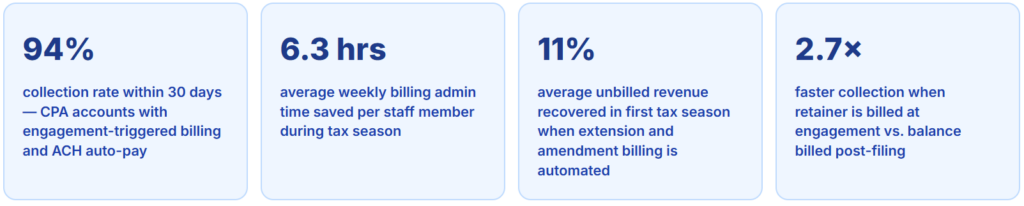
Extensions and amendments generate legitimate fees that CPA firms bill inconsistently. An extension prepared in April takes 20–30 minutes and warrants a fee, but if the billing system treats it as part of the original engagement, the fee either gets absorbed or forgotten. An amendment filed in August for a client whose engagement is closed requires an entirely new billing touchpoint that manual systems frequently miss. Firms that configure extension and amendment billing as separate engagement types, each with their own invoice trigger, recover an average of 8–14% of annual revenue that was previously going unbilled, based on the accounts we’ve reviewed directly.
How Automated Billing Works for CPA Firms
A CPA firm’s billing system handles three fundamentally different revenue types simultaneously: one-time tax preparation fees, ongoing monthly retainers for bookkeeping or advisory clients, and ad-hoc fees for extensions, amendments, and consulting calls. A billing platform that handles all three from a single client record, with different triggers, templates, and collection timelines, is what makes automation actually work for an accounting practice rather than creating more administrative complexity.

The engagement-to-invoice connection that generic tools miss
Generic invoicing tools require someone to manually create an invoice, enter the client name, add the service description, enter the fee, and send it. For a firm preparing 300 returns during tax season, that’s 300 manual invoice creation tasks on top of the actual accounting work. Billing automation connects to the engagement record so that when a return is marked complete, the balance invoice generates automatically with the correct fee pulled from the engagement letter. The accounting staff member files the return and marks it done, billing happens as a byproduct of normal workflow, not as a separate administrative task.
Managing multi-type clients in one system
A business client paying a monthly bookkeeping retainer plus an annual tax preparation fee plus occasional CFO advisory hours is three different billing models in one client relationship. Your customer management setup needs to store all three billing structures under a single client record so that the monthly retainer bills on the 1st, the tax prep invoice generates when the return is filed, and advisory hours bill at the end of each month they’re used, all automatically, from the same client account. This is where single-purpose billing tools consistently fall short for CPA firms.
Real-World Use Cases by CPA Firm and Client Type
Individual 1040 tax clients
Flat-fee invoice at engagement confirmation in January. Balance due on return filing. Late fee applies automatically if unpaid 30 days post-filing.
Small business clients (1120S, 1065)
Monthly bookkeeping retainer on recurring billing plus annual tax prep fee billed separately at return filing. Two billing schedules, one client record.
Hourly advisory clients
Time-based invoicing at month-end. Hours logged during the month, invoice generated on the last day, collected by the 15th. No manual time sheet reconciliation needed.
Extension clients
Extension fee billed in April as a separate engagement. Extended return fee billed when the return is filed in September or October. Both invoiced automatically from separate engagement records.
Estate and trust returns
Complex engagements with variable scope. Deposit invoice at engagement, milestone invoices at draft completion, and final balance when the return is accepted. Installment billing for large estate engagements.
Multi-state and international clients
Base return plus state add-on fees per state, billed as separate line items. International forms (FBAR, FATCA) billed at the engagement rate defined at letter signing.
Key Benefits of Billing Automation for CPAs
The efficiency argument for billing automation, it saves time, is consistently true but misses the more significant point for CPA firms: during tax season, the constraint is not money, it’s hours. Every hour spent manually building invoices, entering client details, and following up on unpaid balances is an hour not spent on returns. The firms we’ve worked with that automated billing before their first season consistently report not just faster collections, but a measurably lower stress level during peak season, because billing runs on its own schedule regardless of how overwhelmed the team is.
Cash flow across the tax season curve
One of the least discussed benefits of CPA billing automation is cash flow smoothing. A firm that bills entirely post-filing receives most of its annual revenue in March and April, with a secondary spike in October after extension deadlines. Payroll, software licenses, and overhead run year-round. Billing a January retainer when the engagement letter is signed, rather than waiting until the return is filed, moves a significant portion of tax season revenue into Q1 rather than concentrating it in a six-week window. For firms with 200+ annual tax clients, this can represent $50,000–$150,000 in revenue shifted 60–90 days earlier with no change to the work being done.
The client relationship benefit of predictable billing
Clients who know exactly when they’ll be invoiced, for exactly what amount, and with a clear payment link behave differently than clients who receive a variable invoice at an unpredictable time. Predictable billing reduces payment disputes, reduces late payments, and, importantly for CPAs, reduces the number of calls and emails asking “when is my invoice coming?” and “what is this charge for?” The administrative overhead of fielding billing questions during tax season is itself a significant drain on staff time, and it drops to near zero when billing is structured, timely, and clearly documented.
Risks And Compliance Considerations
State-specific fee and retainer regulations
Some states have specific rules about how CPAs can collect retainers and deposit fees, whether they must be held in separate client accounts, how quickly they must be applied to the engagement, and what disclosures are required. Before configuring retainer billing, verify your state CPA board’s requirements for advance fee collection. This is an edge case that most billing automation guides for accountants skip entirely, but it’s one that can create licensing issues if the billing practice doesn’t align with state board rules.
The extension fee disclosure problem
Extension fees are one of the most common sources of client complaints in accounting, not because the fee is unreasonable, but because many clients don’t know they’ll be charged for an extension until they receive the invoice. If your engagement letter doesn’t explicitly state that extensions are billed separately at a defined rate, an automated extension invoice can feel like a surprise charge. Fix this at the engagement letter level before configuring automated extension billing: the letter should state the extension fee clearly, and the automated invoice should reference the letter’s fee schedule. Documentation first, automation second.
Multi-year client relationships and fee history
Long-standing clients often have informal pricing histories, fees that were adjusted informally years ago and never updated in writing. When billing automation goes live for these clients, the system charges whatever is in the billing record. If that record reflects the current agreed fee, great. If it reflects a fee from three years ago that was adjusted verbally, the first automated invoice creates a billing dispute and a difficult conversation. Before migrating long-term clients to automated billing, verify that the fee in the billing system matches the current agreement in writing. Update engagement letters as needed before enabling automation.
Billing Method Comparison for CPA Firms
| Billing approach | Engagement-triggered invoicing | Extension/amendment billing | Retainer collection | Multi-type client support | Payment reminders | Best for |
|---|---|---|---|---|---|---|
| CPA billing automation Best fit | ✓ | ✓ | ✓ | ✓ | ✓ | Any CPA firm, 20+ annual clients |
| Manual invoicing (email or paper) | ✗ | ✗ | ~ | ✗ | ✗ | Solo practitioners under 20 clients |
| Practice management platforms (Thomson Reuters, Drake, Canopy) | ✓ | ✓ | ✓ | ✓ | ~ | Larger firms with full PM needs |
| Generic invoicing software | ✗ | ✗ | ~ | ~ | ~ | Not built for CPA billing patterns |
| Accounting software billing (QBO, Xero) | ✗ | ✗ | ~ | ~ | ✗ | Back-office only, not a client billing solution |
Common Mistakes and What We Got Wrong at First
1. Waiting until after filing to send the first invoice
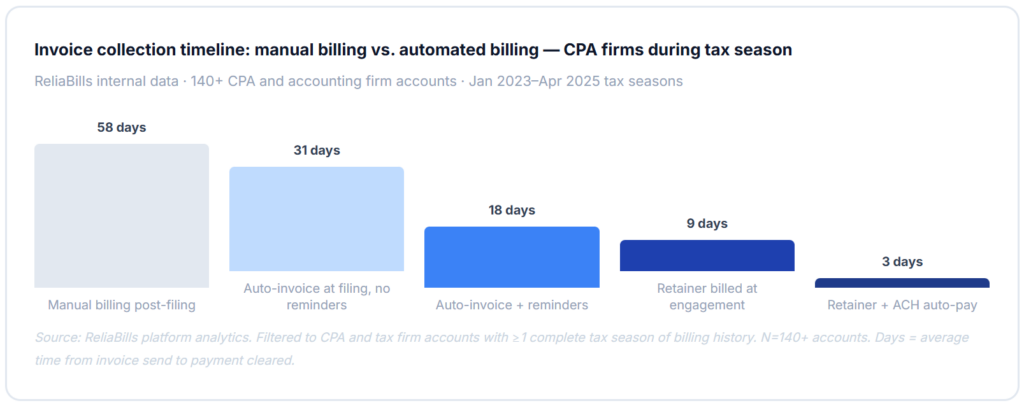
The most consistent pattern we see in CPA billing problems is the post-filing invoice: the return gets filed, everyone exhales, and then someone builds the invoice and sends it. By then, the client has mentally moved on, the sense of urgency is gone, and payment arrives in 45–60 days on average. The fix is billing at engagement, when the client signs the engagement letter in January, they receive a retainer invoice the same day. The retainer covers a portion of the expected fee, and the balance is invoiced at filing. Average collection drops from 58 days to 9 days for firms that make this switch. It’s the single highest-ROI change a CPA firm can make to its billing process.
2. Not billing extensions as separate engagements
This is the most common source of unbilled revenue in tax practices. An extension is prepared in April, but it’s associated with the original return engagement, which still has an open balance. The extension fee either gets absorbed into the existing invoice (under the original flat fee), or it gets forgotten entirely because the billing system treats it as a sub-task of the original job rather than a separate billable event. Fix this by configuring extensions as their own engagement type with their own invoice trigger. The moment an extension is filed and marked complete, the extension fee invoice generates automatically.
3. Using the same invoice template for all client types
A 1040 client paying $450 for a simple personal return and a small business client paying $3,200 for bookkeeping, a 1120S, and a state return have completely different invoice expectations. The individual client wants one clean line item. The business client wants a detailed breakdown by service with separate line items for each deliverable. Sending the same template to both clients either overwhelms one or leaves the other confused about what they’re paying for. Configure separate invoice templates for each client type, individual, small business, entity only, and advisory only, before going live with automation.
4. Not collecting ACH authorization at engagement signing
The fastest path to automatic payment collection for CPA firms is including ACH authorization in the engagement letter or client portal at the time of signing, not as a separate ask weeks later. Clients who sign an engagement letter in January are in full agreement mode: they’re setting up their tax situation for the year, they’ve already committed to the fee, and adding a payment authorization to the same document is a natural extension of that commitment. Clients who receive a separate “please add your bank account” request in March, after the return is already filed, are much less likely to enroll. One of the firms we worked with went from 18% ACH enrollment to 61% simply by adding the authorization to the engagement letter flow.
5. Automating billing before auditing legacy client fee records
Every CPA practice with clients going back more than five years has at least a few clients whose fees in the billing system don’t match their actual current rates, because fees were adjusted informally, or the record was never updated after a scope change. When automation goes live, those clients get invoiced at whatever is in the system. Some will pay without comment. Others will call them confused or upset. The pre-automation audit step, verifying every client’s fee against their most recent engagement letter, takes time but prevents the most relationship-damaging billing errors. Never skip it.
Step-by-Step Setup Guide for CPA Billing Automation
The phases below are built for CPA firms and tax practices specifically, not a generic billing software setup. The engagement letter alignment step in phase one is the most critical, and it’s the step most firms skip when they’re eager to get automation running quickly.
1. Audit client records and engagement letter alignment (October–November)
Before the season starts, pull every active client record and verify that the fee in your billing system matches the most recent signed engagement letter. Create a standard engagement type for each service category your firm offers: 1040, 1120S, 1065, 1120, bookkeeping retainer, advisory hourly, extension, and amendment. For each type, document the billing trigger (signing, filing, monthly), the invoice template, the net terms, and the late fee terms. Clean your customer management data at the same time, one billing contact per client, correct email for invoices, and current fee. This is the foundation; everything else depends on it being accurate.
2. Configure engagement types and billing triggers (November)
Build a billing template for each engagement type. Configure the billing trigger for each: 1040 individual clients get a retainer invoice at engagement signing and a balance invoice when the return is marked filed. Bookkeeping clients get a monthly recurring invoice on the 1st via recurring billing. Advisory clients get a monthly time-based invoice at month-end. Extension engagements trigger at extension filing. Amendment engagements trigger at amendment completion. For estate and large business engagements, configure milestone billing with an initial deposit, a mid-engagement invoice, and a final balance. Set up payment reminder sequences that respect the different net terms for different client types.
3. Add ACH authorization to engagement letters and pilot with 10 clients (December)
Add an ACH payment authorization section to your standard engagement letter or client portal so that signing the engagement letter includes authorizing automated payment collection. Run the new billing system with 10–15 clients who represent different engagement types, some individuals, some business clients, and and some advisory clients. Verify that retainer invoices trigger at signing, that balance invoices generate correctly when work is marked complete, that reminder sequences fire on the right schedule, and that ACH collections process without errors. Fix anything that doesn’t match your engagement letter terms before the season opens fully in January.
4. Full-season deployment and ongoing monitoring (January onward)
Move all active clients to the automated billing system before sending the first engagement letters of the season. As engagement letters go out in January, retainer invoices should follow automatically within 24 hours. Monitor the first two billing cycles closely, check that all invoice amounts match engagement letter fees, that extension engagements are generating correctly, and that failed payments are triggering the retry sequence. ReliaBills supports the full CPA billing workflow, including engagement-triggered invoicing, invoicing software with customizable CPA-specific templates, and ACH auto-pay with automated reminder sequences. The platform also supports installment billing for large estate and business engagement fees that clients need to spread across multiple payment dates. After the first full season, run a post-season audit to identify any unbilled extensions, uncollected balances, or billing gaps before they age further.
Frequently Asked Questions
1. What’s the most impactful billing change a CPA firm can make for tax season?
Billing the retainer at engagement letter signing rather than after the return is filed. This single change moves the average collection timeline from 58 days post-filing to 9 days post-signing, a 49-day improvement in cash flow with no change to the work being done and no additional fee to the client. The mechanism is motivation: clients who have just signed an engagement letter and are anxious about their taxes pay immediately. Clients who receive an invoice after their return is filed have already moved on mentally and deprioritize payment.
2. How should extension fees be billed to avoid client disputes?
Extension fees should be disclosed explicitly in the original engagement letter, the specific dollar amount or calculation method, and the fact that extensions are billed as separate engagements. When an extension is filed, the automated invoice should reference the engagement letter language so the client sees the connection. This documentation-first approach means that when the invoice arrives, the client has already agreed to the fee, the invoice is confirmation rather than a surprise. CPAs who add extension fee disclosure to their standard engagement letter templates before the season starts report significantly fewer extension billing disputes than those who address it on a case-by-case basis.
3. Is it appropriate for a CPA to collect a retainer before starting work?
Yes, and it’s increasingly common practice. A retainer billed at engagement signing is standard in many professional services fields and is permissible under most state CPA board rules, subject to the same professional standards as any fee arrangement. The key is that the retainer amount and its application to the total engagement fee must be clearly stated in the engagement letter. Some states have specific requirements about how retainers must be held or disclosed, verify your state board’s guidance before implementing retainer billing and consult your professional liability carrier if you have questions about the appropriate structure for your practice.
4. How do I handle billing for a client whose return requires unexpected additional work?
Unexpected scope changes, a K-1 that appeared after the original fee was quoted, a state return that turned out to require more complex allocation, or a business transaction that required additional analysis should be handled with a formal scope change communication before the additional work is performed, not after. Most billing automation platforms support change order billing: a separate invoice for the additional scope that references the original engagement and the client’s approval of the additional fee. Getting digital approval of the scope change before billing eliminates the dispute that would otherwise arise when the additional charge appears on the final invoice.
5. What net terms should CPA firms use for individual vs. business clients?
Individual tax clients should generally be on net-15 or immediate-due terms, most individual clients pay within a few days when given a clean invoice and a direct payment link, and longer net terms train them to delay. Business clients, particularly larger entities with formal AP processes, may require net-30 or net-45 terms that align with their payment cycles. The billing system should support different net terms per client type so that reminders fire at the appropriate intervals for each group. A net-15 client shouldn’t receive the same reminder cadence as a net-45 client, the first follow-up timing, tone, and frequency should all reflect the client’s agreed payment window.
6. Can billing automation work for a solo CPA practice with only 50–80 clients?
Billing automation has the highest relative impact for solo practitioners and small firms, not because the volume is large, but because the administrative overhead of manual billing falls entirely on one or two people who are also doing all the accounting work. A solo CPA spending 6 hours per week on billing during tax season is losing 6 hours of billable or work time every week for 12–14 weeks. Automation at 50 clients is less complex to set up than at 500, and the time savings are immediately felt by the person doing all the work. The setup investment is typically recovered in the first two weeks of the first automated season.
Recent Articles:
- How Pool Maintenance Companies Can Automate Monthly Service Billing
- How to Set Up Recurring Membership Billing for Your Club or Organization