
Childcare centers operate on margins under 1%, which means a single week of late tuition payments can turn a profitable month into a deficit. The right childcare billing software automates the entire tuition cycle, from weekly invoice delivery to automated payment reminders to subsidy tracking, freeing directors from admin work and putting cash flow back on a predictable schedule.
What is Childcare Billing Software?
Childcare billing software is a category of financial management technology built specifically for daycares, preschools, and after-school programs. It automates tuition invoicing, payment collection, subsidy tracking, and accounts receivable reporting around the enrollment-based billing model that defines the childcare industry, something generic invoicing tools were never designed to handle.
How Childcare Billing Software Works
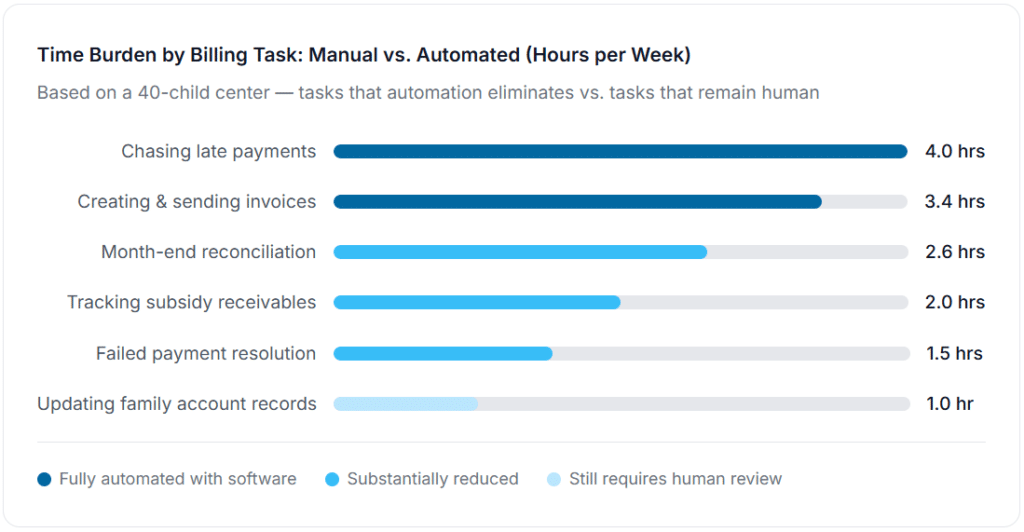
Most daycares still manage billing through a mix of spreadsheets, paper sign-in sheets, and text messages to parents who are running late on payment. The operational cost of that approach compounds quickly. According to research published by LineLeader, approximately 52% of childcare organizations spend seven or more hours per week managing billing manually, hours that could go toward staff supervision, family communication, or curriculum planning.
A purpose-built childcare billing system connects five functions that are typically disconnected in manual workflows:
1. Enrollment Triggers Invoice Setup
When a child is enrolled, the billing system automatically creates a recurring invoice schedule based on the program type, rate, and billing frequency. No manual invoice creation for new families, the billing template fires on enrollment.
2. Invoices Generate and Deliver Automatically
On the billing date, invoices go out to parents by email with an embedded payment link. For multi-child families, one consolidated invoice covers all enrolled siblings under a single family ledger.
3. Auto-Pay Collects Tuition Without Follow-Up
Families enrolled in auto-pay (ACH bank transfer or card) are charged on the invoice date. No reminder, no follow-up, no phone call. The center’s bank account receives the funds on a predictable schedule.
4. Subsidy Payments Are Tracked Separately
Families receiving state childcare assistance are flagged in the system. Their invoices reflect the co-pay owed by the family, while the subsidy portion is tracked separately in a receivables queue for government reimbursement, which typically arrives 30–60 days later.
5. Automated Dunning Handles Late Payments
If payment doesn’t arrive by the due date, the system sends a sequence of automated reminders at configurable intervals. Late fees apply automatically per your enrollment agreement terms. The director sees outstanding balances in a single AR dashboard, not scattered across emails and a spreadsheet.
6. Reporting Shows Financial Health in Real Time
Monthly revenue, outstanding AR, subsidy receivables, and family payment history are all visible in a single reporting view. This is what makes end-of-month reconciliation take 30 minutes instead of three hours.
The Financial Reality: Why Billing Efficiency Is Survival, Not Convenience
The childcare industry operates in a financial environment most other businesses would find unworkable. Research from HINGE Advisors’ 2024 industry survey found total expense loads running 87–97% of revenue at most centers, leaving 3–13% before owner compensation. The Bipartisan Policy Center puts the average net margin below 1%. Labor alone, constrained by state-mandated staff-to-child ratios, runs 56–68% of revenue at most centers before burden costs.
In that context, a week of late tuition payments is not a minor inconvenience. It is a cash flow problem that threatens payroll. And yet most centers are still running their billing through processes that guarantee delayed payment: paper invoices, Venmo requests, and personal check pickup at the front desk.
Here’s what centers that moved from manual to automated billing typically see within the first 90 days, based on service business data from recurring billing platforms (including patterns observed across ReliaBills customers in service and care-based industries):
| Metric | Before Automation | After Automation | Change |
|---|---|---|---|
| Weekly hours spent on billing admin | 7–10 hrs/week | 1–2 hrs/week | −80% |
| Average days from invoice to payment | 16 days | 4 days | −75% |
| Families >30 days past due | 14% of enrollments | 4% of enrollments | −71% |
| Staff hours recovering overdue payments | 4 hrs/week | 0.5 hrs/week | −88% |
| End-of-month reconciliation time | 3–4 hours | 30–45 min | −85% |
Real-World Use Cases: How Childcare Programs Apply Billing Automation
The small center with a big AR problem
A licensed 24-child daycare was collecting tuition by check or Venmo, with no formal due date enforced and no late fee policy in practice. The director spent roughly 4 hours every Friday chasing families who hadn’t paid for the week. After switching to automated weekly invoicing with a 3-day reminder and a $15 late fee applied automatically on day 8, the center reduced overdue balances by 68% within 60 days. More importantly, the Friday “payment chase” was replaced by a 15-minute review of the AR dashboard. The director described it as recovering nearly a full workday per week.
The after-school program with variable billing
After-school programs face a billing model more complex than most daycares: families may enroll for 2, 3, or 5 days per week; rates vary by day count; siblings get discounts; and drop-in days are billed separately. Managing this in a spreadsheet meant invoicing errors every month, wrong amounts, missed sibling discounts, and drop-in days that fell through the cracks. A billing platform with per-child, per-rate-tier configuration eliminated the calculation errors, brought sibling discounts into the family ledger automatically, and gave the program director a clean weekly AR report for the first time.
The multi-site operator managing subsidy families
A three-location childcare operator accepting both private-pay and state-subsidized families had a specific problem: their manual billing process couldn’t distinguish between revenue already received and subsidy reimbursement still pending from the state. Their cash position looked healthier than it was. After implementing a billing system that tracked private-pay and subsidy receivables separately, they discovered they had over $18,000 in uncollected subsidy reimbursement that had aged past 90 days, amounts they had effectively written off without realizing it. Separate reporting by funding source gave them the visibility to actually collect it.
Key Benefits of Childcare Billing Software
Predictable cash flow on enrollment, not collection
The most significant operational benefit is moving from collection-based cash flow (money arrives when parents remember to pay) to enrollment-based cash flow (money arrives on a predictable schedule because the system charges it automatically). For centers with payroll to meet, this distinction is not academic. Auto-pay enrollment is the feature that drives this shift, and it’s the first thing to prioritize when implementing any billing platform.
Reduction in staff time on admin versus care
Every hour a director spends chasing payment or creating invoices is an hour not spent on licensing compliance, staff supervision, parent communication, or curriculum planning. Billing automation doesn’t just save administrative time, it redirects it toward activities that actually affect quality of care and family retention.
Subsidy compliance without manual tracking
Centers accepting state childcare assistance face compliance requirements on top of their regular billing work: correct co-pay calculation, timely subsidy billing to the state, and separate tracking of what has been reimbursed versus what is outstanding. A billing system with subsidy-aware invoicing handles this tracking automatically, reducing compliance risk and ensuring that state reimbursements don’t slip through uncollected.
Parent experience that reduces churn
This benefit is underappreciated: families that can pay their tuition online, view their account balance through a parent portal, and receive clear invoices instead of handwritten notes are measurably more satisfied with their childcare provider. Billing friction is a real driver of family attrition, particularly among working parents who are already managing complex logistics.
Key Risks and Things to Watch For
Configuring billing by attendance instead of enrollment
This is the most common configuration error: setting up billing software to charge only for days a child attends, when childcare is actually billed by enrollment slot. A child absent for a week still holds a licensed spot and still owes tuition. If your billing software is calculating charges based on sign-in sheet data rather than enrollment records, you are systematically under-billing, often by 15–20% of potential revenue in any given month.
Subsidy co-pay errors that cause compliance issues
Families receiving state childcare assistance owe a co-pay that varies based on income and family size. That co-pay amount is set by the state and changes on the family’s redetermination date. Billing the wrong co-pay, either too high or too low, creates compliance exposure and can affect subsidy approval at renewal. Billing software needs to support co-pay updates by family, not just a center-wide rate.
Discounts and sibling rates that don’t carry into recurring invoices
A center offers a 10% sibling discount. The director manually applies it to the first invoice. But the recurring billing template wasn’t updated to reflect it, so every subsequent invoice goes out at the full rate. The family pays full rate without noticing, or notices and requests a retroactive credit that takes hours to resolve. Discount configuration needs to happen at the family level in the billing template, not as a one-time invoice adjustment.
Using a general-purpose invoicing tool for childcare-specific billing
Generic invoicing platforms handle simple invoice-and-pay workflows reasonably well, but they weren’t built for childcare’s enrollment-based model, multi-child family ledgers, or subsidy tracking requirements. The workarounds required to make a general invoicing tool do what childcare billing software does natively end up creating more manual work than the tool saves. This is the right situation to evaluate a purpose-built platform or a flexible recurring billing solution with enough configurability to support the childcare model.
Childcare Billing Software vs. Related Tools
The market contains several overlapping categories of tools, and the distinctions matter when you’re evaluating what your center actually needs.
| Tool Type | Tuition Invoicing | Subsidy Tracking | Family Ledger | Auto-Pay | Best For |
|---|---|---|---|---|---|
| Childcare Billing Software | ✓ | ✓ | ✓ | ✓ | Centers accepting mixed private/subsidy families with enrollment-based billing |
| Childcare Management Software | ✓ | Partial | ✓ | ✓ | Centers needing billing + attendance + compliance in one platform |
| Recurring Billing Platform | ✓ | ✗ | Partial | ✓ | Private-pay centers needing reliable automated tuition collection and dunning |
| General Invoicing Software | Partial | ✗ | ✗ | Partial | Very small programs with simple billing and no subsidy families |
| Accounting Software (QuickBooks, etc.) | ✗ | ✗ | Partial | ✗ | Financial reporting and GL management, not operational billing |
The practical takeaway: if your center accepts state subsidy families, you need a platform that handles subsidy tracking as a native feature, not an add-on. If you’re private-pay only, a strong recurring billing platform with family ledger support and automated dunning can cover most of what you need at a fraction of the cost of a full childcare management system.
What I Got Wrong at First: Common Childcare Billing Mistakes
1. Setting up billing based on the sign-in sheet, not the enrollment record
Attendance and enrollment are not the same thing in childcare. The first time a center connects their sign-in system to billing and discovers they’ve been under-collecting for months is a painful moment. Always configure billing from the enrollment record, with attendance data used only for drop-in surcharges or meal program tracking, never as the primary billing trigger.
2. Applying late fees inconsistently, then disabling them under parent pressure
A director implements a $15 late fee, two families complain, and the director manually waives both and then quietly disables the late fee for everyone to avoid the conversation. What remains is a billing system with no enforcement mechanism and parents who have learned that fees are negotiable. Late fees need to be in the enrollment agreement, communicated clearly at enrollment, and applied consistently by the software, not by staff discretion on a case-by-case basis.
3. Failing to update subsidy co-pays at family redetermination
A family’s state childcare assistance is redetermined annually (or more frequently in some states), and their co-pay amount may change. Centers that don’t update the billing system at redetermination continue invoicing the old co-pay amount, creating either overcharges or shortfalls that surface months later as reconciliation errors. Add subsidy redetermination dates to the family record and build a review reminder into your billing calendar.
4. Not testing the parent experience before going live
The billing platform looks clean from the admin side. But the parent-facing payment link breaks on mobile, the invoice amount shows in a different format than expected, or the “pay now” button leads to a page that requires account creation before payment. Run every billing flow through the parent experience, on both desktop and mobile, before sending the first live invoice. The parents most likely to have payment friction are the ones with the least time to troubleshoot it.
5. Treating billing software as a set-and-forget system
Rate increases happen. Children age up into different program tiers with different rates. New family discounts get added. Siblings enroll. If the billing template for a family isn’t updated when any of these events occur, you will continue invoicing at the old rate indefinitely. Childcare billing software is not a one-time configuration, it requires a brief monthly review to confirm that every active family’s invoice reflects their current enrollment terms.
How to Get Started With Childcare Billing Automation
The transition from manual billing to automated tuition collection is a 4–6 week project for most centers. The software configuration is the shortest part. The preparation work, cleaning family records, defining your billing policies, and communicating with parents are where the time actually goes and where most failed implementations came up short.
1. Audit your current billing process and policies
Document your current billing cycle: when invoices go out, what payment methods you accept, whether you have a late fee policy, and how you handle subsidy families. You cannot configure a billing system to automate a process you haven’t documented. Start here, even before evaluating platforms.
2. Identify your billing model type
Are you enrollment-based (charge by slot), attendance-based (charge by days present), or a hybrid? Do you accept subsidy families? Do you offer sibling discounts or multi-program rates? The answers determine whether you need childcare-specific software or whether a recurring billing platform with configurable rate tiers is sufficient.
3. Clean and organize your family records
Export your current family list and verify: legal guardian names, billing email addresses, enrolled children and their program types, current rates, subsidy status, and any active payment plans or discounts. Bad data in your family records becomes bad invoices in the billing system. See our guide to customer management for how to structure this audit.
4. Update your enrollment agreement
Before going live with automated billing, your enrollment agreement needs to reflect your billing policies: due date, late fee amount, returned payment fee, auto-pay authorization, and the policy for billing during child absences. Families who signed older enrollment agreements may push back on late fees or auto-pay if it wasn’t disclosed upfront. Get this in writing before you flip the switch.
5. Pilot with 5–10 families before full rollout
Select a representative group of families: one or two auto-pay, one or two paying by card, and at least one subsidy family if applicable. Run one complete billing cycle with this pilot group before migrating all families. This surfaces configuration errors before they affect your entire enrollment.
6. Communicate the change to families at least two weeks in advance
Parents who receive an invoice from an unfamiliar platform without warning are likely to ignore it or flag it as suspicious. Send a brief communication explaining the new billing system, what to expect on the due date, and how to enroll in auto-pay. Families who are prepared adopt new payment processes faster and with far fewer support requests.
Frequently Asked Questions
1. What makes childcare billing software different from general invoicing software?
Childcare billing software is built around the enrollment-based model: charges are tied to enrollment slots, not individual transactions or attendance. It also handles multi-child family ledgers, sibling discounts, subsidy co-pay invoicing, and recurring tuition schedules natively. General invoicing software can send invoices, but it wasn’t designed for the recurring, family-account-driven billing structure that childcare requires. See our breakdown on invoicing software to understand the difference.
2. How does childcare billing software handle government subsidy families?
Purpose-built childcare billing software tracks private-pay and subsidy receivables separately. For subsidy families, the system invoices the parent for their co-pay amount and tracks the government reimbursement portion in a separate receivables queue. This matters because subsidy payments typically arrive 30–60 days after service, and without separate tracking, centers can’t distinguish between revenue collected and revenue still outstanding from the state.
3. Should daycares charge by attendance or by enrollment?
Enrollment-based billing is the standard in the childcare industry and the approach recommended by most childcare business advisors. When a child is enrolled, they occupy a licensed slot that cannot be filled by another child. The center incurs staffing costs for that slot regardless of whether the child attends. Charging by attendance shifts that financial risk onto the center, which is why most centers that have switched from attendance to enrollment billing have seen meaningful revenue increases, often 10–20% in months with high absence rates.
4. How do I handle multi-child families in childcare billing software?
Look for a billing platform that supports a family ledger model, one account per family with multiple children enrolled underneath it. Invoices should consolidate all siblings into a single statement with applicable discounts applied at the family level, not per-child. This is standard in childcare-specific software but may require configuration in a general recurring billing platform.
5. What payment methods should childcare centers accept?
ACH bank transfer (e-check) is the preferred method for recurring tuition because it has the lowest processing fees, typically 0.5–1% versus 2.5–3% for credit cards. Many centers accept both but incentivize ACH enrollment. Credit and debit cards should be available for families who prefer them. Paper checks and Venmo are worth phasing out, they reintroduce the manual tracking and reconciliation work that billing automation eliminates.
6. How long does it take to implement childcare billing software?
Most centers can complete a full implementation in 4–6 weeks. The software configuration itself takes a few hours. The time goes into auditing family records, updating enrollment agreements, configuring rate tiers and discount structures, and communicating the change to families. Centers that try to rush the preparation phase consistently encounter the same problems in their first billing cycle: wrong rates, missing discounts, and families surprised by auto-pay charges.
7. What should a childcare billing policy include?
At minimum: billing frequency (weekly, bi-weekly, or monthly), due date, accepted payment methods, late fee amount and grace period, returned payment fee, auto-pay authorization language, and the policy for billing during child absences or center closures. These terms should be in the enrollment agreement signed by every family before care begins. Billing software can only enforce policies that exist, if your policy isn’t documented, the software has nothing to automate.
8. Can childcare billing software handle after-school program billing?
Yes, though configuration is more complex. After-school programs typically have variable enrollment (2-day, 3-day, 5-day tiers), drop-in billing, and sometimes activity-based fees layered on top of tuition. A platform with per-child, per-rate-tier invoice templates and the ability to add line items for drop-ins handles this model well. The alternative is an installment billing approach for programs that charge by semester rather than weekly.
Recent Articles:
- Security Company Billing Software: Automate Contracts and Collections
- Pet Services Billing Software: Complete Guide for Groomers, Sitters, and Vets