

The right security company billing software does what spreadsheets and generic invoicing tools can’t: it ties billing directly to active contracts, automates recurring guard service invoices on the exact schedule each client is on, and follows up on past-due balances without your dispatcher or office manager making an awkward call. For companies managing 15 or more client sites, the difference between manual and automated billing is often 8–12% of annual revenue, money that was earned but never collected.
What is Security Company Billing Software?
Security company billing software is a contract-aware invoicing and collections platform built around the billing patterns common in private security, guard services, and alarm monitoring, fixed-rate monthly contracts, shift-based billing, overtime pass-throughs, and multi-site enterprise accounts. Unlike generic invoicing tools, it connects contract terms directly to invoice generation, so billing is driven by what the contract says, not by what someone remembered to enter manually. Key terms include contract-based billing, shift differential billing, multi-site invoicing, recurring billing automation, and collections escalation workflows. It is the operational system that converts completed guard hours and active monitoring contracts into collected revenue, with minimal manual intervention between those two points.
How Security Company Billing Software Works
The billing cycle in a security company is more complex than most industries because it runs across multiple dimensions simultaneously: active contracts with different rate structures, guards who may work across multiple client sites in a single week, overtime that needs to be passed through at negotiated multipliers, and enterprise clients who want consolidated invoices across a dozen locations. A billing platform built for this handles all of that from a single contract record. Here’s what the standard cycle looks like:

The contract-to-invoice gap, where money actually disappears
Most manual billing processes in security companies have a contract on file somewhere and an invoice that gets created separately, with no automated connection between the two. When the contract changes (a rate increase goes into effect, an additional post gets added, or a site goes from 8-hour to 12-hour shifts), the invoice doesn’t automatically update. Billing continues at the old rate, sometimes for months, until someone catches it during a contract review. Good security company billing software closes that gap by making the contract the source of truth for every invoice that follows from it.
Multi-site enterprise billing
Enterprise security clients, commercial real estate groups, hospital systems, and retail chains often have a single accounts payable contact who expects one consolidated invoice for 20 different locations, with site-level detail attached. Generic invoicing tools can’t generate that without manual assembly. Purpose-built billing platforms handle multi-site consolidation natively, keeping site-level billing records intact while presenting the client with whatever format their AP process requires. Your customer management setup is what makes this hierarchy work cleanly.
Real World Use Cases by Security Business Type
- Contract guard services: Monthly invoices generated directly from contract terms, rate per hour, posted hours, and any OT multipliers, without anyone manually entering line items.
- Multi-site commercial clients: Consolidated invoicing across retail chains, office parks, or hospital campuses. One invoice to AP, site-level detail in the attachment, and one payment collected.
- Alarm and monitoring services: Recurring billing on monthly or annual monitoring contracts. Auto-renews, auto-bills, and sends renewal notices 30 days before expiry.
- Event security: One-time invoices built from post orders, number of guards, hours, and vehicle patrols are generated at event close and sent same-day.
- Mobile patrol routes: Per-check billing tied to route completion data. Clients are invoiced for actual checks performed, with GPS-verified timestamps as backup for disputes.
- Government and institutional contracts: Installment billing and net-30/60/90 terms with automated follow-up cadences that match the client’s procurement cycle, not a generic reminder schedule.
Key Benefits for Security Companies
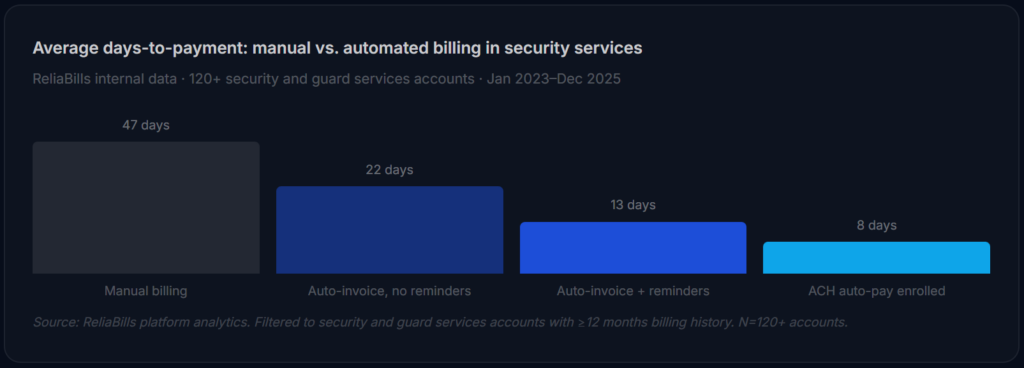
The standard argument for billing automation, that it saves time, understates what’s actually at stake for security companies. Because guard services operate on tight margins with high payroll obligations, the timing of collections is a cash flow issue, not just an administrative one. A 47-day average collection cycle means payroll goes out 3–4 weeks before the revenue that covers it arrives. Compression of that cycle from 47 days to 13 days can be the difference between needing a line of credit and not.

Overtime billing accuracy
One of the highest-value improvements from billing automation in security companies is overtime pass-through accuracy. When OT billing is manual, it depends on whoever is building the invoice to correctly identify which guard hours exceeded 40 in the week and apply the right multiplier from the contract. Errors in either direction, under-billing OT (which you eat) or over-billing it (which the client disputes), are common. A billing platform that imports shift data and applies contract-defined OT rules automatically eliminates the error category entirely.
Contract rate increase enforcement
Most security contracts include annual CPI adjustments or scheduled rate increases. In a manual billing process, these take effect when someone remembers to update the invoice template, often weeks or months late, sometimes never. In a contract-aware billing platform, the rate increase is scheduled at contract setup and applies automatically on the effective date. Across a client base of 50 sites, even a 30-day delay on a $0.50/hour increase across 160 weekly hours per site adds up to real revenue lost.
Risks and What to Watch For
The PO number trap
Enterprise and government security clients almost always require a purchase order number on every invoice before their AP department will process it. If your billing platform sends an invoice without the PO number, the invoice gets returned, sometimes without notification, and sits in a dispute queue for weeks. Before automating billing for any enterprise account, verify whether a PO is required and where it belongs on the invoice. Build it into the account template, not as an afterthought.
Shift data import failures
The billing automation loop depends on clean shift data coming in from your scheduling software. If the integration between your scheduling platform and billing system breaks, a not-uncommon occurrence after version updates, invoices may generate with missing hours, zero amounts, or outdated rates. Set up a weekly billing verification step where someone spot-checks three or four invoices before the batch goes out. Automation is not the same as autonomous.
Disputed invoices and SLA penalties
Some security contracts include service level agreement terms with financial penalties for missed posts, late guard arrivals, or under-staffed shifts. If those events are logged in your operations system but not reflected in the invoice, the client may deduct SLA penalties from payment without notice. Billing software with dispute tracking lets you record client claims, attach supporting documentation, and handle partial payment crediting without losing the audit trail for the remainder.
Billing Software Comparison: Security Companies vs. Adjacent Tools
| Tool type | Contract-driven billing | Multi-site invoicing | OT pass-through | PO field support | Collections escalation | Best for |
|---|---|---|---|---|---|---|
| Security billing software Best fit | ✓ | ✓ | ✓ | ✓ | ✓ | Guard, patrol, monitoring firms |
| Generic invoicing software | ✗ | ✗ | ✗ | ~ | ✗ | Freelancers, small product businesses |
| Security industry ERP (Tracktik, Silvertrac) | ✓ | ✓ | ✓ | ✓ | ~ | Large firms needing full operations platform |
| Accounting software (QBO, Xero) | ✗ | ~ | ✗ | ~ | ✗ | Back-office reconciliation, not AR |
| Spreadsheet-based billing | ✗ | ✗ | ✗ | ✗ | ✗ | Under 5 clients, early-stage only |
Feature Checklist: What Security Companies Actually Need
| Feature | Why it matters for security companies | Priority |
|---|---|---|
| Contract-to-invoice linking | Invoice terms update automatically when the underlying contract changes, no manual re-entry | Essential |
| Recurring billing with variable line items | Fixed monthly contract base plus variable shift add-ons in the same invoice | Essential |
| Multi-site client hierarchy | Site-level billing records with consolidated invoicing for enterprise AP contacts | Essential |
| ACH and check payment support | Enterprise and government clients predominantly pay by ACH or check, not card | Essential |
| Automated payment reminders | Net-30/60 clients need timed nudges without your office manager making the call | Essential |
| PO number and custom invoice fields | Enterprise clients reject invoices without PO numbers, this must be configurable per account | High |
| Overtime calculation and pass-through | Contract-defined OT multipliers applied automatically to imported shift data | High |
| Scheduling software integration | Shift data flows into billing automatically, hours, differentials, site codes | High |
| Dispute tracking and partial payment crediting | SLA deductions and client credits need an audit trail that survives month-end close | High |
Common Mistakes and What We Got Wrong at First
1. Turning on automation before mapping contract terms into the system
The most common implementation failure: a security company connects its billing software, imports the client list, and enables automated invoicing before any contract details have been entered. The system generates invoices using whatever default template is in place. The rates are wrong, OT rules are missing, and PO fields are blank. The first batch of automated invoices creates more correction work than the manual process ever did. Configure every contract first. Automate second.
2. Using one invoice template for all client types
A small retail client and a hospital system have completely different billing expectations. The retail client wants a simple monthly invoice with a total amount due. The hospital needs site codes, department billing numbers, service descriptions by location, and a PO number per building. Trying to serve both with the same template produces invoices that confuse one client and get rejected by the other. Build separate templates for each account tier, residential, commercial, enterprise, and government, before you go live.
3. Trusting the scheduling integration without verifying it weekly
We’ve seen security companies run automated billing for three months before discovering that the integration between their scheduling software and billing platform had been failing silently for six weeks, exporting incomplete shift records, missing certain post types, or losing data for guards who worked across multiple sites in a single week. A weekly spot-check of three to five invoices against source scheduling data takes 20 minutes. The alternative is a reconciliation nightmare that takes days.
4. Not setting separate reminder cadences for government vs. commercial clients
Government clients on net-90 terms should not receive the same automated reminder sequence as a small commercial client on net-30. Sending a “payment overdue” reminder to a government accounts payable contact on day 35 of a net-90 contract is professionally awkward and creates unnecessary friction with a client relationship you want to protect. Billing software that doesn’t support per-account reminder cadences will cause this problem. It’s a non-negotiable configuration requirement for any firm with a government book of business.
5. Ignoring the contract end-date alert as a collections signal
Contracts that are approaching their end date often have outstanding balances that clients are quietly hoping won’t get resolved before the relationship ends. A billing platform with contract lifecycle alerts will surface expiring contracts with open balances, giving you a structured window to collect before you lose the relationship as leverage. Most security companies don’t actively use this feature, which means they regularly write off balances they could have collected with a single well-timed conversation.
How to Get Started: Implementation Roadmap
The phases below are built for security and guard services companies specifically, not a generic software rollout. The order is deliberate: phase one is the work that makes everything else reliable.
Contract audit and data preparation (weeks 1–2)
Before touching any software, pull every active contract and document: hourly or flat rate, OT multiplier, billing frequency, net terms, required PO number, approved invoice format, and designated billing contact. Also pull your AR aging, any balance over 30 days is your first collection priority once the system is live. This is also the time to clean your customer management data: one client record per company, correct billing contacts, and the site hierarchy set up for any multi-location accounts.
Configure contract templates and billing rules (week 3)
Enter every active contract into the billing system with its full rate structure. Set up recurring billing schedules for all fixed-monthly clients. Configure OT pass-through rules for any contracts with shift differential billing. Build account-level invoice templates for enterprise and government clients with custom fields, PO number placeholders, and any required cost-center codes. For government clients on long net terms, configure reminder cadences that align to their payment cycle, not your standard follow-up schedule.
Pilot with 5–8 clients across billing types (week 4)
Run one complete billing cycle, including a reminder sequence, with a cross-section of client types: at least one fixed-monthly contract, one variable shift-based client, and one multi-site account. Verify that invoices match contract terms exactly, that shift data imported correctly, that payment links work, and that reminders fire on the correct schedule for each account’s net terms. Document every discrepancy. Fix before scaling.
Full migration and ACH enrollment campaign (month 2)
For enterprise clients with standing contracts, ReliaBills supports custom billing schedules that match even complex net-60 and net-90 payment cycles, with installment billing options for large setup or mobilization fees that need to be collected in stages. The platform’s free tier covers unlimited clients and invoice sending for firms that want to test the workflow before committing to payment processing volume.
Move all remaining clients onto the platform and launch an ACH enrollment campaign targeting your highest-volume accounts first. Frame ACH enrollment as a convenience, one less check to write, guaranteed on-time processing, and include an enrollment link in the next invoice for every client who hasn’t already set it up. Expect 40–55% enrollment in the first 90 days from commercial clients; government clients will typically stay on check or ACH but require a separate authorization process.
Frequently Asked Questions
1. What makes billing software for security companies different from generic invoicing tools?
Generic invoicing tools are built for single-transaction, product-based billing. Security companies need contract-driven recurring invoices, shift-data imports for variable billing, multi-site client hierarchies, PO number support for enterprise accounts, and collections workflows that respect net-30/60/90 terms. The workarounds required to force a generic tool into those shapes cost more in staff time than a purpose-fit platform, and they introduce error categories that don’t exist when billing is contract-driven from the start.
2. How does billing software handle overtime pass-through billing?
A billing platform with OT support stores the contract-defined multiplier (typically 1.5x or 2x the standard rate) at the contract level. When shift data is imported, the system identifies which guard hours exceeded the weekly threshold, applies the correct multiplier automatically, and includes the OT calculation as a separate line item on the invoice. The client sees exactly how OT was calculated, which eliminates the most common source of billing disputes in guard services contracts.
3. Can billing software consolidate invoices across multiple client sites?
Yes, purpose-built security billing platforms maintain site-level billing records (hours per location, rate per post, any site-specific terms) and generate consolidated invoices that present a single amount due to the client’s AP contact, with site-level detail either embedded or attached. This is a non-negotiable feature for enterprise commercial clients and hospital or government accounts that have multiple locations under a single contract.
4. How should automated reminders be handled for government clients on net-90 terms?
Government clients on extended net terms need their own reminder cadence, one that doesn’t send “payment overdue” notices until the contract’s actual payment window has expired. Any billing platform worth using in this space lets you configure reminder schedules per account, not just globally. For a net-90 government contract, a reasonable sequence might be a delivery confirmation at day 1, a courtesy reminder at day 75, and a follow-up at day 95. Applying a standard net-30 reminder schedule to a net-90 client damages the relationship.
5. What happens when a client disputes a portion of an invoice due to an SLA event?
The correct process is to record the disputed amount in the billing system, attach any supporting documentation (incident reports, client communication, or post log), and issue a credit memo if the dispute is accepted, or keep the full balance open with a dispute flag if it’s contested. Billing software with dispute tracking maintains a clean audit trail for both outcomes, so partial payments can be applied correctly and the remaining balance stays in the AR queue. Without dispute tracking, partial payments create reconciliation confusion that often ends with the remainder being written off rather than collected.
6. Is ACH a realistic payment method for security company clients?
Yes, and it’s typically the best option for both parties. For commercial clients, ACH eliminates check printing and mailing. For government clients, it often aligns with their existing EFT payment infrastructure. And for the security company, ACH processes faster than checks (1–3 business days vs. 5–7 for check clearance), produces fewer returns, and is far cheaper per transaction than card processing. Enrollment rates of 50–70% within 90 days are achievable when ACH is offered as the default payment method during contract setup rather than as an afterthought later.
Recent Articles:
- Pet Services Billing Software: Complete Guide for Groomers, Sitters, and Vets
- CPA Billing Software: Complete Guide to Automating Accounting Firm Invoicing