

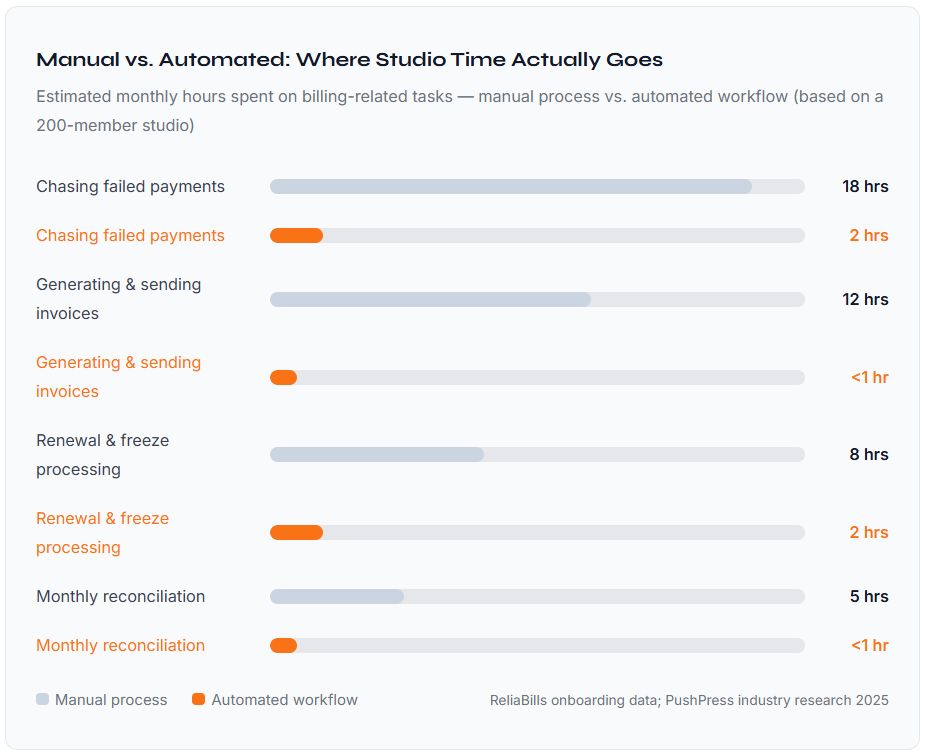
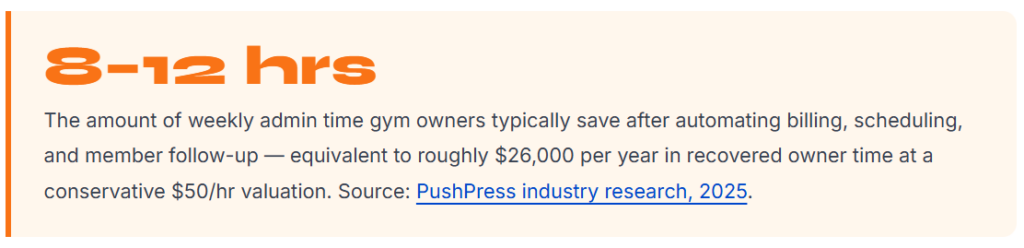
Gym membership billing automation is the process of letting software handle recurring charges, failed payment recovery, and member follow-up, so your team isn’t the system. Done right, it saves most studios 8–12 hours of admin work per week, brings DSO down dramatically, and eliminates the revenue leakage that comes from inconsistent manual follow-up. The thing almost every guide misses: automation doesn’t fix a broken billing process. You have to standardize your membership tiers, payment terms, and follow-up rules before the software can do its job.
What Is Gym Membership Billing Automation?
Gym membership billing automation is the use of software to handle recurring membership charges, payment failure recovery, renewal notifications, and payment follow-up communications without requiring manual action from your staff for each transaction. Instead of someone logging into a system every month to run charges or send reminder emails, the software executes a predefined sequence of actions based on each member’s billing status, payment method, and membership tier.
At its simplest, this means setting up recurring billing so charges run automatically on the right date. At its most complete, it includes smart retry logic for declined cards, tiered dunning sequences, member self-service portals for updating payment info, and real-time dashboards that show your studio’s collection rate at a glance, the same kind of visibility that used to require a full-time bookkeeper.
How Gym Membership Billing Automation Works
Most software demos show you a clean interface with toggles and templates. What they don’t show you is the logic that runs underneath, because understanding that logic is the difference between a setup that actually collects money and one that just moves the chaos from spreadsheets to software.
Here’s the full cycle, from the moment a member signs up to the moment cash hits your account:
1. Member signs up, payment method stored securely
When a new member completes their signup (in person or online), their payment method is tokenized and stored in a PCI-compliant vault. No card numbers on spreadsheets. No manual entry errors. The system ties their payment method to their membership tier and billing date automatically.
2. Recurring charge runs on the billing date
On the scheduled date, the system attempts to charge every active member. This happens in the background, typically overnight, and generates a transaction report you can review the next morning. No one on your team has to initiate anything.
3. Successful payments are logged and receipts sent
Members who pay successfully get an automated receipt. Their account is marked current. If your system integrates with access control, their door access or class booking remains active without any manual step required.
4. Failed payments trigger the dunning sequence
When a charge declines, the system analyzes the decline code. Soft declines (temporary issues like insufficient funds) trigger an automatic retry within 24–48 hours. Hard declines (closed accounts, lost cards) immediately kick off member communication, asking them to update their payment info through a secure self-service link.
5. Multi-channel follow-up runs automatically
If the first retry fails, the dunning sequence escalates, typically email on day one, SMS on day three, and a final notice on day seven before access is flagged for suspension. The member can resolve the issue themselves at any point by clicking the payment link; no staff call required.
6. Unresolved accounts surface for human review
Accounts that don’t resolve through the automated sequence are flagged for your team, with a full history of what was sent and when. At this point, a personal call or negotiation might be appropriate, but only for the small percentage that automation couldn’t recover. Everything else was handled without anyone lifting a finger.
7. Renewals, freezes, and upgrades managed in rules
When a membership reaches its renewal date, the system auto-renews based on your settings. Freeze requests, tier upgrades, and cancellation workflows are also rule-driven, so your front desk staff are executing policy, not making it up as they go.
Critical Detail: The step most studios skip is configuring the cancellation suppression rule, which tells the system to stop the dunning sequence the moment a payment is received or an account is cancelled. Without it, members who paid get follow-up messages anyway. This is the single most common complaint from studios in their first month of automation, and it’s entirely preventable.
Real-World Use Cases by Studio Type
Boutique Yoga and Pilates Studios
The core billing challenge for boutique studios isn’t high volume, it’s high variety. You might have monthly autopay members, class pack purchasers, drop-in clients, and intro-offer converts all in the same week. Manual billing across these categories means different tracking systems, different follow-up cadences, and inevitable gaps. Automation lets you run all four billing models under one system, with each triggered automatically based on what the member purchased at signup. When their class pack expires, the system flags it and can trigger a renewal offer without anyone having to review a spreadsheet.
CrossFit Boxes and Functional Fitness Gyms
CrossFit gyms typically operate on straightforward monthly memberships, which sounds simple, until you’re managing 150 members with different start dates, occasional freezes during travel or injury, and members who upgrade from community to unlimited plans mid-month. Proration gets messy fast when it’s done manually. Automated billing handles this in the background: it calculates the partial charge, applies the new tier rate from the correct date, and logs everything without anyone having to pull out a calculator. Paired with a solid recurring billing setup, it’s one of the clearest examples of automation genuinely replacing a tedious process rather than just moving it.
Martial Arts Schools (BJJ, MMA, Karate)
Martial arts schools have a billing complexity that most fitness software doesn’t handle well out of the box: family accounts. A parent paying for two kids in different programs, with different belt levels affecting pricing, on the same bill, manually tracked, that’s a minefield. The studios that get this right are using billing automation that groups family members under a single account, allows different program rates per student, and bills the responsible party once. They’re also typically using installment billing for annual belt test fees or uniform packages, rather than hitting families with large one-time charges that create payment failure spikes.
Key Benefits of Automating Your Gym’s Billing
The obvious benefit, time savings, tends to crowd out the less-discussed advantages that often matter more for a growing studio. Here’s what the conversion actually looks like in practice:
Revenue predictability improves immediately.
When you know every charge is running on schedule and every failure is triggering an automated recovery, your monthly revenue becomes far more predictable. This matters more than most studio owners realize until they’re trying to plan equipment purchases or staff hires based on a cash flow that used to be a moving target.
The “squeaky wheel” problem disappears.
In a manual process, the members who get followed up on first are the ones who happen to be at the front desk or whose texts your manager happened to see. Automation treats every account the same, a long-time member with a failed charge gets the same timely follow-up as someone who joined last week. That consistency protects relationships rather than straining them.
Churn from billing friction drops noticeably.
Club Automation’s 2026 buyer’s guide makes an important observation: the 24–48 hours after a billing failure is the highest-risk window for cancellation. When that window involves a manual call from a front desk staff member, the outcome depends heavily on who’s calling and how comfortable they are with that conversation. When it involves an automated text with a one-click payment link, members resolve it themselves, and there’s no awkward moment to trigger a cancellation decision.
Your team upgrades from collectors to coaches.
When no one on your staff has to chase payments, follow up on renewals, or manually process mid-cycle upgrades, they have more time for the things that actually drive retention, member check-ins, class programming, and community events. This is the compounding benefit that most ROI calculations for billing software understate.
Key Risks and What to Watch For
Billing automation can create new problems if implemented carelessly. These are the categories most commonly flagged by studio owners in their first six months:
Automation applied to a bad process just automates the bad process.
If your membership tiers aren’t cleanly defined, if payment terms are applied inconsistently, or if your member records have duplicate accounts or incorrect start dates, automation will execute on those errors at scale. Before you touch any software settings, audit your membership structure. It’s not glamorous, but it’s the prerequisite for everything else working.
Access control integration failures.
Most studios link billing status to door access or class booking. When that integration isn’t configured correctly, you get members who are current but can’t get into class, or members with unpaid balances who still have full access. Both situations create friction and complaints. Test this integration with real accounts in a staging environment before going live.
Freeze and cancellation policy gaps.
If your automated billing doesn’t have clearly coded rules for how freezes affect billing, does the billing date shift? If the member gets a prorated credit, you’ll end up with billing disputes and manual overrides that eat up the time you thought you were saving. Write out every policy edge case before you configure anything.
Watch Out For: Studios that automate billing but keep manual customer management often end up with data that lives in two places and matches in neither. When your billing system and your member database aren’t in sync, the automation doesn’t just stop working, it actively creates problems (wrong charges, duplicate invoices, missed cancellations). Integration is not optional; it’s the infrastructure the whole system runs on.
Billing Automation vs. Related Concepts: What’s What
| Concept | What it covers | Distinct from billing automation? | When you need it |
|---|---|---|---|
| Gym Membership Billing Automation | Automated recurring charges, failure recovery, renewal flows, dunning sequences | – | Every studio with more than ~30 members |
| Recurring Billing | Scheduling and processing charges on a fixed cycle (weekly, monthly, annually) | ⚡ Component of | The foundation billing automation is built on |
| Invoicing Software | Creating and delivering one-time billing records (personal training, merchandise) | ✓ Distinct | When you sell anything outside the membership fee |
| Installment Billing | Splitting a larger payment into scheduled partial charges | ✓ Distinct | Annual memberships, large packages, belt programs |
| Dunning Management | Automated recovery sequence for failed payments specifically | ⚡ Component of | Embedded in any complete billing automation setup |
| Customer Management | Member records, contact history, attendance, notes, relationship tracking | ✓ Distinct | Required for billing automation to segment correctly |
| Payment Gateway | The service that processes the actual card/ACH transaction (Stripe, Authorize.net) | ✓ Distinct | The infrastructure layer underneath your billing software |
What I Got Wrong at First: Common Setup Mistakes
Mistake 1: Setting up billing before cleaning up your membership tiers
If you have five different membership types that evolved organically over three years, some grandfathered, some promotional, some typed differently in your spreadsheet, and you drop that directly into an automation system, you get billing chaos at scale. Charges run on the wrong tier, rates are inconsistent, and the system has no way to know which rules apply.
✓ Fix: Before you touch the software, consolidate your membership structure into clean, distinctly named tiers. Every member should map to exactly one tier with defined pricing, billing cycle, and terms.
Mistake 2: Choosing a platform based on features, not on payment failure recovery
Most gym owners evaluate billing software by its scheduling interface or its member app. Very few ask: “What exactly happens when a payment fails? What’s your typical recovery rate on declined cards?” That’s the metric that actually determines how much revenue your studio collects.
✓ Fix: During any software demo, ask specifically about their dunning logic: how many retry attempts, at what intervals, across which channels. Platforms vary enormously on this, and it directly impacts your bottom line.
Mistake 3: Not testing the access-control integration before launch
Going live with billing automation and access control linked sounds smooth, until the first billing run produces false positives and members who paid can’t get in the door Saturday morning. A bad first experience with the new system creates distrust that takes months to recover from, internally and with members.
✓ Fix: Run a controlled pilot with 10–15 accounts for one full billing cycle before activating the system for your whole membership base. Include at least one intentional test failure to confirm the dunning and access logic works correctly end-to-end.
Mistake 4: Automating the dunning sequence but keeping manual receipts
This sounds minor until you’re running 200+ transactions a month. When successful payment receipts go out manually, they lag behind the actual charge date. Members see the charge on their statement before the receipt arrives and call the front desk wondering what the charge is for. Then the desk staff, who didn’t generate the charge, can’t immediately explain it. It’s a small thing that generates a disproportionate number of unnecessary support interactions.
✓ Fix: Automate receipts alongside charges. They should go out within minutes of a successful transaction, not when someone remembers to send them.
Mistake 5: Treating the dunning sequence as a “set once, never revisit” configuration
The first dunning cadence you set up is a hypothesis. After 60–90 days, look at your data: what percentage of failed payments resolve after the first automated message? The second? If most resolutions happen after the SMS on day three, your day-one email might need work, or you might be able to skip a step and shorten the recovery timeline.
✓ Fix: Schedule a 90-day review of your recovery funnel. Treat it like any other conversion metric and optimize the message, timing, and channel based on what’s actually working.
How to Get Started with Gym Membership Billing Automation
The setup sequence I recommend consistently produces the best results, not because it’s the fastest, but because it prevents the most backtracking.
Step 1: Map your current billing process honestly
Document what actually happens today, not what’s supposed to happen. Where do payments fall through the cracks? What does your team do when a card declines? What happens with freeze requests? Is there a policy, or does it depend on who picks up the phone? You can’t automate a process you haven’t defined.
Step 2: Consolidate your membership structure
Every billing tier needs a clean name, a defined price, a billing cycle, and a clear policy for upgrades, downgrades, freezes, and cancellations. For studios with legacy pricing exceptions, now is the time to make a decision: grandfathered pricing is manageable, but it needs to be a rule in the system, not an exception someone remembers.
Step 3: Choose your platform based on recovery logic, not feature count
For small-to-mid-size studios, the major platforms each have tradeoffs. What matters most is whether the payment failure recovery is automated and configurable, not whether the member app looks great. For studios already managing billing through a general-purpose tool, the ReliaBills recurring billing setup offers a straightforward path to automated membership charging without the complexity of a full gym management suite if you don’t need one.
Step 4: Configure your dunning sequence before you go live
Don’t wait until your first failed payment to figure out what happens next. Define your sequence in advance: day-one email, day-three SMS, day-seven final notice, day-ten access flag. Make sure the payment link in each message routes to a working self-service page. Confirm that a successful payment at any stage immediately suppresses all future sequence steps.
Step 5: Run a pilot before full rollout
Activate the system for a subset of members first, ideally your most straightforward accounts. Run one full billing cycle. Review the transaction report, confirm receipts went out, check that failed payments triggered the right sequence, and verify that access control updated correctly for any accounts that went delinquent. Then roll out to the rest of your membership.
Frequently Asked Questions
1. What’s a realistic payment failure rate for a gym, and how much does automation improve it?
Industry benchmarks typically put gym payment failure rates between 3% and 10% per billing cycle, depending on the membership profile and payment method mix. Credit card memberships tend to fail more often than ACH/bank debit. Studios using card account updater tools (which automatically refresh stored card details when a card is reissued) consistently report bringing failure rates down to 2–4%. On top of that, automated dunning sequences recover 70–85% of failed payments that would otherwise require manual follow-up, so the net revenue impact of automation is typically much larger than the headline failure rate suggests.
2. Can I automate billing for gyms that use both monthly memberships and class packs?
Yes, the two billing models run in parallel and don’t conflict. Recurring monthly members are billed automatically on their cycle date. Class pack purchasers are billed once at the point of purchase, with their pack balance decremented as they attend sessions. When a pack expires or runs out, most billing platforms can trigger an automated renewal prompt or offer. The important setup detail is making sure your system can handle both models and that the automation rules for each are configured separately, applying dunning logic to a class pack purchaser whose balance is simply empty is a common setup mistake.
3. How does automated billing handle membership freezes without creating billing errors?
This depends almost entirely on how the freeze policy is configured in your system, which is exactly why this needs to be defined before you go live, not after a member complains. A well-configured freeze setup pauses the billing cycle for the freeze duration and resumes it on the correct date when the freeze ends, without requiring any manual adjustment. The three decisions you need to make in your configuration: Does the billing date shift by the freeze duration or restart at the next calendar cycle? Is there a minimum or maximum freeze length? And does the freeze automatically lift, or does it require member confirmation to reactivate? Once those are in the system, every freeze behaves identically regardless of who processes it.
4. Is gym billing automation only useful for large studios, or can small gyms benefit?
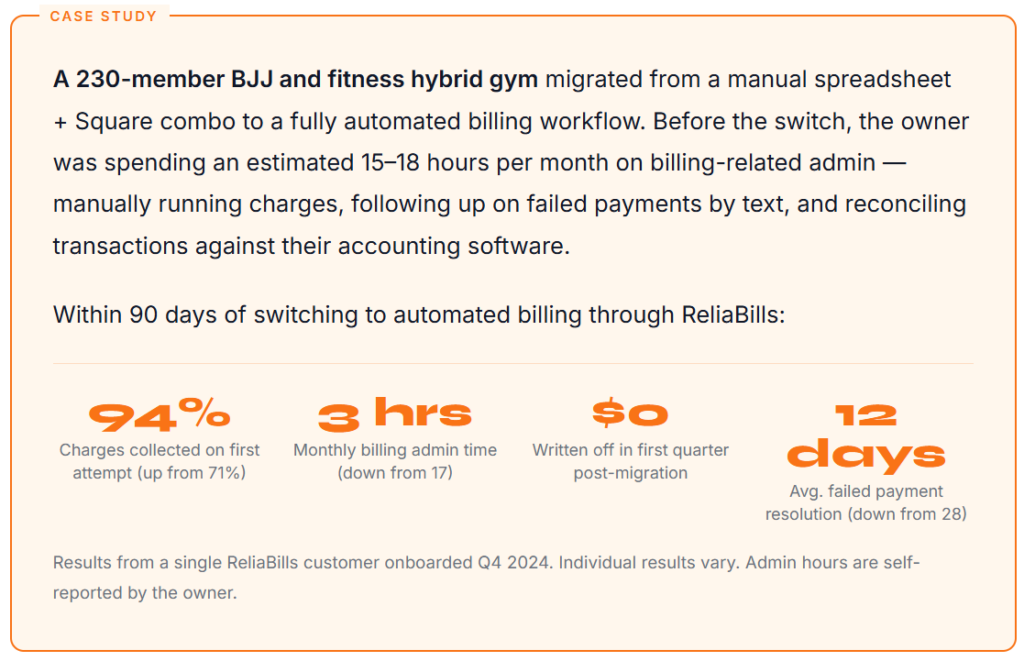
Small studios often benefit proportionally more because the manual burden falls on the owner personally rather than an office manager. When billing admin is consuming 10–15 hours per month of a solo owner’s time, automating it doesn’t just save money, it changes the nature of the job. That said, small studios should resist the temptation to over-invest in software complexity they don’t need. A boutique studio with 60 members on monthly autopay doesn’t need enterprise-tier billing infrastructure. Match the tool to your actual membership structure and growth trajectory, not to the most feature-rich platform on the market.
5. What should I look for when evaluating gym billing software?
The four questions that actually matter, beyond the feature list: (1) What’s the payment failure recovery process, specifically? How many retries, at what intervals, across which channels? (2) How is proration calculated for mid-cycle changes, and is it automatic? (3) Can I link billing status to access control and class booking, and what does the integration look like in practice? (4) What’s the total cost including transaction fees, not just the subscription price? A platform that costs $50 more per month but recovers 15% more failed payments almost always has a better ROI. Don’t optimize on subscription cost alone.
6. Can automated billing handle family accounts and multi-member households?
The better gym billing platforms support family accounts natively, grouping multiple members under a single billing contact, with different membership types per family member, all consolidated onto one monthly charge or invoice. This is particularly valuable for martial arts schools and kids’ fitness programs. The key feature to verify during evaluation is whether the system can apply different rates to different family members within the same account and whether it handles partial cancellations (one child stops, the other continues) without requiring a full account rebuild.
Recent Articles:
- Recurring Billing for Landscaping Companies: A Complete Guide
- What Is a Collections Workflow? How to Automate Payment Follow-Ups

Brant Pallazza is the Founder and President of ReliaBills, an invoicing and recurring billing platform built to help small businesses secure predictable cash flow. With over 20 years of experience in direct response marketing and e-commerce leadership, including a 13-year tenure managing over $500 million in gross sales at Digital River. Brant writes actionable guides on automated billing, payment processing, and scaling SMBs.