

An aging receivables report does not become useful when you create it. It becomes useful when you have a clear decision rule for every bucket, what action to take, at what threshold, in what order of priority. The report is just the diagnostic tool. Acting on it is the skill, and it is almost entirely learnable once you understand that not all overdue invoices are the same problem.
What Is an Aging Receivables Report?
An aging receivables report, also called an accounts receivable aging report or AR aging report, is a financial document that sorts all your outstanding invoices into time-based buckets based on how long they have been unpaid. The standard buckets are Current (not yet due), 1–30 days past due, 31–60 days past due, 61–90 days past due, and 90+ days past due. Each row represents a client, each column represents a time bucket, and the number in the cell is the dollar value of invoices that have been sitting in that bucket for that client.
The report gives you a complete, real-time picture of who owes what and how urgent the situation is, at a glance, without opening a single invoice. Combined with collection automation and AR automation, it becomes the command center for your entire receivables operation, a single document that tells you where to spend your collection effort today, not next month.
Every guide to aging receivables reports covers the same ground: here’s what it is, here are the time buckets, and here’s why it matters. What almost none of them cover is the moment you’re actually in, sitting with the report in front of you, seeing several names you recognize, and trying to decide which one to call first, what to say, and what to do differently going forward so this isn’t the same list next month.
That decision-making layer is what this guide is actually about. The mechanics of building the report are not complicated. The judgment about what the report means and how to respond is where most service businesses get stuck and where the real cash flow improvement lives.
What an Aging Report Actually Shows You (and What It Doesn’t)
The aging report shows you which invoices are unpaid and for how long. What it does not show, and this distinction matters enormously for how you respond, is why they are unpaid. An invoice sitting in the 61–90 day bucket could be there for any of a dozen reasons: a slow but reliable client, a client in financial difficulty, an invoice that went to the wrong email address, a scope dispute that was never formally raised, a missed reminder that was caught and resolved but not yet reconciled in the system, or a client who simply lost track of the invoice in a busy month.
The report tells you where the risk is concentrated. Your knowledge of each client relationship tells you what the risk actually is. Acting on an aging report well requires both.
How to Build the Report: Step by Step
Whether you build this manually in a spreadsheet or generate it from billing software, the structure is identical. Here is the exact sequence I use.
1. Gather Every Open Invoice as of Today
Export or list all unpaid invoices from your billing or accounting system. Include every invoice regardless of status, pending, overdue, disputed, or in a payment plan. Do not pre-filter for invoices you think are “on track.” The report’s value comes from seeing everything together, not from seeing a curated version that makes you feel better.
2. Age Each Invoice Against Its Due Date, Not Its Invoice Date
This is the single most important technical detail in building an accurate aging report. The aging clock starts on the due date, not the date the invoice was issued. An invoice issued on June 1 with Net 30 terms is not overdue until July 1. Aging from the invoice date instead of the due date inflates the overdue buckets and makes the report look worse than it is, leading to misplaced urgency on invoices that aren’t actually late yet.
3. Sort into Buckets by Client
Create one row per client. Create five columns: Current (not yet due), 1–30 days past due, 31–60 days past due, 61–90 days past due, and 90+ days past due. For each invoice, place the outstanding balance in the appropriate column for that client. If a client has two invoices, one 22 days overdue and one 48 days overdue, both go in different columns on the same row.
4. Add a Notes Column for Status Context
This column is what separates an aging report that is useful from one that is just data. Note whether a payment plan is in place, whether a dispute is open, whether a reminder was sent and acknowledged, or whether the invoice was sent to a contact you’re not certain is still correct. Status context transforms the report from a list of numbers into a workable action plan.
5. Add a Weighted Priority Score
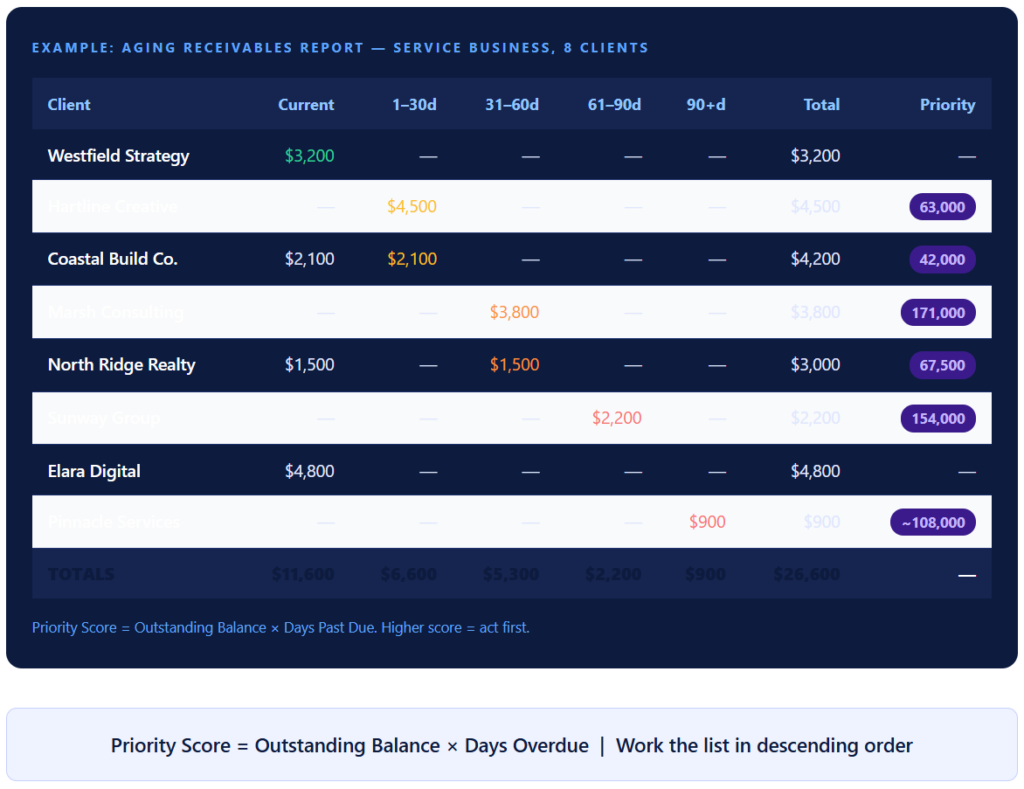
This is the step no other guide includes, and it is the most valuable five minutes you will spend with the report. For every overdue invoice, calculate the priority score: Priority Score = Outstanding Balance × Days Overdue. Sort by this score in descending order. This gives you a single ranked list that accounts for both the size of the exposure and the urgency of the age, so you are not spending your first call on a $300 invoice at 35 days when a $4,200 invoice has been sitting at 28 days.
6. Total Each Column and Calculate Your Distribution
Sum each aging bucket and express it as a percentage of total outstanding AR. This percentage view is what tells you whether your receivables health is improving or deteriorating week over week, more reliably than any individual account movement.
How to Read It: Distribution, Red Flags, and Priority Scoring
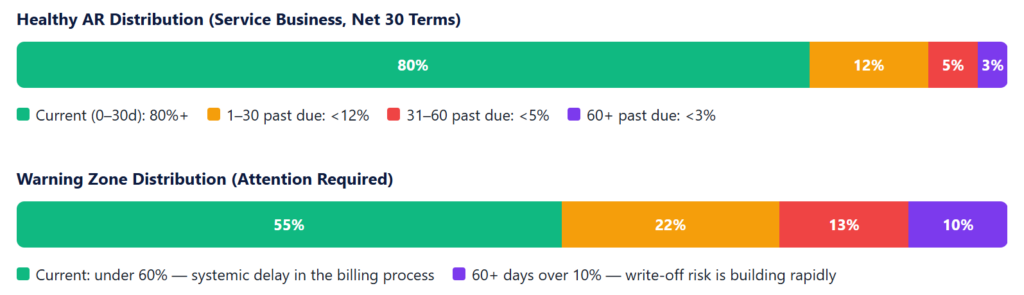
The most useful reading of an aging report is not at the account level, it is at the distribution level. The breakdown of your total AR across buckets tells you whether your overall receivables health is stable, improving, or deteriorating.
The distribution view in the example aging report above shows: $11,600 current (43.6%) · $6,600 mild (24.8%) · $5,300 concern (19.9%) · $2,200 + $900 critical (11.7%). That 11.7% in the 61+ buckets is a warning signal. In isolation it looks manageable. But if that same distribution shows up again next week without reduction, it is the beginning of a collections problem compounding in slow motion.
The Three Types of Aging Problems (and What Each Requires)
Every aging problem looks similar in the report, a dollar amount sitting in a bucket older than it should be. But the cause determines the fix, and the wrong response to the right problem wastes time and can damage client relationships. After years of working through aging reports weekly, I’ve come to see nearly all overdue situations as one of three types.
📊 Systemic Aging
Multiple clients consistently appear in the same overdue bucket. Not one bad client, a pattern across your book.
→ Fix: Your billing process (timing, reminders, payment options), not the client relationships.
👤 Client-Specific Aging
One client repeatedly appears in the 61–90d or 90+ bucket across multiple billing cycles.
→ Fix: A direct conversation about terms, credit risk, or the health of the relationship itself.
📄 Invoice Quality Aging
An invoice sits unpaid not because the client won’t pay but because there’s an error, ambiguity, or delivery failure stopping them.
→ Fix: The invoice itself, resend, correct, or clarify it before sending any collection follow-up.
Recognizing which type you’re dealing with changes everything about how you respond. Calling a client about an invoice that went to a dead email address or invoice quality aging, as if they have a payment problem, is guaranteed to create friction for no reason. Treating a client who has appeared in the 90+ bucket three months in a row, client-specific aging, as a reminder issue is guaranteed to keep not working.
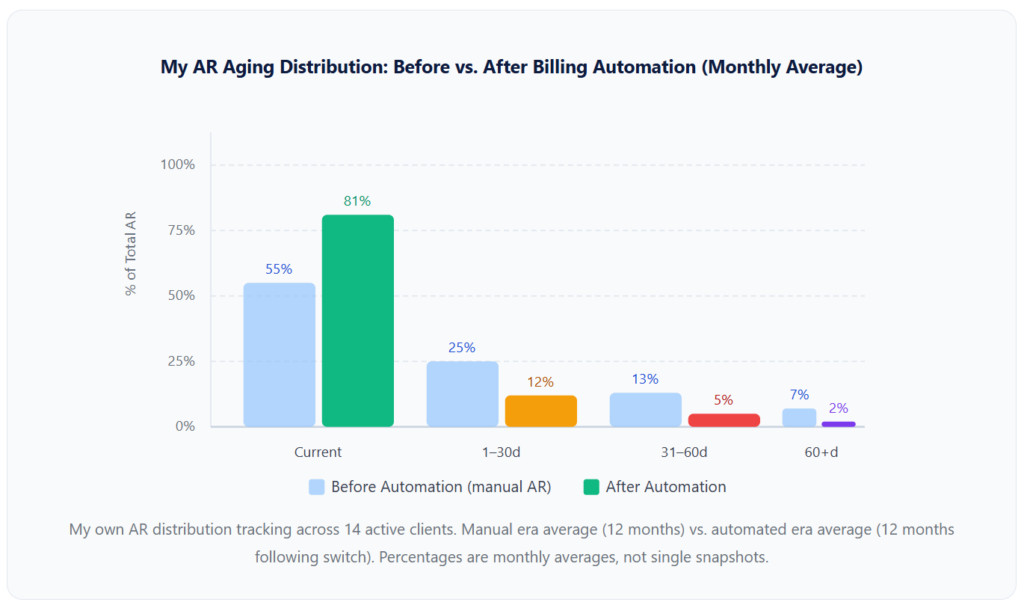
In my own tracking, roughly 40% of the overdue invoices I investigated during my manual billing years turned out to be invoice quality aging, wrong email, a vague description that prompted a question the client never sent, or a billing contact who had changed without anyone updating my records. None of those required a collections conversation. All of them required a corrected invoice.
Real-World Examples and Use Cases
The Client I Nearly Wrote Off Who Just Had a New Bookkeeper
About eight months into weekly aging report reviews, one of my longer-standing retainer clients appeared in the 61–90 day bucket for the second consecutive week. My initial read was client-specific aging, a relationship conversation ahead. When I called, I discovered that the company had hired a new bookkeeper two months earlier. Every invoice I had sent to the old contact had been forwarded to a shared inbox that the new bookkeeper wasn’t monitoring. Three invoices worth $9,600 were sitting unread. I updated the billing contact, resent all three, and had payment within a week. Had I not been running a weekly aging report, this would have been a 120-day situation before I noticed it.
The Agency Owner Who Discovered 22% of AR Past 60 Days: Instantly
A friend who runs a 6-person marketing agency shared her experience building her first formal aging report. She had been tracking invoicing “by feel,” following up when she remembered, and checking the bank when she was anxious. When she built the aging report for the first time, she discovered that 22% of her total outstanding AR was past 60 days across four clients. Not a single one of those four had been contacted in the past three weeks. The report didn’t create a new problem, it made an existing one visible for the first time. Two of the four paid within 48 hours of a direct follow-up. The other two required renegotiated terms.
The False Positive Problem with Installment Billing
This is the edge case nobody in other aging report guides mentions: if you use installment billing for project clients, invoices for future installments will sometimes appear in your aging report as outstanding, creating a distorted picture of your overdue exposure. An invoice for the third installment of a project, due in 45 days, is not overdue, but if your system has generated it early and the client hasn’t paid it yet, it may appear in the report. The fix is to configure installment invoices to generate close to their due date rather than all at once at project start, or to tag them in your status notes column so the report reader can distinguish between a genuine overdue and a future-dated installment.
Key Benefits of Running Aging Receivables Reports Regularly
Visibility before the bank account tells you.
For most service businesses operating without dedicated finance staff, the bank account is the de facto AR system, you know something is wrong when the balance looks low. An aging report tells you the same thing 15 to 30 days earlier, when the options are still good.
Prioritized follow-up that doesn’t rely on memory.
Without an aging report, collection follow-up defaults to whoever you remember to follow up with, which tends to be whoever you spoke to most recently, not whoever represents the most pressing risk. The weighted priority score changes this to a ranked list that is objective, updated every week, and independent of which client feels most present in your mind.
Early detection of systemic problems.
A single late invoice is a client situation. Three late invoices in the same week across different clients is a process situation. The aging report makes this distinction visible because you see all clients at once, rather than encountering each situation individually as the follow-up emails land in your inbox.
Better allowance for doubtful accounts.
For businesses maintaining formal financial statements, the aging report is the basis for estimating your allowance for doubtful accounts, a provision for invoices that may never be collected. A realistic allowance, updated quarterly from the aging report, keeps your financial picture accurate rather than optimistically overstated. Typical doubtful account percentages: 1–2% for invoices under 30 days past due, 5–8% for 31–60 days, 20–30% for 61–90 days, and 50%+ for 90+ days.
Improved days sales outstanding (DSO).
The correlation is direct: businesses that run aging reports weekly and act on them consistently have measurably lower DSO than those that track receivables ad hoc. The report does not improve DSO by itself, the action it enables does.
Risks and Things to Watch For
⚠ Aging from Invoice Date Instead of Due Date
The most common technical error in manual aging reports. If an invoice was issued June 1 with Net 30 terms, it is not overdue until July 1. Aging from the issue date puts it in the 1–30 day bucket on June 15, even though it is still current. This inflates your overdue totals and creates false urgency around invoices that don’t require action yet. Always age from the due date.
⚠ Including Invoices on Active Payment Plans as “Overdue”
If a client is on a structured payment plan and making their scheduled payments, the outstanding balance should not appear in your overdue buckets as a collection priority. Flag these accounts with a status note (“Payment Plan, Current”) so the report reader doesn’t treat a healthy account as a problem account.
⚠ Treating the Report as Sufficient Without Acting on It
I have spoken with business owners who describe running aging reports diligently, and then acknowledging the overdue accounts without taking specific action. The report is not a substitute for the follow-up conversation, the corrected invoice, or the decision to write off a 120-day account. It is a trigger for action, not a replacement for it.
⚠ Using Aggregate DSO Without the Segmented Aging View
An overall DSO of 22 days can hide the fact that two of your 12 clients are in the 61–90 day bucket while the other ten are paying promptly. The aggregate number looks fine; the segment reveals the risk. The aging report is what gives you the segmented view that aggregate DSO alone cannot provide.
⚠ Running the Report Monthly Instead of Weekly
An invoice that crosses from the 31–60 day bucket to the 61–90 day bucket during a month where you didn’t run the report has aged 30 days without any intervention. The collection difficulty increases nonlinearly as invoices age: intervention at day 30 has roughly a 65% success rate, at day 45 a 45% rate, and at day 60+ drops below 30%, per Credit Pulse benchmarks. Monthly review misses the windows where intervention is most effective.
What I Got Wrong the First Time
I built the report but didn’t know what “acting on it” meant
My first aging report showed three clients in the 31–60 day bucket. I made a note to follow up. Then I closed the spreadsheet. Then I opened it again the following month, and they were in the 61–90 day bucket. The report had been doing its job; I was not doing mine. The gap was that I had no defined action for each bucket. Once I wrote out exactly what I would do for each stage, a specific email template for 1–30 days, a direct phone call for 31–60, a formal notice for 61–90, the report became something I could act on immediately rather than something I acknowledged and closed.
I used the invoice date instead of the due date for three months
My early spreadsheet calculated aging from the invoice issue date. On Net 30 terms, this meant every invoice appeared to be 30 days older than it actually was in terms of collection urgency. I was sending follow-ups to clients whose invoices were still current, which created unnecessary friction, and I was calculating my “overdue” percentage at roughly twice the accurate level. And I didn’t catch the error until I compared my spreadsheet data to the aging report generated by my billing software and saw significant discrepancies.
I treated every overdue invoice as the same type of problem
Before I developed the three-problem-type framework above, my default response to any overdue invoice was a reminder email. This worked well for invoice quality aging and occasionally for systemic aging, but it was actively counterproductive for client-specific aging, a client who had been paying 75 days late for six consecutive months was not going to change behavior because of a reminder email. What they needed was a direct conversation about terms and probably a requirement to move to autopay before continuing the engagement. That conversation took three months longer than it should have because I kept sending reminders instead of having it.
I didn’t have a write-off policy and carried uncollectable invoices too long
For two years, I had invoices sitting in the 90+ bucket on my aging report that I hadn’t collected and wasn’t going to collect but hadn’t formally written off because doing so felt like admitting failure. These invoices artificially inflated my reported AR balance, made my aging distribution look worse than the collectible portion, and occupied space in my head disproportionate to their actual value. Setting a defined write-off trigger, any invoice at 120 days with no active dispute and no payment plan, freed up both the reporting accuracy and the mental bandwidth.
Aging Report vs. Related Financial Tools
| Tool | What It Shows | Cadence | Action It Enables | Replaces the Aging Report? |
|---|---|---|---|---|
| Aging Receivables Report | Who owes what, organized by how long it’s been unpaid | Weekly (ideal) | Prioritized collection action, write-off decisions, credit policy changes | (this is the tool) |
| DSO Metric | Average days to payment across all clients | Monthly or weekly | Trend identification; process improvement targeting | No, aggregate only; hides individual account status |
| Invoice List / Outstanding Invoices | All unpaid invoices in a flat list | On demand | Looking up individual invoice status | No, lacks time-bucket structure and distribution view |
| Cash Flow Forecast | Projected inflows and outflows over future periods | Weekly or monthly | Spending decisions, payroll planning, investment timing | No, forward-looking; doesn’t show current delinquency |
| Bank Statement | Actual cash received and spent | Daily | Confirms payments arrived; basis for reconciliation | No, shows what happened; aging report shows what hasn’t happened yet |
| Collections Automation Dashboard | Status of automated reminder sequences per client | Real-time | Exception management; human override decisions | Partially, complements but doesn’t replace the distribution view |
How to Get Started: Automated Aging Reports in 5 Steps
1. Build or Generate Your First Report This Week
If you have billing software, find the AR aging report in the reports section and run it today. If you are working from a spreadsheet, export your open invoices and structure them into the five-bucket format above using due dates, not invoice dates, for aging. Do not wait until you have a “complete” system. The value of seeing your current distribution is immediate and independent of the format you use to view it.
2. Write Your Action Playbook Before Your Second Review
For each aging bucket, define the following: what action you take, what the communication says, and at what point you escalate. Print it and keep it next to wherever you review the report. The playbook does not need to be elaborate, one sentence per bucket is enough to prevent the “acknowledged and closed” trap.
3. Diagnose Each Overdue Account Using the Three Problem Types
Before acting on any overdue invoice, categorize it: systemic, client-specific, or invoice quality. Check the delivery record, verify the billing contact is current, look at whether the client has other invoices also overdue, and check whether any communications were exchanged about the invoice. This takes two to three minutes per account and prevents the wrong response to the right problem.
4. Set Up Automated Aging Report Generation and Reminders
Configure your billing platform to generate the aging report on a weekly schedule and to flag any account that crosses into a new bucket since last week. Collection automation workflows can trigger a reminder or status check automatically whenever an account crosses from 1–30 days to 31–60 days, removing the dependency on remembering to look. Combined with a customer management system that stores billing contact details and payment history, this creates a closed loop from aging signal to action without manual coordination.
5. Set a Write-Off Policy and Apply It Consistently
Define your trigger: for example, any invoice at 120 days past due with no active dispute and no payment plan gets written off and removed from active receivables. Document the policy, apply it consistently, and track write-off rate separately from your collection rate. This keeps the aging report clean, the AR balance accurate, and your allowance for doubtful accounts realistic. For reference guides on handling the invoices that surface in your aging report, the article on outstanding invoices covers the practical steps for resolving each situation, and the guide on how much interest to charge on overdue invoices covers the late fee policy that makes your 31–60 day conversations easier to have.
Frequently Asked Questions
1. What is an aging receivables report?
An aging receivables report is a financial document that organizes all your outstanding invoices into time-based buckets, typically Current (not yet due), 1–30 days past due, 31–60 days past due, 61–90 days past due, and 90+ days past due, sorted by client. It gives you a real-time picture of who owes what, how long they’ve owed it, and where collection risk is concentrated across your book of business.
2. How often should I run an aging receivables report?
Weekly is the right cadence for most service businesses. Monthly review catches problems after they’ve already moved one bucket further along the aging scale, and collection difficulty increases significantly with each bucket crossed. A ten-minute weekly review, enabled by a billing platform that generates the report automatically, is the minimum viable practice for staying ahead of collection issues before they compound.
3. What is a healthy aging receivables distribution?
For a service business on Net 30 terms: 80% or more of AR in the Current bucket, under 12% in 1–30 days past due, under 5% in 31–60 days past due, and under 3% in the 60+ day buckets combined. If more than 20% of your total AR is sitting past 60 days, that signals a structural collections gap, not a run of bad luck with individual clients.
4. What is the weighted priority formula for acting on an aging report?
Priority Score = Outstanding Balance × Days Overdue. Calculate this for every overdue invoice and sort in descending order. This prevents the common mistake of calling about the oldest invoice regardless of size or the largest invoice regardless of how recent it is. The formula balances both dimensions and gives you an objective ranking that is reproducible every week without subjective judgment calls about which client feels most urgent.
5. What are the three types of aging problems?
Systemic aging (multiple clients late, a process problem), client-specific aging (one client repeatedly late, a relationship or credit problem), and invoice quality aging (an invoice unpaid because of an error or delivery failure, an invoice problem). The correct response is different for each: fix the process, have the relationship conversation, or correct and resend the invoice. Applying the wrong response is a common reason collection follow-up doesn’t work.
6. Can billing automation generate an aging receivables report automatically?
Yes. Most billing and AR automation platforms generate aging reports in real time as invoices are created and payments are applied. This means the report is always current, not based on the last time someone manually reconciled a spreadsheet. Combined with collection automation, the platform can also act on the aging report by triggering reminders when accounts cross bucket thresholds, further reducing the manual work required to maintain healthy receivables.
The Bottom Line
An aging receivables report is a ten-minute investment that makes every follow-up conversation easier, every collection decision more confident, and every cash flow month less surprising. The mechanics of building one are genuinely simple once you know to age from the due date, add a status column, and calculate a priority score. The skill is in reading the distribution weekly and knowing which type of aging problem you’re looking at before you decide how to respond.
What separates businesses that run an aging report from those that actually improve their receivables position is the action playbook, the pre-written decision rule for what happens when an invoice crosses into each bucket. Write that first, before your next review. The report will tell you where the problem is. The playbook will tell you what to do about it.
Recent Articles:
- Cash Flow Forecasting for Service Businesses Using Recurring Revenue
- How to Improve Your Days Sales Outstanding (DSO) with Billing Automation