

Businesses across industries are increasingly relying on digital systems to manage invoicing, payments, and recurring revenue structures as transaction volumes continue to grow and operational complexity increases. Manual billing processes, while once sufficient for small-scale operations, often become inefficient when businesses start handling more customers, multiple billing cycles, and diverse payment arrangements. These challenges typically result in errors, delayed invoicing, and inconsistent cash flow that can negatively impact financial stability and customer satisfaction. This is why the shift from manual billing to automated billing has become an essential step for businesses aiming to scale efficiently and maintain financial control.
The inefficiencies associated with manual billing are often amplified as businesses expand, because even small delays or errors in invoice creation and payment tracking can accumulate into larger operational and financial issues over time. As teams rely on spreadsheets, manual data entry, and repetitive administrative tasks, the risk of human error increases significantly, which can lead to inaccurate billing records and payment disputes. These issues also slow down cash flow cycles, making it harder for businesses to forecast revenue reliably. Over time, this creates unnecessary operational pressure and limits growth potential.
The purpose of this guide is to provide a clear and structured explanation of how businesses can transition from manual billing to automated billing in a smooth and controlled manner that minimizes disruption while maximizing long-term efficiency. It outlines the key differences between manual and automated systems, identifies when automation becomes necessary, and provides step-by-step implementation strategies for successful adoption. Additionally, it explores common challenges and how to overcome them effectively. The goal is to help businesses build a scalable billing system that supports long-term operational success.
What Is Manual Billing?
Manual billing is a traditional invoicing process where invoices are created, sent, and tracked entirely through human effort without the use of automated systems or software-driven workflows. In this process, employees are responsible for generating invoices, calculating totals, sending documents to customers, and recording payments manually using spreadsheets or accounting tools. Because every step requires direct human involvement, the process becomes increasingly time-consuming as the number of customers grows. While it may work for small businesses, it quickly becomes inefficient in more complex environments.
This billing method relies heavily on repetitive administrative tasks that must be performed consistently for every billing cycle, which can significantly reduce productivity and increase the likelihood of operational bottlenecks within finance teams. Employees often need to re-enter the same information multiple times, manually verify payment statuses, and follow up with customers individually, all of which increase the risk of delays and inconsistencies. These inefficiencies can also lead to fragmented financial records, making it difficult to maintain accurate reporting. Over time, this lack of structure can create confusion and reduce financial visibility.
Another major limitation of manual billing is its lack of scalability, since every new customer or transaction adds additional workload that must be managed manually by staff members. As businesses grow, this often results in increased administrative costs and operational strain because more human resources are required to maintain the same level of billing accuracy and consistency. This creates a system where growth becomes more expensive and harder to manage effectively. For this reason, manual billing is not suitable for long-term scaling.
What Is Automated Billing (Auto-Billing)?
Automated billing is a modern financial system that automatically generates, sends, and tracks invoices based on predefined rules, schedules, and customer billing configurations without requiring manual intervention from staff members. Instead of handling each invoice individually, the system executes billing tasks automatically based on triggers such as subscription renewals, due dates, or recurring payment cycles. This ensures that invoices are consistently created and delivered on time, reducing the risk of human error and operational delays. As a result, businesses achieve greater accuracy and efficiency in their billing processes.
A key feature of automated billing is its ability to integrate seamlessly with payment gateways, accounting platforms, and customer management systems, allowing all financial data to be synchronized in real time across multiple systems. This integration also enables features such as Auto Pay, where customers can authorize automatic payments that are processed without manual approval each billing cycle. This significantly improves cash flow consistency and reduces the likelihood of missed or delayed payments. It also enhances the customer experience by simplifying the payment process.
Automated billing also supports scalability by allowing businesses to handle increasing transaction volumes without requiring additional administrative resources or manual oversight. Whether managing a small customer base or thousands of accounts, the system applies consistent rules and workflows across all transactions. This ensures uniformity, accuracy, and operational stability as the business grows. Additionally, real-time reporting provides valuable insights into revenue performance and outstanding balances, supporting better financial decision-making.
Manual Billing to Automated Billing: Key Differences
Manual processes vs automated workflows
Manual billing depends entirely on human execution for every step of the invoicing process, which includes creating invoices, sending them to customers, and tracking payments manually across different systems or spreadsheets. This makes the process time-consuming and highly dependent on employee availability and attention to detail. In contrast, automated billing uses predefined workflows that execute billing tasks automatically based on schedules and system rules without requiring ongoing manual input. This transition significantly improves speed, consistency, and reliability across billing operations.
High risk of human error vs improved accuracy
Manual billing systems are highly vulnerable to human error because they involve repeated data entry, manual calculations, and individual tracking of invoices and payments, all of which increase the risk of mistakes. These errors can lead to incorrect billing amounts, duplicate entries, or missed invoices that affect financial accuracy and customer trust. Automated billing systems eliminate much of this risk by applying standardized rules and calculations consistently across all transactions. This ensures greater accuracy and reduces the need for corrections or dispute resolution.
Time-consuming tasks vs time-saving systems
Manual billing requires significant time and effort from employees who must handle repetitive tasks such as invoice creation, payment tracking, and customer follow-ups on a daily basis. These tasks consume valuable working hours that could otherwise be spent on strategic or revenue-generating activities. Automated billing systems eliminate much of this workload by handling these processes automatically in the background according to predefined rules. This results in major time savings and improved operational efficiency.
Inconsistent cash flow vs predictable revenue cycles
Manual billing often leads to irregular invoice timing and inconsistent payment follow-ups, which can result in unpredictable cash flow patterns that make financial planning more difficult. Automated billing ensures that invoices are generated and delivered on a fixed schedule, while reminders are sent automatically to maintain consistent payment behavior. This creates predictable revenue cycles that improve forecasting and financial stability. Businesses gain better control over their cash flow as a result.
Limited scalability vs business growth enablement
Manual billing systems struggle to scale because every increase in customer volume requires additional manual effort, which often leads to increased workload and operational strain on finance teams. Automated billing systems eliminate this limitation by applying the same workflows across all customers regardless of scale or complexity. This allows businesses to grow without significantly increasing administrative costs or resources. Automation therefore becomes a key enabler of sustainable business expansion.
Why Businesses Need to Transition to Automated Billing
As businesses grow and customer transactions increase in volume and complexity, manual billing systems begin to show clear limitations that affect efficiency, accuracy, and overall financial performance across the organization. These limitations often include delayed invoice generation, inconsistent payment tracking, and increasing difficulty in managing large volumes of customer accounts manually. Over time, these inefficiencies can disrupt cash flow and create unnecessary operational stress for finance teams. This makes automation essential for maintaining smooth financial operations.
Efficiency is one of the main reasons businesses move toward automated billing systems, as automation eliminates repetitive manual tasks and replaces them with structured workflows that operate consistently without ongoing human intervention. This allows teams to focus on higher-value responsibilities such as financial planning, customer management, and business development rather than administrative billing work. It also reduces operational delays and improves overall productivity. As a result, businesses operate more effectively with fewer resources.
In addition to efficiency, automated billing provides a competitive advantage by improving speed, accuracy, and customer experience in ways that manual systems cannot match. Businesses that adopt automation are able to collect payments faster, reduce billing errors, and provide a more seamless experience for customers. These improvements contribute to stronger customer retention and more reliable revenue streams. In competitive markets, this advantage becomes increasingly important for long-term success.
Signs It’s Time to Move from Manual Billing to Automated Billing
Increasing billing errors or disputes
Frequent billing errors or customer disputes often indicate that manual billing systems are no longer capable of maintaining consistent accuracy across all transactions. These issues usually arise from repeated manual data entry and inconsistent tracking practices that lead to discrepancies in invoices or payment records.
Delayed invoice generation and payments
When invoices are consistently generated late or payment follow-ups are not conducted on time, it directly affects cash flow and slows down revenue collection across the business. Manual billing processes often cause these delays because they rely on human availability and workload prioritization.
Growing customer base that is hard to manage manually
As the number of customers increases, manual billing becomes increasingly difficult to manage due to the rising complexity of tracking invoices, payments, and account statuses across multiple records. This can overwhelm finance teams and increase the likelihood of errors or missed payments.
Time spent on repetitive billing tasks
When employees spend too much time performing repetitive billing tasks such as invoicing, payment tracking, and follow-up communications, it indicates that valuable resources are being underutilized. These tasks, while necessary, do not contribute directly to business growth and can be automated for better efficiency.
Difficulty tracking payments and outstanding balances
Manual tracking systems often make it difficult to maintain real-time visibility into payment statuses, overdue accounts, and outstanding balances, especially when information is spread across multiple tools. This lack of visibility can lead to missed follow-ups and financial inaccuracies. Automated billing systems provide centralized dashboards that update payment information in real time.
Steps to Transition from Manual Billing to Automated Billing
Evaluate Your Current Billing Process
The first step in transitioning involves conducting a detailed analysis of the existing billing workflow, including how invoices are created, how payments are tracked, and where inefficiencies or delays occur most frequently. This evaluation helps businesses identify problem areas that can be improved through automation.
Choose the Right Billing Software
Selecting the right billing software is a critical decision because it determines how effectively the transition will be executed and how well the system will support future business growth. Businesses should look for platforms that offer automation, recurring billing, reporting tools, and integration capabilities with existing systems.
Migrate Customer and Billing Data
Data migration involves transferring all customer records, invoices, and payment histories into the new automated system while ensuring accuracy and consistency throughout the process. This step requires careful validation to prevent errors that could impact billing accuracy after implementation.
Set Up Automated Workflows
Once data is migrated, businesses must configure automated workflows that define how invoices are generated, delivered, and followed up on throughout each billing cycle. These workflows may also include payment reminders, Auto Pay settings, and recurring billing schedules. Proper configuration ensures that all billing operations run consistently without manual intervention.
Train Your Team and Customers
Training is essential because both internal teams and customers need to understand how the new billing system works to ensure smooth adoption and minimize confusion. Employees must be trained on system usage, while customers should be informed about changes in billing and payment processes.
Common Challenges During Transition
Data migration errors
Data migration errors can occur when information is transferred incorrectly or incompletely from legacy systems to the new automated platform, potentially affecting billing accuracy. These issues often arise due to inconsistent formatting or missing data fields. Careful validation and testing are necessary to avoid such problems. Proper planning significantly reduces risk.
Resistance to change from staff or customers
Resistance to change is common because employees and customers may be unfamiliar with the new system and hesitant to adapt to new workflows. This can slow down adoption and create temporary inefficiencies during the transition period. Training and clear communication help reduce resistance. Gradual onboarding improves acceptance.
Integration issues with existing systems
Integration challenges may occur when new billing software does not seamlessly connect with accounting or CRM systems already in use. These issues can disrupt workflows and require technical adjustments to resolve. Ensuring compatibility before implementation is essential. Proper integration improves long-term efficiency.
Initial setup complexity
The initial setup phase can be complex because it involves configuring workflows, billing rules, and system settings to match business requirements. While this requires time and attention, it is necessary for long-term success. Proper setup ensures smooth system operation. Careful planning reduces complexity.
Ensuring billing accuracy during transition
Maintaining billing accuracy during the transition is critical to avoid customer disputes and financial reporting issues. Businesses must test all workflows thoroughly before full deployment. Continuous monitoring during early stages helps identify issues quickly. Accuracy ensures stability.
How to Overcome Transition Challenges
Conduct thorough testing before full rollout
Testing ensures that all billing processes, invoices, and payment workflows function correctly before the system is fully deployed. This helps identify issues early and reduces operational risks. Simulated scenarios improve system reliability. Testing builds confidence in the transition.
Provide training and onboarding support
Training helps employees understand how to use the new system effectively, while onboarding support ensures customers adapt smoothly to changes in billing processes. This reduces confusion and operational errors during early stages. Continuous support improves adoption rates. Training is essential for success.
Use reliable and scalable billing software
Reliable software ensures system stability, while scalability allows the platform to grow alongside the business without performance issues. Choosing the right solution reduces long-term operational challenges. It also improves efficiency and consistency. Software quality directly impacts success.
Maintain clear communication with customers
Clear communication helps customers understand changes in billing systems, reducing confusion and improving trust. Businesses should explain new processes and payment options clearly and proactively. Transparency reduces support issues. Communication strengthens relationships.
Monitor performance and adjust workflows
Monitoring system performance helps businesses evaluate how well automation is working and identify areas for improvement. Adjusting workflows ensures continued efficiency and accuracy over time. Continuous optimization improves results. Monitoring supports long-term success.
Key Features to Look for in Automated Billing Software
Recurring billing and subscription management
Supports automated subscription cycles and recurring payments that reduce manual effort and ensure consistent revenue collection. This feature is essential for scalable business models. It improves financial predictability. Automation supports long-term growth.
Automated invoice generation and delivery
Ensures invoices are created and sent automatically based on predefined schedules and billing rules. This reduces delays and administrative workload. It improves efficiency significantly. Timely delivery supports faster payments.
Auto Pay and payment processing
Allows customers to authorize automatic payments that are processed without manual intervention. This reduces missed payments and improves cash flow consistency. It enhances customer convenience. Payment processing becomes seamless.
Real-time reporting and analytics
Provides immediate visibility into financial performance, outstanding balances, and revenue trends. This supports better decision-making and financial planning. Data-driven insights improve control. Reporting enhances transparency.
Customizable billing workflows
Allows businesses to tailor billing processes based on customer needs and operational requirements. This flexibility improves efficiency and adaptability. It supports different business models. Customization improves usability.
Integration with accounting and CRM systems
Ensures seamless data flow between billing, accounting, and customer management systems. This reduces duplication and improves accuracy. Integration enhances operational efficiency. Connected systems improve performance.
Key Benefits of Moving to Automated Billing
Increased efficiency and time savings
Automation significantly reduces the time spent on repetitive billing tasks, allowing teams to focus on more strategic activities that drive business growth. This improves productivity and operational efficiency. Time savings become substantial over time. Efficiency strengthens performance.
Improved billing accuracy
Automated systems reduce human error by applying consistent rules across all transactions. This improves financial reliability and reduces disputes. Accuracy strengthens trust. Consistency improves control.
Faster payment collection
Invoices are delivered and processed more quickly, leading to faster payments and improved cash flow. Automated reminders also help reduce delays. Payment cycles become more efficient. Cash flow becomes more stable.
Better cash flow management
Predictable billing cycles improve financial forecasting and planning. Businesses gain better visibility into revenue streams. Stability supports growth. Financial control improves significantly.
Enhanced customer experience
Customers benefit from timely invoices, clear communication, and convenient payment options. This improves satisfaction and retention. Experience becomes more seamless. Trust increases loyalty.
Scalable business operations
Automated billing systems allow businesses to grow without increasing administrative workload proportionally. This supports expansion and efficiency. Scalability ensures long-term success. Growth becomes sustainable.
Common Use Cases
SaaS companies managing subscriptions
SaaS businesses rely on automated billing to manage recurring subscriptions, renewals, and upgrades efficiently. This ensures predictable revenue and reduces manual workload. Automation improves scalability. Subscription management becomes seamless.
Service-based businesses with recurring clients
Service providers benefit from automated billing by simplifying recurring invoicing and payment tracking. This ensures consistent cash flow. It reduces administrative effort. Operations become more efficient.
Property management firms handling tenant billing
Property managers use automation to handle rent collection and recurring fees. This improves accuracy and reduces delays. Tracking becomes easier. Efficiency improves significantly.
Healthcare providers managing patient invoices
Healthcare organizations use automated billing to manage complex invoicing structures and recurring payments. This improves accuracy and reduces administrative burden. Financial clarity improves. Operations become more streamlined.
Gyms and membership-based businesses
Membership businesses rely on automation to handle renewals and recurring payments efficiently. This reduces missed payments and improves retention. Billing becomes consistent. Customer experience improves.
How ReliaBills Simplifies the Transition to Automated Billing
ReliaBills helps businesses transition from manual billing to automated billing by providing a centralized platform that eliminates the need for spreadsheets, manual invoicing, and repetitive administrative tasks that often slow down financial operations and increase the risk of errors. The system is designed to simplify billing workflows by automating invoice creation, delivery, and tracking in a way that is easy to understand and implement. Its user-friendly interface allows businesses to adopt automation without requiring extensive technical expertise or long onboarding periods. This makes the transition smoother and more efficient for teams of all sizes.
The platform’s recurring billing capabilities play a key role in ensuring a seamless shift by allowing businesses to automate subscription cycles, schedule invoices, and enable Auto Pay for consistent and reliable payment collection. These features reduce delays, improve cash flow stability, and eliminate many of the inefficiencies associated with manual billing processes. Customers also benefit from a more predictable and convenient payment experience that reduces friction. As a result, businesses can maintain continuity while upgrading their billing systems.
ReliaBills PLUS enhances these capabilities with advanced automation tools, detailed reporting dashboards, and improved customer communication features that give businesses deeper visibility and control over their financial operations. These tools allow organizations to monitor performance, optimize workflows, and scale operations without increasing administrative workload. The platform is designed to support long-term growth by adapting to evolving business needs. This makes ReliaBills a scalable and future-ready solution for automated billing management.
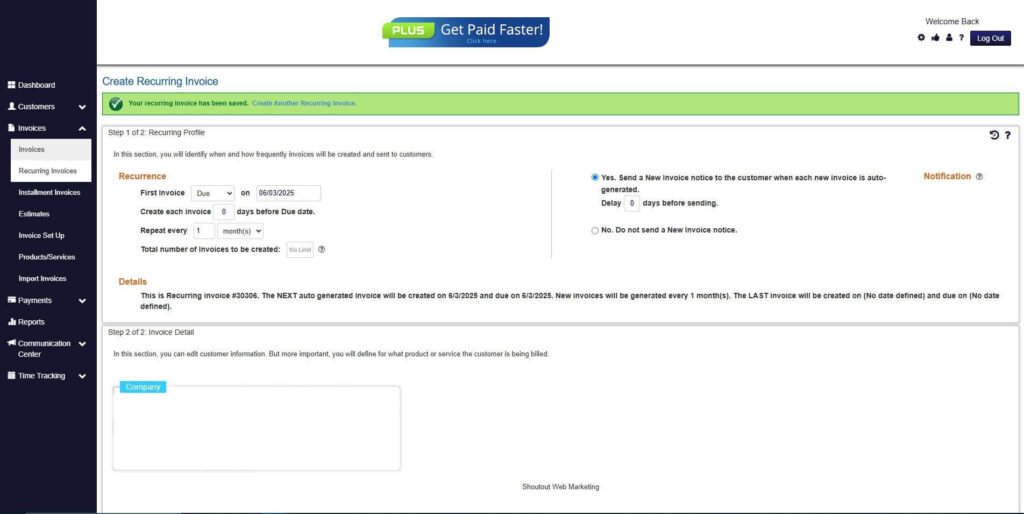
How to Create a New Recurring Invoice Using ReliaBills
Creating a New Recurring Invoice using ReliaBills involves the following steps:
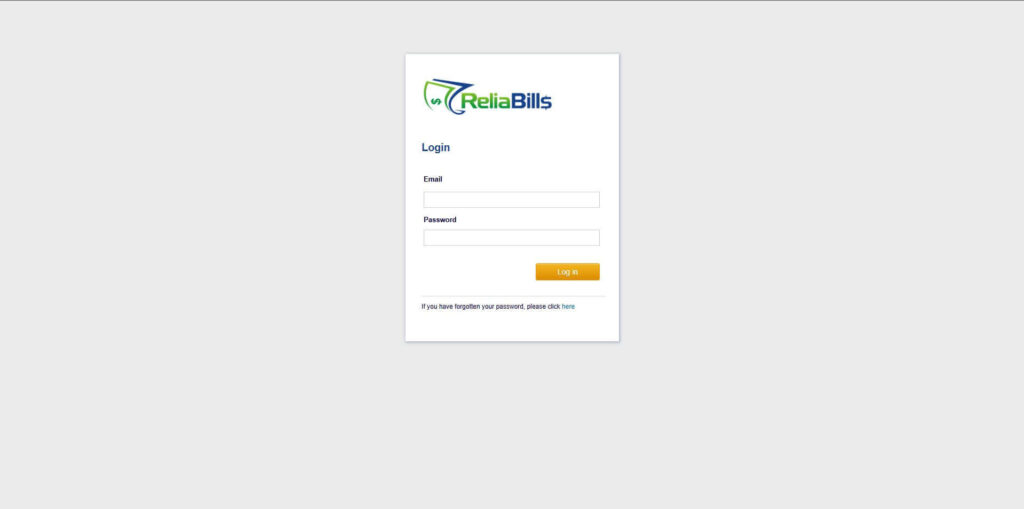
Step 1: Login to ReliaBills
- Access your ReliaBills Account using your login credentials. If you don’t have an account, sign up here.
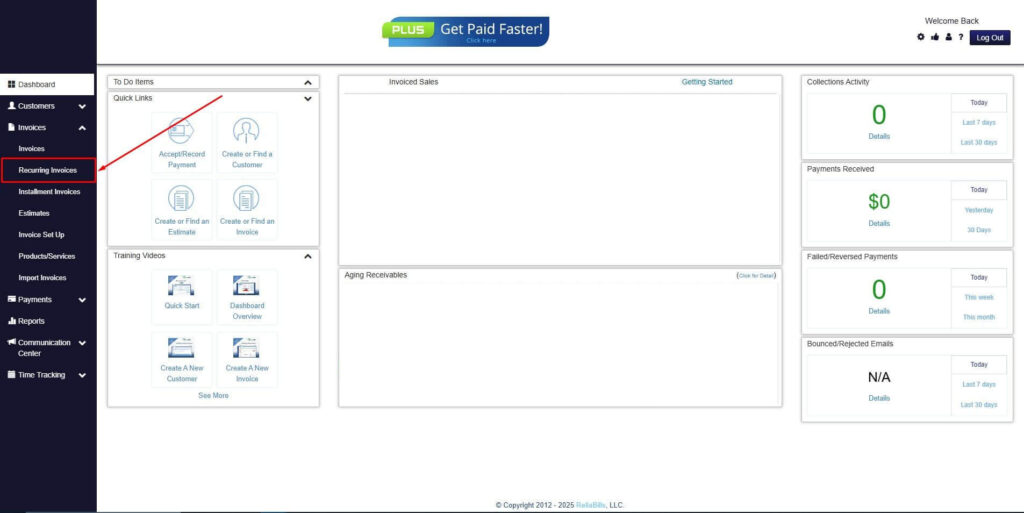
Step 2: Click on Recurring Invoices
- Navigate to the Invoices Dropdown and click on Recurring Invoices for an overview of the list of your existing customers.
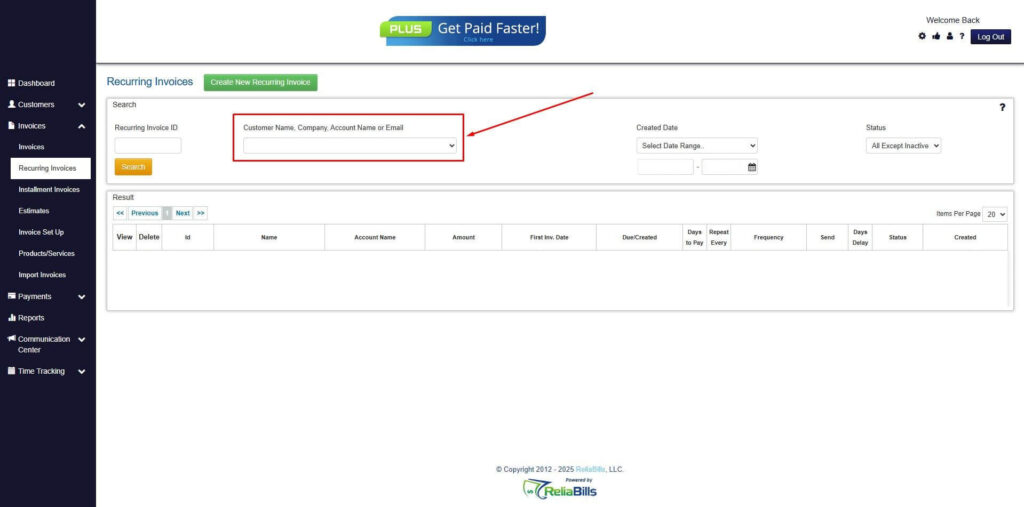
Step 3: Go to the Customers Tab
- If you have already created a customer, search for them in the Customers tab and make sure their status is “Active”.
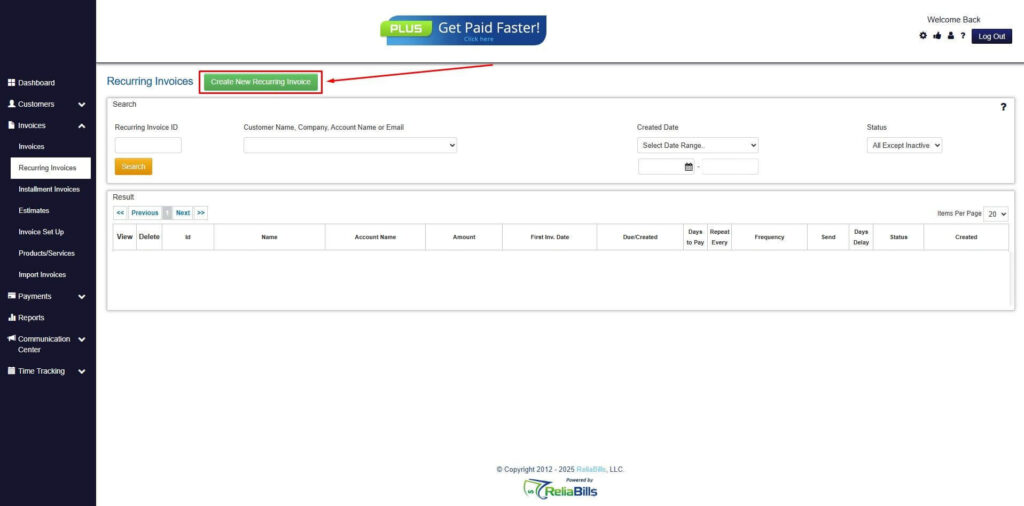
Step 4: Click the Create New Recurring Invoice
- If you haven’t created any customers yet, click the Create New Recurring Invoice to create a new customer.
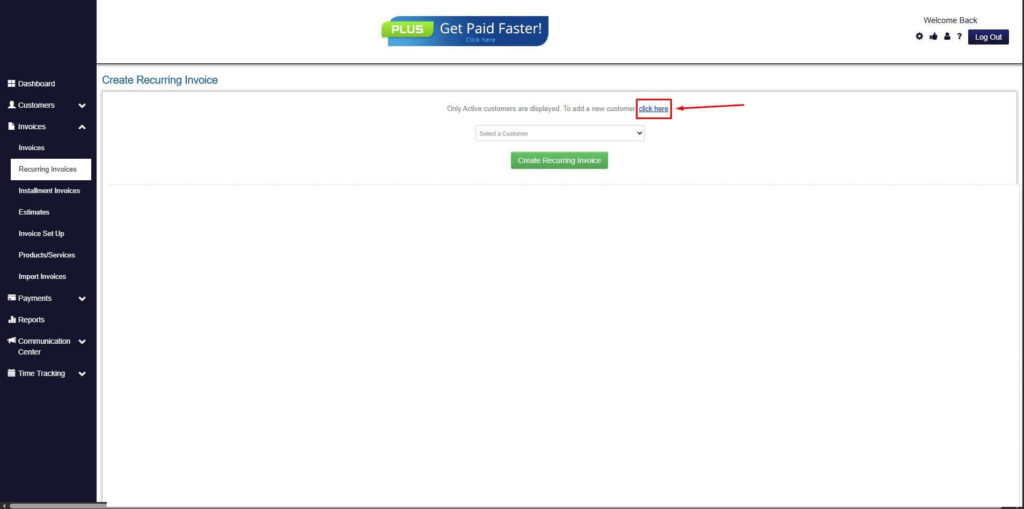
Step 5: Click on the “Click here” Button
- Click on the “Click here” button to proceed with the recurring invoice creation.
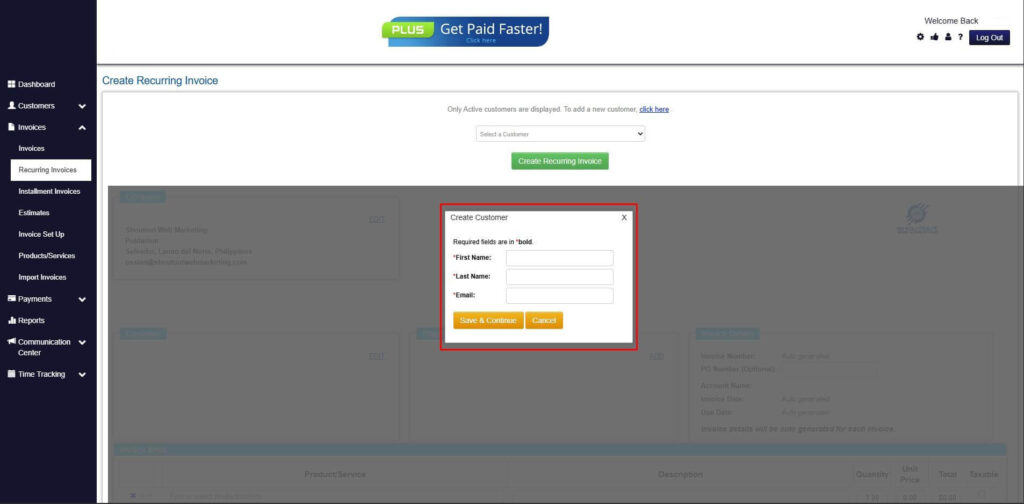
Step 6: Create Customer
- Provide your First Name, Last Name, and Email to proceed.
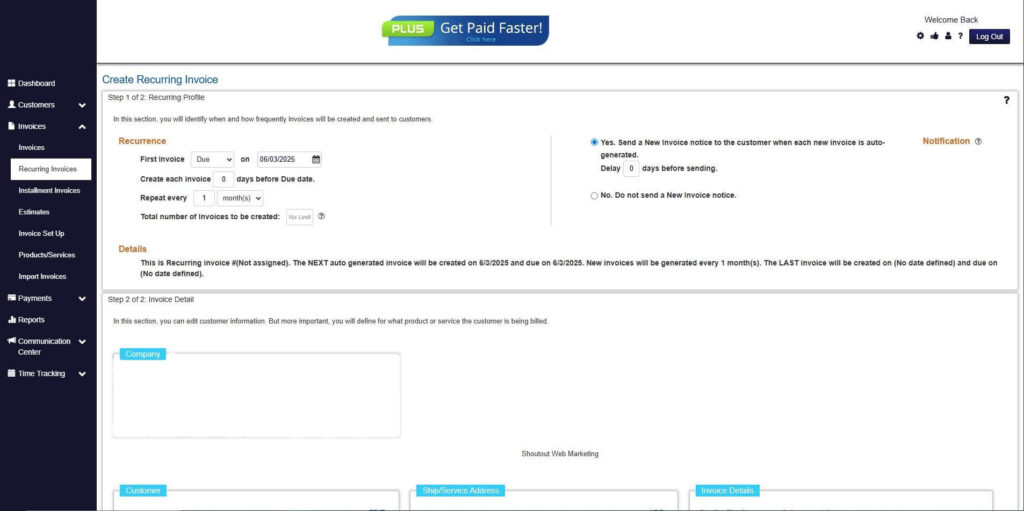
Step 7: Fill in the Create Recurring Invoice Form
- Fill in all the necessary fields.
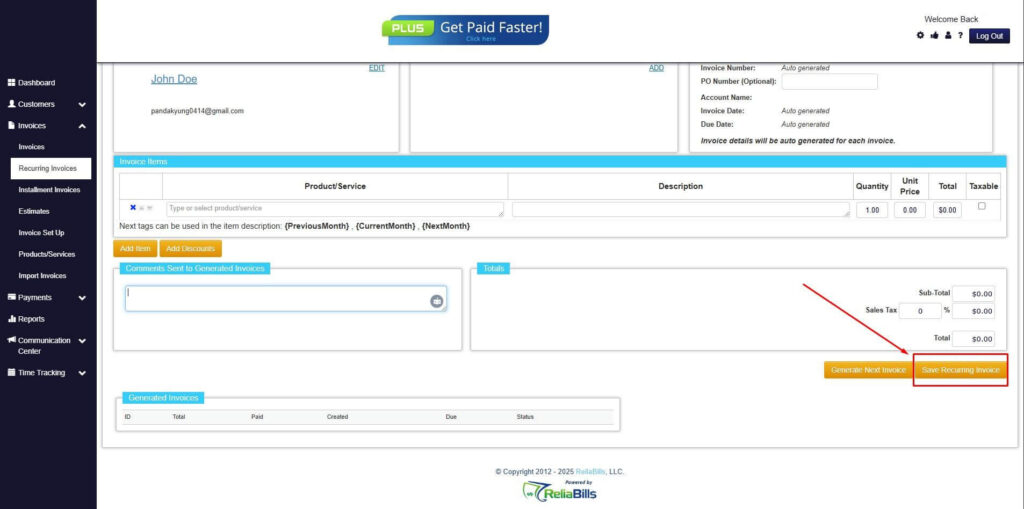
Step 8: Save Recurring Invoice
- After filling up the form, click “Save Recurring Invoice” to continue.
Step 9: Recurring Invoice Created
- Your Recurring Invoice has been created.
Frequently Asked Questions (FAQs)
1. What does manual billing to automated billing mean?
It refers to the process of replacing manual invoice creation and tracking with automated systems that handle billing workflows such as invoicing, payment tracking, and reminders without human intervention.
2. How long does it take to transition to automated billing?
The timeline depends on business size and system complexity, but most transitions require careful planning, data migration, testing, and onboarding to ensure a smooth and accurate implementation.
3. Is automated billing suitable for small businesses?
Yes, automated billing is highly suitable for small businesses because it reduces manual workload, improves accuracy, and allows operations to scale efficiently as the business grows.
4. Can automated billing reduce payment delays?
Yes, it reduces delays by ensuring invoices are sent on time, reminders are automated, and customers have access to convenient payment options such as Auto Pay.
5. What features should I look for in billing software?
Key features include automation, recurring billing, reporting tools, payment integration, workflow customization, and scalability to support long-term business growth.
Conclusion
Transitioning from manual billing to automated billing is a critical step for businesses that want to improve efficiency, accuracy, and financial stability while preparing for long-term growth in increasingly competitive markets. Manual billing systems often create operational bottlenecks that slow down invoicing, increase errors, and make cash flow management more difficult as transaction volume increases. By adopting automation, businesses can eliminate these inefficiencies and create a more structured and reliable billing process.
The benefits of automation extend across all areas of financial operations, including faster payment collection, improved reporting accuracy, better customer experience, and significantly enhanced scalability that allows businesses to grow without proportional increases in administrative workload. These improvements directly contribute to stronger operational performance and more predictable financial outcomes. Over time, this leads to greater business stability and competitiveness.
Ultimately, adopting automated billing is not just a technical upgrade but a strategic transformation that enables businesses to operate more efficiently, reduce risk, and build a scalable financial foundation for future growth. Organizations that embrace automation early are better positioned to adapt to changing market demands and maintain long-term success.