
As companies grow, their billing processes become significantly more complex, often involving multiple clients, pricing models, and payment schedules. What once worked with a handful of invoices quickly turns into a time-consuming and error-prone operation when scaled. Manual or semi-manual invoicing systems, such as spreadsheets or basic accounting tools, struggle to keep up with this increasing demand. This leads to inconsistencies, missed invoices, and delays that directly impact revenue flow.
Many businesses continue to rely on outdated invoicing workflows without realizing the hidden costs associated with inefficiency. Errors in calculations, duplicate invoices, and forgotten billing cycles can all contribute to revenue leakage. Additionally, tracking payments manually limits visibility into cash flow, making financial planning more difficult. These inefficiencies compound over time, especially for businesses experiencing rapid growth.
This is where automated invoicing software becomes a strategic upgrade rather than just a convenience. By automating invoice generation, delivery, and tracking, businesses can significantly improve accuracy and operational speed. More importantly, automation provides better control over cash flow and accounts receivable. Companies that adopt automated invoicing software at the right time position themselves for scalable and sustainable growth.
What Is Automated Invoicing Software?
Automated invoicing software is a digital solution designed to streamline and manage the entire invoicing lifecycle with minimal manual intervention. Its core function is to automatically generate invoices based on predefined rules, billing schedules, or customer agreements. This eliminates repetitive tasks and ensures consistency across all billing operations. As a result, businesses can reduce human error and improve overall efficiency.
Beyond invoice creation, automated invoicing software handles the distribution and tracking of invoices in real time. It can send invoices via email or integrated digital platforms while monitoring payment status as transactions occur. This provides businesses with immediate insight into which invoices are paid, pending, or overdue. Such visibility is critical for maintaining healthy cash flow.
Modern automated invoicing software also integrates seamlessly with payment gateways, accounting platforms, and customer relationship management (CRM) systems. This integration ensures that financial data flows accurately across all business systems without manual entry. It also allows for features like Auto Pay, recurring billing, and consolidated reporting. Ultimately, this creates a unified and efficient financial ecosystem.
Why Companies Still Rely on Manual Invoicing
Despite the advantages of automation, many companies continue to use manual invoicing systems due to familiarity and comfort. Teams that have long relied on spreadsheets or legacy tools often resist change because they understand the existing process. This perceived simplicity creates a false sense of efficiency, even when underlying issues exist. Over time, however, these systems become increasingly difficult to manage.
Another common reason is the belief that manual invoicing has a lower upfront cost. Businesses may hesitate to invest in automated invoicing software due to budget concerns, especially in the early stages. However, this perspective often overlooks the long-term costs of inefficiency, including labor hours and lost revenue. What seems cost-effective initially can become expensive as operations expand.
A lack of awareness about the benefits of automation also contributes to this hesitation. Many small businesses are unaware of how accessible and scalable modern solutions have become. Additionally, companies with a small customer base may feel that manual invoicing is still manageable. However, this approach quickly becomes unsustainable as customer numbers and transaction volumes increase.
Key Signs It’s Time to Upgrade
Increasing volume of invoices and customers
As your business grows, the number of invoices you generate each month increases exponentially. Managing this volume manually becomes inefficient and increases the risk of missed or delayed invoices. Automated invoicing software ensures that every transaction is captured and processed without additional workload.
Frequent billing errors or discrepancies
Recurring mistakes in invoice amounts, duplicate billing, or incorrect customer details are strong indicators of system limitations. These errors not only affect revenue but also damage customer trust and credibility. Automation minimizes these risks by standardizing calculations and data entry.
Delayed payments and rising overdue invoices
If customers are consistently paying late, it may be due to inconsistent invoicing or lack of timely reminders. Manual systems often fail to follow up effectively on unpaid invoices. Automated invoicing software sends reminders and enables faster payment options to improve collection rates.
Too much time spent on administrative billing tasks
When your team spends hours generating, sending, and tracking invoices, it diverts focus from core business activities. Administrative overhead increases without adding value to revenue generation. Automation reduces this burden and improves overall productivity.
Difficulty tracking payments and invoice status in real time
Manual tracking methods limit visibility into your accounts receivable. Without real-time updates, it becomes difficult to make informed financial decisions. Automated systems provide dashboards and reporting tools that offer instant insights.
Limited scalability of current invoicing system
A system that works for 10 clients may fail when handling 100 or more. Manual processes cannot scale efficiently with business growth. Automated invoicing software is designed to grow alongside your operations without compromising performance.
Problems Caused by Delaying the Upgrade
Delaying the transition to automated invoicing software can result in significant revenue leakage over time. Missed invoices, incorrect billing amounts, and delayed issuance all contribute to lost income. These issues are often difficult to detect in manual systems, making them even more costly. Over time, small inefficiencies accumulate into substantial financial losses.
Cash flow also suffers when invoicing processes are slow or inconsistent. Late invoice delivery leads to delayed payments, which disrupts financial stability. Businesses may struggle to meet operational expenses or invest in growth opportunities. Efficient invoicing is critical for maintaining a steady revenue stream.
Operational costs increase as more time and labor are required to manage billing tasks manually. Employees spend valuable hours on repetitive processes instead of strategic work. Additionally, poor billing experiences can frustrate customers, leading to dissatisfaction and potential churn. Financial reporting also becomes less accurate, impacting decision-making.
How Automated Invoicing Software Works
Automated invoicing software operates by using predefined billing rules and schedules to generate invoices automatically. Businesses can set parameters based on customer agreements, subscription plans, or one-time services. This ensures that invoices are created consistently without manual input. It also reduces the likelihood of missed billing cycles.
Once generated, invoices are sent through digital channels such as email or customer portals. This eliminates delays associated with manual distribution and ensures timely delivery. Customers receive invoices instantly, improving the chances of faster payment. The system can also support multiple payment methods for convenience.
The software continuously tracks payment status in real time, updating records as transactions occur. Automated reminders are triggered for overdue invoices, helping maintain consistent follow-ups. Additionally, the system syncs with accounting and financial platforms to ensure accurate data across all records. This creates a streamlined and transparent billing process.
Core Features of Automated Invoicing Systems
Recurring billing and subscription management
Recurring billing allows businesses to automate invoices for repeat customers or subscription-based services. This ensures consistent billing cycles without manual intervention. It also reduces errors and provides predictable revenue streams.
Real-time invoice tracking and reporting
Automated systems provide dashboards that display invoice statuses, payment trends, and outstanding balances. This real-time visibility helps businesses make informed financial decisions. It also simplifies reporting and auditing processes.
Auto Pay and online payment integration
Customers can pay invoices instantly through integrated payment gateways. Auto Pay features allow automatic deductions on due dates, reducing missed payments. This significantly improves cash flow and customer convenience.
Automated reminders and dunning workflows
The system sends scheduled reminders for upcoming or overdue payments. This reduces the need for manual follow-ups and improves collection efficiency. Consistent communication also strengthens customer relationships.
Customizable invoice templates
Businesses can create branded invoice templates that reflect their identity. This enhances professionalism and ensures consistency across all communications. Customization also allows inclusion of specific billing details.
Integration with CRM and accounting tools
Seamless integration ensures that customer and financial data remain synchronized. This eliminates duplicate data entry and reduces errors. It also enhances overall operational efficiency.
Benefits of Upgrading to Automated Invoicing Software
Faster and more accurate billing processes
Automation eliminates manual data entry, reducing errors and speeding up invoice generation. This ensures that invoices are sent promptly and accurately. Faster billing directly contributes to improved revenue cycles.
Improved cash flow and reduced overdue payments
Timely invoicing and automated reminders encourage faster payments from customers. Integrated payment options make transactions more convenient. This leads to healthier and more predictable cash flow.
Lower administrative workload
Automation significantly reduces the time spent on repetitive billing tasks. Employees can focus on higher-value activities that drive business growth. This improves overall operational efficiency.
Better financial visibility and reporting
Real-time data and reporting tools provide clear insights into financial performance. Businesses can track revenue, outstanding invoices, and payment trends بسهولة. This supports better decision-making.
Enhanced customer experience
Customers receive accurate invoices on time with multiple payment options. This improves satisfaction and reduces disputes. A smooth billing experience strengthens long-term relationships.
Scalable billing operations for business growth
Automated invoicing software can handle increasing transaction volumes without additional resources. This makes it ideal for growing businesses. Scalability ensures long-term sustainability.
The Role of Recurring Billing in Automation
Recurring billing is a critical component of automated invoicing software, especially for businesses with subscription-based models. It allows companies to automate billing cycles for repeat customers without manual input. This ensures that invoices are generated and sent consistently according to predefined schedules. As a result, businesses can maintain operational efficiency even as their customer base grows.
One of the biggest advantages of recurring billing is the creation of predictable and stable revenue streams. Businesses can forecast income more accurately, improving financial planning and decision-making. This stability is particularly valuable for SaaS companies, service providers, and membership-based organizations. It also reduces the uncertainty associated with one-time billing models.
Additionally, recurring billing minimizes errors associated with repetitive invoicing tasks. Since the system handles calculations and scheduling automatically, there is less room for human error. This leads to more accurate billing and fewer customer disputes. Overall, recurring billing enhances both efficiency and reliability in financial operations.
How Automation Improves Financial Control
Automated invoicing software provides businesses with real-time visibility into their accounts receivable. This allows finance teams to monitor outstanding invoices, track payment trends, and identify potential issues quickly. With accurate and up-to-date data, businesses can make informed decisions about cash flow management. This level of transparency is difficult to achieve with manual systems.
Improved data accuracy also enhances forecasting and budgeting processes. Businesses can rely on consistent financial data to predict future revenue and expenses. This supports strategic planning and reduces financial uncertainty. Automation ensures that all transactions are recorded and updated automatically.
Furthermore, automation reduces reliance on manual reconciliation processes. By syncing invoicing data with accounting systems, discrepancies are minimized. This streamlines financial operations and improves efficiency. Ultimately, businesses gain greater control over their financial health.
Best Practices Before Upgrading
Assess current invoicing challenges and inefficiencies
Identify the specific issues in your existing invoicing process, such as delays, errors, or lack of visibility. Understanding these pain points helps determine the features you need in automated invoicing software. This ensures a more targeted and effective upgrade.
Choose software that supports scalability and integration
Select a solution that can grow with your business and integrate with existing tools. Compatibility with accounting systems and CRMs is essential for seamless operations. This prevents data silos and enhances efficiency.
Ensure proper data migration planning
Plan how existing customer and billing data will be transferred to the new system. Accurate migration is critical to avoid disruptions or data loss. Testing migration processes helps ensure a smooth transition.
Train staff on new invoicing workflows
Provide comprehensive training to ensure that employees understand how to use the new system. This reduces resistance to change and improves adoption rates. Well-trained staff can maximize the benefits of automation.
Test system performance before full rollout
Run pilot tests to evaluate system performance and identify potential issues. This allows adjustments before full implementation. Testing ensures a smoother transition and minimizes operational risks.
Key Benefits of Making the Upgrade at the Right Time
Improved billing accuracy and reliability
Upgrading at the right time ensures that your invoicing system can handle current and future demands. Automation reduces errors and ensures consistent billing practices. This improves overall reliability.
Faster payment collection cycles
Timely invoicing and automated reminders accelerate the payment process. Customers are more likely to pay on time when systems are efficient. This strengthens cash flow.
Reduced operational costs
Automation lowers labor costs associated with manual invoicing tasks. Businesses can operate more efficiently with fewer resources. This improves profitability.
Stronger financial forecasting
Accurate and real-time data enables better financial predictions. Businesses can plan for growth with greater confidence. This supports long-term success.
Better customer satisfaction and retention
Efficient billing processes enhance the customer experience. Timely and accurate invoices reduce disputes and confusion. Satisfied customers are more likely to remain loyal.
Common Use Cases
SaaS and subscription-based companies
These businesses rely heavily on recurring billing models to manage subscriptions. Automated invoicing software ensures consistent billing cycles and reduces churn. It also simplifies revenue tracking.
Service-based businesses with repeat clients
Companies offering ongoing services benefit from automated recurring invoices. This eliminates the need for manual billing each cycle. It improves efficiency and consistency.
Agencies and freelancers scaling operations
As client numbers grow, manual invoicing becomes unsustainable. Automation helps manage multiple clients and projects بسهولة. This supports scalability.
Utilities and membership organizations
Organizations with fixed billing cycles require consistent invoicing. Automated systems ensure timely billing and payment collection. This improves operational stability.
Growing small and mid-sized businesses
SMBs experiencing growth need scalable solutions for billing. Automated invoicing software supports expansion without increasing administrative workload. It enables sustainable growth.
How ReliaBills Supports Businesses Transitioning to Automated Invoicing
ReliaBills helps businesses make a smooth transition from manual invoicing to a more efficient automated invoicing system by streamlining everyday billing operations. It reduces the need for time-consuming manual tasks such as creating, sending, and tracking invoices while improving overall accuracy and consistency. Businesses can gain better visibility into their cash flow and invoice status, which supports faster and more informed financial decision-making. This shift not only improves operational efficiency but also helps businesses scale without being held back by outdated invoicing processes.
A key part of this transition is ReliaBills’ recurring billing capability, which is designed to support businesses with repeat customers or subscription-based services. Instead of manually generating invoices for every billing cycle, recurring billing automates the entire process to ensure invoices are sent on time, every time. This helps reduce administrative workload while minimizing the risk of missed or late invoices. As a result, businesses benefit from more predictable revenue streams and a more consistent billing experience for their customers.
ReliaBills PLUS takes automation further by offering enhanced features such as advanced billing automation, detailed financial reporting, and improved customer management tools. These features provide businesses with deeper insights into payment trends, invoice performance, and overall financial health. With this level of visibility, companies can make more strategic decisions and optimize their billing processes as they grow. ReliaBills PLUS is built to support scaling businesses that need stronger control, efficiency, and long-term invoicing reliability.
How to Create a New Recurring Invoice Using ReliaBills
Creating a New Recurring Invoice using ReliaBills involves the following steps:
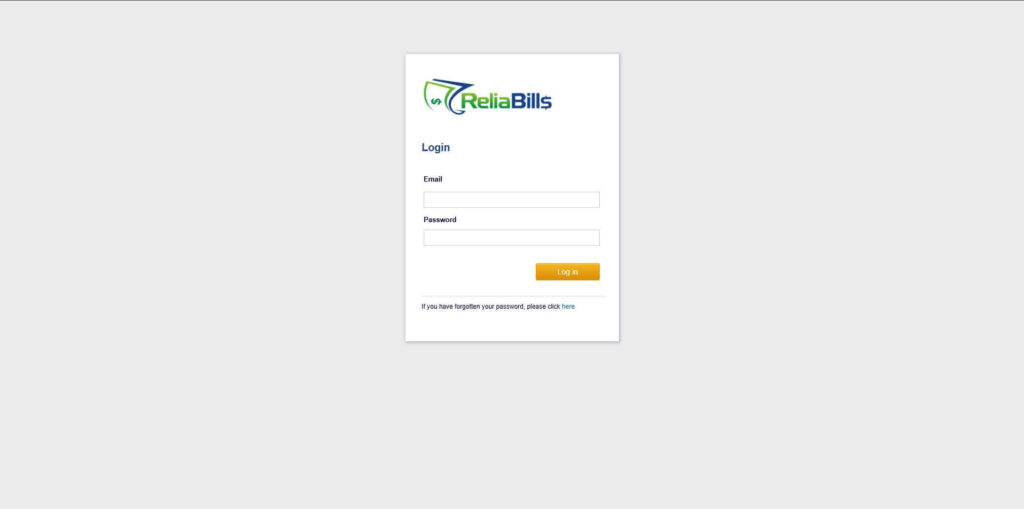
Step 1: Login to ReliaBills
- Access your ReliaBills Account using your login credentials. If you don’t have an account, sign up here.
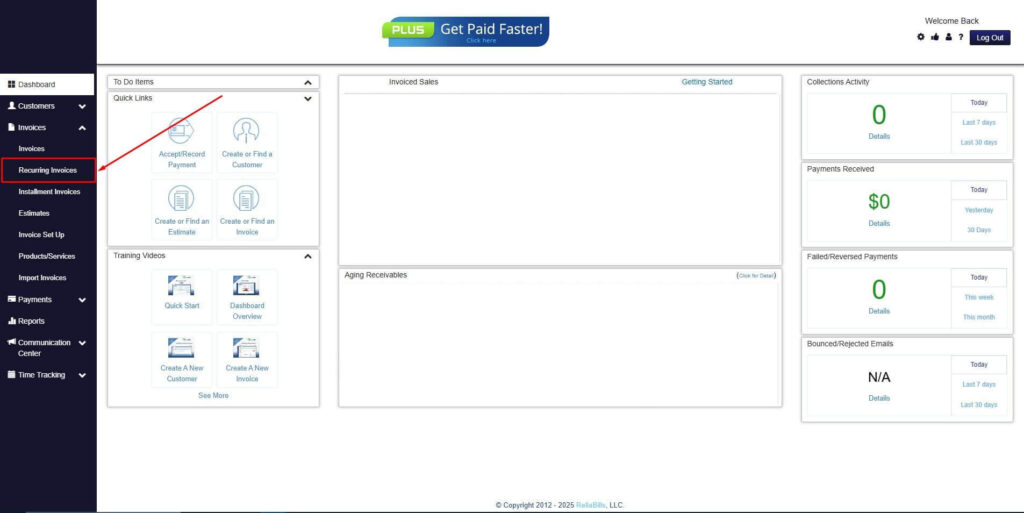
Step 2: Click on Recurring Invoices
- Navigate to the Invoices Dropdown and click on Recurring Invoices for an overview of the list of your existing customers.
Step 3: Go to the Customers Tab
- If you have already created a customer, search for them in the Customers tab and make sure their status is “Active”.
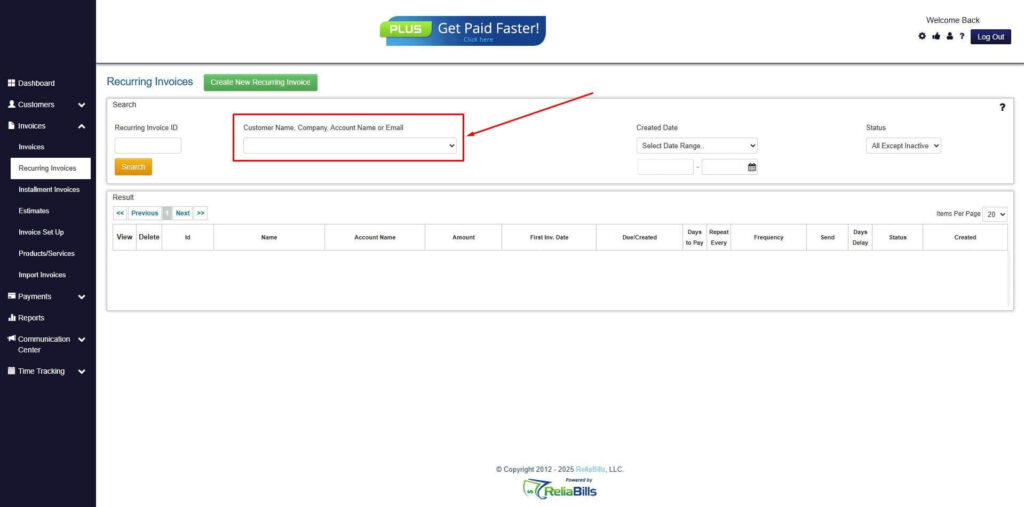
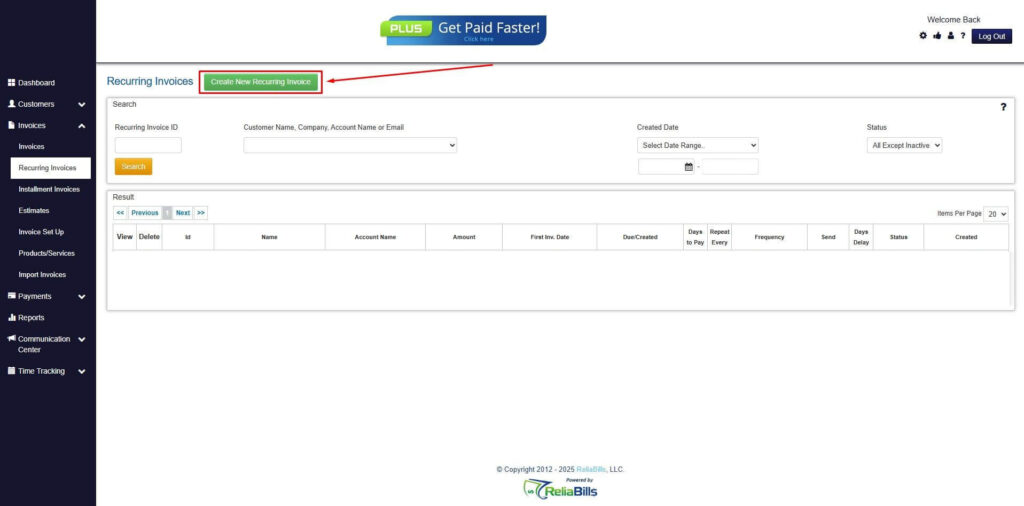
Step 4: Click the Create New Recurring Invoice
- If you haven’t created any customers yet, click the Create New Recurring Invoice to create a new customer.
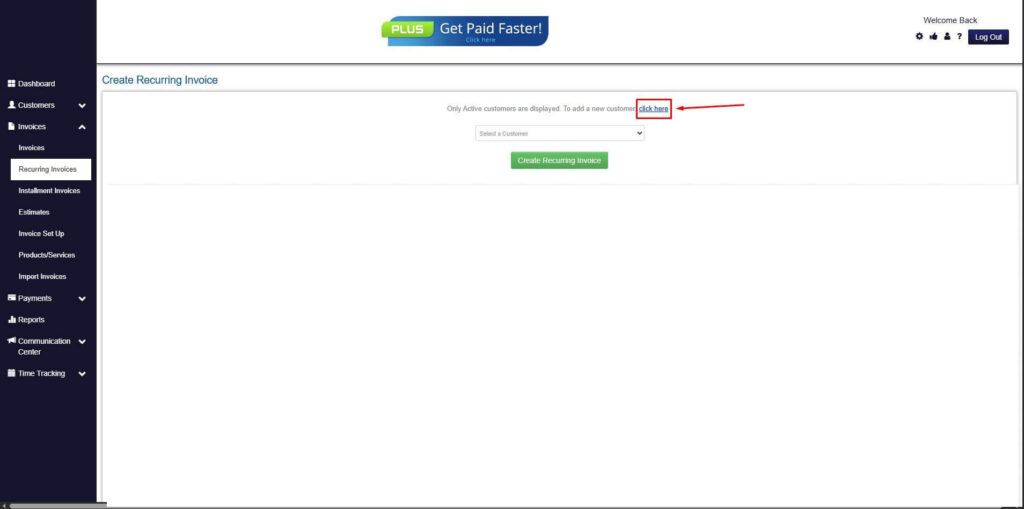
Step 5: Click on the “Click here” Button
- Click on the “Click here” button to proceed with the recurring invoice creation.
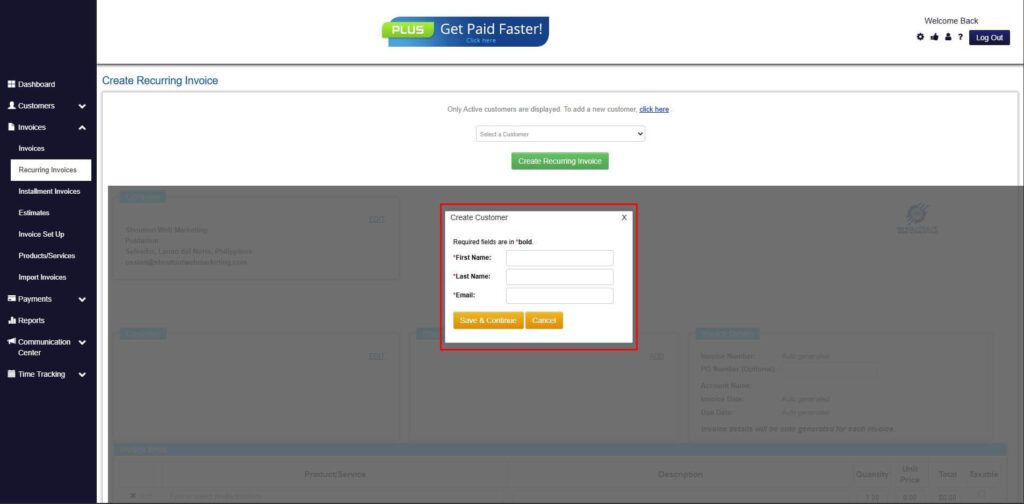
Step 6: Create Customer
- Provide your First Name, Last Name, and Email to proceed.
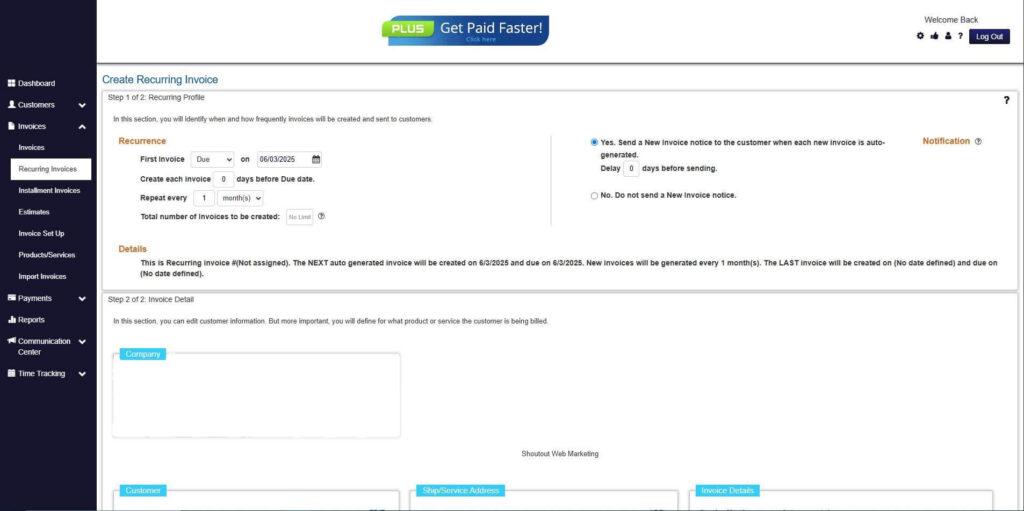
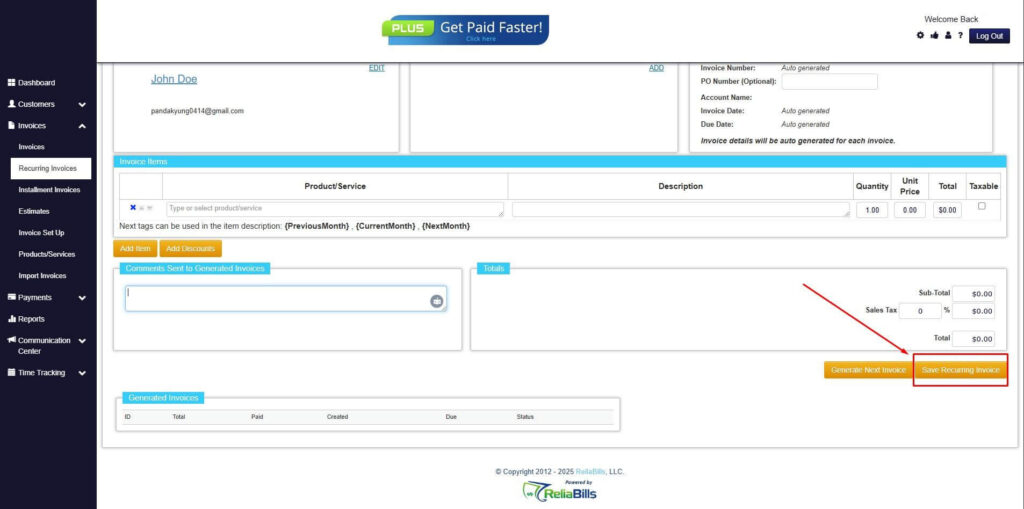
Step 7: Fill in the Create Recurring Invoice Form
- Fill in all the necessary fields.
Step 8: Save Recurring Invoice
- After filling up the form, click “Save Recurring Invoice” to continue.
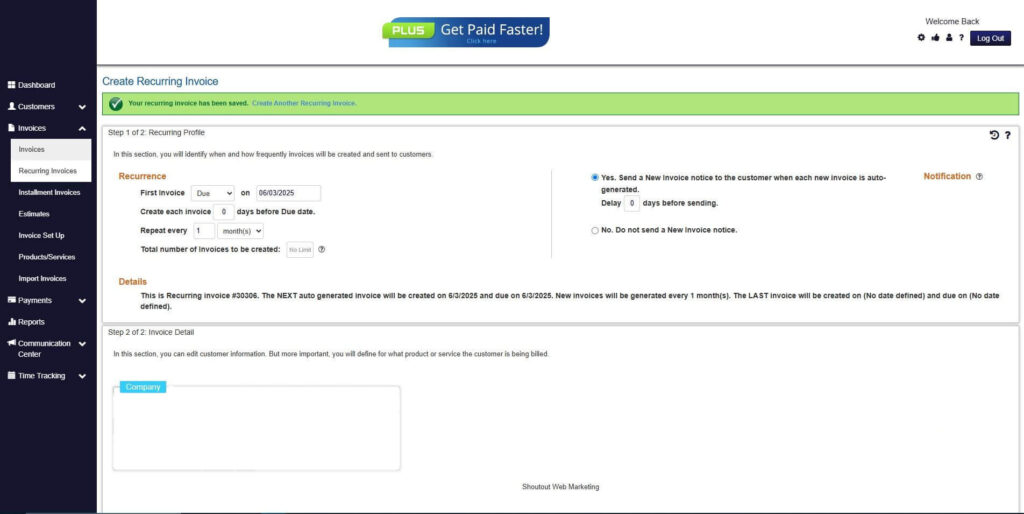
Step 9: Recurring Invoice Created
- Your Recurring Invoice has been created.
Frequently Asked Questions (FAQs)
1. When should a business switch to automated invoicing?
Businesses should upgrade when manual processes begin causing delays, errors, or inefficiencies. Growth in customer base and invoice volume is a key trigger. Early adoption prevents operational bottlenecks.
2. What are the risks of not upgrading invoicing systems?
Delaying automation can lead to revenue loss, cash flow issues, and increased operational costs. Errors and inefficiencies become more frequent over time. This can also impact customer satisfaction.
3. Is automated invoicing suitable for small businesses?
Yes, automated invoicing software is scalable and beneficial even for small businesses. It reduces administrative workload and improves accuracy. Early adoption supports growth.
4. How long does it take to implement invoicing software?
Implementation time varies depending on system complexity and data migration needs. Most solutions can be set up within a few days to weeks. Proper planning ensures a smooth transition.
5. Does automation help reduce overdue payments?
Yes, automation improves payment collection through timely invoicing and reminders. Integrated payment options make it easier for customers to pay. This reduces overdue accounts significantly.
Conclusion
Recognizing the right time to upgrade to automated invoicing software is essential for maintaining operational efficiency and financial health. Key indicators such as increasing invoice volume, frequent errors, delayed payments, and limited scalability signal that manual systems are no longer sufficient. Addressing these challenges early prevents revenue loss and operational strain. Businesses that act proactively gain a competitive advantage.
Timing plays a critical role in maximizing the benefits of automation. Upgrading too late can result in accumulated inefficiencies and missed growth opportunities. On the other hand, adopting automated invoicing software at the right stage ensures a smoother transition and immediate improvements. It allows businesses to scale confidently without being hindered by outdated processes.
Looking ahead, modern businesses must embrace digital solutions to remain competitive and financially stable. Automated invoicing software is no longer optional but a necessary tool for growth and efficiency. By investing in automation, companies can streamline operations, improve cash flow, and deliver better customer experiences. Now is the time to upgrade and future-proof your billing processes.