
Many businesses struggle to efficiently track invoices and payments, especially as transaction volumes grow and processes become more complex. Without a clear system in place, it becomes difficult to know which invoices are paid, which are overdue, and which require follow-up. This lack of visibility can quickly lead to confusion and inefficiencies in daily operations.
Poor tracking doesn’t just create administrative headaches—it directly impacts cash flow. Missed payments, delayed follow-ups, and inaccurate records can disrupt financial stability and make it harder to plan for future expenses. Over time, these issues can compound and hinder business growth.
The easiest way to solve this challenge is by using billing software and automation. These tools centralize invoice management, provide real-time tracking, and eliminate manual processes. As a result, businesses can confidently track invoices and payments while improving accuracy and efficiency.
What Does It Mean to Track Invoices and Payments?
Tracking invoices and payments refers to the process of monitoring all billing activities within a business. This includes keeping records of issued invoices, tracking due dates, and confirming when payments are received. It ensures that every transaction is accounted for and properly documented.
This process also involves monitoring the status of each invoice, whether it is pending, paid, or overdue. Businesses need to stay updated on these statuses to take timely action, such as sending reminders or following up with customers. Accurate tracking helps maintain financial clarity and accountability.
Basic tracking methods often rely on spreadsheets or manual logs, which can be prone to errors and inefficiencies. In contrast, automated systems provide real-time updates, centralized dashboards, and seamless integrations. This makes it much easier to track invoices and payments without the risk of human error.
Why Tracking Invoices and Payments Is Important
Tracking invoices and payments ensures that businesses maintain accurate financial records. Proper documentation helps with reporting, auditing, and compliance, reducing the risk of discrepancies. This level of accuracy is essential for making informed financial decisions.
It also improves cash flow visibility and forecasting. When businesses know exactly when payments are expected, they can better plan expenses and investments. This predictability reduces financial uncertainty and supports long-term stability.
Additionally, effective tracking reduces overdue and missed payments. By staying on top of invoice statuses, businesses can follow up promptly and avoid delays. It also enhances customer relationship management by ensuring clear and consistent communication regarding billing.
Challenges of Manual Invoice and Payment Tracking
Manual tracking requires significant time and effort, especially when dealing with multiple invoices and customers. Data must be entered and updated repeatedly, which can slow down operations. This makes it difficult to scale as the business grows.
There is also a higher risk of human error and discrepancies. Mistakes in data entry, missed updates, or incorrect calculations can lead to confusion and financial inaccuracies. These errors often result in delayed payments or disputes with customers.
Another major challenge is the lack of real-time visibility. Without automated systems, businesses may not know the current status of invoices at any given time. This makes it harder to effectively track invoices and payments and respond quickly to issues.
How to Easily Track Invoices and Payments
The simplest way to track invoices and payments is by using centralized billing software. This allows businesses to manage all invoices, payments, and customer data in one place. A centralized system eliminates confusion and improves organization.
Automation plays a key role in simplifying the process. By automating invoice creation and delivery, businesses can ensure that invoices are sent on time without manual effort. This reduces delays and improves consistency.
Real-time tracking features provide instant updates on payment statuses. Businesses can quickly identify unpaid invoices and take action when needed. Automated reminders and integrated payment gateways further streamline the process, making it easier to manage transactions efficiently.
Key Features to Look for in Invoice Tracking Systems
Automated invoicing and payment recording
Automated systems generate invoices and record payments without manual input. This reduces administrative workload and ensures accuracy in financial records. It also helps businesses consistently track invoices and payments without delays.
Real-time tracking dashboards and reporting
Dashboards provide a clear overview of all invoice statuses in one place. Businesses can instantly see which invoices are paid, pending, or overdue. This visibility allows for faster decision-making and better financial control.
Recurring billing for repeat customers
Recurring billing automates invoices for ongoing services or subscriptions. This eliminates repetitive tasks and ensures consistent billing cycles. It also simplifies tracking by maintaining predictable payment schedules.
Auto-pay and multiple payment options
Offering flexible payment options makes it easier for customers to pay on time. Auto-pay ensures payments are processed automatically, reducing delays. This improves overall efficiency in tracking payments.
Customer account and transaction history
Maintaining detailed customer records helps businesses track payment behavior and history. This information is useful for resolving disputes and managing relationships. It also provides better insights into customer activity.
Integration with accounting and financial tools
Integrations ensure that all financial data is synchronized across systems. This eliminates duplicate entries and improves accuracy. It also streamlines financial management and reporting.
The Role of Recurring Billing in Simplifying Tracking
Recurring billing automates repeat transactions, making it easier to manage ongoing payments. Instead of manually creating invoices for each billing cycle, the system handles it automatically. This ensures consistency and reduces the risk of missed invoices.
It also reduces the manual effort required to track payments. Businesses no longer need to monitor each recurring transaction individually. This saves time and improves efficiency.
Additionally, recurring billing creates predictable cash flow patterns. Customers are billed at regular intervals, making it easier to anticipate incoming payments. This consistency enhances the ability to track invoices and payments effectively.
Best Practices for Tracking Invoices and Payments
Centralize all billing and payment data in one system
Keeping all financial data in a single platform improves organization and accessibility. It eliminates confusion caused by scattered records across multiple tools. Centralization makes it easier to track invoices and payments accurately.
Automate reminders and follow-ups
Automated reminders ensure customers are notified about upcoming or overdue payments. This reduces the need for manual follow-ups and improves consistency. It also increases the likelihood of timely payments.
Regularly reconcile accounts and financial records
Reconciliation ensures that all transactions are accurately recorded and matched. This helps identify discrepancies early and maintain financial accuracy. Regular checks are essential for reliable tracking.
Maintain accurate and up-to-date customer information
Updated customer records ensure invoices are sent to the correct recipients. This reduces delays and communication issues. Accurate data also improves overall billing efficiency.
Monitor reports to identify trends and issues
Analyzing reports helps businesses identify payment patterns and potential problems. This allows for proactive decision-making and better financial planning. Insights from reports improve long-term efficiency.
How Automation Improves Accuracy and Efficiency
Automation reduces manual errors by handling calculations and data entry. This ensures invoices are accurate and minimizes disputes. Accurate billing leads to faster payments and improved customer trust.
It also speeds up invoice processing and payment collection. Automated systems handle repetitive tasks quickly and consistently. This improves overall operational efficiency.
Real-time insights provide a clear view of financial performance. Businesses can monitor cash flow and make informed decisions. By automating processes, companies can focus more on growth and strategy.
Key Benefits of Efficient Invoice and Payment Tracking
Improves financial accuracy and reporting
Efficient tracking ensures that every invoice and payment is properly recorded and categorized. This reduces discrepancies in financial data and makes reporting more reliable. Accurate records are essential for audits, tax compliance, and strategic financial planning.
Reduces overdue payments
When businesses consistently monitor invoice statuses, they can quickly identify and follow up on unpaid invoices. This proactive approach minimizes delays and prevents payments from becoming overdue. As a result, businesses can maintain a healthier and more predictable cash flow.
Saves time on administrative tasks
Automated tracking eliminates the need for repetitive manual data entry and updates. Employees can spend less time managing invoices and more time focusing on growth-oriented activities. This leads to increased productivity and operational efficiency.
Enhances cash flow management
Real-time visibility into incoming and outstanding payments allows businesses to manage their finances more effectively. Knowing when payments are expected helps with budgeting and expense planning. This improved control reduces financial uncertainty and supports stability.
Supports business growth and scalability
As transaction volumes increase, efficient tracking systems can handle the workload without additional administrative effort. This allows businesses to scale operations without compromising accuracy or efficiency. Scalable systems are critical for long-term growth and expansion.
Provides real-time financial insights
Tracking systems offer dashboards and reports that give instant visibility into financial performance. Businesses can analyze trends, identify delays, and make data-driven decisions. These insights help improve overall financial strategy.
Strengthens customer relationships
Clear and accurate invoicing builds trust with customers. When businesses communicate billing information effectively, it reduces confusion and disputes. Strong relationships often lead to better payment behavior and long-term loyalty.
Reduces operational risks
Efficient tracking minimizes risks such as lost invoices, missed follow-ups, and inconsistent processes. Automated systems ensure that nothing falls through the cracks. This creates a more reliable and secure billing environment.
Common Use Cases
Small and medium-sized businesses
SMBs often lack dedicated accounting teams, making efficient tracking essential. Automated systems help them stay organized and reduce errors in financial records. This allows them to easily track invoices and payments while focusing on business growth.
Subscription-based services
Businesses offering subscriptions rely on recurring billing and consistent payment cycles. Efficient tracking ensures that all transactions are recorded accurately and on time. This helps maintain predictable revenue streams and reduces churn.
Freelancers and consultants
Independent professionals manage multiple clients and projects simultaneously. Tracking systems help them stay on top of invoices, due dates, and payments. This reduces administrative workload and ensures timely income.
Property and tenant billing
Property managers must handle multiple tenants, lease terms, and payment schedules. Efficient tracking systems simplify rent collection and ensure accurate records. This reduces missed payments and improves financial organization.
eCommerce and retail businesses
High transaction volumes make manual tracking impractical for these businesses. Automated systems ensure all sales and payments are recorded in real time. This improves efficiency and reduces errors.
Healthcare and professional services
Clinics, law firms, and accounting services often deal with complex billing structures. Efficient tracking ensures accurate invoicing and timely payments. It also improves transparency and client satisfaction.
Utilities and recurring service providers
Businesses offering ongoing services require consistent billing and tracking. Automated systems ensure invoices are sent regularly and payments are monitored. This reduces overdue payments and improves revenue consistency.
Agencies and service-based companies
Marketing agencies, IT services, and other service providers handle multiple clients with varying billing terms. Efficient tracking systems help manage these complexities بسهولة. This ensures accurate billing and better financial control.
How ReliaBills Helps Businesses Track Invoices and Payments
Manually trying to track invoices and payments often leads to scattered records, delayed updates, and missed follow-ups. ReliaBills solves this by centralizing the entire billing process into one automated platform. Businesses can generate, send, and monitor invoices in real time, ensuring complete visibility over every transaction. This reduces confusion and helps maintain accurate financial records without relying on spreadsheets or manual logs.
A major advantage of ReliaBills is its recurring billing system, which automates repeat invoices and ensures consistent payment cycles. Instead of manually tracking each billing period, businesses can set up schedules that automatically generate invoices and record payments. Combined with automated reminders and payment notifications, this significantly reduces overdue payments and improves overall tracking efficiency.
For businesses that need deeper financial control, ReliaBills PLUS offers advanced reporting, enhanced automation workflows, and powerful customer management tools. These features provide real-time insights into cash flow, payment history, and outstanding balances. With this level of visibility and automation, businesses can easily track invoices and payments while scaling operations with confidence.
How to Create a New Recurring Invoice Using ReliaBills
Creating a New Recurring Invoice using ReliaBills involves the following steps:
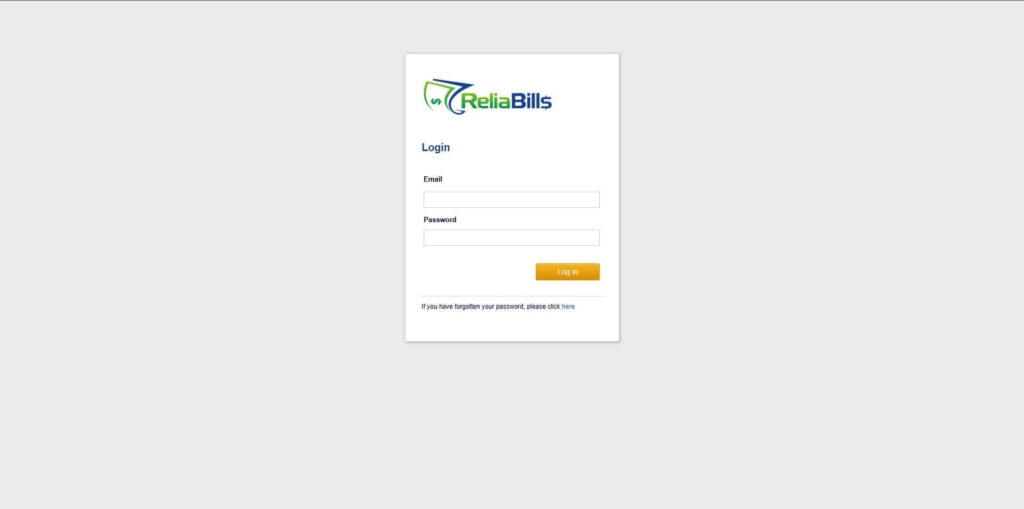
Step 1: Login to ReliaBills
- Access your ReliaBills Account using your login credentials. If you don’t have an account, sign up here.
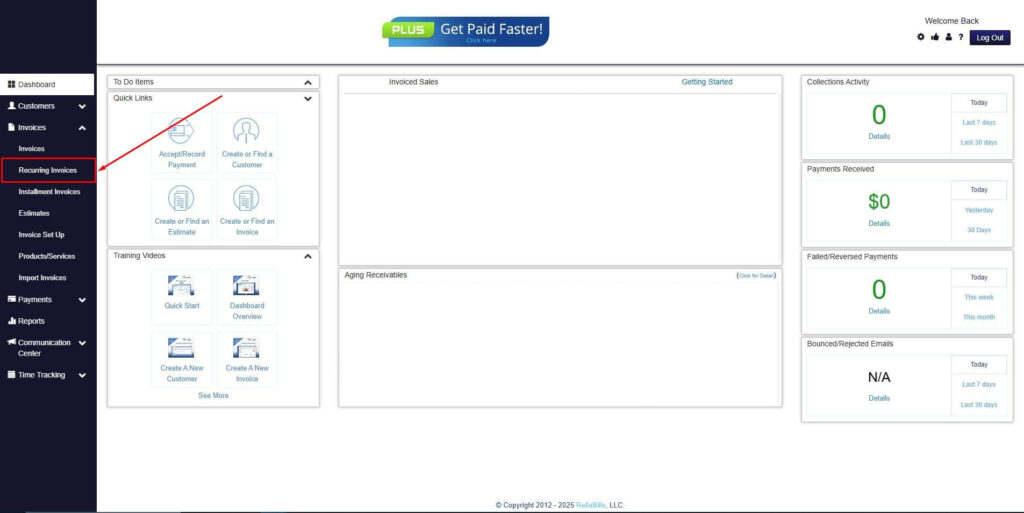
Step 2: Click on Recurring Invoices
- Navigate to the Invoices Dropdown and click on Recurring Invoices for an overview of the list of your existing customers.
Step 3: Go to the Customers Tab
- If you have already created a customer, search for them in the Customers tab and make sure their status is “Active”.
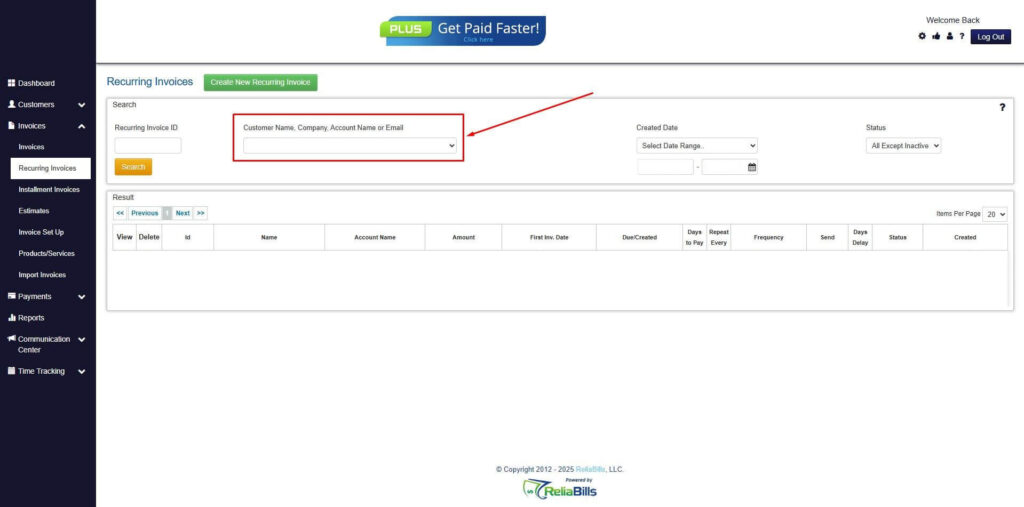
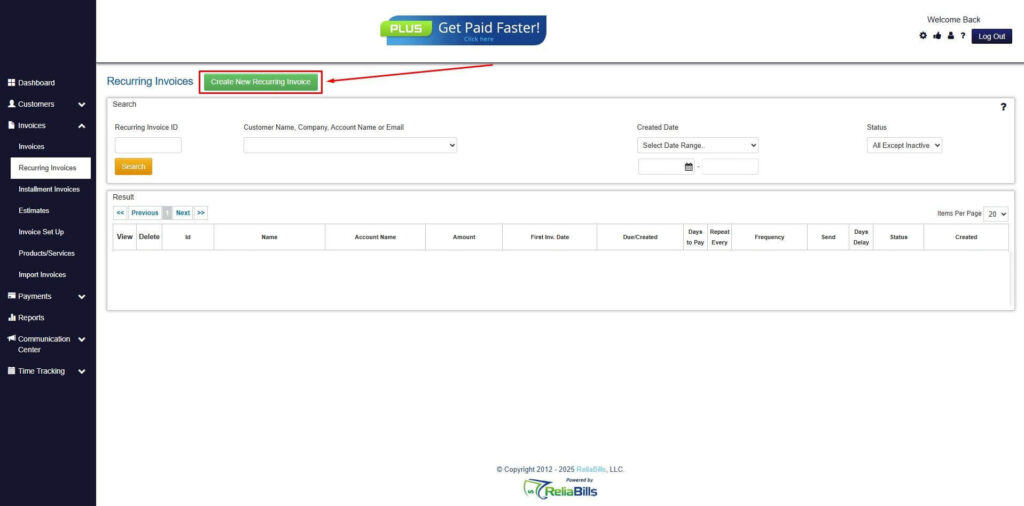
Step 4: Click the Create New Recurring Invoice
- If you haven’t created any customers yet, click the Create New Recurring Invoice to create a new customer.
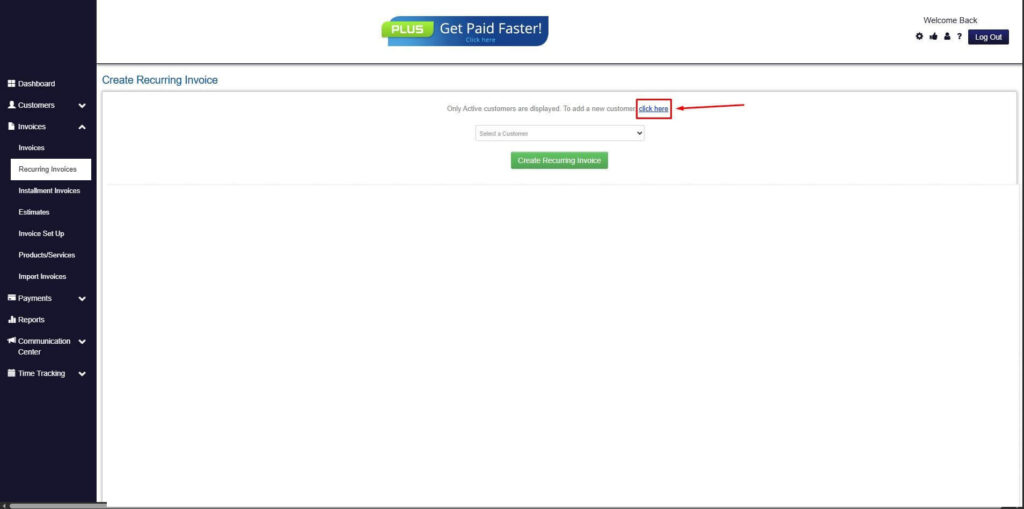
Step 5: Click on the “Click here” Button
- Click on the “Click here” button to proceed with the recurring invoice creation.
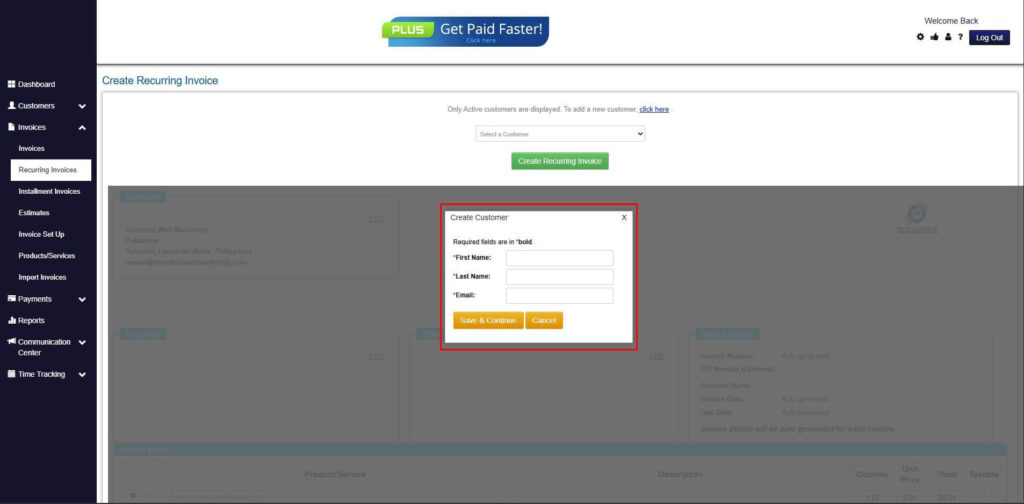
Step 6: Create Customer
- Provide your First Name, Last Name, and Email to proceed.
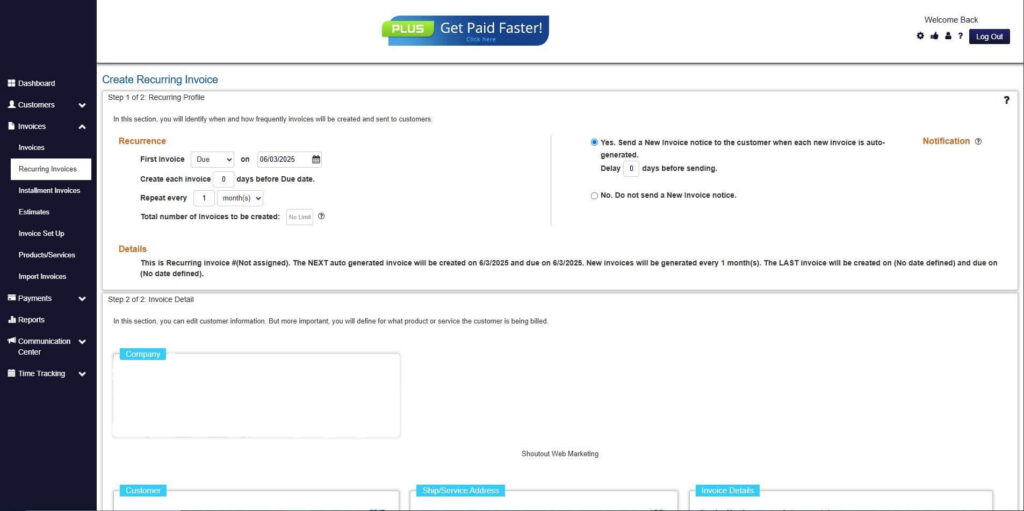
Step 7: Fill in the Create Recurring Invoice Form
- Fill in all the necessary fields.
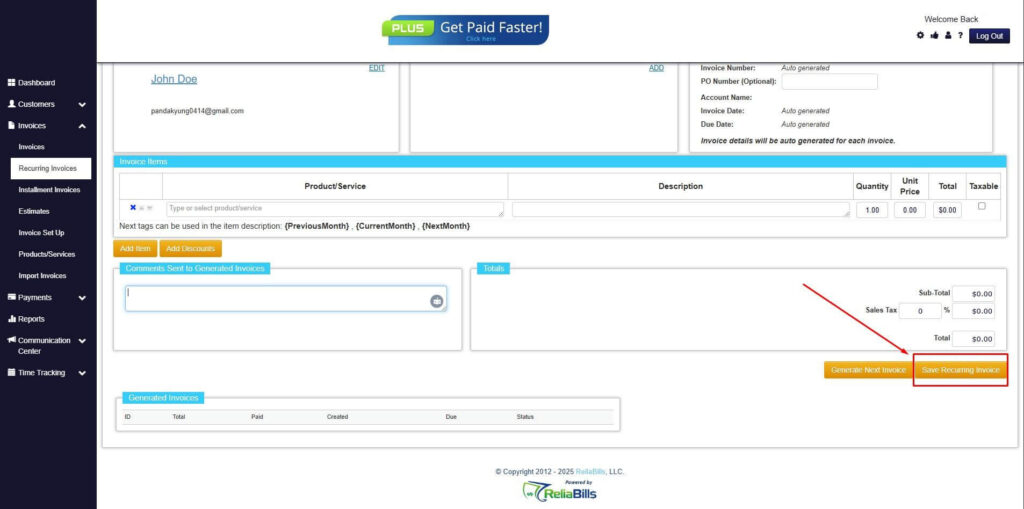
Step 8: Save Recurring Invoice
- After filling up the form, click “Save Recurring Invoice” to continue.
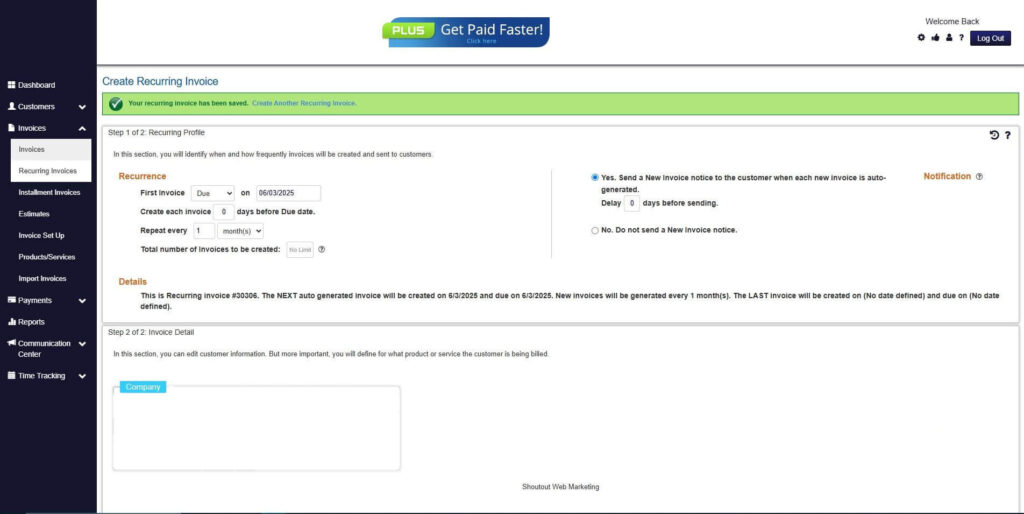
Step 9: Recurring Invoice Created
- Your Recurring Invoice has been created.
Frequently Asked Questions (FAQs)
1. What is the best way to track invoices and payments?
The best way is to use automated billing software that centralizes all invoice and payment data. This allows businesses to monitor transactions in real time and reduce manual errors. A centralized system makes it easier to stay organized and maintain accurate records.
2. Can invoice tracking be automated?
Yes, most modern billing systems offer full automation for invoice tracking. This includes automatic invoice generation, payment recording, and reminder notifications. Automation significantly reduces administrative workload and improves efficiency.
3. How does recurring billing help with tracking?
Recurring billing automates repeat transactions, eliminating the need for manual invoicing. This ensures consistency and makes it easier to monitor ongoing payments. It also creates predictable billing cycles, which improves tracking accuracy.
4. What features should I look for in billing software?
Key features include automated invoicing, real-time tracking, recurring billing, and multiple payment options. Integration with accounting tools is also important for maintaining accurate financial records. These features help streamline the entire billing process.
5. Is invoice tracking important for small businesses?
Yes, accurate invoice tracking is essential for maintaining healthy cash flow in small businesses. It helps prevent missed payments and ensures proper financial management. Efficient tracking also supports growth and scalability.
Conclusion
Learning how to effectively track invoices and payments is essential for maintaining financial stability and operational efficiency. Manual methods often lead to errors, delays, and missed opportunities, making it difficult to manage cash flow effectively.
By adopting automation and centralized billing systems, businesses can streamline their processes and gain real-time visibility into their finances. Recurring billing further simplifies tracking by ensuring consistent and predictable payment cycles.
As businesses continue to grow, investing in digital billing solutions becomes a critical step toward long-term success. With the right tools in place, companies can improve accuracy, reduce overdue payments, and achieve better financial control.