
Understanding the difference between a void vs refund is essential for businesses that process payments and manage invoices regularly. As transaction volume grows, small billing mistakes can quickly impact cash flow, customer trust, and financial reporting. Knowing when to void a transaction versus when to issue a refund helps businesses resolve issues efficiently.
Many businesses confuse voids and refunds because both are used to correct billing errors. However, they apply at different stages of the payment process and have very different accounting and cash flow implications. Using the wrong method can create reconciliation issues and customer confusion.
This guide explains the key differences between voids and refunds, when to use each option, and how they affect invoicing, cash flow, and reporting. It also covers best practices and how billing platforms like ReliaBills help manage both processes effectively.
What Does It Mean to Void a Transaction?
A void cancels a transaction before it is fully processed or settled by the payment system. When a transaction is voided, the funds never leave the customer’s account. From the customer’s perspective, the charge simply disappears.
Voids are typically used when errors are caught immediately, such as duplicate charges or incorrect amounts. Since the payment has not settled, the void prevents unnecessary fund movement. This makes voids faster and cleaner than refunds.
From an accounting standpoint, voided transactions usually do not appear as revenue. They leave minimal impact on financial records because the transaction is essentially erased. This simplifies reconciliation and reduces reporting adjustments.
What Is a Refund?
A refund returns money to a customer after a transaction has already been completed and settled. In this case, funds move from the business back to the customer’s payment method. Refunds can take several days to process, depending on the payment provider.
Refunds are commonly issued for product returns, service disputes, or billing adjustments discovered after settlement. They may be full or partial, depending on the situation. Unlike voids, refunds require additional documentation and tracking.
From an accounting perspective, refunds directly impact cash flow and revenue reporting. The original transaction remains recorded, and the refund is logged as a separate adjustment. This adds complexity to reconciliation and financial analysis.
Void vs Refund: Key Differences
The primary difference between a void vs refund is timing. Voids occur before settlement, while refunds happen after funds have been captured. This timing affects how payments move and how quickly issues are resolved.
Voids prevent money from changing hands, while refunds reverse completed payments. As a result, voids are faster and usually invisible to customers, while refunds are noticeable and may take time to process. This can affect customer satisfaction.
In reporting, voids typically do not affect revenue totals, while refunds reduce recognized revenue. Understanding this distinction helps businesses maintain accurate financial records and avoid audit issues.
When Should You Void a Transaction?
Voiding a transaction is best when an error is identified immediately after payment. Common examples include duplicate charges, incorrect amounts, or selecting the wrong customer account. Acting quickly allows the business to stop settlement.
Voids are also ideal when transactions have not yet been batched or processed by the payment processor. Most systems allow voids only within a short time window. Missing this window often requires issuing a refund instead.
Using voids whenever possible reduces administrative work and avoids unnecessary cash movement. It also minimizes customer concerns since no funds ever leave their account.
When Should You Issue a Refund?
Refunds are necessary when a transaction has already settled and cannot be voided. This often occurs when customers request returns, cancel services, or dispute completed charges. Refunds are also used for partial reimbursements.
Refunds may take longer to complete due to bank and card network processing times. Customers should be informed about expected timelines to prevent confusion or complaints. Clear communication is essential in these situations.
From a financial standpoint, refunds require careful tracking. Businesses must ensure refunds are correctly linked to the original transaction to maintain accurate records and avoid discrepancies.
Void vs Refund in Invoicing Systems
In invoicing systems, voids typically cancel the invoice or mark it as voided before payment is finalized. This keeps invoice balances clean and prevents outstanding amounts from appearing in reports. It also simplifies customer account histories.
Refunds, on the other hand, usually require additional documents such as credit memos or return invoices. The original invoice remains paid, while the refund creates an adjustment. This is especially important for audit and compliance purposes.
For businesses using recurring billing, refunds and voids must be handled carefully. Incorrect adjustments can disrupt future billing cycles if not properly linked to the original invoice.
Impact on Cash Flow and Financial Reporting
Voids have little to no impact on cash flow because funds never move. This makes them preferable whenever possible, especially for high-volume businesses. Financial reports remain cleaner and easier to reconcile.
Refunds directly affect cash flow because money is returned to customers. This can create short-term cash strain if refunds occur frequently or in large amounts. Proper planning and tracking are critical.
From a reporting perspective, refunds reduce recognized revenue and must be reflected accurately. Failure to account for refunds correctly can distort profitability and financial forecasts.
Best Practices for Handling Voids and Refunds
Establish clear internal policies for voids vs refunds
Define exactly when a transaction should be voided and when a refund must be issued. These guidelines should account for settlement timing, payment method rules, and accounting impact. Clear policies reduce staff hesitation and prevent inconsistent handling across teams.
Train billing and support teams on timing and settlement rules
Staff should understand payment processing timelines so they can act quickly when errors are discovered. Knowing the cutoff window for voiding transactions helps avoid unnecessary refunds. Proper training minimizes delays and customer frustration.
Always link adjustments to the original invoice or transaction
Every void or refund should be traceable back to the original invoice, payment, or charge. This improves transparency, simplifies reconciliation, and supports audit requirements. Linked records also make it easier to explain adjustments to customers.
Communicate clearly with customers about the action taken
Customers should be informed whether a charge was voided or refunded and what that means for their account. Voids often appear immediately, while refunds take time to process. Clear expectations reduce follow-up inquiries and disputes.
Use automated billing and invoicing systems
Automation reduces human error and ensures adjustments are reflected accurately across invoices, reports, and customer records. Systems like ReliaBills help standardize how voids and refunds are handled. This is especially important for businesses with recurring billing.
Review void and refund activity regularly
Tracking patterns in voids and refunds can reveal pricing issues, system errors, or process gaps. Regular reviews help businesses correct root causes rather than repeatedly fixing symptoms. This improves long-term billing accuracy and efficiency.
Common Mistakes to Avoid
Attempting to void transactions after settlement
Many businesses try to void payments that have already been processed, which leads to failed adjustments. Once a transaction is settled, a refund is required. Understanding this distinction saves time and prevents confusion.
Issuing refunds without proper documentation
Refunds that are not tied to an original invoice or payment create gaps in financial records. This can cause reconciliation problems and audit risks. Proper documentation ensures financial accuracy and accountability.
Failing to update invoice and account balances correctly
If refunds or voids are not reflected in the invoicing system, balances may appear incorrect. This can lead to overbilling or customer disputes. Accurate system updates are essential for reliable reporting.
Inconsistent handling across departments or team members
When different teams apply different rules, customers receive mixed messages. Inconsistency increases errors and damages trust. Standardized workflows prevent this issue.
Poor customer communication during adjustments
Not explaining whether a charge was voided or refunded leaves customers uncertain. This often results in unnecessary support tickets or payment disputes. Clear and proactive communication improves the customer experience.
Ignoring the impact on recurring billing schedules
Improper refunds or voids can disrupt future recurring charges if not handled correctly. Businesses must ensure adjustments do not interfere with ongoing subscriptions or billing cycles. This is especially important for automated billing environments.
How ReliaBills Helps Manage Voids and Refunds
ReliaBills simplifies the management of voids and refunds by centralizing all invoicing and payment adjustments in one intuitive dashboard. Instead of toggling between multiple spreadsheets or systems, users can view invoice history, payment statuses, and any associated adjustments from a single place. This level of visibility reduces confusion, minimizes errors, and saves valuable time in reconciliation and reporting.
Recurring billing adds complexity to voids and refunds, especially for subscription services or ongoing client engagements. ReliaBills handles this seamlessly by ensuring that voids and refunds are automatically linked back to the original invoice and recurring billing schedule. Customers receive clear notifications, and future scheduled payments remain intact, helping businesses maintain predictable cash flow without manual intervention.
For teams that need deeper insights and more advanced controls, ReliaBills PLUS provides enhanced tools for tracking and reporting voids, refunds, and return invoices. With detailed analytics, customizable reporting, and stronger audit trails, businesses gain clarity into adjustment patterns and billing performance. ReliaBills PLUS supports scalable billing processes, making it easier for growing businesses to maintain accuracy and compliance as transaction volume increases.
How to Create a New Invoice Using ReliaBills
Creating an invoice using ReliaBills involves the following steps:
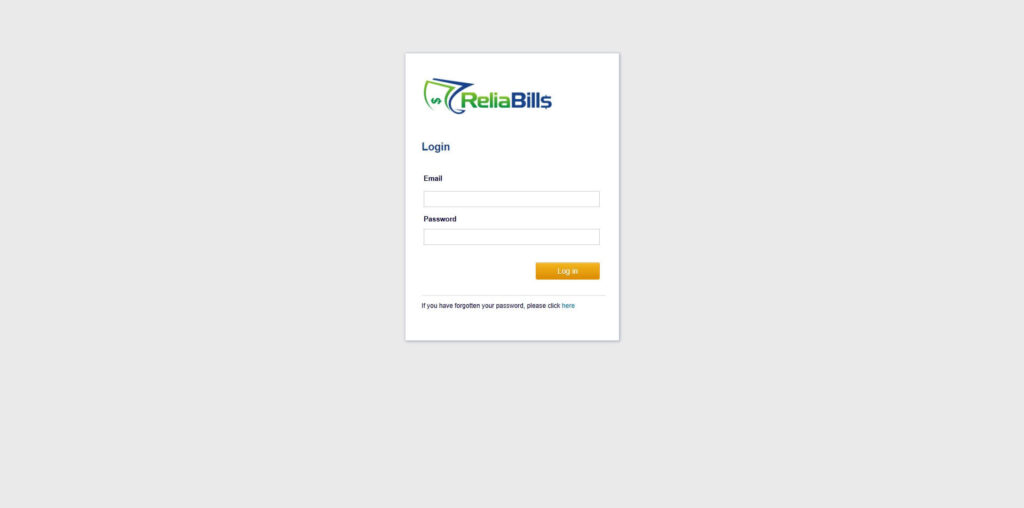
Step 1: Login to ReliaBills
- Access your ReliaBills Account using your login credentials. If you don’t have an account, sign up here.
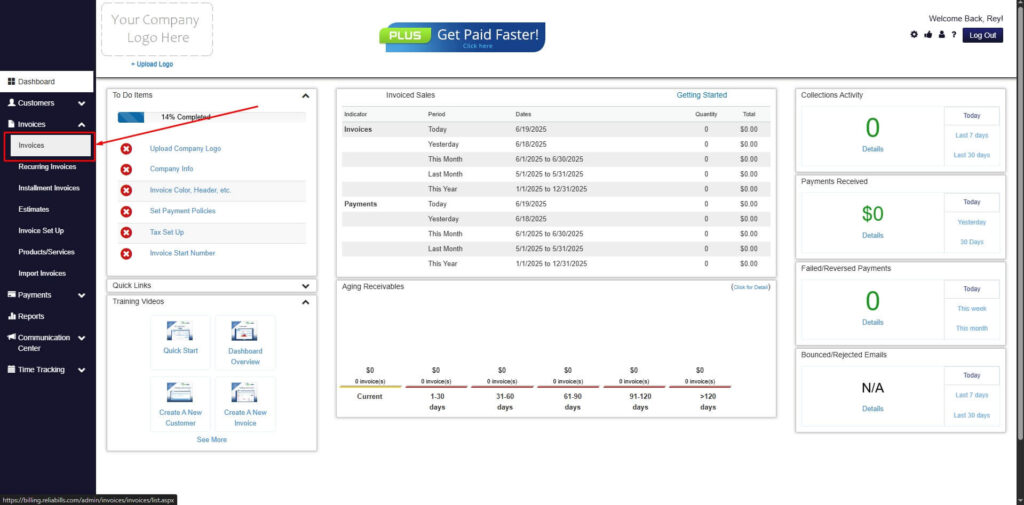
Step 2: Click on Invoices
- Navigate to the Invoices Dropdown and click on Invoices.
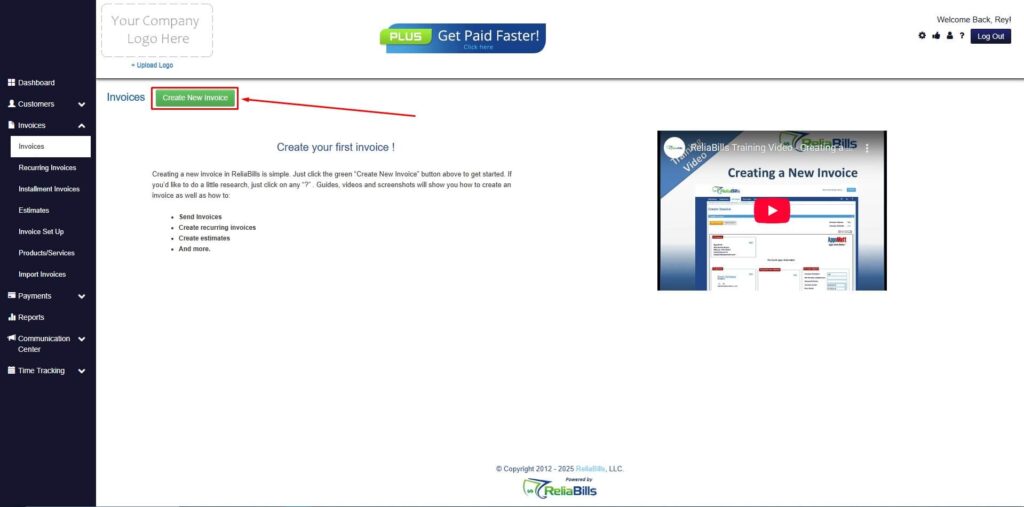
Step 3: Click ‘Create New Invoice’
- Click ‘Create New Invoice’ to proceed.
Step 4: Go to the ‘Customers Tab’
- If you have already created a customer, search for them in the Customers tab and make sure their status is “Active”.
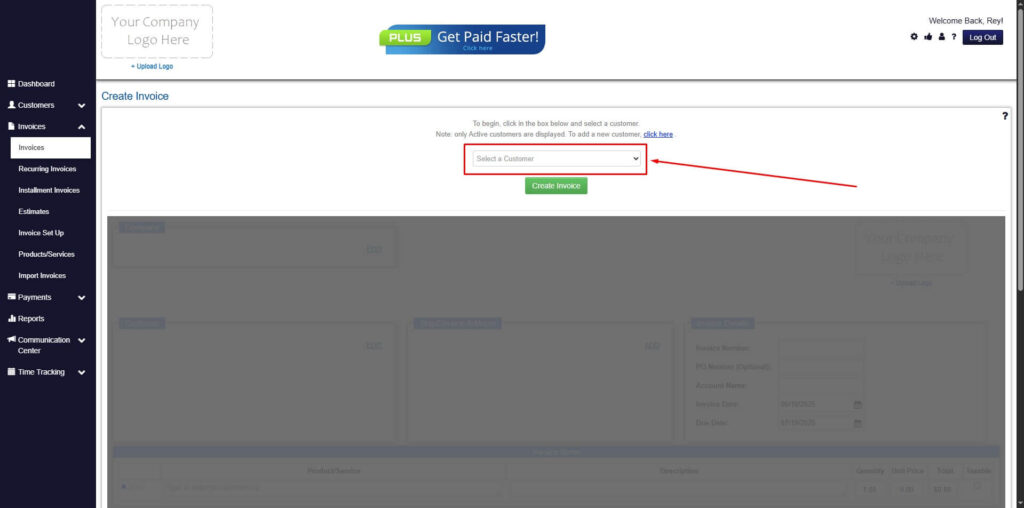
Step 5: Create Customer
- If you haven’t created any customers yet, click the ‘Click here’ to create a new customer.
- Provide the First Name, Last Name, and Email to proceed.
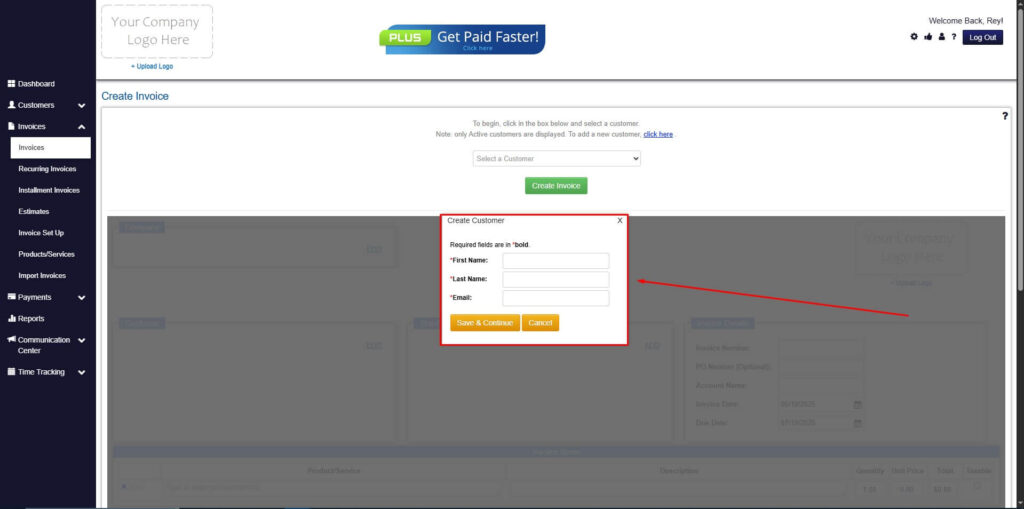
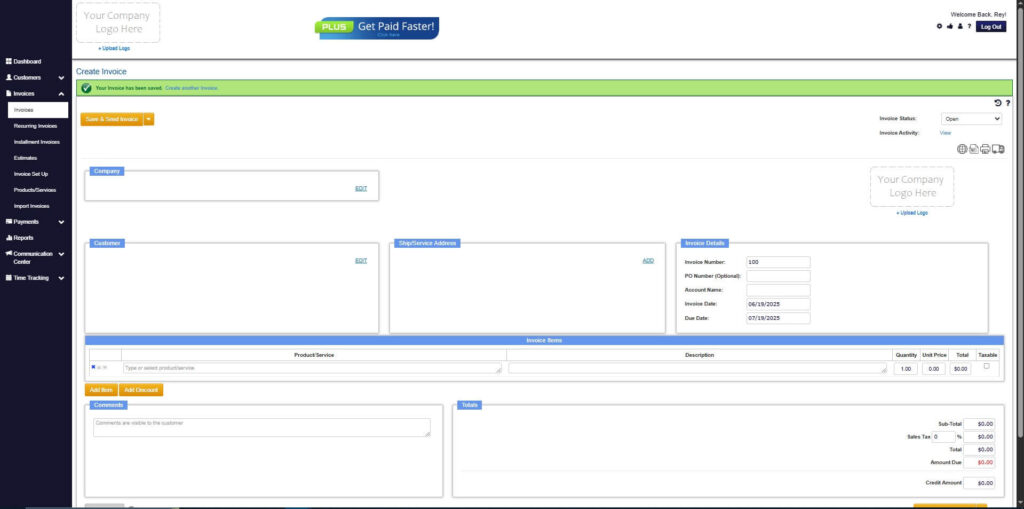
Step 6: Fill in the Create Invoice Form
- Fill in all the necessary fields.
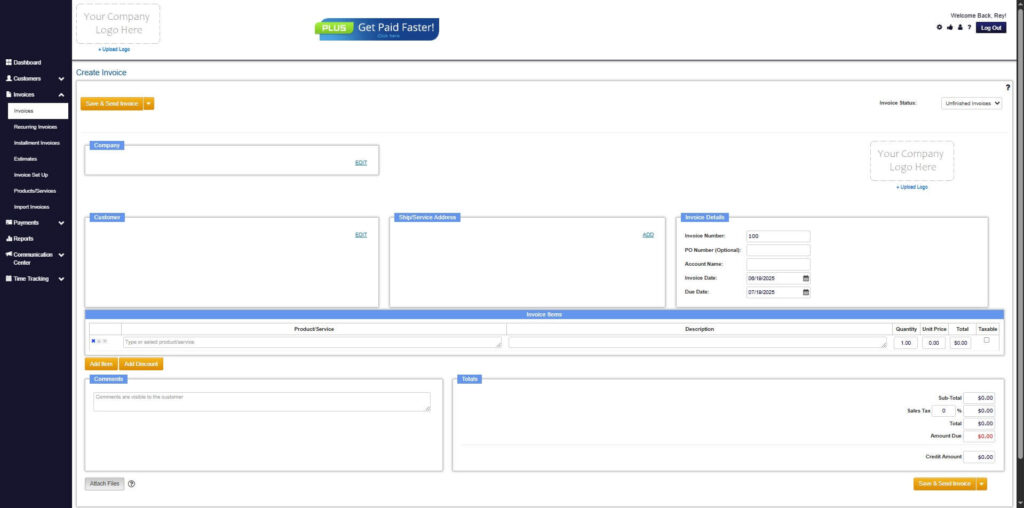
Step 7: Save Invoice
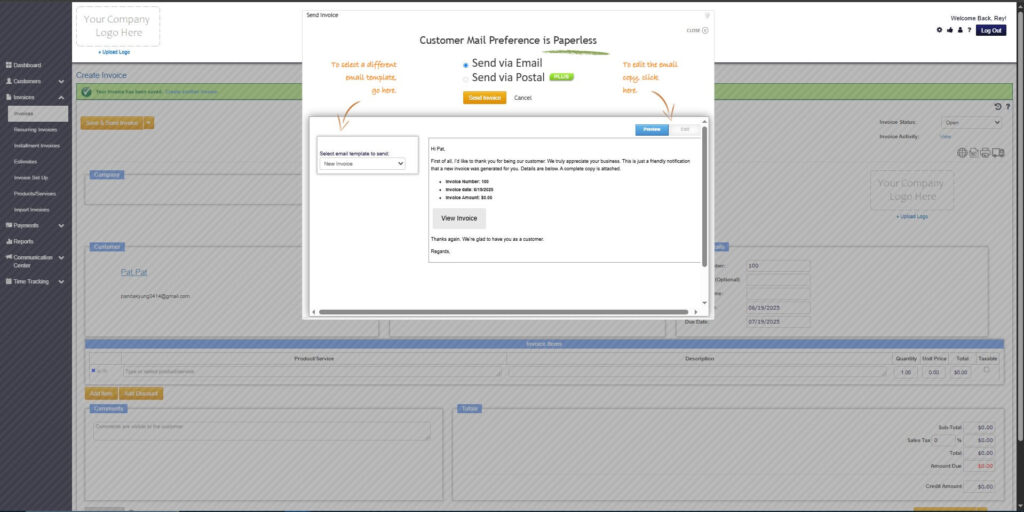
- After filling out the form, click “Save & Send Invoice” to continue.
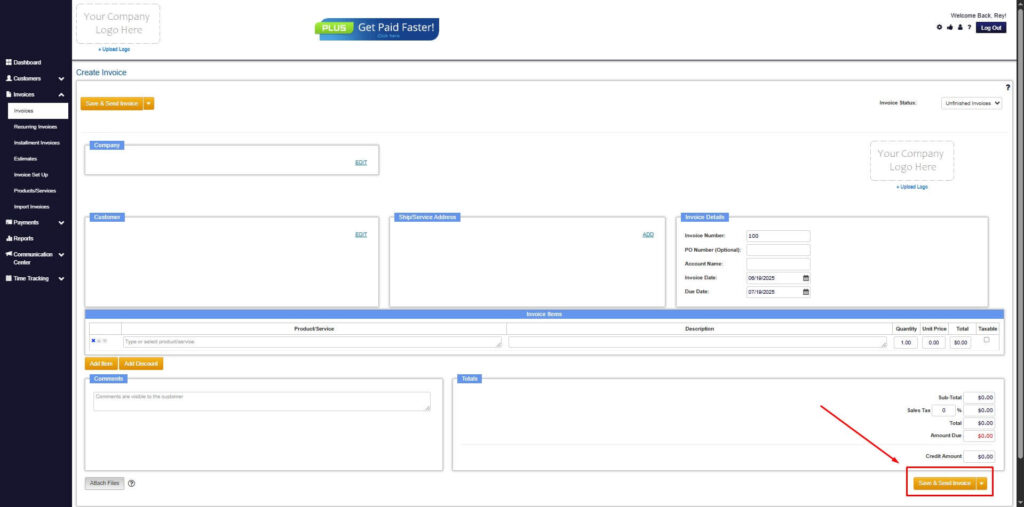
Step 8: Invoice Created
- Your Invoice has been created.
Frequently Asked Questions
1. Can a transaction be both voided and refunded?
No. A transaction can only be voided before it settles. Once settlement occurs, the only option is to issue a refund. The correct action depends entirely on timing.
2. Do voids and refunds affect accounting records differently?
Yes. Voids typically remove the transaction entirely and do not affect revenue. Refunds remain recorded and reduce recognized revenue, impacting cash flow and financial statements.
3. How long does it take for a refund to reach a customer?
Refund processing times vary by payment method and provider. Card refunds often take several business days, while bank transfers may take longer. Businesses should communicate expected timelines clearly.
4. Do voids and refunds affect taxes differently?
In many cases, voids do not impact tax reporting because the transaction never completes. Refunds may require tax adjustments depending on jurisdiction. Businesses should consult accounting professionals for compliance guidance.
5. Can voids and refunds be automated?
Yes. Modern billing platforms support automated voids, refunds, and return invoice workflows. Automation reduces errors, ensures proper documentation, and speeds up resolution.
6. How do voids and refunds affect recurring billing customers?
If handled incorrectly, adjustments can disrupt future charges. Proper systems ensure refunds and voids are applied without altering recurring billing schedules. This maintains predictable revenue and customer trust.
Conclusion
Understanding the difference between void vs refund helps businesses manage billing corrections efficiently. Each option serves a specific purpose depending on transaction timing and settlement status. Choosing the right approach protects cash flow and customer trust.
Clear policies, proper documentation, and automation are key to handling voids and refunds effectively. As billing complexity increases, manual processes become riskier and more time-consuming.
Platforms like ReliaBills provide the structure and visibility businesses need to manage adjustments confidently. With the right tools in place, voids and refunds become part of a controlled, scalable billing process rather than a source of confusion.