
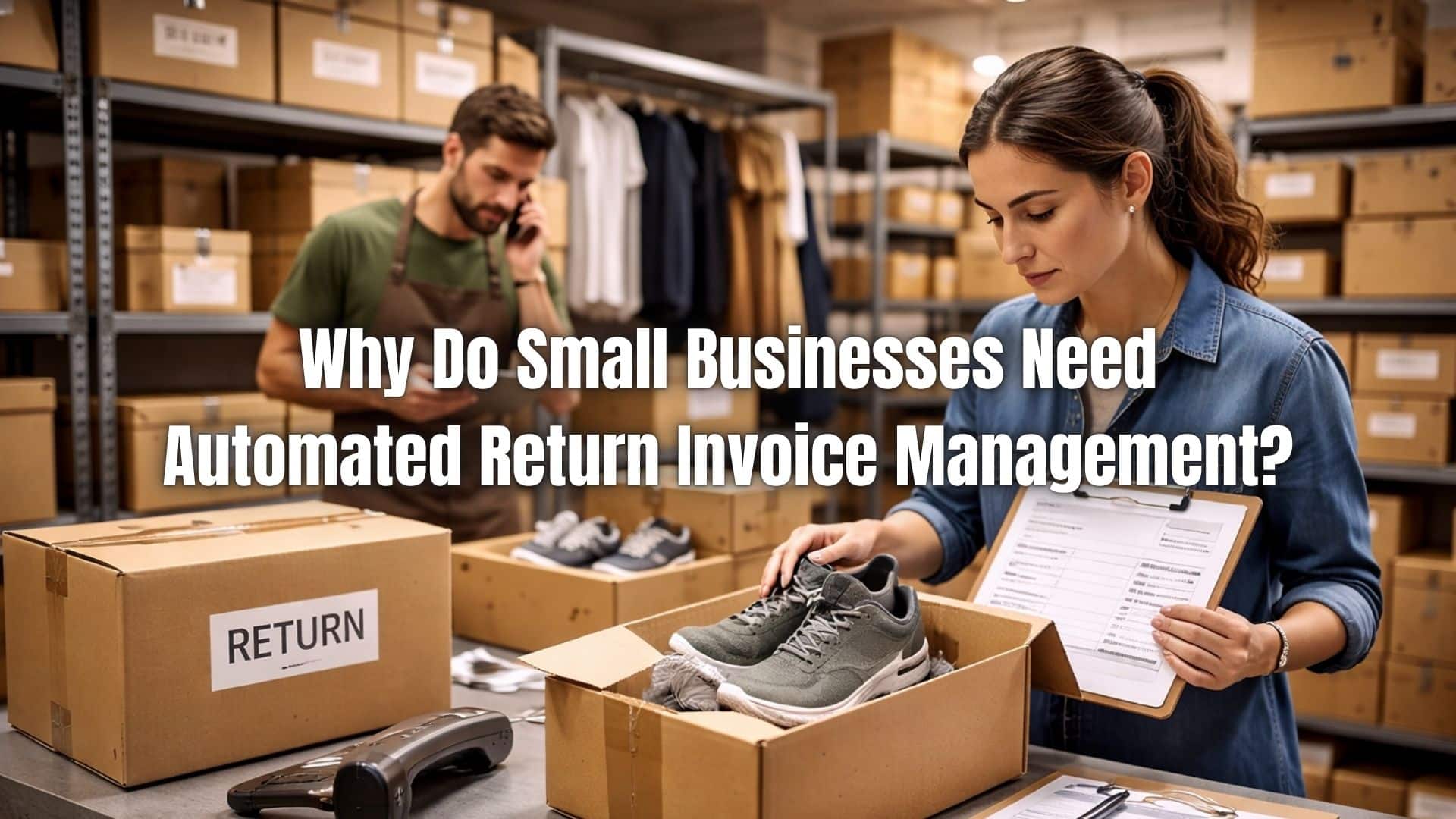
Product returns are a normal part of running a small business, but they can quickly become operationally disruptive when not managed properly. Whether dealing with damaged items, incorrect shipments, or subscription cancellations, returns require careful documentation and financial adjustments. Without a structured system, return processing can consume valuable time and create accounting inconsistencies.
Return invoices directly affect revenue reporting, inventory tracking, and customer satisfaction. If credits are misapplied or refunds are delayed, financial records become inaccurate and client relationships may suffer. Even small discrepancies can accumulate over time and impact profitability.
This is where small business return invoice automation becomes essential. Automating return workflows ensures that credit invoices are generated correctly, refunds are tracked accurately, and financial records remain aligned with actual transactions. For growing businesses, automation provides control, clarity, and scalability.
What Is Return Invoice Management?
Return invoice management refers to the process of issuing and tracking credit invoices or refund documentation when goods or services are returned. A return invoice, sometimes called a credit memo, reverses or adjusts the original sale. It ensures that accounting records reflect the reduced revenue accurately.
Return invoices are typically issued when customers return products, cancel services, or receive pricing adjustments. Unlike standard invoices, which record revenue earned, return invoices document revenue reductions. This distinction is critical for maintaining clean financial statements.
Managing these documents manually increases the risk of mismatched records. A structured system ensures that each credit is linked to its original invoice, maintaining transparency and audit readiness.
What Are the Common Causes of Returns in Small Businesses?
Damaged or Defective Products
Products may arrive damaged during shipping or contain manufacturing defects. In these cases, businesses must issue return invoices or credit memos quickly to maintain customer trust. Without a structured system, tracking these adjustments can become disorganized.
Order Fulfillment Errors
Mistakes such as shipping the wrong item, incorrect quantities, or missing products frequently result in returns. These errors require invoice reversals or partial credits, which must be accurately documented to avoid revenue discrepancies.
Customer Dissatisfaction
Customers may return items that do not meet expectations in terms of quality, size, or functionality. Even when the product is not defective, businesses must process refund documentation properly to keep financial records accurate.
Pricing or Contract Discrepancies
In B2B transactions, incorrect pricing, discount miscalculations, or contract misunderstandings may require invoice adjustments. Credit invoices must clearly reflect the corrected amounts to prevent accounting inconsistencies.
Subscription Cancellations or Service Changes
Subscription-based businesses often issue prorated credits when customers cancel mid-cycle. Without automation, calculating these adjustments manually increases the risk of error and revenue misstatement.
Duplicate Orders or Billing Errors
Customers may accidentally place duplicate orders or be charged incorrectly. These situations require prompt credit issuance and careful documentation to prevent financial reporting inaccuracies.
What Are the Challenges of Manual Return Invoice Processing?
Misapplied Credits
When credit invoices are created manually, they may be assigned to the wrong customer account or invoice. This causes reconciliation issues and requires time-consuming corrections.
Data Entry Errors
Manual input of refund amounts, tax adjustments, and invoice references increases the likelihood of mistakes. Even small errors can distort revenue reports and complicate month-end closing.
Delayed Refund Processing
Without automated workflows, return approvals may sit in email inboxes or spreadsheets. Delays frustrate customers and can negatively impact brand reputation.
Inconsistent Documentation
Paper-based credit notes or disconnected systems make it difficult to maintain a clean audit trail. Missing or incomplete records can create compliance risks and reporting challenges.
Duplicate Refunds
Lack of centralized tracking may lead to issuing multiple refunds for the same transaction. This directly impacts cash flow and reduces profitability.
Poor Visibility into Return Trends
Manual systems limit reporting capabilities. Businesses struggle to identify recurring product issues, high-return customers, or financial impact trends without centralized data.
Inventory Reconciliation Errors
Returned items must be logged back into inventory systems. Manual tracking increases the chance of mismatches between accounting records and physical stock levels.
Increased Administrative Workload
Processing returns manually requires repetitive tasks, follow-ups, and reconciliations. This slows operations and prevents accounting teams from focusing on higher-value financial analysis.
What Are the Financial Risks of Poor Return Invoice Management?
Inaccurate return tracking can lead to revenue misstatements, affecting profit reporting and tax calculations. When credit invoices are not properly recorded, financial statements may overstate income. This creates compliance risks and distorts business performance metrics.
Duplicate refunds are another serious concern. Without centralized controls, businesses may accidentally process the same credit twice. Inventory reconciliation errors can also arise if returned items are not properly logged back into stock systems.
Cash flow instability is perhaps the most immediate impact. Poor visibility into outgoing refunds makes forecasting difficult and increases financial uncertainty. Small businesses cannot afford these preventable risks.
What Is Automated Return Invoice Management?
Automated return invoice management uses software to generate credit invoices based on predefined workflows. Instead of manually preparing refund documentation, the system links returns directly to original sales transactions. This ensures accurate revenue adjustments every time.
Automation also enables refund tracking and approval workflows. Managers can review and authorize credits within the system, maintaining control while reducing processing time. Digital storage keeps all documentation organized and accessible.
By implementing small business return invoice automation, companies create a streamlined, error-resistant process that protects financial integrity and improves operational efficiency.
How Does Automation Improve Accuracy?
Automation auto-populates credit invoices using data from the original transaction. This eliminates manual re-entry and significantly reduces human error. Linking returns directly to sales orders ensures proper reconciliation.
Built-in validation checks flag inconsistencies before invoices are finalized. For example, systems can prevent credits that exceed the original invoice amount. These safeguards maintain data integrity.
As a result, accounting teams spend less time correcting mistakes and more time focusing on financial analysis and strategic planning.
How Does Automation Accelerate Refund Processing?
Automated systems issue credit memos immediately after return approval. This reduces waiting periods and speeds up customer refunds. Faster processing improves satisfaction and strengthens brand trust.
Real-time return tracking provides visibility into refund status. Customers and staff can see where each return stands in the workflow. This reduces follow-up inquiries and administrative workload.
Efficiency in refund handling reflects positively on the business, encouraging repeat purchases and long-term loyalty.
How Does Automation Protect Cash Flow?
Small business return invoice automation provides clear visibility into outgoing credits and refunds. Managers can monitor financial impact in real time and adjust projections accordingly. This supports more accurate cash flow forecasting.
Controlled approval workflows prevent unauthorized or duplicate refunds. By centralizing oversight, businesses reduce financial leakage. Accurate revenue reporting ensures that financial statements reflect true performance.
With better control over returns, small businesses maintain stability even during periods of high refund activity.
How Are Returns Managed in Recurring Billing Environments?
Subscription-based businesses face unique return challenges. Cancellations often require prorated credits, adjustments to recurring invoices, or contract-based refund calculations. Handling these manually increases the likelihood of errors.
Automated systems adjust recurring billing schedules when subscriptions are modified or canceled. Credits are calculated proportionally and linked to the appropriate billing cycle. This ensures recurring revenue records remain accurate.
Maintaining correct recurring revenue data is critical for forecasting and financial reporting. Automation protects subscription businesses from revenue distortion.
How Does Automation Enhance Compliance and Audit Readiness?
Centralized digital records ensure every credit invoice is time-stamped and securely stored. This simplifies audits and financial reporting. Tax adjustments can also be automated to maintain compliance with local regulations.
Consistent documentation reduces the risk of missing or incomplete records. When auditors request information, businesses can retrieve it instantly. This level of organization strengthens financial credibility.
Compliance is not just about avoiding penalties; it also builds trust with partners and stakeholders.
How Does Automation Reduce Administrative Burden?
Eliminating paper-based credit notes saves time and reduces clutter. Automated reconciliation matches return invoices with sales and inventory records seamlessly. This removes repetitive manual tasks.
Staff no longer need to track refund approvals through email chains or spreadsheets. Workflow automation ensures accountability and transparency. As a result, small businesses can scale operations without expanding accounting teams.
Efficiency gains allow business owners to focus on growth instead of administrative corrections.
How ReliaBills Supports Automated Return Invoice Management
ReliaBills simplifies small business return invoice automation by automatically generating credit invoices linked to original sales transactions. This ensures accurate revenue adjustments while reducing manual errors. Businesses gain better visibility into returns without increasing administrative effort.
For subscription-based companies, ReliaBills integrates recurring billing adjustments directly into the return process. Prorated credits, canceled subscriptions, and contract-based adjustments are handled automatically, preserving accurate recurring revenue records. This prevents misstatements and improves financial clarity.
With centralized reporting, branded digital communication, and real-time refund tracking, ReliaBills provides the tools small businesses need to reduce errors and improve financial visibility. Automation allows companies to manage returns confidently while maintaining consistent cash flow and customer trust.
How to Create a New Recurring Invoice Using ReliaBills
Creating a New Recurring Invoice using ReliaBills involves the following steps:
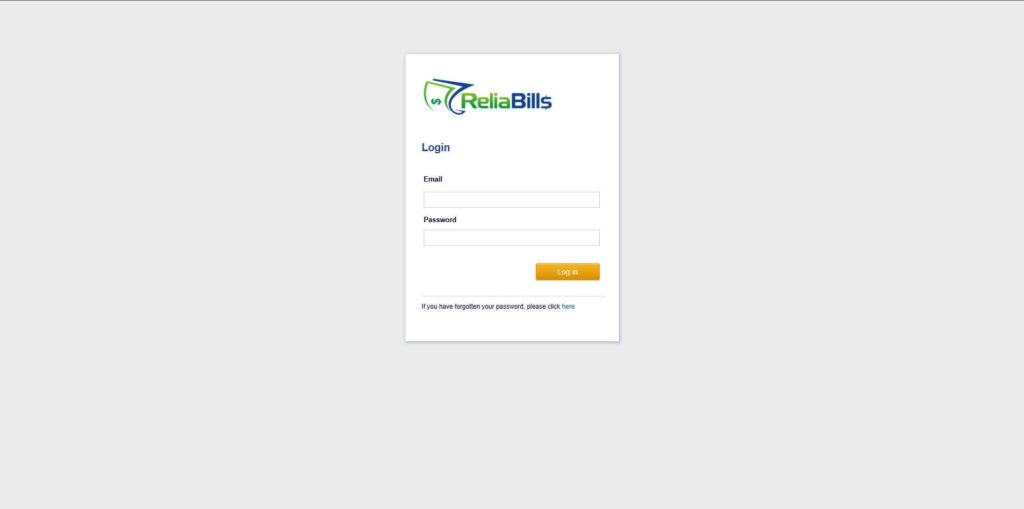
Step 1: Login to ReliaBills
- Access your ReliaBills Account using your login credentials. If you don’t have an account, sign up here.
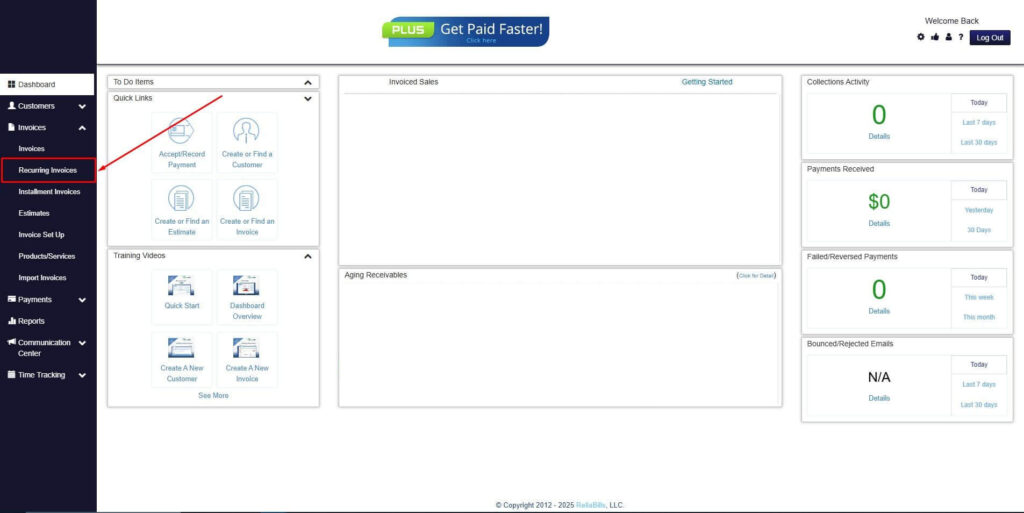
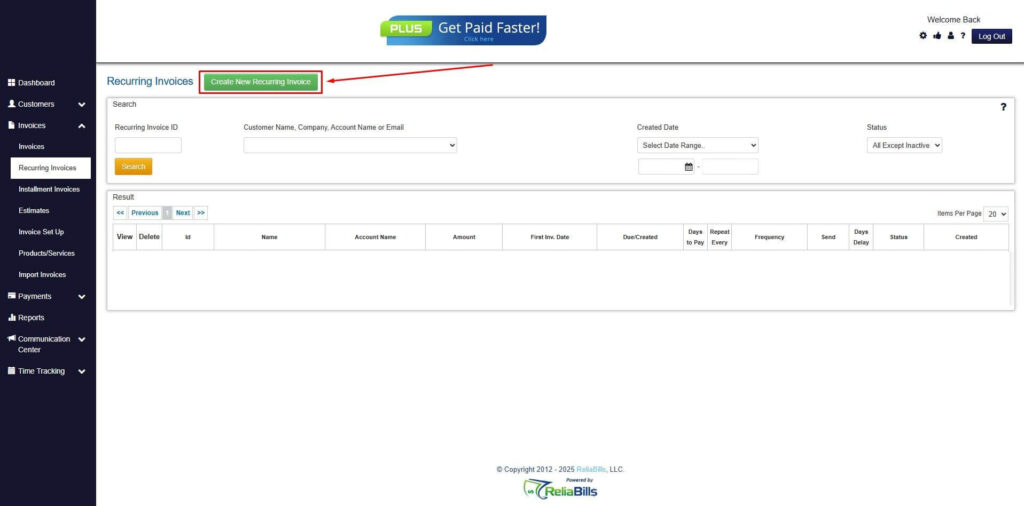
Step 2: Click on Recurring Invoices
- Navigate to the Invoices Dropdown and click on Recurring Invoices for an overview of the list of your existing customers.
Step 3: Go to the Customers Tab
- If you have already created a customer, search for them in the Customers tab and make sure their status is “Active”.
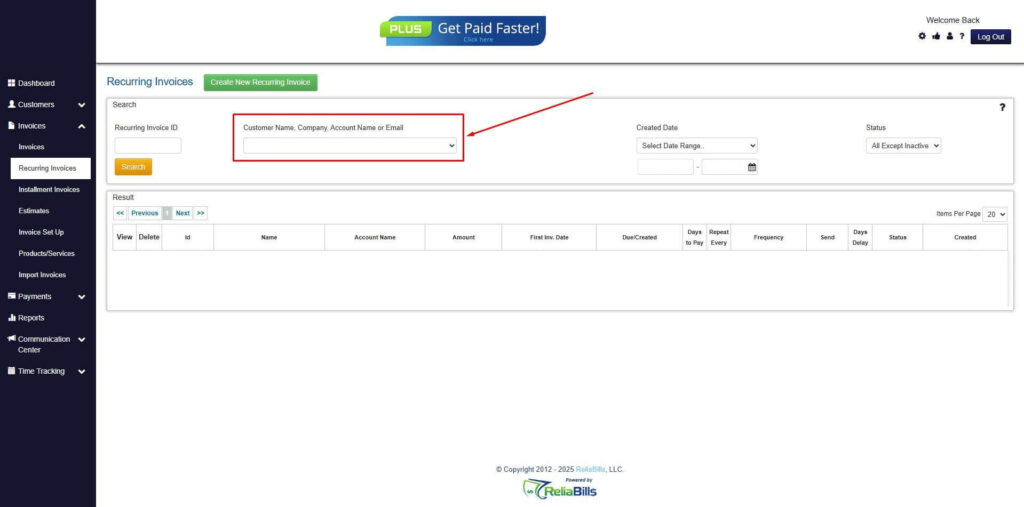
Step 4: Click the Create New Recurring Invoice
- If you haven’t created any customers yet, click the Create New Recurring Invoice to create a new customer.
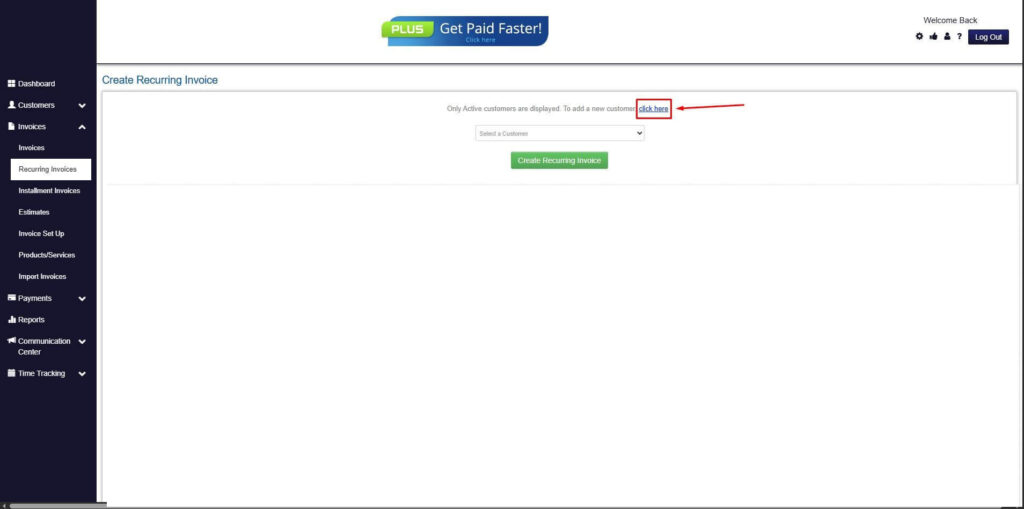
Step 5: Click on the “Click here” Button
- Click on the “Click here” button to proceed with the recurring invoice creation.
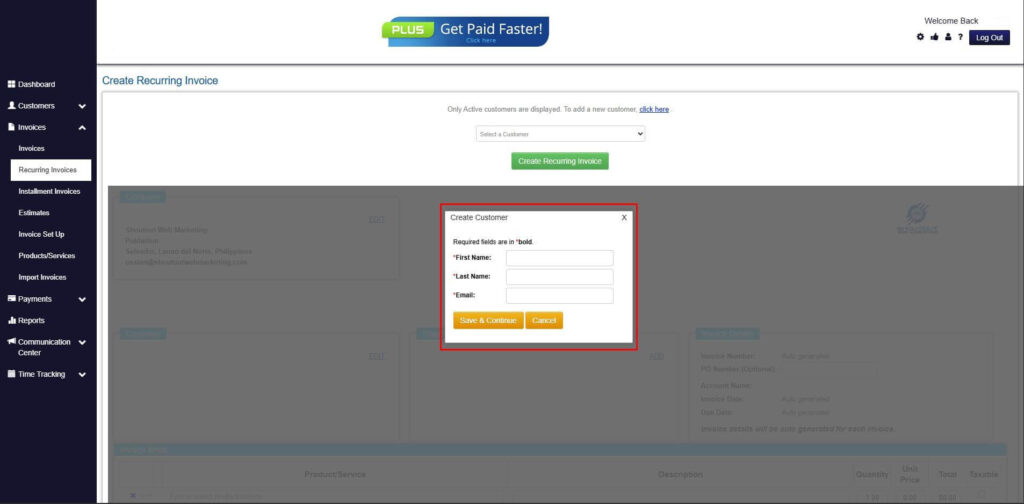
Step 6: Create Customer
- Provide your First Name, Last Name, and Email to proceed.
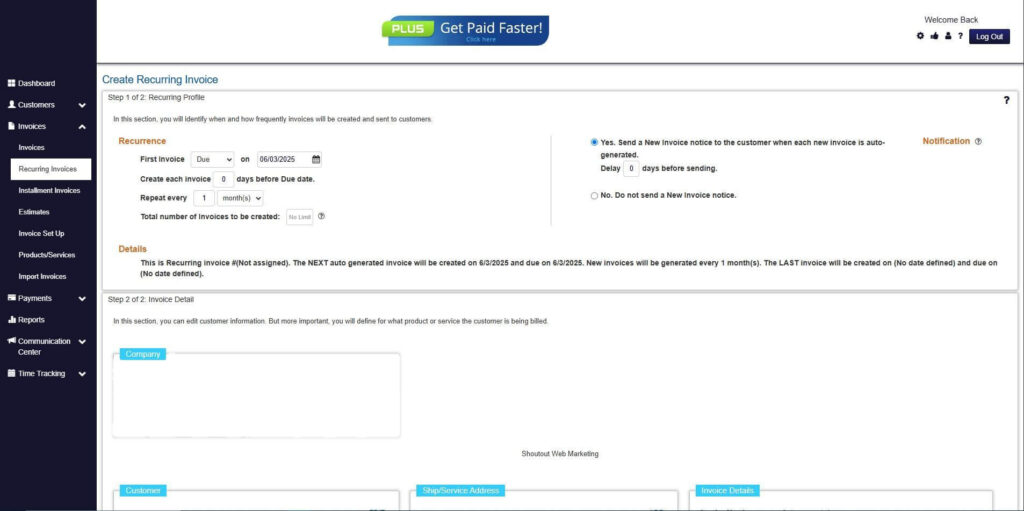
Step 7: Fill in the Create Recurring Invoice Form
- Fill in all the necessary fields.
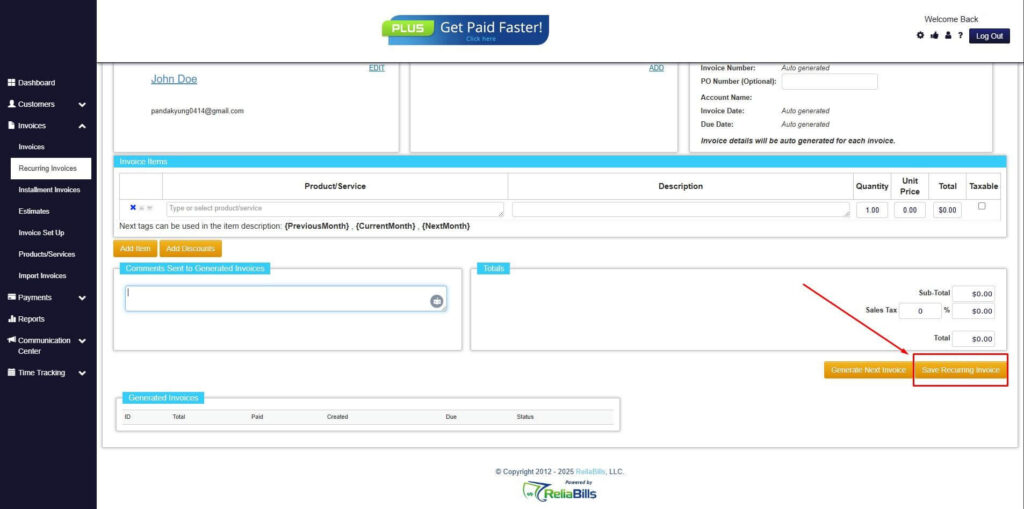
Step 8: Save Recurring Invoice
- After filling up the form, click “Save Recurring Invoice” to continue.
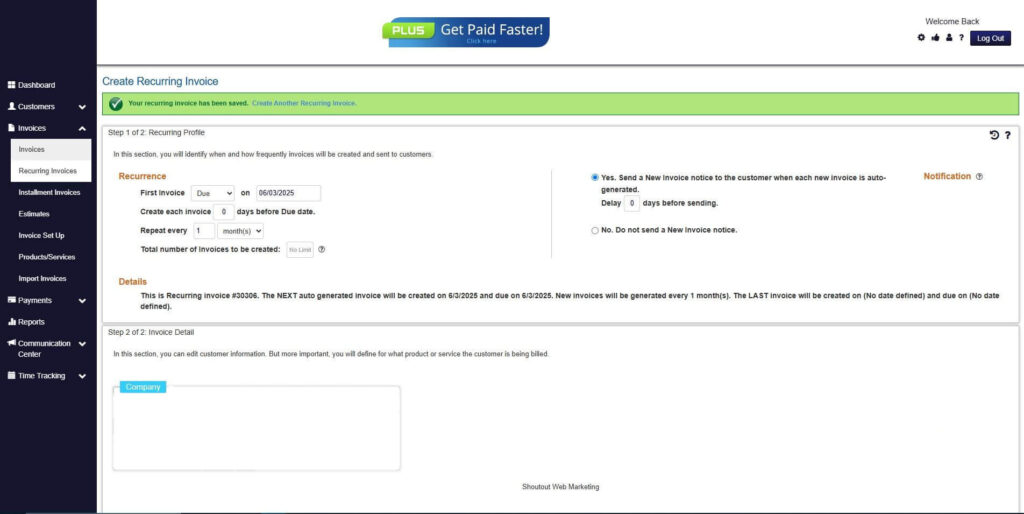
Step 9: Recurring Invoice Created
- Your Recurring Invoice has been created.
Frequently Asked Questions
1. What is small business return invoice automation?
It is the use of software to automatically generate and manage credit invoices, refunds, and return documentation, reducing errors and improving financial accuracy.
2. Why is manual return processing risky?
Manual systems increase the risk of duplicate refunds, revenue misstatements, and reconciliation errors, which can negatively affect cash flow.
3. Can automation handle subscription cancellations?
Yes. Automated systems can calculate prorated credits and adjust recurring invoices to maintain accurate revenue records.
4. How does automation improve compliance?
It provides time-stamped digital records, automated tax adjustments, and centralized documentation for audit readiness.
5. How does ReliaBills help with return invoice management?
ReliaBills automates credit invoice creation, integrates recurring billing adjustments, and centralizes reporting to reduce errors and improve financial visibility.
Conclusion
Small businesses cannot afford inefficient, manual return invoice processes. Errors in refund management can disrupt cash flow, distort revenue reporting, and damage customer relationships.
Small business return invoice automation delivers accuracy, efficiency, and financial control. By automating credit invoices and refund workflows, businesses protect profitability and reduce administrative strain.
Implementing a scalable invoice management system such as ReliaBills allows small businesses to handle returns confidently while maintaining transparency, compliance, and long-term growth.