
Recurring billing has changed how many businesses operate. Subscriptions, service agreements, and ongoing plans make revenue more predictable and easier to forecast. However, they also create new billing scenarios that do not exist in one-time transactions.
Return invoices are one of the most common challenges in recurring billing systems. A declined payment, a canceled subscription, or a billing mistake can quickly require an adjustment. If handled poorly, these issues can frustrate customers and interrupt cash flow.
Managing return invoices properly is not just about correcting numbers. It is about maintaining trust and keeping long-term customer relationships intact. Businesses that take a structured approach are far more likely to avoid repeat disputes.
Understanding Return Invoices in Recurring Billing
A return invoice is issued when a charge from a previous invoice needs to be reversed or corrected. It formally documents the adjustment and links back to the original billing record. In recurring billing, return invoices often involve subscription-related charges.
Return invoices are often confused with refunds or credit memos. Refunds typically send money back to the customer, while credit memos apply balances to future invoices. Chargebacks are different altogether and involve banks rather than internal billing systems.
In recurring billing environments, return invoices usually occur when subscriptions change or payments fail. Because billing is automated, even small errors can repeat quickly. Understanding what a return invoice is helps teams respond appropriately.
Why Return Invoice Management Is Challenging in Recurring Systems
Recurring billing systems process large volumes of transactions automatically. While automation is efficient, it also means errors can go unnoticed until customers raise concerns. Once discovered, fixing those issues can be time-consuming.
Automated renewals and payment retries add another layer of complexity. A failed payment might retry multiple times across billing cycles. Without clear tracking, it becomes difficult to know which charges need to be reversed.
Return invoices also affect financial reporting and revenue recognition. Incorrect handling can distort monthly or annual figures. This makes proper return invoice management especially important for subscription-based businesses.
Common Causes of Return Invoices in Recurring Billing
One of the most common causes is failed or declined recurring payments. Expired cards and insufficient funds are frequent issues. These situations often require adjustments once payment attempts stop.
Duplicate charges are another common trigger. They can occur due to system errors or overlapping billing cycles. Customers are quick to notice these issues and expect fast resolution.
Subscription changes such as cancellations, downgrades, or plan switches can also lead to return invoices. Timing matters in recurring billing. If changes are not reflected correctly, incorrect charges may occur.
Key Components of a Return Invoice in a Recurring Billing System
A return invoice should always reference the original invoice and billing period. This connection helps both customers and accounting teams understand what is being corrected. It also supports clean audit trails.
Customer and subscription details should be clearly shown. This includes the plan name, billing dates, and reason for the adjustment. Transparency reduces confusion and follow-up questions.
Adjusted amounts and updated balances must be accurate. If future billing is affected, the next billing date should be visible. Clear information helps reset expectations.
Step-by-Step Process to Manage Return Invoices
Step 1: Identify and confirm the issue
Start by determining why the return invoice is needed. This may come from a customer dispute, a failed recurring payment, or a billing review. Confirming the issue early prevents unnecessary corrections.
Step 2: Review subscription and payment history
Examine the customer’s subscription details and recent billing records. Look for pricing changes, cancellations, or payment failures that may have triggered the issue. This context helps you choose the correct adjustment.
Step 3: Decide on the appropriate adjustment
Determine whether the situation requires a return invoice, credit, or billing correction. The goal is to resolve the issue accurately without overcorrecting. Choosing the right method protects revenue and reporting.
Step 4: Issue the return invoice
Create the return invoice and clearly reference the original invoice and billing period. Ensure the adjusted amount and explanation are easy to understand. Transparency helps reduce follow-up questions.
Step 5: Update the billing schedule and account balance
Adjust the customer’s account to reflect the correction. Update future billing dates or subscription charges if needed. This prevents repeat errors in upcoming cycles.
Step 6: Communicate the resolution to the customer
Notify the customer of the adjustment and explain what changed. Clear communication reassures them and reinforces trust. This step is critical in recurring billing relationships.
Best Practices for Handling Return Invoices in Recurring Billing
- Clearly define subscription terms and billing policies
- Use automated notifications for payments and adjustments
- Maintain detailed records for every return invoice
- Standardize invoice formats across billing cycles
- Review dispute patterns regularly to prevent repeat issues
The Role of Automation in Return Invoice Management
Automation significantly reduces the chance of human error. Adjustments are applied consistently, even across large subscription bases. This improves overall billing accuracy.
Automated systems also help teams respond faster to disputes. Centralized data makes it easier to understand what happened and why. Customers appreciate timely responses.
Reporting becomes more reliable with automation in place. Businesses can track trends and identify recurring problems early. This supports better long-term decisions.
Common Mistakes to Avoid
Many businesses treat return invoices as isolated incidents. This often leads to repeated problems that go unresolved. Patterns should always be reviewed.
Another common mistake is failing to link return invoices to original transactions. Without clear references, audits and customer conversations become harder. Proper documentation is essential.
Not updating future billing schedules after adjustments can also cause issues. This may result in repeat errors. Clear updates prevent unnecessary disputes.
How ReliaBills Supports Return Invoice Management
ReliaBills provides a centralized platform for managing invoices and billing adjustments. Return invoices can be created, tracked, and linked to original transactions easily. This keeps records clean and accessible.
Recurring billing is fully integrated within ReliaBills. Subscription changes, payment retries, and adjustments stay synchronized automatically. This reduces errors and manual follow-ups.
ReliaBills PLUS is the pricing tier built for businesses managing higher volumes and complex billing needs. It includes advanced recurring billing controls, reporting, and automation tools. These features help businesses scale without adding billing headaches.
How to Create a New Recurring Invoice Using ReliaBills
Creating a New Recurring Invoice using ReliaBills involves the following steps:
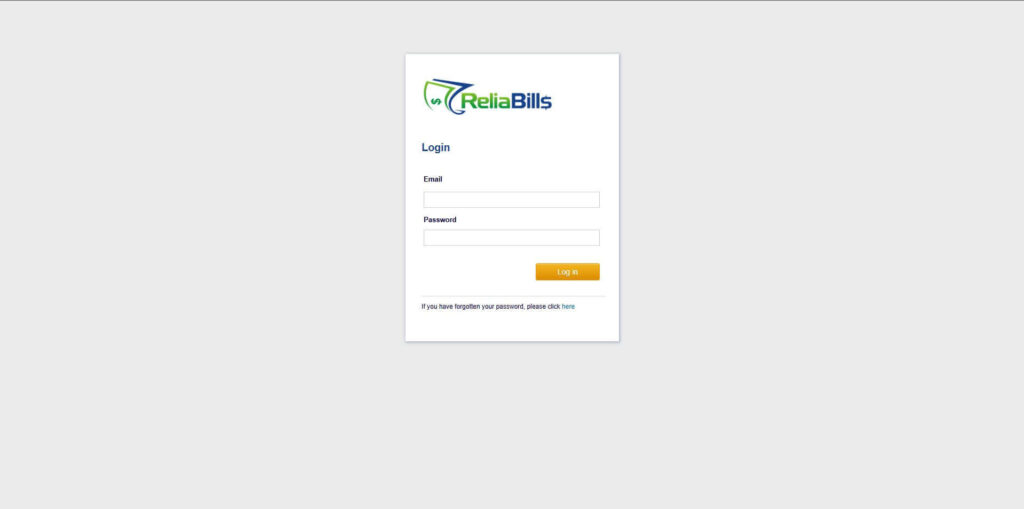
Step 1: Login to ReliaBills
- Access your ReliaBills Account using your login credentials. If you don’t have an account, sign up here.
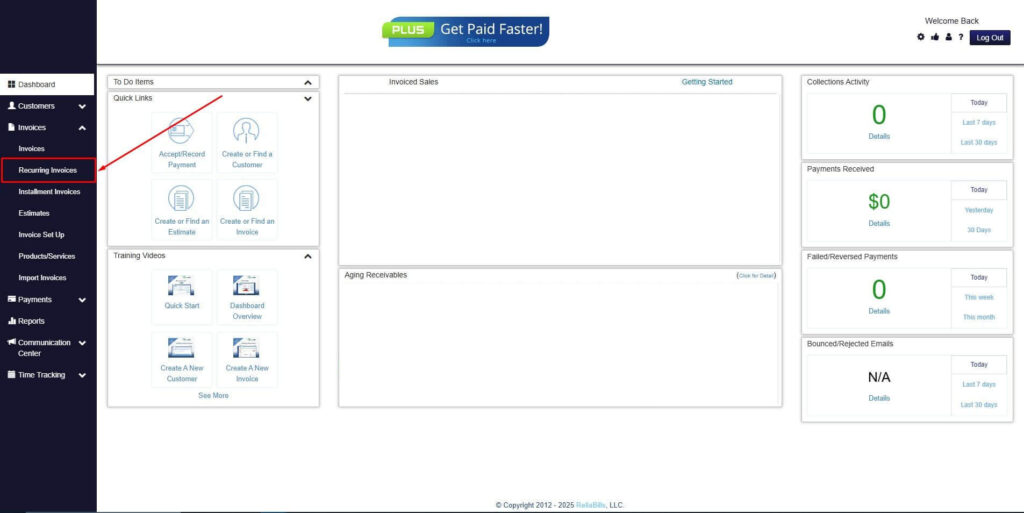
Step 2: Click on Recurring Invoices
- Navigate to the Invoices Dropdown and click on Recurring Invoices for an overview of the list of your existing customers.
Step 3: Go to the Customers Tab
- If you have already created a customer, search for them in the Customers tab and make sure their status is “Active”.
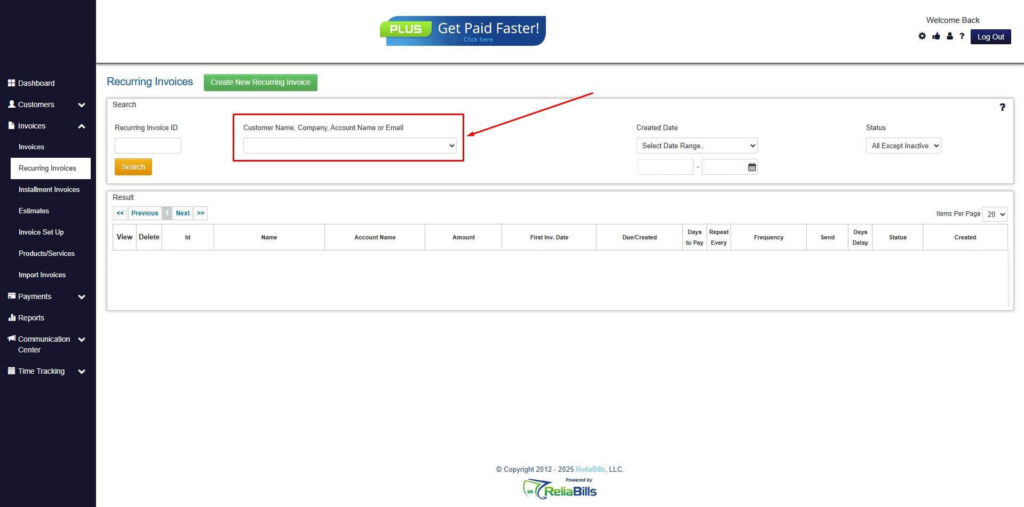
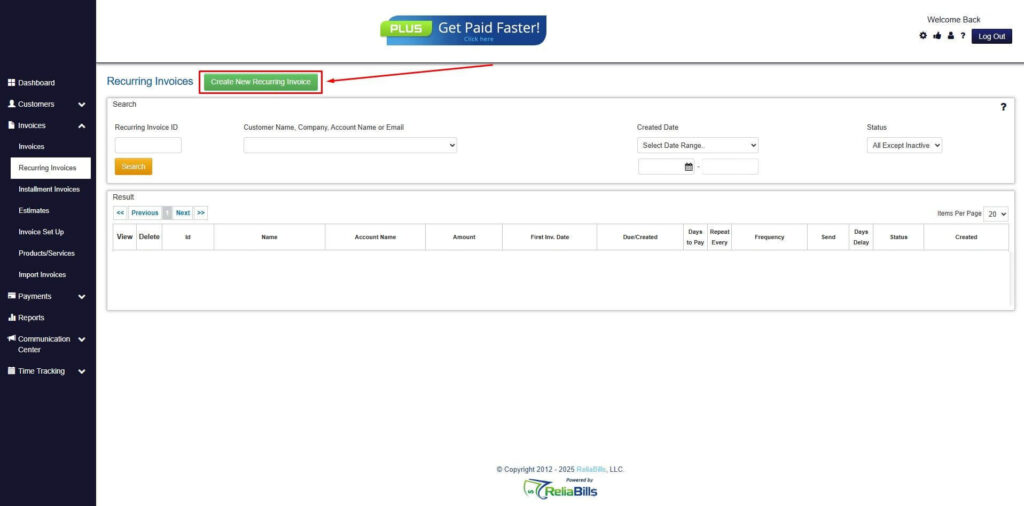
Step 4: Click the Create New Recurring Invoice
- If you haven’t created any customers yet, click the Create New Recurring Invoice to create a new customer.
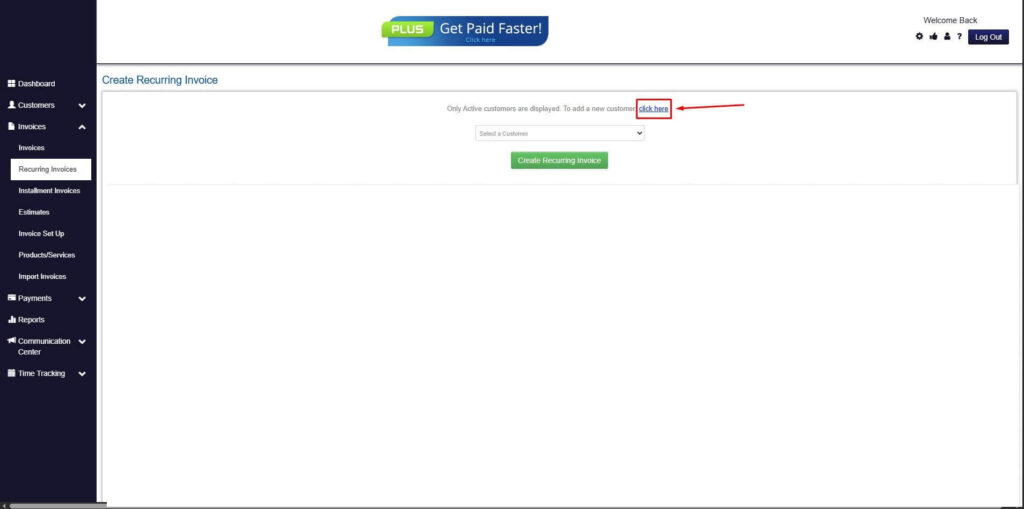
Step 5: Click on the “Click here” Button
- Click on the “Click here” button to proceed with the recurring invoice creation.
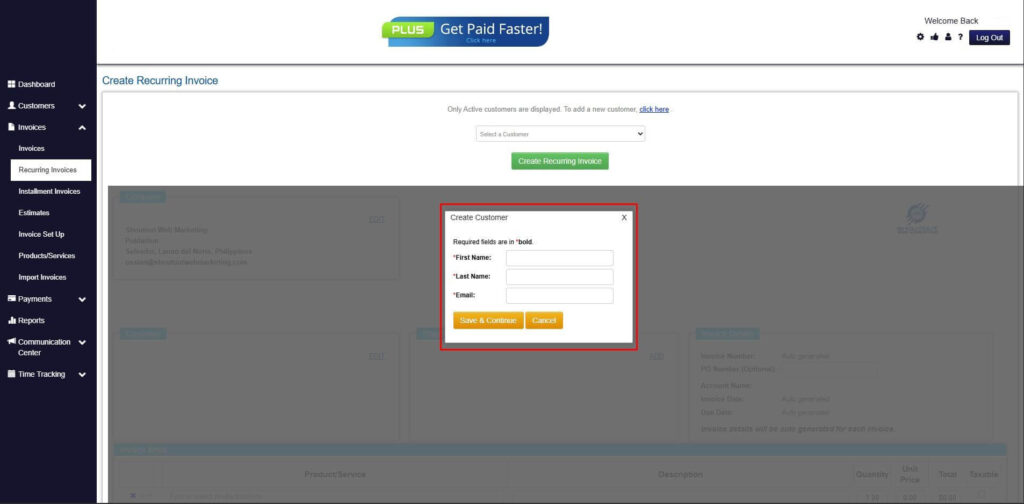
Step 6: Create Customer
- Provide your First Name, Last Name, and Email to proceed.
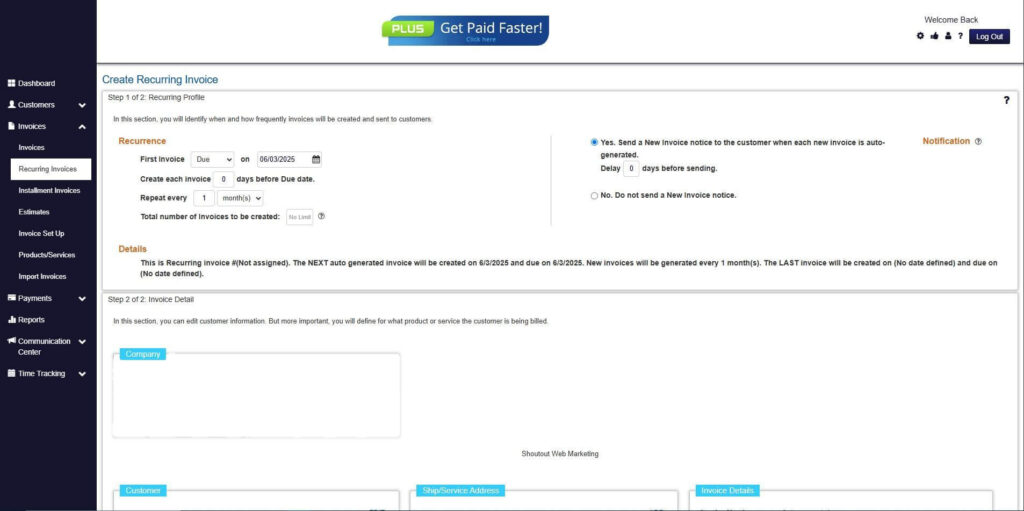
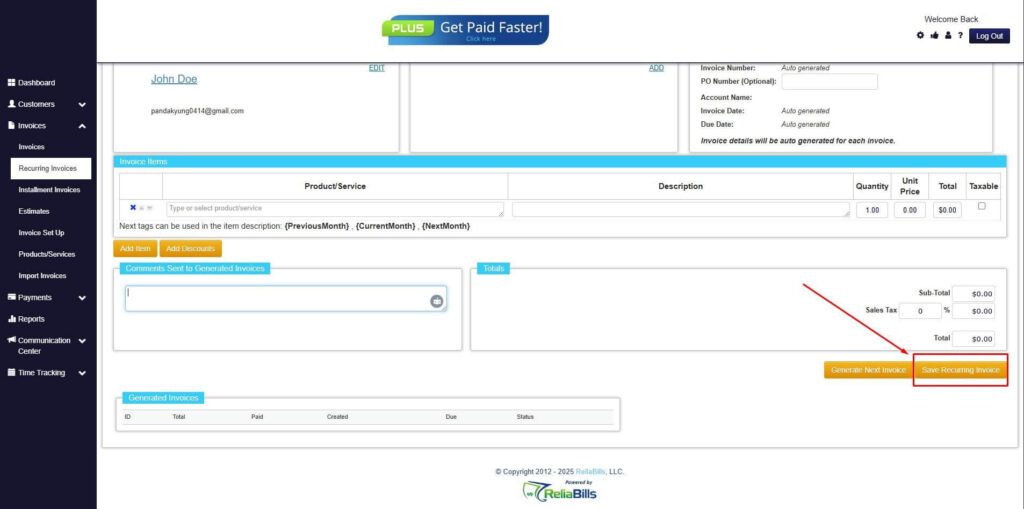
Step 7: Fill in the Create Recurring Invoice Form
- Fill in all the necessary fields.
Step 8: Save Recurring Invoice
- After filling up the form, click “Save Recurring Invoice” to continue.
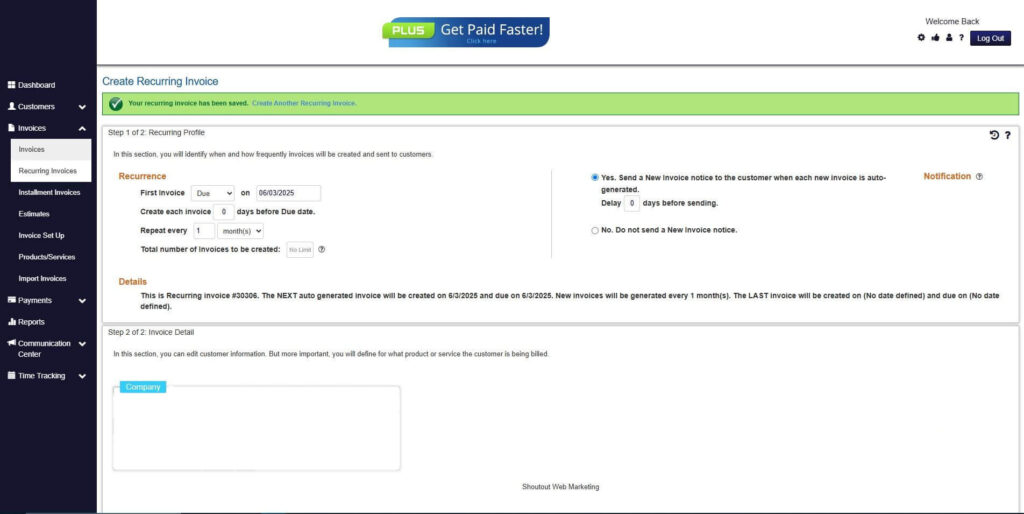
Step 9: Recurring Invoice Created
- Your Recurring Invoice has been created.
Frequently Asked Questions
1. How often do return invoices occur in recurring billing?
They are fairly common, especially in subscription models with automated renewals.
2. Can return invoices be automated?
Yes, many modern billing platforms support automated return invoice handling.
3. How do return invoices affect future billing cycles?
They adjust balances and may change upcoming charges depending on the correction.
4. What is the difference between a return invoice and a chargeback?
Return invoices are handled internally, while chargebacks involve banks or card issuers.
Conclusion
Managing return invoices in recurring billing systems requires attention and consistency. Clear processes reduce disputes and protect long-term revenue. Businesses that handle adjustments well earn customer trust.
Automation plays a major role in simplifying return invoice workflows. It improves accuracy and speeds up resolution times. Subscription businesses benefit the most from structured systems.
With the right approach and tools, return invoices become manageable rather than disruptive. Platforms like ReliaBills help keep billing accurate and transparent. This supports stable, recurring revenue over time.