
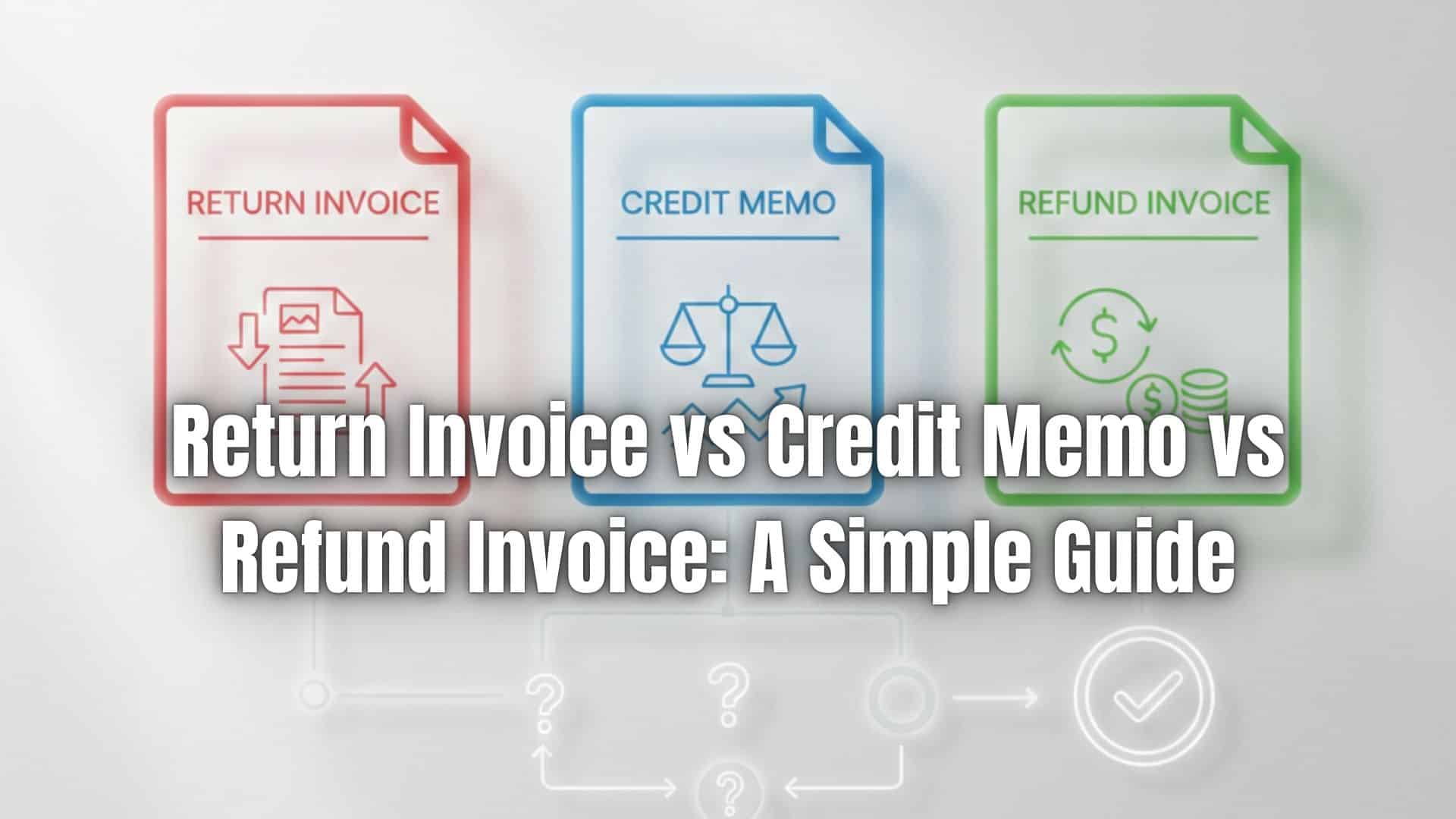
Billing adjustments are a normal part of doing business, especially when products are returned, services are disputed, or billing errors occur. However, many businesses struggle to understand which document to use when correcting a charge.
The confusion between return invoices, credit memos, and refund invoices often leads to accounting errors, delayed resolutions, and frustrated customers. Understanding the differences helps businesses respond faster, protect cash flow, and maintain accurate records.
Overview of Invoice Adjustments
Invoice adjustments are documents used to correct, reverse, or modify previously issued invoices. These adjustments may be required due to returned goods, overbilling, service cancellations, or customer disputes.
Adjustments directly affect revenue reporting, taxes, and customer balances. When handled incorrectly, they can distort financial statements and disrupt cash flow, especially for businesses that rely on recurring billing or subscription models.
What Is a Return Invoice?
A return invoice is issued when goods are physically returned by a customer. It documents the quantity and value of items being returned and links directly to the original invoice.
Return invoices reduce the original sale amount and are commonly used in retail, manufacturing, and wholesale environments. They help businesses track inventory movement and ensure accurate accounting records.
What Is a Credit Memo?
A credit memo is a document that reduces the amount a customer owes without issuing an immediate refund. It is often used when billing errors occur or when a customer is given a credit for future purchases.
Credit memos are applied to upcoming invoices, making them especially useful for businesses with ongoing client relationships. They help preserve cash flow while still resolving customer issues fairly.
What Is a Refund Invoice?
A refund invoice documents money that is returned directly to the customer. It is typically issued after payment has already been received and a refund is required due to cancellations, overcharges, or unresolved disputes.
Unlike receipts, refund invoices formally record the reversal of revenue and are essential for accurate accounting and tax reporting.
Return Invoice vs Credit Memo vs Refund Invoice
The main difference between these documents lies in how they affect payments and accounting. A return invoice records the return of goods and adjusts inventory and revenue. A credit memo applies a balance toward future invoices rather than issuing cash back. A refund invoice results in money being returned to the customer.
Each document serves a specific purpose, and using the wrong one can create confusion in financial records and customer accounts.
When to Use Each Option
Return invoices are best used when physical goods are sent back and inventory needs to be updated. Credit memos work well when customers will continue doing business and can apply the credit later.
Refund invoices should be used when a customer requests or is entitled to immediate reimbursement. Choosing the correct option ensures compliance, accuracy, and better customer relationships.
How These Documents Affect Accounting and Cash Flow
All three adjustment types impact revenue recognition and tax reporting. Return invoices and credit memos reduce reported income, while refund invoices reverse both revenue and cash received.
For businesses with subscriptions or recurring billing, adjustments must be applied carefully to avoid incorrect future charges. Proper documentation ensures predictable cash flow and accurate financial statements.
Common Mistakes to Avoid
One common mistake is using a credit memo when a refund invoice is required, or vice versa. Failing to reference the original invoice can also cause audit issues.
Incomplete documentation, missing adjustment reasons, and poor tracking often lead to disputes and accounting inconsistencies.
Best Practices for Managing Invoice Adjustments
Businesses should maintain clear billing and adjustment policies so staff know which document to use. Standardizing workflows reduces errors and improves response time.
Accurate recordkeeping is essential for audits, tax compliance, and customer transparency. Consistency across all billing adjustments builds trust and operational efficiency.
How ReliaBills Simplifies Invoice Adjustments
ReliaBills makes it easy to create return invoices, credit memos, and refund invoices from a single platform. All adjustments are linked to original invoices, ensuring complete documentation and clear audit trails.
For businesses using recurring billing, ReliaBills ensures adjustments are applied correctly to future invoices. This prevents overbilling, billing gaps, and customer disputes while maintaining predictable revenue streams.
For growing businesses, ReliaBills Plus, the paid tier of ReliaBills, offers advanced reporting, customizable adjustment workflows, and deeper visibility into billing trends. ReliaBills Plus helps teams manage complex adjustments at scale while keeping recurring billing accurate and compliant.
How to Create a New Recurring Invoice Using ReliaBills
Creating a New Recurring Invoice using ReliaBills involves the following steps:
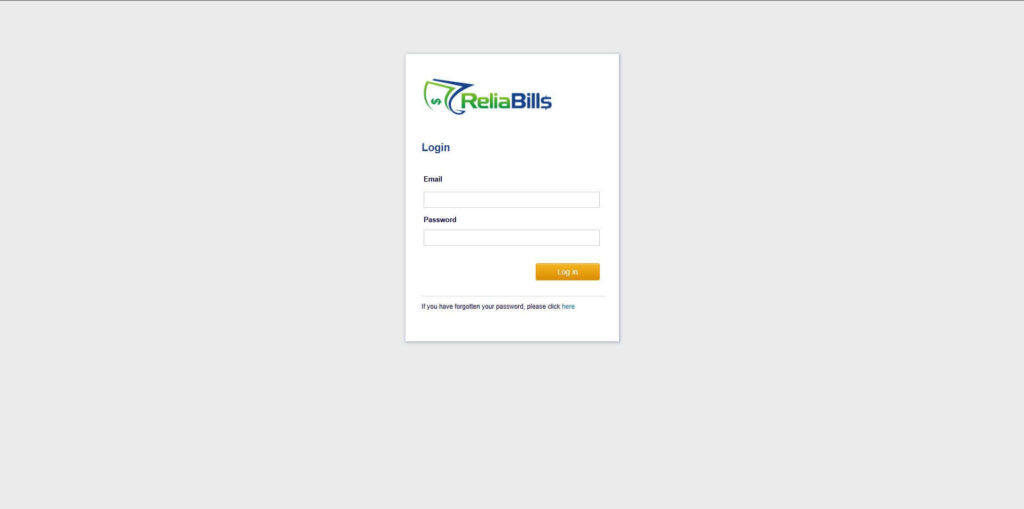
Step 1: Login to ReliaBills
- Access your ReliaBills Account using your login credentials. If you don’t have an account, sign up here.
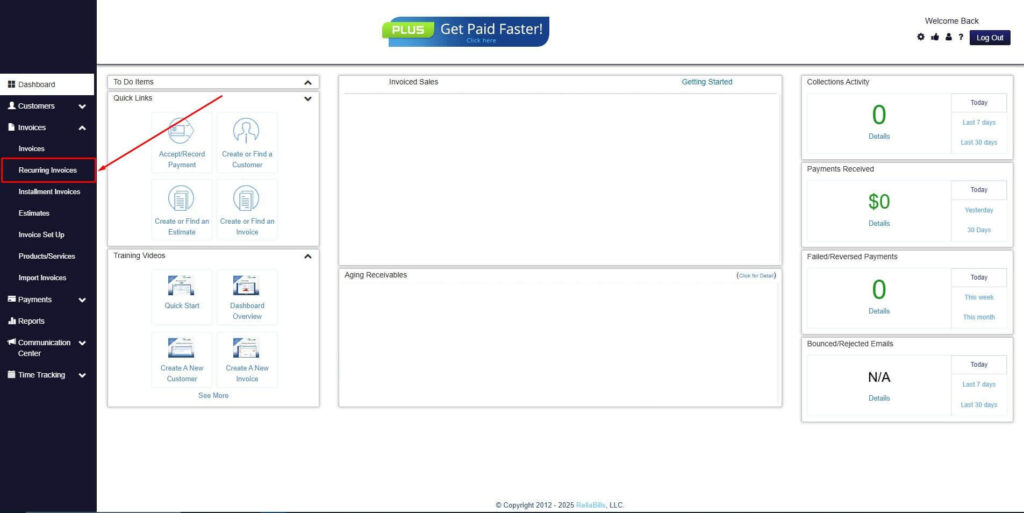
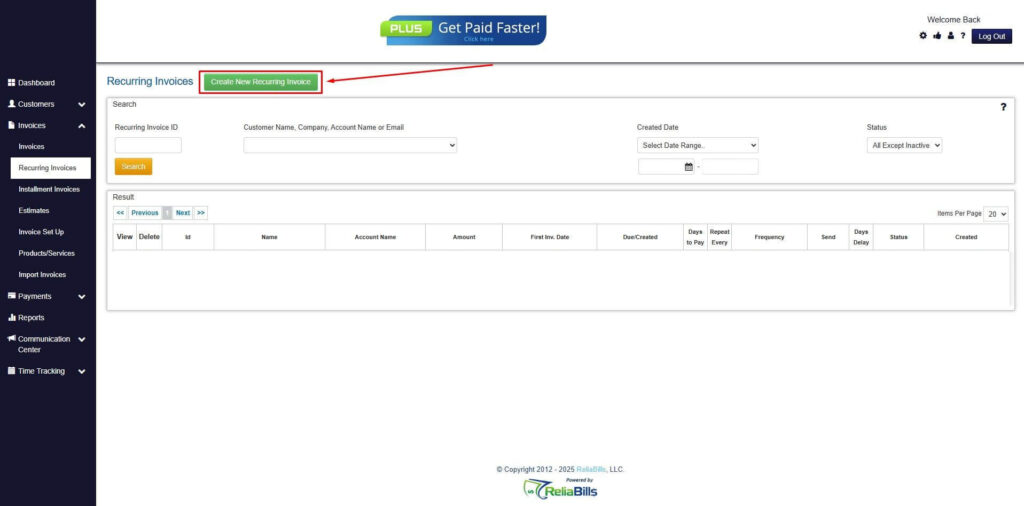
Step 2: Click on Recurring Invoices
- Navigate to the Invoices Dropdown and click on Recurring Invoices for an overview of the list of your existing customers.
Step 3: Go to the Customers Tab
- If you have already created a customer, search for them in the Customers tab and make sure their status is “Active”.
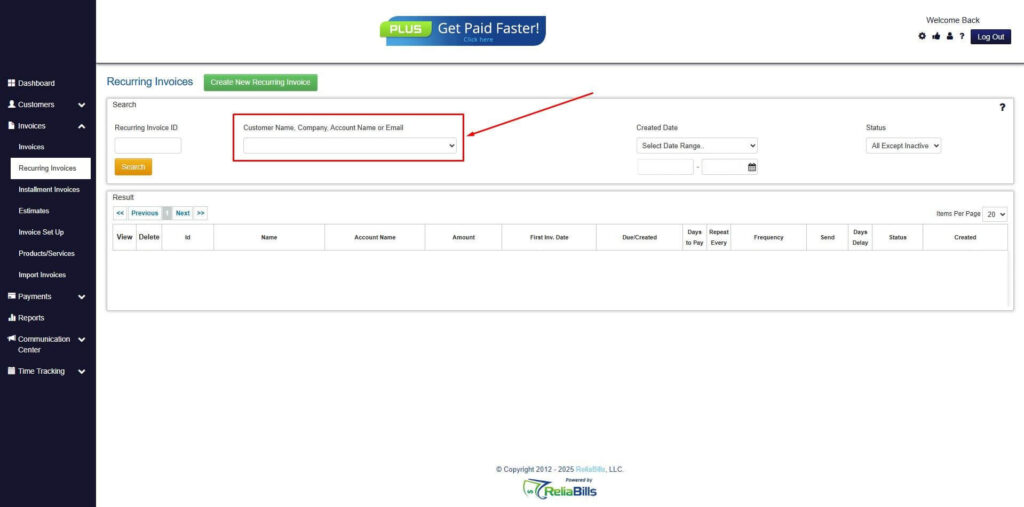
Step 4: Click the Create New Recurring Invoice
- If you haven’t created any customers yet, click the Create New Recurring Invoice to create a new customer.
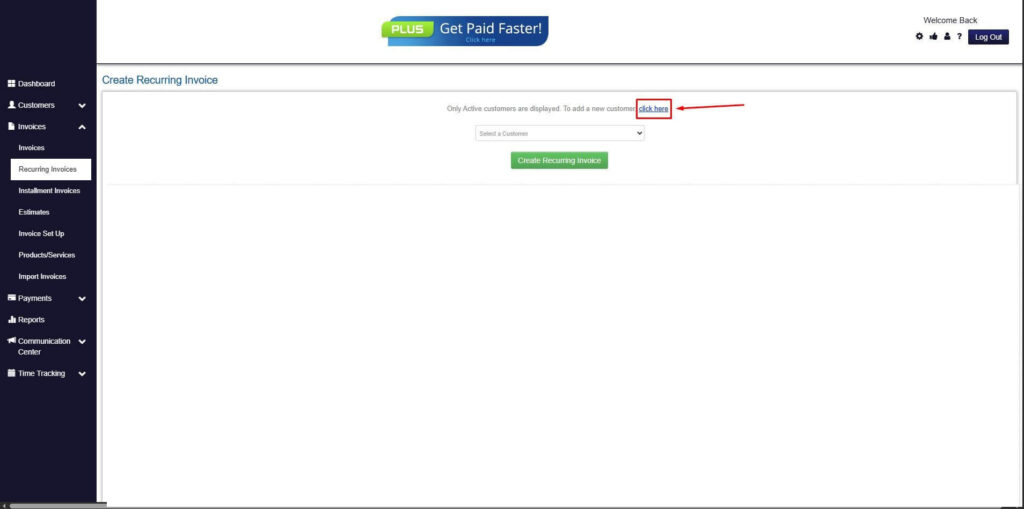
Step 5: Click on the “Click here” Button
- Click on the “Click here” button to proceed with the recurring invoice creation.
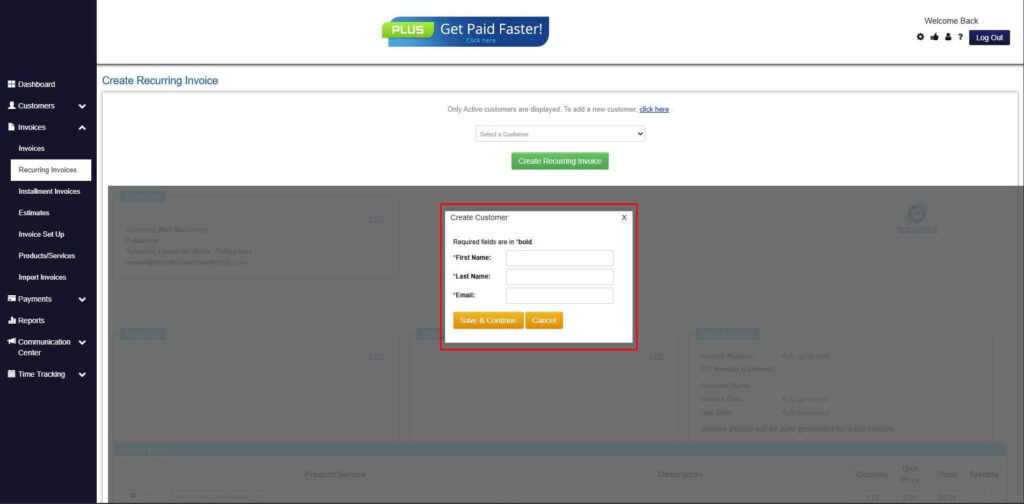
Step 6: Create Customer
- Provide your First Name, Last Name, and Email to proceed.
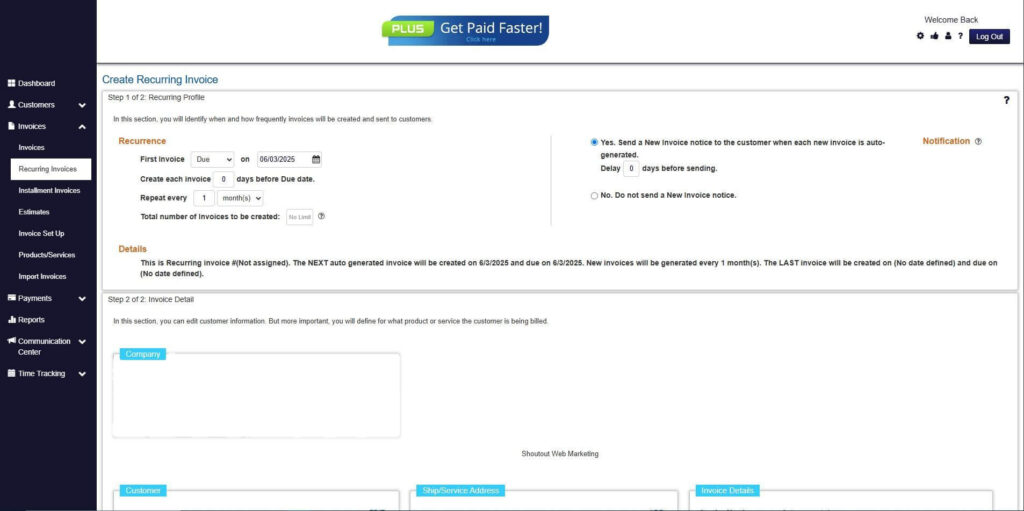
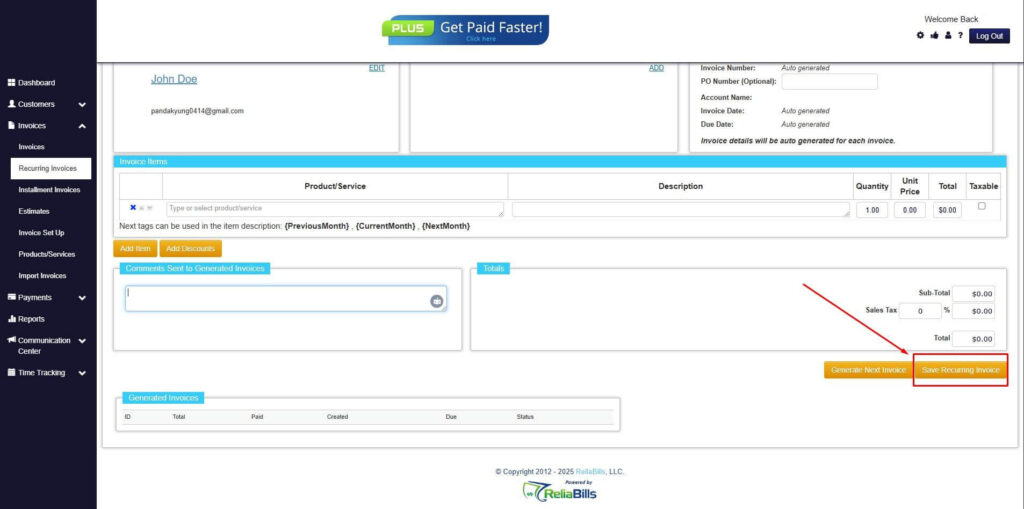
Step 7: Fill in the Create Recurring Invoice Form
- Fill in all the necessary fields.
Step 8: Save Recurring Invoice
- After filling up the form, click “Save Recurring Invoice” to continue.
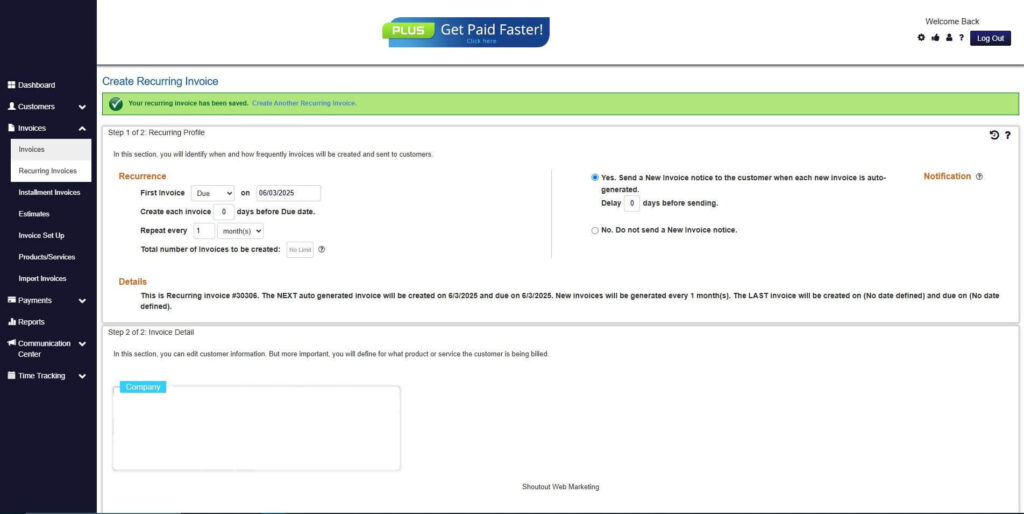
Step 9: Recurring Invoice Created
- Your Recurring Invoice has been created.
Frequently Asked Questions
1. Are return invoices and credit memos the same?
No. Return invoices document returned goods, while credit memos apply a balance toward future charges.
2. Do refund invoices affect taxes?
Yes. Refund invoices reverse revenue and may impact tax reporting depending on local regulations.
3. How should recurring billing adjustments be handled?
Adjustments should be applied to future billing cycles to avoid incorrect charges and revenue misstatements.
4. Can these documents be automated?
Yes. Automated billing systems can generate and track adjustments accurately.
Conclusion
Understanding the difference between return invoices, credit memos, and refund invoices helps businesses resolve billing issues efficiently and accurately. Each document serves a specific role in financial management.
By choosing the right adjustment method and using tools like ReliaBills, businesses can protect cash flow, reduce errors, and maintain strong customer relationships.