
Return invoices are essential when managing disputes that arise from recurring billing cycles. Customers may question charges, request reversals, or identify billing errors, and without a clear return invoice process, these situations can escalate quickly. Strong return invoice management protects your revenue, improves transparency, and strengthens customer trust. This guide explains what return invoices are, why disputes happen, and how to manage them in a clear, organized way.
What Is a Return Invoice?
A return invoice is a document issued to correct, reverse, or refund a previous charge. It is especially useful in subscription or recurring billing environments where adjustments must be properly recorded. A return invoice ensures that any billing correction is clearly documented and traceable, which helps both the business and the customer understand the change made.
Causes of Recurring Billing Disputes
Recurring billing disputes commonly arise when customers experience unexpected charges, subscription renewals they did not anticipate, or errors such as duplicate charges. Some disputes occur because of delayed cancellations or confusion about billing dates. Others happen when customers do not recognize a transaction or are dissatisfied with the service. Understanding the reason behind each dispute makes the return invoice process more accurate and efficient.
When Should You Issue a Return Invoice?
A return invoice should be issued whenever a charge needs to be reversed or corrected. This may occur when a customer disputes a fee, requests a refund, or identifies a billing error. It is also important during adjustments to unused subscription periods, changes in service levels, or when accounting for chargebacks. Issuing a return invoice creates a clear record of the correction.
Key Elements of a Return Invoice
A return invoice should always include the customer’s name, contact information, the original invoice number, and a clear explanation of the reason for the adjustment. It should also show the item or service being refunded or reversed, the corrected amount, and the issuance date. When relevant, additional notes should be added to support the dispute resolution. Including these elements helps prevent confusion and ensures the correction is understood by all parties.
How to Process Return Invoices Step-by-Step
Use the following steps to manage return invoices properly:
Step 1: Review the dispute or billing issue
Confirm the customer’s claim and verify any system or invoicing errors.
Step 2: Validate the original charge
Check the original invoice, subscription plan, billing dates, and transaction details.
Step 3: Determine the type of return invoice needed
Decide whether the adjustment is a partial refund, full refund, or credit memo.
Step 4: Create the return invoice
List the corrected amounts, reason for return, and connections to the original invoice.
Step 5: Update the customer’s recurring billing plan
Make sure future charges are adjusted so the issue does not repeat.
Step 6: Send the return invoice to the customer
Communicate what was corrected and provide a copy for their records.
Step 7: Log and track the adjustment
Keep consistent records to support financial audits and dispute prevention efforts.
Best Practices for Managing Recurring Billing Disputes
The most effective approach to return invoice management is to document everything clearly and communicate billing terms early. Providing customers with clear invoices reduces confusion, while automating billing tasks helps prevent disputes caused by human error. Reviewing dispute patterns also helps identify recurring issues that may require changes in billing practices. A prompt response to disputes shows professionalism and helps prevent escalation.
Common Mistakes to Avoid
Many businesses struggle with return invoice management due to avoidable errors. Avoid:
- Not issuing a return invoice after a refund or adjustment
- Forgetting to update the customer’s recurring billing status
- Making unclear notes or leaving key details out of the invoice
- Allowing disputes to sit unresolved
- Failing to track dispute trends
- Manually handling invoices without automation support
These mistakes can lead to more disputes and unnecessary revenue loss.
How ReliaBills Helps Simplify Return Invoice Management
ReliaBills provides a structured way to manage return invoices by giving businesses the tools they need to correct billing errors quickly and maintain transparent communication with customers. The platform makes it simple to create accurate return invoices, attach supporting details, and send them instantly through digital channels. This reduces confusion, helps resolve billing disputes faster, and supports a more consistent payment experience for both the business and the customer.
Beyond basic invoicing, ReliaBills organizes every return invoice, adjustment, and refund in one central system. This is especially important for companies handling multiple recurring billing accounts, subscription changes, or customer disputes each month. Automated reminders, scheduled follow-ups, online payment options, and detailed reporting help ensure that nothing gets overlooked and that every correction is properly documented. This saves time, lowers administrative workload, and streamlines financial management.
ReliaBills is also designed to support recurring billing in a way that prevents future disputes. By automating subscription charges, updating billing cycles accurately, and maintaining real-time records of payment histories, the platform reduces the risk of repeat issues. Businesses gain clearer oversight, customers benefit from transparent communication, and return invoice management becomes far easier to handle.
How to Create a New Invoice Using ReliaBills
Creating an invoice using ReliaBills involves the following steps:
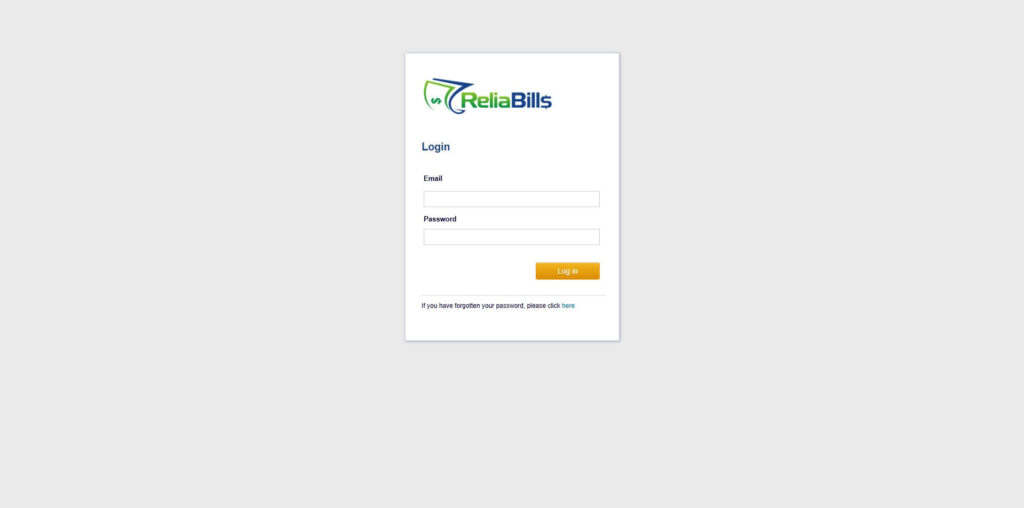
Step 1: Login to ReliaBills
- Access your ReliaBills Account using your login credentials. If you don’t have an account, sign up here.
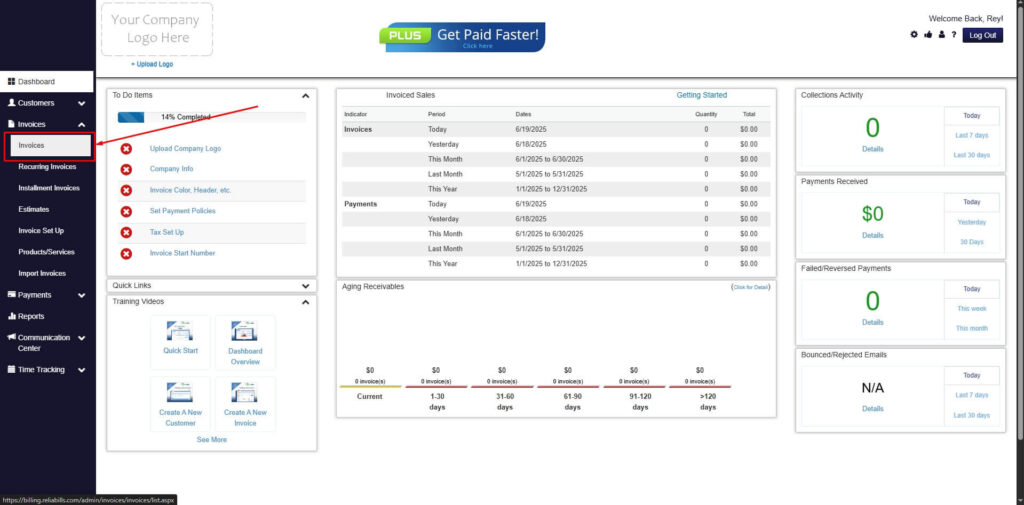
Step 2: Click on Invoices
- Navigate to the Invoices Dropdown and click on Invoices.
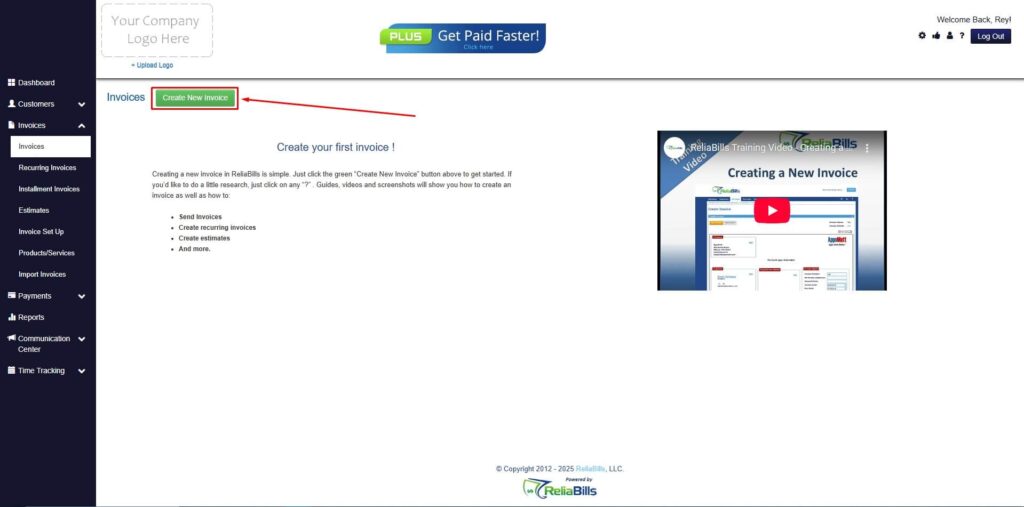
Step 3: Click ‘Create New Invoice’
- Click ‘Create New Invoice’ to proceed.
Step 4: Go to the ‘Customers Tab’
- If you have already created a customer, search for them in the Customers tab and make sure their status is “Active”.
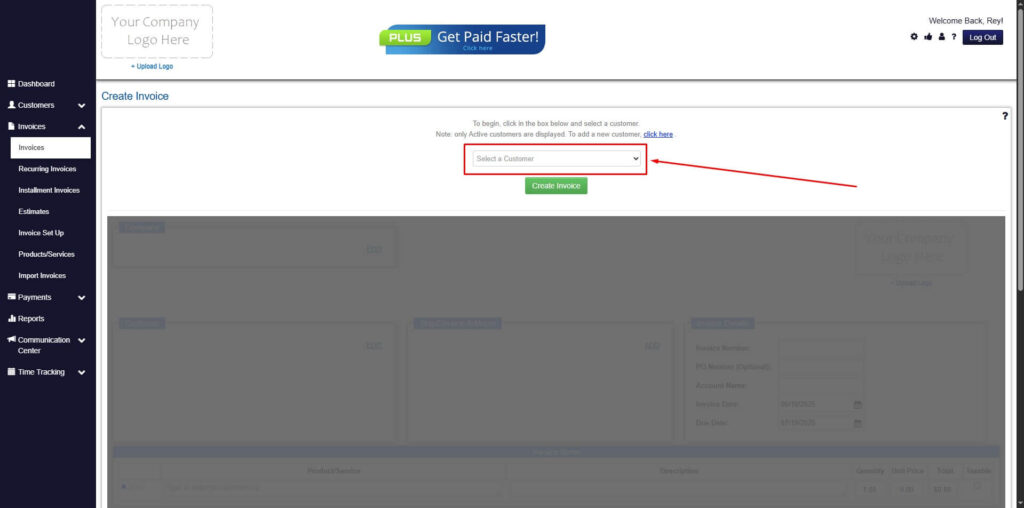
Step 5: Create Customer
- If you haven’t created any customers yet, click the ‘Click here’ to create a new customer.
- Provide the First Name, Last Name, and Email to proceed.
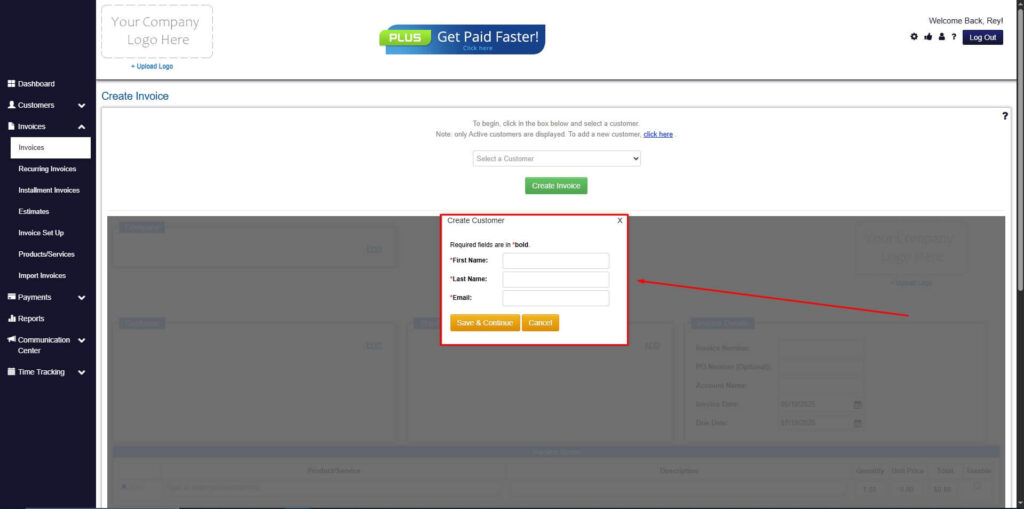
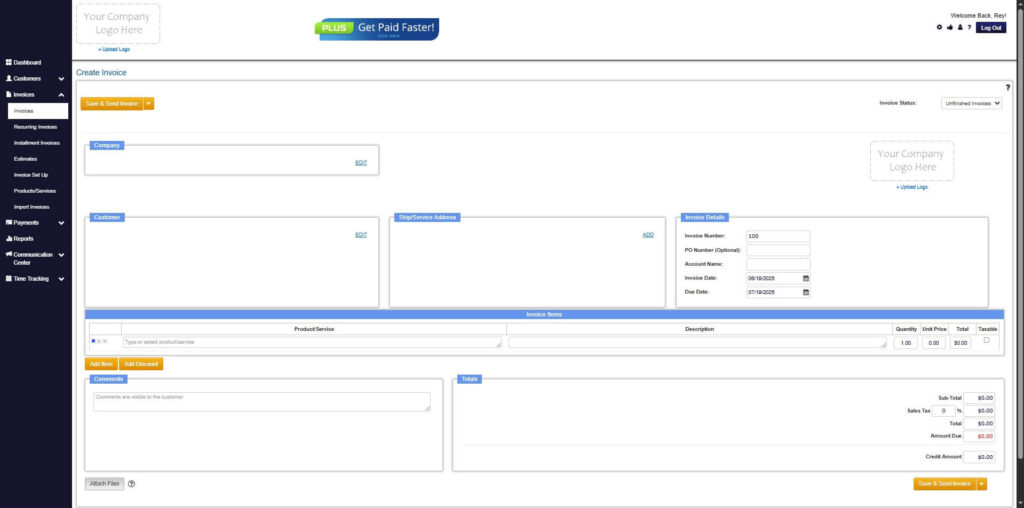
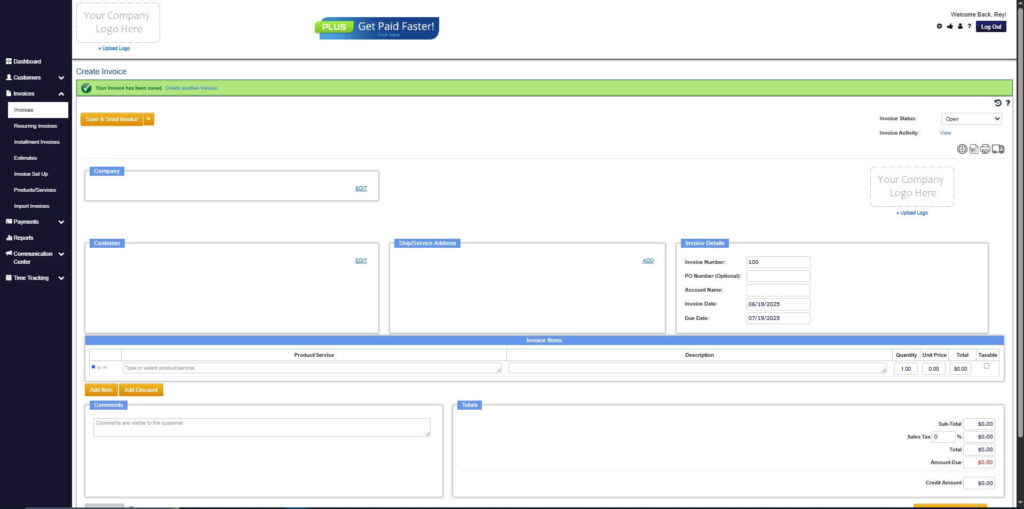
Step 6: Fill in the Create Invoice Form
- Fill in all the necessary fields.
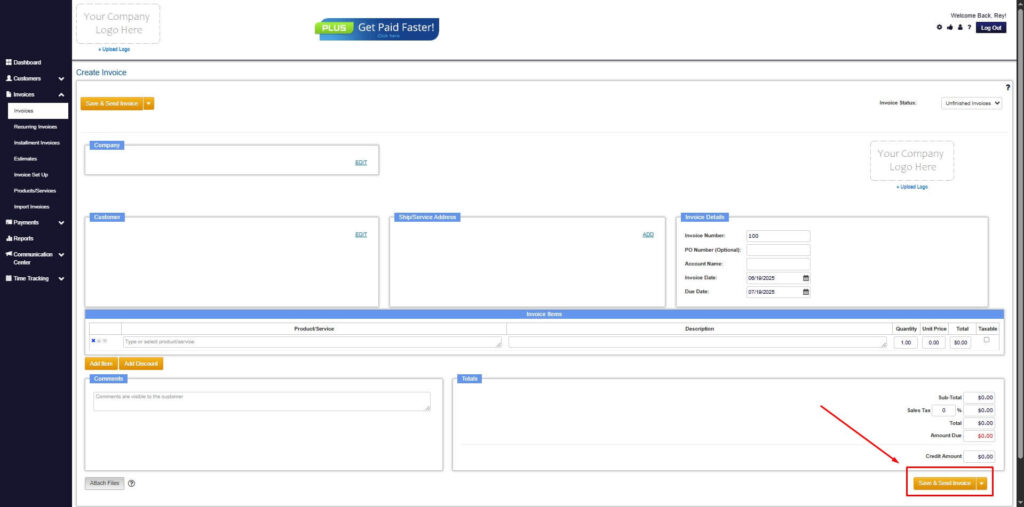
Step 7: Save Invoice
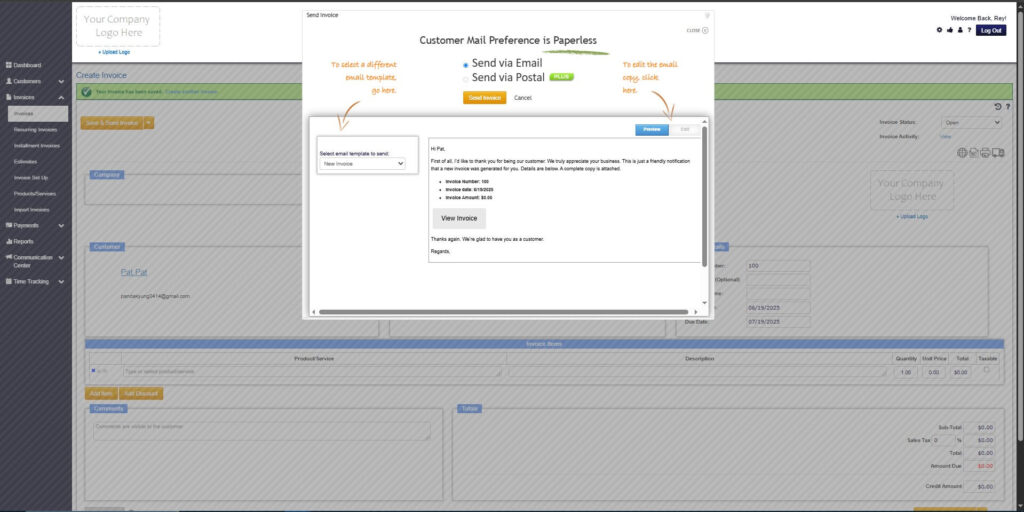
- After filling out the form, click “Save & Send Invoice” to continue.
Step 8: Invoice Created
- Your Invoice has been created.
Frequently Asked Questions
1. What is the main purpose of a return invoice?
It documents any refund, reversal, or billing correction issued to a customer.
2. Do return invoices help reduce recurring billing disputes?
Yes. Clear documentation and accurate adjustments reduce confusion and prevent disputes from escalating.
3. Are return invoices required for partial refunds?
Yes. Any adjustment, whether partial or full, should be properly documented.
4. Can return invoices prevent chargebacks?
They help significantly by resolving customer concerns early and providing clear communication.
5. What tools make return invoice management easier?
Platforms such as ReliaBills offer automation, recurring billing updates, and streamlined dispute handling.
Conclusion
Return invoice management is essential for handling recurring billing disputes effectively. With clear documentation, timely adjustments, and strong communication, businesses can resolve issues quickly while maintaining financial accuracy. Using an automated platform like ReliaBills further strengthens this process by reducing errors and improving the customer experience. A well-managed return invoice system is key to maintaining trust, improving cash flow, and supporting long-term business success.