
Managing return invoices can be overwhelming for many businesses, especially those with high transaction volumes or subscription-based services. A return invoice is more than a simple correction. It reflects a customer dispute, a product issue, or a billing mistake that needs immediate and accurate resolution. When handled poorly, it can negatively impact cash flow, customer satisfaction, and operational efficiency.
This is why many companies are shifting to automated billing systems. Automation reduces human error, speeds up return processing, and ensures every adjustment is documented properly. Manual return invoice management is often slow and inconsistent, which increases the chances of mistakes and delays.
As customer expectations rise and billing cycles become more complex, automated billing is no longer optional. It is becoming an essential tool for businesses that want better accuracy, faster response times, and reliable return invoice automation.
What Are Return Invoices?
A return invoice is issued when a product or service needs to be corrected, refunded, or reversed. It formalizes adjustments caused by billing errors, customer disputes, damaged items, subscription issues, or product returns. These invoices help maintain accurate records and ensure both parties have clear documentation for the transaction.
Return invoices play a major role in cash flow and customer relationships. When they are handled quickly and clearly, customers feel supported and trust your billing process. When they are delayed or inconsistent, disputes last longer and turnover grows.
The Challenges of Managing Return Invoices Manually
Manual return invoice management tends to create slowdowns across accounting and customer service. High error rates are common because teams must review multiple documents, emails, and order records. This often leads to miscommunication between departments and customers.
Tracking recurring billing disputes is especially difficult when information is scattered across spreadsheets, emails, and paper files. These inefficiencies increase labor costs and create more opportunities for mistakes that could have been avoided with better organization.
What Is Automated Billing?
Automated billing is a technology-driven system that handles invoicing tasks with minimal manual input. It performs functions such as generating invoices, detecting discrepancies, calculating adjustments, and scheduling recurring payments.
Unlike manual or semi-manual processes, automated billing creates consistent workflows and ensures that each step follows the same rules every time. This improves accuracy and reduces the friction that normally comes with manual billing corrections.
How Automated Billing Streamlines Return Invoice Management
Automated billing improves return invoice management by detecting discrepancies in real time. The system compares invoices, subscriptions, payments, and adjustments automatically so errors are flagged before they reach the customer. Pre-configured billing rules minimize human mistakes and ensure that every return or correction is handled the same way.
Automation also centralizes data, which makes it easier to review the full transaction history when disputes occur. This results in faster refunds, credit memos, and billing corrections. With everything stored in one system, teams gain real-time visibility into every return case without digging through multiple records.
Benefits of Using Automated Billing for Return Invoices
Automated billing provides several operational and financial benefits. Accuracy improves because the system follows standardized rules, reducing the number of disputes. Customers appreciate faster response times, which strengthens trust and long-term loyalty.
Automation also ensures clean documentation for audits and compliance reviews. Administrative tasks decrease because the system handles calculations, reminders, adjustments, and approvals. Businesses with subscription or recurring billing models benefit the most since automation tracks and manages billing cycles, renewals, and disputes more efficiently.
Best Practices for Managing Return Invoices with Automation
Businesses that want to streamline their return invoice workflow should use standardized invoice formats to reduce confusion. Clear billing policies and dispute guidelines help shorten resolution times. Automated alerts and reminders assist teams in managing return requests promptly.
Maintaining proper documentation is also important. Every adjustment, conversation, or related transaction should be logged so customer service and accounting stay aligned.
Common Mistakes to Avoid
Many businesses mix manual and automated processes, which creates inconsistencies. Others fail to track return reasons, making it harder to identify recurring issues. Businesses should also review automated billing rules regularly to ensure they align with new policies or product changes.
Communication gaps are another common problem. During return invoice processing, customers should always know what is happening and when to expect updates. Automation helps maintain transparency, but businesses must still monitor responses and inquiries.
How ReliaBills Simplifies Return Invoice Management
ReliaBills offers a complete return invoice automation system designed to help businesses manage invoice discrepancies, adjustments, and disputes with greater accuracy. Its automated invoicing tools handle a wide range of billing tasks, from detecting errors to generating corrected invoices or credit memos. With centralized dispute tracking, teams always have access to the full history of each case.
For subscription-based businesses, ReliaBills offers a powerful recurring billing system. This makes it easier to manage disputes triggered by renewals, paused accounts, billing cycle changes, or subscription cancellations. Automated billing schedules reduce human error and ensure each cycle is processed consistently.
ReliaBills also includes tools for adjustments, credit memos, corrected invoices, and automated customer communication. Everything is stored in one dashboard, allowing businesses to track patterns, analyze dispute data, and improve overall billing performance. With this level of automation and reporting, companies can process returns more efficiently while strengthening customer trust.
How to Create a New Recurring Invoice Using ReliaBills
Creating a New Recurring Invoice using ReliaBills involves the following steps:
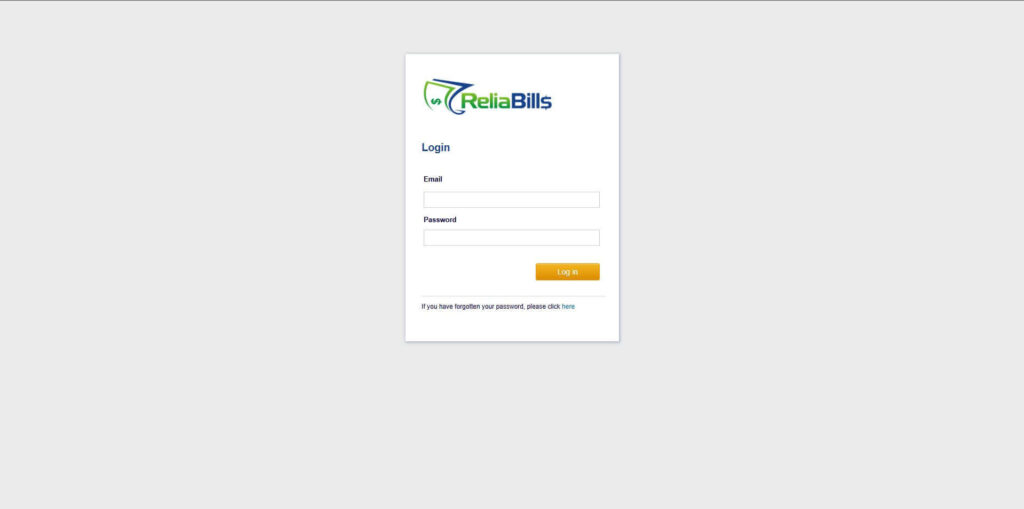
Step 1: Login to ReliaBills
- Access your ReliaBills Account using your login credentials. If you don’t have an account, sign up here.
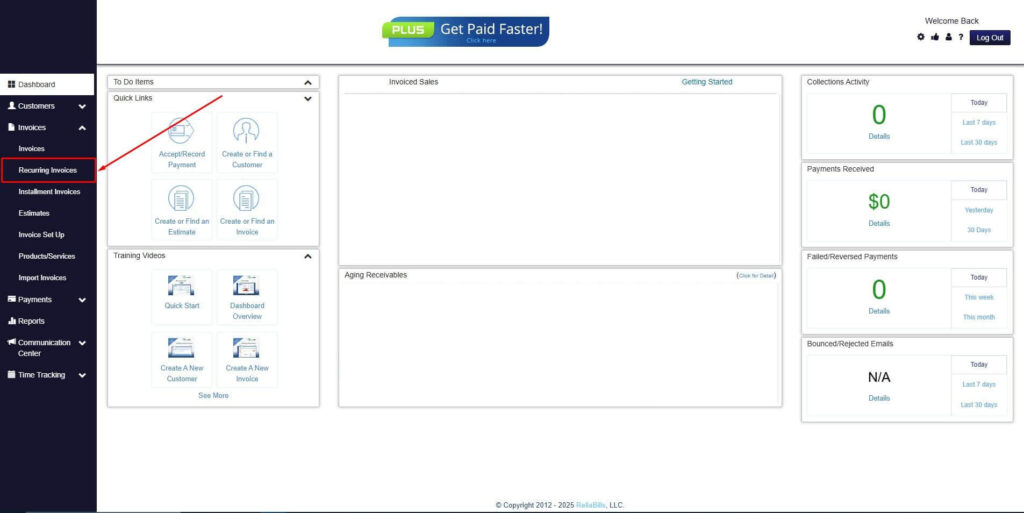
Step 2: Click on Recurring Invoices
- Navigate to the Invoices Dropdown and click on Recurring Invoices for an overview of the list of your existing customers.
Step 3: Go to the Customers Tab
- If you have already created a customer, search for them in the Customers tab and make sure their status is “Active”.
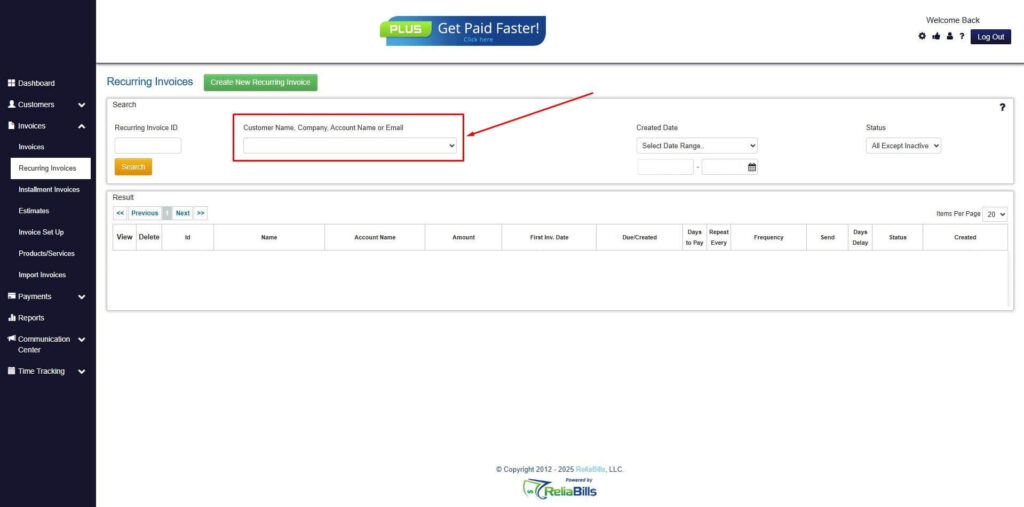
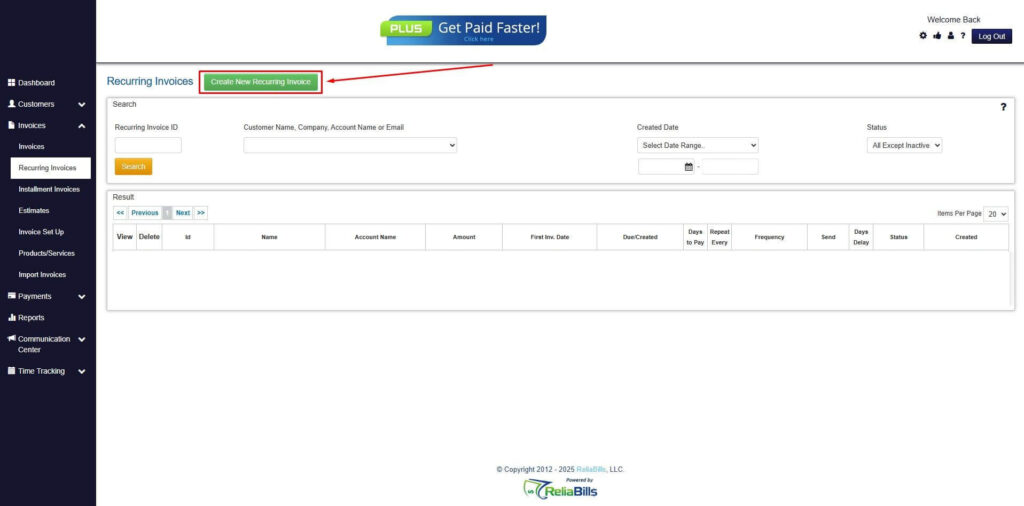
Step 4: Click the Create New Recurring Invoice
- If you haven’t created any customers yet, click the Create New Recurring Invoice to create a new customer.
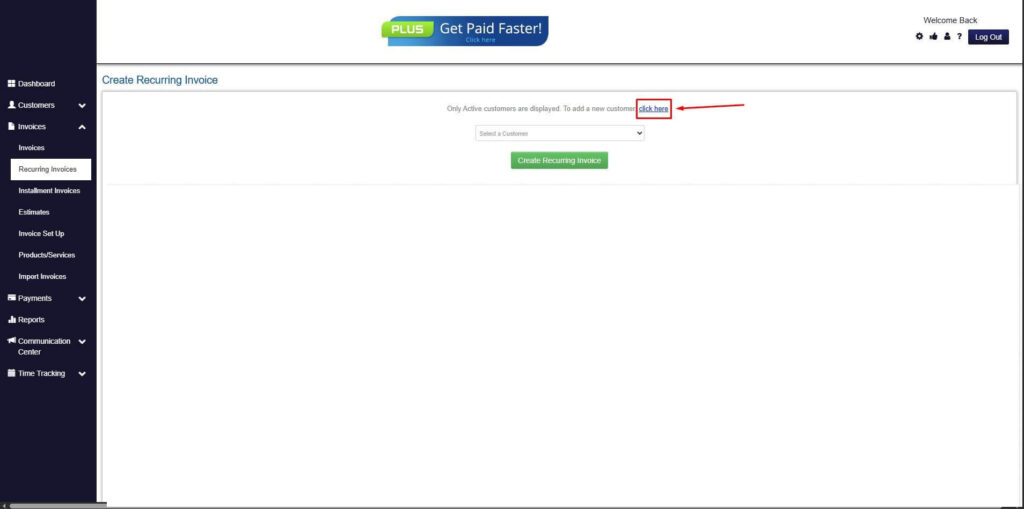
Step 5: Click on the “Click here” Button
- Click on the “Click here” button to proceed with the recurring invoice creation.
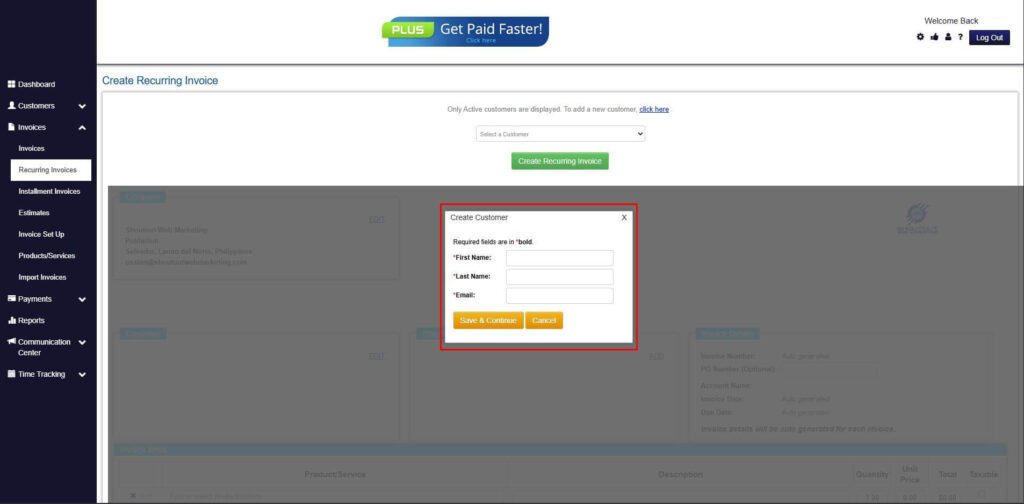
Step 6: Create Customer
- Provide your First Name, Last Name, and Email to proceed.
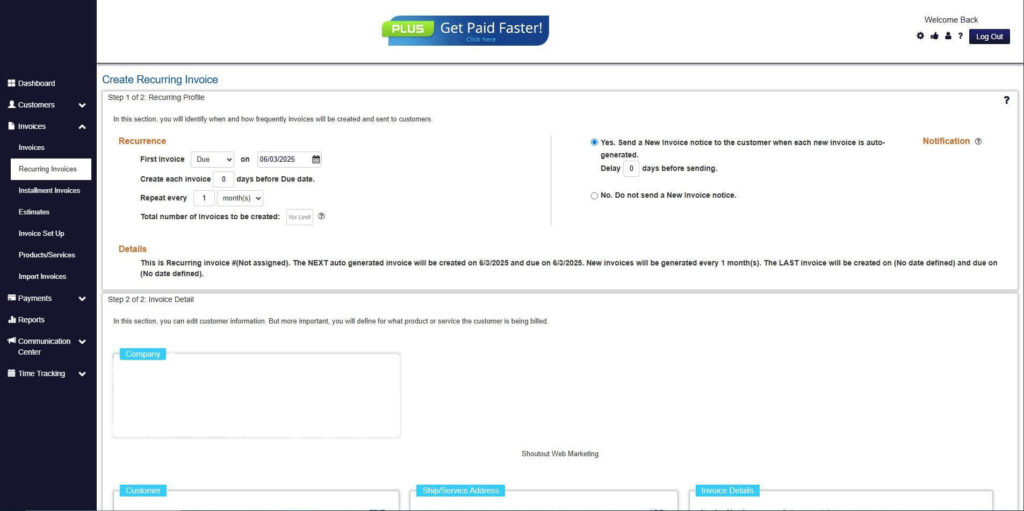
Step 7: Fill in the Create Recurring Invoice Form
- Fill in all the necessary fields.
Step 8: Save Recurring Invoice
- After filling up the form, click “Save Recurring Invoice” to continue.
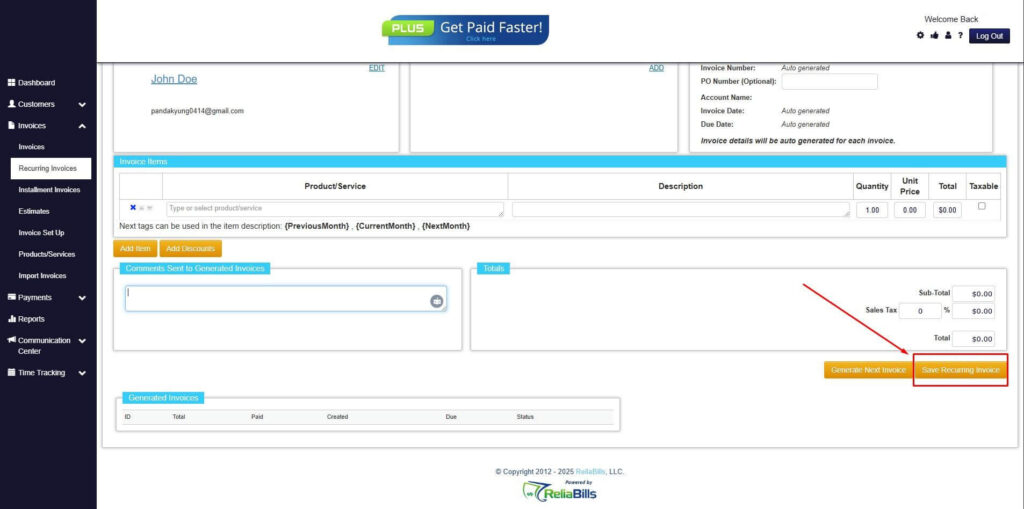
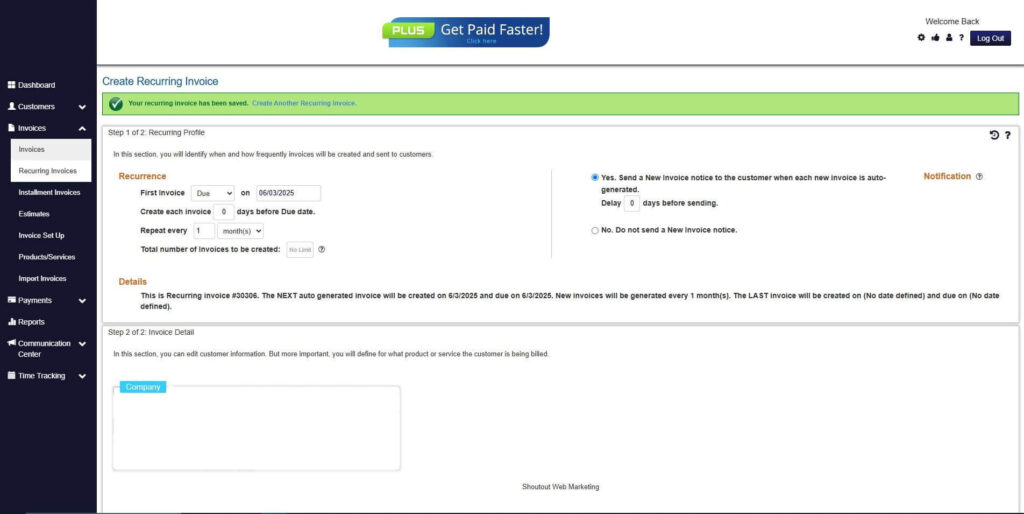
Step 9: Recurring Invoice Created
- Your Recurring Invoice has been created.
Frequently Asked Questions
1. How do automated systems handle disputes?
They store all transaction details, detect discrepancies, and streamline communication so disputes are resolved quickly.
2. Can automation reduce the number of return invoices?
Yes. Automation prevents errors, which reduces customer complaints and billing corrections.
3. Which industries benefit the most from automated return invoice management?
Subscription services, retail, e-commerce, logistics, and SaaS companies.
4. Can automated billing generate credit memos automatically?
Yes. Most automated billing platforms can create and send credit memos instantly.
5. How do recurring billing businesses manage returns efficiently?
By using automated billing tools that track renewals, adjustments, pauses, and cancellations in real time.
Conclusion
Return invoice automation transforms the way businesses handle disputes, corrections, and billing errors. Automated billing ensures that return invoices are processed quickly, accurately, and consistently while improving transparency for customers. With fewer errors, faster adjustments, and better insight into billing patterns, businesses can reduce costs and strengthen client relationships. Automation is no longer just an improvement. It is the foundation of modern return invoice management.