

Invoicing is a crucial part of running any auto service business, and oil change services are no exception. A well-structured oil change invoice not only ensures you get paid promptly but also communicates professionalism to your clients. Proper invoicing helps track customer services, manage costs, and improve overall cash flow.
Effective invoicing can also enhance customer retention. Clients who receive clear and accurate invoices are more likely to return for future services. Documenting every oil change service accurately helps build trust and encourages repeat business, which is essential for growth in the competitive automotive industry.
What Is an Oil Change Invoice?
An oil change invoice is a document that details the services provided during an oil change, the associated costs, and the payment terms. Unlike general auto repair invoices, it specifically highlights oil type, filter replacement, and any additional checks performed during the service.
Oil change invoices typically include the service date, customer and vehicle details, labor and parts costs, taxes, discounts, and the total amount due. By providing a clear and detailed record, the invoice ensures clients understand what they are paying for and reinforces your shop’s professionalism.
Key Elements of an Oil Change Invoice
A proper oil change invoice should include: your business information and branding, customer and vehicle details, a description of services performed, labor and parts costs, taxes, discounts, total amount due, and payment terms with accepted methods.
Adding specific details, such as the type of oil used and any additional maintenance performed, helps clients see the value of your service. A well-designed invoice also serves as a reference for future services and creates an organized record for your business.
How an Oil Change Invoice Can Help Boost Your Business
A professional oil change invoice enhances your shop’s credibility and professionalism. When clients receive clear documentation of services, they trust your expertise and are more likely to return for future maintenance.
Invoices can also encourage repeat visits and upselling opportunities. By tracking service history, you can suggest related maintenance services or seasonal checkups. Over time, documenting every service allows you to create personalized marketing strategies and strengthen long-term customer relationships.
Step-by-Step Guide to Creating an Oil Change Invoice
- Gather customer and vehicle details, including make, model, and license plate.
- Itemize labor, parts, and any additional services provided during the oil change.
- Apply applicable taxes, discounts, or promotions.
- Review all totals and ensure the invoice is accurate and complete.
- Deliver the invoice digitally or physically to the client promptly after service.
Following this workflow reduces errors, improves clarity, and demonstrates professionalism to clients.
Best Practices for Effective Oil Change Invoicing
Use clear and detailed descriptions of every service performed. Send invoices immediately after the service is completed to maintain accurate records and ensure timely payment. Maintain consistent pricing for transparency and encourage clients to pay online or through automated platforms.
Timely and well-organized invoicing reflects the professionalism of your business and reduces confusion for clients. It also helps you manage recurring services efficiently, ensuring that repeat customers remain loyal and satisfied.
Common Mistakes to Avoid
Common mistakes include vague service descriptions, forgetting to include taxes or additional charges, unclear payment terms, and failing to track repeat customers for follow-ups. These errors can delay payment and damage client trust.
Another issue is not having a consistent system for recurring clients. Failing to track service schedules and invoices can create confusion, missed payments, and missed opportunities for upselling services.
Sample Oil Change Invoice Template
Auto Service Business Information
Business Name
Address
Phone Number
Email Address
Invoice Details
Invoice Number
Invoice Date
Service Date
Customer and Vehicle Information
Customer Name
Vehicle Make and Model
Vehicle Year
License Plate Number
Services Provided
Oil change service
Oil type used
Oil filter replacement
Additional inspections or services
Charges
Labor cost
Parts cost
Subtotal
Taxes
Discounts (if applicable)
Total amount due
Payment Terms
Accepted payment methods
Due date
Notes or warranty details
How ReliaBills Can Help Auto Service Businesses
ReliaBills streamlines oil change invoicing by automating invoice creation and delivery. You can quickly generate invoices for one-time services, ensuring clients receive accurate billing every time.
For ongoing services, recurring billing simplifies the process by automatically sending invoices on weekly, monthly, or seasonal schedules. This ensures consistent cash flow, reduces administrative work, and eliminates the risk of missed payments.
For businesses looking for advanced features, ReliaBills Plus, the paid tier of ReliaBills, offers customizable invoice templates, detailed reporting, and integration with multiple payment platforms. ReliaBills Plus gives you full control over recurring billing, customer communication, and service tracking, making it easier to run your business efficiently while maintaining professionalism.
How to Create a New Recurring Invoice Using ReliaBills
Creating a New Recurring Invoice using ReliaBills involves the following steps:
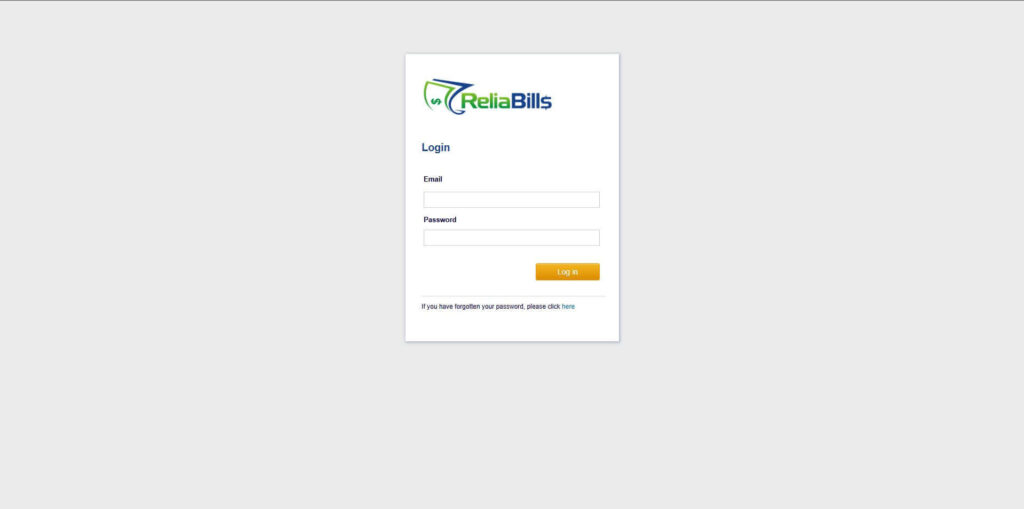
Step 1: Login to ReliaBills
- Access your ReliaBills Account using your login credentials. If you don’t have an account, sign up here.
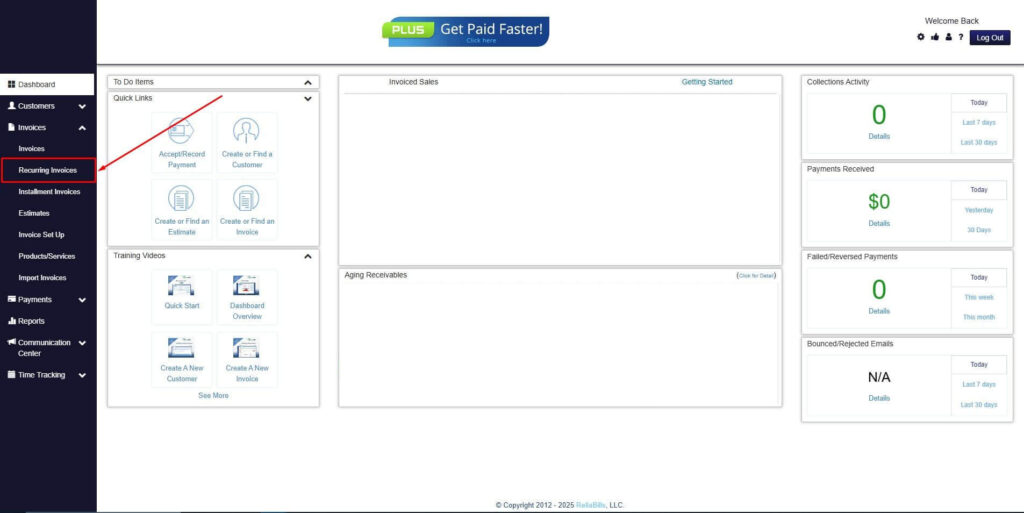
Step 2: Click on Recurring Invoices
- Navigate to the Invoices Dropdown and click on Recurring Invoices for an overview of the list of your existing customers.
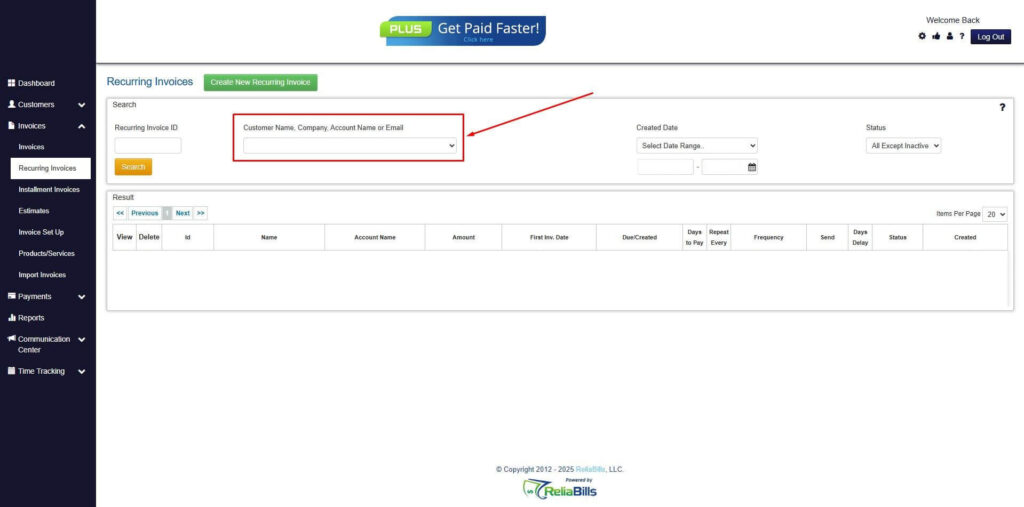
Step 3: Go to the Customers Tab
- If you have already created a customer, search for them in the Customers tab and make sure their status is “Active”.
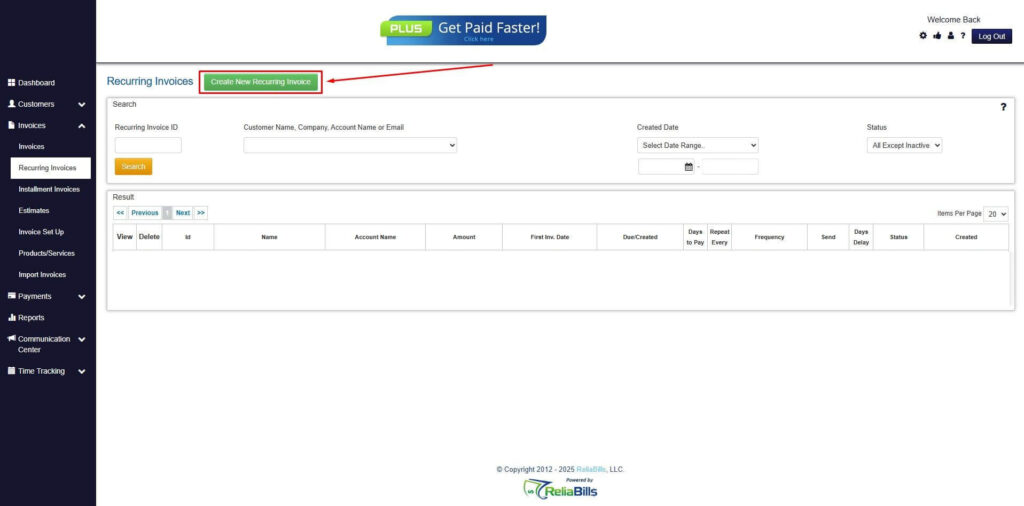
Step 4: Click the Create New Recurring Invoice
- If you haven’t created any customers yet, click the Create New Recurring Invoice to create a new customer.
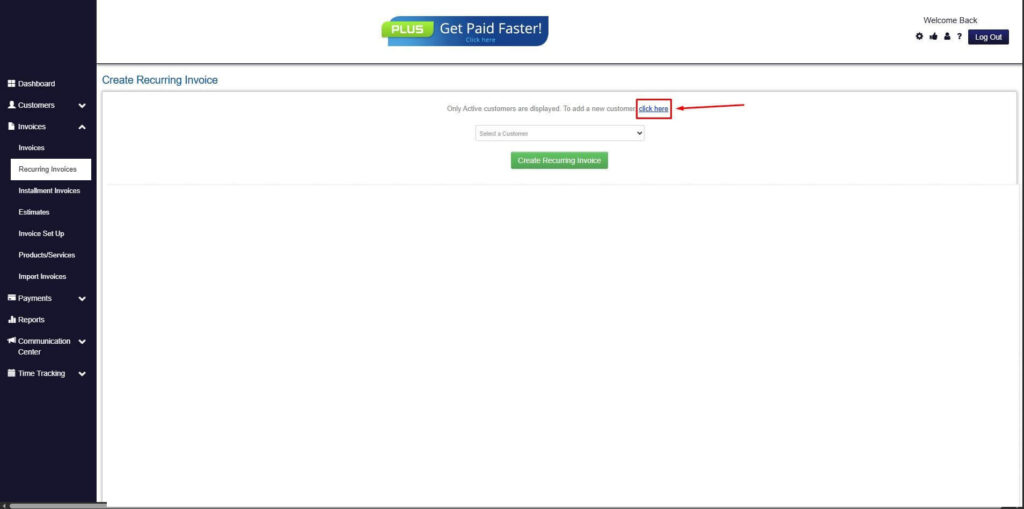
Step 5: Click on the “Click here” Button
- Click on the “Click here” button to proceed with the recurring invoice creation.
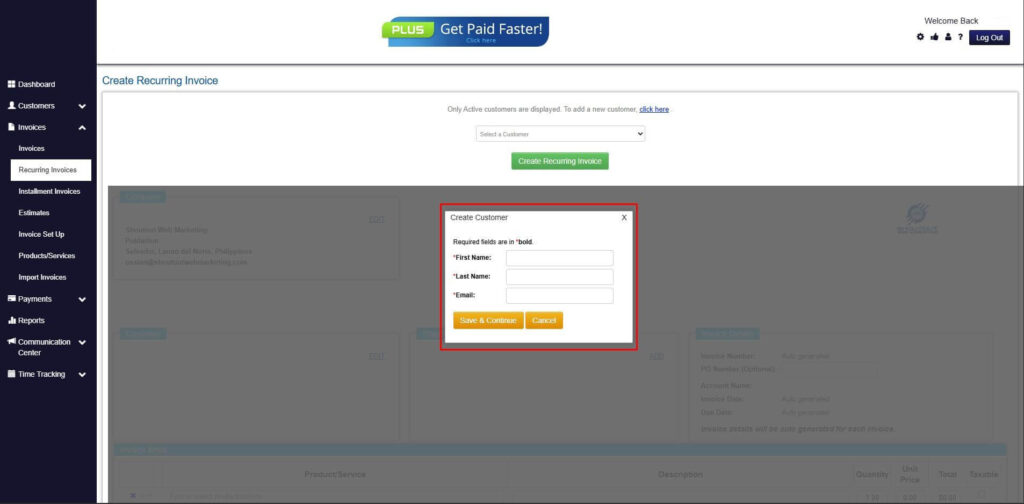
Step 6: Create Customer
- Provide your First Name, Last Name, and Email to proceed.
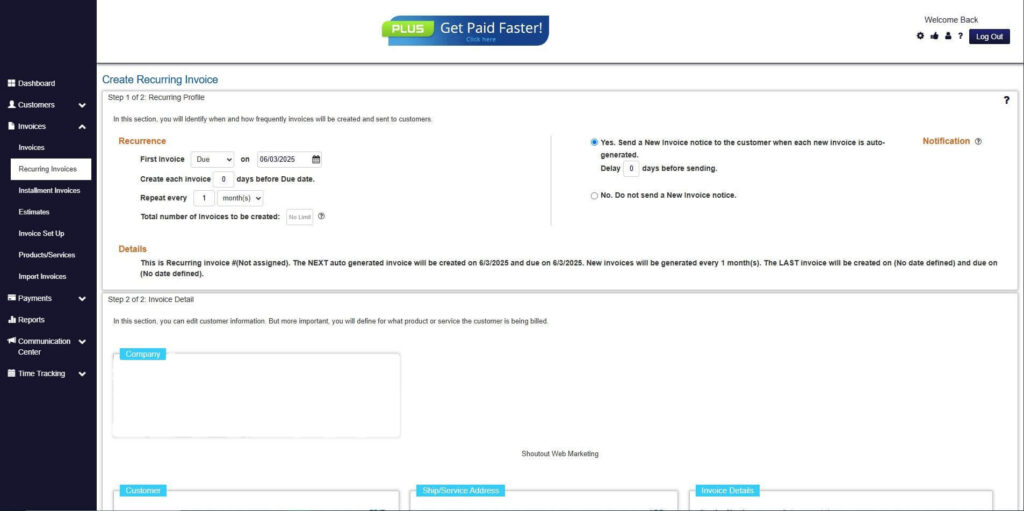
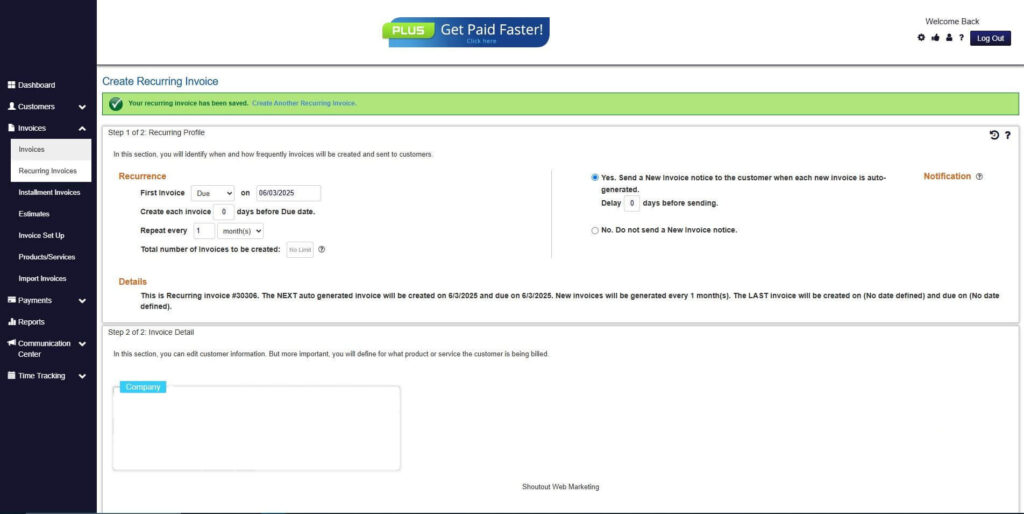
Step 7: Fill in the Create Recurring Invoice Form
- Fill in all the necessary fields.
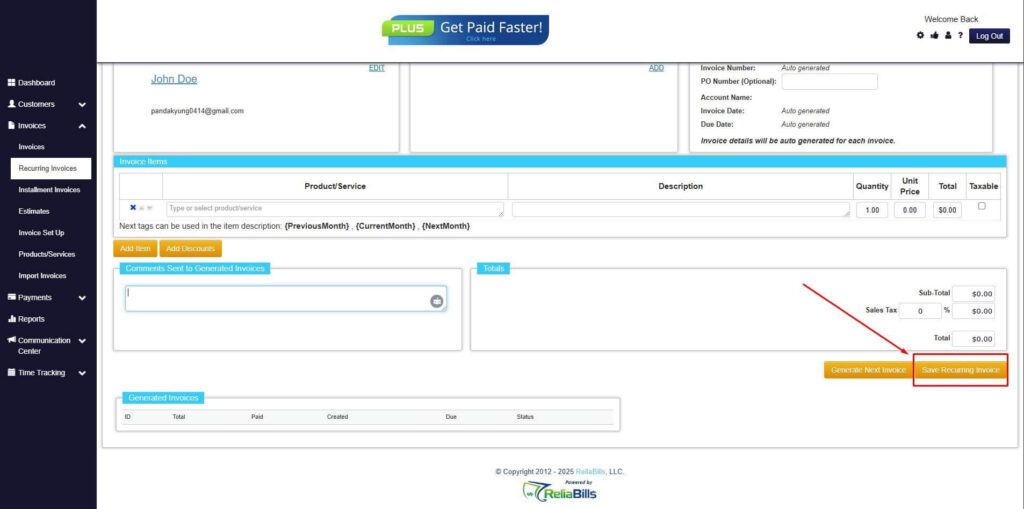
Step 8: Save Recurring Invoice
- After filling up the form, click “Save Recurring Invoice” to continue.
Step 9: Recurring Invoice Created
- Your Recurring Invoice has been created.
Frequently Asked Questions
1. How often should recurring customers be invoiced?
It depends on the service schedule. Weekly or monthly invoicing is common for regular maintenance.
2. Can invoices include multiple services?
Yes, multiple services can be itemized on a single invoice, making it easier for clients to understand the full scope of work.
3. How do automated invoices reduce disputes?
Automation ensures accuracy, prevents missing details, and provides a clear record of services, reducing misunderstandings.
4. Are digital invoices legally valid?
Yes, digital invoices are legally valid and widely accepted by clients and accounting authorities.
Conclusion
An oil change invoice is more than just a payment request—it is a tool for professionalism, trust, and business growth. Clear, detailed invoices improve customer satisfaction, streamline cash flow, and create opportunities for upselling services. Leveraging tools like ReliaBills and ReliaBills Plus allows auto service businesses to automate recurring billing, track customer history, and manage payments efficiently, freeing time to focus on providing excellent service.