
Non-commercial invoice management is often overlooked because these invoices do not generate direct revenue. However, they still play a critical role in documentation, compliance, and internal tracking. When handled manually, non-commercial invoices can create just as many problems as revenue-generating invoices.
Managing non-commercial invoices manually introduces complexity that many businesses underestimate. These invoices often lack standard pricing, vary in purpose, and require careful classification to avoid accounting or compliance issues. Without proper systems in place, errors and inconsistencies can quickly accumulate.
Automated invoicing brings structure and efficiency to non-commercial invoice management. By standardizing workflows and centralizing records, automation helps businesses maintain control, reduce risk, and ensure accuracy across all non-revenue transactions.
What Is a Non-Commercial Invoice?
A non-commercial invoice is a document used to record transactions that do not involve direct payment or revenue. Its primary purpose is documentation rather than billing, helping businesses track movements of goods, services, or internal value. These invoices are still essential for audits, reporting, and regulatory requirements.
Common use cases include product samples, charitable donations, warranty replacements, internal transfers, and no-charge service adjustments. In many industries, these transactions occur frequently and must be recorded accurately to maintain clean financial records. Even without payment, the documentation must be complete and consistent.
Unlike commercial invoices, non-commercial invoices typically have zero or adjusted values and require different classification rules. They also demand careful labeling to avoid being mistaken for revenue-related documents. This distinction makes proper management especially important.
Why Non-Commercial Invoices Are Difficult to Manage
Non-commercial invoices are difficult to manage because they often rely on manual classification. Without automation, teams may mislabel invoices or apply incorrect tax or accounting treatment. These errors can lead to reporting discrepancies and compliance risks.
Documentation requirements add another layer of complexity. Many non-commercial invoices must include specific notes, references, or disclaimers depending on their purpose. Tracking these details manually increases the chance of missing or incomplete information.
Visibility is another challenge. When non-commercial invoices are stored across spreadsheets, emails, or shared folders, it becomes difficult to retrieve records quickly. This lack of centralized tracking makes audits, reviews, and internal reporting more time-consuming.
Common Mistakes in Manual Non-Commercial Invoicing
Incorrect Invoice Classification
One of the most common mistakes is labeling non-commercial invoices as commercial invoices. This can lead to incorrect revenue reporting, tax treatment issues, and confusion during audits. Misclassification often occurs when teams reuse standard invoice templates without adjusting them for non-revenue transactions.
Missing Required Explanations or References
Non-commercial invoices often require additional context, such as explanations for zero-value charges or references to internal transfers or donations. When created manually, these details are frequently omitted, reducing documentation quality. Incomplete records can raise questions during compliance checks or internal reviews.
Inconsistent Formatting Across Departments
Different teams may use different invoice formats, file naming conventions, or templates. This inconsistency makes invoices harder to track, review, and audit. Over time, inconsistent formatting increases administrative workload and reduces reporting accuracy.
Poor Record Storage and Retrieval
Manual non-commercial invoices are often stored across emails, spreadsheets, or shared folders. This scattered storage makes it difficult to retrieve invoices quickly when needed. Poor record management increases audit preparation time and compliance risk.
Lack of Audit Trails
Manual processes rarely provide clear tracking of when invoices were created, edited, or approved. Without a documented audit trail, businesses may struggle to explain invoice history or changes. This lack of transparency can weaken internal controls.
What Is Automated Invoicing?
Automated invoicing uses software to generate, manage, and store invoices with minimal manual input. It relies on predefined rules, templates, and workflows to ensure consistency and accuracy. Automation replaces repetitive manual tasks with structured processes.
Automated systems handle invoice creation, data population, delivery, and storage in a centralized environment. This ensures all invoices follow the same format and include required information. It also makes records easy to access and review.
In modern billing operations, automation supports both revenue and non-revenue invoices. By extending automation to non-commercial invoice management, businesses can reduce risk while improving efficiency across all invoice types.
How Automated Invoicing Simplifies Invoice Creation
Automated invoicing simplifies non-commercial invoice creation through template-based workflows. Businesses can design templates specifically for samples, donations, or internal transfers. This ensures each invoice type includes the correct fields and labels.
Automated data population reduces manual entry. Customer details, internal references, and transaction descriptions are filled in automatically based on predefined rules. This minimizes errors and saves time for finance and operations teams.
Standardized invoice layouts further improve consistency. Every non-commercial invoice follows the same structure, making records easier to review and audit. This standardization strengthens documentation quality across the organization.
Improving Accuracy and Compliance Through Automation
Automation improves accuracy by applying built-in validation rules. These rules help ensure invoices are properly classified and include all required details. Errors are flagged before invoices are finalized, reducing downstream issues.
Clear audit trails are another major benefit. Automated systems record when invoices are created, modified, and approved. This transparency supports compliance and simplifies internal and external audits.
By reducing misclassification and documentation gaps, automation lowers compliance risk. Businesses gain confidence that non-commercial invoices are handled consistently and correctly at all times.
Automating Non-Commercial Invoices in Recurring Billing Systems
Recurring billing systems are traditionally designed for revenue transactions, but modern platforms can also support non-commercial invoices. Automation allows businesses to issue non-commercial invoices alongside recurring customer relationships without disruption. This ensures accurate records even when no payment is involved.
Automation prevents conflicts between revenue and non-revenue billing. Non-commercial invoices are clearly separated from recurring charges, avoiding duplication or incorrect billing. This distinction helps maintain clean customer and account histories.
By keeping all invoice activity centralized, recurring billing systems improve long-term record accuracy. Businesses can track all interactions with a customer, including non-commercial transactions, in one place.
Centralized Tracking and Reporting
Centralized tracking makes non-commercial invoice records easy to access. All invoices are stored in a single system, eliminating the need to search across emails or spreadsheets. This improves efficiency during reviews and audits.
Reporting becomes simpler with automation. Businesses can generate reports for internal analysis or regulatory purposes without manual data gathering. This saves time and improves reporting accuracy.
Centralized documentation also supports better decision-making. With clear visibility into non-commercial activity, teams can identify trends, improve processes, and maintain compliance more effectively.
Reducing Administrative Workload
Automation significantly reduces manual steps involved in non-commercial invoice management. Tasks like data entry, formatting, and filing are handled automatically. This frees teams to focus on higher-value work.
Processing times are also faster. Automated workflows eliminate delays caused by approvals, corrections, or missing information. Invoices are created and stored correctly from the start.
Improved efficiency leads to better team productivity. Finance and operations teams spend less time fixing errors and more time managing strategic tasks.
Supporting Business Growth and Scalability
As businesses grow, the volume of non-commercial invoices often increases. Automation allows organizations to handle higher volumes without adding administrative staff. This scalability supports sustainable growth.
Automated systems can adapt to changing compliance requirements. New fields, rules, or documentation standards can be updated centrally. This flexibility helps businesses stay compliant as regulations evolve.
By future-proofing invoice workflows, automation ensures non-commercial invoice management remains reliable over time. Businesses are better prepared for expansion and operational complexity.
Best Practices for Automating Non-Commercial Invoice Management
Establish Clear Classification Rules
Before automating, businesses should clearly define what qualifies as a non-commercial invoice. These rules should cover common scenarios such as samples, donations, replacements, and internal transfers. Clear definitions ensure automation rules are applied consistently.
Use Dedicated Non-Commercial Invoice Templates
Automation works best when templates are designed specifically for non-commercial use. These templates should include appropriate labels, notes, and required fields. Standardized templates improve accuracy and make invoices easier to review and audit.
Integrate Automation with Existing Billing Workflows
Non-commercial invoices should be automated within the same system used for recurring or commercial billing. This ensures all invoice records are centralized while maintaining proper separation between revenue and non-revenue transactions. Integration improves visibility and reduces duplication.
Schedule Regular System Reviews and Audits
Automated systems should be reviewed periodically to ensure templates, rules, and reports remain accurate. Regular audits help identify gaps, outdated configurations, or new compliance requirements. Ongoing reviews keep the system aligned with business needs.
Train Teams on Automation Usage and Exceptions
Staff should understand how automated non-commercial invoicing works and how to handle exceptions. Proper training ensures users trust the system and use it correctly. Well-trained teams maximize efficiency and reduce manual workarounds.
How ReliaBills Supports Automated Non-Commercial Invoicing
ReliaBills simplifies non-commercial invoicing by giving businesses a structured way to create, manage, and store non-revenue invoices without relying on manual processes. The platform allows teams to generate clearly labeled non-commercial invoices using standardized templates, ensuring consistency across departments. This approach reduces classification errors while keeping documentation accurate and easy to review. Businesses gain better control over invoices related to samples, donations, replacements, and internal transfers.
Automation within ReliaBills works seamlessly alongside recurring billing workflows, making it easy to issue non-commercial invoices without disrupting revenue billing. Even when customers are on recurring plans, non-commercial invoices can be generated separately to reflect adjustments, replacements, or zero-value transactions. This separation helps maintain clean financial records while preserving a complete customer billing history. As a result, businesses avoid confusion between revenue and non-revenue activity.
ReliaBills also centralizes reporting and documentation, giving teams full visibility into all non-commercial invoices in one place. Invoice histories, timestamps, and records are easily accessible for audits, compliance checks, and internal reviews. For businesses using ReliaBills PLUS, enhanced reporting and automation controls provide even greater flexibility and oversight. This ensures non-commercial invoicing remains accurate, compliant, and scalable as operations grow.
How to Create a New Recurring Invoice Using ReliaBills
Creating a New Recurring Invoice using ReliaBills involves the following steps:
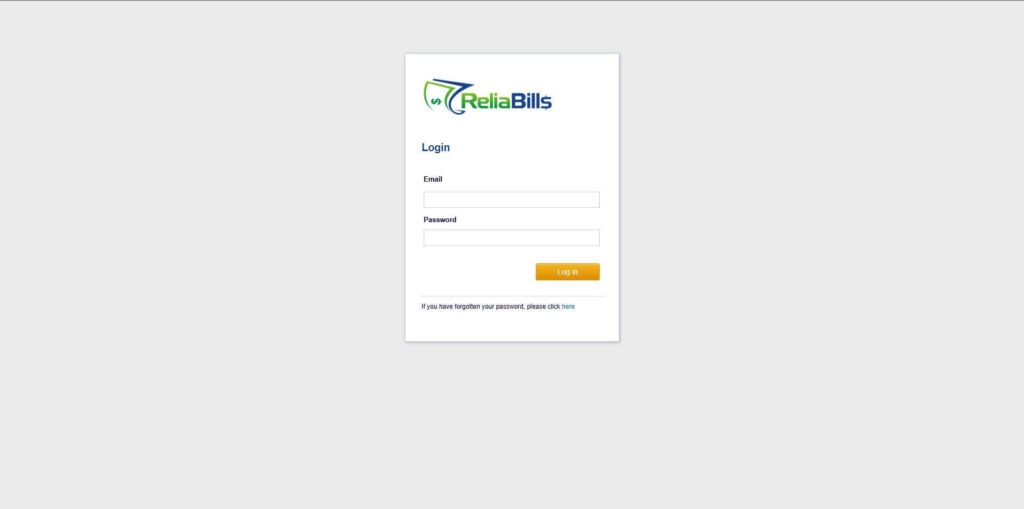
Step 1: Login to ReliaBills
- Access your ReliaBills Account using your login credentials. If you don’t have an account, sign up here.
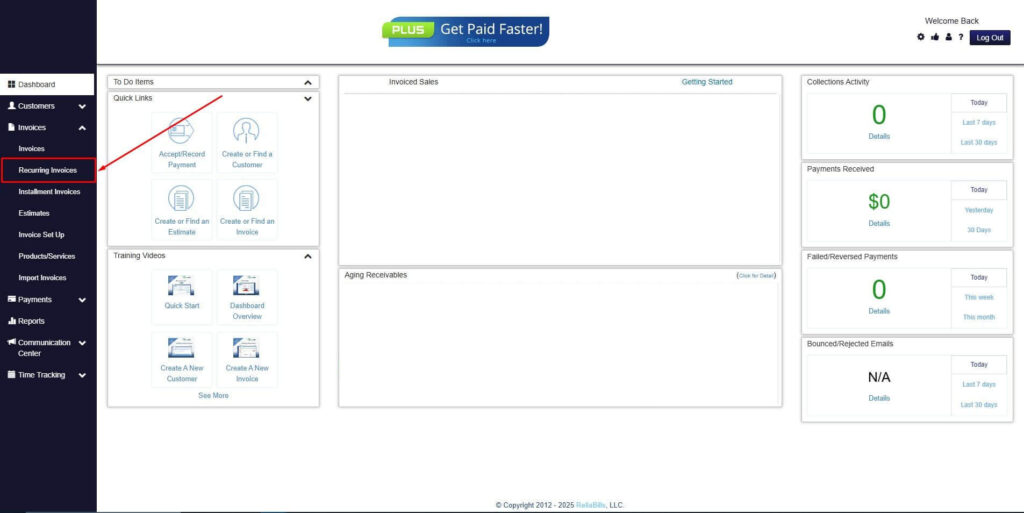
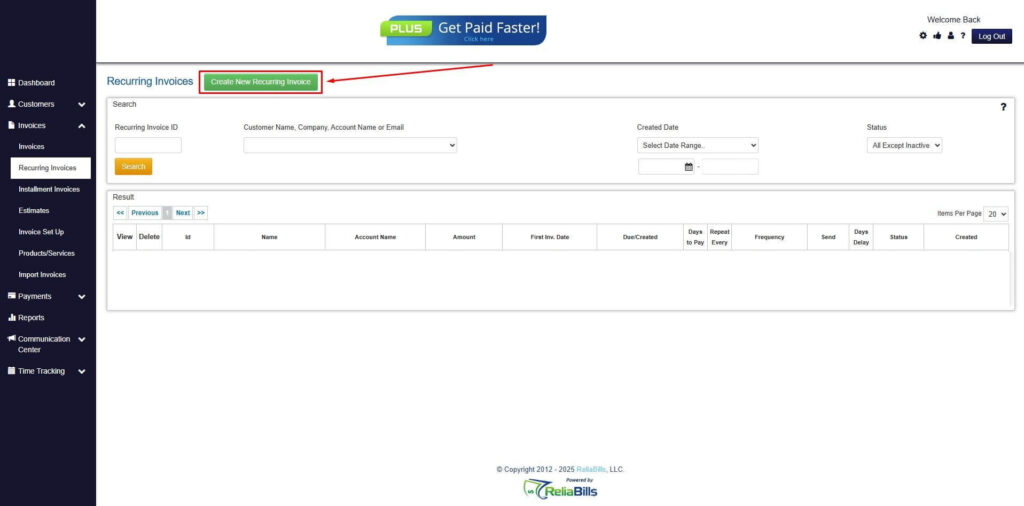
Step 2: Click on Recurring Invoices
- Navigate to the Invoices Dropdown and click on Recurring Invoices for an overview of the list of your existing customers.
Step 3: Go to the Customers Tab
- If you have already created a customer, search for them in the Customers tab and make sure their status is “Active”.
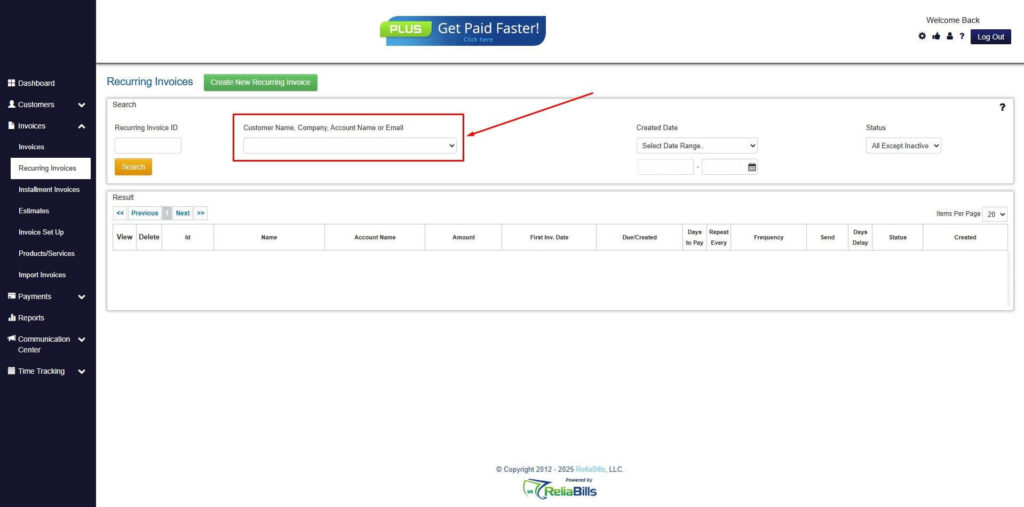
Step 4: Click the Create New Recurring Invoice
- If you haven’t created any customers yet, click the Create New Recurring Invoice to create a new customer.
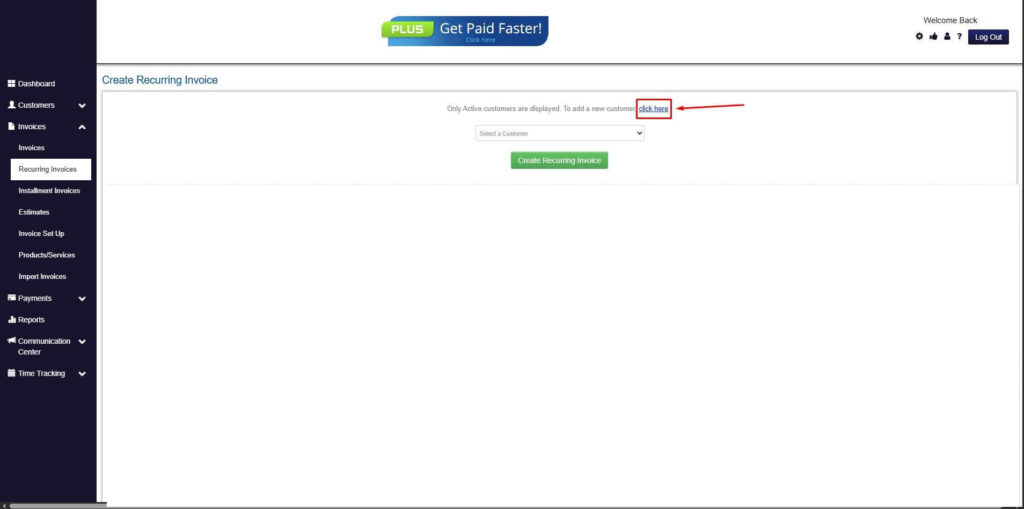
Step 5: Click on the “Click here” Button
- Click on the “Click here” button to proceed with the recurring invoice creation.
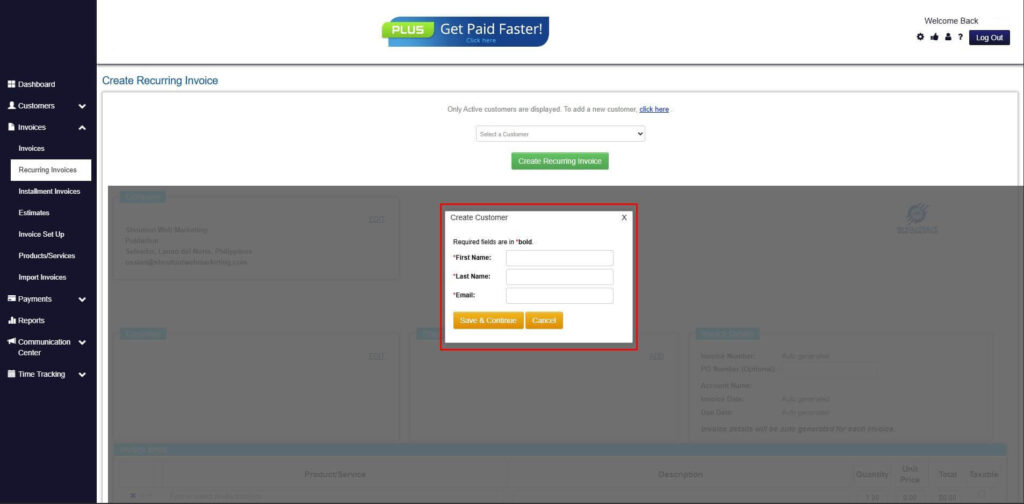
Step 6: Create Customer
- Provide your First Name, Last Name, and Email to proceed.
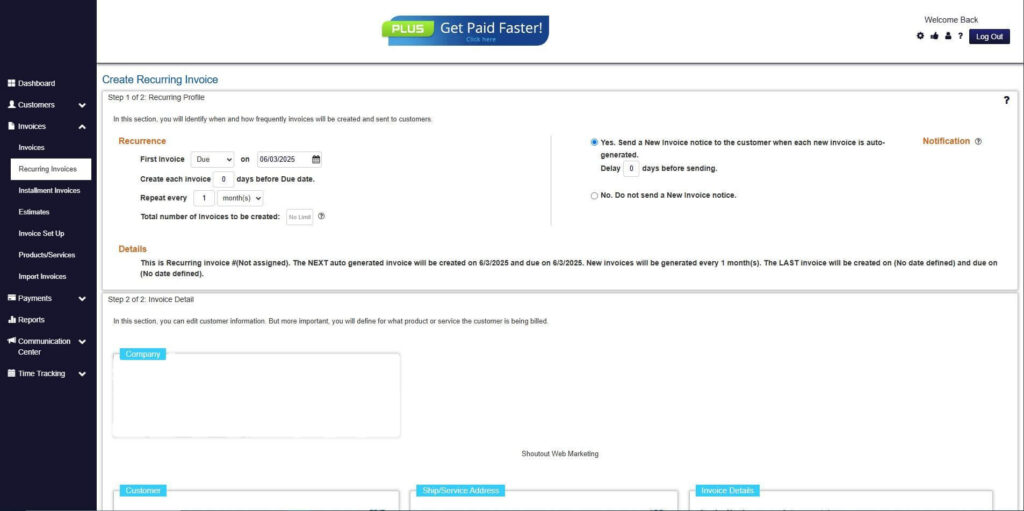
Step 7: Fill in the Create Recurring Invoice Form
- Fill in all the necessary fields.
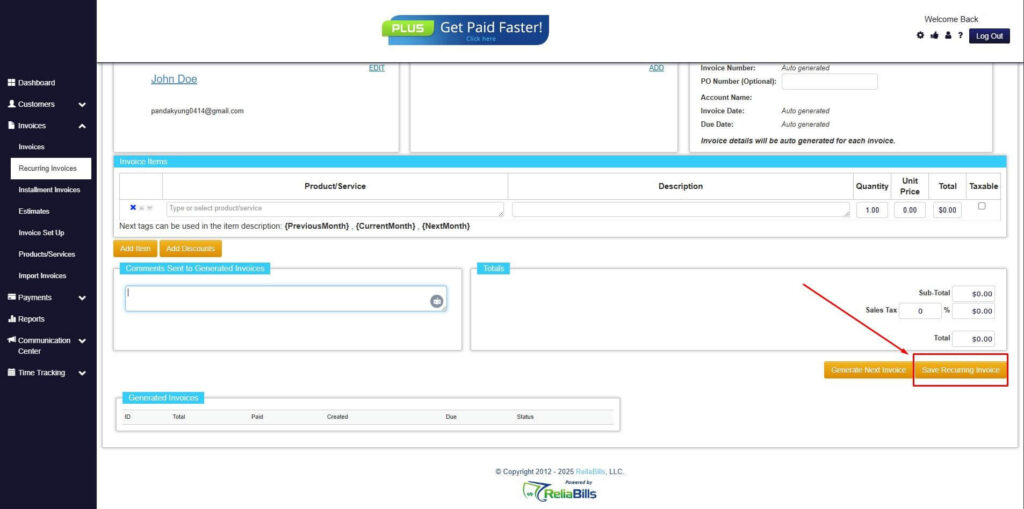
Step 8: Save Recurring Invoice
- After filling up the form, click “Save Recurring Invoice” to continue.
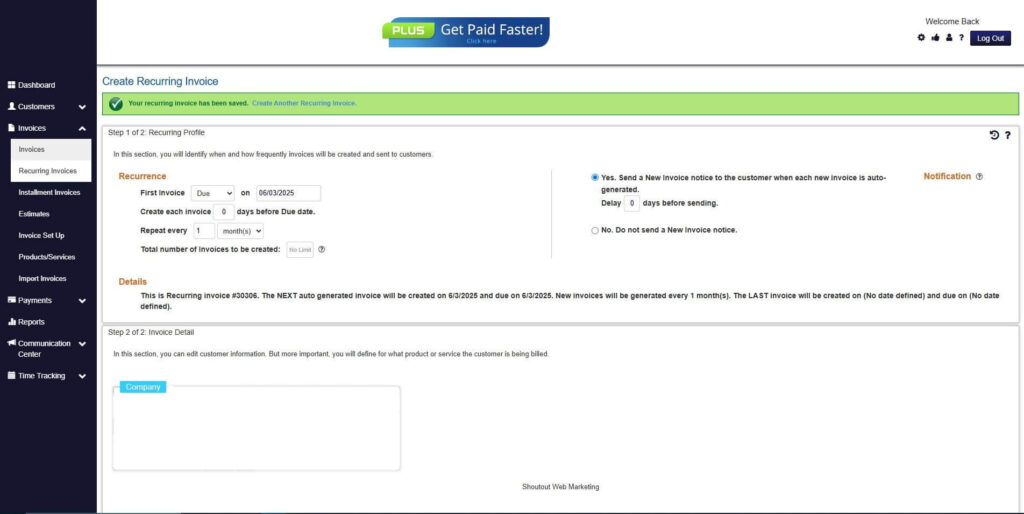
Step 9: Recurring Invoice Created
- Your Recurring Invoice has been created.
Frequently Asked Questions
1. Do non-commercial invoices require payment processing?
No, non-commercial invoices typically do not involve payment collection. However, they still require accurate documentation and proper classification. Automation ensures these invoices are recorded without triggering payment workflows.
2. Can non-commercial invoices be automated in recurring billing systems?
Yes, modern billing platforms can automate non-commercial invoices alongside recurring billing. Automation allows these invoices to be issued without interfering with revenue billing. This keeps customer records complete and accurate.
3. How are automated non-commercial invoices stored and accessed?
Automated non-commercial invoices are stored in a centralized system. This makes them easy to retrieve for audits, reporting, or internal reviews. Centralized storage improves record retention and compliance readiness.
4. Is automation suitable for small businesses managing non-commercial invoices?
Yes, automation is especially beneficial for small businesses with limited administrative resources. It reduces manual work, improves accuracy, and supports growth. Even low invoice volumes benefit from standardized processes.
5. What happens if non-commercial invoice requirements change?
Automated systems can be updated with new rules, templates, or fields as requirements evolve. This flexibility helps businesses stay compliant without rebuilding processes. Automation supports long-term adaptability.
Conclusion
Automated invoicing transforms non-commercial invoice management by reducing errors, improving compliance, and centralizing documentation. What was once an overlooked process becomes structured and reliable through automation.
By simplifying invoice creation, tracking, and reporting, businesses gain better control over non-revenue transactions. Automation also reduces administrative workload and supports scalability as operations grow.
For businesses seeking efficiency and accuracy, adopting automated invoicing for non-commercial invoices is a practical and future-ready decision.