

Submitting an invoice for insurance claims is a critical part of working with insurance companies. Whether you are a contractor, repair specialist, medical provider, or any other service professional, your invoice determines how quickly you get paid. A clear and complete invoice can speed up approvals, reduce back and forth, and avoid delays that often frustrate both you and the claimant.
Insurance companies are strict about documentation, format, and accuracy. This is why creating a detailed invoice that matches insurer expectations can make a big difference in your payment timeline. With the right structure, supporting files, and submission method, you can streamline the process and make every claim easier to navigate.
What Is an Insurance Claim Invoice?
An insurance claim invoice is a formal document sent to an insurance company to request payment for services related to a covered claim. Unlike a regular service invoice, this document must match the insurer’s requirements, include claim identifiers, and clearly justify every charge.
It provides information about the service provider, the claimant, and the work performed, along with itemized pricing and proof of the work completed. Because insurance companies review these invoices for accuracy and validity, the format must be precise and consistent.
When Do You Need to Submit an Invoice for Insurance Claims?
You may need to submit an invoice for insurance claims in many situations, including:
- Property repairs after fire, water, or storm damage
- Auto body work and mechanical repairs
- Medical treatments covered by a policy
- Contractor jobs such as roofing, flooring, plumbing, or electrical work
- Emergency services and immediate-response work
- Restoration and cleanup projects
- Assessments, inspections, or diagnostic services connected to a claim
Whenever insurance is responsible for paying you directly or reimbursing a customer, you must provide a formal invoice for insurance review.
Required Details in an Insurance Claim Invoice
To avoid delays, be sure your invoice includes all essential elements. Insurance companies check these details carefully:
- Business name, address, phone, and email
- Claimant or customer details
- Policy number
- Claim number
- Service date and project description
- Itemized charges
- Labor hours and rates
- Materials, parts, equipment, and fees
- Total amount due
- Payment terms
- Supporting documents such as photos, estimates, or receipts
Missing even one of these details can result in rejections or follow-up requests.
How To Create an Invoice for Insurance Claims (Step-by-Step)
Here is a simple process you can follow:
1. Start with your business information
Include your name, logo, address, and contact details so insurers can identify you easily.
2. Add the claimant details
List the customer’s name, address, and contact information.
3. Include policy and claim numbers
These numbers help insurers match your invoice to the correct case.
4. Describe the services performed
Use clear language to explain what work was done and why.
5. Itemize every charge
Break down labor, materials, equipment, and any fees.
6. Attach supporting evidence
Include photos, reports, receipts, and other documentation.
7. Add totals and payment terms
End with a clear summary and due date.
8. Review for accuracy
Double-check spelling, math, and documentation.
Insurance adjusters appreciate clarity and completeness, which helps them process the claim faster.
How To Submit an Invoice to Insurance Companies
There are several ways to send your invoice:
- Email
Send the invoice and attachments directly to the adjuster or claims department. - Client portals
Many insurance companies use online submission systems. - Insurance adjuster channels
Adjusters often provide direct upload links. - Physical mail
Some insurers still accept printed invoices when digital submissions are not available.
Always follow the insurer’s instructions. Using the wrong submission method can delay approval.
Tips for Faster Claim Approval and Payment
To speed up processing:
- Keep the invoice clean, organized, and easy to read
- Use clear descriptions and avoid vague terms
- Attach all required proof
- Match the insurer’s preferred format
- Follow up with the adjuster after submission
- Keep a record of every file sent
Small improvements can make a big difference in how fast you get paid.
Common Mistakes to Avoid
Avoid these common errors:
- Missing claim or policy numbers
- Vague service descriptions
- Incorrect pricing or math
- Forgetting supporting documentation
- Unclear payment terms
- Sending the invoice to the wrong email or portal
These mistakes often cause rejections or long delays.
Insurance Claim Invoice Template (Example)
Below is a simple layout you can use:
INVOICE FOR INSURANCE CLAIM
Business Name
Business Address
Phone and Email
Client Name
Client Address
Policy Number
Claim Number
Service Date
Service Description
Itemized Charges:
- Labor
- Materials
- Equipment
- Additional fees
Subtotal
Taxes
Total Amount Due
Payment Terms
Attachments: Photos, reports, receipts, or documents
How ReliaBills Can Help With Insurance Claim Invoicing
ReliaBills makes creating and managing an invoice for insurance fast, accurate, and stress-free. With customizable invoice templates, you can include claim numbers, itemized repair details, and all required supporting information in a clean and professional layout insurers appreciate.
The platform also organizes documents such as estimates, photos, and inspection files, keeping everything in one place for easy access. This helps you avoid missing files or scrambling for paperwork when an adjuster asks for verification. Automated reminders ensure clients and insurers stay on track, reducing delays and improving approval timelines.
For businesses that handle ongoing claim-related services, ReliaBills supports recurring billing. This is especially helpful for restoration companies, medical providers, home care services, and contractors who bill insurers on a regular schedule. With automated billing, clear tracking, and fast online payments, you can improve cash flow and keep your invoicing process running smoothly.
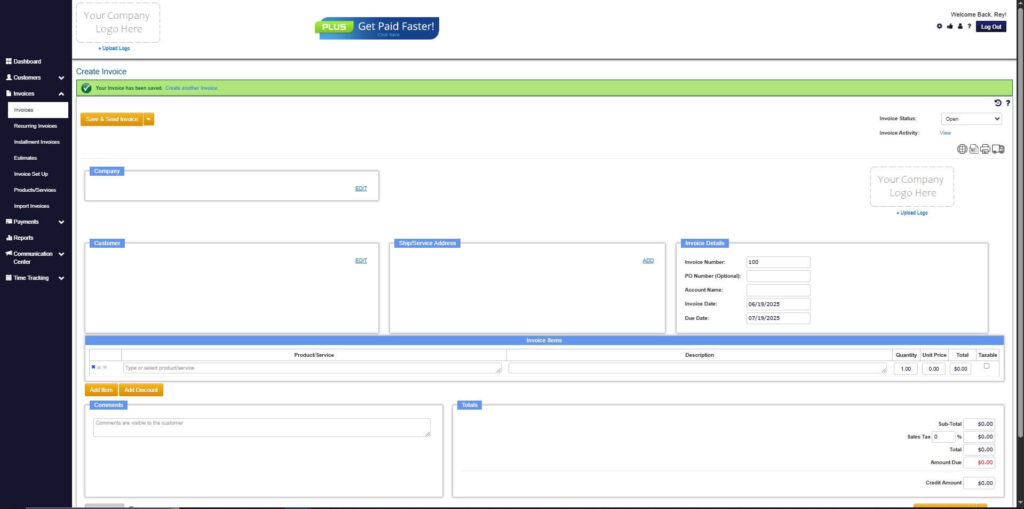
How to Create a New Invoice Using ReliaBills
Creating an invoice using ReliaBills involves the following steps:
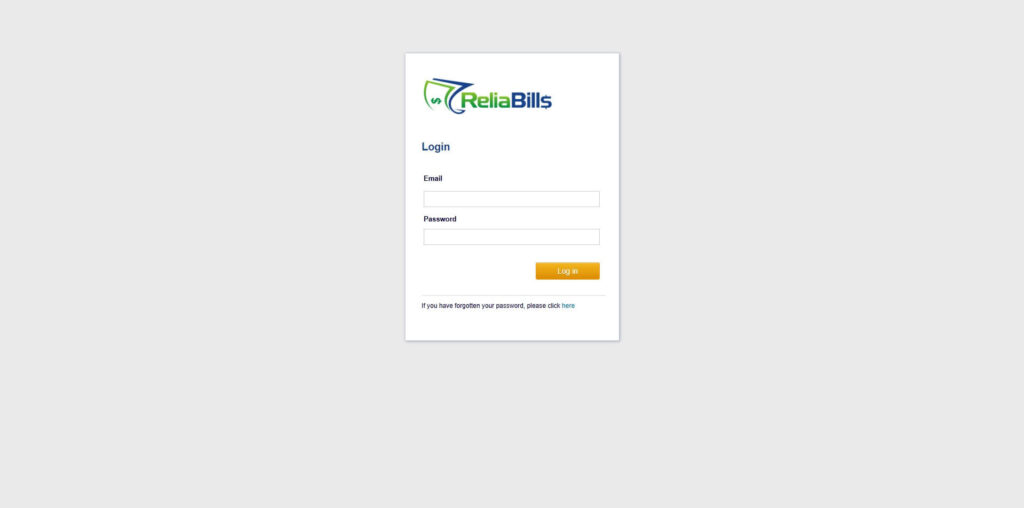
Step 1: Login to ReliaBills
- Access your ReliaBills Account using your login credentials. If you don’t have an account, sign up here.
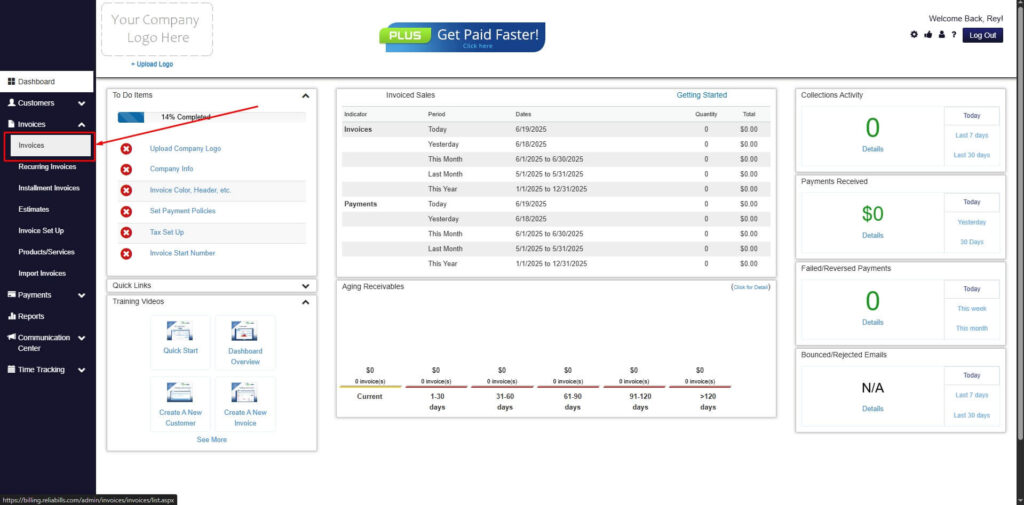
Step 2: Click on Invoices
- Navigate to the Invoices Dropdown and click on Invoices.
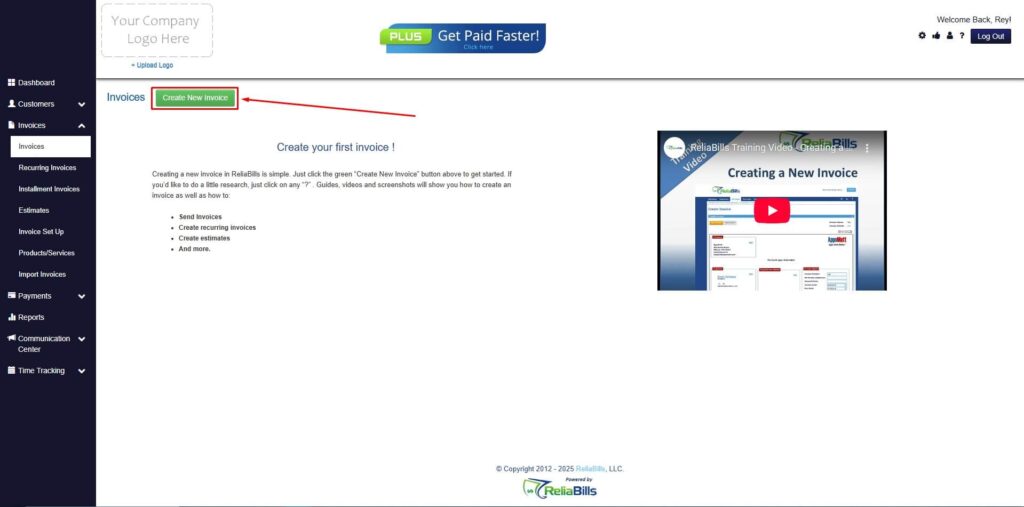
Step 3: Click ‘Create New Invoice’
- Click ‘Create New Invoice’ to proceed.
Step 4: Go to the ‘Customers Tab’
- If you have already created a customer, search for them in the Customers tab and make sure their status is “Active”.
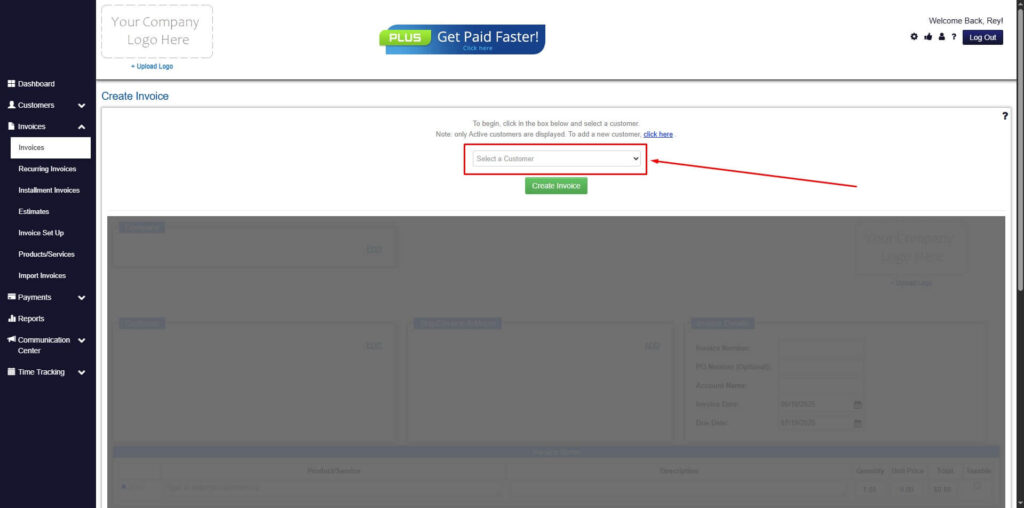
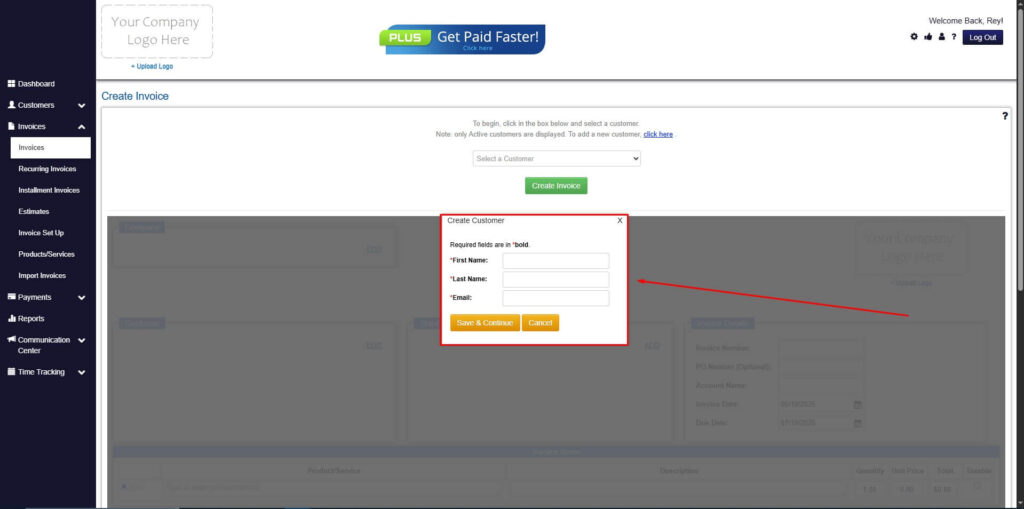
Step 5: Create Customer
- If you haven’t created any customers yet, click the ‘Click here’ to create a new customer.
- Provide the First Name, Last Name, and Email to proceed.
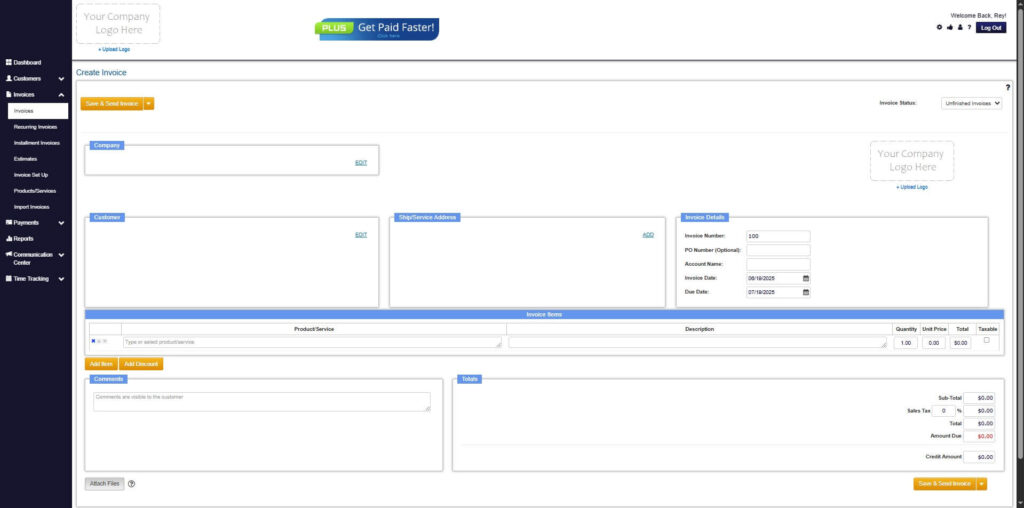
Step 6: Fill in the Create Invoice Form
- Fill in all the necessary fields.
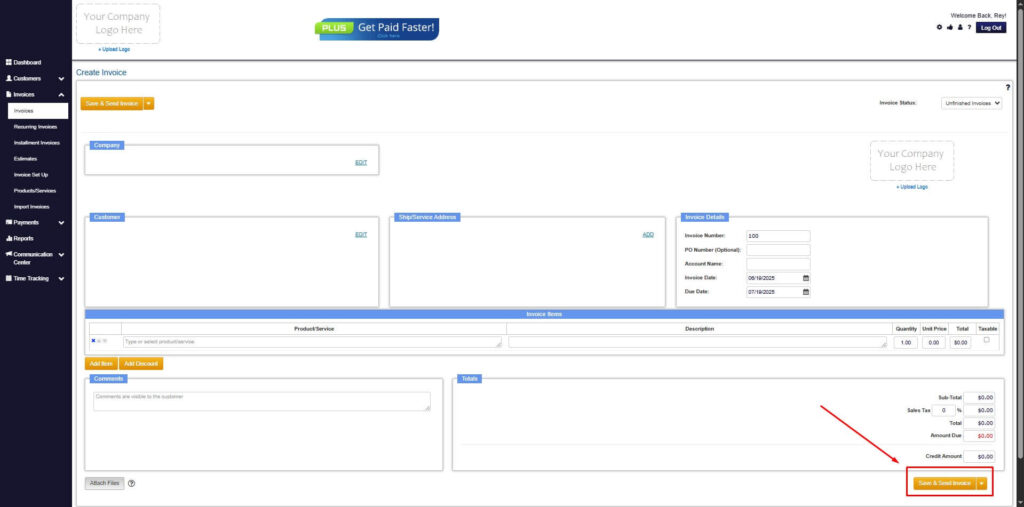
Step 7: Save Invoice
- After filling out the form, click “Save & Send Invoice” to continue.
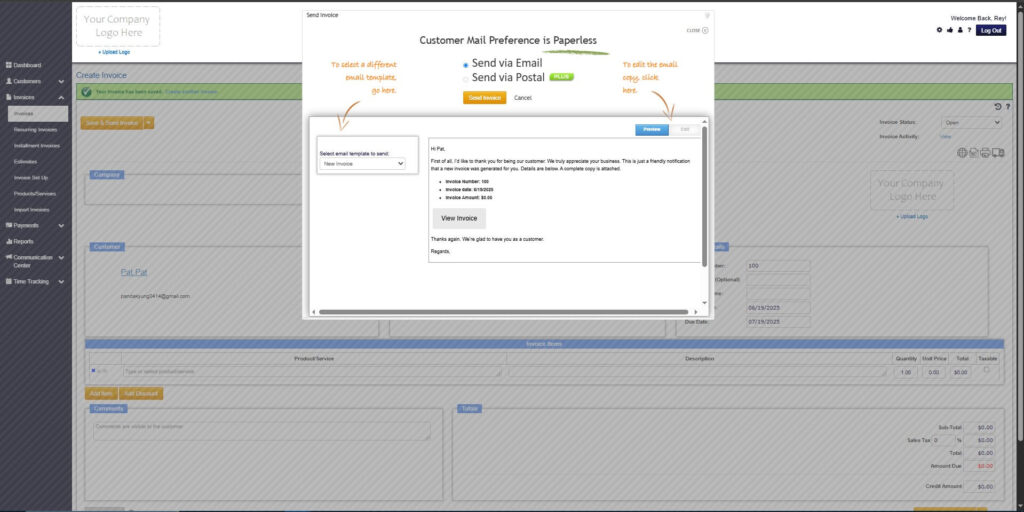
Step 8: Invoice Created
- Your Invoice has been created.
Frequently Asked Questions
1. Do insurance companies require a specific invoice format?
Some do. Always check with the insurer or adjuster.
2. Can I send an invoice before the work is finished?
Only if the insurance company allows partial billing or progress invoicing.
3. Should I include photos with every invoice?
If the claim involves physical repairs or inspections, attaching photos is strongly recommended.
4. How long does it take to get paid?
Timing varies, but clear and complete invoices typically get processed faster.
Conclusion
Submitting an invoice for insurance does not have to be complicated as long as you follow the right structure and include all the required details. With accurate documentation, clear descriptions, and proper formatting, you can speed up approval and receive payments much sooner. Tools like ReliaBills make the process even easier by automating billing, organizing documents, and offering recurring billing for businesses that work with insurers regularly.