
Whether you’re spinning at weddings, clubs, corporate events, or private parties, being a DJ means juggling creativity and business. One part of that business is sending clean, professional invoices that help you get paid on time. A well-made invoice doesn’t just list your rates. It shows clients that you take your work seriously and value clear communication.
In competitive DJ markets, presentation matters. An appealing invoice can strengthen your branding, reduce payment delays, and build trust with new and returning clients. With the right structure and design, you can create an invoice for DJ services that supports your reputation and makes payment processing smooth and stress-free.
What Is a DJ Service Invoice?
A DJ services invoice is a document you send to a client requesting payment for a performance or event. It outlines your hours, services, equipment fees, and payment terms. Unlike general service invoices, a DJ invoice includes event-specific details, such as set duration, venue information, and add-ons like sound systems or lighting.
This invoice acts as a professional record that helps both you and your client stay aligned on expectations and final costs.
Why an Appealing Invoice Matters for DJs
Your invoice is part of your brand. If it’s clean, organized, and visually appealing, clients immediately view you as reliable and professional. A polished invoice can also reduce back-and-forth communication, making it clear what the client owes and when.
An appealing invoice can also improve client trust. When people book DJs for weddings or major events, they want reassurance that everything is handled properly. A strong invoice can set the right tone from the start.
Key Elements Every DJ Invoice Should Include
To create an effective invoice for DJ services, make sure you include:
- Your business name or DJ stage name
- Contact information
- Client details
- Event name and description
- Date, time, and venue
- Services provided
- Hourly or flat rate
- Equipment or add-on fees
- Deposits received
- Total amount due
- Accepted payment methods
- Payment terms and due dates
These details help your clients understand exactly what they’re paying for.
How to Create an Appealing DJ Invoice (Step-by-Step)
- Start with branding. Add your logo, color scheme, and professional header.
- Enter client and event details. Be specific about the date, venue, and service type.
- Break down your charges. List DJ hours, equipment rentals, travel fees, and any special requests.
- Include notes or policies. Add cancellation rules, overtime rates, or deposit policies.
- Review before sending. Make sure the numbers and dates are accurate.
- Send your invoice promptly. The quicker you send it, the faster you get paid.
Design Tips to Make Your DJ Invoice Stand Out
A DJ invoice doesn’t have to look boring. Simple design choices can make a big difference:
- Use consistent fonts and spacing
- Add your logo or branding
- Use subtle color accents
- Keep sections clearly separated
- Avoid clutter
- Make totals easy to locate
The goal is to look professional while staying true to your DJ identity.
Example DJ Invoice Template
Here’s a simple layout you can follow:
- DJ Name or Business Name
- Contact Details
- Client Name
- Event Date and Venue
- Services Provided
- DJ set hours
- Equipment
- Add-ons
- Subtotal
- Deposits Paid
- Total Amount Due
- Payment Terms
- Notes
How to Send and Manage DJ Invoices Effectively
Sending invoices right after the event or immediately after booking helps maintain professionalism. Make sure clients know your preferred payment methods and follow up politely if payments are late. Keeping good records of past invoices also makes tax season and repeat bookings much easier to manage.
Automation tools can help you set reminders, manage deposits, and organize client communication without needing extra manual work.
How ReliaBills Can Help DJs With Professional Invoicing
ReliaBills gives DJs an easy way to create polished, branded invoices without spending hours formatting documents. You can build a fully customized invoice for DJ services that includes your rates, equipment fees, and event details. Everything is laid out clearly so clients know exactly what to expect.
Beyond creating invoices, ReliaBills helps DJs collect payments faster. You can set payment reminders, accept online payments, and even schedule automated billing for regular clients like bars, clubs, or entertainment venues. With features for tracking invoices, sending updates, and managing deposits, ReliaBills helps you stay organized and professional.
If you want to level up your business, ReliaBills also supports recurring billing, client management tools, and branded communication. This helps DJs reduce administrative work and spend more time doing what they do best performing and delivering great music experiences.
How to Create a New Recurring Invoice Using ReliaBills
Creating a New Recurring Invoice using ReliaBills involves the following steps:
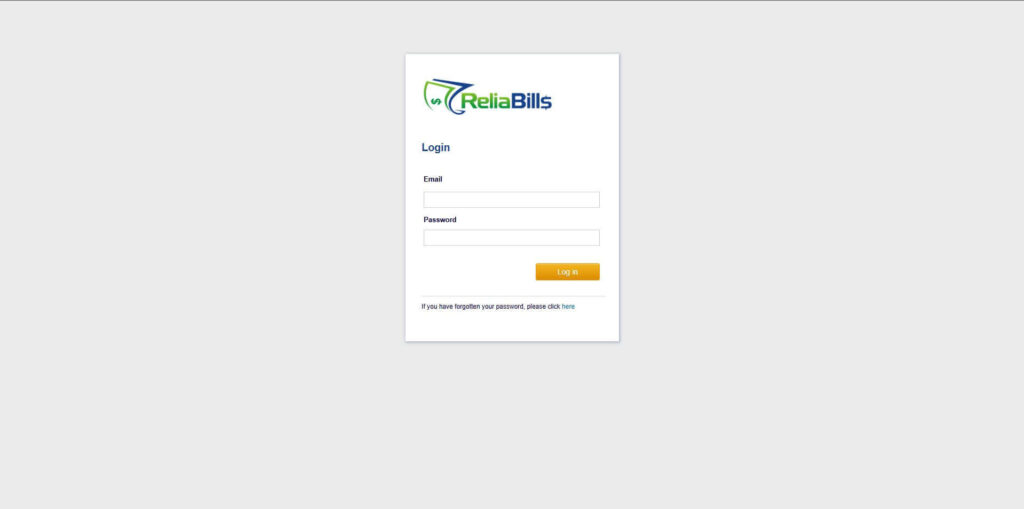
Step 1: Login to ReliaBills
- Access your ReliaBills Account using your login credentials. If you don’t have an account, sign up here.
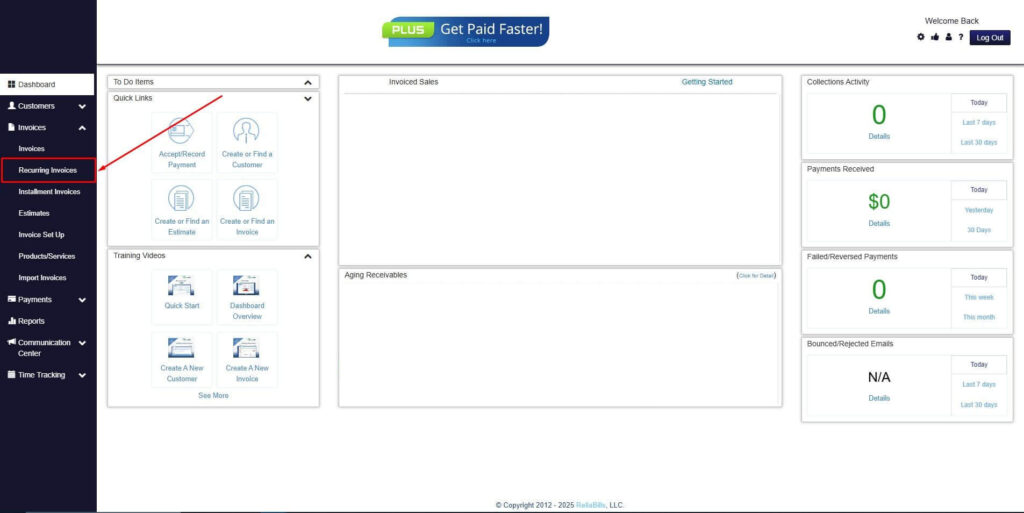
Step 2: Click on Recurring Invoices
- Navigate to the Invoices Dropdown and click on Recurring Invoices for an overview of the list of your existing customers.
Step 3: Go to the Customers Tab
- If you have already created a customer, search for them in the Customers tab and make sure their status is “Active”.
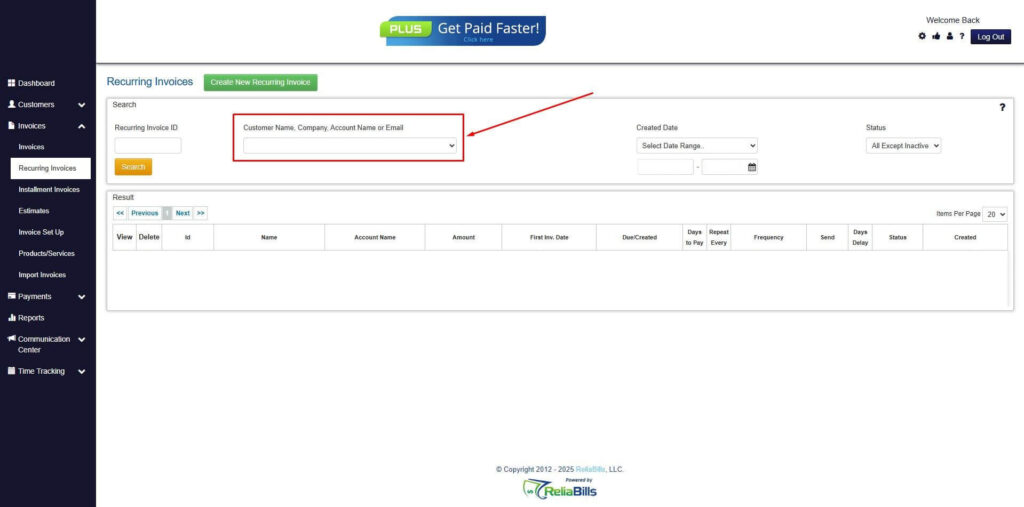
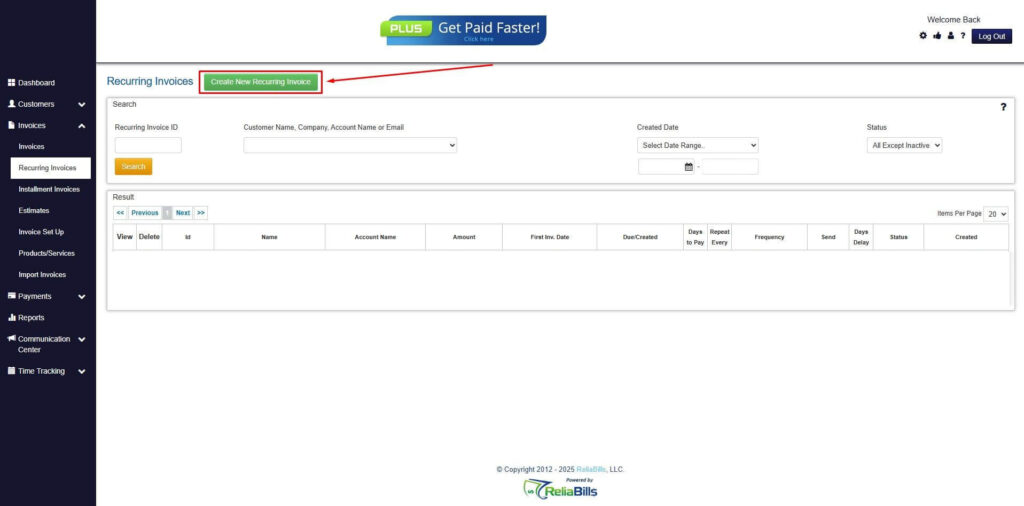
Step 4: Click the Create New Recurring Invoice
- If you haven’t created any customers yet, click the Create New Recurring Invoice to create a new customer.
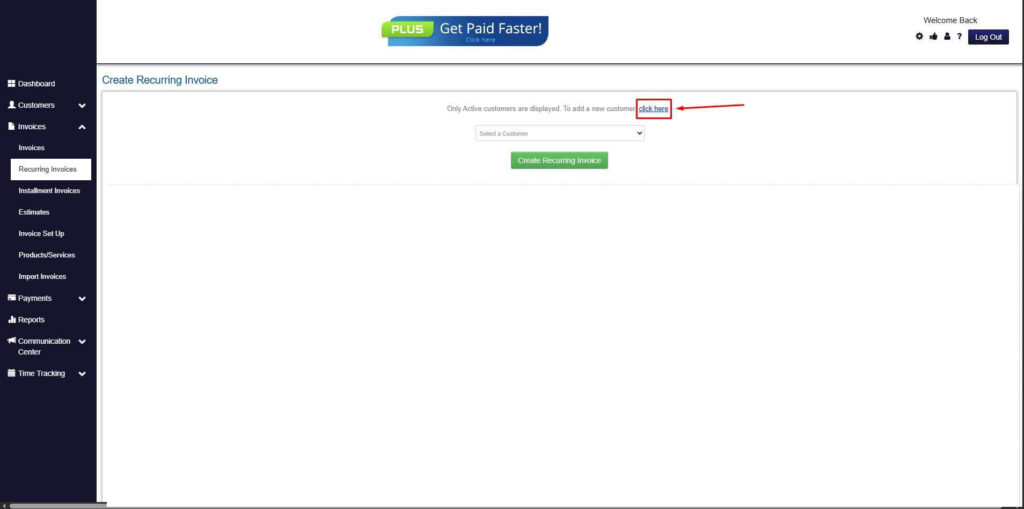
Step 5: Click on the “Click here” Button
- Click on the “Click here” button to proceed with the recurring invoice creation.
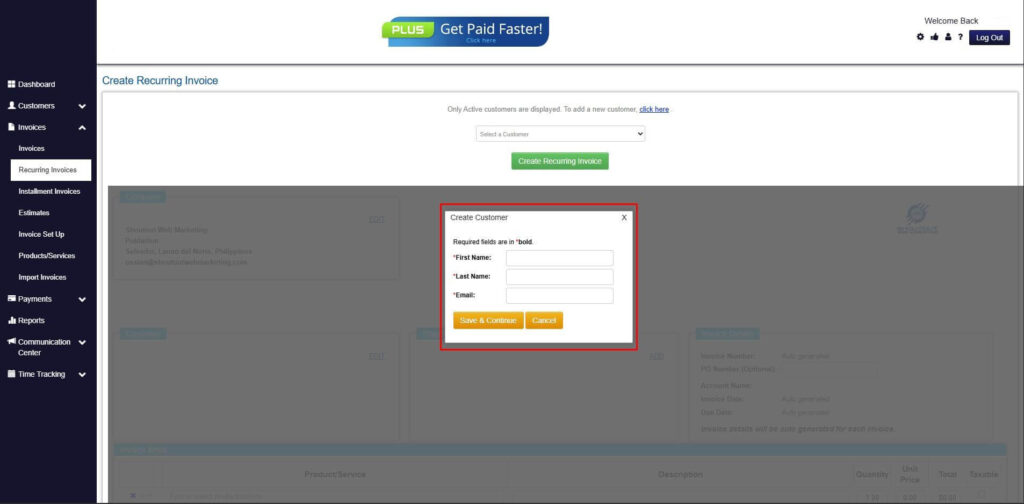
Step 6: Create Customer
- Provide your First Name, Last Name, and Email to proceed.
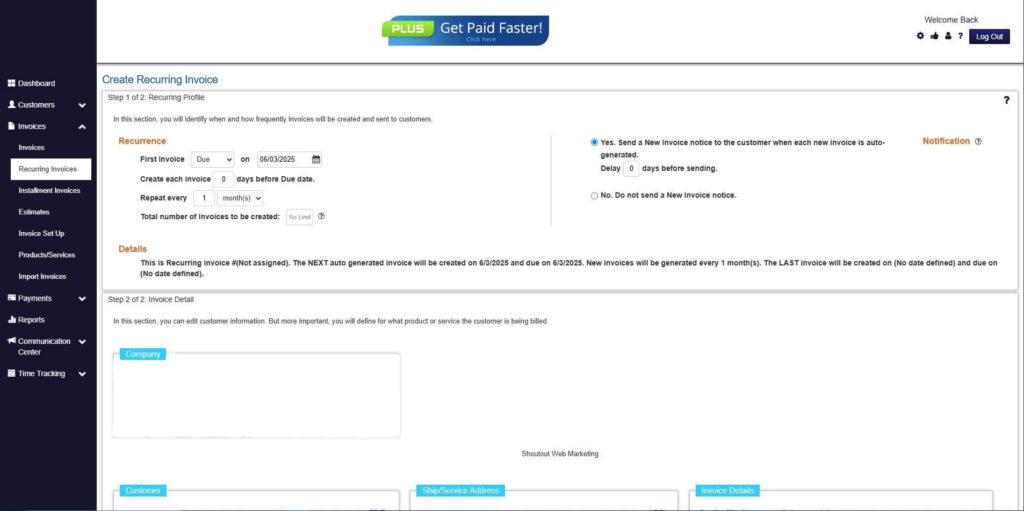
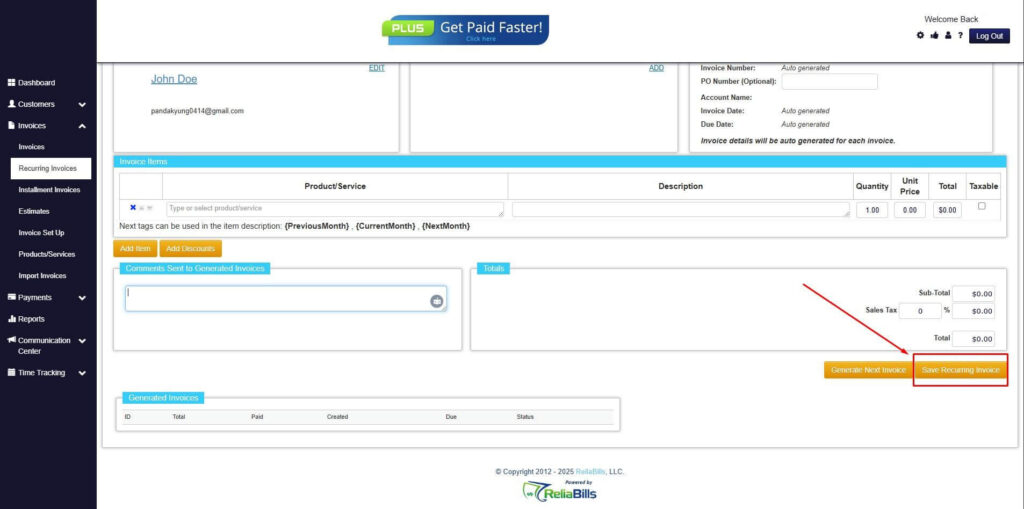
Step 7: Fill in the Create Recurring Invoice Form
- Fill in all the necessary fields.
Step 8: Save Recurring Invoice
- After filling up the form, click “Save Recurring Invoice” to continue.
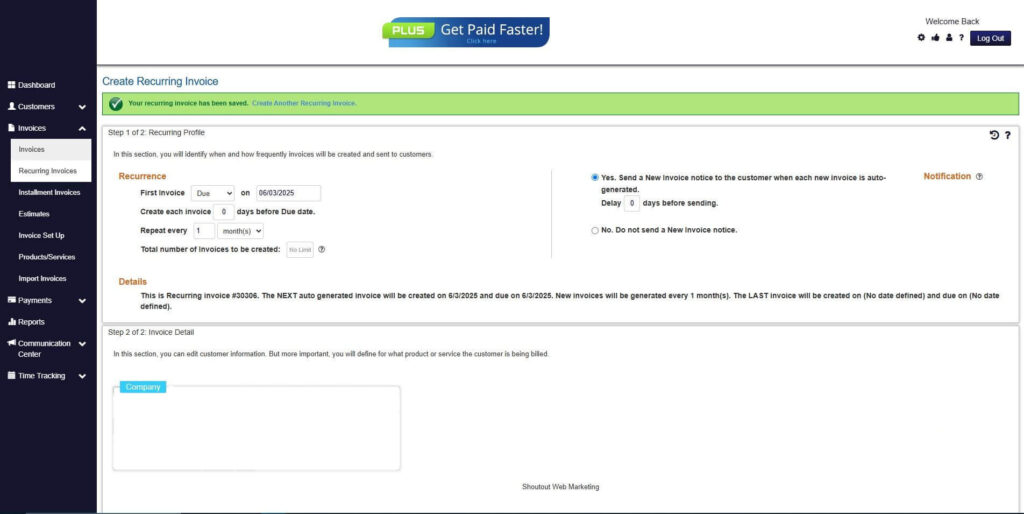
Step 9: Recurring Invoice Created
- Your Recurring Invoice has been created.
Frequently Asked Questions
1. Do DJ invoices require a deposit section?
Yes. If your booking requires a deposit, it should be listed on your invoice for transparency.
2. Can DJs charge extra for equipment?
Absolutely. Any equipment or add-ons like lighting or speakers should be added as separate line items.
3. Should a DJ invoice include a cancellation policy?
Yes. Including this helps protect your time and sets clear expectations for clients.
4. How soon should DJs send their invoices?
It’s best to send them right after booking or immediately after completing the event.
5. Do DJs need invoicing software?
It isn’t required, but platforms like ReliaBills make invoicing faster, more organized, and more professional.
Conclusion
A clean and appealing invoice helps DJs stay professional, improve client trust, and get paid on time. By including the right details and presenting your services clearly, you make it easier for clients to understand charges and follow your payment terms. With tools like ReliaBills, you can automate invoicing, manage payments, and keep your DJ business running smoothly.