

For first-time employers, calculating payroll can feel overwhelming. There are many moving parts to consider employee classifications, pay types, deductions, taxes, and payroll schedules. Any errors can lead to unhappy employees, compliance issues, or even penalties.
Accurate payroll ensures employees are paid correctly and on time, which builds trust and strengthens morale. It also supports regulatory compliance and helps business owners maintain financial stability. Learning how to calculate payroll properly from the start can save time, reduce stress, and prevent costly mistakes down the line.
This guide is designed for new business owners and first-time employers. By the end, you will know exactly how to calculate payroll, manage deductions, handle employer contributions, maintain records, and leverage automation and recurring billing to streamline the process.
What You Need Before Calculating Payroll
Before starting payroll calculations, preparation is key. Gathering the right information and tools ensures accuracy and efficiency.
The first step is classifying your workers correctly. Employees can be either full-time, part-time, or independent contractors. Misclassification can lead to tax penalties and compliance violations. Next, determine the pay types. Are employees hourly or salaried? Do any receive commissions, bonuses, or overtime? Understanding this ensures correct calculations.
Establish a pay schedule weekly, biweekly, or monthly and decide on the payroll period. Collect all required employee tax forms, including federal W-4 forms and any state or local tax documentation. Having this data organized helps first-time employers avoid mistakes and sets the foundation for smooth payroll processing.
Understanding Gross Pay
Gross pay is the total amount an employee earns before any deductions. It is the starting point for payroll calculations and must be accurate.
For hourly employees, gross pay equals hours worked multiplied by the hourly rate. Overtime hours, usually calculated at 1.5 times the standard rate, must be included according to labor laws. For salaried employees, gross pay is calculated by dividing the annual salary by the number of pay periods. Bonuses, commissions, and other incentives also need to be added to the total gross pay.
Accurate gross pay calculation is crucial, as all subsequent deductions, taxes, and net pay are based on it. Errors here can cascade into payroll mistakes, employee dissatisfaction, and compliance risks.
Payroll Deductions and Net Pay
After calculating gross pay, deductions are applied to arrive at net pay, the amount employees actually receive.
Mandatory deductions include federal, state, and local taxes, as well as Social Security and Medicare contributions (FICA). Voluntary deductions may include retirement contributions, health insurance premiums, union dues, or wage garnishments.
Calculating net pay involves subtracting all these deductions from gross pay. Common mistakes include omitting overtime, misapplying voluntary deductions, or incorrectly withholding taxes. Accurate net pay calculations are essential for employee trust and compliance.
Example:
An hourly employee earns $20/hour and worked 45 hours in a week. Gross pay is $950 ($20 × 40 hours + $30 overtime for 5 hours). Federal and state taxes, Social Security, and voluntary deductions reduce this to a net pay of $750.
Employer Payroll Taxes and Contributions
Employers are responsible for more than just employee deductions. These employer-paid payroll taxes must also be calculated and submitted.
This includes the employer portion of FICA taxes, federal and state unemployment taxes, and any additional contributions required by state or local regulations. Understanding these obligations ensures compliance and prevents penalties.
Properly accounting for employer taxes during payroll ensures that your total payroll cost is accurate and reflects all obligations, helping with cash flow planning and financial forecasting.
Step-by-Step Guide to Calculating Payroll
Calculating payroll for the first time may seem complicated, but breaking it into clear steps makes the process manageable and accurate.
1. Collect Employee Work Data
Begin by gathering time and attendance information for hourly employees and confirming salaries for salaried employees. Ensure you include any overtime hours, bonuses, or commissions. Mistakes at this stage can create cascading errors in payroll calculations. Using a time-tracking system or integrated payroll software can help eliminate human error.
2. Calculate Gross Pay
Gross pay is the total compensation before any deductions. For hourly employees, multiply hours worked by the hourly rate, and account for overtime pay at 1.5x the normal rate. Salaried employees’ gross pay is calculated by dividing their annual salary by the number of pay periods. Remember to include commissions, performance bonuses, and other earnings in this calculation. Accuracy here is crucial, as all taxes and deductions will be based on gross pay.
3. Apply Deductions and Taxes
Next, subtract mandatory deductions such as federal, state, and local taxes, Social Security, and Medicare contributions. Include voluntary deductions for benefits, retirement contributions, or wage garnishments if applicable. Be careful to apply the correct tax rates and withholdings. Payroll software can automatically calculate these amounts, ensuring accuracy and saving time.
4. Determine Net Pay
Net pay is the amount employees take home after all deductions. Double-check your calculations and ensure that any overtime or bonus adjustments are correctly included. Accurate net pay protects employee trust and ensures compliance with wage laws.
5. Distribute Payments and Maintain Records
Once calculations are complete, distribute payments via direct deposit or check. Record each transaction accurately, keeping documentation of gross pay, deductions, net pay, and employer contributions. Organized records simplify audits, reporting, and future payroll cycles.
6. Review and Verify Payroll
Before finalizing payroll, review the data to confirm there are no discrepancies. Compare with previous pay periods and ensure all deductions, overtime, and bonuses are correctly applied. This final check reduces the likelihood of errors and ensures employees are paid correctly and on time.
Payroll Recordkeeping and Reporting
Proper documentation is a cornerstone of compliant payroll management.
Employers must maintain detailed records of employee earnings, tax withholdings, benefits, and payroll payments. Payroll reports help reconcile accounts, track outstanding liabilities, and support tax filings. Regulations typically require payroll records to be kept for three to seven years, depending on federal and state laws. Organized recordkeeping also simplifies audits, ensures transparency, and allows for accurate forecasting of future payroll obligations.
Common Payroll Mistakes First-Time Employers Make
Even experienced employers can make mistakes, but first-time payroll administrators are particularly prone to errors. Understanding common pitfalls helps avoid costly issues and ensures a smoother payroll process.
1. Misclassifying Employees or Contractors
Treating employees as contractors or vice versa can have major tax implications. Misclassification can lead to penalties, fines, and unexpected tax liabilities. Always verify employee status before processing payroll.
2. Incorrect Tax Withholding
Failing to withhold the correct federal, state, or local taxes is one of the most common payroll mistakes. This can result in penalties for both the employer and employees. Using payroll software or consulting a tax professional can help ensure accurate withholding.
3. Missing Filing or Payment Deadlines
Payroll taxes and filings must be submitted on time to avoid fines and interest charges. Missing deadlines is easy for first-time employers, especially without a reliable system for tracking due dates. Automation and recurring billing reminders can help stay on top of deadlines.
4. Overlooking Overtime, Bonuses, or Incentives
Failing to calculate overtime correctly or forgetting to include bonuses and commissions can damage employee trust and potentially violate labor laws. Maintain detailed records of all compensation components to ensure accuracy.
5. Inconsistent Payroll Schedules
Paying employees on irregular or unpredictable schedules can lead to confusion, frustration, and decreased morale. Establish a consistent pay schedule and stick to it.
6. Poor Recordkeeping
Incomplete or disorganized payroll records make it difficult to track payments, reconcile accounts, and respond to audits. Accurate and organized documentation is essential for both compliance and operational efficiency.
7. Ignoring Changes in Employee Status or Tax Updates
Employees’ personal circumstances, such as exemptions or benefits elections, can change. Payroll administrators must update these changes promptly. Additionally, staying informed about updated tax rates or new regulations is essential to maintain compliance.
By being aware of these common mistakes and implementing checks, small business owners can ensure first-time payroll is accurate, timely, and compliant with regulations.
Payroll Tools and Software Options
Manual payroll calculations are prone to error, especially for first-time employers. Modern payroll tools simplify the process.
Payroll software automates gross-to-net calculations, tax withholdings, deductions, and reporting. These tools save time, reduce mistakes, and provide audit-ready records. Outsourcing payroll services is another option for businesses that prefer expert handling, particularly as the company grows or compliance requirements become more complex.
Using technology ensures that payroll remains accurate, efficient, and scalable as the business grows.
Managing Cash Flow for Payroll
Cash flow planning is critical for successful payroll management. Even profitable businesses can face challenges if revenue timing does not align with payroll obligations.
Planning ahead allows employers to allocate funds for payroll, ensuring employees are paid on time. Predictable income, supported by automated invoicing and recurring billing tools like ReliaBills, simplifies payroll management by providing a steady flow of funds. This stability allows business owners to focus on operations rather than scrambling to meet payroll each period.
How ReliaBills Helps First-Time Employers Calculate Payroll Confidently
Managing payroll for the first time can feel overwhelming, but ReliaBills simplifies the process by providing tools that keep payroll calculations accurate and consistent. With automated invoicing, businesses can reduce manual data entry and minimize errors in employee pay. This ensures that gross wages, deductions, and net pay are calculated correctly every time, giving first-time employers peace of mind.
Recurring billing through ReliaBills provides predictable revenue, which is critical for maintaining timely payroll. By automating client payments and scheduling invoices in advance, business owners can plan cash flow more effectively, making it easier to fund payroll on schedule. This feature helps prevent delays or shortfalls, even for businesses with fluctuating income.
Additionally, ReliaBills centralizes payment tracking, records all transactions, and generates clear reports. This visibility allows employers to monitor incoming funds, reconcile accounts, and plan for taxes and deductions efficiently. With these tools, first-time payroll becomes less intimidating, more reliable, and fully aligned with compliance requirements, enabling small business owners to focus on growth rather than administrative stress.
How to Create a New Recurring Invoice Using ReliaBills
Creating a New Recurring Invoice using ReliaBills involves the following steps:
Step 1: Login to ReliaBills
- Access your ReliaBills Account using your login credentials. If you don’t have an account, sign up here.

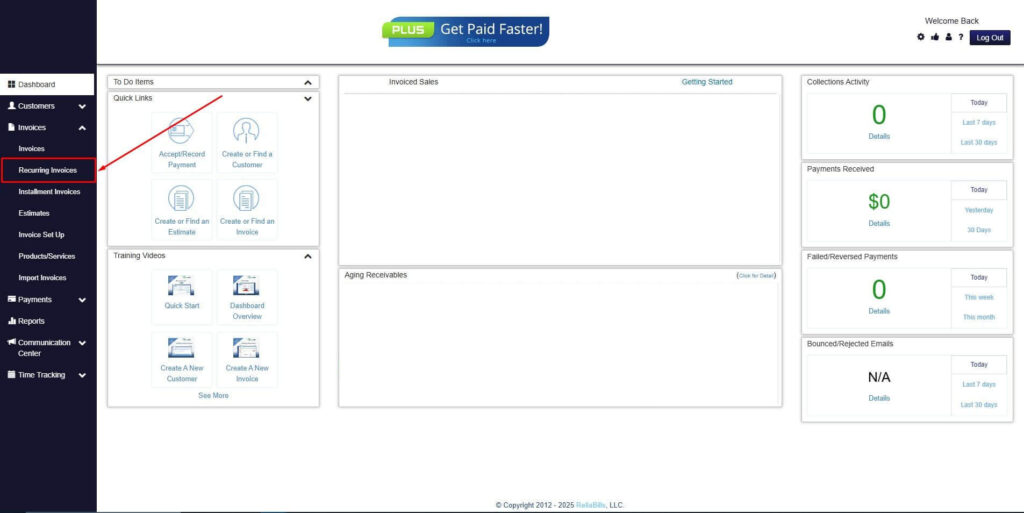
Step 2: Click on Recurring Invoices
- Navigate to the Invoices Dropdown and click on Recurring Invoices for an overview of the list of your existing customers.
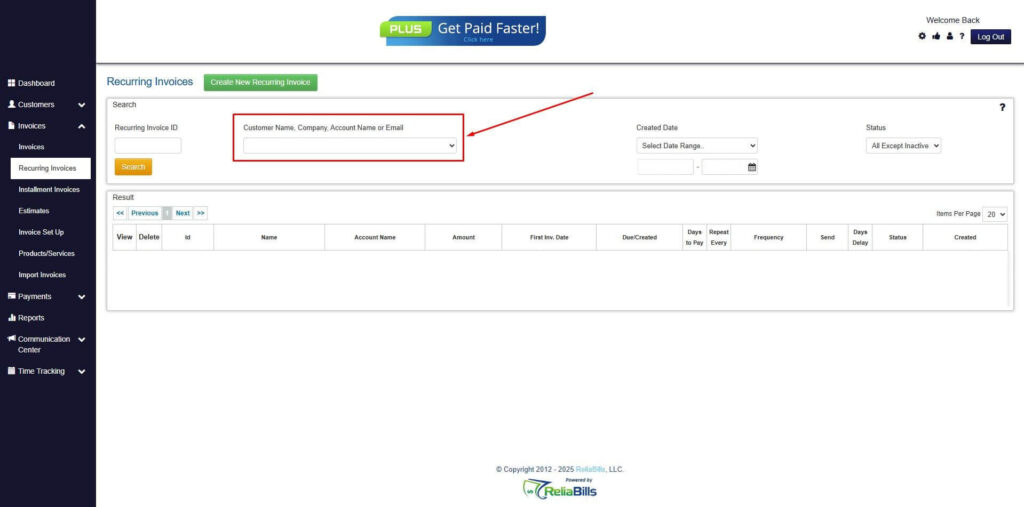
Step 3: Go to the Customers Tab
- If you have already created a customer, search for them in the Customers tab and make sure their status is “Active”.
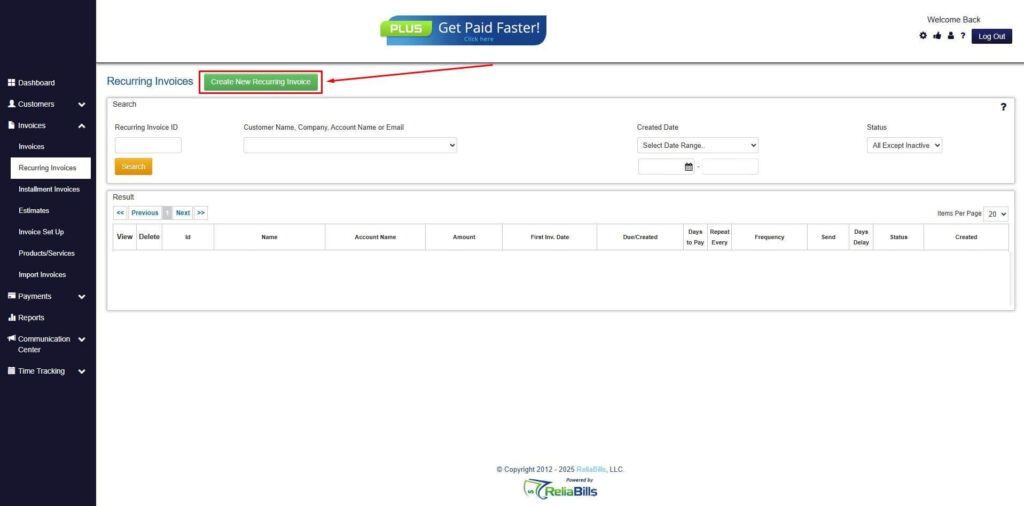
Step 4: Click the Create New Recurring Invoice
- If you haven’t created any customers yet, click the Create New Recurring Invoice to create a new customer.
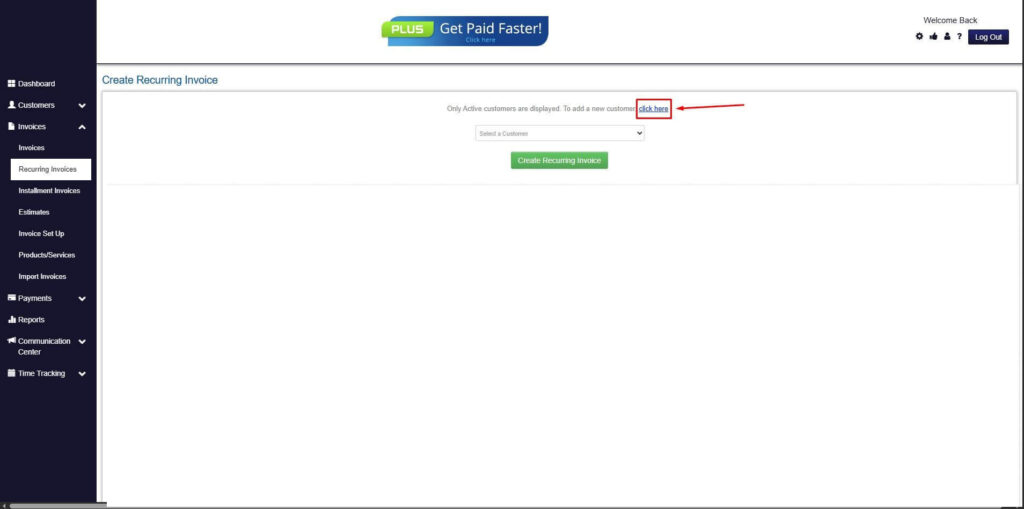
Step 5: Click on the “Click here” Button
- Click on the “Click here” button to proceed with the recurring invoice creation.
Step 6: Create Customer
- Provide your First Name, Last Name, and Email to proceed.
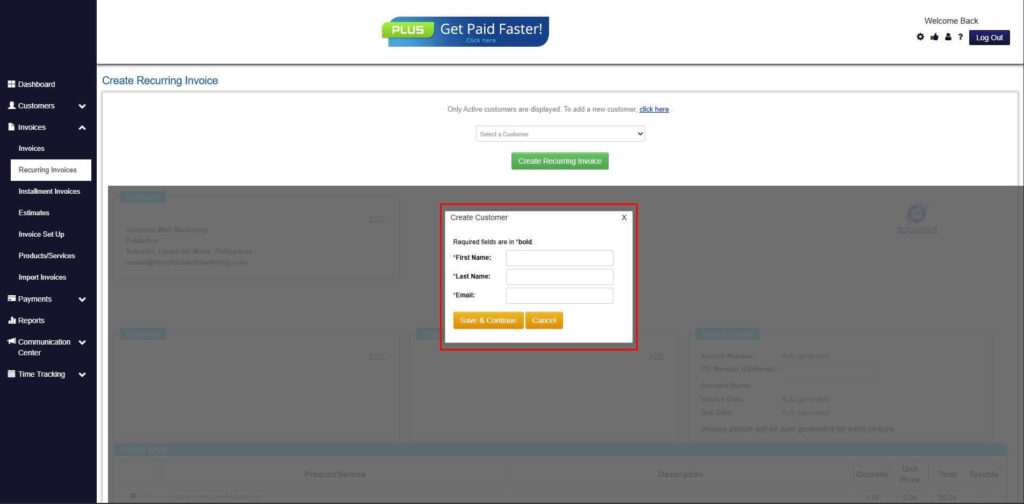
Step 7: Fill in the Create Recurring Invoice Form
- Fill in all the necessary fields.
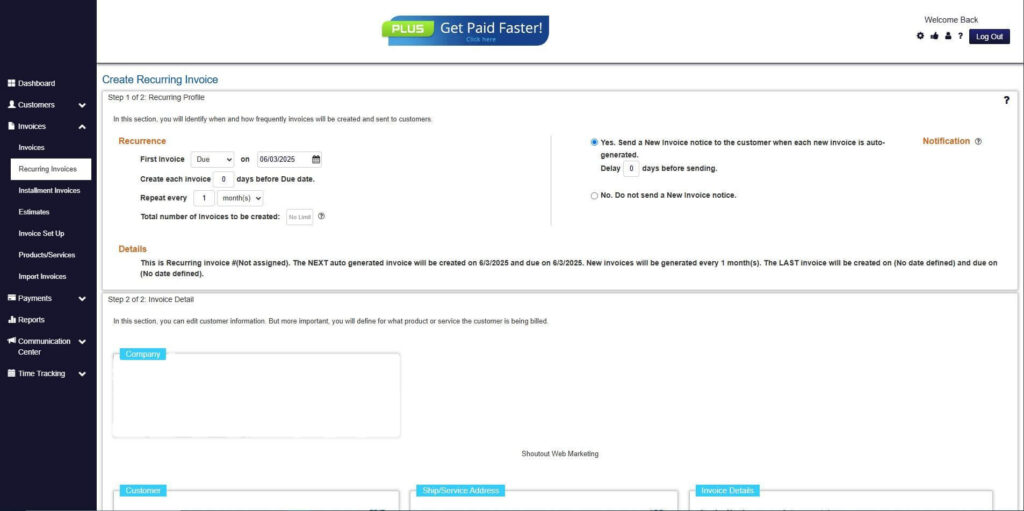
Step 8: Save Recurring Invoice
- After filling up the form, click “Save Recurring Invoice” to continue.
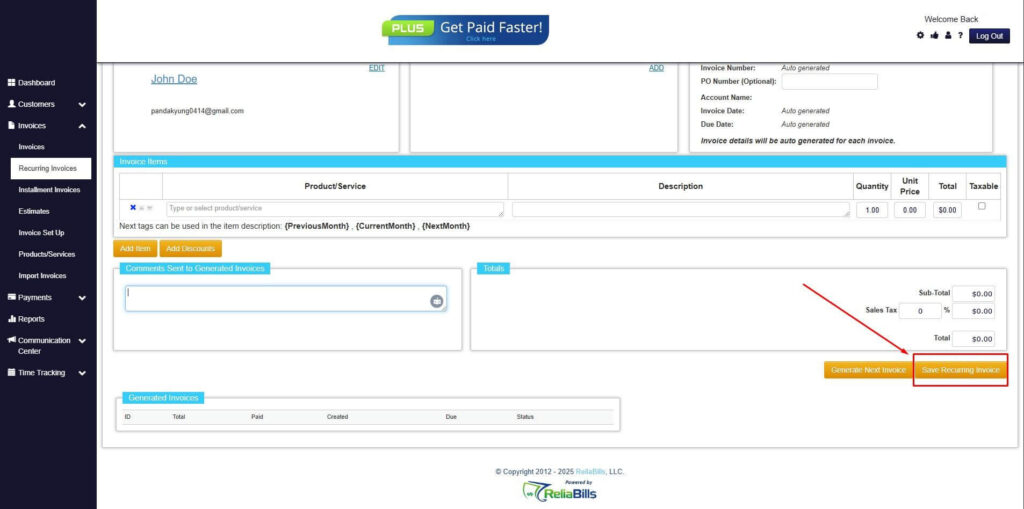
Step 9: Recurring Invoice Created
- Your Recurring Invoice has been created.
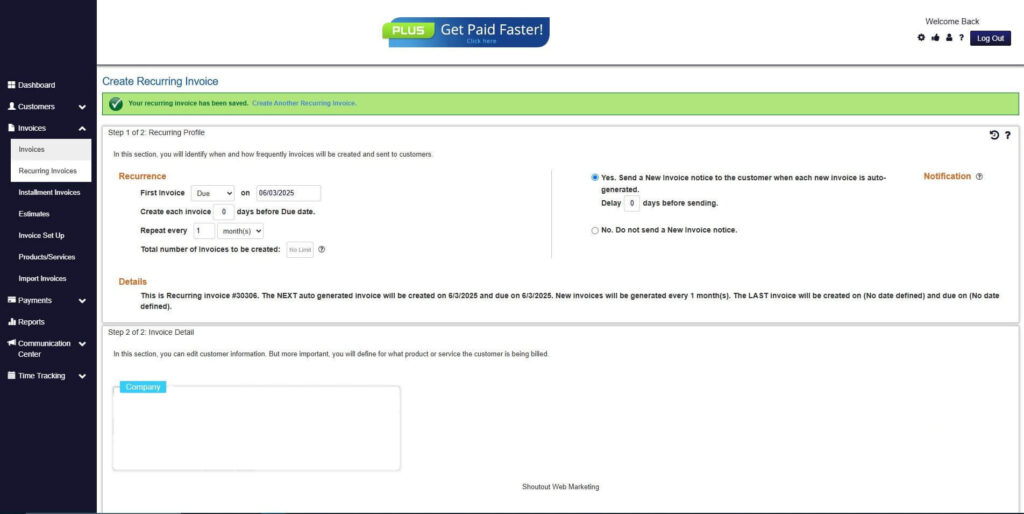
Frequently Asked Questions
1. How long does payroll processing take?
Processing time varies depending on the number of employees and method used. Automation can significantly reduce the time required.
2. Can payroll be automated from the start?
Yes, payroll software and tools like ReliaBills allow first-time employers to automate calculations, tax deductions, and payment tracking.
3. What if payroll errors occur?
Errors should be corrected immediately. Automation minimizes mistakes and maintains accurate audit trails for compliance.
4. How often should payroll be reviewed?
Payroll should be reviewed each pay cycle and audited periodically to ensure accuracy and regulatory compliance.
Conclusion
Calculating payroll for the first time can seem daunting, but careful preparation, understanding of payroll components, and the right tools make the process manageable. By learning how to calculate gross pay, deductions, employer contributions, and net pay, first-time employers can confidently manage payroll. Leveraging automated invoicing and recurring billing ensures predictable cash flow, reduces errors, and supports consistent employee payments. Following these steps helps business owners build trust, remain compliant, and manage their finances with confidence.