
Engineering projects often involve complex work, detailed deliverables, and multiple stages of completion. Because of this, engineers need a structured and reliable way to bill clients. A professional invoice not only outlines the work completed but also supports accurate records, smoother communication, and faster payments.
Using a standardized engineering invoice template helps ensure consistency from one client to another. It reduces mistakes, clarifies expectations, and allows engineering firms and independent contractors to spend more time on technical work and less time on administrative tasks.
What Is an Engineering Invoice Template?
An engineering invoice template is a ready-to-use document that outlines the structure of your billing format. It guides what information to include, such as project scope, labor hours, materials, and costs. Unlike a general service invoice, this template is designed for engineering work where calculations, project phases, permits, and professional fees often need to be itemized with clarity.
A solid engineering invoice template ensures accuracy and helps clients easily understand what they are being billed for.
When Should Engineers Use an Invoice Template?
Engineers use invoice templates in a variety of situations, including:
- Consulting and advisory work
- Technical design or drafting
- Site inspections and assessments
- Project management or supervision
- Prototyping and testing
- Ongoing contract work with monthly or milestone billing
Any time you deliver a professional service, a well-crafted engineering invoice keeps the billing process smooth and consistent.
Key Elements of an Engineering Invoice Template
A complete engineering invoice should include the following:
- Engineer or firm name, address, and contact details
- Client or company information
- Project name and reference number
- Detailed description of services performed
- Labor hours and hourly rates
- Materials, equipment, or special tools used
- Deliverables produced
- Project dates or milestones
- Payment terms and accepted payment methods
- Notes, disclaimers, or technical remarks
- Tax details, if applicable
These elements help create a transparent invoice clients can easily review and approve.
How To Create an Engineering Invoice Template (Step-by-Step)
- Start with your header
Add your business name, logo, and contact details to establish professionalism. - Include client and project details
Add the client’s information, project title, reference numbers, and important dates. - Itemize your services
Break down each task, phase, or deliverable. Include labor hours, rates, and any specialized engineering services. - Include materials and additional costs
List parts, equipment rental, travel, tools, permits, or testing fees if relevant. - Add totals and payment terms
Summarize charges, apply taxes, and clearly state when payment is due. - Provide notes or clarifications
Use this area for technical notes, warranty details, or project reminders. - Save and reuse the template
Once finalized, you can use this invoice format for future engineering projects.
How To Price Engineering Services
Pricing engineering work correctly requires understanding both your expertise and the complexity of the project. Consider:
- Hourly rates based on experience and specialization
- Project-based fees for clearly defined deliverables
- Retainer fees for long-term or ongoing support
- Additional charges such as permits, materials, or outsourced work
- Travel, research, or consultation time
A clear and predictable pricing structure helps clients plan their budgets and reduces payment disputes.
Best Practices for Engineering Invoicing
Here are a few tips that lead to successful invoicing:
- Use consistent terminology that aligns with your project contract.
- Keep descriptions clear and detailed to reduce questions.
- Maintain a professional design and clean layout.
- Send invoices on time to encourage prompt payment.
- Use digital invoicing tools to track and organize billing.
Professional presentation builds trust and reinforces your credibility as an engineer.
Common Mistakes To Avoid
Avoid these issues that often delay payments:
- Vague descriptions of services
- Missing project reference numbers
- Incorrect math or totals
- Not including payment terms
- Sending invoices late
- Forgetting taxes or applicable fees
A clean, complete invoice prevents back-and-forth communication and speeds up approval.
Engineering Invoice Template (Example)
Sample Layout:
- Header with engineer or firm details
- Client name and address
- Invoice number and date
- Project description
- Itemized list of services with hours and rates
- Materials or equipment charges
- Subtotal, taxes, and total amount
- Payment terms
- Signature or notes
This structure keeps your invoice organized and easy to follow.
How ReliaBills Can Help Engineers With Invoicing
ReliaBills offers an all-in-one solution for engineers looking to simplify and streamline their billing process. With customizable templates, you can create detailed and professional invoices that reflect your engineering work accurately. Each invoice allows you to itemize labor, add project details, and attach supporting documents such as drawings, reports, or inspection notes.
The platform also helps you track payments in real time. You can schedule automatic reminders, send digital invoices, and accept online payments to get paid faster. Everything is stored in one place, which makes organizing project billing much easier.
For engineers who work on long-term or recurring projects, ReliaBills supports full recurring billing automation. This means you can schedule recurring invoices, set up automatic charges, and maintain consistent billing cycles without extra manual work. It’s a reliable way to ensure your engineering invoices are always delivered on time.
How to Create a New Recurring Invoice Using ReliaBills
Creating a New Recurring Invoice using ReliaBills involves the following steps:
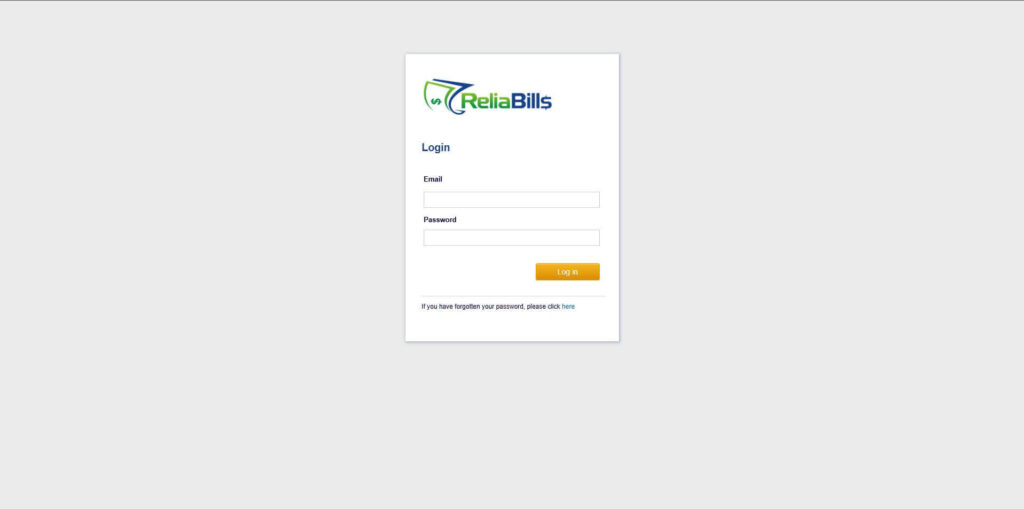
Step 1: Login to ReliaBills
- Access your ReliaBills Account using your login credentials. If you don’t have an account, sign up here.
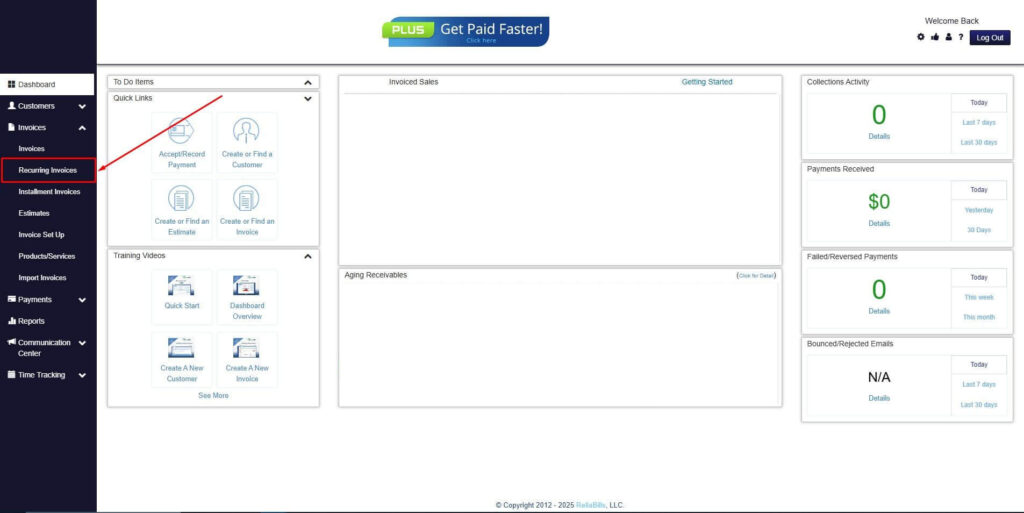
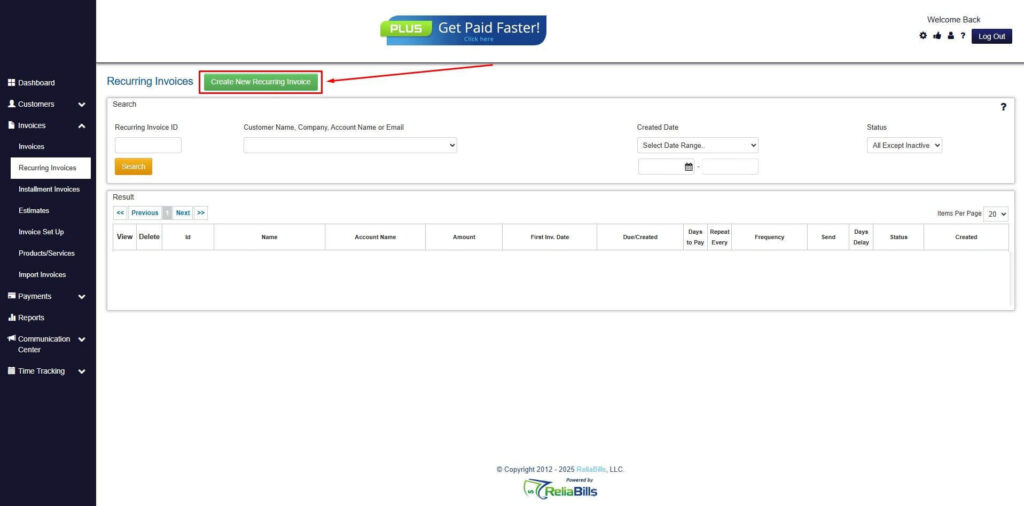
Step 2: Click on Recurring Invoices
- Navigate to the Invoices Dropdown and click on Recurring Invoices for an overview of the list of your existing customers.
Step 3: Go to the Customers Tab
- If you have already created a customer, search for them in the Customers tab and make sure their status is “Active”.
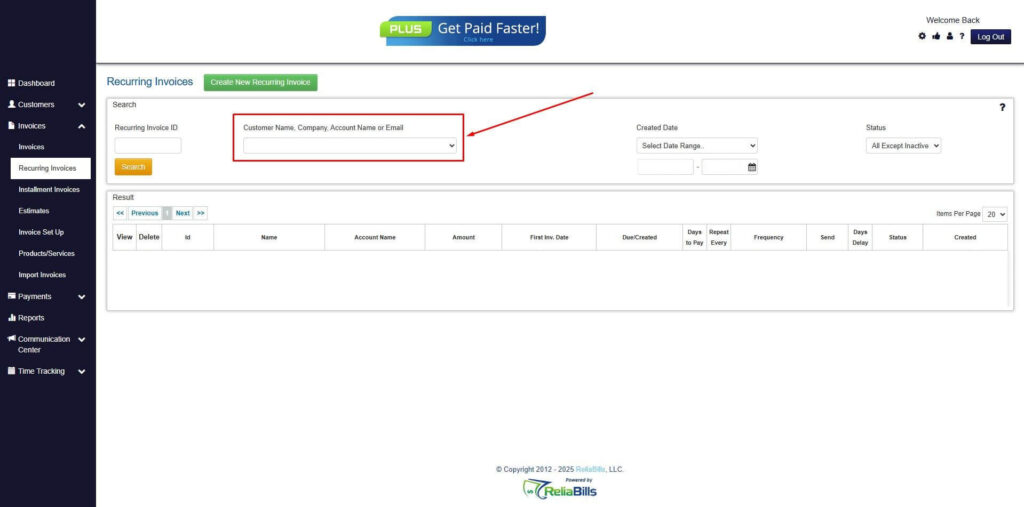
Step 4: Click the Create New Recurring Invoice
- If you haven’t created any customers yet, click the Create New Recurring Invoice to create a new customer.
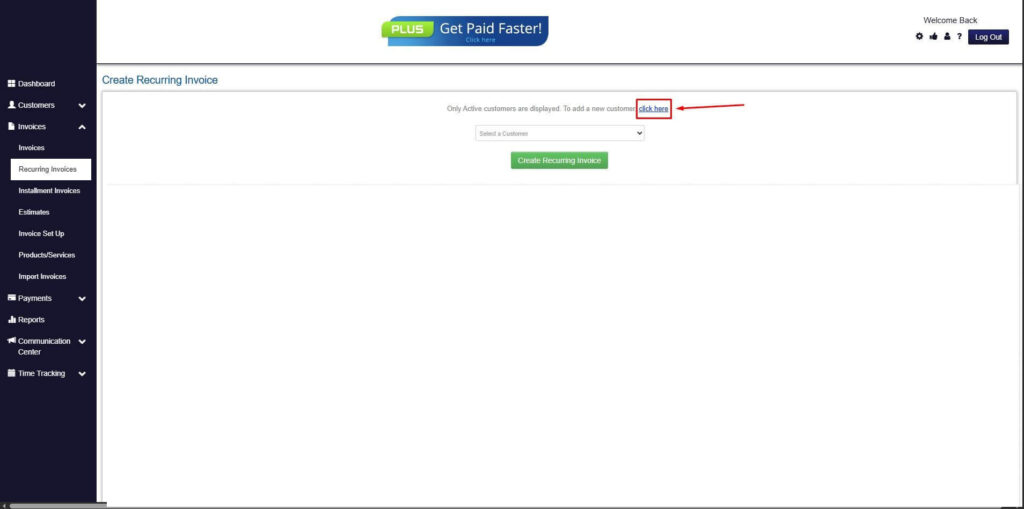
Step 5: Click on the “Click here” Button
- Click on the “Click here” button to proceed with the recurring invoice creation.
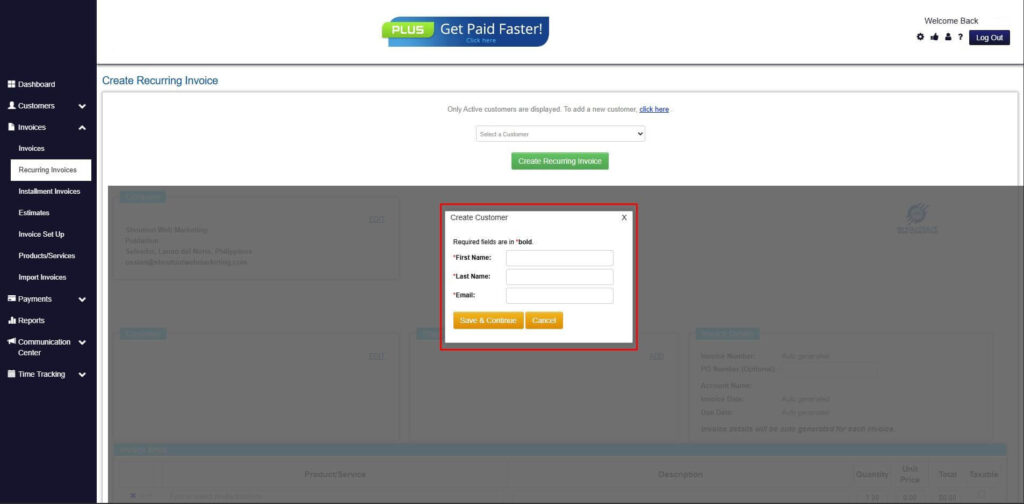
Step 6: Create Customer
- Provide your First Name, Last Name, and Email to proceed.
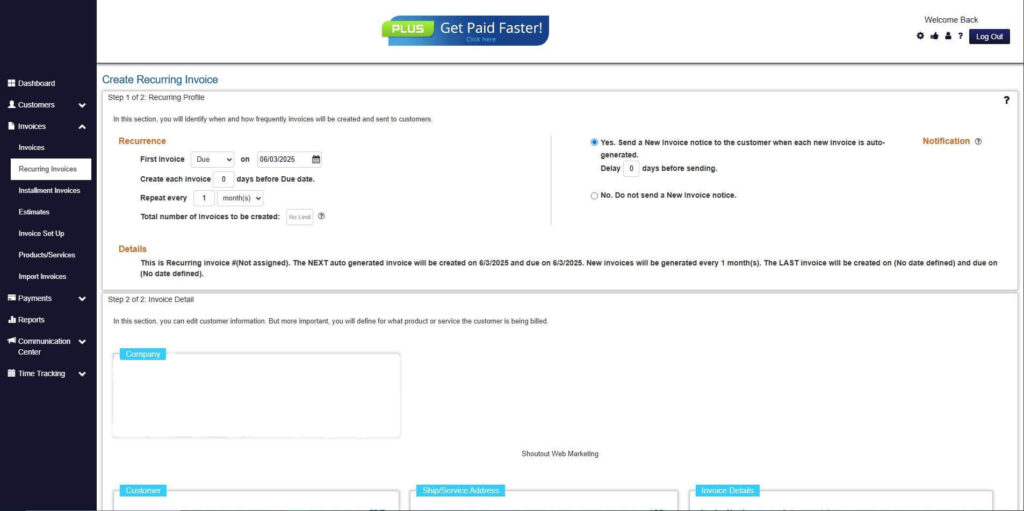
Step 7: Fill in the Create Recurring Invoice Form
- Fill in all the necessary fields.
Step 8: Save Recurring Invoice
- After filling up the form, click “Save Recurring Invoice” to continue.
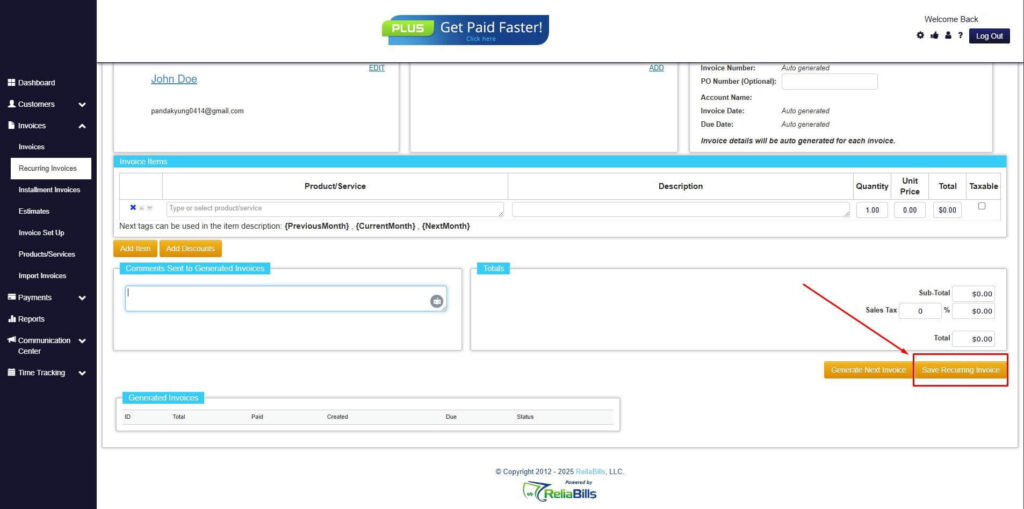
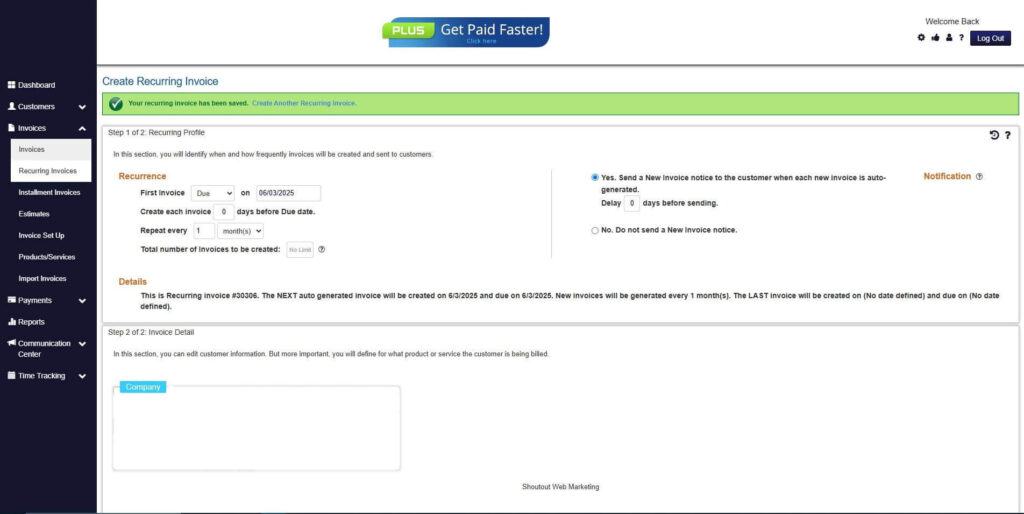
Step 9: Recurring Invoice Created
- Your Recurring Invoice has been created.
Frequently Asked Questions
1. Do engineers need a specialized invoice template?
Yes. Engineering projects often involve technical details, materials, and multi-phase work, so a tailored template ensures accuracy.
2. Can I charge flat rates instead of hourly?
Absolutely. Many engineers use project-based pricing for predictable deliverables.
3. Should I include technical notes in my invoice?
If details support clarity or justify costs, adding short notes is helpful.
4. How often should I invoice for long-term engineering projects?
Monthly, milestone-based, or through automated recurring billing depending on the contract.
5. Is digital invoicing better than paper?
Digital invoicing is faster, easier to track, and reduces errors.
Conclusion
A well-crafted engineering invoice helps you maintain professionalism, reduce payment delays, and clearly document the work performed. With the right template and a reliable invoicing platform, you can streamline your workflow and focus on delivering high-quality engineering services. Tools like ReliaBills make billing easier by offering automation, recurring billing, reminders, and detailed reporting that keep your finances organized.