

Educational consultants work with schools, parents, and organizations to provide guidance, training, and strategic support. Since most of this work involves scheduled sessions, hourly consulting, and project-based deliverables, having a clear and professional invoice is essential. A well-structured invoice not only documents the services provided but also helps maintain trust and transparency between you and your clients.
Invoicing might not be the most exciting part of being a consultant, but it plays a major role in how smoothly your business runs. Consistent, organized billing helps prevent payment delays, avoids misunderstandings, and ensures clients always know what they are being charged for. With the right system, you can simplify your workflow and create invoices that look polished, accurate, and easy to understand.
What Is an Educational Consultant Invoice?
An educational consultant invoice is a billing document used to charge clients for consulting services such as training, curriculum development, coaching sessions, assessments, and academic planning. It outlines what work was performed, how much time was spent, and the rates applied.
Unlike general consulting invoices, educational consultant invoices often include service-specific details like session hours, materials used for training, or curriculum preparation time. This level of clarity helps clients see the full value of your work.
When Should Educational Consultants Issue an Invoice?
Educational consultants typically issue invoices in the following situations:
- Hourly consulting sessions with parents, schools, or academic teams
- Curriculum development or instructional design projects
- Teacher or staff training programs
- Program evaluation or strategic planning services
- Retainer-based arrangements for ongoing consulting
- Workshops, seminars, or speaking engagements
Any time you complete work, deliver materials, or reach a project milestone, an invoice should follow to keep payments on schedule.
Key Elements of an Educational Consultant Invoice
A clear and complete educational consultant invoice should include:
- Consultant name, business details, and contact information
- Client name and organization
- A detailed scope of work
- Hours worked or project fees
- Rate per hour or total agreed-upon fee
- Additional costs such as materials, travel, or preparation
- Invoice date and due date
- Payment terms and accepted payment methods
The more specific the invoice, the easier it is for clients to review and approve payment.
How to Create an Educational Consultant Invoice (Step-by-Step)
Start with your business information
Include your name, business logo, and contact details at the top of the invoice.
Add the client’s information
List the school, parent, or organization you’re billing.
Create an invoice number
Use a unique number for tracking and recordkeeping.
Detail the services provided
Break down tasks such as training hours, planning sessions, curriculum work, or assessments.
List rates and hours
Include your hourly rate or project fee and multiply it by the number of hours worked.
Include extra costs
Add materials, travel fees, or printing charges if applicable.
Add payment terms
Specify the due date, payment methods, and any late fee policy.
Review for accuracy before sending
Ensuring accuracy helps avoid delays and questions from clients.
How to Price Educational Consulting Services
Pricing can vary based on your experience, location, and the type of services you offer. Here are a few common methods:
- Hourly rate – Standard option for one-on-one consulting, training, or coaching
- Project-based fee – Ideal for curriculum development or large school projects
- Retainers – Monthly flat fees for ongoing support or long-term clients
- Additional expenses – Travel, materials, or special resources
Make sure to communicate pricing clearly at the start of every engagement.
Best Practices for Professional Consultant Invoicing
- Use a clean, organized layout
- Provide clear service descriptions
- Maintain consistent formatting
- Send invoices promptly after work is completed
- Offer digital payment options for convenience
- Keep records of all invoices and receipts
Professional invoices make you look reliable and help clients trust your process.
Educational Consultant Invoice Template (Example)
Educational Consultant Invoice Example
- Consultant name and contact info
- Client name and address
- Invoice number and date
- Service descriptions with hours and rates
- Additional expenses
- Total amount due
- Due date and payment terms
You can format this in a spreadsheet, PDF, or invoicing software.
How ReliaBills Can Help Educational Consultants With Invoicing
ReliaBills makes invoicing easier for educational consultants by offering professional templates and simple tools that help you create clean, accurate invoices. You can list your services, add hours, attach materials, and include detailed descriptions that make your invoice clear and easy to understand. This reduces confusion and helps clients approve payments faster.
The platform also tracks every invoice you send, logs payment activity, and stores your documentation in one organized dashboard. Automated reminders help you avoid late or missed payments, while online payment options give clients a convenient way to pay. Everything stays accessible and easy to manage, even during busy consulting seasons.
For consultants who work with ongoing clients or long-term school programs, ReliaBills supports recurring billing. This means you can schedule automated monthly invoices, maintain steady revenue, and eliminate the stress of manual billing. Combined with accurate tracking and automated communication, ReliaBills helps you run a smooth and professional consulting business from start to finish.
How to Create a New Invoice Using ReliaBills
Creating an invoice using ReliaBills involves the following steps:
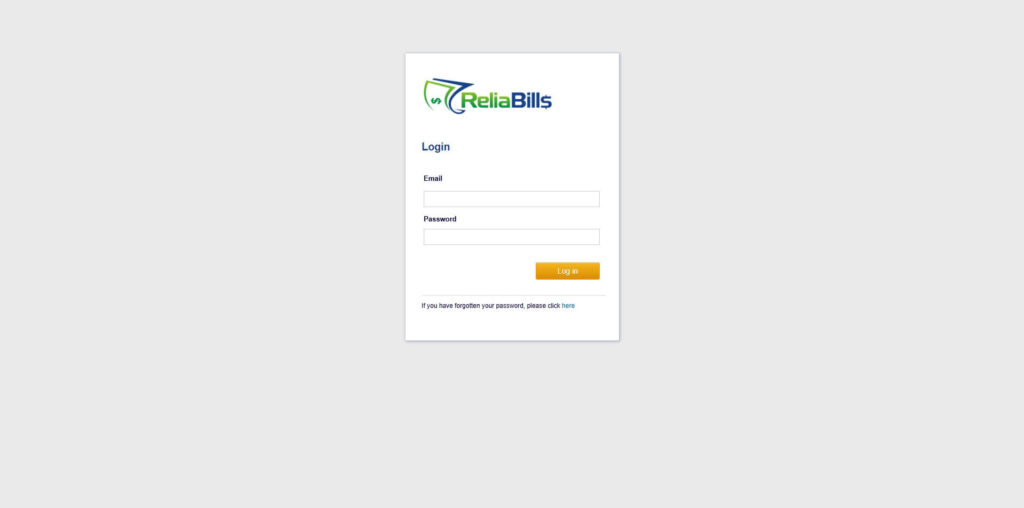
Step 1: Login to ReliaBills
- Access your ReliaBills Account using your login credentials. If you don’t have an account, sign up here.
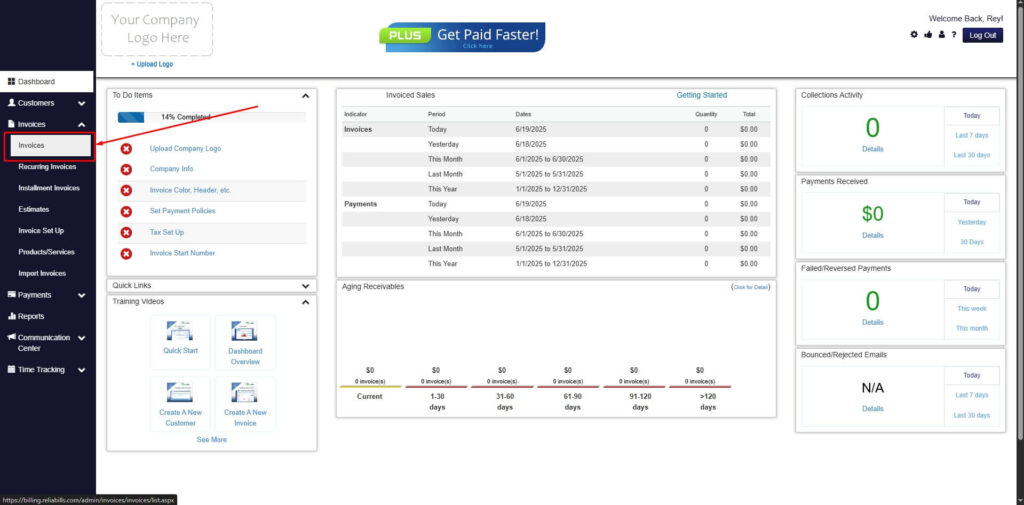
Step 2: Click on Invoices
- Navigate to the Invoices Dropdown and click on Invoices.
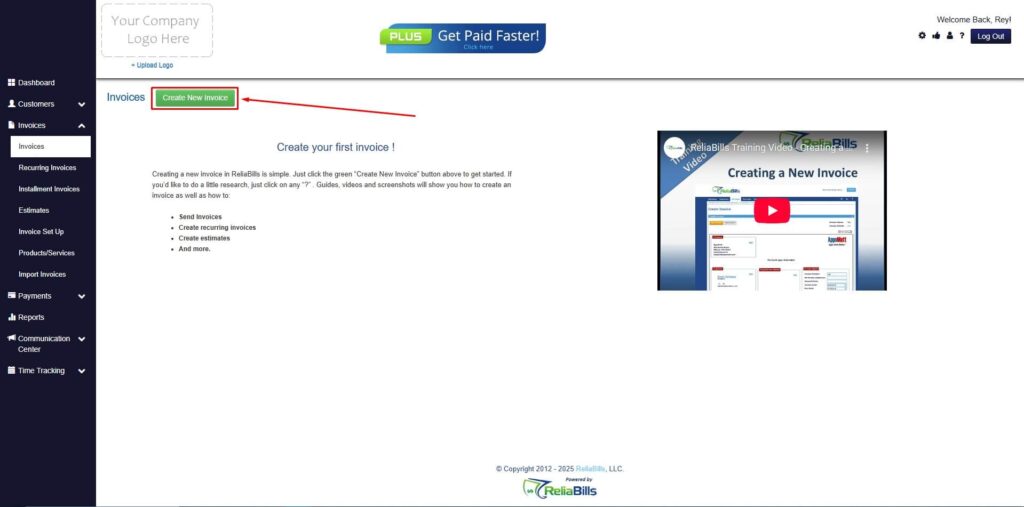
Step 3: Click ‘Create New Invoice’
- Click ‘Create New Invoice’ to proceed.
Step 4: Go to the ‘Customers Tab’
- If you have already created a customer, search for them in the Customers tab and make sure their status is “Active”.
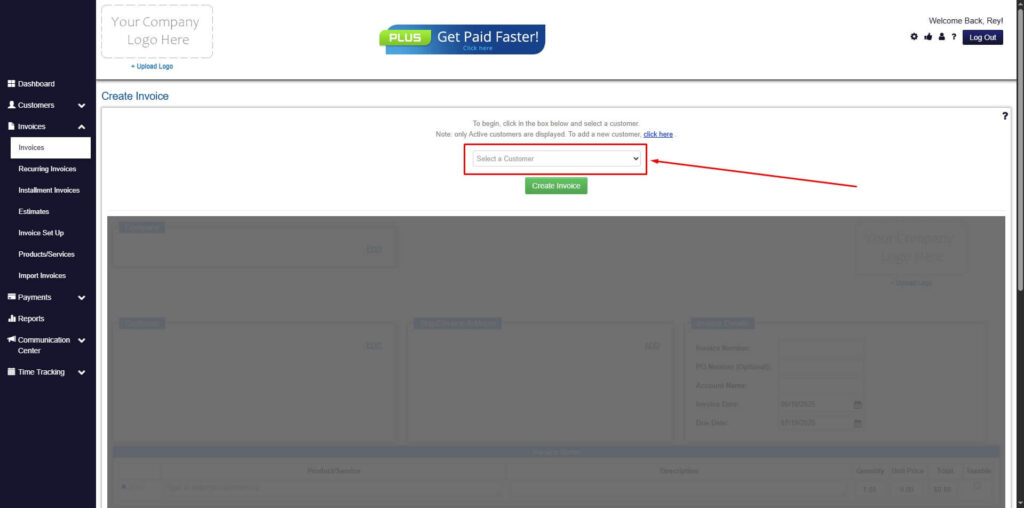
Step 5: Create Customer
- If you haven’t created any customers yet, click the ‘Click here’ to create a new customer.
- Provide the First Name, Last Name, and Email to proceed.
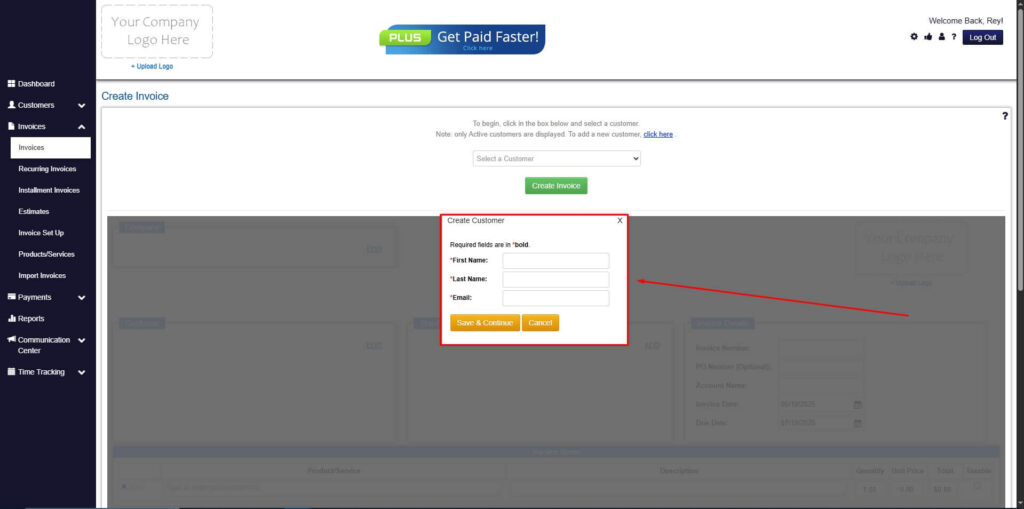
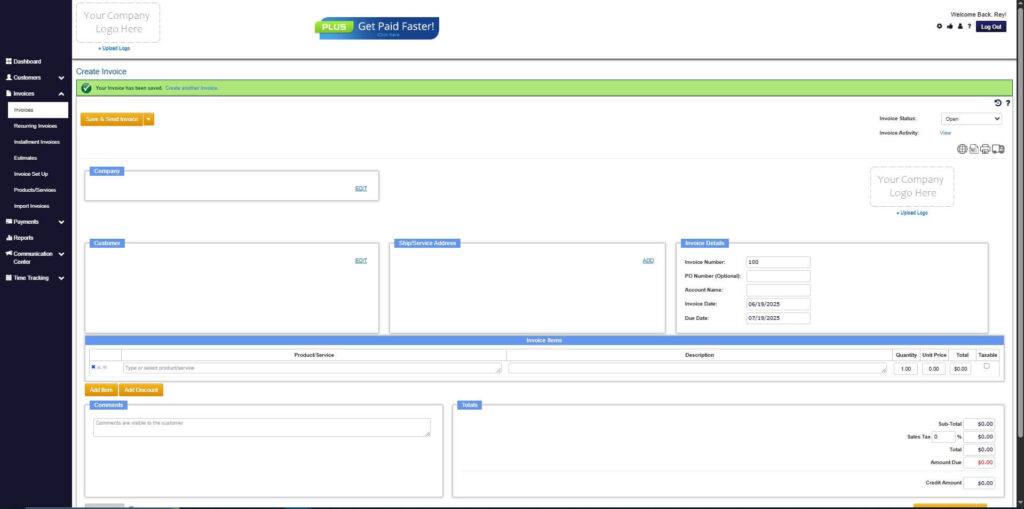
Step 6: Fill in the Create Invoice Form
- Fill in all the necessary fields.
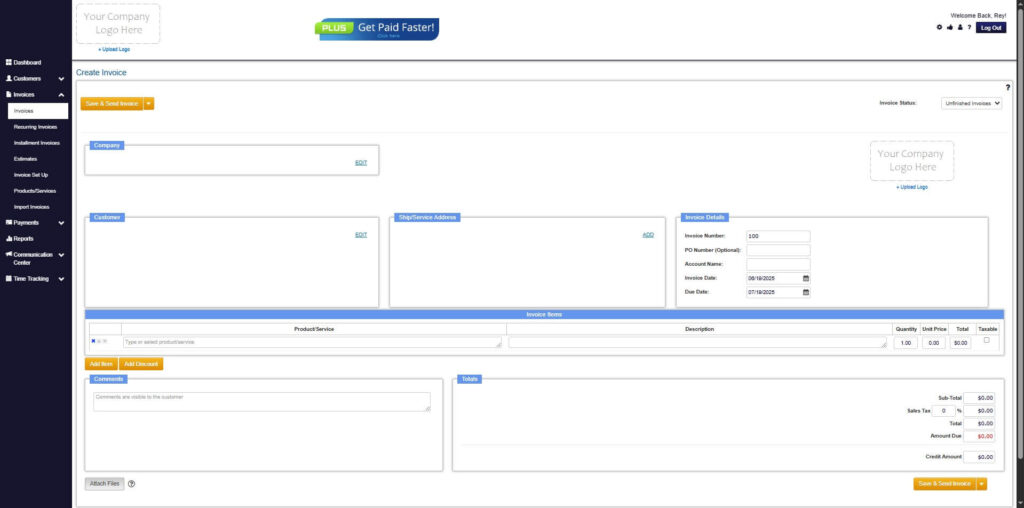
Step 7: Save Invoice
- After filling out the form, click “Save & Send Invoice” to continue.
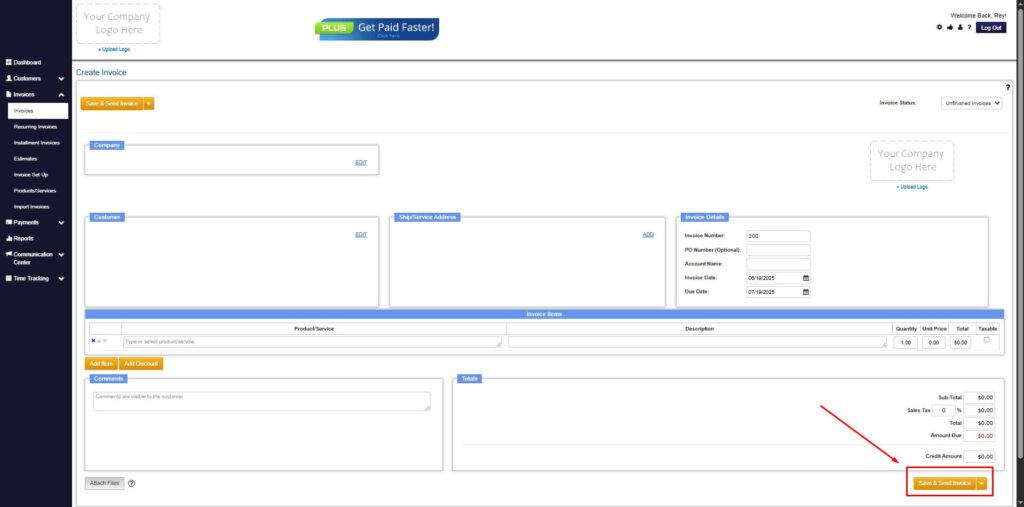
Step 8: Invoice Created
- Your Invoice has been created.
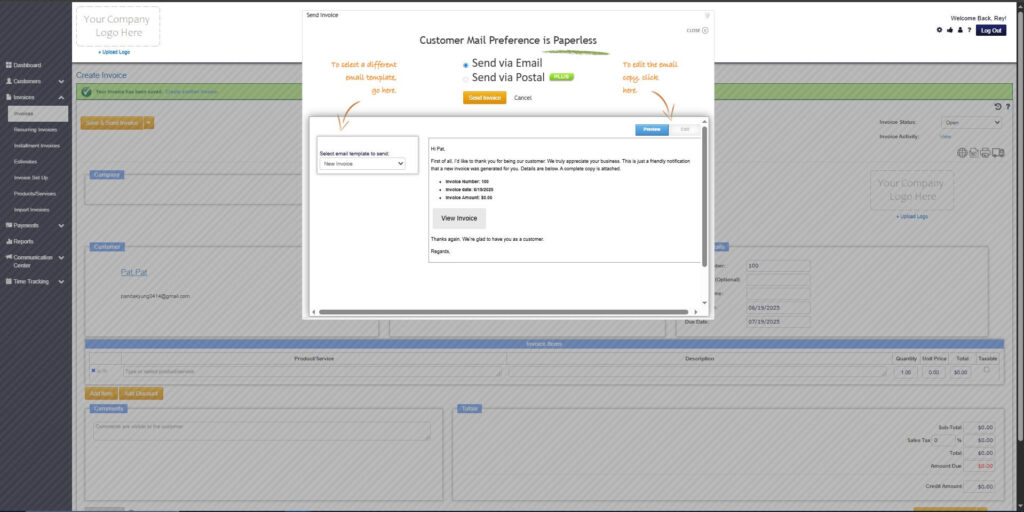
Frequently Asked Questions
1. Do I need a contract before sending an invoice?
It’s always best to have a written agreement that outlines your services and pricing.
2. Can I charge late fees?
Yes, if you clearly state your late fee policy in your invoice or contract.
3. Can educational consultants bill for travel time?
Many do, as long as it’s agreed upon ahead of time.
4. Should I itemize every service?
Itemizing helps clients understand what they’re paying for, which improves transparency.
Conclusion
Creating a clear and well-structured educational consultant invoice helps you get paid on time and maintain strong relationships with your clients. By organizing your billing, using professional templates, and simplifying your process with tools like ReliaBills, you can focus more on delivering value and less on paperwork. With the right approach, invoicing becomes a smooth and stress-free part of your consulting workflow.