
Digital payments have become a core part of how small businesses operate today. Customers expect fast, convenient, and secure ways to pay, whether they are shopping online or receiving an invoice. As cash and checks continue to decline, digital payments help businesses stay competitive while improving efficiency and cash flow.
For small businesses, digital payments are no longer a nice to have option. They directly impact how quickly payments are received, how smoothly transactions are processed, and how satisfied customers feel during checkout. This guide explains how digital payments work, why they matter, and how small businesses can use them effectively.
By the end of this article, you will understand the most common digital payment types, how they affect cash flow, and what to consider when choosing the right solution. You will also learn how digital payments support recurring billing and long term business growth.
What Are Digital Payments?
Digital payments refer to any payment made electronically without the use of physical cash or paper checks. These payments are processed through digital systems such as cards, bank transfers, mobile apps, or online platforms. They allow money to move quickly between customers and businesses using secure networks.
When a customer makes a digital payment, the transaction is authorized, verified, and settled through payment processors and financial institutions. This process happens in the background and is often completed within seconds or days depending on the payment method. For businesses, this means less manual handling and faster access to funds.
Digital payments differ from traditional payments because they reduce paperwork and delays. While electronic payments focus on the technical transaction, digital payments often include user friendly tools like payment links, mobile apps, and invoice based payments.
Common Types of Digital Payments
Credit and debit card payments
Widely accepted and easy for customers to use both online and in person. These payments are processed quickly and work well for most small businesses.
Bank transfers and ACH payments
Common for larger invoices, recurring billing, and B2B transactions. They often come with lower processing fees compared to card payments.
Digital wallets and mobile payments
Options such as mobile apps and wallet-based payments offer convenience and speed, especially for tech-savvy customers.
Online payment gateways
Platforms that securely process digital payments through websites or checkout pages. They support multiple payment methods in one system.
Invoice-based digital payments
Payments made directly from an invoice using embedded payment links. This method reduces friction and speeds up collections.
Why Digital Payments Matter for Small Businesses
Digital payments help small businesses get paid faster by reducing delays caused by manual invoicing and check processing. Faster settlements improve cash flow and make it easier to cover operating expenses. This is especially important for businesses with tight margins.
Customer convenience is another major benefit of digital payments. When customers can pay using their preferred method, they are more likely to complete transactions on time. A smooth payment experience also builds trust and professionalism.
Digital payments also reduce administrative work. Automated records, payment confirmations, and reporting save time and minimize errors, allowing business owners to focus on growth instead of chasing payments.
Digital Payments for Different Small Business Models
Retail and point-of-sale businesses
Digital payments help speed up checkout, reduce cash handling, and improve the in-store customer experience.
Service-based and professional businesses
Invoice-based digital payments allow clients to pay online after services are delivered, keeping billing organized and professional.
Subscription and recurring billing models
Automated digital payments ensure consistent revenue and reduce the need for manual follow-ups.
B2B and invoice-driven businesses
Bank transfers and ACH payments support higher transaction values and structured billing cycles.
Costs and Fees Associated With Digital Payments
Digital payments come with transaction and processing fees that vary by provider and payment type. Credit card payments typically have higher fees, while ACH and bank transfers are often more affordable. Understanding these differences helps manage costs.
Some platforms also charge monthly or platform fees. These may include access to reporting tools, automation features, or customer management dashboards. Businesses should review contracts carefully to avoid unexpected expenses.
Balancing cost and convenience is key. The cheapest option is not always the best if it creates delays or poor customer experiences.
Security and Compliance Considerations
Security is a critical part of digital payments. Businesses must ensure customer payment data is protected through encryption and secure processing systems. This reduces the risk of fraud and data breaches.
PCI compliance is required for businesses that accept card payments. Following these standards protects both the business and its customers. Working with compliant payment providers simplifies this responsibility.
Fraud prevention tools and chargeback management also play an important role. Monitoring transactions helps identify issues early and maintain customer trust.
How to Choose the Right Digital Payment Solutions
Choosing the right digital payment solution starts with understanding customer preferences. Some customers prefer cards, while others prefer bank transfers or invoice based payments. Offering flexibility improves satisfaction.
Comparing providers based on fees, features, and support is essential. Integration with existing invoicing and accounting tools should also be considered. Seamless integration saves time and reduces errors.
Small businesses should look for solutions that scale as they grow. Automation, reporting, and recurring billing support are especially valuable over time.
Best Practices for Using Digital Payments
Offer multiple payment options
Giving customers flexibility increases the likelihood of on-time payments and improves satisfaction.
Automate payment reminders and follow-ups
Automated reminders reduce late payments and save time without damaging customer relationships.
Monitor transactions and reports regularly
Reviewing payment data helps identify issues early and supports better financial decisions.
Communicate payment policies clearly
Clear terms and instructions prevent confusion and reduce disputes.
How Digital Payments Improve Cash Flow
Digital payments shorten the time between invoicing and payment. Faster payment cycles mean businesses can reinvest funds sooner. This improves overall financial stability.
Late payments are reduced when customers can pay instantly online. Payment reminders and automated retries further support consistent collections. This is especially useful for recurring services.
Recurring digital payments create predictable revenue streams. Predictability makes budgeting, forecasting, and growth planning much easier for small businesses.
Common Mistakes to Avoid
Limiting digital payment options
Offering too few payment methods can frustrate customers and delay payments.
Ignoring security and compliance requirements
Failing to follow security standards increases the risk of fraud and data breaches.
Not tracking fees and payment performance
Overlooking processing costs can reduce profitability over time.
Relying on manual processes
Manual billing and payment tracking increase errors and slow down cash flow.
How ReliaBills Helps Small Businesses Accept Digital Payments
ReliaBills helps small businesses simplify how they accept and manage digital payments by combining invoicing and payment collection in one place. Businesses can send professional invoices with built-in digital payment options, making it easy for customers to pay online without extra steps. This streamlined approach reduces payment delays and keeps billing organized as transaction volume grows.
Recurring billing is a core strength of ReliaBills, especially for businesses that rely on subscriptions, retainers, or ongoing services. Automated recurring invoices and scheduled payments help ensure consistent revenue without manual follow-ups. By reducing missed or late payments, businesses gain more predictable cash flow and stronger long-term customer relationships.
For businesses that need more control and scalability, ReliaBills PLUS provides advanced tools to support growing payment operations. This includes enhanced automation, deeper payment tracking, and improved reporting across customers and invoices. With ReliaBills PLUS, small businesses can manage digital payments more efficiently while preparing their billing processes for future growth.
How to Create a New Recurring Invoice Using ReliaBills
Creating a New Recurring Invoice using ReliaBills involves the following steps:
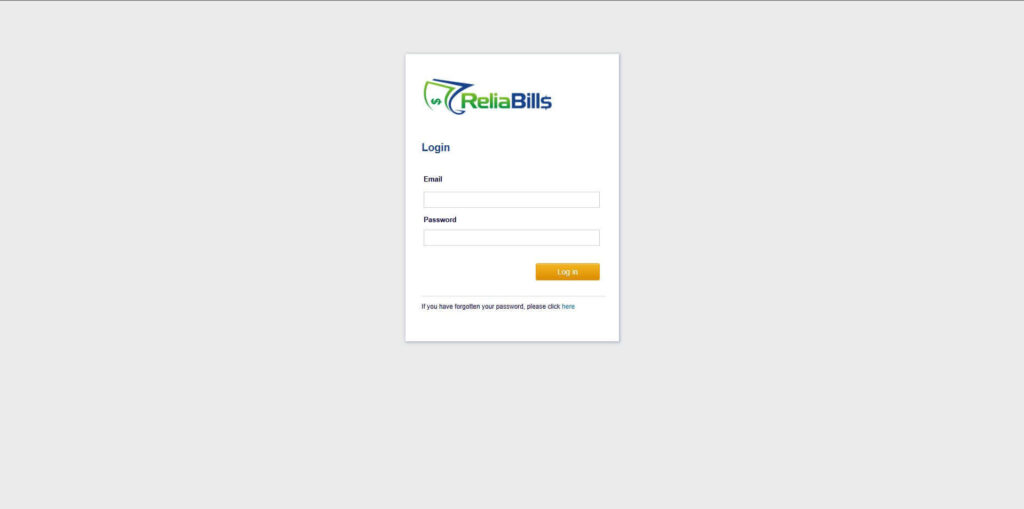
Step 1: Login to ReliaBills
- Access your ReliaBills Account using your login credentials. If you don’t have an account, sign up here.
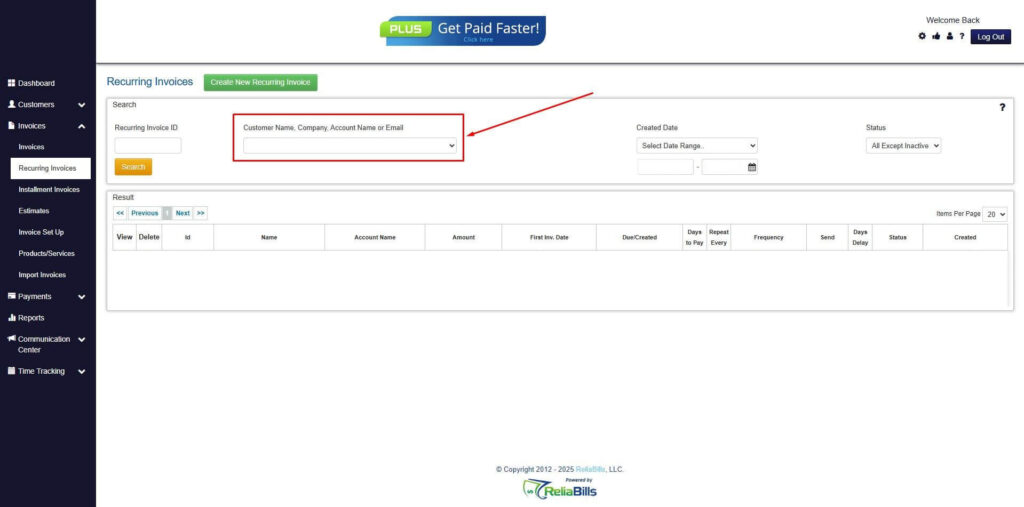
Step 2: Click on Recurring Invoices
- Navigate to the Invoices Dropdown and click on Recurring Invoices for an overview of the list of your existing customers.

Step 3: Go to the Customers Tab
- If you have already created a customer, search for them in the Customers tab and make sure their status is “Active”.
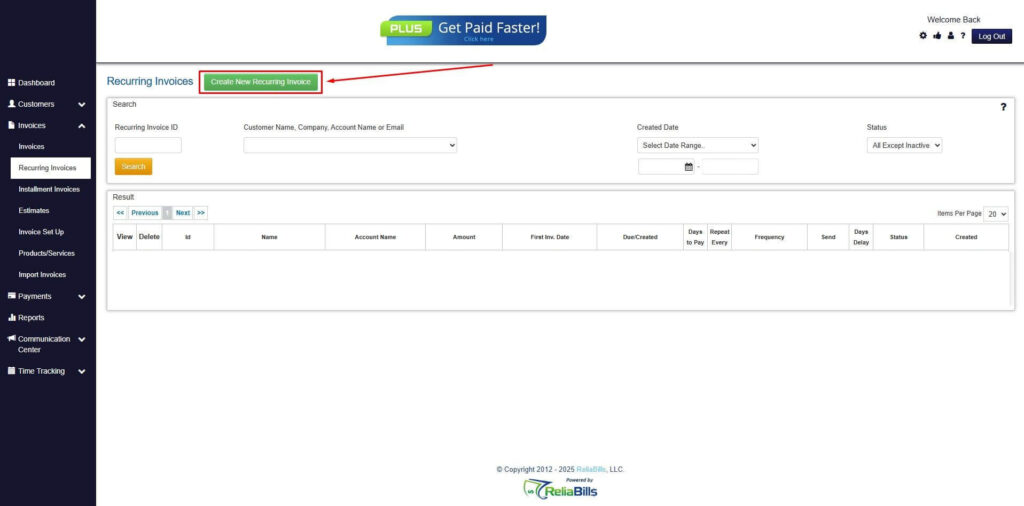
Step 4: Click the Create New Recurring Invoice
- If you haven’t created any customers yet, click the Create New Recurring Invoice to create a new customer.
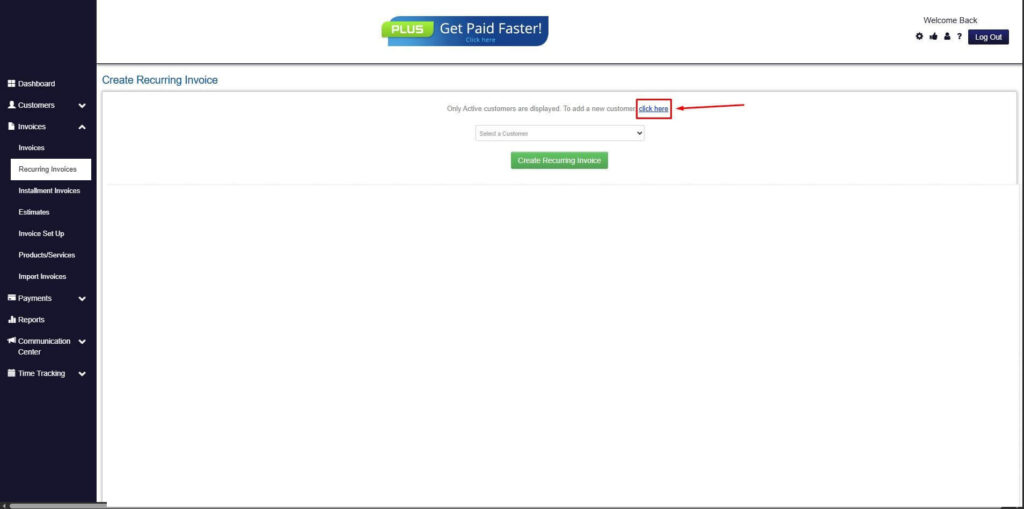
Step 5: Click on the “Click here” Button
- Click on the “Click here” button to proceed with the recurring invoice creation.
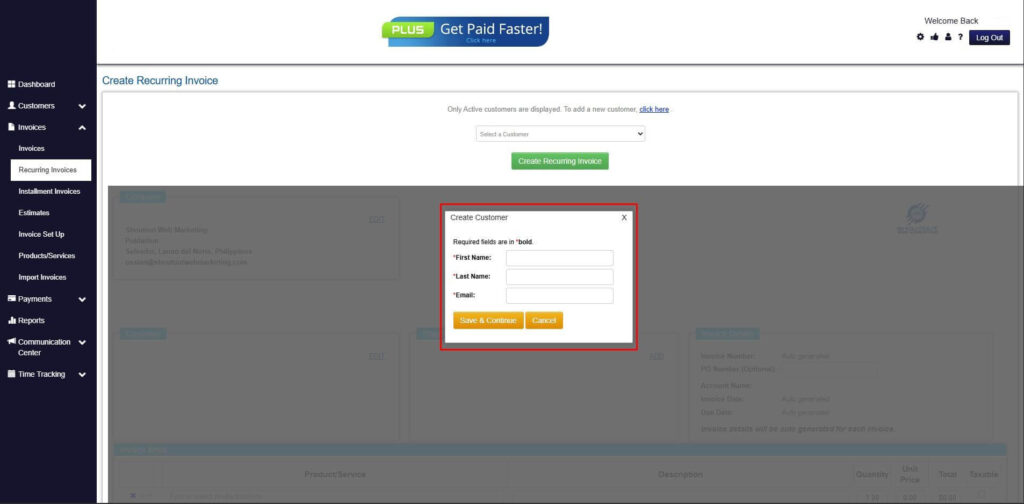
Step 6: Create Customer
- Provide your First Name, Last Name, and Email to proceed.
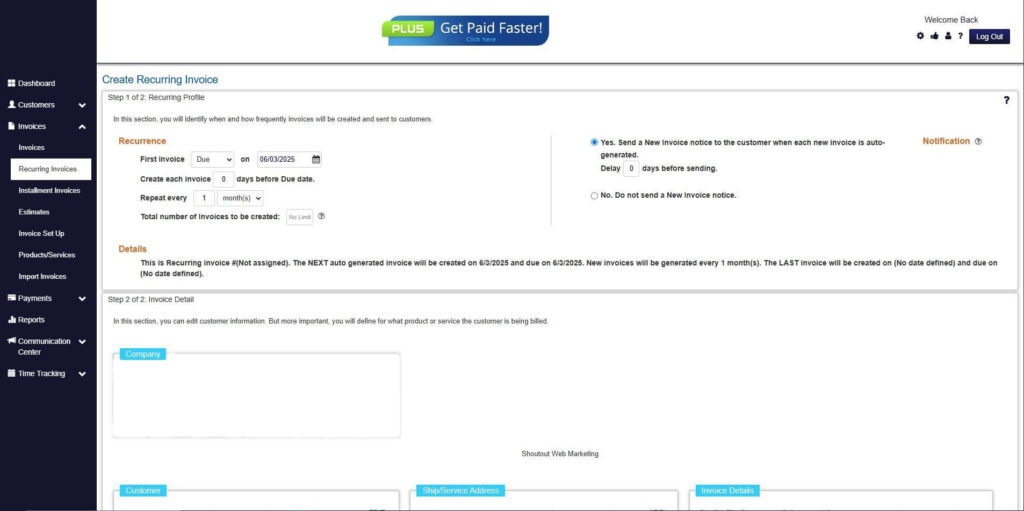
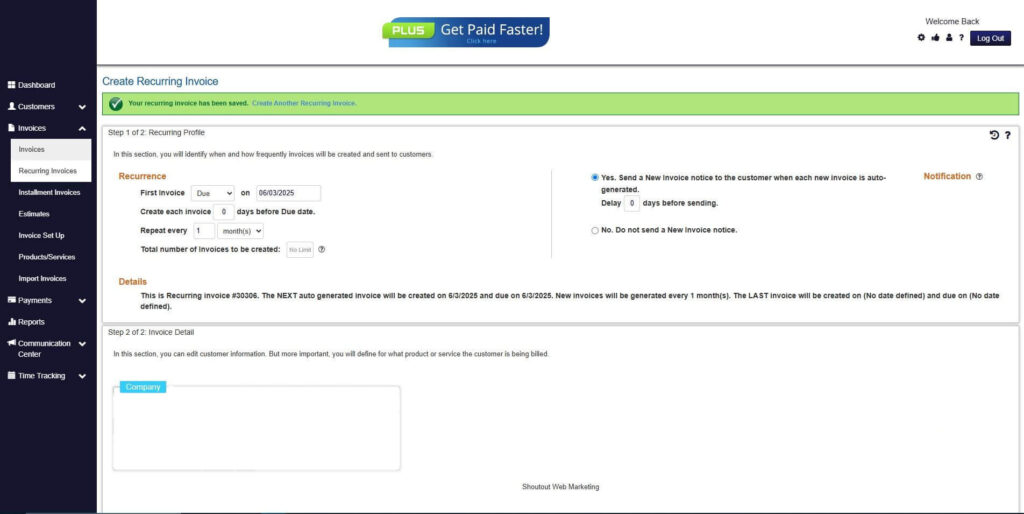
Step 7: Fill in the Create Recurring Invoice Form
- Fill in all the necessary fields.
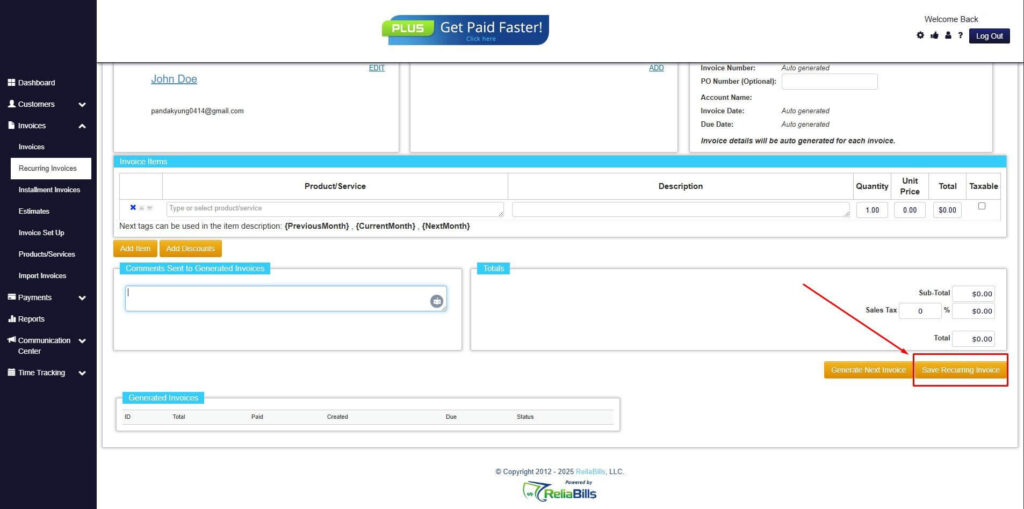
Step 8: Save Recurring Invoice
- After filling up the form, click “Save Recurring Invoice” to continue.
Step 9: Recurring Invoice Created
- Your Recurring Invoice has been created.
Frequently Asked Questions
1. Are digital payments safe for small businesses?
Yes, when processed through secure and compliant providers, digital payments are highly secure.
2. What digital payment methods should small businesses offer?
Most businesses benefit from offering cards, bank transfers, and invoice based payments.
3. How quickly do digital payments process?
Processing times vary, but many digital payments settle faster than checks.
4. Can digital payments be automated?
Yes, automation is one of the biggest advantages of digital payment systems.
Conclusion
Digital payments are essential for small businesses that want to improve efficiency, customer experience, and cash flow. They reduce administrative work while making it easier for customers to pay on time.
By choosing the right digital payment solutions and following best practices, small businesses can build more predictable revenue streams. Adopting digital payments is not just about convenience, but about long term business sustainability.