
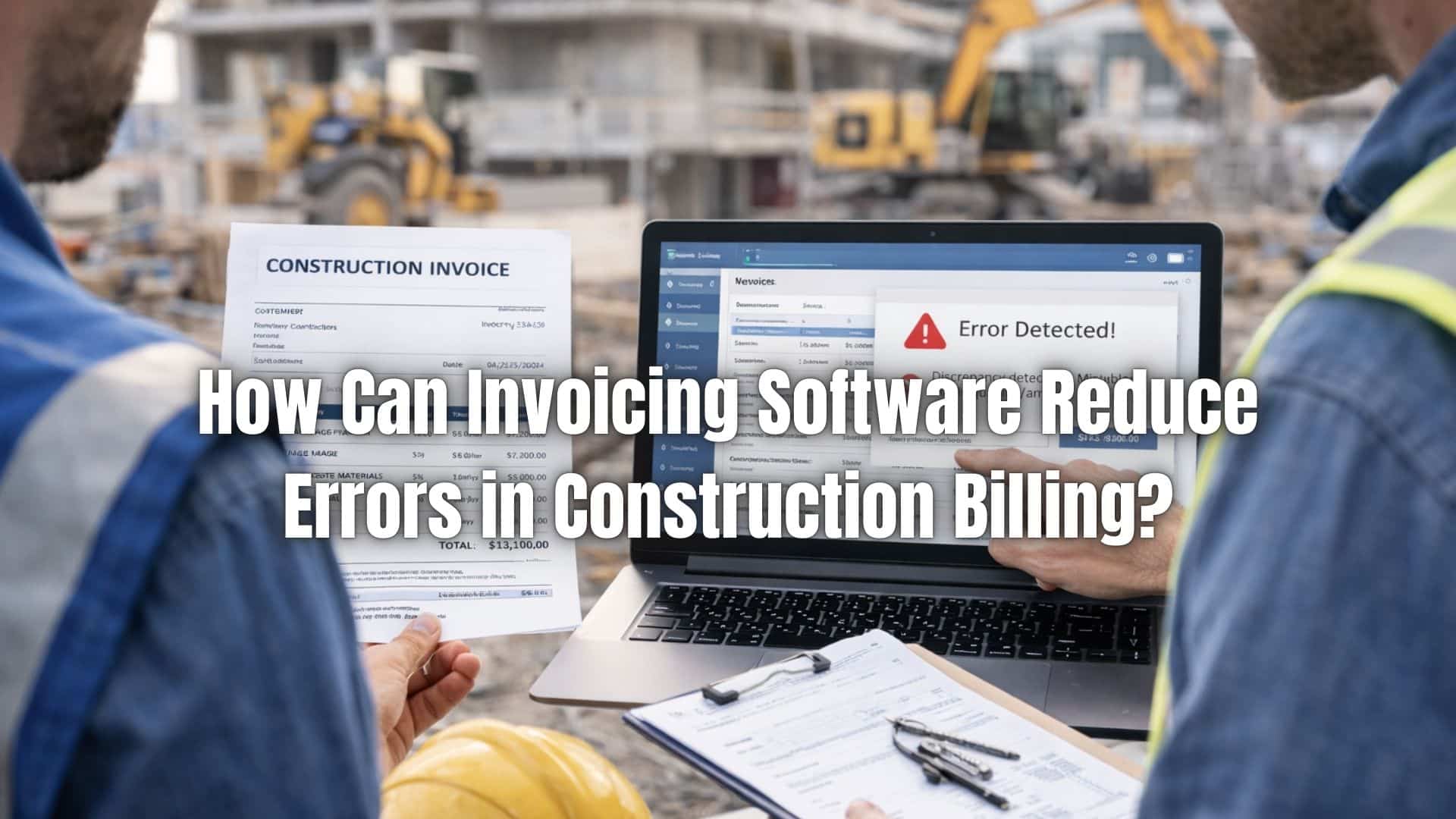
Billing accuracy is critical in construction projects where profit margins are often tight and costs constantly fluctuate. Contractors must account for labor, materials, subcontractors, equipment, taxes, and retainage, all while adhering to strict contract terms. Even a small invoicing error can delay payments, disrupt cash flow, or create unnecessary disputes with clients.
The financial risks of construction billing mistakes are significant. Underbilling reduces revenue and affects profitability, while overbilling can damage trust and lead to payment delays. Misapplied retainage, incorrect tax calculations, or overlooked change orders can also create compliance problems and administrative complications that slow down project completion.
This is where construction billing software becomes essential. By automating calculations, standardizing invoice templates, and integrating job cost data in real time, it significantly reduces human error. With improved accuracy and better financial visibility, contractors can protect their margins, strengthen client relationships, and maintain healthier cash flow throughout every project.
Common Errors in Construction Billing
Incorrect Labor Calculations
Miscalculating labor hours, overtime rates, or crew allocations is one of the most frequent billing errors. When timesheets are entered manually or transferred from paper logs, discrepancies can easily occur. Construction billing software reduces this risk by integrating time tracking directly into invoice calculations, ensuring approved hours and rates are applied consistently.
Material Quantity or Pricing Mistakes
Errors often occur when material costs fluctuate or purchase orders are not updated in real time. Incorrect unit pricing or outdated supplier costs can distort invoice totals. Automated systems pull current pricing data and reduce the likelihood of manual entry mistakes.
Duplicate Charges
On multi-phase or multi-site projects, it is easy to accidentally bill the same labor, equipment, or materials twice. Without centralized tracking, duplicate line items may go unnoticed. Construction billing software helps prevent duplication by consolidating job cost data into a single system.
Missed Billable Items
Just as harmful as overbilling is underbilling. Contractors sometimes forget to invoice small but legitimate costs such as equipment rentals, disposal fees, or minor change orders. Automated cost tracking ensures all approved billable items are captured.
Misapplied Retainage
Retainage calculations must follow strict contract terms. Applying the wrong percentage or releasing retainage too early can create financial and contractual issues. Automated retainage tracking ensures compliance with agreed terms.
Inaccurate Tax or Fee Calculations
Construction projects may involve varying tax rates depending on location or project type. Manual miscalculations can lead to compliance risks. Construction billing software applies tax rules automatically, reducing regulatory exposure.
Failure to Reflect Approved Change Orders
When scope changes are not updated in billing documents, invoices become inaccurate. Centralized systems ensure that approved adjustments are reflected immediately.
Why Manual Construction Invoicing Leads to Mistakes
Manual invoicing systems often rely on spreadsheets, which have limitations. Formulas can break, data can be overwritten, and version control becomes difficult when multiple team members access the same files.
Construction projects involve complex cost tracking, including job costing, subcontractor expenses, and equipment usage. Managing this manually increases the risk of inconsistencies between field reports and office records.
Frequent change orders and scope revisions add another layer of complexity. Without a centralized system, communication gaps between field teams and accounting departments can result in inaccurate billing.
Construction billing software eliminates many of these vulnerabilities by creating a unified, automated workflow.
What Is Construction Invoicing Software?
Construction invoicing software is a specialized billing solution designed to address the unique needs of contractors. It supports job cost tracking, progress billing, retainage calculations, and change order management.
Key features often include automated invoice generation, labor and material cost integration, payment tracking, and reporting dashboards. These tools are tailored to the construction industry’s complexity.
Unlike generic invoicing tools, construction billing software is built to handle milestone billing, percentage-of-completion tracking, and multi-phase projects.
Automating Labor and Material Calculations
Labor and material costs fluctuate throughout a project. Real-time cost inputs allow contractors to update rates and quantities as conditions change. Automated rate application ensures consistency across invoices.
Reducing manual data entry significantly lowers the risk of input errors. Instead of recalculating totals manually, the system applies predefined formulas and rates automatically.
This improves job cost accuracy and helps contractors maintain profitability on each project.
Managing Progress Billing Accurately
Progress billing is common in construction, especially for long-term projects. Milestone-based invoicing ensures clients are billed at agreed stages of completion. Percentage-of-completion tracking helps align billing with project progress.
Automated retainage calculations ensure that withheld amounts are applied correctly and released at the appropriate time. This prevents disputes and ensures compliance with contract terms.
Construction billing software reduces the risk of overbilling or underbilling by aligning invoices with real-time project data.
How to Handle Change Orders Without Billing Errors
- Document Every Change in Writing – All scope modifications should be formally approved before updating invoices. Verbal approvals often lead to confusion and payment disputes. A documented workflow ensures accountability.
- Link Change Orders to Specific Job Codes – Each approved change should connect directly to relevant cost categories within the project. Construction billing software allows contractors to tag change orders to labor, materials, or subcontractor costs, ensuring accurate allocation.
- Update Project Budgets in Real Time – Once a change order is approved, project budgets and cost forecasts should be updated immediately. This prevents discrepancies between accounting records and field operations.
- Automatically Adjust Invoice Totals – Manual recalculations increase the risk of arithmetic errors. Software systems automatically update invoice amounts when change orders are entered, preserving accuracy.
- Maintain Transparent Line-Item Breakdown – Clients should clearly see how change orders affect overall project cost. Detailed invoice line items reduce confusion and protect contractor credibility.
- Track Change Order History – A complete audit trail ensures that every modification is traceable. Time-stamped records strengthen dispute resolution and support financial transparency.
Standardizing Invoice Templates
Consistent invoice formatting improves clarity and professionalism. Standardized templates ensure that all required information is included on every invoice.
Clear line-item breakdowns help clients understand charges for labor, materials, and other costs. This transparency reduces confusion and minimizes disputes.
Construction billing software ensures every invoice follows a consistent format, strengthening brand credibility and payment reliability.
Real-Time Payment and Balance Tracking
Monitoring outstanding invoices is critical for maintaining cash flow. Construction billing software provides real-time visibility into unpaid balances, partial payments, and retainage amounts.
Tracking partial payments helps contractors reconcile accounts accurately. Managing retainage balances ensures final payments are collected efficiently at project completion.
Improved cash flow visibility allows contractors to make informed financial decisions.
Reducing Disputes with Digital Documentation
Digital documentation strengthens accountability. Centralized invoice records ensure that every billing update is traceable. Time-stamped changes create a clear audit trail.
Supporting documentation, such as contracts or change orders, can be attached directly to invoices. This speeds up dispute resolution and provides evidence if questions arise.
Construction billing software improves transparency and reduces the likelihood of prolonged billing conflicts.
Integrating Recurring Billing for Ongoing Contracts
Not all construction work is project-based. Many contractors maintain long-term service contracts or maintenance agreements. Automated recurring invoices simplify billing for these ongoing arrangements.
Recurring billing ensures consistent revenue streams and reduces administrative workload. Instead of manually generating monthly invoices, contractors can schedule them automatically.
Construction billing software that supports recurring billing helps stabilize income and improve operational efficiency.
Best Practices for Implementing Invoicing Software in Construction
- Align Software with Existing Project Workflows – Construction billing software should integrate with job costing, project management, and accounting systems. Alignment reduces duplicate data entry and improves efficiency.
- Standardize Billing Procedures Across Projects – Establish consistent invoicing processes for all projects, regardless of size. Standardization reduces variability and improves internal control.
- Train Both Field and Office Teams – Accurate billing depends on accurate data input. Field supervisors, project managers, and accounting staff must understand how to enter and review cost information properly.
- Set Clear Approval Hierarchies – Implement structured invoice approval processes before submission. Multiple review checkpoints reduce the risk of billing mistakes reaching clients.
- Regularly Review Billing Accuracy Reports – Periodic internal audits identify patterns such as recurring underbilling or frequent corrections. Reviewing system reports strengthens oversight.
- Establish Internal Billing Controls – Segregation of duties, documented procedures, and consistent oversight protect against errors and potential fraud.
- Monitor Key Performance Indicators – Track metrics such as average days to payment, billing cycle time, and percentage of disputed invoices. Construction billing software dashboards provide visibility into these indicators.
How ReliaBills Supports Error-Free Construction Billing
Construction billing requires precision, especially when managing multiple projects, subcontractors, and complex cost structures. ReliaBills simplifies this process by automating invoice generation and ensuring that labor, materials, retainage, and service charges are calculated consistently. By reducing manual data entry and standardizing invoice workflows, contractors can minimize costly billing mistakes and maintain accurate financial records.
Beyond basic invoicing, ReliaBills strengthens recurring billing operations for contractors who manage ongoing maintenance agreements or long-term service contracts. Automated recurring invoices ensure consistent revenue collection without repetitive administrative work. Payment tracking, automated reminders, and real-time account updates help contractors reduce delays, improve cash flow visibility, and maintain stronger client relationships.
For growing construction businesses, financial oversight is just as important as billing accuracy. ReliaBills provides centralized dashboards and detailed reporting tools that allow contractors to monitor outstanding invoices, track payment trends, and review billing performance across projects. With structured workflows and recurring billing automation built into the system, ReliaBills supports error-free construction billing while helping contractors scale with confidence.
How to Create a New Recurring Invoice Using ReliaBills
Creating a New Recurring Invoice using ReliaBills involves the following steps:
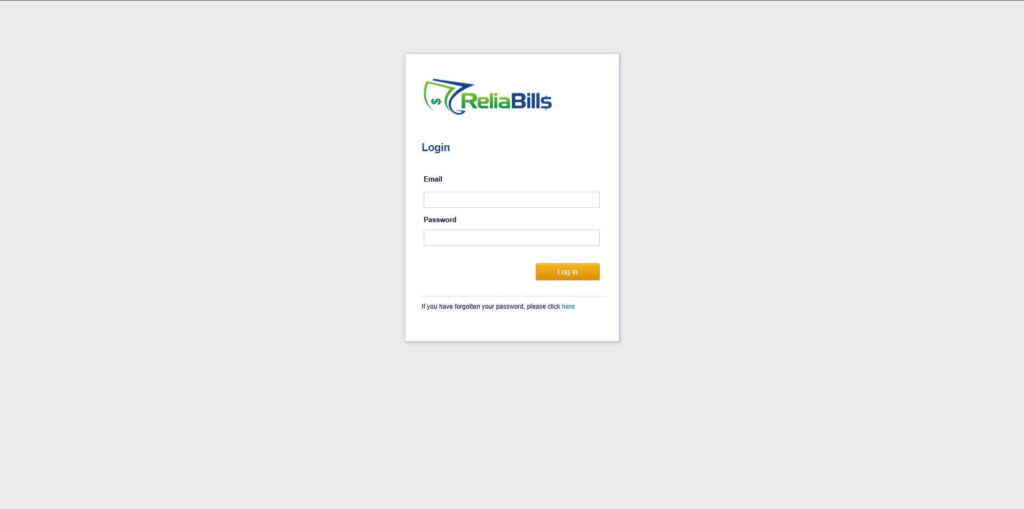
Step 1: Login to ReliaBills
- Access your ReliaBills Account using your login credentials. If you don’t have an account, sign up here.
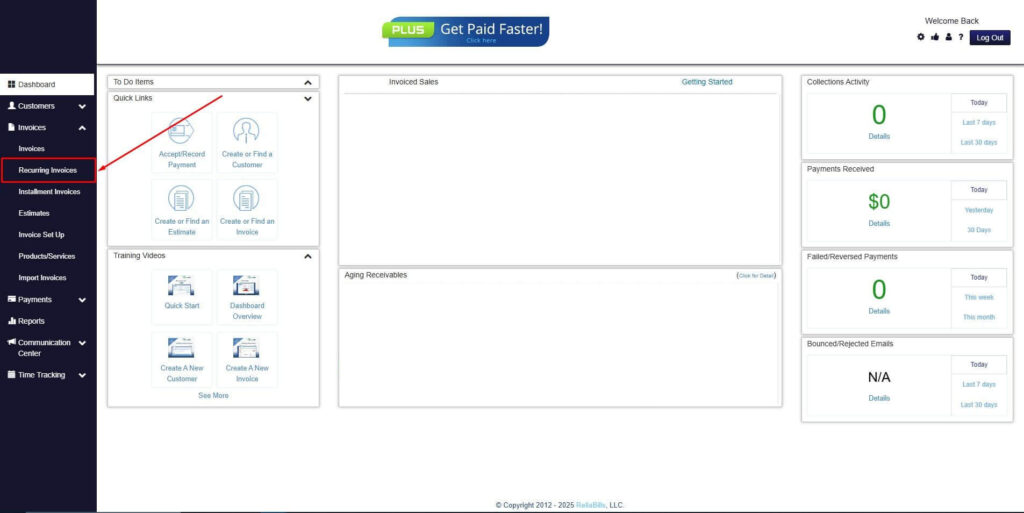
Step 2: Click on Recurring Invoices
- Navigate to the Invoices Dropdown and click on Recurring Invoices for an overview of the list of your existing customers.
Step 3: Go to the Customers Tab
- If you have already created a customer, search for them in the Customers tab and make sure their status is “Active”.
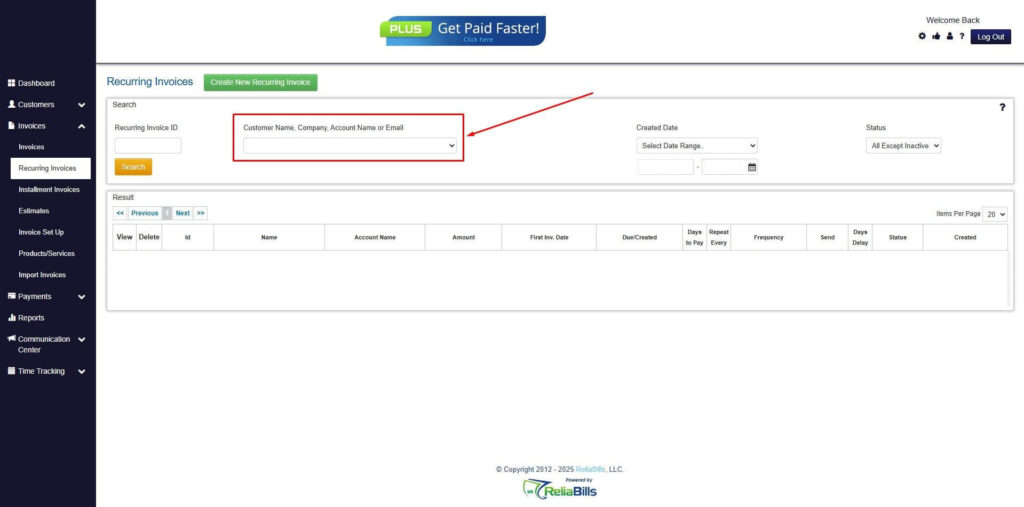
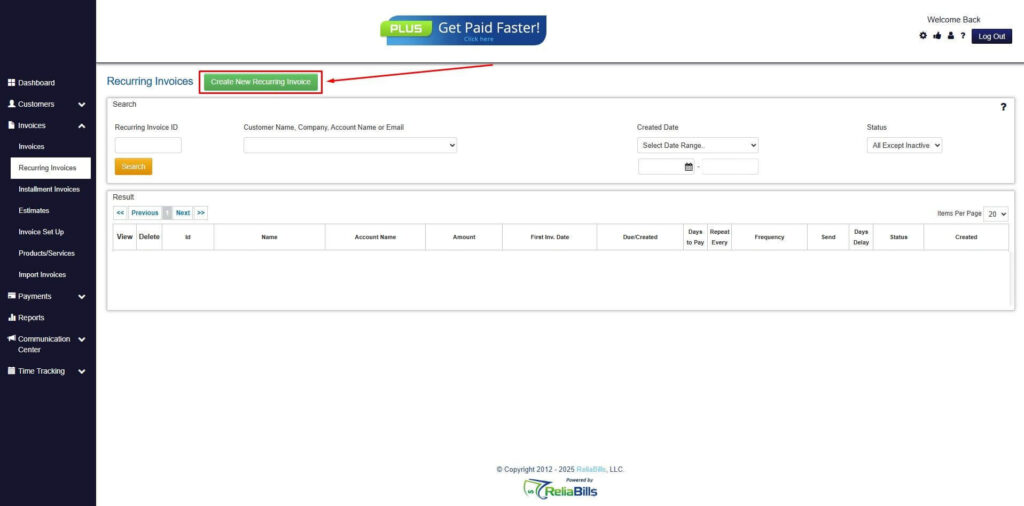
Step 4: Click the Create New Recurring Invoice
- If you haven’t created any customers yet, click the Create New Recurring Invoice to create a new customer.
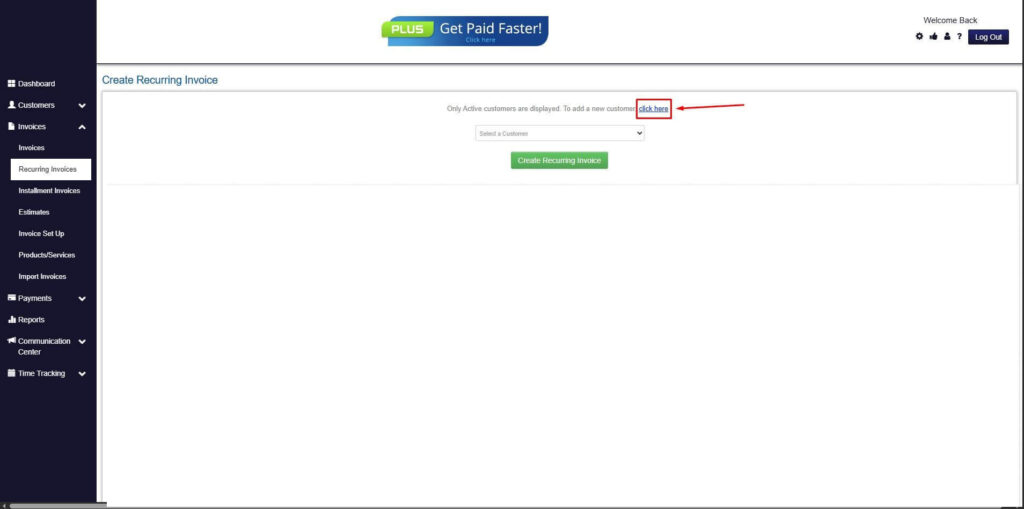
Step 5: Click on the “Click here” Button
- Click on the “Click here” button to proceed with the recurring invoice creation.
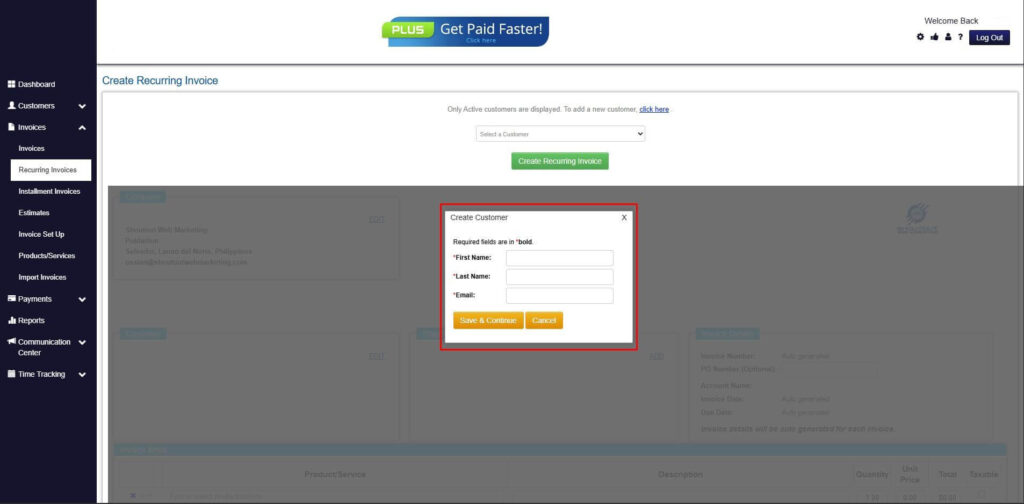
Step 6: Create Customer
- Provide your First Name, Last Name, and Email to proceed.
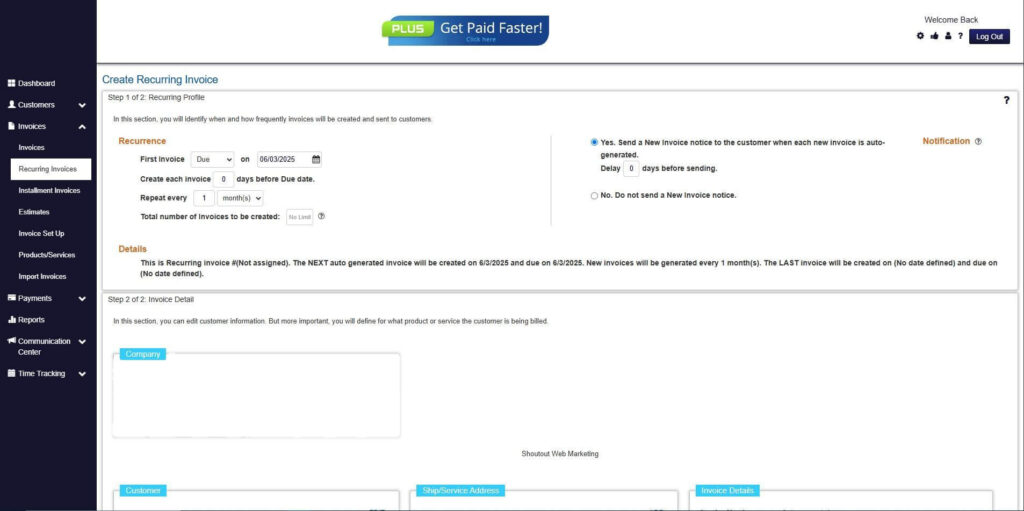
Step 7: Fill in the Create Recurring Invoice Form
- Fill in all the necessary fields.
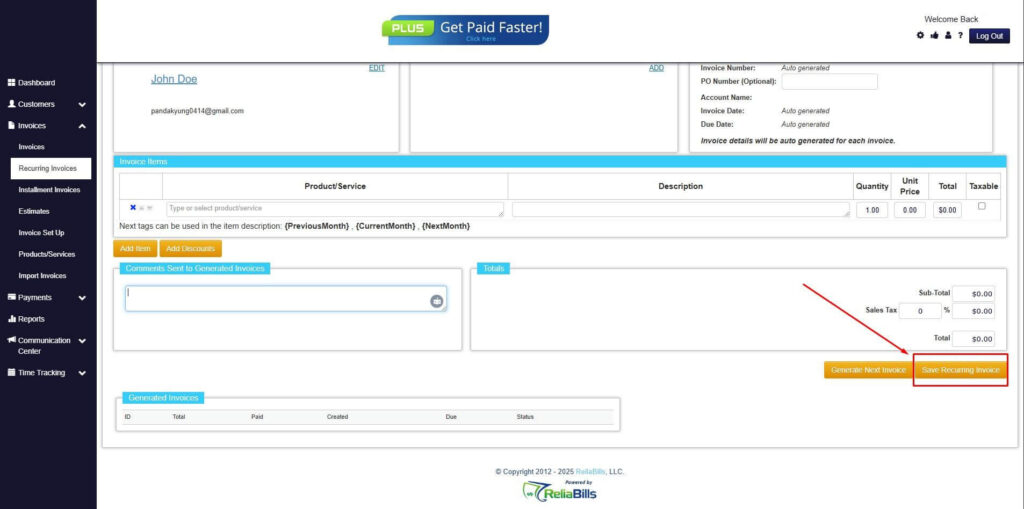
Step 8: Save Recurring Invoice
- After filling up the form, click “Save Recurring Invoice” to continue.
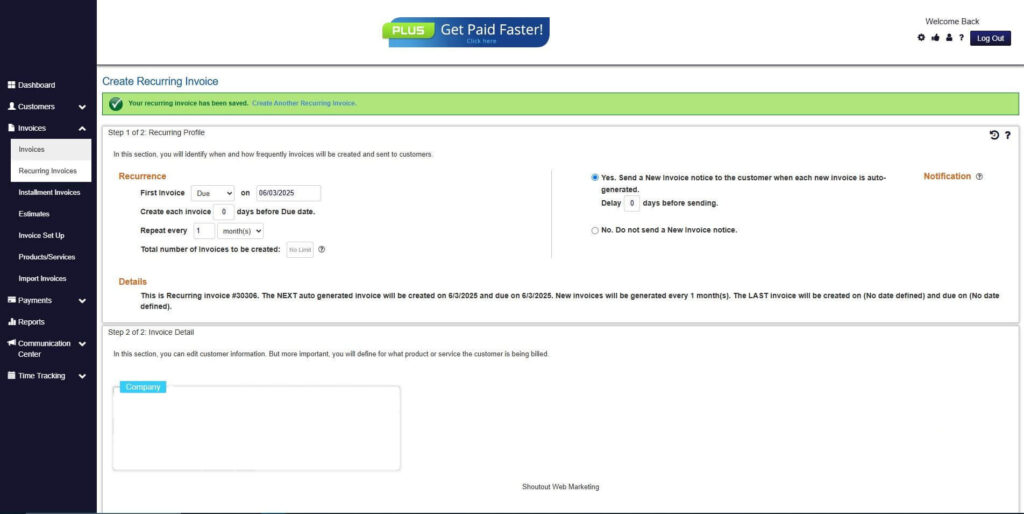
Step 9: Recurring Invoice Created
- Your Recurring Invoice has been created.
Frequently Asked Questions
1. What is construction billing software?
Construction billing software is a specialized invoicing system designed to manage job costing, progress billing, retainage, and change orders for contractors. It reduces manual errors and improves billing accuracy.
2. How does construction billing software reduce errors?
It automates calculations, applies standardized templates, tracks retainage, integrates job cost data, and reduces manual data entry. This significantly lowers the risk of arithmetic mistakes and omissions.
3. Can construction billing software manage progress billing?
Yes. It supports milestone-based billing and percentage-of-completion invoicing, ensuring accurate alignment with contract terms.
4. How does it handle retainage tracking?
The system automatically calculates retainage percentages and tracks withheld balances until release conditions are met.
5. Is recurring billing possible for ongoing contracts?
Yes. Many systems support recurring invoices for maintenance agreements or long-term service contracts, helping contractors maintain consistent revenue.
6. Does it improve cash flow visibility?
Absolutely. Real-time dashboards display outstanding invoices, partial payments, and retainage balances, improving financial oversight.
7. Is construction billing software suitable for small contractors?
Yes. Both small and large contractors benefit from automation, standardized processes, and improved billing accuracy.
Conclusion
Construction billing errors can disrupt cash flow, damage client relationships, and reduce profitability. Manual processes and spreadsheet-based systems increase the likelihood of costly mistakes.
Construction billing software reduces errors by automating calculations, standardizing templates, tracking progress billing, and integrating change orders seamlessly. It improves accuracy, enhances transparency, and strengthens financial oversight.
For contractors seeking better billing control and scalable growth, automation is no longer optional. Implementing reliable construction billing software is a strategic step toward improved accuracy, stronger cash flow, and long-term business success.