
As businesses grow, billing operations naturally become more complex. Higher transaction volumes, more customers, and varied pricing models all increase the likelihood of billing adjustments and corrections. Return invoices become a regular part of day-to-day operations rather than rare exceptions.
Without the right systems in place, managing these adjustments manually can slow teams down and create unnecessary friction. Small billing errors can quickly scale into larger cash flow and reporting issues as volume increases. This is why many growing businesses begin rethinking how they manage return invoices.
Automated return invoice management offers a scalable solution that keeps billing accurate and efficient. By reducing manual effort and improving visibility, automation helps businesses stay organized while continuing to grow. It allows teams to focus on customers and strategy instead of repetitive billing tasks.
What Are Return Invoices?
A return invoice is a billing document issued to adjust or reverse part or all of a previously issued invoice. It is commonly used when goods are returned, services are canceled, or pricing errors are discovered. The return invoice ensures financial records accurately reflect the corrected transaction.
Return invoices often occur in situations such as damaged products, duplicate charges, contract changes, or service disputes. In subscription or recurring billing environments, they may also result from plan downgrades or partial service periods. These scenarios become more frequent as customer bases expand.
Unlike refunds or credit memos, return invoices maintain a clear link to the original invoice. This connection helps preserve accurate audit trails and simplifies reconciliation. It also makes financial reporting more transparent and reliable.
Challenges of Manual Return Invoice Management
Managing return invoices manually requires significant administrative effort. Teams must track original invoices, calculate adjustments, and ensure records are updated correctly across systems. This process becomes increasingly time-consuming as transaction volume grows.
Manual handling also increases the risk of errors and inconsistencies. Incorrect amounts, missing documentation, or delayed updates can lead to customer dissatisfaction and internal confusion. Over time, these mistakes can damage trust and strain customer relationships.
Limited visibility is another major challenge. When return invoices are handled outside a centralized system, it becomes difficult to identify patterns or recurring issues. This lack of insight prevents businesses from improving billing processes proactively.
Why Growing Businesses Need Automated Return Invoices
As businesses scale, the volume of billing adjustments rises along with sales activity. What once felt manageable with spreadsheets or manual workflows quickly becomes inefficient. Automation helps businesses keep pace with growth without adding unnecessary overhead.
Small billing errors have a larger impact when transaction values and customer counts increase. Delayed or incorrect adjustments can disrupt cash flow and complicate financial reporting. Automated return invoice management reduces these risks by standardizing how adjustments are handled.
Scalable billing processes are essential for sustainable growth. Automation ensures that return invoices are processed consistently, accurately, and on time. This allows finance teams to support expansion rather than struggle to keep up with it.
Key Benefits of Automating Return Invoices
- Faster processing and resolution
Automated workflows reduce the time required to issue and apply return invoices. Adjustments are created quickly, helping resolve billing issues before they escalate. - Improved billing accuracy
Automation minimizes manual data entry and calculation errors. This leads to more reliable invoices and cleaner financial records. - Reduced administrative workload
Finance teams spend less time on repetitive tasks and more time on analysis and strategy. This improves productivity without increasing headcount. - Better customer experience
Faster, clearer billing adjustments improve transparency and trust. Customers are more confident when issues are resolved promptly. - Stronger audit trails and compliance
Automated systems maintain consistent documentation and clear links between invoices. This simplifies audits and regulatory reviews.
How Automated Return Invoices Work
Automated return invoice management begins with identifying returned or disputed charges. This may be triggered by customer requests, internal reviews, or system-based rules. Automation ensures these events are captured consistently.
Once identified, the system generates the appropriate adjustment documents. Return invoices are automatically linked to the original invoices, preserving financial context. Account balances are updated in real time to reflect the changes.
These updates flow through reporting and accounting systems without manual intervention. Finance teams gain immediate visibility into adjustments and their impact. This real-time accuracy supports better decision-making.
Impact on Cash Flow and Financial Reporting
Automated return invoices help correct billing issues faster, which directly improves cash flow. Prompt adjustments prevent prolonged disputes and reduce delayed payments. This keeps revenue cycles moving smoothly.
Revenue visibility also improves when adjustments are handled systematically. Businesses can clearly see how returns and corrections affect overall performance. This reduces the risk of revenue leakage over time.
Accurate and timely adjustments support better forecasting and reporting. Financial statements reflect true performance rather than outdated or incorrect figures. This reliability is especially important for growing businesses.
Best Practices for Implementing Automated Return Invoices
- Standardize return and adjustment policies
Clear rules ensure return invoices are issued consistently across teams. This reduces confusion and improves compliance. - Integrate return invoices with invoicing systems
Automation works best when return invoices are part of the core billing workflow. Integration eliminates duplicate data entry. - Monitor trends and recurring issues
Regular review helps identify common causes of returns. These insights can drive process improvements. - Train teams on automated workflows
Proper training ensures staff understand how automation supports accuracy and efficiency. This increases adoption and effectiveness.
Common Mistakes to Avoid
- Treating return invoices as rare exceptions instead of standard processes
- Delaying automation as transaction volume grows
- Poor documentation and inconsistent record-keeping
- Handling adjustments differently across departments
How ReliaBills Supports Automated Return Invoices
ReliaBills helps businesses manage automated return invoices by keeping all billing activity centralized in one platform. Return invoices are directly linked to the original invoices, which makes adjustments clear, traceable, and easy to review. This centralized approach reduces confusion and ensures billing records stay accurate as transaction volume grows.
For businesses using recurring billing, ReliaBills makes return invoice management even more seamless. Adjustments can be applied without disrupting future billing cycles or scheduled payments. This allows businesses to correct charges while maintaining predictable cash flow and consistent customer billing experiences.
With ReliaBills PLUS, businesses gain deeper visibility and control over return invoice activity. Advanced reporting tools help identify recurring adjustment trends and potential process issues early. ReliaBills PLUS is designed to support growing businesses that need scalable, audit-ready billing workflows as complexity increases.
How to Create a New Recurring Invoice Using ReliaBills
Creating a New Recurring Invoice using ReliaBills involves the following steps:
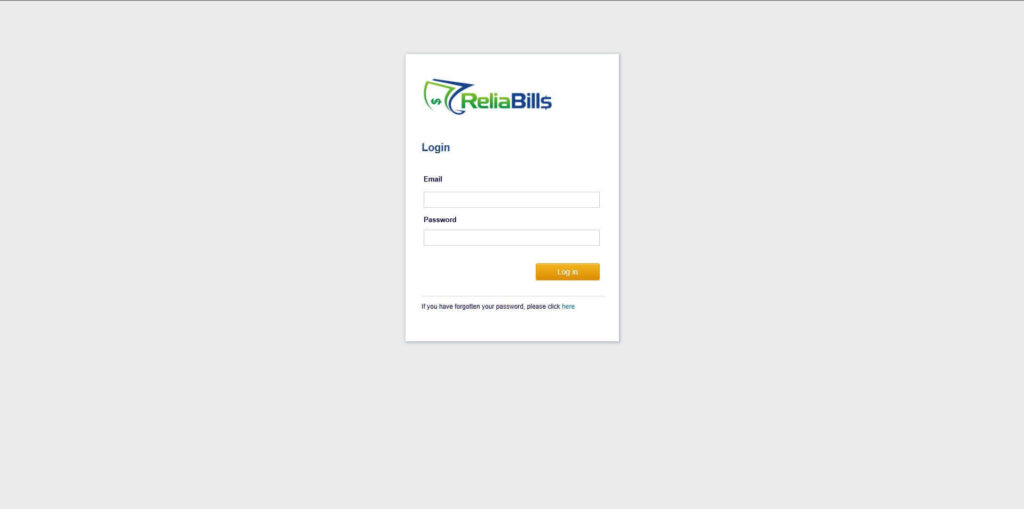
Step 1: Login to ReliaBills
- Access your ReliaBills Account using your login credentials. If you don’t have an account, sign up here.
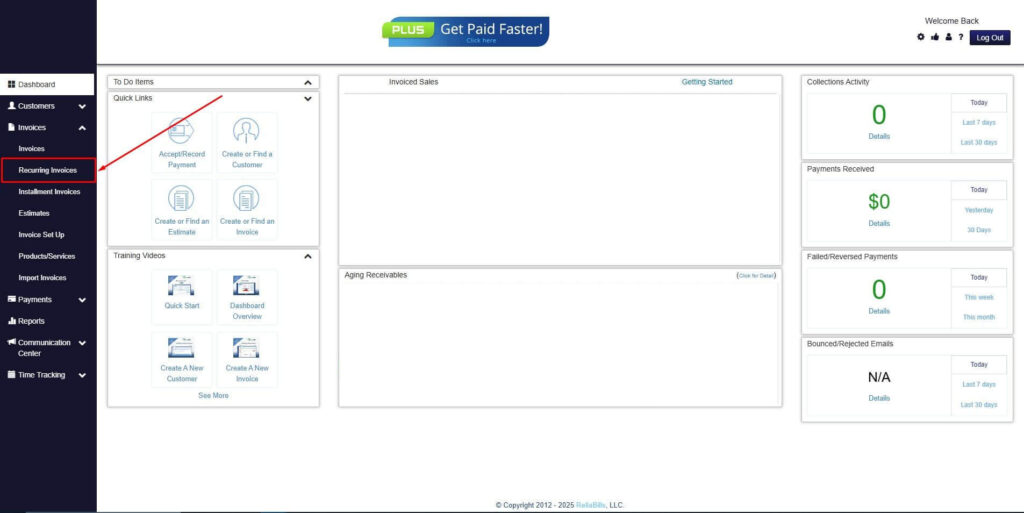
Step 2: Click on Recurring Invoices
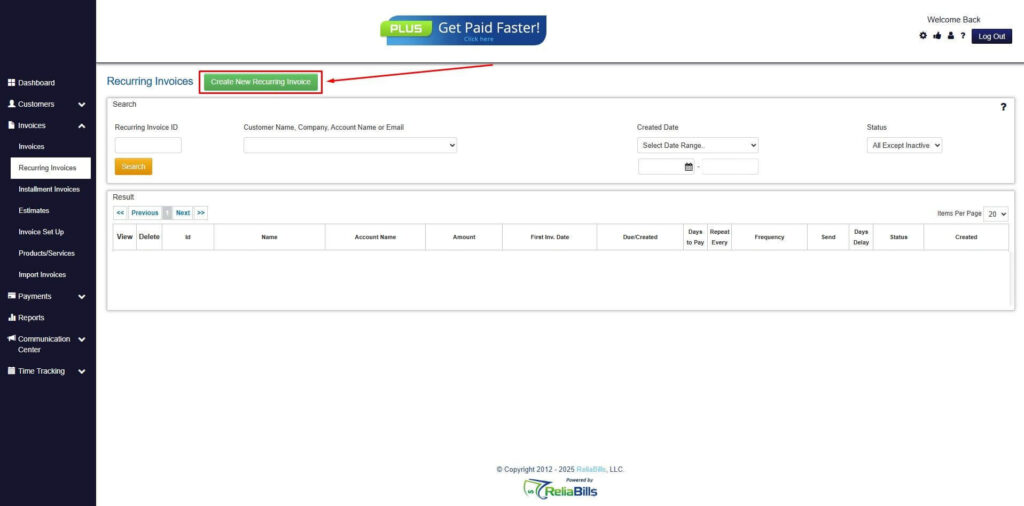
- Navigate to the Invoices Dropdown and click on Recurring Invoices for an overview of the list of your existing customers.
Step 3: Go to the Customers Tab
- If you have already created a customer, search for them in the Customers tab and make sure their status is “Active”.
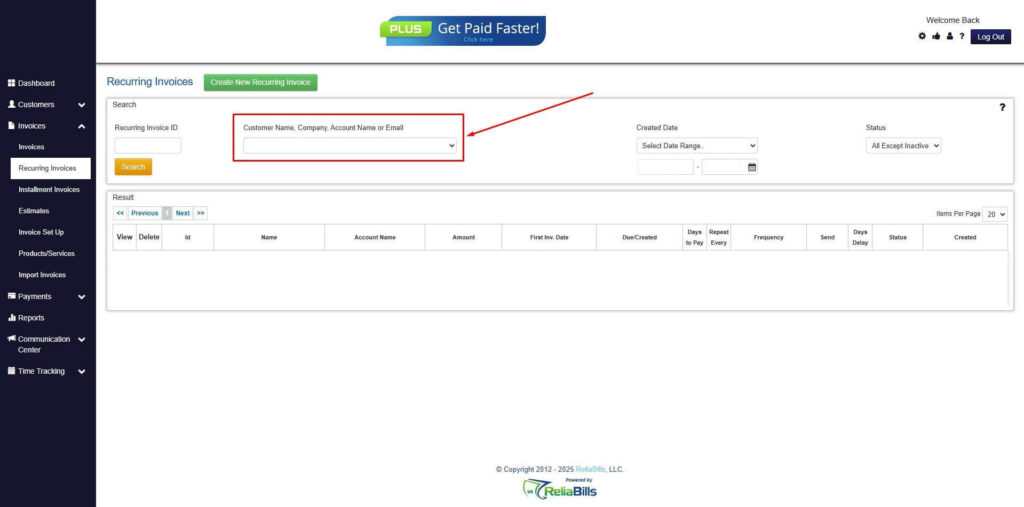
Step 4: Click the Create New Recurring Invoice
- If you haven’t created any customers yet, click the Create New Recurring Invoice to create a new customer.
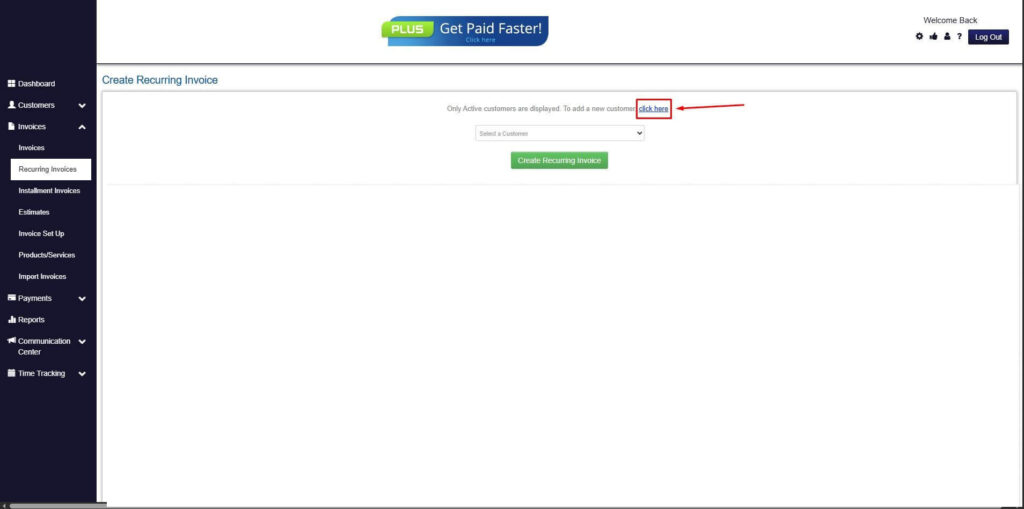
Step 5: Click on the “Click here” Button
- Click on the “Click here” button to proceed with the recurring invoice creation.
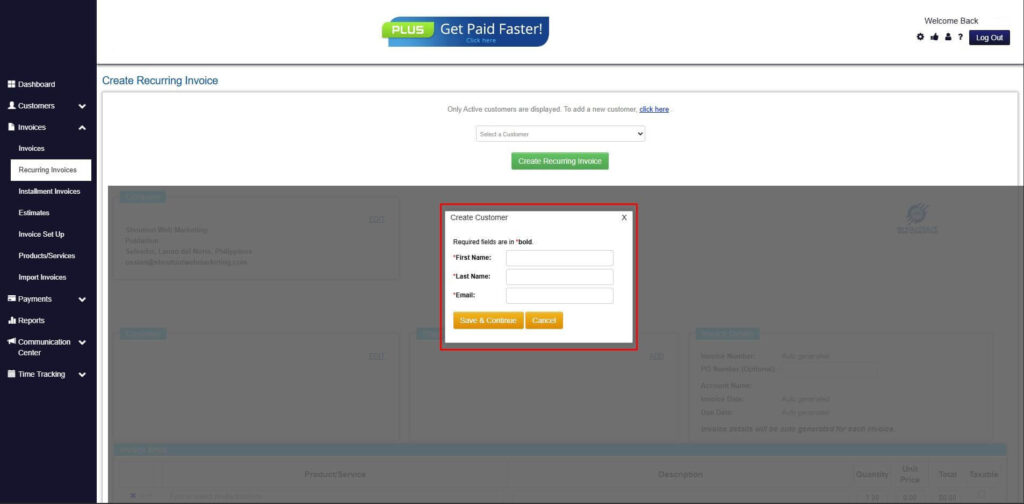
Step 6: Create Customer
- Provide your First Name, Last Name, and Email to proceed.
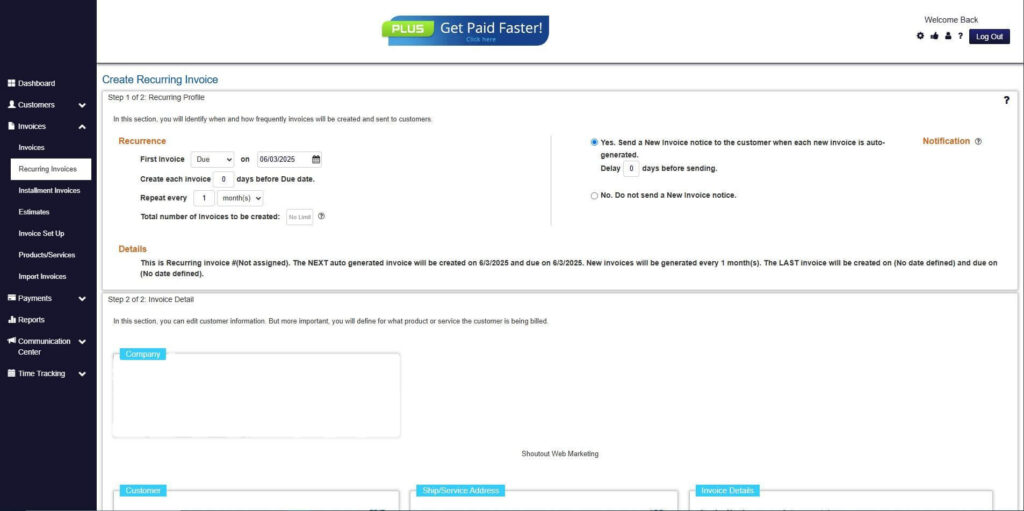
Step 7: Fill in the Create Recurring Invoice Form
- Fill in all the necessary fields.
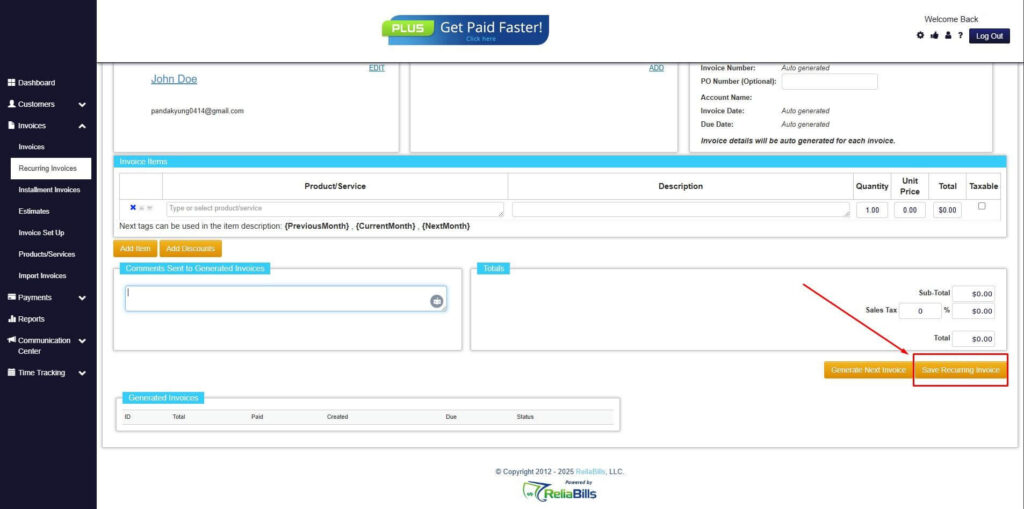
Step 8: Save Recurring Invoice
- After filling up the form, click “Save Recurring Invoice” to continue.
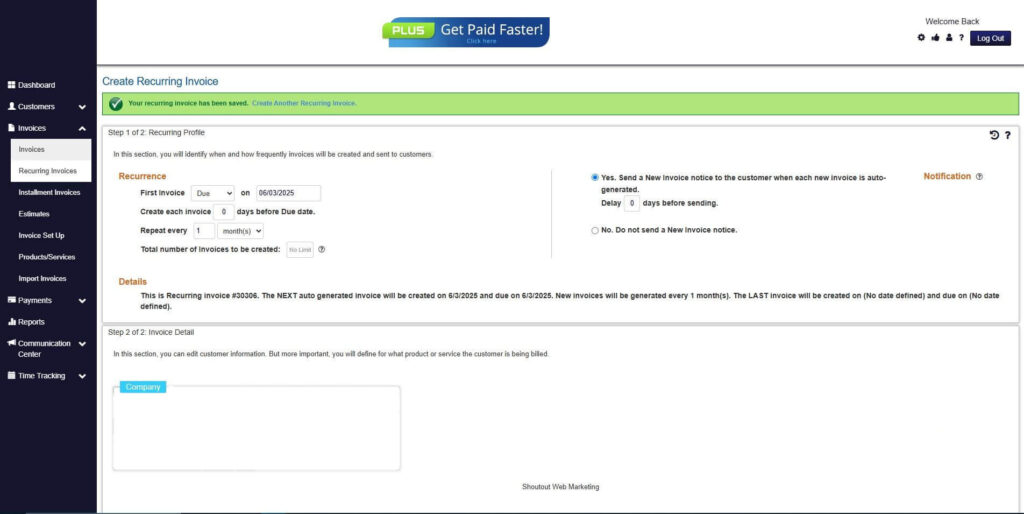
Step 9: Recurring Invoice Created
- Your Recurring Invoice has been created.
Frequently Asked Questions
1. Can return invoices be fully automated?
Yes, many return invoice processes can be automated when integrated with invoicing systems.
2. How do automated return invoices reduce disputes?
Faster and clearer adjustments improve transparency and communication with customers.
3. Do return invoices affect recurring billing schedules?
When managed correctly, return invoices adjust balances without disrupting future billing.
4. Are automated return invoices audit-ready?
Automated systems provide consistent documentation and clear audit trails.
Conclusion
Automated return invoice management is no longer optional for growing businesses. As billing complexity increases, manual processes introduce unnecessary risk and inefficiency. Automation provides structure, accuracy, and scalability.
By streamlining adjustments, businesses improve cash flow, reporting accuracy, and customer trust. Automated return invoices help teams stay organized while supporting continued growth. For businesses looking to scale confidently, automation is a critical investment.