
Payroll errors are one of the most common operational problems businesses face, especially as teams grow and pay structures become more complex. Even small mistakes in calculations, timing, or tax handling can lead to frustrated employees, compliance issues, and unnecessary financial strain. For many businesses, these errors stem from outdated or manual payroll processes.
When payroll mistakes occur, the impact goes beyond numbers on a paycheck. Employees may lose trust, regulators may impose penalties, and finance teams often spend hours correcting issues that could have been avoided. Over time, recurring payroll problems can slow growth and distract leadership from more strategic priorities.
Automation is changing how businesses manage payroll accuracy. By using automated payroll software, companies can reduce manual effort, apply consistent rules, and ensure calculations are handled correctly every cycle. Automation shifts payroll from a reactive task to a reliable, repeatable process that supports long-term stability.
What Are Common Payroll Errors?
Incorrect wage calculations
Errors in hourly rates, salaried pay, overtime, bonuses, or commissions are among the most frequent payroll mistakes. These often occur when calculations are done manually or when pay rules differ across roles and schedules.
Missed or late payroll payments
Payroll delays can result from poor scheduling, approval bottlenecks, or cash flow timing issues. Late payments negatively affect employee trust and can expose businesses to compliance penalties.
Tax withholding and filing mistakes
Incorrect federal, state, or local tax withholdings are common when rates are updated manually or applied inconsistently. These errors often lead to penalties, interest, and time-consuming corrections.
Incorrect deductions and benefits processing
Mistakes in health benefits, retirement contributions, garnishments, or reimbursements can create employee dissatisfaction and accounting discrepancies.
Data entry and recordkeeping errors
Manual entry increases the risk of duplicate records, missing information, or outdated employee data being used in payroll runs.
Why Manual Payroll Processes Lead to Errors
Manual payroll processes depend heavily on data entry, spreadsheets, and repetitive calculations. These tools are prone to human error, especially when handling large volumes of employee data or frequent changes. A single incorrect formula or copied value can affect multiple paychecks.
Another issue with manual payroll is the lack of real-time updates. Changes to employee status, pay rates, or tax rules may not be reflected immediately, increasing the risk of outdated information being used. This gap makes it difficult to maintain accuracy across payroll cycles.
Poor visibility and limited controls also contribute to mistakes. Without automated checks or approval workflows, errors may go unnoticed until after payroll is processed. By then, correcting issues becomes more time-consuming and costly.
What Is Payroll Automation?
Payroll automation refers to the use of automated payroll software to handle calculations, deductions, tax rules, and payment scheduling with minimal manual intervention. These systems are designed to apply consistent logic across every payroll cycle, reducing variability and risk.
Core features of payroll automation typically include automated wage calculations, tax withholding, compliance updates, and digital recordkeeping. Many platforms also integrate time tracking, benefits administration, and reporting tools to centralize payroll data.
By reducing reliance on manual steps, automation limits the opportunities for human error. Instead of recalculating or rechecking data each cycle, teams can focus on reviewing exceptions and ensuring accuracy at a higher level.
How Automation Reduces Payroll Calculation Errors
Automated payroll software calculates wages, overtime, and deductions using predefined rules that are applied consistently. This eliminates guesswork and reduces discrepancies caused by manual math or inconsistent interpretation of pay policies.
Built-in validation checks help catch issues before payroll is finalized. These checks can flag unusual changes, missing data, or values that fall outside expected ranges. As a result, errors are identified earlier in the process.
Real-time updates to employee records further improve accuracy. When pay rates, schedules, or deductions change, automation ensures those updates are reflected immediately in the next payroll run.
Improving Compliance Through Automation
Compliance is one of the most challenging aspects of payroll, particularly as tax rules and labor laws change. Automated payroll software helps by updating tax rates and regulatory requirements automatically, reducing the risk of noncompliance.
Consistent application of payroll rules ensures that all employees are treated fairly and in accordance with regulations. Automation removes subjective decision-making from routine payroll tasks, which is especially important during audits or reviews.
Automated systems also create audit-ready payroll records. Detailed logs, reports, and documentation make it easier to demonstrate compliance and respond quickly to inquiries from regulators or accountants.
Payroll Automation for Growing and Remote Teams
As businesses grow, payroll complexity increases. Multiple pay rates, departments, and schedules become harder to manage manually. Automation allows companies to scale payroll operations without adding administrative burden.
Remote and contract workers introduce additional challenges, such as different tax jurisdictions and pay structures. Automated payroll software can apply location-specific rules and manage varied payment arrangements more accurately.
For growing teams, automation provides consistency across locations and roles. This reduces risk while supporting expansion into new markets or work models.
Operational Benefits Beyond Accuracy
- Faster payroll processing cycles
Automation reduces the number of steps required to run payroll, allowing teams to complete payroll more quickly and with fewer delays each cycle. - Reduced administrative workload
By eliminating repetitive calculations and manual checks, payroll teams can focus on higher-value tasks like reporting, planning, and employee support. - Improved cash flow planning
Predictable payroll expenses combined with automated billing and recurring revenue make it easier to forecast cash needs and avoid funding shortfalls. - Scalability without added risk
Automated systems handle growing headcounts, multiple pay schedules, and varied employee types without increasing the likelihood of errors. - Better visibility and reporting
Centralized payroll data and automated reports provide clearer insights into labor costs, trends, and compliance status.
Best Practices for Implementing Payroll Automation
Evaluate current payroll pain points first
Identify where errors, delays, or inefficiencies most often occur. This ensures automation targets the most impactful areas.
Choose tools that integrate with billing and accounting systems
Seamless data flow between payroll, invoicing, and payment platforms reduces reconciliation issues and improves accuracy.
Standardize payroll rules and policies
Clearly defined pay rates, schedules, and deduction rules help automation work consistently across all payroll cycles.
Test payroll workflows before full rollout
Running parallel payroll tests helps catch configuration issues early and builds confidence in automated calculations.
Train teams and review results regularly
Automation still requires oversight. Regular reviews ensure payroll remains accurate as the business grows or regulations change.
How ReliaBills Supports Payment and Billing Automation
ReliaBills helps businesses automate billing and payment processes by replacing manual invoicing, follow-ups, and tracking with a centralized, easy-to-manage system. Instead of juggling spreadsheets, separate tools, or one-off invoices, businesses can generate invoices automatically and deliver them consistently to customers. This reduces administrative friction and ensures billing workflows remain accurate and repeatable as operations grow.
Recurring billing is a core strength of ReliaBills, making it easier to collect payments on time and maintain predictable cash flow. Businesses can set up scheduled invoices, enable autopay, and apply consistent billing rules without manual intervention. This steady revenue flow supports more reliable financial planning, including payroll funding, expense management, and long-term growth decisions.
ReliaBills also provides real-time visibility into invoices, payments, and customer activity through centralized tracking and reporting. Automated reminders, branded communication, and clear payment histories improve customer experience while reducing disputes and late payments. By connecting billing automation with payment collection, ReliaBills gives businesses greater control, accuracy, and confidence in their financial operations.
How to Create a New Recurring Invoice Using ReliaBills
Creating a New Recurring Invoice using ReliaBills involves the following steps:
Step 1: Login to ReliaBills
- Access your ReliaBills Account using your login credentials. If you don’t have an account, sign up here.

Step 2: Click on Recurring Invoices
- Navigate to the Invoices Dropdown and click on Recurring Invoices for an overview of the list of your existing customers.
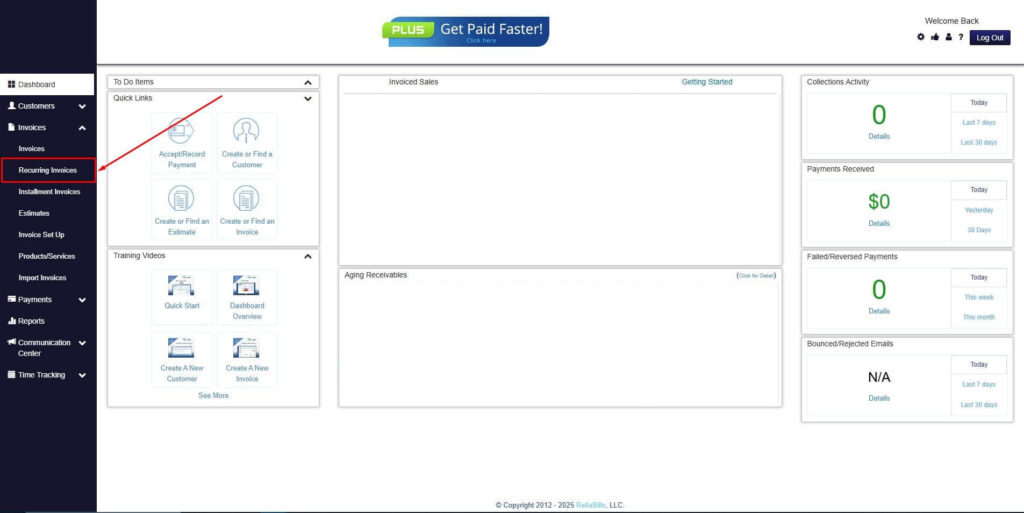
Step 3: Go to the Customers Tab
- If you have already created a customer, search for them in the Customers tab and make sure their status is “Active”.
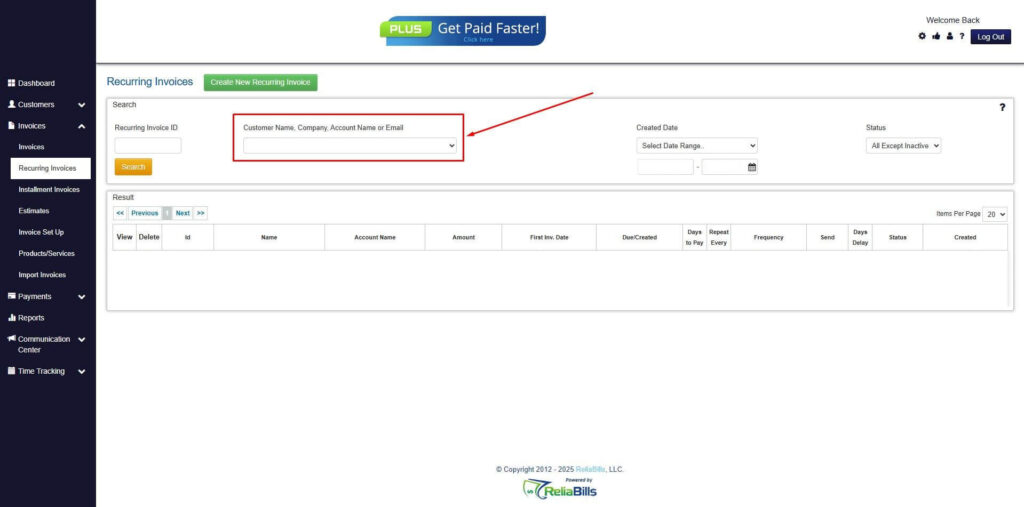
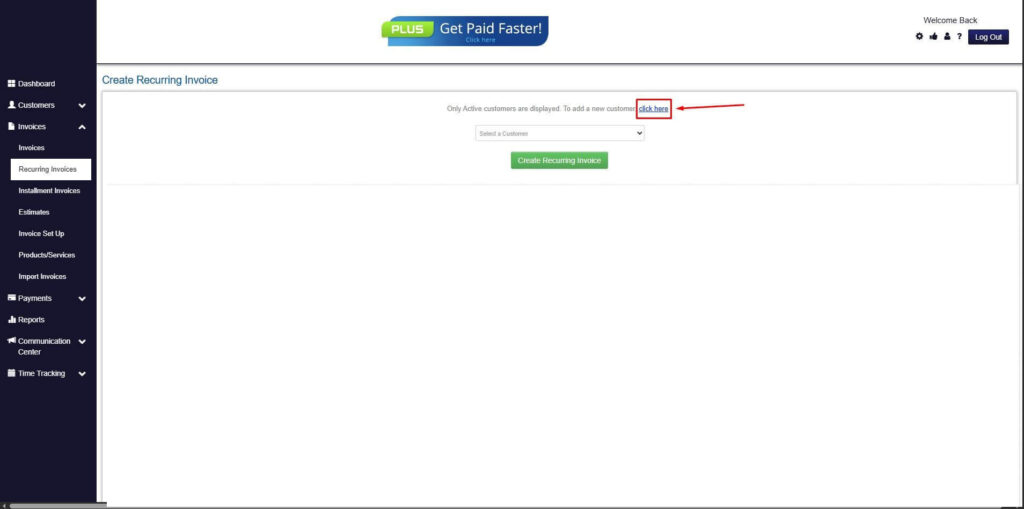
Step 4: Click the Create New Recurring Invoice
- If you haven’t created any customers yet, click the Create New Recurring Invoice to create a new customer.
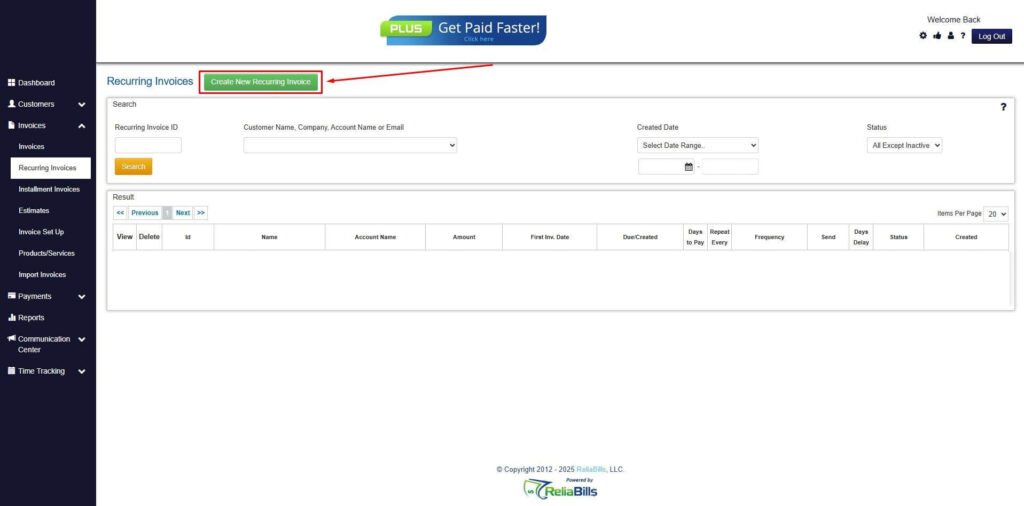
Step 5: Click on the “Click here” Button
- Click on the “Click here” button to proceed with the recurring invoice creation.
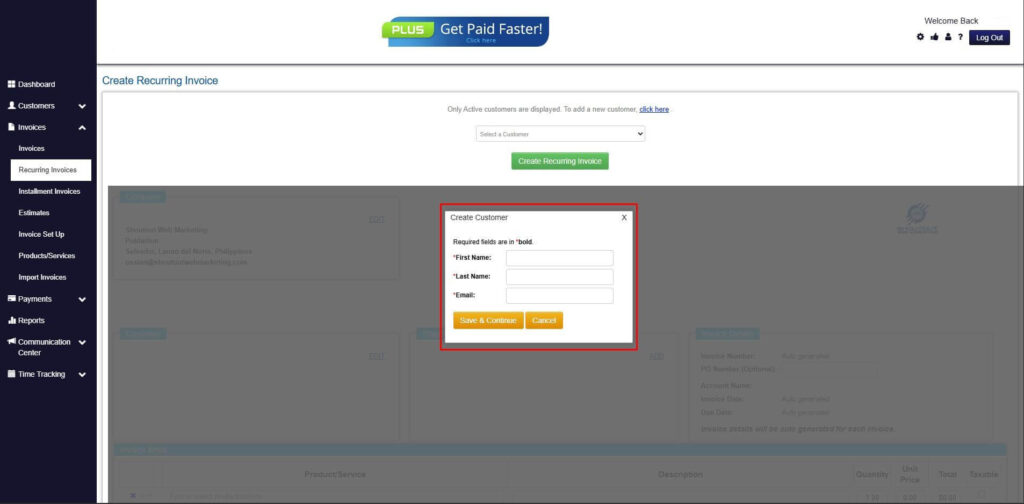
Step 6: Create Customer
- Provide your First Name, Last Name, and Email to proceed.
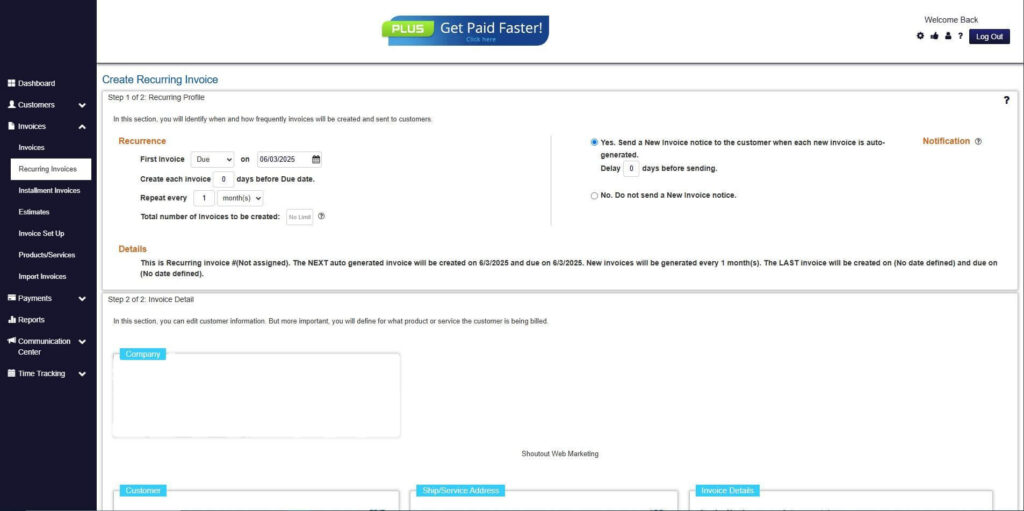
Step 7: Fill in the Create Recurring Invoice Form
- Fill in all the necessary fields.
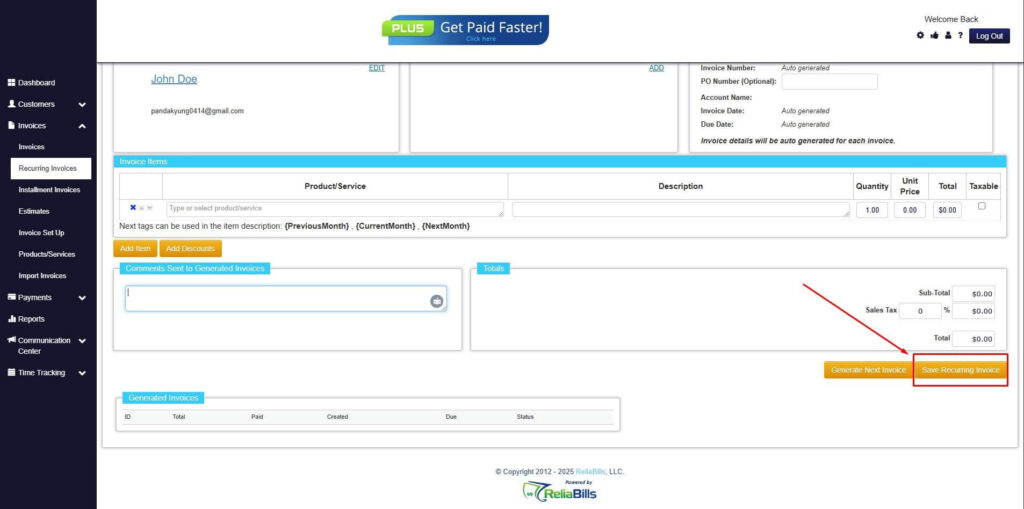
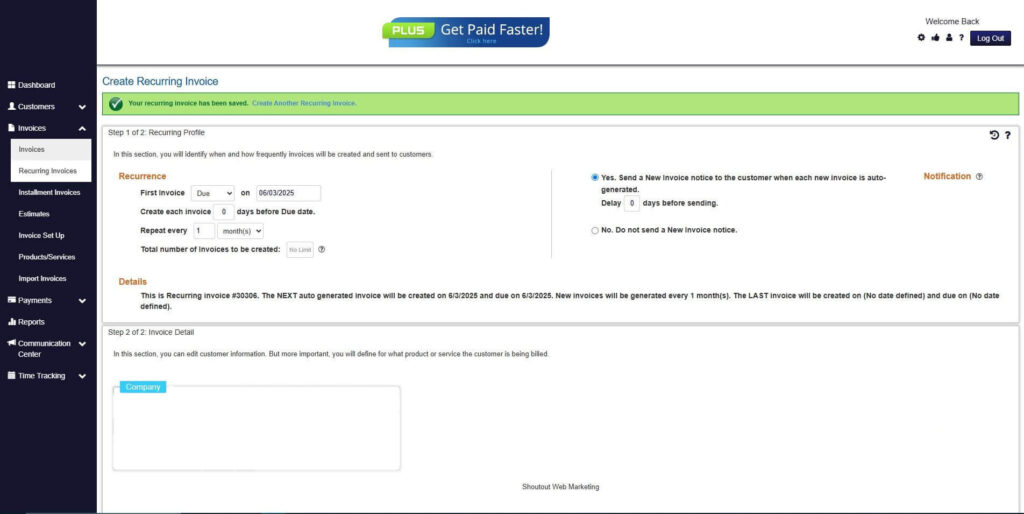
Step 8: Save Recurring Invoice
- After filling up the form, click “Save Recurring Invoice” to continue.
Step 9: Recurring Invoice Created
- Your Recurring Invoice has been created.
Frequently Asked Questions
Can payroll automation completely eliminate errors?
Automation greatly reduces errors caused by manual calculations and data entry, but human review is still important for handling exceptions and changes.
Is payroll automation suitable for small businesses?
Yes. Small businesses benefit significantly from early automation because it establishes consistent processes before payroll complexity increases.
How secure is automated payroll software?
Reputable platforms use encryption, role-based access, and compliance standards to protect sensitive payroll and employee data.
How does billing automation support payroll accuracy?
Automated invoicing and recurring billing create more predictable cash flow, making it easier to fund payroll on time and avoid rushed or delayed processing.
Conclusion
Payroll errors are costly, disruptive, and often avoidable. Manual processes increase the likelihood of mistakes, while automated payroll software provides consistency, accuracy, and compliance support.
Automation improves payroll calculations, simplifies compliance, and supports growing and remote teams. Beyond accuracy, it delivers operational efficiency and better financial planning.
For businesses focused on growth, automation is no longer optional. It is a critical foundation for reliable payroll and long-term success.