
Automated billing and payment collection has become essential for modern businesses that want to scale efficiently and maintain healthy cash flow. Manual invoicing, delayed follow-ups, and inconsistent payment tracking often lead to missed revenue and unnecessary administrative work. As customer expectations for convenience and speed increase, businesses need more reliable billing systems.
Many companies struggle with manual billing processes that rely on spreadsheets, email reminders, or one-time invoices. These methods increase the risk of errors, late payments, and poor customer experiences. Over time, even small inefficiencies can grow into serious financial and operational challenges.
This guide explains how to configure automated billing and payment collection step by step. You will learn how to prepare your business, set up recurring billing, automate payments, manage exceptions, and use reporting to maintain control and visibility.
What Is Automated Billing and Payment Collection?
Automated billing and payment collection refers to the use of software to generate invoices, collect payments, and manage billing cycles without constant manual intervention. Once billing rules are configured, invoices are created and delivered automatically, and payments are processed according to predefined schedules.
Unlike manual billing, which requires staff to create and send each invoice individually, automated systems operate on schedules. Scheduled billing allows invoices to be sent automatically, while fully automated billing includes autopay, reminders, retries, and reconciliation.
Common use cases include subscription services, monthly retainers, installment plans, and ongoing service agreements. In these scenarios, recurring billing ensures consistent invoicing and predictable revenue.
Benefits of Automating Billing and Payment Collection
Faster and More Predictable Cash Flow
Automated billing ensures invoices are generated and sent on time for every billing cycle. When combined with autopay, payments are collected consistently, reducing delays caused by manual follow-ups or forgotten invoices.
Reduced Billing Errors and Late Payments
Automation minimizes human error by using predefined billing rules and standardized invoice templates. Automated reminders and payment retries further reduce late payments and missed revenue.
Significant Time Savings for Internal Teams
Finance and operations teams no longer need to manually create invoices, send reminders, or reconcile payments. This allows staff to focus on strategic tasks rather than repetitive administrative work.
Improved Customer Experience and Trust
Customers benefit from clear billing schedules, predictable charges, and convenient payment options. Transparent and consistent billing builds trust and strengthens long-term relationships.
Preparing Your Business for Automation
Before configuring automated billing, businesses should review their billing models and pricing structures. Understanding whether customers are billed monthly, annually, or on custom schedules helps determine how recurring billing should be set up.
Organizing customer and payment data is equally important. Accurate customer details, billing preferences, and payment methods reduce errors once automation is enabled. Clean data ensures invoices and payments flow smoothly from the start.
Defining billing terms and payment policies upfront provides clarity for both internal teams and customers. This includes due dates, accepted payment methods, late fee policies, and refund guidelines.
Step-by-Step: How to Configure Automated Billing
Create Standardized Invoice Templates
Design invoice templates that include consistent branding, clear descriptions, pricing details, and payment terms. Standardization reduces confusion and presents a professional image.
Set Billing Schedules and Frequencies
Define when invoices are generated and how often customers are billed. This may include monthly subscriptions, quarterly retainers, or custom billing intervals.
Define Recurring Billing Rules
Configure rules that determine how charges repeat, how long billing continues, and how adjustments are handled. These rules ensure invoices are accurate across billing cycles.
Assign Customers to Billing Plans
Link customers to the appropriate recurring billing plans based on their agreements. Once assigned, invoicing and payment collection are handled automatically.
Configuring Automated Payment Collection
Automated payment collection begins with enabling autopay options. Customers can pay using saved payment methods such as credit cards, debit cards, or ACH, reducing the need for manual payments.
Payment reminders and retries further support timely collection. Automated notifications remind customers before due dates, while retry logic handles failed payments without manual follow-up. This reduces disruptions in cash flow.
Managing failed payments through structured dunning workflows helps recover revenue while maintaining positive customer relationships. Clear communication and automated retries ensure issues are addressed promptly.
Handling Adjustments and Exceptions
No billing system is complete without the ability to manage changes. Automated billing platforms allow businesses to handle prorations, credits, refunds, and return invoices while maintaining accurate records.
Plan changes such as upgrades, downgrades, or cancellations can be applied to future billing cycles automatically. This ensures customers are charged correctly without manual recalculations.
Maintaining accurate records during adjustments is critical. Automation ensures that every change is documented, supporting transparency, compliance, and customer trust.
Monitoring, Reporting, and Reconciliation
Automated billing and payment collection systems provide real-time visibility into payment statuses and outstanding balances. Businesses can easily see which invoices are paid, pending, or overdue.
Reporting tools offer valuable cash flow insights. By reviewing trends and performance metrics, businesses can forecast revenue more accurately and make informed financial decisions.
Reconciliation becomes simpler with centralized data. Automated systems reduce discrepancies between invoices, payments, and accounting records, saving time during audits and reporting periods.
Security, Compliance, and Customer Trust
Security is a critical component of automated billing. Reliable platforms follow industry standards such as PCI compliance to protect payment data and customer information.
Transparent billing communication builds trust. Customers should clearly understand billing schedules, charges, and payment terms before enrolling in automated payments.
Managing customer consent is essential. Automated systems track authorization for recurring payments, ensuring compliance and reducing disputes.
Best Practices for Successful Automation
Test Billing Rules Before Full Launch
Run test invoices and payments to confirm billing schedules, amounts, and notifications work as expected. Early testing prevents recurring errors.
Regularly Review Automated Workflows
Periodic reviews help ensure billing rules remain accurate as pricing, services, or customer agreements change over time.
Keep Customer Communication Clear and Proactive
Inform customers about billing schedules, payment methods, and upcoming charges. Clear communication reduces disputes and increases payment success rates.
Monitor Reports and Performance Metrics
Use reporting tools to track payment trends, overdue invoices, and cash flow. These insights support better financial decision-making.
Common Mistakes to Avoid
Over-Automation Without Oversight
Relying entirely on automation without review can allow small errors to repeat across billing cycles. Human oversight remains essential.
Inconsistent Billing Policies
Applying different billing rules to similar customers can create confusion and disputes. Consistency is critical for accuracy and trust.
Mixing Manual and Automated Processes
Using both manual invoicing and automation increases the risk of duplicate invoices and reconciliation issues. Businesses should standardize processes where possible.
Ignoring Failed Payments and Feedback
Failed payments should trigger follow-up actions and communication. Customer feedback can also reveal issues that automation alone cannot address.
How ReliaBills Simplifies Automated Billing and Payments
ReliaBills simplifies automated billing and payments by bringing invoicing, payment collection, and account tracking into a single, centralized platform. Instead of managing disconnected tools or manual processes, businesses can automate routine billing tasks while maintaining full visibility into invoices and payment activity. This streamlined approach reduces administrative effort and helps teams stay organized as billing volumes grow.
Recurring billing is a core strength of ReliaBills, allowing businesses to schedule invoices, collect payments automatically, and maintain consistent billing cycles. Once billing rules are set, invoices are generated and delivered on time, and payments are collected through secure autopay options. This consistency helps prevent late payments, reduces follow-ups, and supports more predictable cash flow for payroll and operating expenses.
ReliaBills also enhances control through real-time tracking, automated reminders, and clear reporting. Businesses can quickly identify outstanding balances, monitor payment trends, and address issues before they impact cash flow. By combining automated invoicing with recurring billing and centralized reporting, ReliaBills helps businesses maintain accuracy, improve efficiency, and build stronger customer payment relationships.
How to Create a New Recurring Invoice Using ReliaBills
Creating a New Recurring Invoice using ReliaBills involves the following steps:
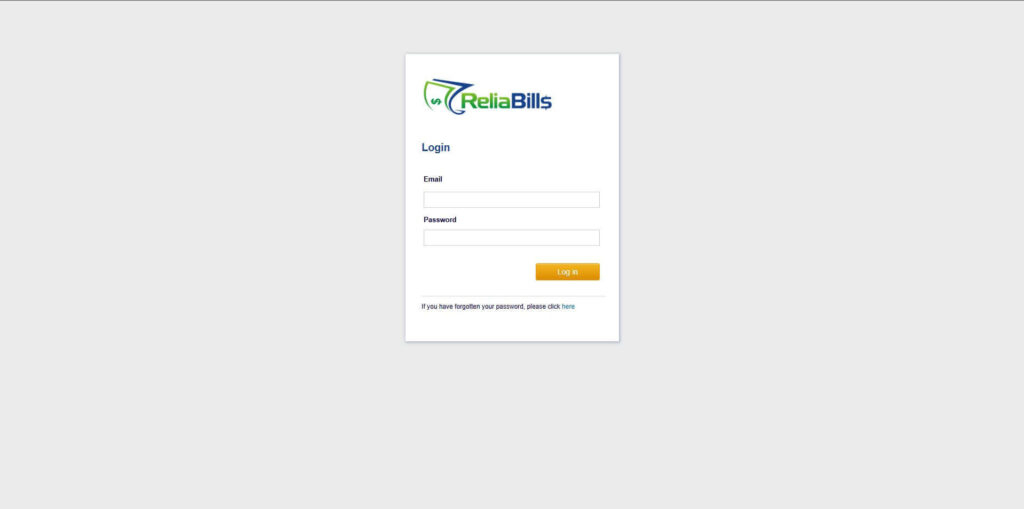
Step 1: Login to ReliaBills
- Access your ReliaBills Account using your login credentials. If you don’t have an account, sign up here.
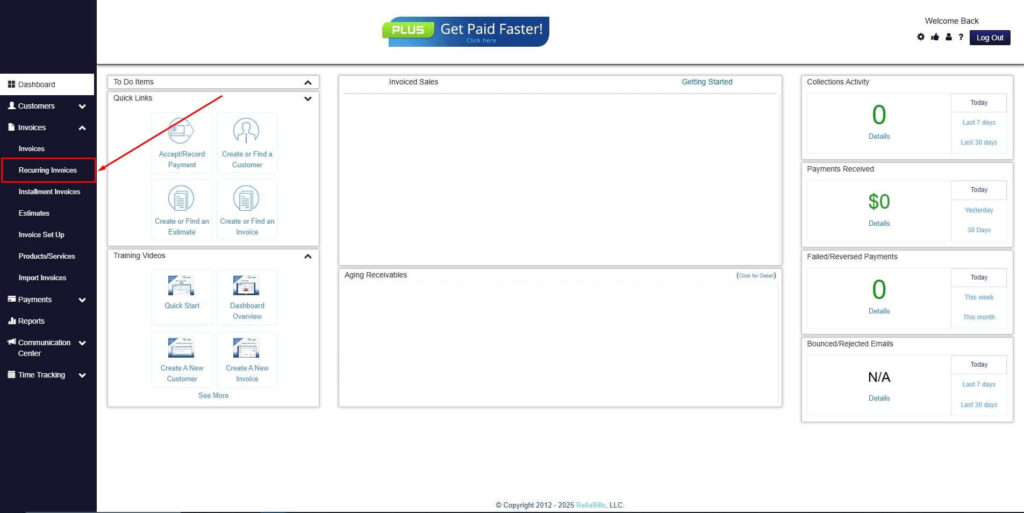
Step 2: Click on Recurring Invoices
- Navigate to the Invoices Dropdown and click on Recurring Invoices for an overview of the list of your existing customers.
Step 3: Go to the Customers Tab
- If you have already created a customer, search for them in the Customers tab and make sure their status is “Active”.
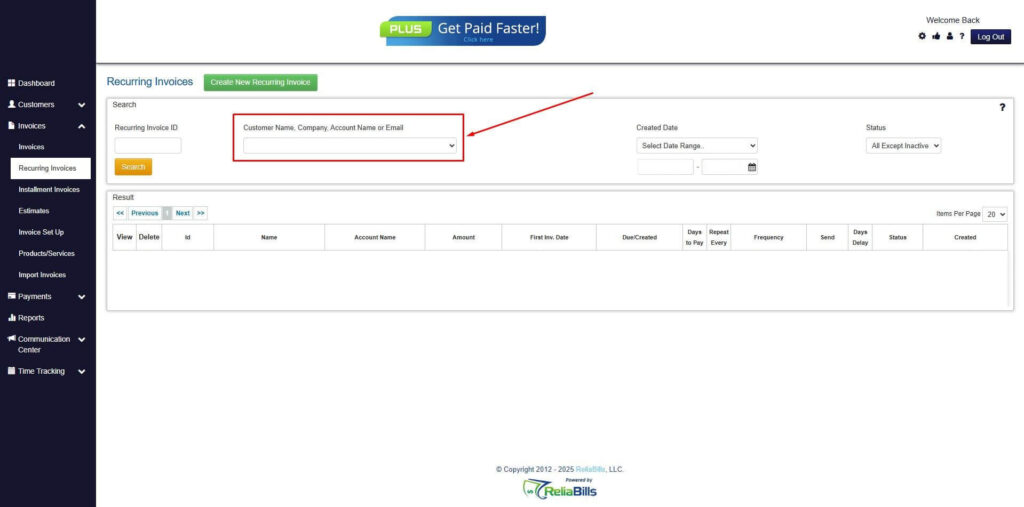
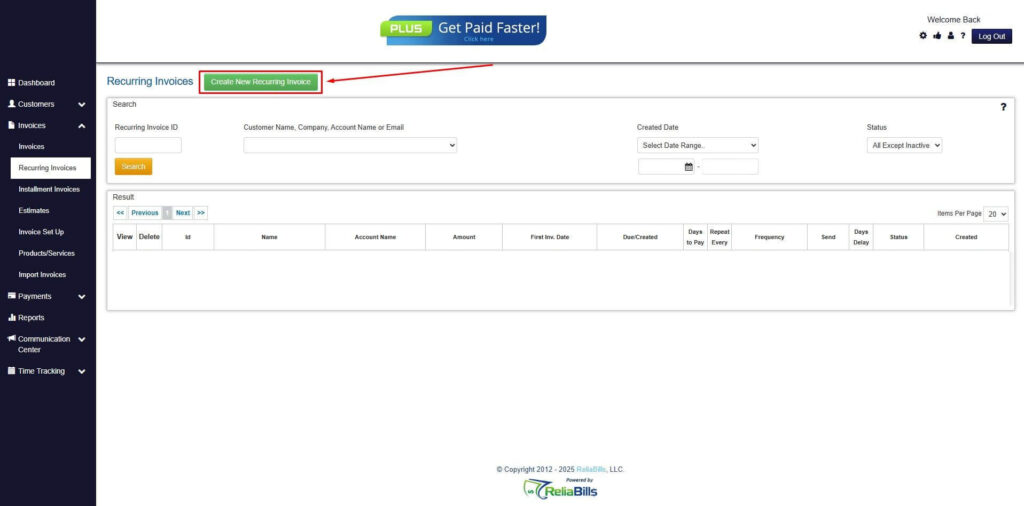
Step 4: Click the Create New Recurring Invoice
- If you haven’t created any customers yet, click the Create New Recurring Invoice to create a new customer.
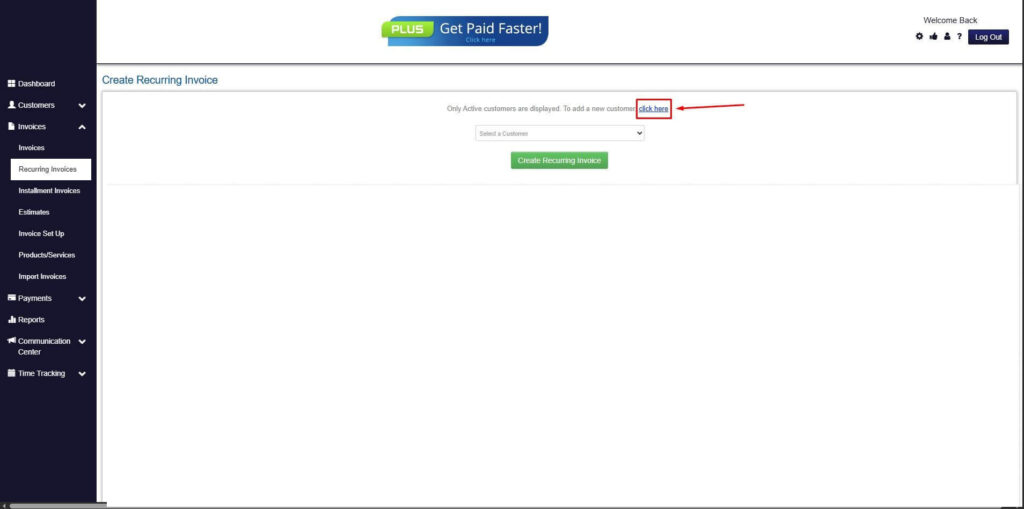
Step 5: Click on the “Click here” Button
- Click on the “Click here” button to proceed with the recurring invoice creation.
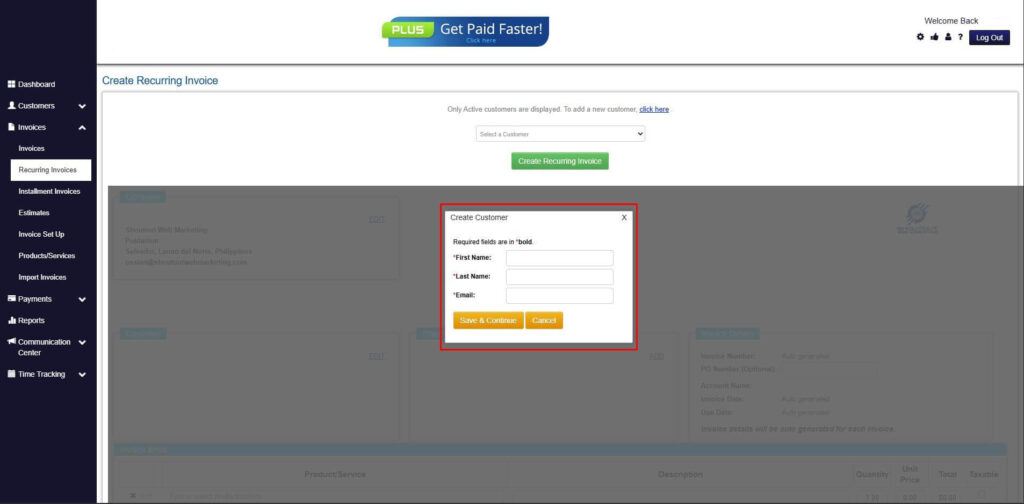
Step 6: Create Customer
- Provide your First Name, Last Name, and Email to proceed.
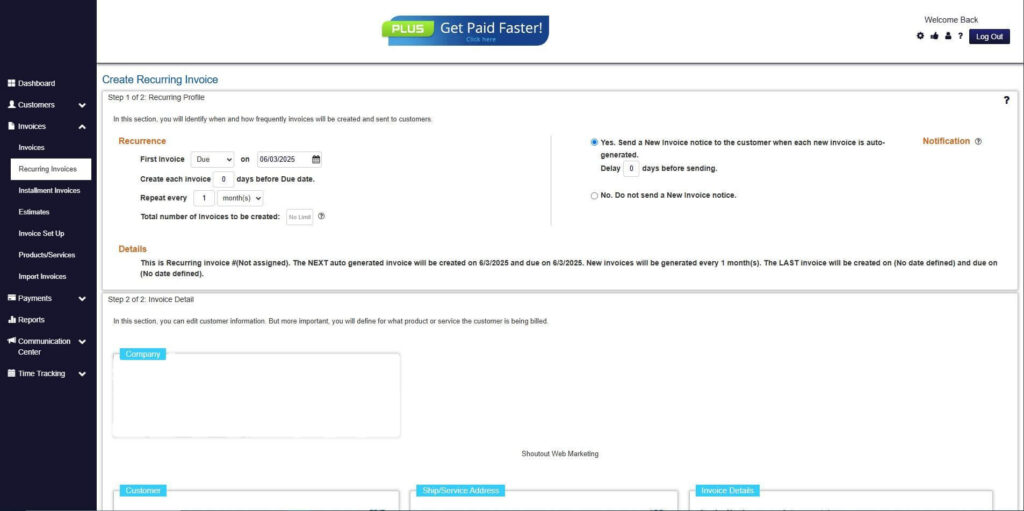
Step 7: Fill in the Create Recurring Invoice Form
- Fill in all the necessary fields.
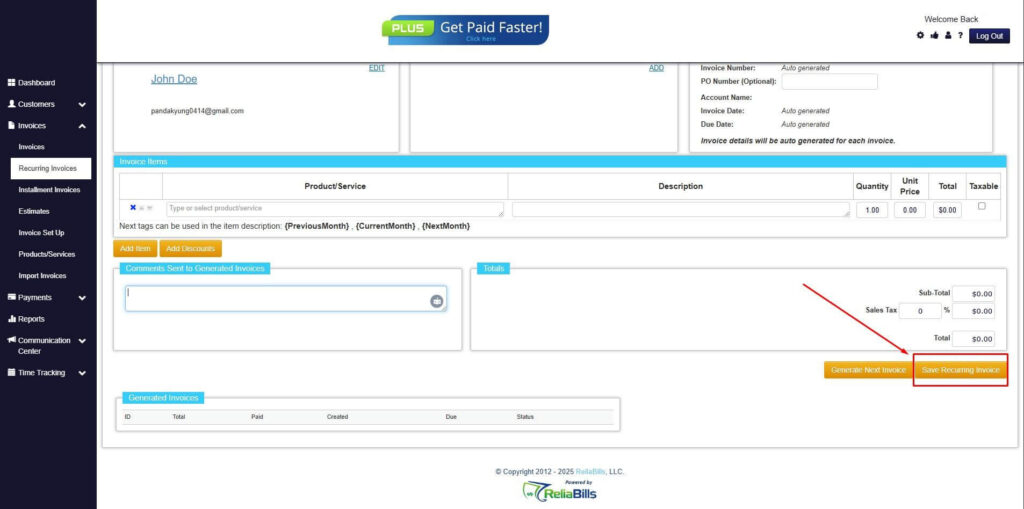
Step 8: Save Recurring Invoice
- After filling up the form, click “Save Recurring Invoice” to continue.
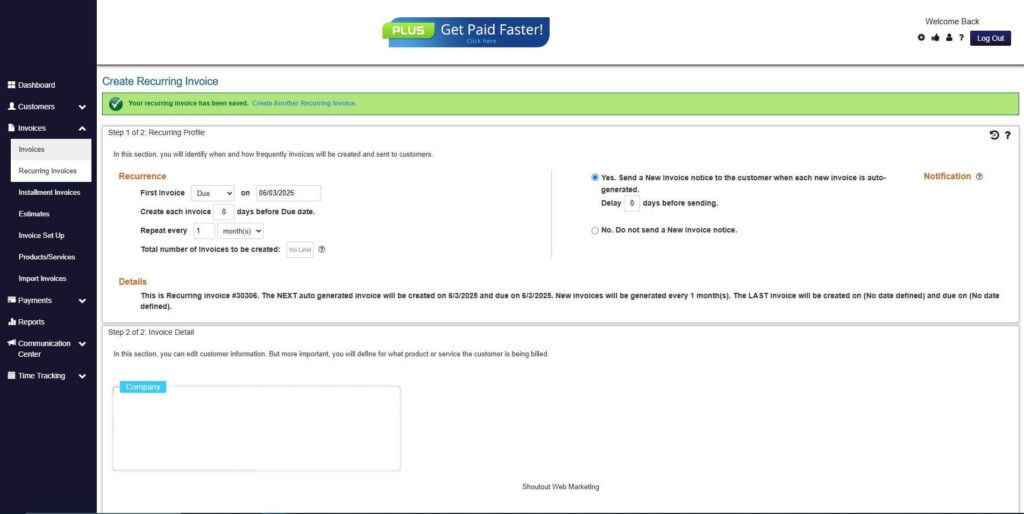
Step 9: Recurring Invoice Created
- Your Recurring Invoice has been created.
Frequently Asked Questions
1. Can automated billing handle variable charges?
Yes, automated billing systems can accommodate variable charges when billing rules are configured correctly. Adjustments can be applied within recurring billing plans.
2. How are failed payments managed?
Failed payments are typically handled through automated retries, reminders, and dunning workflows. This helps recover revenue while maintaining professionalism.
3. Is automated billing secure for customers?
Reputable billing platforms follow strict security standards and compliance requirements to protect customer payment data.
4. Is automated billing suitable for small businesses?
Automated billing is highly suitable for small businesses because it reduces administrative workload, improves cash flow consistency, and supports scalable growth.
Conclusion
Automated billing and payment collection helps businesses reduce errors, save time, and improve cash flow predictability. By replacing manual processes with structured automation, businesses gain efficiency and financial clarity.
With the right preparation, configuration, and best practices, automation becomes a powerful tool for scaling operations and enhancing customer experience.
Platforms like ReliaBills make it easier to configure, manage, and optimize automated billing and payment collection, giving businesses the confidence to grow with organized and reliable billing systems.