

Small businesses often spend an excessive amount of time managing payments manually. From generating invoices and processing checks to reconciling accounts, these repetitive tasks consume significant staff hours, slow operations, and increase the likelihood of errors.
Missed or delayed payments add another layer of administrative complexity, as teams must chase late invoices, update records, and manage disputes. This extra work diverts attention from more strategic initiatives like customer engagement and business growth.
Auto pay solutions provide a solution by automating recurring payments, streamlining financial workflows, and ensuring predictable cash flow. By reducing the manual workload, small businesses can focus on core operations while maintaining financial accuracy and consistency.
Why Are Manual Payments Costly for Small Businesses?
Manual payments may seem simple at first glance, but the hidden costs are significant. Staff members spend hours generating invoices, preparing payments, and following up with vendors or clients. Any errors in calculation or data entry can create delays, additional reconciliation work, and even late fees.
These inefficiencies increase labor costs, requiring businesses to dedicate extra resources to administrative tasks rather than revenue-generating activities. Over time, manual processing reduces operational efficiency and can negatively impact cash flow, vendor trust, and overall profitability.
Automating these processes with auto pay is not just a convenience; it is a strategic decision to improve accuracy, reduce overhead, and free up valuable staff resources.
What Is Auto Pay and How Does It Work?
Auto pay is a system that schedules and executes payments automatically, ensuring vendors, suppliers, and service providers are paid on time. Payments are processed digitally, eliminating the need for manual data entry or check processing.
Integration with accounting and invoicing systems ensures that invoices are automatically matched with payments, creating a seamless financial workflow. Digital receipts and real-time confirmation of transactions provide transparency, accountability, and a clear audit trail.
By automating payments for both one-time and recurring obligations, small businesses can reduce late fees, minimize errors, and maintain predictable cash flow without constant manual oversight.
How Can Auto Pay Save Time on Invoice Processing?
Auto pay significantly reduces the time small businesses spend on handling invoices manually. Instead of manually entering each payment or checking due dates, businesses can schedule automatic payments for recurring bills, subscriptions, or vendor invoices. This eliminates repetitive administrative tasks and reduces the need for constant oversight.
Automated workflows also streamline approval processes. For example, managers no longer need to manually verify each invoice before payment, as auto pay can integrate with accounting software to match invoices with purchase orders and payment terms. This ensures that all invoices are processed accurately and on time without extra manual intervention.
By saving these hours, employees can redirect their efforts toward more strategic tasks such as analyzing financial performance, improving customer relationships, or developing growth initiatives. Businesses also experience faster operational cycles, as invoices are processed immediately upon reaching their due date, supporting consistent and reliable payment schedules.
How Does Auto Pay Minimize Human Errors?
Manual invoice processing is prone to errors, from miscalculating totals and taxes to accidentally skipping payments or duplicating transactions. Auto pay minimizes these errors by automatically calculating invoice amounts, taxes, discounts, and fees based on predefined rules. Payments are executed accurately on schedule, reducing the risk of late fees and reconciliation issues.
Additionally, auto pay provides real-time tracking and notifications. Business owners and finance teams receive immediate alerts if there’s a discrepancy or failed transaction, allowing them to address issues before they escalate. This proactive monitoring reduces errors in accounts payable and maintains clean financial records.
Overall, fewer mistakes translate into better vendor relationships, reduced administrative stress, and higher operational efficiency. With auto pay handling the calculations and scheduling, businesses no longer need to rely on staff to manually manage every payment detail, significantly lowering the risk of errors.
How Can Auto Pay Simplify Vendor and Supplier Management?
Auto pay creates a centralized dashboard where all vendor and supplier payments are visible, eliminating the need to track each payment individually. Businesses can schedule recurring transactions, monitor payment history, and see outstanding amounts at a glance, making vendor management far more straightforward.
Integration with accounting or ERP systems ensures automatic reconciliation. Each payment is matched to its corresponding invoice, creating a clear audit trail and reducing time spent verifying accounts payable. This automation also ensures that payments are consistently accurate and timely, strengthening trust and reliability with suppliers.
Furthermore, streamlined vendor management allows small business teams to focus on strategic partnerships and negotiation opportunities. By reducing the time spent on administrative follow-ups and reconciliation, businesses can maintain strong supplier relationships while freeing up resources for growth and operational efficiency.
How Does Auto Pay Improve Cash Flow Predictability?
With auto pay, small businesses can schedule outgoing payments at fixed intervals, creating more predictable cash flow. This ensures that bills, subscriptions, and vendor payments are processed on time, which helps businesses avoid late fees, overdraft charges, and unexpected disruptions.
Predictable payment schedules also allow owners to budget and forecast more effectively. By knowing exactly when money will leave the business, leaders can plan for payroll, inventory purchases, and other operational expenses with confidence. This consistency reduces reliance on emergency credit lines or short-term loans to cover cash flow gaps.
In addition, businesses can better track and plan for recurring obligations such as software subscriptions, utility bills, or service contracts. The ability to forecast cash outflows and maintain steady liquidity is critical for small business growth and financial stability.
How Does Auto Pay Reduce Administrative Workload?
Auto pay eliminates many repetitive administrative tasks. Manual processes such as check writing, invoice entry, payment tracking, and follow-ups are no longer necessary. Payments are processed automatically, and each transaction is logged digitally for accounting and reporting purposes.
Automation also simplifies reconciliation and reporting. Business owners and finance teams can quickly verify that all payments are complete, accurately applied, and accounted for. This reduces the time spent cross-checking records, correcting mistakes, and managing overdue payments.
By decreasing the administrative workload, small businesses can scale operations without hiring additional staff. Teams can focus on higher-value activities like improving customer experience, expanding services, or analyzing financial performance, rather than spending hours on repetitive, error-prone tasks. The efficiency gains from auto pay ultimately save time, reduce stress, and improve operational reliability.
How ReliaBills Helps Small Businesses Implement Auto Pay
ReliaBills simplifies automated payment management for small businesses by providing a full setup for recurring auto pay. Businesses can schedule payments for vendors, subscriptions, or client invoices, ensuring that all transactions are processed accurately and on time. The platform automatically generates digital invoices, integrates with accounting systems, and delivers real-time confirmations, reducing the risk of missed or late payments.
Recurring billing is at the heart of ReliaBills’ auto pay solution. For subscription-based services, membership plans, or long-term contracts, the platform can automatically calculate recurring charges, apply discounts or fees, and send invoices on a fixed schedule. This ensures predictable cash flow while minimizing manual oversight, helping businesses maintain financial stability and focus on growth rather than administrative tasks.
ReliaBills also supports robust reporting and communication tools. Business owners and managers can monitor payment status, track receivables, and access detailed financial dashboards without manual reconciliation. Branded digital communications ensure clients and vendors receive clear, professional invoices, enhancing trust and streamlining financial operations. With automation, small businesses can reduce administrative workload, prevent errors, and scale operations efficiently.
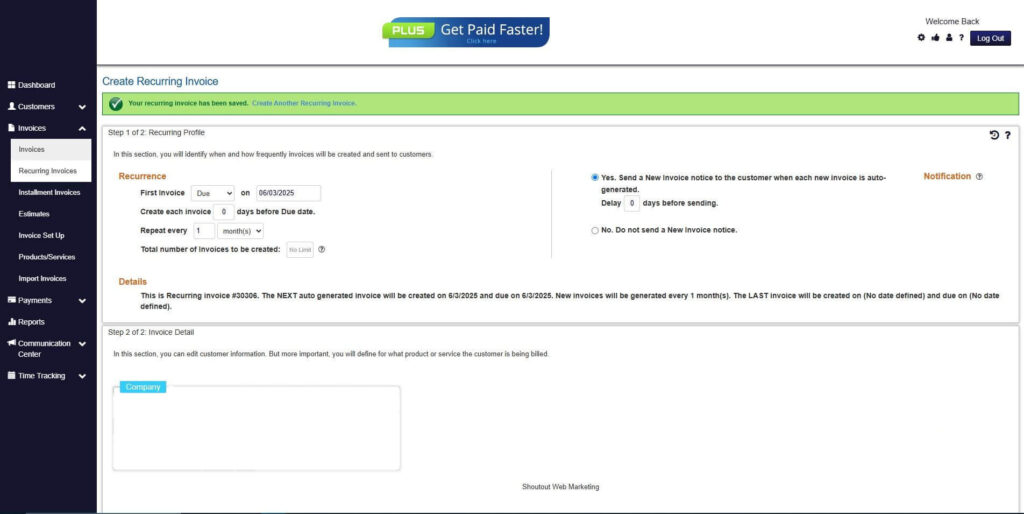
How to Create a New Recurring Invoice Using ReliaBills
Creating a New Recurring Invoice using ReliaBills involves the following steps:
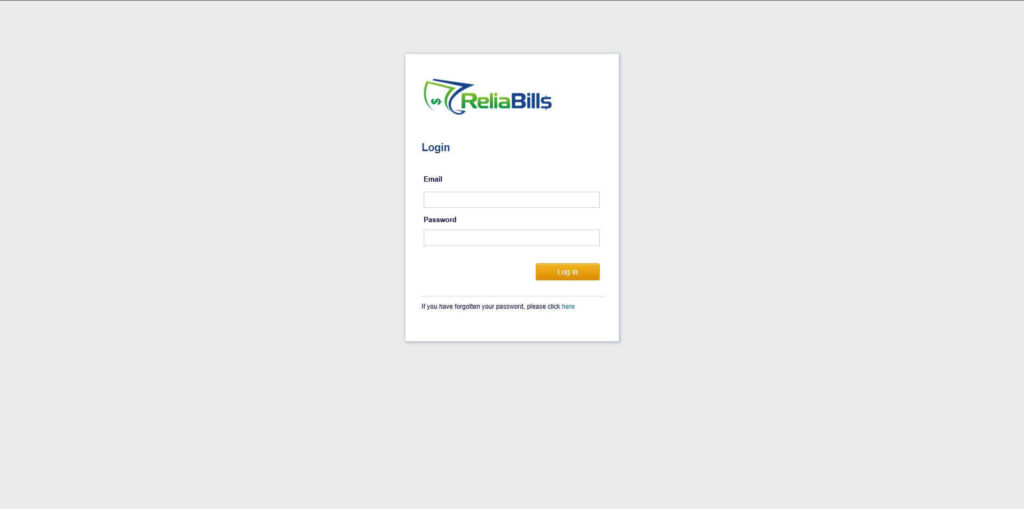
Step 1: Login to ReliaBills
- Access your ReliaBills Account using your login credentials. If you don’t have an account, sign up here.
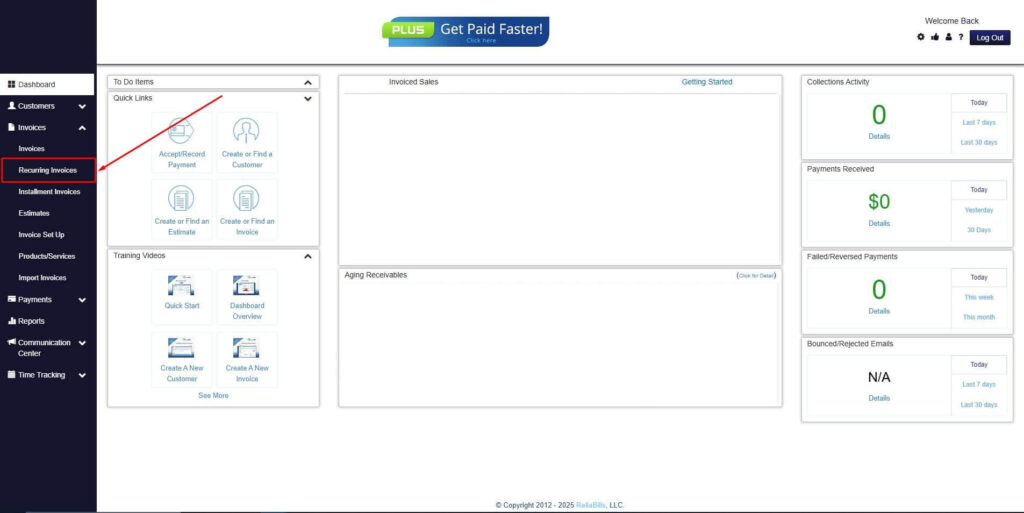
Step 2: Click on Recurring Invoices
- Navigate to the Invoices Dropdown and click on Recurring Invoices for an overview of the list of your existing customers.
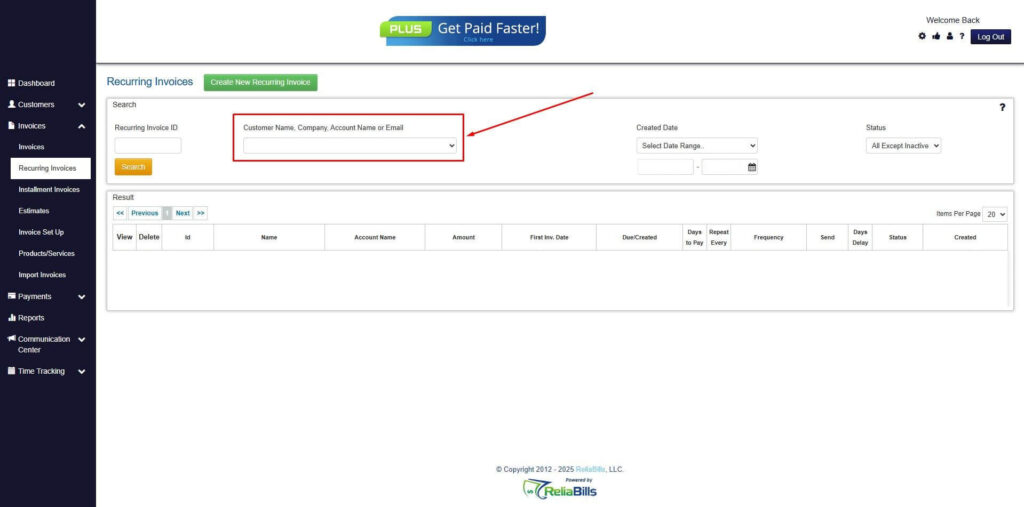
Step 3: Go to the Customers Tab
- If you have already created a customer, search for them in the Customers tab and make sure their status is “Active”.
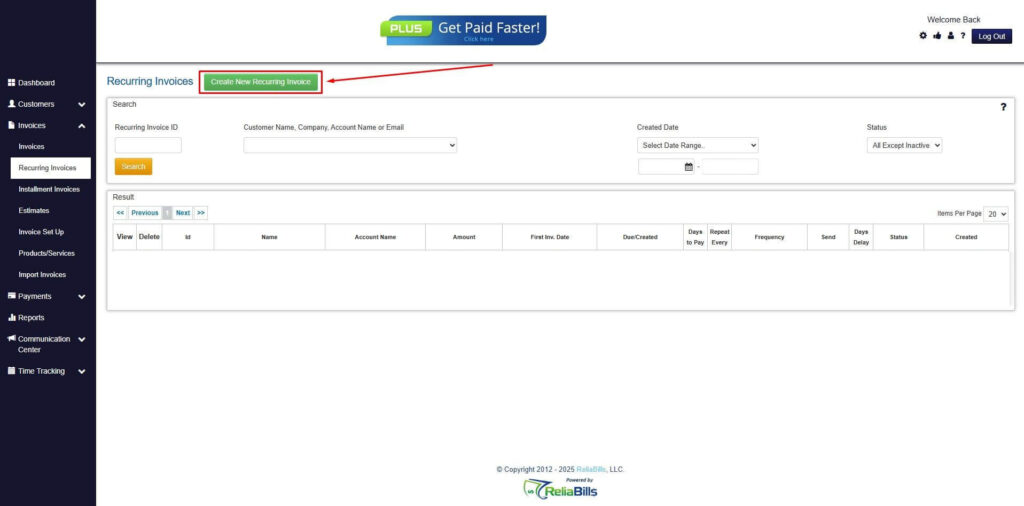
Step 4: Click the Create New Recurring Invoice
- If you haven’t created any customers yet, click the Create New Recurring Invoice to create a new customer.
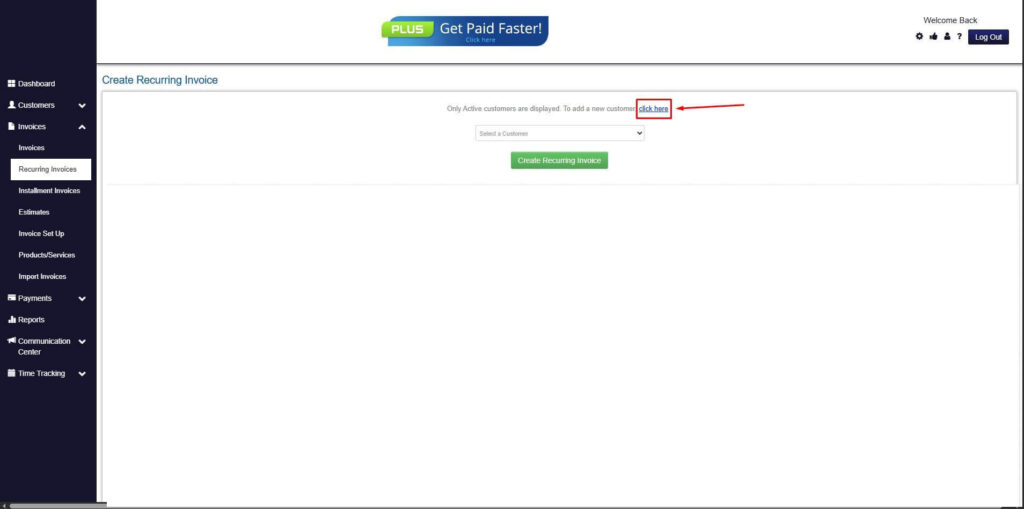
Step 5: Click on the “Click here” Button
- Click on the “Click here” button to proceed with the recurring invoice creation.
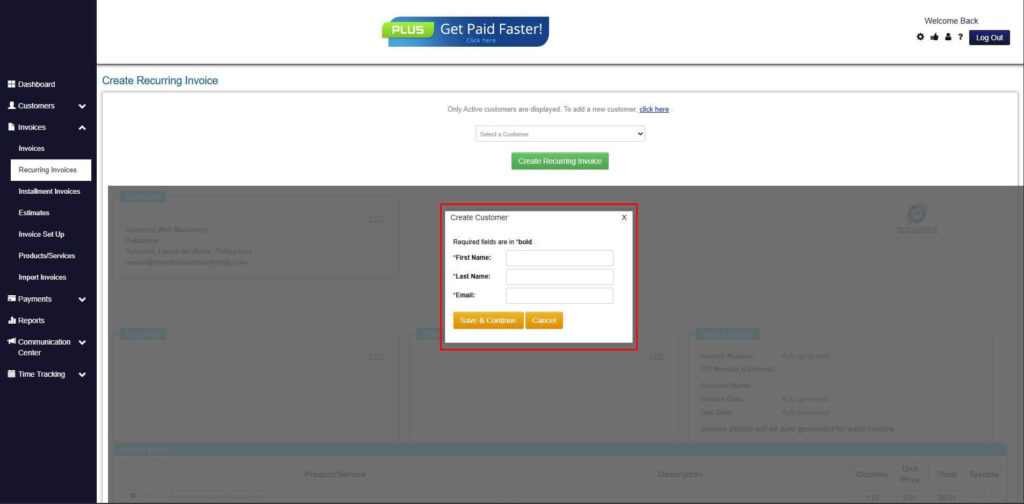
Step 6: Create Customer
- Provide your First Name, Last Name, and Email to proceed.
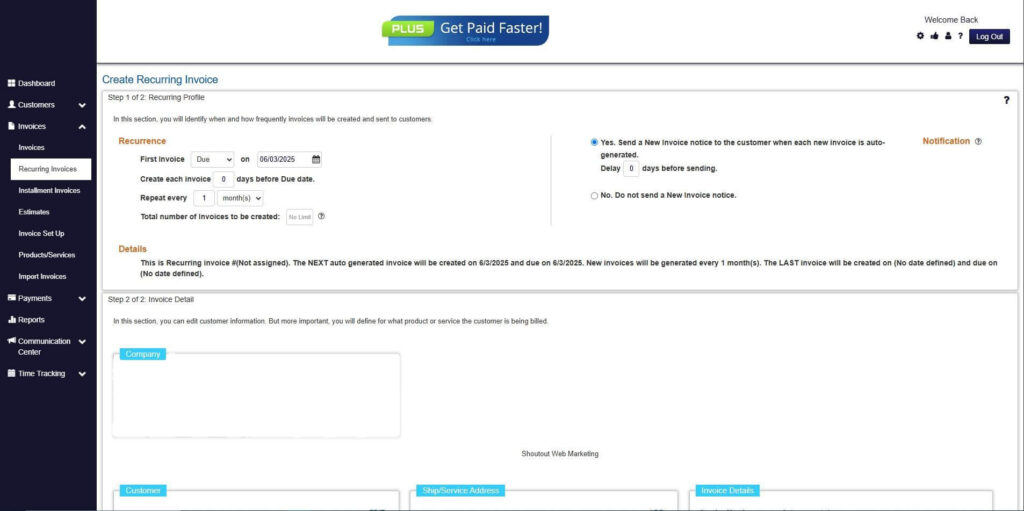
Step 7: Fill in the Create Recurring Invoice Form
- Fill in all the necessary fields.
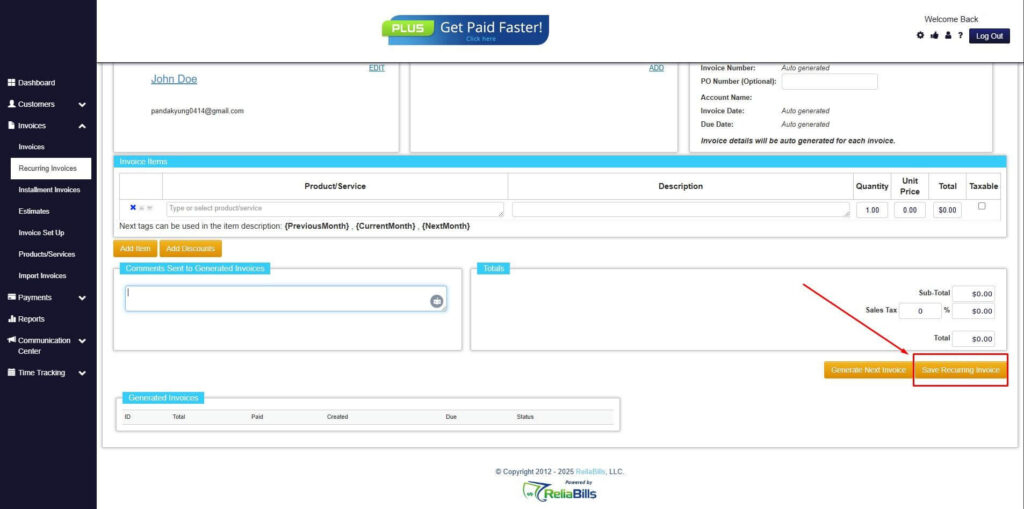
Step 8: Save Recurring Invoice
- After filling up the form, click “Save Recurring Invoice” to continue.
Step 9: Recurring Invoice Created
- Your Recurring Invoice has been created.
Frequently Asked Questions
1. What is auto pay for small businesses?
Auto pay is an automated system that schedules payments for vendors, subscriptions, or services, eliminating manual entry and reducing errors.
2. Can auto pay improve cash flow?
Yes. By ensuring timely payments and predictable schedules, businesses can plan budgets and reduce late fees or penalties.
3. Is auto pay secure?
Modern auto pay systems use encryption, tokenization, and access controls to protect sensitive financial information.
4. Does auto pay save staffing costs?
Yes. With fewer hours spent on manual payment processing, teams can focus on strategic initiatives and revenue-generating activities.
5. Can auto pay handle recurring payments for subscriptions or contracts?
Absolutely. Recurring billing can be customized for subscription-based services, vendor payments, or any ongoing contractual obligations.
Conclusion
Auto pay for small businesses is more than a convenience; it is a strategic tool that reduces administrative workload, minimizes human errors, and ensures timely, predictable payments. By leveraging recurring billing automation through platforms like ReliaBills, businesses can improve cash flow, maintain strong vendor relationships, and focus on growth without increasing administrative overhead.