
Overdue invoices are one of the most persistent challenges businesses face, directly impacting cash flow, operational stability, and long-term growth. When payments are delayed, companies often struggle to cover expenses, invest in new opportunities, or maintain smooth day-to-day operations. This issue becomes even more significant for small and mid-sized businesses that rely on consistent incoming payments.
Auto-pay for invoices offers a practical solution by automating the payment process and removing the need for manual customer action. Instead of waiting for clients to remember due dates, businesses can schedule payments to be automatically processed using pre-authorized methods. This reduces delays and ensures a more predictable revenue stream.
By combining automation with recurring billing, businesses can significantly reduce or even eliminate overdue invoices. These systems streamline both invoicing and payment collection, creating a seamless financial workflow that benefits both businesses and their customers.
What Are Auto-Pay Features?
Auto-pay features allow businesses to automatically collect payments from customers on predetermined due dates. Once a customer authorizes the payment, the system processes transactions without requiring further input, ensuring invoices are paid on time. This makes auto pay for invoices an essential tool for improving payment reliability.
Customers typically authorize payments by securely storing their preferred payment methods, such as credit cards, bank accounts, or digital wallets. These stored credentials are then used to process transactions automatically according to the billing schedule. This eliminates the need for repeated manual entry and reduces friction during checkout.
Unlike manual or one-time payments, auto-pay operates continuously in the background. Manual payments depend on customer action, while auto-pay ensures consistency and accuracy by automating the entire payment lifecycle from invoice generation to collection.
Why Overdue Invoices Are a Common Problem
Overdue invoices often stem from simple customer forgetfulness or missed due dates. Even well-intentioned clients may overlook payment deadlines, especially when managing multiple financial obligations. This creates delays that can accumulate and disrupt cash flow.
Another major factor is the reliance on manual invoicing processes and delayed payment reminders. When businesses send invoices inconsistently or fail to follow up promptly, customers may not prioritize payments. This lack of automation increases the likelihood of late transactions.
Additionally, friction in the payment process, such as complicated steps, limited payment options, or unclear billing terms, can discourage timely payments. Inconsistent billing cycles and poorly defined payment expectations further contribute to confusion and delays.
How Auto-Pay Features Eliminate Overdue Invoices
Auto-pay for invoices removes the need for customers to manually initiate payments by automatically charging them on due dates. This ensures payments are processed on time, every time, without relying on memory or manual intervention. As a result, businesses can significantly reduce late payments.
By eliminating forgetfulness as a factor, auto-pay minimizes one of the most common causes of overdue invoices. Customers no longer need to track due dates or log in to complete payments, which simplifies the entire process and increases compliance.
Automation also creates a steady and predictable cash flow, allowing businesses to plan more effectively. With fewer missed payments, companies spend less time on follow-ups and collections, improving operational efficiency and overall financial health.
Key Features That Support Auto-Pay Systems
Secure Storage of Payment Methods
Customer payment information is encrypted and safely stored to prevent fraud. This ensures sensitive data like credit cards or bank accounts remain protected. Security builds trust and encourages adoption of auto pay for invoices.
Scheduled and Recurring Payment Processing
Payments are automatically processed on due dates without manual intervention. This ensures invoices are paid on time every cycle. Businesses can maintain consistent cash flow and reduce late payments.
Automated Invoice Generation and Billing Cycles
Invoices are created automatically for recurring services or subscriptions. This minimizes human errors and reduces administrative work. Auto pay for invoices works seamlessly with these automated billing cycles.
Payment Reminders Before Charges Are Processed
Customers are notified before auto-pay charges occur. This increases transparency and gives customers time to ensure funds are available. It also reduces failed or disputed payments.
Real-Time Payment Confirmations and Receipts
Once a payment is processed, confirmation is sent instantly. Businesses get accurate records, and customers receive reassurance. This improves accountability and trust in auto pay for invoices.
Failed Payment Retry and Dunning Management
If a payment fails, automatic retry attempts are made. Customers are notified to update their payment methods. This helps recover payments quickly and minimizes overdue invoices.
The Role of Recurring Billing in Auto-Pay Success
Recurring billing plays a critical role in maximizing the effectiveness of auto pay for invoices. It establishes a consistent billing schedule, ensuring customers are charged at regular intervals without manual intervention. This predictability benefits both businesses and customers.
When auto-pay is integrated with recurring invoices, the entire billing cycle becomes seamless. Invoices are generated automatically, and payments are collected on schedule, reducing administrative workload and eliminating delays. This integration creates a frictionless experience from start to finish.
Consistency in both invoicing and payment collection leads to improved financial stability. Businesses can forecast revenue more accurately, while customers benefit from clear and predictable billing expectations.
Best Practices for Implementing Auto-Pay Features
Clearly Communicate Billing Schedules and Payment Terms
Customers should know when payments are due and how much will be charged. Transparency reduces confusion and late payments. Clear communication increases auto-pay adoption and satisfaction.
Offer Flexible Payment Options for Customers
Support multiple methods such as credit cards, bank transfers, and digital wallets. Flexibility encourages enrollment and timely payments. It reduces friction in the payment process.
Ensure Strong Security and Data Protection Measures
Encrypt and tokenise payment information to prevent unauthorized access. Compliance with security standards protects both businesses and customers. Security reassures customers to use auto pay for invoices confidently.
Provide Notifications Before and After Auto-Pay Transactions
Send reminders before processing and confirmations afterward. Customers remain informed and avoid surprises. This transparency improves trust and reduces failed payments.
Monitor Failed Payments and Implement Retry Strategies
Track unsuccessful transactions automatically. Send notifications and attempt retries to recover missed payments. This reduces overdue invoices and supports consistent cash flow.
Test and Optimize Your Auto-Pay Workflow Regularly
Regularly verify that recurring payments and notifications work correctly. Continuous testing ensures smooth operation. Optimization improves the overall auto pay for invoices experience.
Educate Customers on Benefits of Auto-Pay
Highlight convenience, reliability, and security. Informed customers are more likely to enroll in auto-pay programs. Education reduces missed payments and strengthens relationships.
How Auto-Pay Improves Customer Experience
Auto-pay significantly enhances customer convenience by enabling hands-free payments. Customers no longer need to remember due dates or manually process transactions, making the payment experience effortless and stress-free.
It also reduces the risk of service interruptions caused by missed payments. With automatic processing in place, customers can maintain uninterrupted access to products or services, improving overall satisfaction.
Additionally, auto pay for invoices creates a transparent and predictable billing process. Customers gain trust in businesses that offer secure, reliable, and consistent payment systems, leading to stronger long-term relationships.
Key Benefits of Auto-Pay Features
Eliminates or Significantly Reduces Overdue Invoices
Auto-pay ensures invoices are paid on schedule automatically. This reduces late payments and collection efforts. Businesses gain more predictable revenue.
Improves Cash Flow Consistency
Predictable payments allow accurate financial forecasting. Consistent revenue helps cover operational expenses and plan growth. Businesses can operate more confidently with auto pay for invoices.
Saves Time on Collections and Follow-Ups
Less manual chasing of late payments is required. Staff can focus on higher-value tasks instead. Auto-pay simplifies financial operations for businesses of all sizes.
Enhances Customer Convenience
Customers enjoy hands-free payments without remembering due dates. This makes the payment process effortless and stress-free. Convenience strengthens customer satisfaction and loyalty.
Reduces Billing Errors and Administrative Workload
Automation ensures invoices and payments are accurate. Manual mistakes are minimized, reducing disputes. Businesses save time while improving reliability.
Strengthens Customer Relationships
Reliable, secure, and predictable billing increases trust. Customers feel more confident in consistent service delivery. This fosters long-term loyalty.
Supports Business Scalability
Auto-pay handles growing customer bases without adding administrative burden. Businesses can scale efficiently. Predictable revenue streams make planning easier.
Common Use Cases
Subscription-Based Services
Streaming platforms, SaaS products, and subscription boxes rely on auto-pay for invoices. This ensures timely monthly payments. Customers experience uninterrupted service and convenience.
Utility and Energy Billing
Electricity, water, and gas providers automate recurring payments. Auto-pay reduces missed bills and late fees. Businesses maintain consistent revenue and customer satisfaction.
Property and Tenant Rent Collection
Landlords and property managers use auto-pay for rent collection. Tenants avoid late fees, and landlords reduce manual follow-ups. This simplifies property management finances.
Membership and Service Plans
Gyms, clubs, and professional associations automate recurring payments. Auto-pay ensures continuous access to services. Customers enjoy hassle-free membership management.
Maintenance and Recurring Service Contracts
Landscaping, cleaning, IT, or equipment services secure timely payments. Contracts are honored consistently, improving operational reliability. Businesses benefit from predictable cash flow.
Insurance Premiums
Policyholders can schedule monthly or annual payments automatically. Auto-pay reduces lapses in coverage and missed payments. Insurers maintain steady revenue while improving customer experience.
Healthcare or Wellness Programs
Subscription-based medical services or therapy sessions collect recurring payments. Patients experience a seamless process with no missed appointments. Providers enjoy improved cash flow and operational efficiency.
How ReliaBills Helps Eliminate Overdue Invoices with Auto-Pay
ReliaBills simplifies billing operations by automating invoice generation and payment collection, helping businesses drastically reduce overdue invoices. Its platform is designed to streamline workflows, minimize manual effort, and ensure payments are received on time. This leads to improved cash flow and reduced administrative burden.
With built-in recurring billing and auto-pay features, ReliaBills enables businesses to schedule invoices and automatically collect payments without delays. Customers can securely store payment methods, while businesses benefit from consistent and reliable payment cycles. This integration ensures that invoices are not only sent on time but also paid on time.
ReliaBills PLUS takes automation further by offering advanced tools such as detailed reporting, enhanced customer communication, and intelligent payment tracking. These features provide deeper insights into payment performance while strengthening customer relationships. Businesses can scale more efficiently with a system that supports both growth and financial stability.
How to Create a New Recurring Invoice Using ReliaBills
Creating a New Recurring Invoice using ReliaBills involves the following steps:
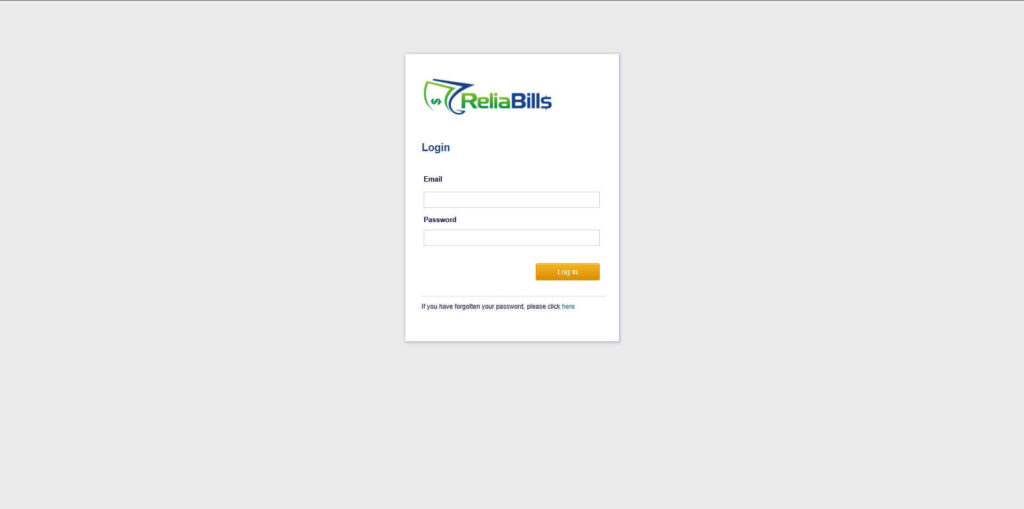
Step 1: Login to ReliaBills
- Access your ReliaBills Account using your login credentials. If you don’t have an account, sign up here.
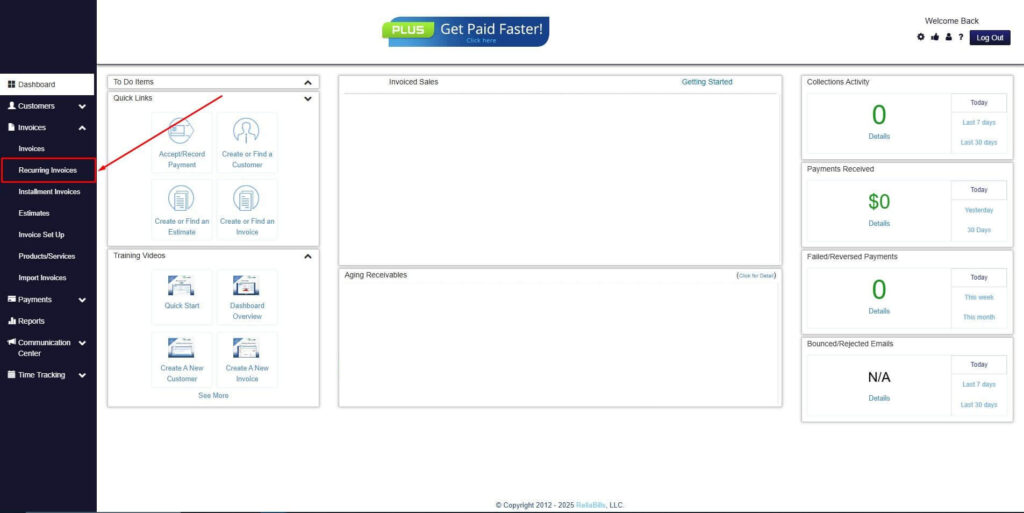
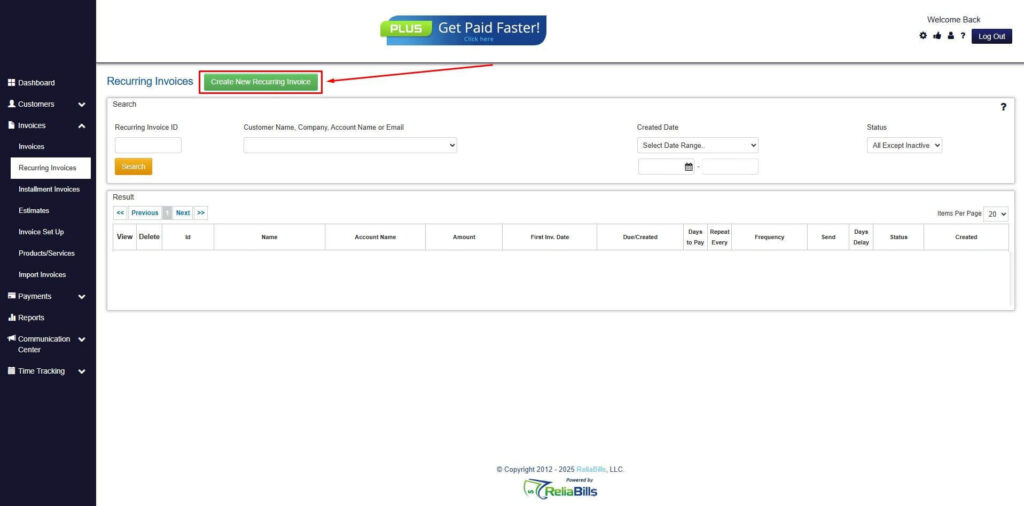
Step 2: Click on Recurring Invoices
- Navigate to the Invoices Dropdown and click on Recurring Invoices for an overview of the list of your existing customers.
Step 3: Go to the Customers Tab
- If you have already created a customer, search for them in the Customers tab and make sure their status is “Active”.
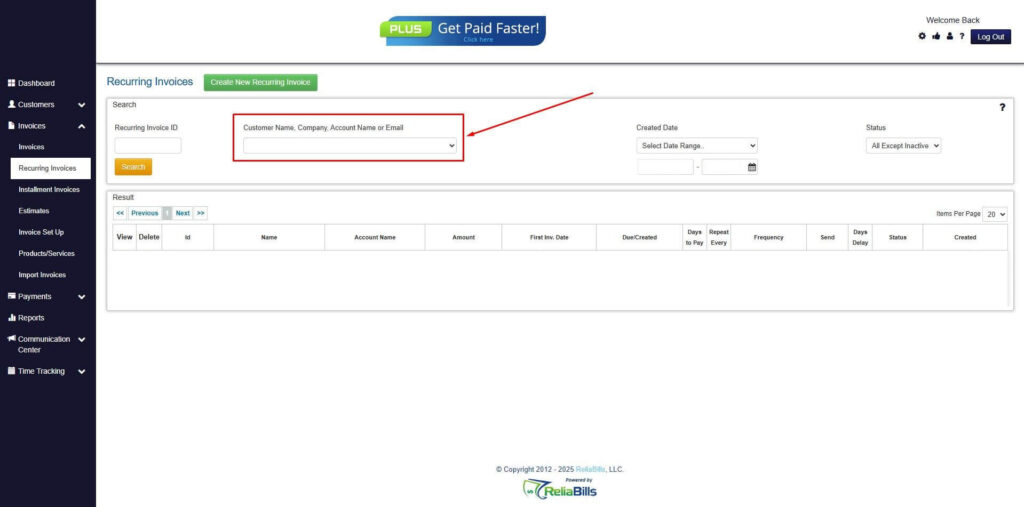
Step 4: Click the Create New Recurring Invoice
- If you haven’t created any customers yet, click the Create New Recurring Invoice to create a new customer.
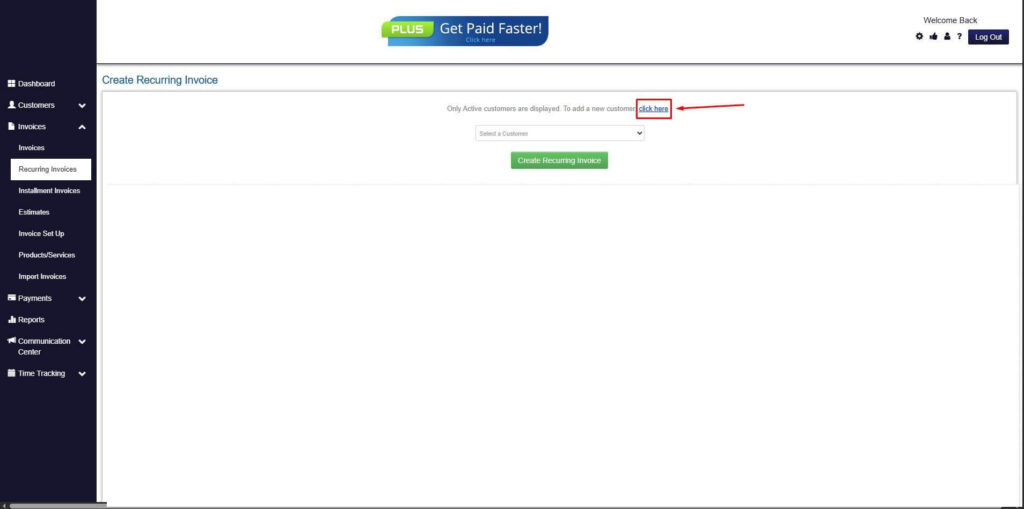
Step 5: Click on the “Click here” Button
- Click on the “Click here” button to proceed with the recurring invoice creation.
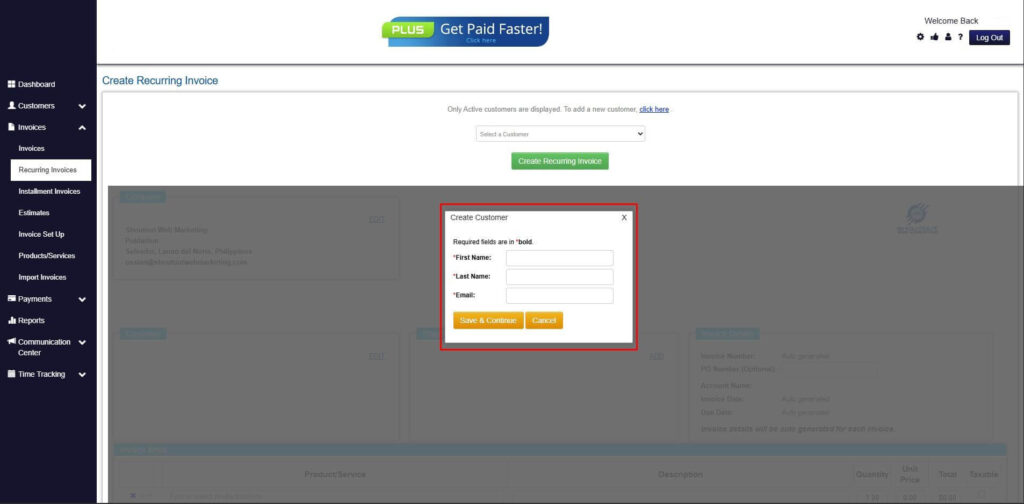
Step 6: Create Customer
- Provide your First Name, Last Name, and Email to proceed.
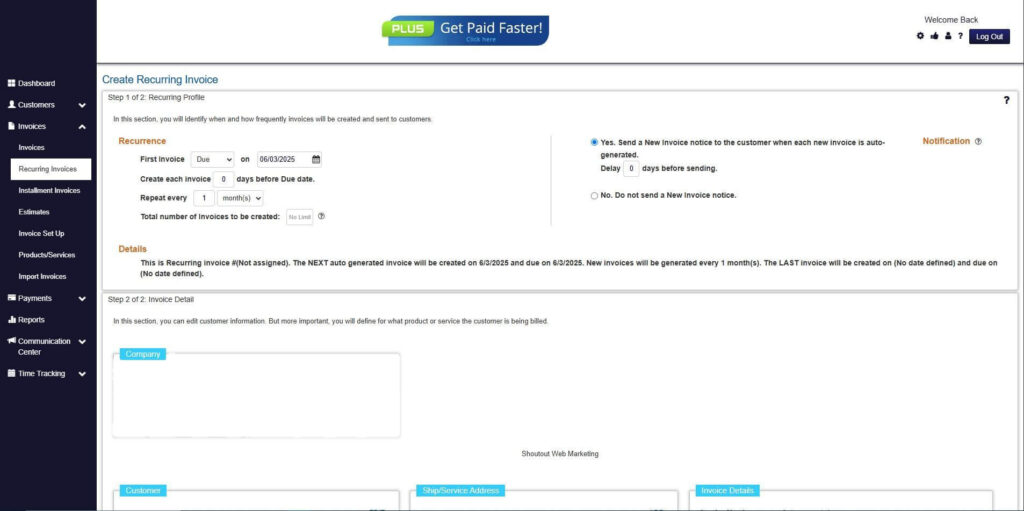
Step 7: Fill in the Create Recurring Invoice Form
- Fill in all the necessary fields.
Step 8: Save Recurring Invoice
- After filling up the form, click “Save Recurring Invoice” to continue.
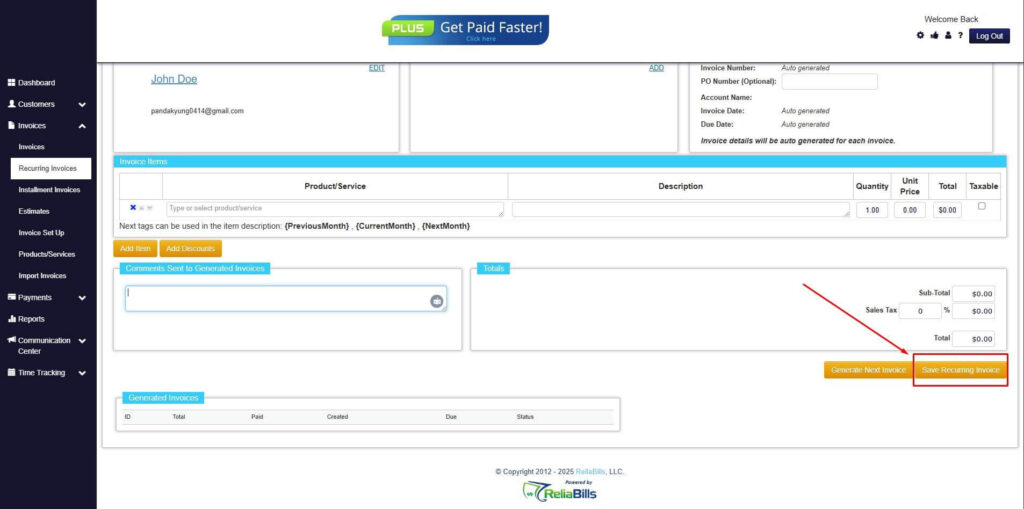
Step 9: Recurring Invoice Created
- Your Recurring Invoice has been created.
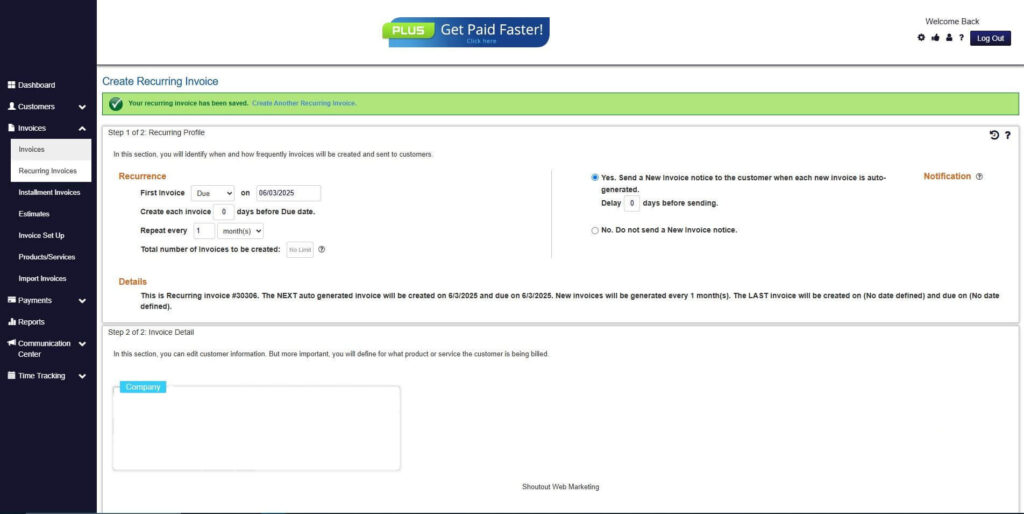
Frequently Asked Questions (FAQs)
1. How does auto-pay prevent overdue invoices?
Auto-pay for invoices charges customers automatically on due dates. This removes reliance on manual action. It significantly reduces missed payments.
2. Is auto-pay secure for customers?
Yes, systems use encryption and secure gateways to protect sensitive data. Tokenization prevents unauthorized access. Customers can confidently use auto-pay for invoices.
3. What happens if an auto-pay transaction fails?
Failed payments trigger automatic retries and notifications. Customers are alerted to update their payment methods. This minimizes missed payments and overdue invoices.
4. Can customers opt out of auto-pay?
Yes, customers usually have full control to enable or disable auto-pay. They can manage payments according to their preferences. Flexibility increases trust and adoption.
5. How does recurring billing work with auto-pay?
Recurring billing schedules invoices at regular intervals. Auto-pay ensures those invoices are paid automatically. This creates a seamless payment experience.
Conclusion
Auto pay for invoices directly addresses the root causes of overdue payments by removing manual processes, reducing friction, and ensuring consistent billing cycles. By automating both invoicing and payment collection, businesses can eliminate delays and maintain a steady cash flow.
Recurring billing further strengthens this system by creating predictable schedules and seamless transactions. Together, these tools provide a reliable framework for efficient financial management and improved customer satisfaction.
As businesses continue to prioritize efficiency and scalability, adopting auto-pay solutions is no longer optional, it’s a strategic advantage. Implementing automation today can lead to stronger cash flow, reduced workload, and sustainable growth in the long run.