
Getting paid on time is one of the biggest challenges service businesses face, especially when revenue depends on completed work rather than upfront transactions. Delayed invoices, unclear payment terms, and manual follow-ups often slow down cash flow and create unnecessary stress for teams.
Slow invoicing does more than delay payments. It disrupts cash flow forecasting, limits growth opportunities, and forces owners to spend time chasing payments instead of serving clients. For service businesses operating on tight margins, even small delays can have a noticeable impact.
Automated invoicing for service businesses helps solve these issues by speeding up invoice delivery, improving accuracy, and simplifying collections. By removing manual steps from billing, businesses can shorten the time between service completion and payment.
Why Service Businesses Struggle with Late Payments
Service businesses often face unique billing challenges compared to product-based companies. Invoicing usually depends on project completion, approvals, or time tracking, which can delay when invoices are sent. The longer it takes to issue an invoice, the longer it takes to get paid.
Client approval delays also contribute to late payments. When billing expectations are unclear or invoices lack detail, clients may hesitate to approve or question charges. This back-and-forth slows the payment process and strains relationships.
Manual follow-ups add another layer of friction. Staff time is often wasted sending reminders, checking payment statuses, and updating records. These tasks are repetitive and prone to error, especially as the business grows.
What Are Automated Invoices?
Automated invoices are invoices created, sent, and tracked using software instead of manual processes. They are triggered by predefined rules such as service completion, billing schedules, or recurring timelines.
Core components of automated invoicing include standardized invoice templates, automatic calculations, scheduled delivery, and integrated payment options. These features work together to reduce manual effort and improve consistency.
By automating routine billing tasks, service businesses can eliminate delays caused by data entry, missed invoices, or inconsistent formatting. This creates a smoother and faster billing cycle from start to finish.
Manual vs Automated Invoicing: Key Differences
Invoice creation and delivery speed
Manual invoicing often depends on staff availability, approvals, and manual data entry, which can delay invoice delivery by days. Automated invoicing creates and sends invoices instantly once a service is completed or a billing trigger is met, significantly shortening the billing cycle.
Accuracy of calculations and data entry
Manual invoicing increases the risk of incorrect pricing, missing billable hours, or tax miscalculations. Automated invoicing uses predefined rules and formulas to ensure consistent and accurate calculations every time.
Consistency in invoice formatting and branding
Manual invoices may vary depending on who creates them, leading to inconsistent layouts and messaging. Automated invoicing applies standardized templates, ensuring a professional and uniform appearance across all client communications.
Visibility into invoice and payment status
With manual invoicing, tracking payments often requires spreadsheets and email follow-ups. Automated invoicing provides real-time status updates for sent, viewed, paid, and overdue invoices from a centralized dashboard.
Administrative workload and scalability
As invoice volume grows, manual invoicing demands more staff time and resources. Automated invoicing scales effortlessly, allowing businesses to handle more clients without increasing administrative overhead.
How Automated Invoices Accelerate Invoice Delivery
One of the biggest advantages of automation is trigger-based invoice creation. Invoices can be generated immediately after a service is completed, approved, or logged.
Scheduled and recurring invoice automation further reduces delays. Instead of manually creating invoices each billing cycle, businesses can set schedules that run automatically.
By removing manual workflows, automated invoicing ensures invoices are delivered faster and more consistently. This shortens the time between service delivery and payment.
How to Use Recurring Billing to Ensure Consistent Payments
Automating retainers and ongoing services
Recurring billing automatically generates invoices for monthly retainers, subscriptions, and long-term service agreements without requiring manual setup each cycle.
Creating predictable billing schedules for clients
Clients receive invoices on the same date each billing period, which improves familiarity and reduces confusion around payment timing.
Reducing missed or forgotten invoices
Automated recurring billing eliminates the risk of skipped billing cycles caused by human error or staff turnover.
Supporting flexible billing models
Recurring billing can be customized for different pricing structures, including fixed fees, usage-based charges, or tiered services.
Improving revenue forecasting and cash flow planning
Consistent recurring payments provide reliable revenue data, helping service businesses plan expenses and growth more accurately.
Improving Invoice Accuracy to Avoid Payment Delays
Invoice errors are a common cause of delayed payments. Automated invoicing reduces these issues by applying consistent calculations and standardized line items.
Clear service descriptions and transparent pricing help clients understand exactly what they are paying for. This reduces confusion and minimizes disputes.
By improving accuracy upfront, service businesses can avoid payment delays caused by corrections, clarifications, or reissued invoices.
Integrated Payment Options That Speed Up Collections
Multiple digital payment methods in one place
Integrated invoicing systems allow clients to pay using credit cards, ACH transfers, and other online options directly from the invoice.
Frictionless payment experience
Clients can complete payments in just a few clicks without logging into separate portals or sending manual transfers.
Shorter time between invoice receipt and payment
Easy-to-use payment options reduce hesitation and speed up client decision-making.
Automatic payment confirmation and reconciliation
Payments are instantly recorded in the system, reducing manual tracking and accounting errors.
Improved client satisfaction
Convenient payment options enhance the overall client experience and encourage faster future payments.
Automated Payment Reminders and Follow-Ups
Automated payment reminders keep invoices top of mind without awkward manual follow-ups. Reminders can be scheduled before and after due dates.
This consistent communication encourages timely payments while maintaining a professional tone. Clients are reminded without feeling pressured.
Automation also saves staff time by eliminating repetitive reminder tasks, allowing teams to focus on higher-value work.
Reducing Billing Disputes with Digital Records
Digital invoicing systems store all invoices and payment history in one place. This centralized record makes it easier to resolve disputes quickly.
Audit trails and time-stamped documentation provide clear proof of charges and adjustments. Both businesses and clients can reference the same information.
By improving transparency, automated invoicing helps prevent repeat billing issues and builds long-term trust.
Client Experience and Trust Benefits
Consistent, professional billing improves the overall client experience. Automated invoices look polished and arrive on time, reinforcing credibility.
Transparency and accountability also increase trust. Clients appreciate clear records, predictable billing, and easy access to invoices.
Over time, better billing experiences strengthen client relationships and improve retention.
Best Practices for Implementing Automated Invoicing
- Assess current billing pain points: Review where delays, errors, or disputes most often occur in your manual invoicing process.
- Select software designed for service-based workflows: Choose a platform that supports recurring billing, automated reminders, and detailed service line items.
- Standardize invoice templates and payment terms: Clear, consistent invoices reduce confusion and speed up approvals.
- Gradually automate high-volume or repetitive services: Start with recurring or predictable services before expanding automation to more complex billing scenarios.
- Train staff and monitor performance metrics: Ensure your team understands the system and regularly review metrics like payment time and overdue rates.
How ReliaBills Helps Service Businesses Get Paid Faster
ReliaBills helps service businesses shorten the time between service completion and payment by automating the entire invoicing process. Instead of relying on manual invoice creation and follow-ups, invoices are generated and delivered automatically, ensuring clients receive accurate bills without delay. This reduces administrative bottlenecks and allows teams to focus more on delivering services rather than chasing payments.
Recurring billing plays a critical role in helping service businesses get paid consistently. With ReliaBills, retainers, subscriptions, and ongoing service agreements are billed automatically on a set schedule, eliminating missed invoices and inconsistent payment cycles. Automated reminders keep invoices top of mind for clients, reducing late payments and improving cash flow predictability.
ReliaBills also centralizes invoice tracking, payment status, and reporting in one platform, giving service businesses full visibility into their revenue. Built-in payment options make it easy for clients to pay directly from the invoice, while real-time updates reduce the need for manual follow-ups. As service businesses grow, ReliaBills scales effortlessly, supporting higher invoice volumes without increasing administrative workload.
How to Create a New Recurring Invoice Using ReliaBills
Creating a New Recurring Invoice using ReliaBills involves the following steps:
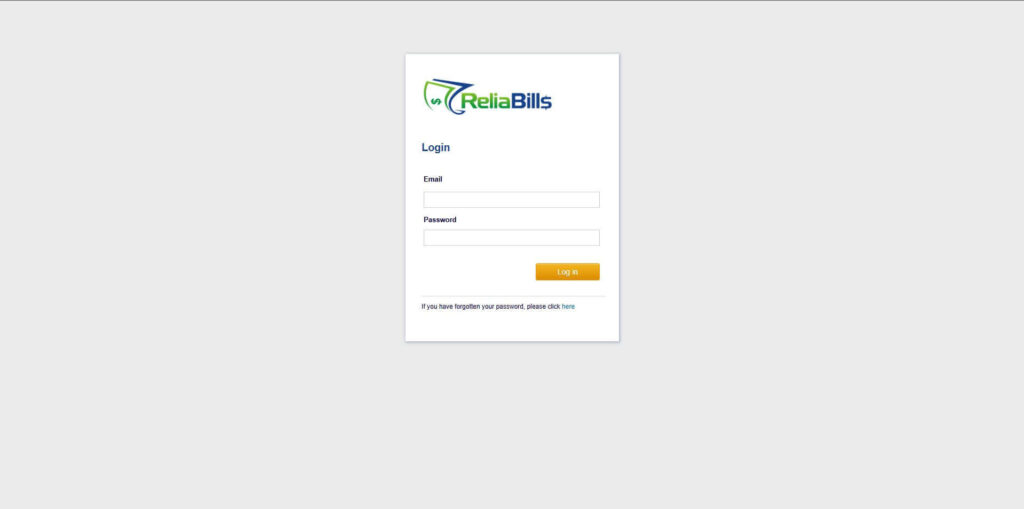
Step 1: Login to ReliaBills
- Access your ReliaBills Account using your login credentials. If you don’t have an account, sign up here.
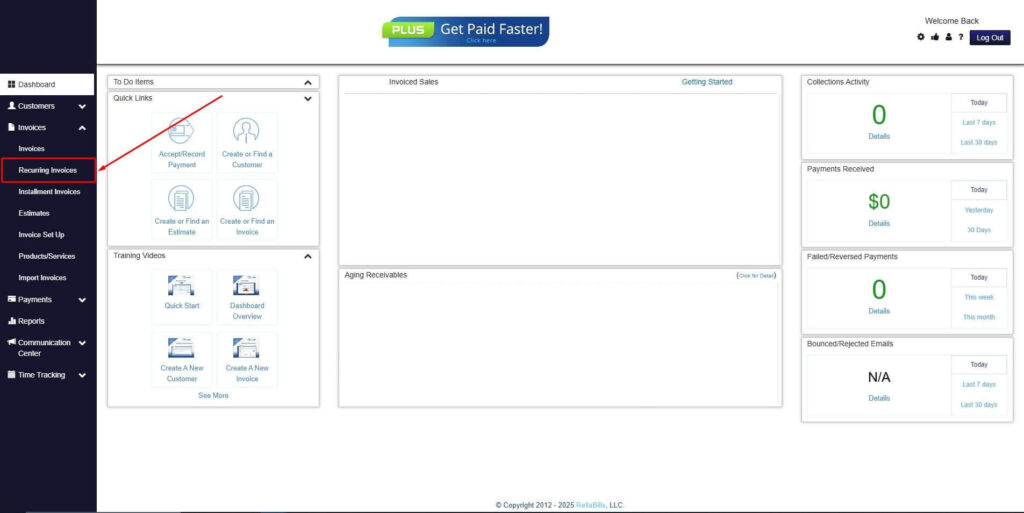
Step 2: Click on Recurring Invoices
- Navigate to the Invoices Dropdown and click on Recurring Invoices for an overview of the list of your existing customers.
Step 3: Go to the Customers Tab
- If you have already created a customer, search for them in the Customers tab and make sure their status is “Active”.
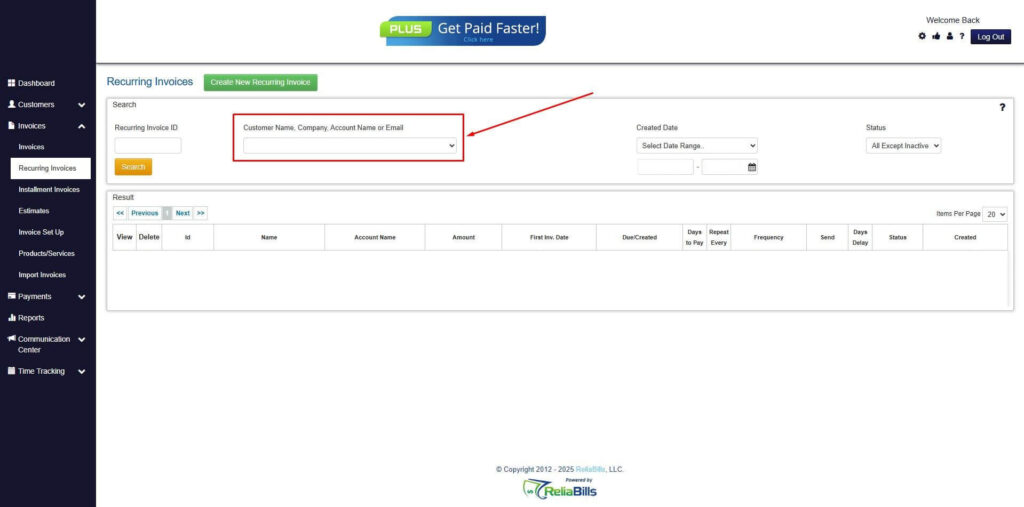
Step 4: Click the Create New Recurring Invoice
- If you haven’t created any customers yet, click the Create New Recurring Invoice to create a new customer.
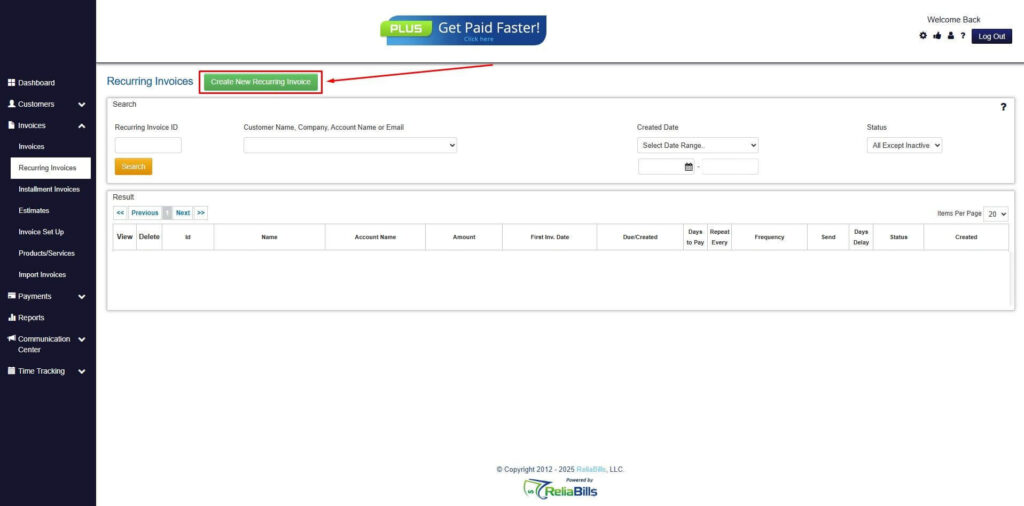
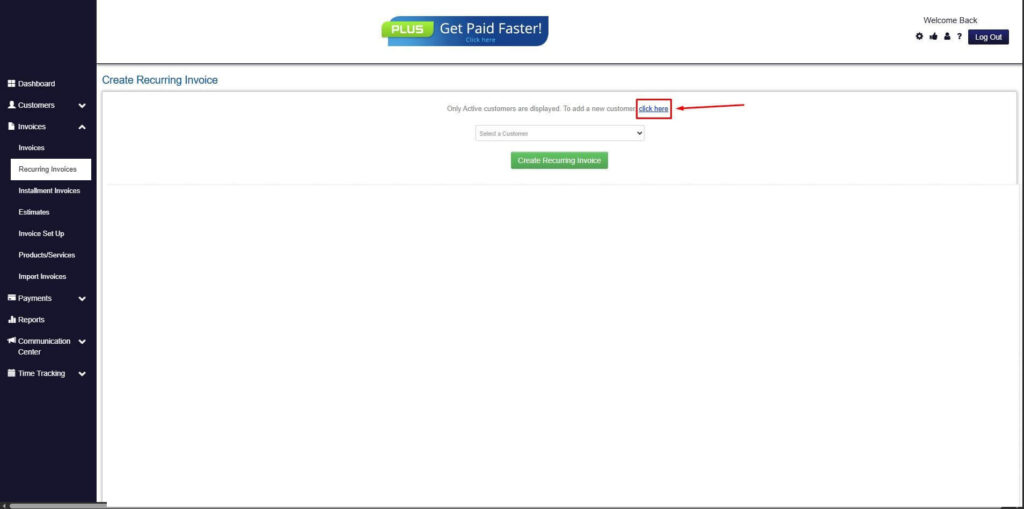
Step 5: Click on the “Click here” Button
- Click on the “Click here” button to proceed with the recurring invoice creation.
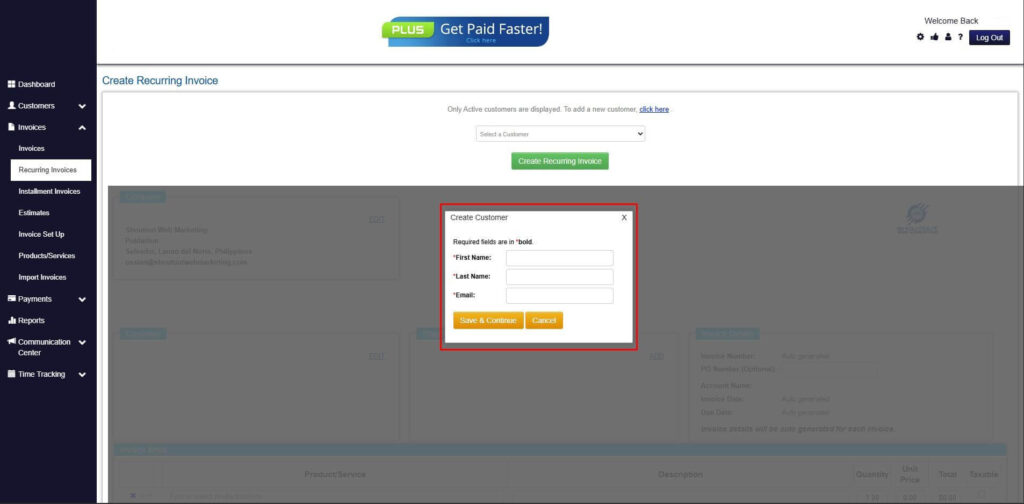
Step 6: Create Customer
- Provide your First Name, Last Name, and Email to proceed.
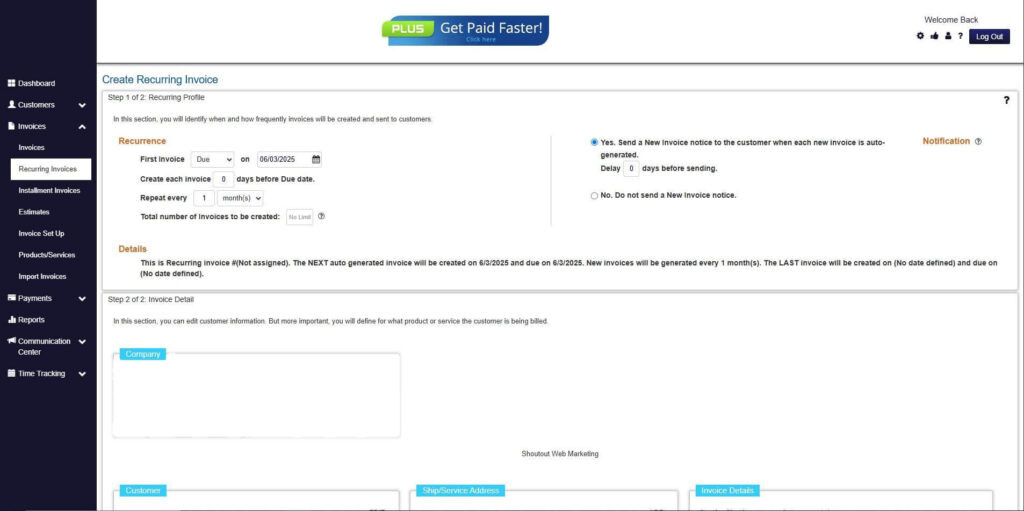
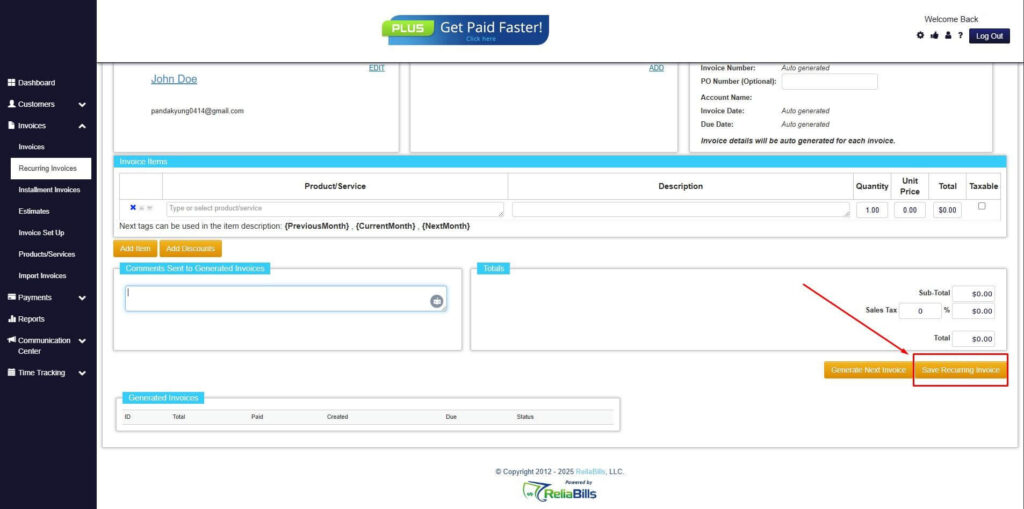
Step 7: Fill in the Create Recurring Invoice Form
- Fill in all the necessary fields.
Step 8: Save Recurring Invoice
- After filling up the form, click “Save Recurring Invoice” to continue.
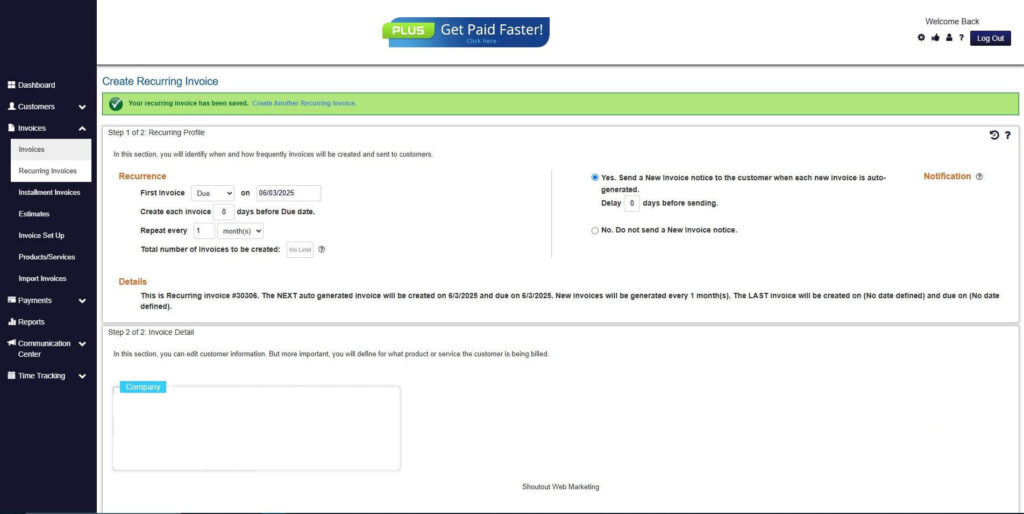
Step 9: Recurring Invoice Created
- Your Recurring Invoice has been created.
Frequently Asked Questions
1. Can automated invoicing support custom and project-based pricing?
Yes. Automated invoicing systems can handle hourly billing, milestone payments, retainers, and mixed pricing models.
2. Is automated invoicing secure for handling payments?
Most platforms use encrypted payment processing and comply with industry security standards to protect sensitive data.
3. Will clients resist automated invoices?
In most cases, clients prefer automated invoices because they are timely, clear, and easy to pay.
4. Does automated invoicing eliminate the need for manual review?
Automation reduces manual work but still allows businesses to review, edit, and approve invoices when necessary.
5. How does recurring billing help reduce late payments?
Recurring billing ensures invoices are sent on schedule and paired with automated reminders, keeping payments consistent.
6. Can automated invoicing integrate with other financial systems?
Many automated invoicing tools integrate with accounting and payment platforms, improving financial visibility.
Conclusion
Automated invoicing helps service businesses get paid faster by eliminating delays, improving accuracy, and simplifying collections. Faster invoice delivery and easier payments directly improve cash flow.
For growing service businesses, automation is no longer optional. It provides the structure and consistency needed to scale without increasing administrative burden.
By adopting automated invoicing for service businesses, companies can improve efficiency, strengthen client relationships, and create a more predictable revenue stream.