
Non-commercial invoices are increasingly used by businesses across logistics, manufacturing, nonprofit, SaaS, and service industries. These invoices support transactions that do not involve direct payment, such as product samples, donations, warranty replacements, internal transfers, or no-charge adjustments. Even without revenue attached, these documents are still essential for transparency, compliance, and accurate recordkeeping.
As businesses scale, manually creating and managing non-commercial invoices becomes inefficient and risky. Finance teams often rely on spreadsheets, reused templates, or one-off processes that are prone to inconsistency. At the same time, recurring billing systems are widely adopted to manage ongoing billing relationships, leading many businesses to question whether these systems can also handle non-commercial invoicing.
This article explores whether businesses can automate non-commercial invoices within recurring billing systems, how the automation works, and what role modern billing platforms play in making this process accurate, scalable, and compliant.
What Is a Non-Commercial Invoice?
A non-commercial invoice is a formal document used to record transactions that do not involve a sale or payment obligation. Its primary purpose is documentation rather than billing or revenue collection. These invoices are often required for operational clarity, regulatory compliance, or internal tracking.
Typical scenarios include sending free product samples to potential customers, issuing replacement items under warranty, donating goods to organizations, or documenting internal inventory movements. In many cases, these invoices may show zero value or a nominal amount, but they still need accurate descriptions and references.
Unlike commercial invoices, non-commercial invoices are not used to request payment or recognize revenue. However, they must still meet documentation standards, especially when involved in audits, customs declarations, or internal financial reviews.
Why Automating Non-Commercial Invoices Matters
Manual creation of non-commercial invoices increases the likelihood of errors, particularly when teams adapt commercial invoice templates for non-revenue use. Incorrect descriptions, missing labels, or inaccurate values can create compliance issues or confusion during audits.
Documentation challenges also grow as transaction volumes increase. Without automation, invoices may be stored inconsistently across emails, folders, or spreadsheets, making it difficult to retrieve records when needed. This lack of structure can slow down audits and internal reviews.
From an operational standpoint, manually processing non-commercial invoices consumes time without generating income. Automating these invoices helps businesses maintain accuracy and compliance while reducing administrative workload and freeing teams to focus on revenue-driving activities.
Overview of Recurring Billing Systems
Recurring billing systems are designed to automate invoice creation, scheduling, and payment collection for repeat transactions. They are commonly used for subscriptions, retainers, installment plans, and long-term service agreements.
Core features include invoice templates, automated billing schedules, customer account management, payment tracking, and reporting. These systems bring consistency to billing operations and reduce reliance on manual processes.
Historically, recurring billing systems focused on revenue-based invoices. Non-commercial transactions were often treated as exceptions handled outside the system. Modern billing platforms are now evolving to support flexible invoice types, including non-commercial invoices, within automated workflows.
Can Non-Commercial Invoices Be Automated?
Yes, businesses can automate non-commercial invoices within recurring billing systems that support flexible configurations. Automation is possible when the system allows invoice classification, custom fields, and rule-based logic rather than forcing payment processing.
Non-commercial invoice automation requires clearly defined data fields such as invoice purpose, reference numbers, descriptions, and value settings. These fields ensure the invoice is generated correctly without triggering payment requests.
With the right setup, recurring billing systems can generate non-commercial invoices on a schedule or based on triggers, just like recurring invoices, while preserving their documentation-only function.
How Automation Works for Non-Commercial Invoices
Automation begins with template-based invoice creation. Businesses define non-commercial invoice templates that include correct labels, descriptions, and default values. This eliminates inconsistencies caused by manual edits.
Automated scheduling and triggers allow invoices to be generated based on predefined conditions, such as recurring internal transfers or scheduled sample shipments. This ensures invoices are created consistently and on time.
Centralized recordkeeping stores all invoices in one system. This improves traceability, supports audits, and ensures non-commercial invoices are easily accessible alongside commercial invoices.
Handling Non-Commercial Invoices in Recurring Billing Models
In recurring billing environments, customers may occasionally receive non-commercial invoices alongside standard billing cycles. Automation ensures these invoices do not interfere with payment schedules or recurring charges.
Recurring billing systems can separate documentation from billing logic, preventing non-commercial invoices from affecting balances or triggering payment reminders. This separation is critical for maintaining customer trust.
Automation also helps maintain complete customer histories. All invoices, whether commercial or non-commercial, are linked to the customer record, providing a full view of interactions over time.
Compliance and Reporting Considerations
Regulatory and documentation accuracy
Non-commercial invoices are often required for customs clearance, internal audits, and regulatory reporting. Even when no payment is involved, invoices must clearly state the purpose of the transaction, item descriptions, and declared values. Automation helps ensure every non-commercial invoice follows consistent documentation standards and reduces the risk of compliance gaps.
Audit readiness and traceability
Automated systems create time-stamped records that are easy to search and retrieve. This improves traceability during audits and minimizes delays caused by missing or incomplete paperwork. Centralized storage also ensures that non-commercial invoices are linked to the correct customer or internal account.
Consistent reporting across invoice types
When businesses automate non-commercial invoices, they can include these documents in financial and operational reports without affecting revenue calculations. This provides better visibility into inventory movement, replacements, donations, and internal transfers while keeping financial statements accurate.
Secure record retention and access control
Compliance often requires invoices to be retained for specific periods. Automated billing systems support secure digital storage with controlled access, ensuring sensitive documentation is protected while remaining available when needed.
Best Practices for Automating Non-Commercial Invoices
Define clear classification rules
Businesses should establish guidelines that clearly distinguish non-commercial invoices from commercial ones. This includes defining when zero-value or adjusted-value invoices should be used and how they should be labeled. Clear rules prevent billing confusion and ensure proper automation setup.
Use standardized invoice templates
Creating dedicated templates for non-commercial invoices ensures consistent formatting, wording, and required fields. Standardization reduces manual edits and helps maintain professional documentation across all non-revenue transactions.
Integrate automation with recurring billing workflows
Non-commercial invoices should work alongside recurring billing schedules without triggering payments or disrupting account balances. Proper integration allows businesses to automate documentation while preserving accurate recurring billing operations.
Review and update automation rules regularly
As business processes evolve, automation settings should be reviewed to reflect new use cases or compliance requirements. Regular audits help identify outdated templates or incorrect rules before they create issues.
Train teams and document processes
Staff should understand how automated non-commercial invoicing works and when exceptions may apply. Clear process documentation ensures consistent usage and reduces dependency on individual knowledge.
How ReliaBills Enables Automated Non-Commercial Invoicing
ReliaBills provides a centralized platform that allows businesses to automate non-commercial invoices seamlessly while maintaining accuracy and compliance. Users can create custom templates specifically for non-commercial transactions, such as samples, donations, internal transfers, or warranty replacements. These templates ensure every invoice has the correct labels, fields, and descriptions without manual intervention, reducing the risk of errors.
With ReliaBills, automation is fully integrated into recurring billing workflows. This means non-commercial invoices can be scheduled or triggered automatically alongside subscription or recurring billing plans, preventing missed documentation and maintaining consistent records. Businesses no longer need to manually recreate similar invoices, saving time and administrative effort while ensuring accuracy across repeated transactions.
Additionally, ReliaBills provides centralized tracking and reporting for all non-commercial invoices. Users can monitor invoice histories, generate compliance-ready reports, and keep audit trails without disrupting financial operations. By combining automation, recurring billing, and robust reporting, ReliaBills ensures that businesses can efficiently handle non-commercial invoice creation while minimizing errors and improving overall operational control.
How to Create a New Recurring Invoice Using ReliaBills
Creating a New Recurring Invoice using ReliaBills involves the following steps:
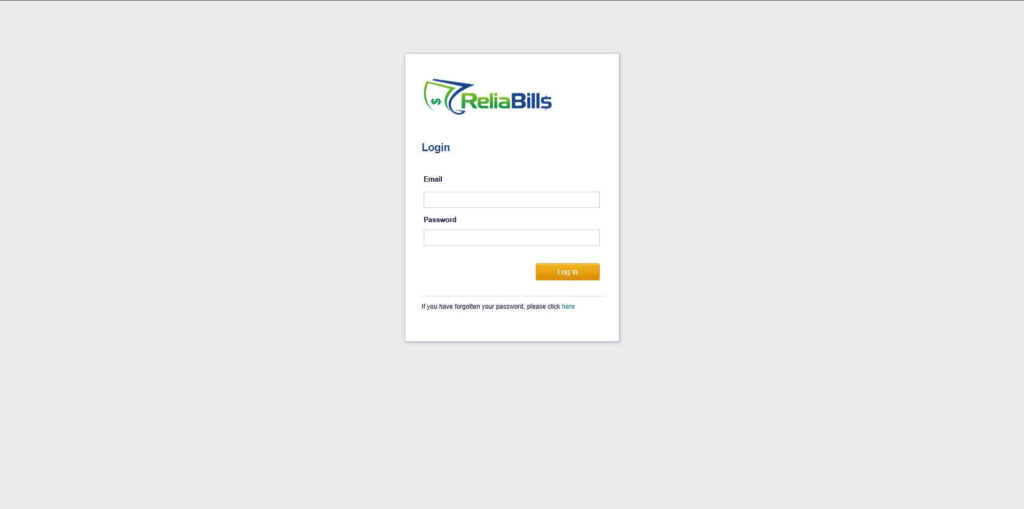
Step 1: Login to ReliaBills
- Access your ReliaBills Account using your login credentials. If you don’t have an account, sign up here.
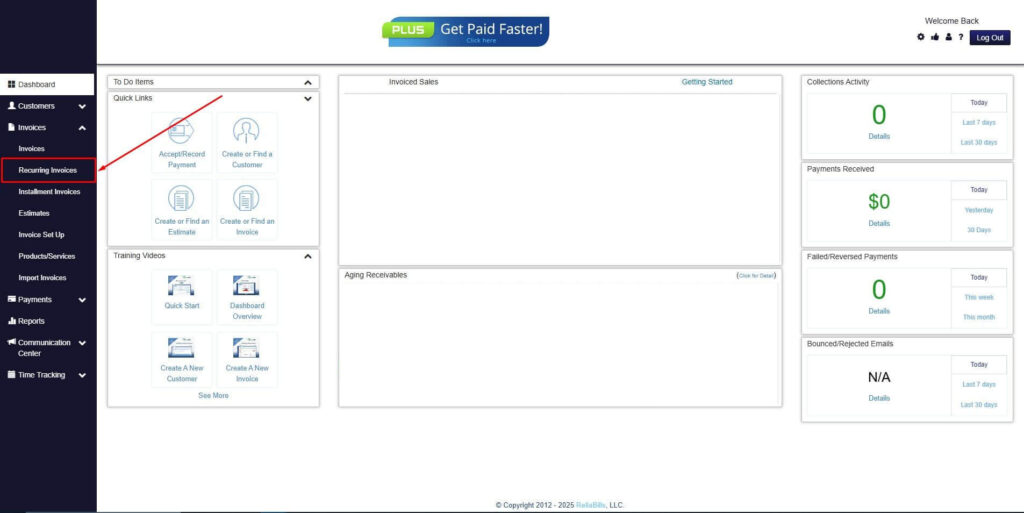
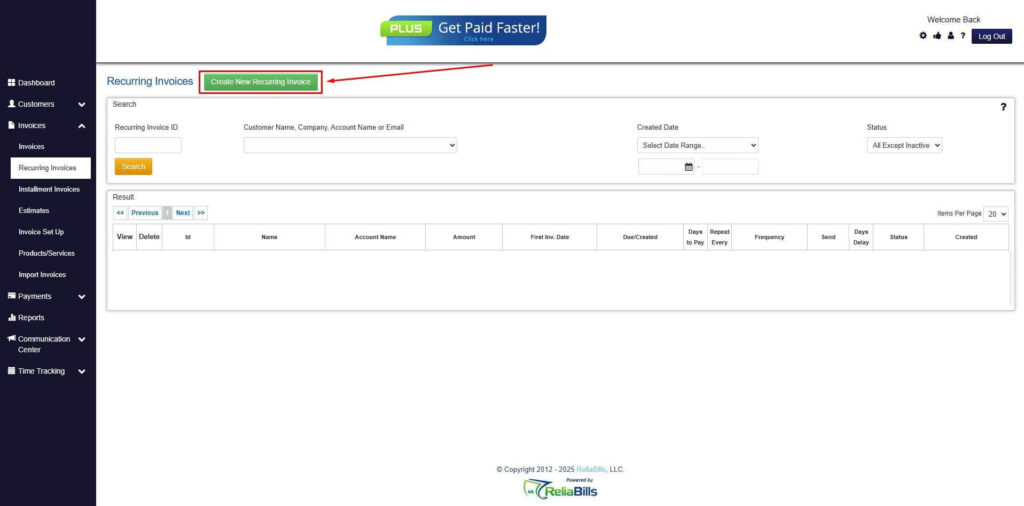
Step 2: Click on Recurring Invoices
- Navigate to the Invoices Dropdown and click on Recurring Invoices for an overview of the list of your existing customers.
Step 3: Go to the Customers Tab
- If you have already created a customer, search for them in the Customers tab and make sure their status is “Active”.
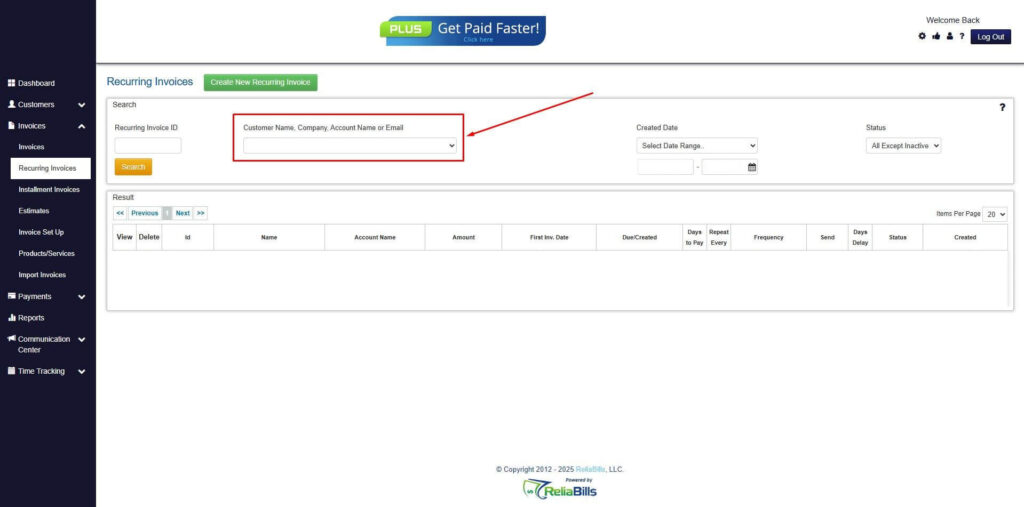
Step 4: Click the Create New Recurring Invoice
- If you haven’t created any customers yet, click the Create New Recurring Invoice to create a new customer.
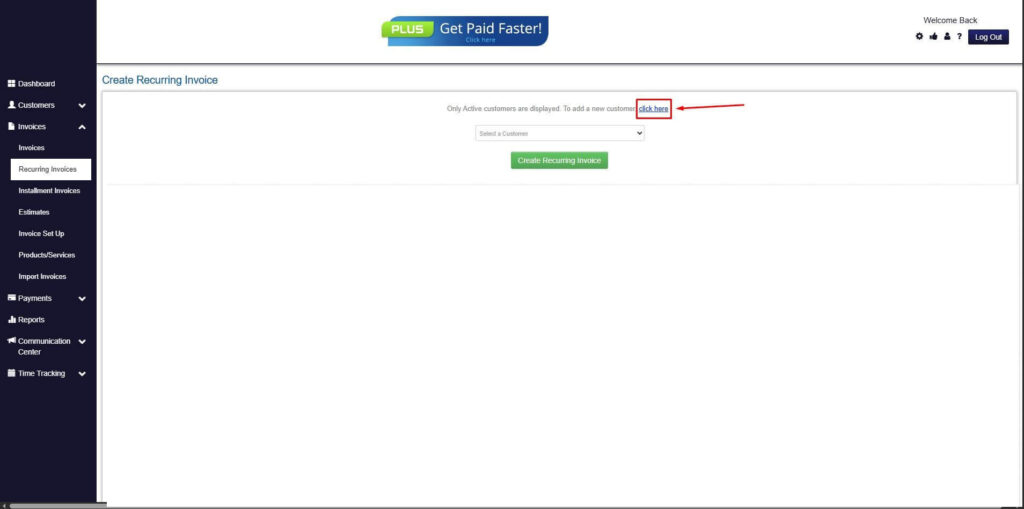
Step 5: Click on the “Click here” Button
- Click on the “Click here” button to proceed with the recurring invoice creation.
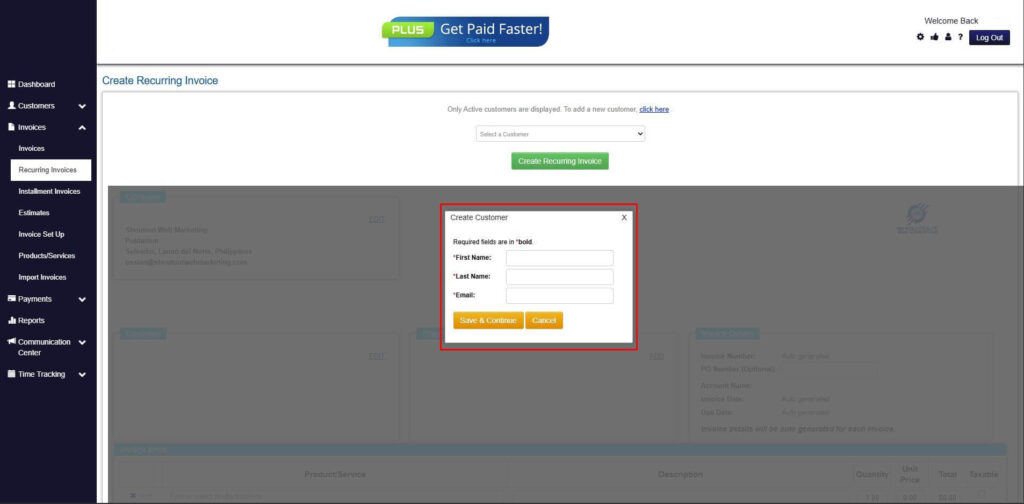
Step 6: Create Customer
- Provide your First Name, Last Name, and Email to proceed.
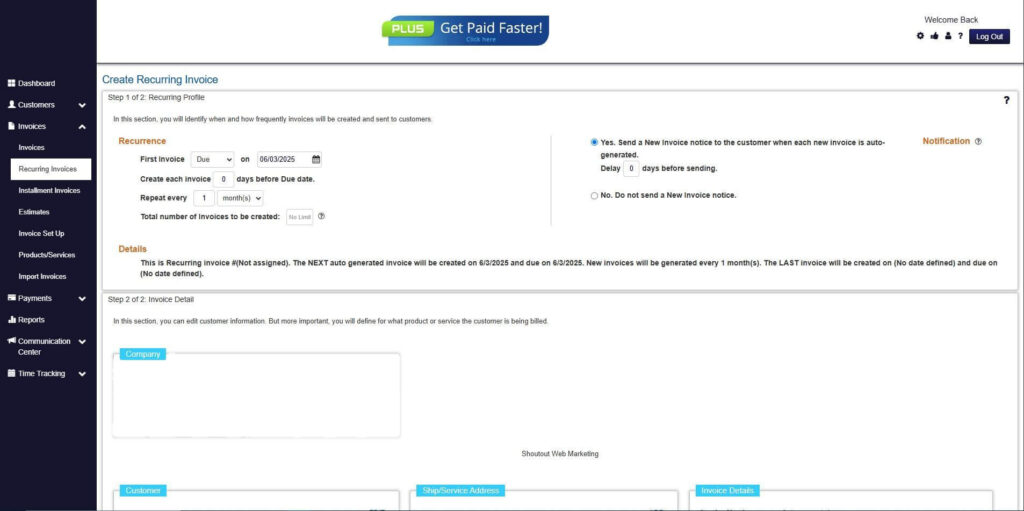
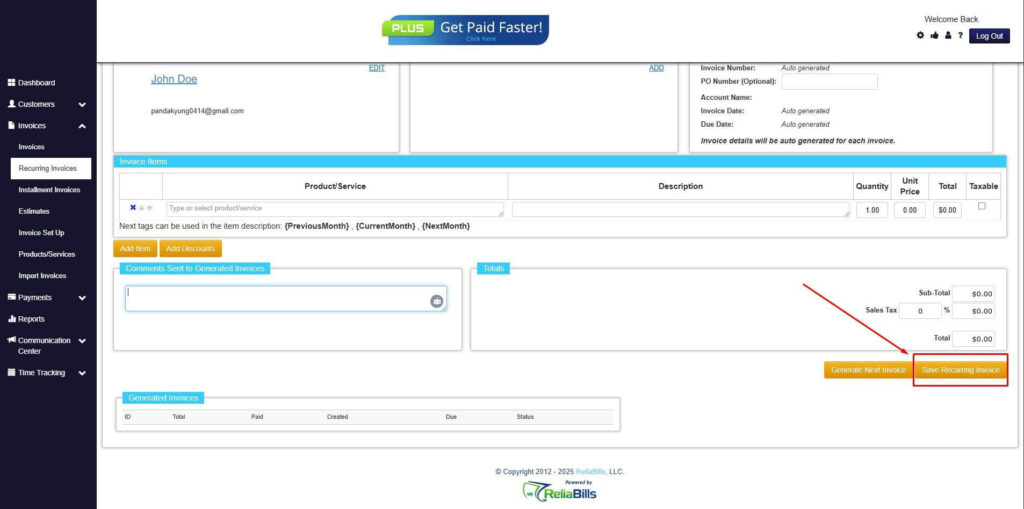
Step 7: Fill in the Create Recurring Invoice Form
- Fill in all the necessary fields.
Step 8: Save Recurring Invoice
- After filling up the form, click “Save Recurring Invoice” to continue.
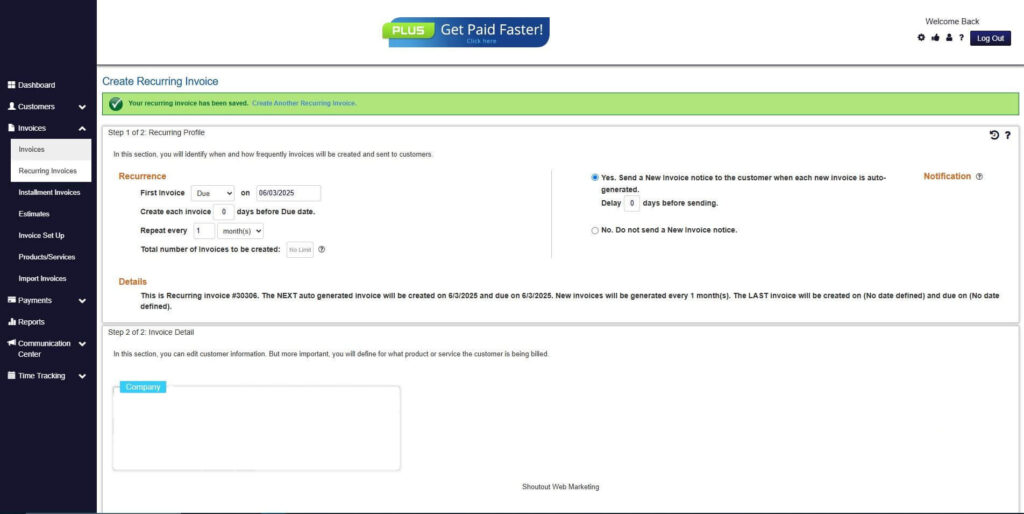
Step 9: Recurring Invoice Created
- Your Recurring Invoice has been created.
Frequently Asked Questions
1. Do non-commercial invoices require payment processing?
No, non-commercial invoices are used for documentation rather than payment collection. When businesses automate non-commercial invoices, the system should be configured to exclude payment reminders and collection workflows.
2. Can non-commercial invoices be scheduled automatically?
Yes, recurring billing systems can schedule non-commercial invoices or trigger them based on specific events. This is useful for recurring internal transfers, sample distributions, or routine replacements.
3. How are automated non-commercial invoices stored?
Automated invoices are typically stored in a centralized billing system alongside commercial invoices. This makes them easy to retrieve for audits, compliance reviews, or internal reporting.
4. Will non-commercial invoices affect customer account balances?
Properly configured systems separate documentation from billing logic. This ensures non-commercial invoices do not impact balances, revenue tracking, or recurring billing calculations.
Conclusion
Automating non-commercial invoices within recurring billing systems is both feasible and beneficial for growing businesses. Automation reduces errors, improves documentation, and saves time while maintaining compliance.
Modern recurring billing platforms allow businesses to manage non-commercial invoices with the same consistency and control as revenue-based invoices. This creates a more reliable and scalable billing operation.
For organizations seeking efficiency and accuracy, automating non-commercial invoices is a logical step toward more streamlined billing workflows.