

Managing invoicing and payments manually can quickly become overwhelming for growing businesses. Disorganized records, missed payments, and inconsistent billing schedules often lead to cash flow problems and strained customer relationships. As transaction volumes increase, relying on spreadsheets or one-off invoices makes it harder to stay accurate and efficient.
Recurring billing tools have become essential for businesses that want to organize invoicing and payments more effectively. By automating routine billing tasks and centralizing financial data, these tools reduce administrative burden and improve payment consistency. They also provide clearer visibility into upcoming revenue, helping businesses plan with confidence.
In this guide, you will learn how recurring billing tools help organize invoicing and payments, solve common billing challenges, and create more predictable cash flow. You will also see how platforms like ReliaBills support structured, scalable billing workflows for small businesses.
What Are Recurring Billing Tools?
Recurring billing tools are software solutions designed to automatically generate invoices and collect payments on a scheduled basis. Instead of creating individual invoices each time, businesses set predefined billing rules that repeat weekly, monthly, or on another agreed schedule. This approach is especially useful for ongoing services, subscriptions, and retainers.
There are several recurring billing models commonly used by businesses. Subscription billing is ideal for software, memberships, and digital services. Retainer billing works well for consultants and agencies charging a fixed recurring fee. Installment billing supports structured payment plans for larger purchases spread over time.
Unlike one-time invoicing, recurring billing focuses on consistency and automation. Once a billing plan is set up, invoices and payments continue without manual intervention, helping businesses organize invoicing and payments in a predictable, repeatable way.
Common Invoicing and Payment Organization Problems
Scattered invoices and payment records
Invoices sent through different tools, emails, or formats make it difficult to maintain a single source of truth. This fragmentation increases the risk of lost invoices, duplicate billing, and confusion during audits or customer inquiries.
Missed or late payments
Without structured billing schedules or automated reminders, businesses often forget to send invoices on time or fail to follow up consistently. This leads to delayed payments and unpredictable cash flow.
Manual tracking and reconciliation issues
Manually matching payments to invoices is time-consuming and prone to error. As transaction volume grows, even small mistakes can compound into significant reporting and accounting problems.
Limited visibility into cash flow
Disorganized invoicing makes it hard to forecast incoming revenue. When businesses cannot clearly see what is due and when, planning for expenses, payroll, and growth becomes challenging.
How Recurring Billing Tools Improve Organization
Recurring billing tools centralize invoice and payment management in one system. All invoices, payment statuses, and customer billing details are stored in a single dashboard, making it easier to stay organized and informed. This eliminates the need to switch between multiple tools or spreadsheets.
Automated invoice creation and scheduling ensure that bills are sent on time and follow a consistent structure. Businesses no longer have to remember billing dates or manually recreate invoices each cycle. This consistency improves accuracy and reinforces professionalism with customers.
By standardizing billing cycles and automating payment collection, recurring billing tools significantly reduce administrative workload. Teams can spend less time on billing tasks and more time on customer service and strategic planning.
Setting Up Organized Invoicing with Recurring Billing
Creating organized invoicing starts with standardized invoice templates. These templates ensure that every invoice includes clear descriptions, pricing, payment terms, and branding. Consistent formatting helps customers understand charges quickly and reduces questions or disputes.
Defining billing schedules and terms is equally important. Businesses should clearly specify billing frequency, due dates, and accepted payment methods. When these terms are applied consistently through recurring billing plans, customers know what to expect and are more likely to pay on time.
Assigning customers to the appropriate recurring billing plans completes the setup process. Once customers are enrolled, invoices are generated automatically based on the defined rules, creating an organized and reliable billing system.
Automating Payment Collection
Automated payment collection is a key benefit of recurring billing tools. Features like autopay and scheduled payments allow customers to pay invoices automatically using saved payment methods. This reduces friction and improves payment consistency.
Automated reminders and notifications further support timely payments. Customers receive alerts before due dates and follow-ups if payments are missed, without requiring manual outreach. This keeps communication professional and consistent.
By reducing the need for follow-ups and manual collection efforts, automation minimizes disputes and late payments. The result is a smoother payment experience for both businesses and customers.
Tracking Payments and Outstanding Balances
Recurring billing tools provide real-time visibility into payment status. Businesses can instantly see which invoices are paid, pending, or overdue, eliminating guesswork and delays in decision-making. This transparency supports better financial control.
Managing overdue invoices becomes more straightforward with centralized tracking. Automated reminders, clear payment histories, and consistent records make it easier to resolve outstanding balances without damaging customer relationships.
Simplified reconciliation and reporting further enhance organization. With accurate, up-to-date data, businesses can generate reports that support accounting, forecasting, and compliance needs.
Managing Changes and Adjustments
Billing changes are inevitable as customer needs evolve. Recurring billing tools make it easier to handle plan upgrades, downgrades, or cancellations without disrupting invoice accuracy. Adjustments are applied automatically to future billing cycles.
Issuing credits, refunds, or return invoices is also more efficient within an organized system. Rather than creating manual corrections, businesses can track adjustments directly within the billing platform, preserving clean records.
Maintaining accurate customer records throughout these changes ensures long-term organization. Every update is documented, creating a reliable billing history that supports transparency and trust.
Best Practices for Using Recurring Billing Tools
Standardize invoice templates across customers
Use consistent layouts, descriptions, and payment terms to reduce confusion and improve professionalism. Standardization also makes automation more reliable and scalable.
Define clear billing schedules and rules
Establish billing frequency, due dates, and payment methods upfront. Clear rules ensure recurring billing runs smoothly and reduces the need for manual corrections.
Keep customer and payment information up to date
Regularly review customer details, billing plans, and saved payment methods. Accurate information reduces failed payments and unnecessary follow-ups.
Monitor reports and billing performance regularly
Use reporting tools to track paid, pending, and overdue invoices. Ongoing review helps identify trends, spot issues early, and optimize billing workflows.
Communicate billing expectations clearly with customers
Transparent communication about billing cycles, charges, and payment terms builds trust and minimizes disputes, especially in recurring billing arrangements.
Common Mistakes to Avoid
Mixing manual and automated billing processes
Switching between manual invoices and recurring billing creates inconsistencies and increases error risk. A unified approach keeps records clean and reliable.
Overcomplicating billing plans
Too many billing variations or custom rules can make invoicing harder to manage. Simple, well-defined plans are easier to automate and maintain.
Ignoring reporting and reconciliation
Automation does not eliminate the need for oversight. Failing to review billing reports regularly can allow small issues to go unnoticed.
Delaying adjustments and corrections
Waiting too long to issue credits, refunds, or corrections can frustrate customers and distort financial records.
How ReliaBills Helps Organize Invoicing and Payments
ReliaBills helps businesses organize invoicing and payments by combining automated invoicing with powerful recurring billing tools. Businesses can set up scheduled invoices for ongoing services, ensuring bills are sent accurately and on time without manual effort. This structured approach reduces errors and improves billing consistency across customers.
With centralized tracking of invoices, payments, and adjustments, ReliaBills gives business owners a clear view of accounts receivable. Real-time payment visibility makes it easier to manage overdue invoices, forecast revenue, and maintain financial control. Everything is managed from one platform, eliminating scattered records.
ReliaBills also supports branded communication and automated reminders that improve the customer payment experience. By promoting predictable revenue through recurring billing and improving cash flow visibility, the platform helps businesses stay organized, scalable, and financially confident.
How to Create a New Recurring Invoice Using ReliaBills
Creating a New Recurring Invoice using ReliaBills involves the following steps:
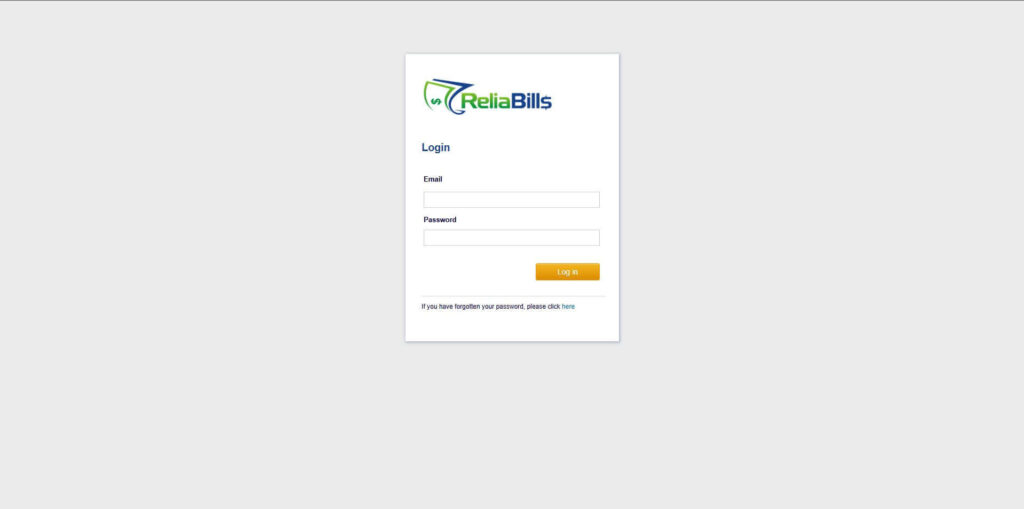
Step 1: Login to ReliaBills
- Access your ReliaBills Account using your login credentials. If you don’t have an account, sign up here.
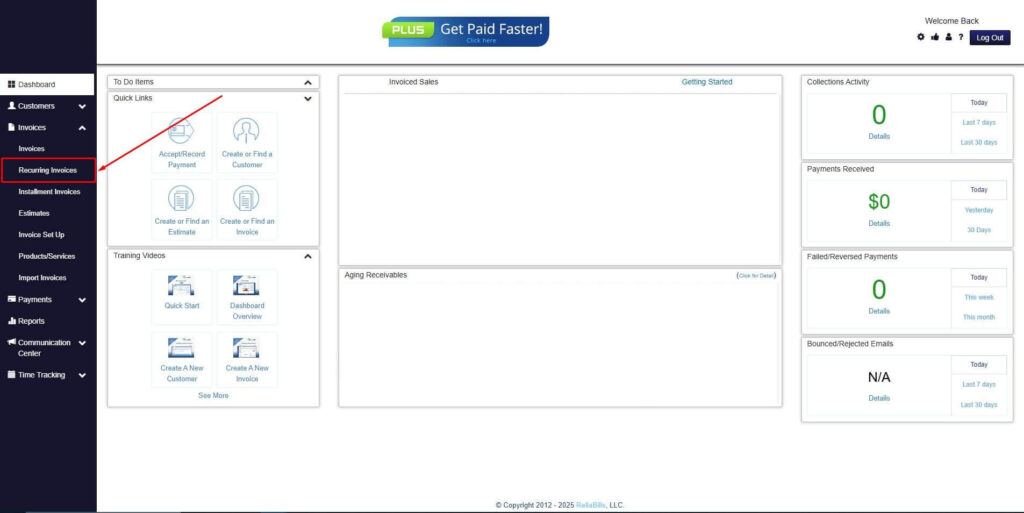
Step 2: Click on Recurring Invoices
- Navigate to the Invoices Dropdown and click on Recurring Invoices for an overview of the list of your existing customers.
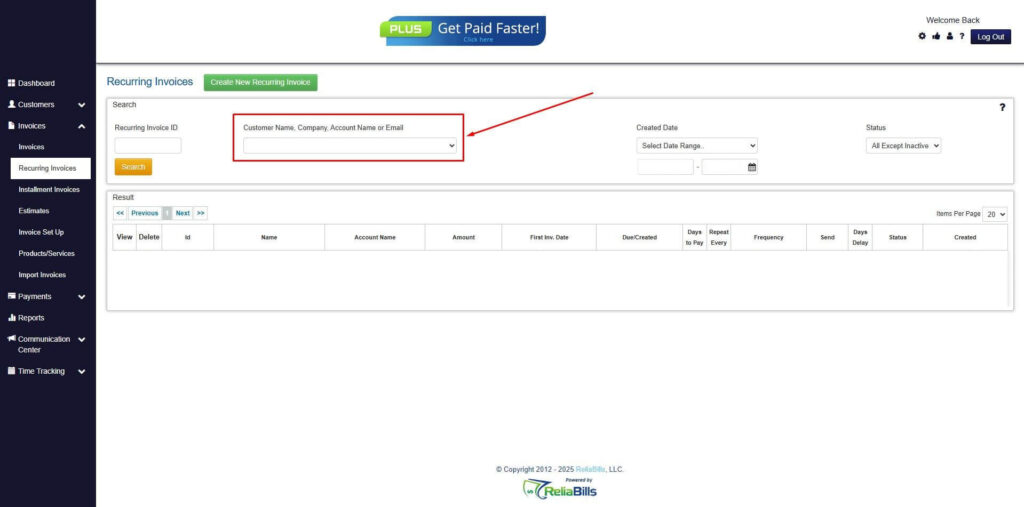
Step 3: Go to the Customers Tab
- If you have already created a customer, search for them in the Customers tab and make sure their status is “Active”.
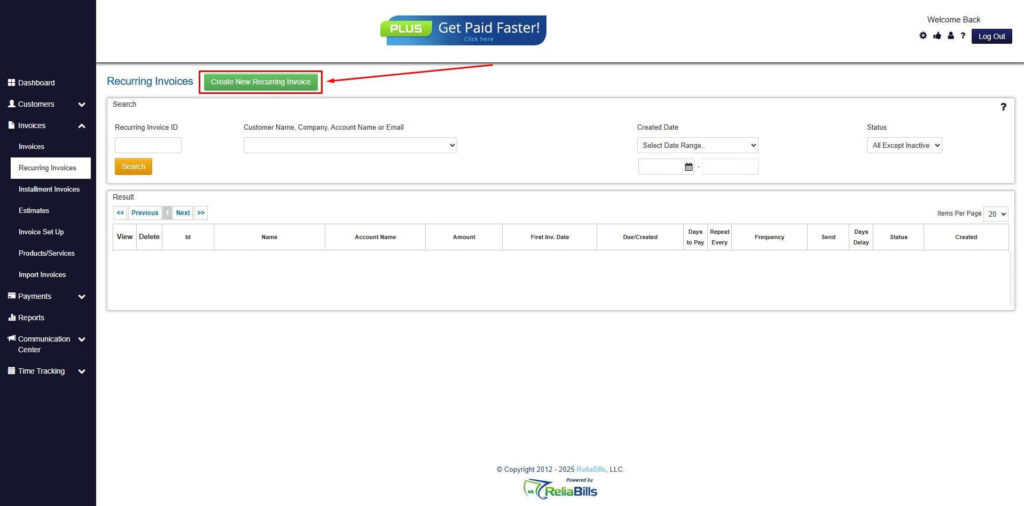
Step 4: Click the Create New Recurring Invoice
- If you haven’t created any customers yet, click the Create New Recurring Invoice to create a new customer.
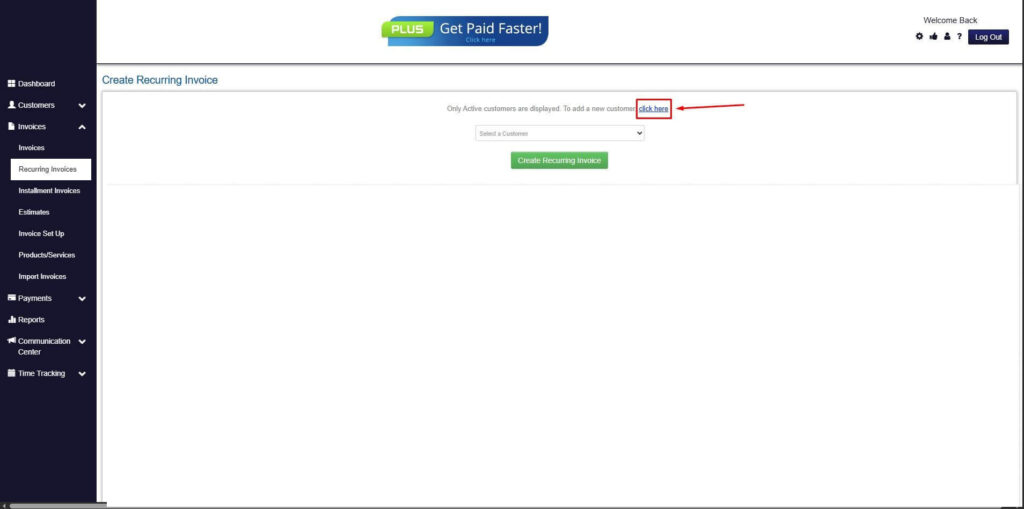
Step 5: Click on the “Click here” Button
- Click on the “Click here” button to proceed with the recurring invoice creation.
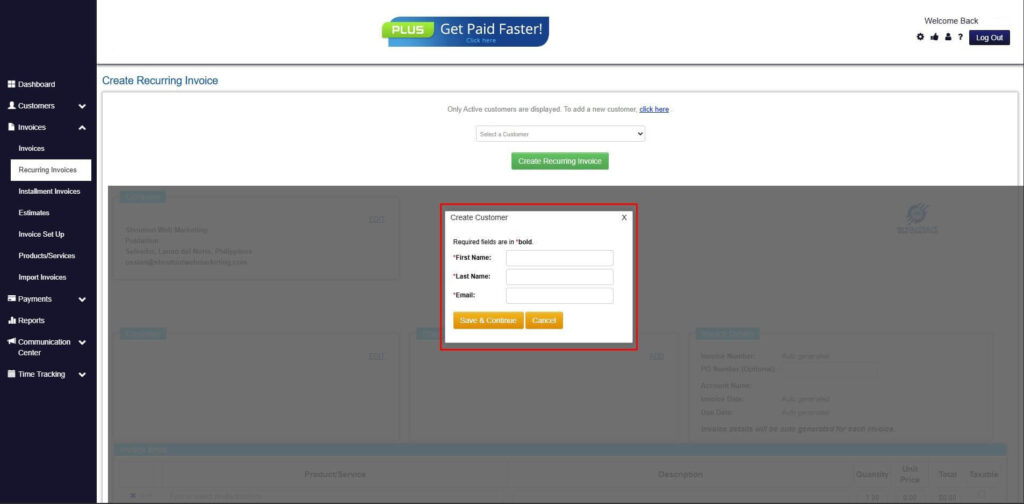
Step 6: Create Customer
- Provide your First Name, Last Name, and Email to proceed.
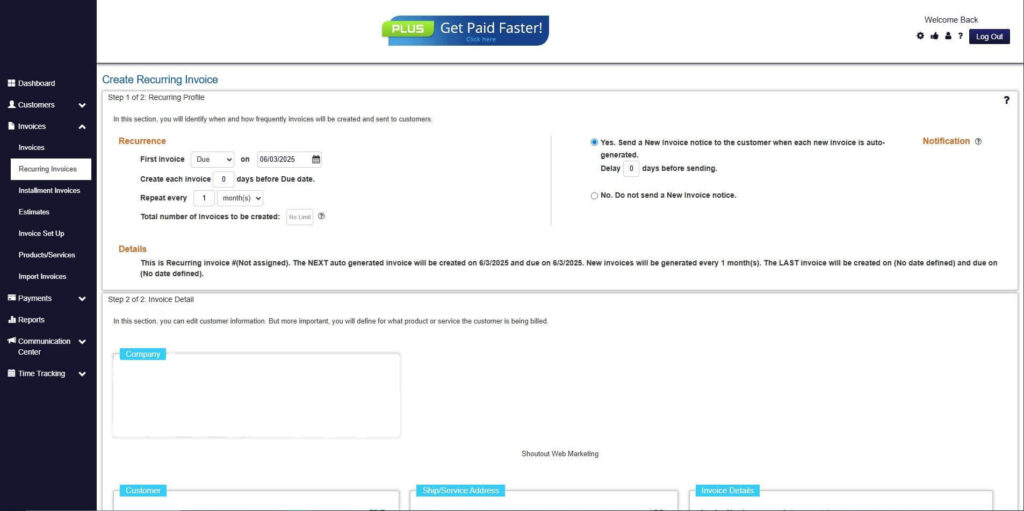
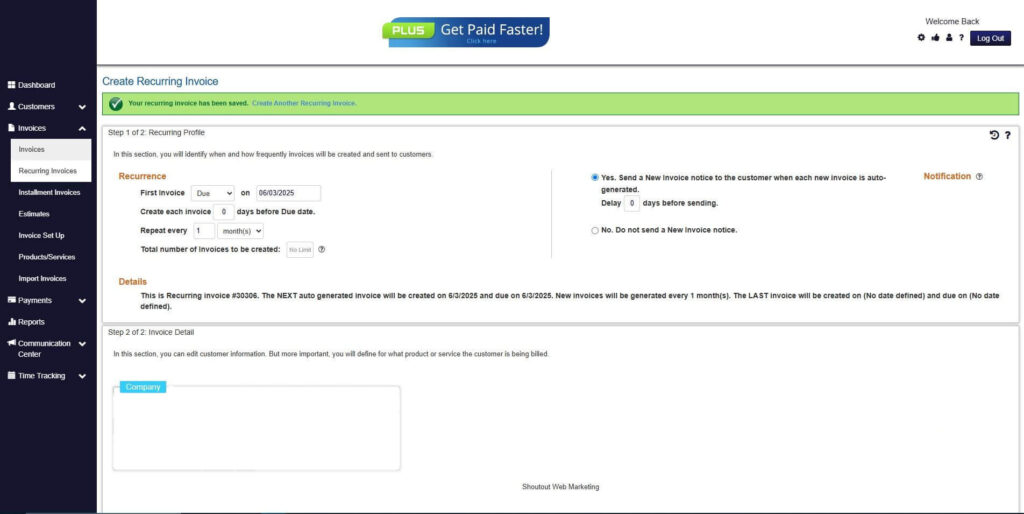
Step 7: Fill in the Create Recurring Invoice Form
- Fill in all the necessary fields.
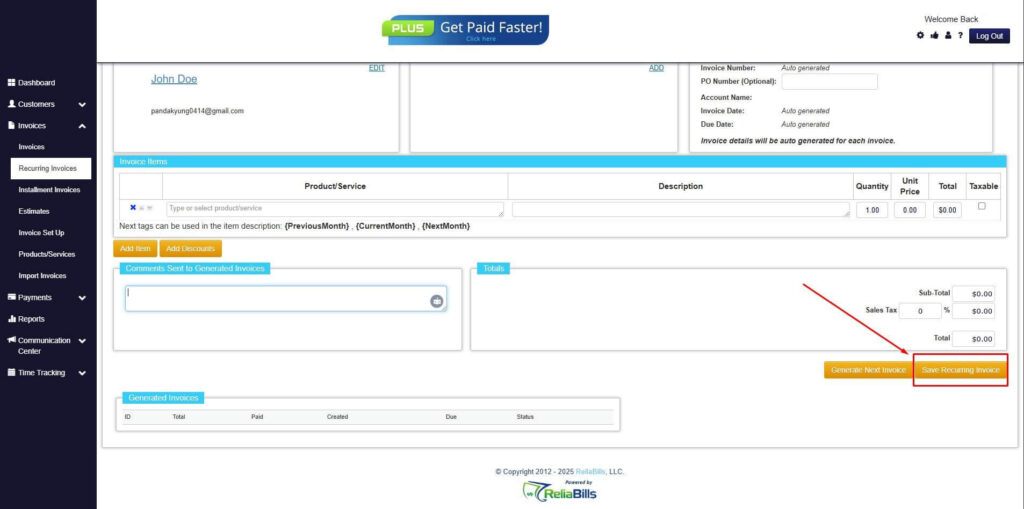
Step 8: Save Recurring Invoice
- After filling up the form, click “Save Recurring Invoice” to continue.
Step 9: Recurring Invoice Created
- Your Recurring Invoice has been created.
Frequently Asked Questions
1. Are recurring billing tools suitable for small businesses?
Yes. Recurring billing tools are especially valuable for small businesses because they reduce manual work, improve payment consistency, and support predictable cash flow.
2. Can recurring billing handle variable charges?
Many tools allow flexible billing rules, including usage-based fees, add-ons, or periodic adjustments, while still maintaining organized invoicing.
3. How secure are recurring billing tools?
Reputable platforms use encryption, secure payment gateways, and compliance standards to protect customer and payment data.
4. Can invoices be customized when using recurring billing?
Yes. Most tools allow customization of invoice branding, descriptions, and terms while still benefiting from automated scheduling and payment collection.
Conclusion
Recurring billing tools play a critical role in helping businesses organize invoicing and payments. By centralizing records, automating billing cycles, and simplifying payment collection, they eliminate many of the inefficiencies of manual processes.
With the right setup and best practices, businesses gain better visibility, fewer errors, and more predictable cash flow. These benefits support long-term growth and stronger customer relationships.
For businesses looking to streamline invoicing and payments, recurring billing tools like ReliaBills provide a practical, scalable solution that brings structure and clarity to financial operations.