
Non-commercial invoicing is often treated as a low-risk administrative task, but errors in these invoices can still create compliance issues, reporting problems, and operational inefficiencies. Many organizations rely on manual processes when issuing non-commercial invoices, especially when transactions repeat or follow predictable schedules. Over time, this approach increases the likelihood of mistakes.
Common invoicing errors arise when invoices are created repeatedly for similar purposes such as internal transfers, warranty replacements, or donations. These errors may include inconsistent descriptions, incorrect values, or missing documentation. While the transactions themselves may not involve direct revenue, inaccuracies can still affect audits, recordkeeping, and regulatory reviews.
Recurring billing tools significantly reduce these risks by introducing automation, consistency, and standardized processes. Through non-commercial invoice automation, organizations can ensure accuracy while saving time and maintaining reliable records.
What Is Non-Commercial Invoicing?
Non-commercial invoicing refers to invoices issued for transactions that do not involve the direct sale of goods or services for profit. These invoices are often used for internal, administrative, or compliance-related purposes rather than revenue generation.
Typical scenarios include product samples, donations, internal department transfers, warranty replacements, or zero-value shipments required for customs documentation. While these invoices may not request payment, they still serve as formal records of movement, value, and purpose.
Unlike commercial invoices, non-commercial invoices focus more on documentation accuracy than pricing. However, they still require correct descriptions, consistent values, and proper labeling to meet internal controls and external regulatory requirements.
Why Errors Occur in Non-Commercial Invoicing
Errors in non-commercial invoicing are most commonly caused by manual processes. When staff repeatedly create similar invoices, data is often copied and edited manually, increasing the risk of inconsistencies. Even small errors can accumulate over time.
Another common issue is the lack of standardized documentation. Without clear templates or automation rules, invoice descriptions, values, and purposes may vary from one invoice to another. This inconsistency creates confusion during audits and reviews.
Mislabeling invoice purpose or assigning incorrect values is also a frequent problem. In some cases, invoices are created without proper internal review, leading to missing references or incomplete records that are difficult to reconcile later.
The Role of Recurring Billing Tools
Recurring billing tools are typically associated with subscription payments, but their functionality extends well beyond revenue-based billing. At their core, these tools automate invoice creation on a scheduled basis using predefined rules and templates.
For non-commercial use cases, recurring billing tools allow organizations to generate consistent invoices for recurring internal or administrative transactions. Instead of recreating invoices manually, the system automatically produces them with the correct structure and data.
Compared to manual invoice creation, automation reduces variability and eliminates repetitive tasks. This makes recurring billing tools a practical foundation for non-commercial invoice automation.
How Recurring Billing Tools Prevent Common Errors
Recurring billing tools prevent errors by enforcing consistency across every invoice generated. Standardized templates ensure that descriptions, reference numbers, and values remain uniform for similar transactions.
Automated data population removes the need for manual entry, reducing the risk of typos, missing fields, or incorrect calculations. Once invoice rules are defined, the system applies them consistently across all recurring invoices.
Recurring billing also ensures consistent labeling and descriptions. This is especially important for non-commercial invoices that must clearly state their purpose for internal audits or external compliance checks. By reducing duplication and omissions, organizations maintain cleaner, more reliable records.
Preventing Errors in Cross-Border and Compliance Scenarios
Non-commercial invoices are frequently required for cross-border shipments, even when no sale occurs. In these cases, accurate descriptions and declared values are essential for customs clearance.
Recurring billing tools help maintain consistent documentation over time, ensuring that invoice values and descriptions align with regulatory expectations. This reduces delays, rejections, or follow-up requests from customs authorities.
Automation also supports audit readiness. When invoices are generated using standardized rules and stored centrally, finance and compliance teams can quickly retrieve records for reviews or inspections.
Benefits of Using Recurring Billing for Non-Commercial Invoices
Improved accuracy and consistency
Recurring billing ensures that non-commercial invoices follow the same structure, descriptions, and values each time they are issued. By using predefined templates and rules, businesses avoid inconsistencies that often occur when invoices are created manually for similar transactions. This consistency is especially important for internal documentation, audits, and cross-department reviews.
Reduced manual workload and time savings
Automating non-commercial invoice creation eliminates repetitive tasks such as re-entering data, copying previous invoices, or manually updating descriptions. Finance and operations teams can focus on higher-value work instead of routine administrative tasks. Over time, these time savings significantly improve operational efficiency.
Better recordkeeping and traceability
Recurring billing systems automatically store invoice histories, timestamps, and associated details in one centralized location. This makes it easier to trace non-commercial transactions such as samples, replacements, or donations when questions arise. Strong traceability also supports internal controls and compliance requirements.
Lower risk of compliance and documentation issues
Accurate, consistently labeled invoices reduce the risk of misclassification or missing documentation during audits or regulatory reviews. Recurring billing tools help ensure that invoice values, descriptions, and supporting notes remain aligned with internal policies and external compliance standards.
Best Practices for Using Recurring Billing in Non-Commercial Invoicing
Define clear non-commercial invoicing policies
Establish written guidelines that outline when non-commercial invoices should be issued, how they should be labeled, and what values should be included. Clear policies help ensure automation rules are set up correctly and consistently followed across teams.
Use standardized templates and automation rules
Create invoice templates specifically designed for non-commercial use cases, including standardized descriptions and custom fields. Automation rules should be configured to populate these fields consistently, reducing the need for manual adjustments.
Schedule regular reviews and reconciliations
Even with automation, it is important to periodically review recurring invoices to confirm accuracy and relevance. Regular reconciliation helps catch outdated templates, incorrect values, or changes in internal processes before issues compound.
Maintain clear documentation and audit trails
Store supporting notes, internal references, and transaction details alongside each invoice. This documentation strengthens accountability and ensures that non-commercial invoices can be easily explained during internal or external reviews.
Common Mistakes to Avoid
Treating non-commercial invoices as one-off exceptions
Handling non-commercial invoices manually because they are not revenue-generating often leads to errors and inconsistencies. These invoices still require accuracy, clarity, and proper documentation, especially for audits and compliance.
Mixing manual and automated processes
Using automation for some invoices while manually creating others increases the risk of mismatched formats, missing information, and tracking gaps. A consistent approach across all non-commercial invoices improves accuracy and efficiency.
Failing to review automation rules periodically
Automation rules that are not reviewed can become outdated as business processes change. Regular evaluations ensure that recurring billing settings remain aligned with current policies and use cases.
Overlooking communication and internal visibility
Non-commercial invoices often involve multiple departments. Failing to ensure clear visibility and communication can lead to confusion, duplicated work, or incomplete documentation.
How ReliaBills Supports Error-Free Non-Commercial Invoicing
ReliaBills provides a powerful solution for organizations looking to minimize errors and streamline non-commercial invoice automation. Instead of relying on manual processes that are prone to typos, inconsistent descriptions, or missing fields, ReliaBills enables you to set up automated recurring invoices with preconfigured templates. Once you define the invoice parameters and descriptions for non-commercial use cases, the platform generates each invoice consistently and accurately, reducing the risk of mistakes that often occur with manual entry.
One of the key features that supports error-free invoicing is ReliaBills’ recurring billing capability. You can create scheduled invoice routines that automatically populate client or internal information, invoice values, and purpose labels every time an invoice needs to be issued. This ensures consistency across periods and eliminates the repetitive task of copying and editing similar invoices manually a common source of errors in non-commercial scenarios.
ReliaBills also offers customizable invoice fields, which allow you to tailor each non-commercial invoice with clear purpose labels, transaction notes, or internal codes that improve clarity and tracking. Combined with centralized invoice tracking and detailed reporting, this helps organizations maintain a complete and error-free audit trail, which is especially useful for internal documentation, compliance reviews, or regulatory reporting.
How to Create a New Recurring Invoice Using ReliaBills
Creating a New Recurring Invoice using ReliaBills involves the following steps:
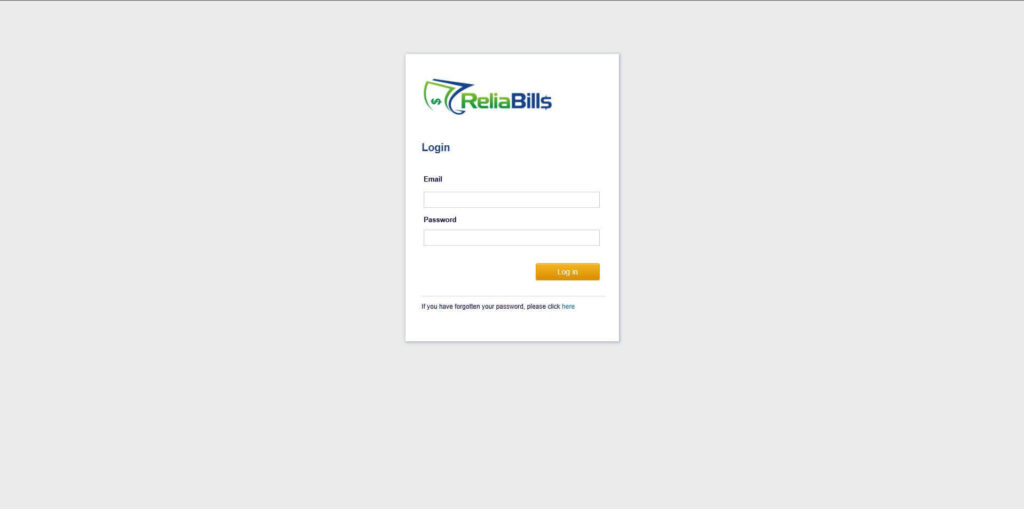
Step 1: Login to ReliaBills
- Access your ReliaBills Account using your login credentials. If you don’t have an account, sign up here.
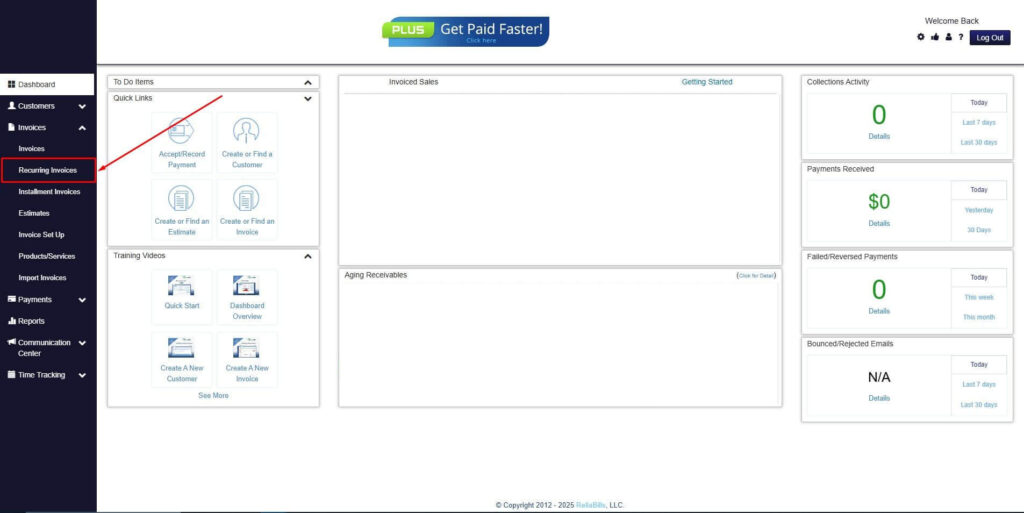
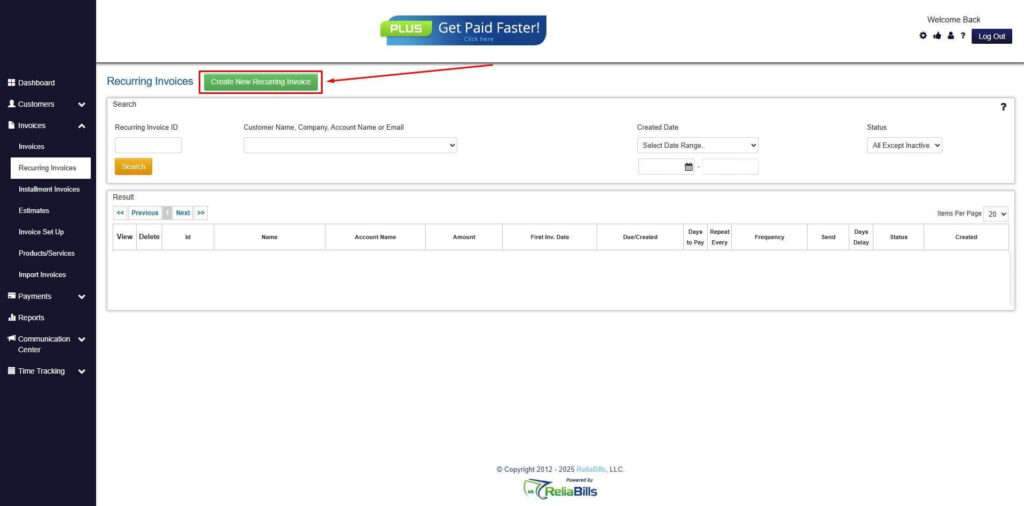
Step 2: Click on Recurring Invoices
- Navigate to the Invoices Dropdown and click on Recurring Invoices for an overview of the list of your existing customers.
Step 3: Go to the Customers Tab
- If you have already created a customer, search for them in the Customers tab and make sure their status is “Active”.
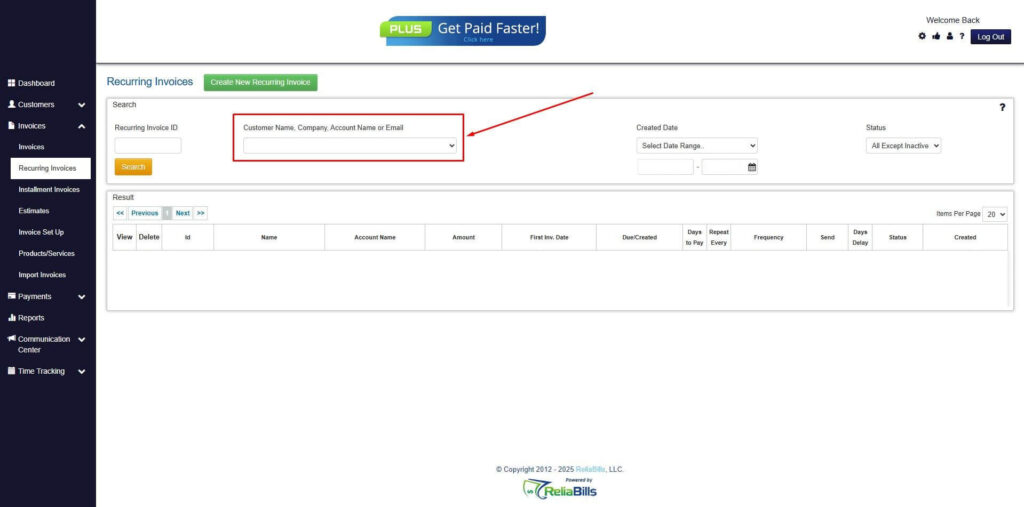
Step 4: Click the Create New Recurring Invoice
- If you haven’t created any customers yet, click the Create New Recurring Invoice to create a new customer.
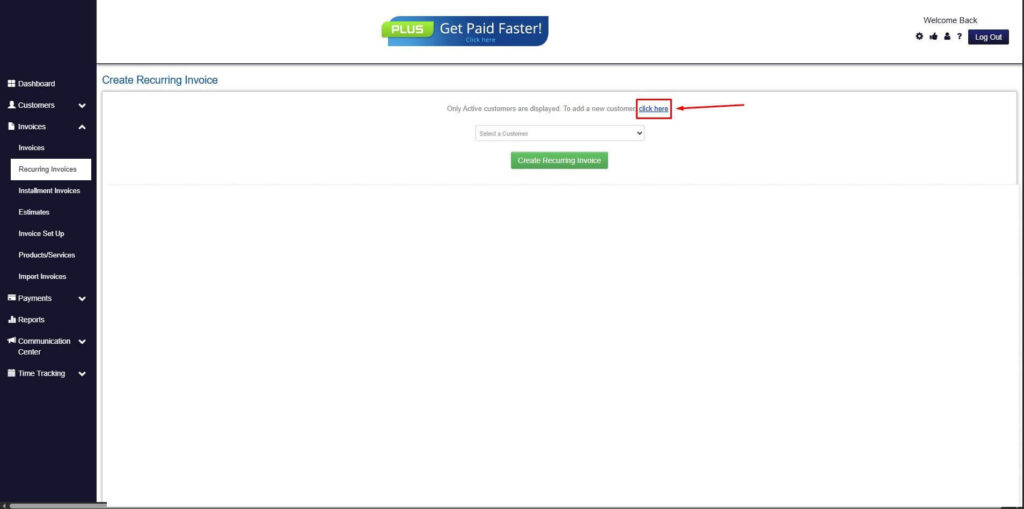
Step 5: Click on the “Click here” Button
- Click on the “Click here” button to proceed with the recurring invoice creation.
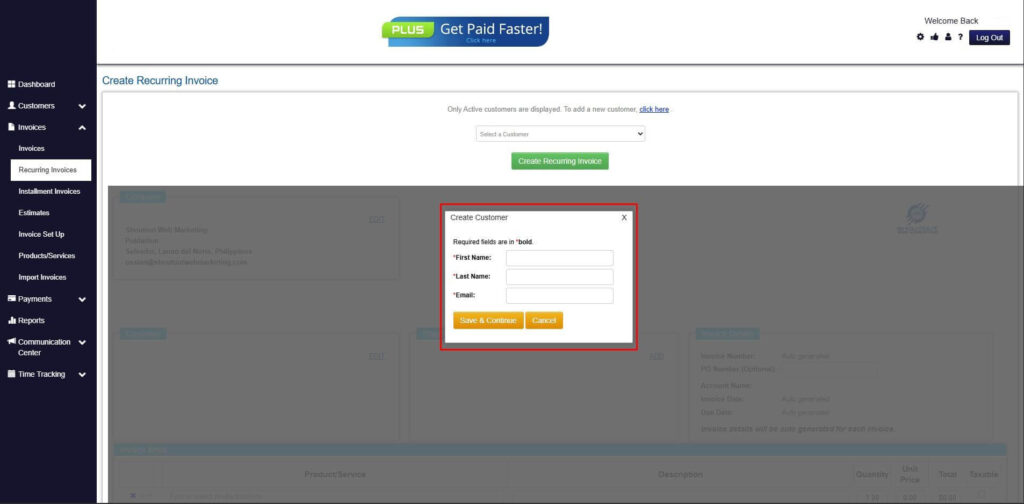
Step 6: Create Customer
- Provide your First Name, Last Name, and Email to proceed.
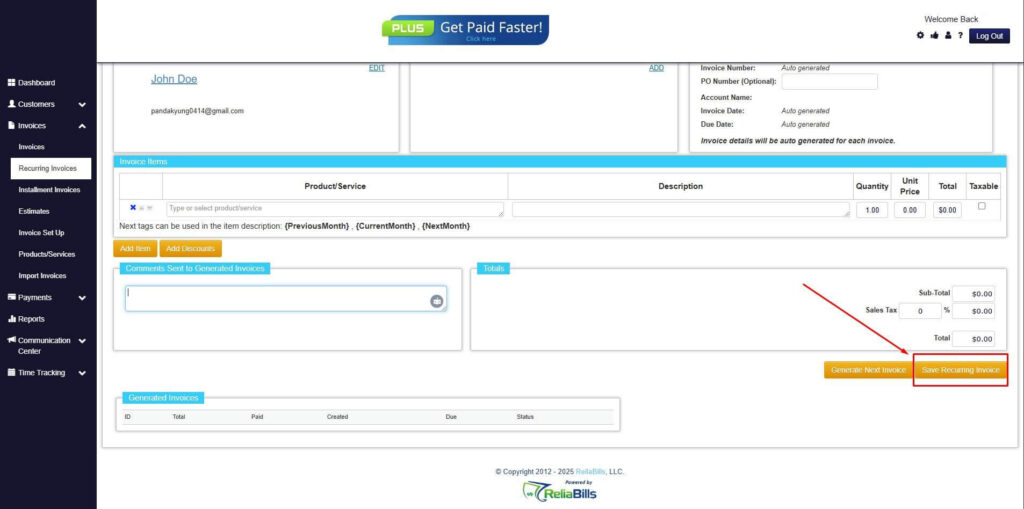
Step 7: Fill in the Create Recurring Invoice Form
- Fill in all the necessary fields.
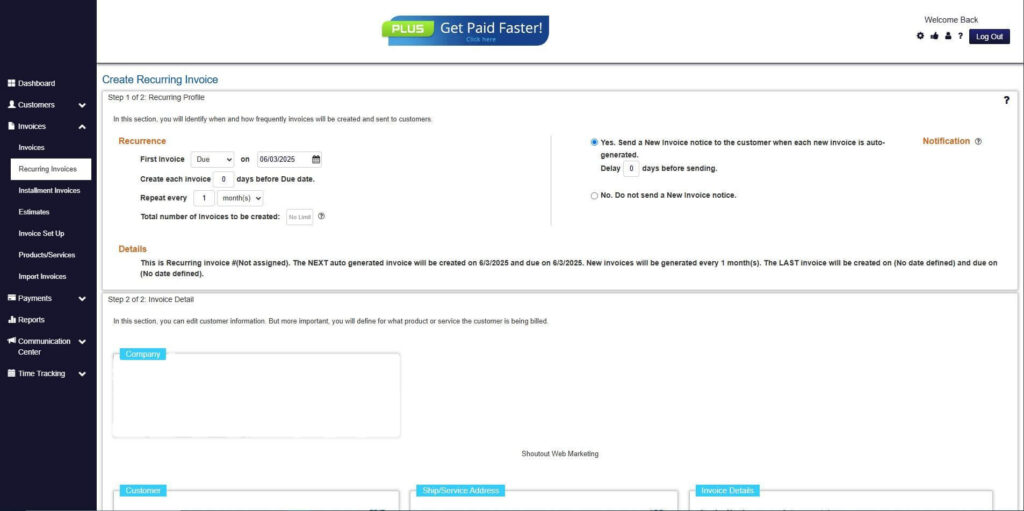
Step 8: Save Recurring Invoice
- After filling up the form, click “Save Recurring Invoice” to continue.
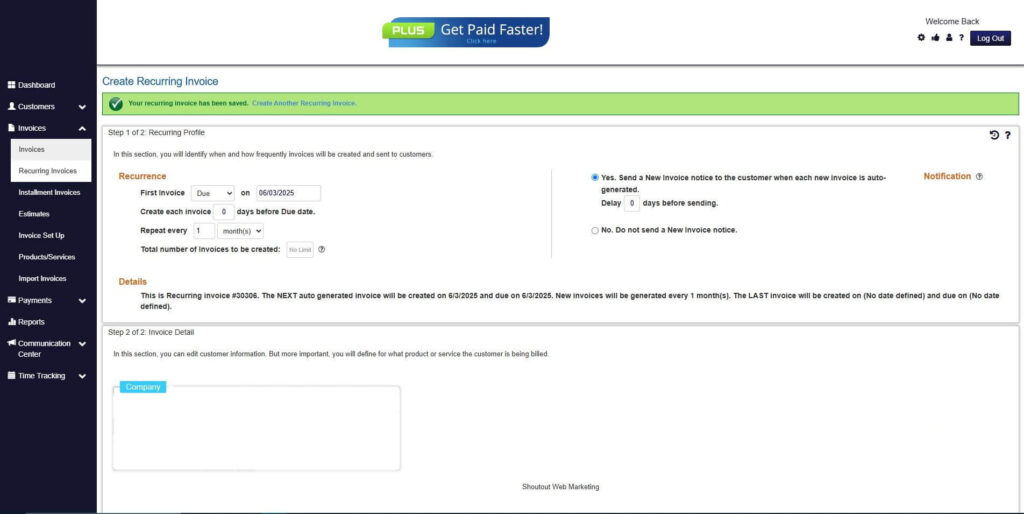
Step 9: Recurring Invoice Created
- Your Recurring Invoice has been created.
Frequently Asked Questions
1. Can non-commercial invoices be set up as recurring invoices?
Yes, recurring billing tools can be configured to issue non-commercial invoices on a set schedule, such as monthly internal transfers or recurring sample distributions. Automation ensures consistency across each billing cycle.
2. Do non-commercial invoices always need to be zero value?
Not necessarily. While many non-commercial invoices have zero totals, others may include declared values for documentation, customs, or internal tracking purposes. Automation helps ensure these values are applied correctly.
3. How do recurring billing tools support compliance?
Recurring billing tools maintain consistent invoice formats, centralized records, and complete audit trails. This makes it easier to demonstrate compliance during audits or regulatory reviews.
4. Are recurring billing tools suitable for small organizations?
Yes. Small organizations often benefit the most from automation because it reduces manual effort, improves accuracy, and supports scalability as invoice volume grows.
Conclusion
Errors in non-commercial invoicing often stem from manual, repetitive processes and inconsistent documentation. Recurring billing tools address these challenges by automating invoice creation, standardizing formats, and reducing human error.
Through non-commercial invoice automation, organizations gain accuracy, efficiency, and audit-ready records. Tools like ReliaBills make it easier to manage recurring non-commercial invoices while maintaining compliance and operational clarity.