
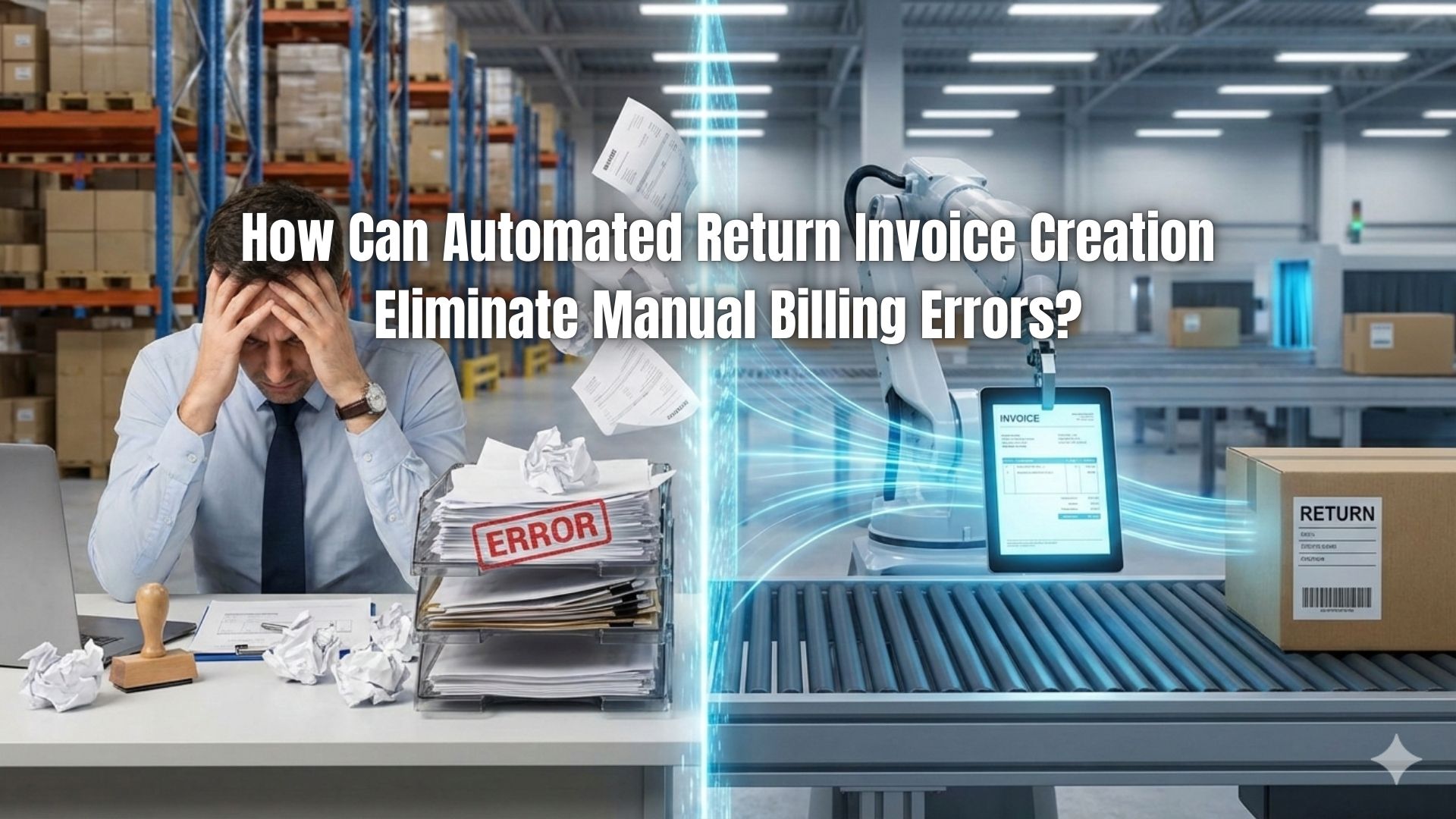
Billing errors are one of the most common challenges businesses face today. Mistakes in invoicing, such as incorrect amounts, missing invoice references, or miscalculated taxes, can cause cash flow disruptions, harm client relationships, and create unnecessary work for accounting teams. Return invoices are particularly prone to mistakes because they involve reversing or correcting previous transactions, which often include multiple adjustments.
Manual processes rely heavily on human accuracy, and even small errors can escalate quickly. Businesses handling multiple transactions, recurring billing cycles, or subscription services often struggle to keep up with the volume of corrections needed. When mistakes accumulate, customer trust diminishes, and finance teams spend significant time reconciling accounts instead of focusing on growth.
Automation offers a solution that reduces human error and ensures that every adjustment is correctly recorded. Automated return invoice creation streamlines the correction process by linking return invoices to original transactions, calculating adjustments automatically, and updating customer accounts in real time. This enables businesses to maintain accurate financial records, prevent disputes, and enhance overall operational efficiency.
What Is a Return Invoice?
A return invoice is a formal document used to adjust, reverse, or correct a previous invoice. It may be required when billing mistakes occur, when products are returned, or when subscription or service adjustments are necessary. Unlike a refund or a credit memo, a return invoice directly links to the original transaction, creating a complete record that ensures accounting clarity.
Return invoices are issued for a variety of reasons, including product damages, customer disputes, subscription modifications, overbilling, or pricing errors. When managed correctly, they provide a clear trail for accounting, reduce confusion for clients, and prevent financial discrepancies.
These invoices are essential for businesses that handle high transaction volumes or recurring billing because they ensure that every correction is properly documented. Without a proper return invoice, disputes can linger, customer satisfaction can decline, and internal accounting becomes more complex.
In addition, return invoices help businesses track patterns and identify recurring issues. By analyzing these documents, companies can uncover trends in billing errors or client requests, allowing them to refine processes and prevent future problems.
Common Manual Billing Errors in Return Invoices
- Data entry mistakes – Typing errors, missing numbers, or incorrect calculations are common when invoices are processed manually. These mistakes can lead to overbilling or underbilling, creating disputes with customers.
- Duplicate or missing invoice references – Manual processes often result in invoices being duplicated or references overlooked, making it difficult to reconcile accounts. This can confuse customers and finance teams alike.
- Timing issues in recurring billing adjustments – Adjusting invoices for subscriptions or recurring services manually can result in delayed or inconsistent charges across billing cycles.
- Lack of audit trails and documentation – Manual workflows rarely maintain full records of adjustments, making it hard to track changes, justify corrections, or prepare for audits.
- Miscommunication between departments – Without a centralized system, accounting, customer service, and sales may process returns differently, leading to errors or duplicate actions.
- Inconsistent handling of partial returns or prorated charges – Calculating partial adjustments manually is prone to mistakes, which can affect future invoices and customer trust.
- Human oversight under high volume – As transaction volume increases, manual handling becomes unsustainable, and small errors quickly accumulate.
Why Manual Return Invoice Processing Fails at Scale
Manual return invoice processing fails to keep up with large-scale operations due to the inherent complexity of managing multiple adjustments across invoices. Increased transaction volumes multiply the risk of errors, delays, and missed corrections. When issues take longer to resolve, cash flow is impacted, and businesses may face penalties or customer dissatisfaction.
Additionally, inconsistencies in how return invoices are handled can erode trust with clients. Customers expect accurate, timely corrections, and repeated mistakes reflect poorly on a company’s professionalism.
Manual processing also limits visibility. Managers may struggle to see the full scope of pending return invoices or recurring billing discrepancies, making it difficult to plan resources or forecast revenue accurately. Automation addresses these challenges by standardizing the process and providing real-time insights into return activity.
Without scalable solutions, companies risk wasted labor, delayed corrections, and frustrated customers, which can harm long-term growth and brand reputation. Automated systems provide the reliability and consistency that manual processes simply cannot match.
How Automated Return Invoice Creation Works
Automated return invoice creation works by linking each return invoice directly to the original invoice, ensuring accuracy and eliminating guesswork. Adjustments, taxes, and fees are calculated automatically, and the updated balance is reflected in customer accounts immediately. This reduces manual intervention and ensures that every correction follows predefined rules and standards.
Integration with accounting and payment systems is another key benefit. Data flows seamlessly across platforms, reducing the need for multiple reconciliations or duplicate entries. Automated notifications also alert finance teams and clients of updates, improving transparency.
In recurring billing or subscription environments, automation ensures that return invoices do not disrupt future invoices. Adjustments for partial returns, prorated charges, or service modifications are automatically applied, maintaining consistent billing cycles.
Finally, automated systems maintain a complete audit trail. Every change, adjustment, and communication is logged, making it easy to review historical transactions, identify trends, and comply with regulatory requirements.
How Automation Eliminates Manual Billing Errors
Automation reduces human errors by standardizing invoice formats and calculations. Repetitive data entry tasks are eliminated, ensuring that adjustments are applied consistently across all invoices. Human intervention is limited to exceptions, which minimizes mistakes caused by oversight or fatigue.
Automated return invoice creation also improves consistency in recurring billing environments. Adjustments are applied systematically across subscription cycles, preventing compounding errors that could affect future invoices. Businesses gain confidence that each transaction is accurate and compliant with internal and external requirements.
Automation further improves workflow efficiency. Teams no longer need to spend hours reconciling disputes or tracking corrections manually. Instead, finance staff can focus on analysis, reporting, and strategic decision-making, knowing that automated systems handle the bulk of transactional accuracy.
Benefits of Automated Return Invoices
- Faster dispute resolution – Automation identifies discrepancies immediately, reducing the time needed to correct errors and send updated invoices.
- Improved accounting accuracy – Standardized calculations and automated linking to original invoices ensure all adjustments are accurate and properly recorded.
- Better customer communication and transparency – Clients receive timely notifications, clear documentation, and real-time updates on their account adjustments.
- Stronger compliance and audit readiness – Automated systems generate complete audit trails, ensuring regulatory requirements are met without manual recordkeeping.
- Reduced administrative workload – Manual tasks like data entry, calculations, and reconciliation are minimized, freeing staff for strategic work.
- Consistent recurring billing adjustments – Automation ensures that subscription modifications, partial returns, or prorated charges flow accurately across all billing cycles.
- Predictable cash flow and revenue tracking – Accurate return invoice handling prevents delays in payments and ensures financial forecasting is more reliable.
- Enhanced operational efficiency – Teams spend less time managing errors, enabling faster processing and better focus on client relationships.
Automation in Recurring Billing Environments
Recurring billing adds complexity to return invoice management. Partial returns, subscription modifications, and proration must be applied consistently to avoid errors in future invoices. Automation ensures that these adjustments are accurately calculated and reflected across all billing cycles.
Automated return invoice creation also helps prevent compounding errors, where small mistakes in one invoice can escalate over multiple cycles. By standardizing adjustments, businesses maintain consistent cash flow and accurate records for each subscriber or client.
Additionally, automation provides visibility into recurring billing trends, helping finance teams identify potential issues before they affect revenue. This proactive approach strengthens operational efficiency and improves client satisfaction.
Best Practices for Implementing Automated Return Invoices
- Establish clear return and adjustment policies – Define rules for issuing return invoices, partial refunds, or credits so the automation system follows consistent procedures.
- Align automation with accounting workflows – Integrate automated return invoices with accounting software to ensure seamless posting and reconciliation.
- Monitor and review automated outputs regularly – Check system outputs periodically to ensure rules are applied correctly and adjustments remain accurate.
- Train teams on exception handling – While automation handles most cases, staff should know how to manage unusual or complex situations that require manual intervention.
- Standardize invoice formats – Use consistent templates for return invoices to prevent confusion, maintain professionalism, and reduce processing errors.
- Leverage automated alerts and reminders – Notifications help track pending adjustments and notify teams and clients when corrections occur.
- Document all return cases – Maintain records of adjustments, communications, and disputes to support audits and improve process efficiency.
- Review recurring billing rules carefully – Ensure that adjustments, proration, and subscription changes propagate correctly across future invoices.
Common Mistakes to Avoid
- Mixing manual and automated processes – Combining both approaches can create inconsistencies and duplicate work, negating the benefits of automation.
- Failing to review automated rules periodically – Automated systems require oversight. Ignoring updates or changes in business rules can result in errors going unnoticed.
- Poor communication with customers during corrections – Clients should be informed promptly and clearly about adjustments; failure to do so can damage trust.
- Ignoring patterns in return invoice data – Not analyzing recurring errors or dispute trends limits the ability to prevent future issues.
- Overcomplicating automation settings – Overly complex rules may cause confusion or unintended invoice adjustments; simplicity and clarity are key.
- Neglecting training for staff – Even automated systems require human oversight for exceptions. Untrained staff may mishandle unusual cases.
- Failing to integrate with accounting or payment systems – Without proper integration, automation may create additional reconciliation tasks instead of reducing errors.
- Delaying adoption of automated systems – Businesses that continue relying on manual processes risk increasing error rates and client dissatisfaction.
How ReliaBills Helps Eliminate Manual Billing Errors
ReliaBills simplifies billing by automating return invoice creation and linking each correction directly to the original transaction. This reduces human error, ensures accurate adjustments, and maintains clear records for every invoice. By removing repetitive data entry, finance teams can focus on higher-value tasks instead of manually reconciling errors, improving both efficiency and accuracy.
The platform’s recurring billing system is particularly valuable for subscription-based or repeat services. Once a schedule is set, invoices are generated and sent automatically, preventing timing mistakes and inconsistencies across billing cycles. Clients receive invoices on time, payments are easier to track, and accounting teams spend less time resolving disputes, creating a smoother cash flow process.
ReliaBills also provides a centralized dashboard with complete audit trails, adjustment history, and automated notifications. This transparency allows teams to track invoices, monitor recurring billing accuracy, and communicate efficiently with clients about corrections or overdue payments. Overall, ReliaBills combines automation, recurring billing, and clear documentation to eliminate manual billing errors while improving customer trust and operational efficiency.
How to Create a New Recurring Invoice Using ReliaBills
Creating a New Recurring Invoice using ReliaBills involves the following steps:
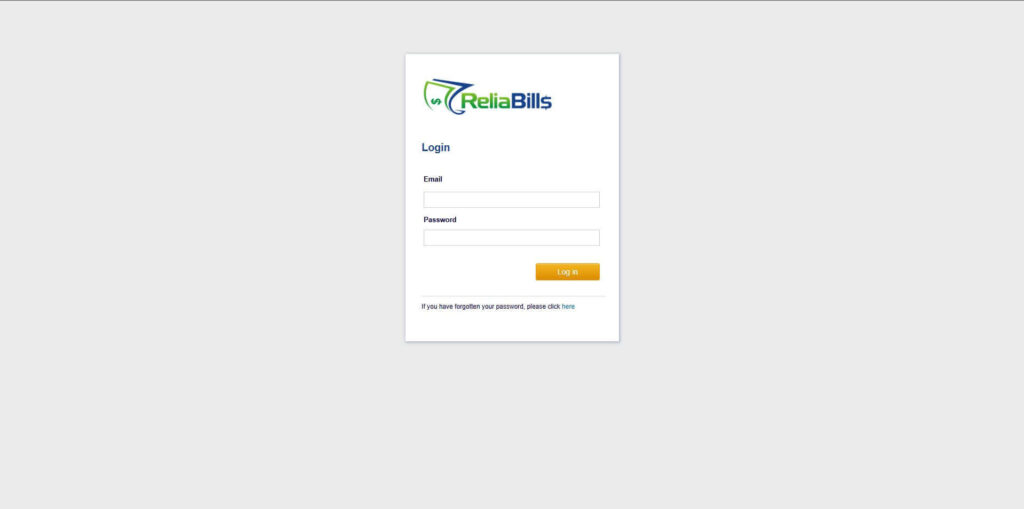
Step 1: Login to ReliaBills
- Access your ReliaBills Account using your login credentials. If you don’t have an account, sign up here.
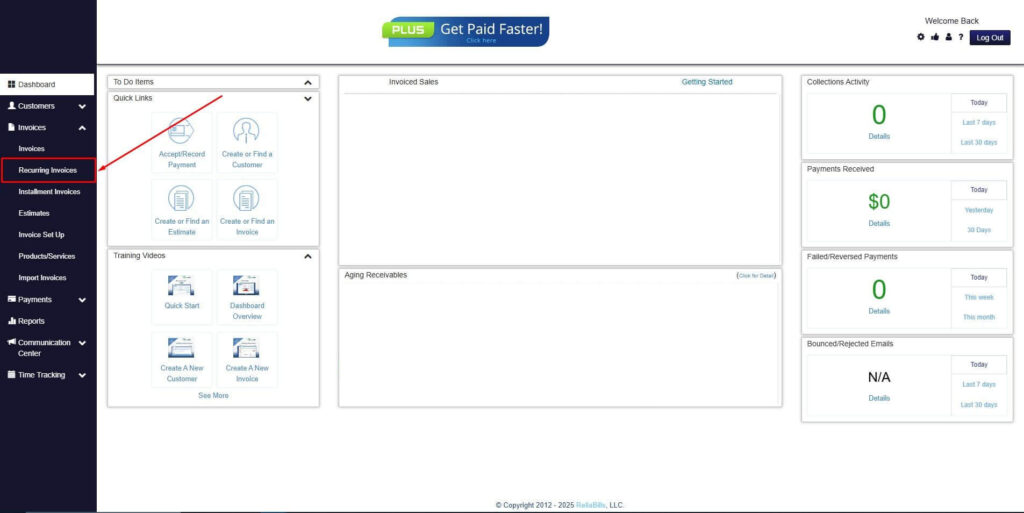
Step 2: Click on Recurring Invoices
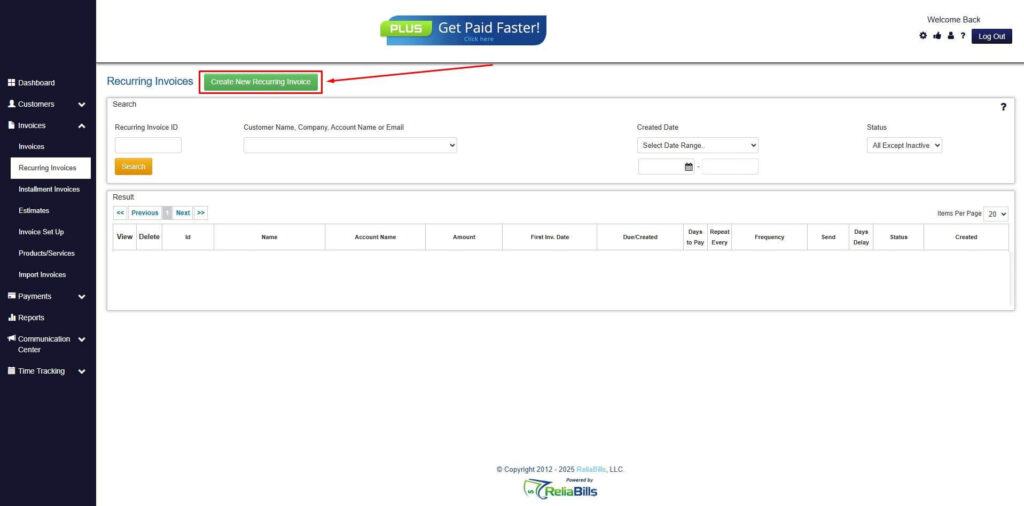
- Navigate to the Invoices Dropdown and click on Recurring Invoices for an overview of the list of your existing customers.
Step 3: Go to the Customers Tab
- If you have already created a customer, search for them in the Customers tab and make sure their status is “Active”.
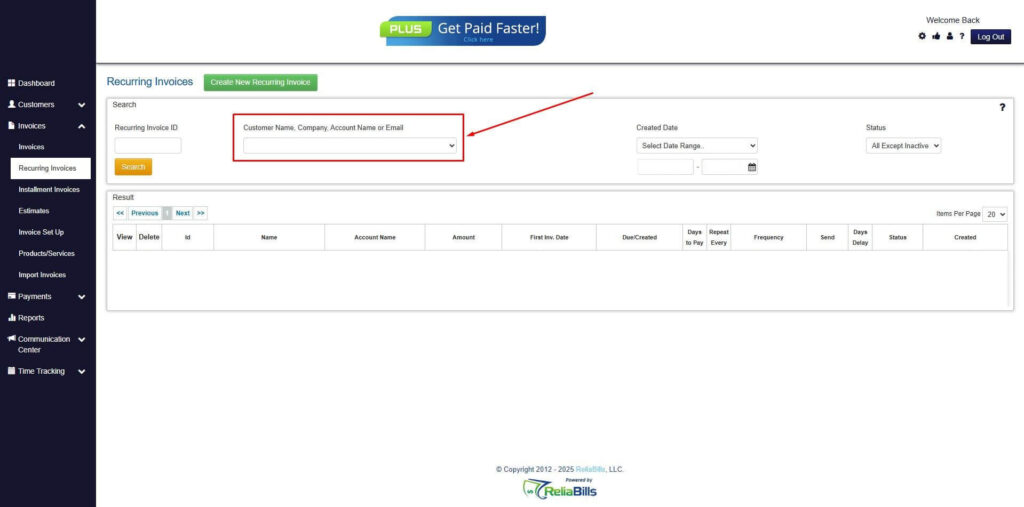
Step 4: Click the Create New Recurring Invoice
- If you haven’t created any customers yet, click the Create New Recurring Invoice to create a new customer.
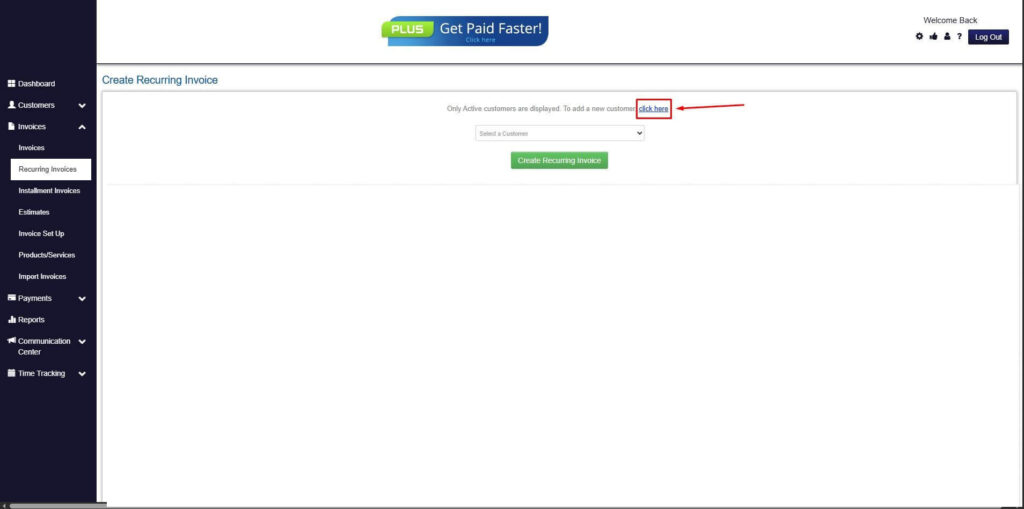
Step 5: Click on the “Click here” Button
- Click on the “Click here” button to proceed with the recurring invoice creation.
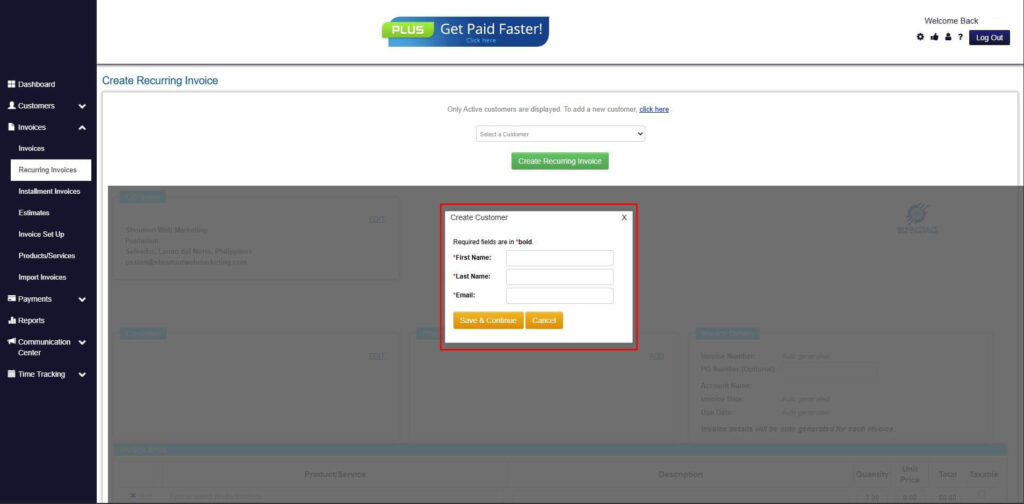
Step 6: Create Customer
- Provide your First Name, Last Name, and Email to proceed.
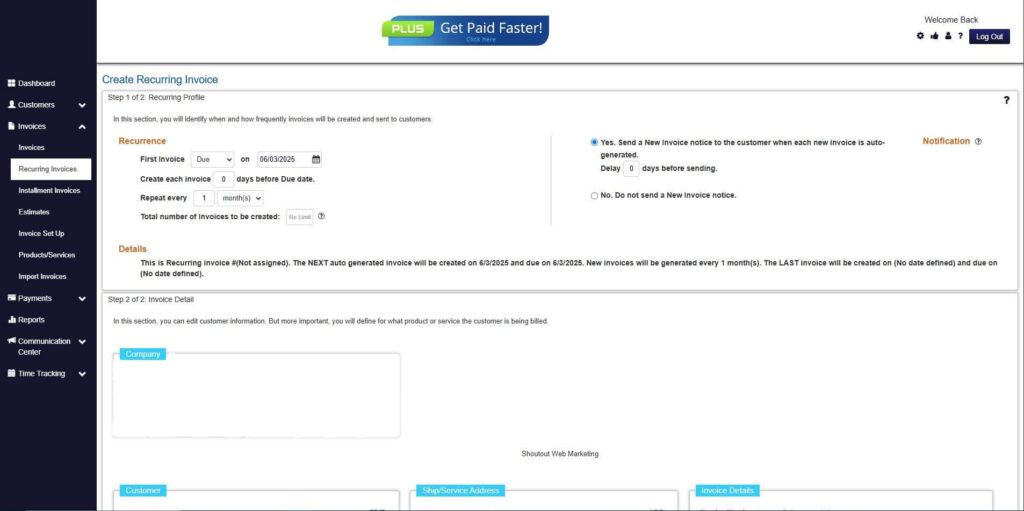
Step 7: Fill in the Create Recurring Invoice Form
- Fill in all the necessary fields.
Step 8: Save Recurring Invoice
- After filling up the form, click “Save Recurring Invoice” to continue.
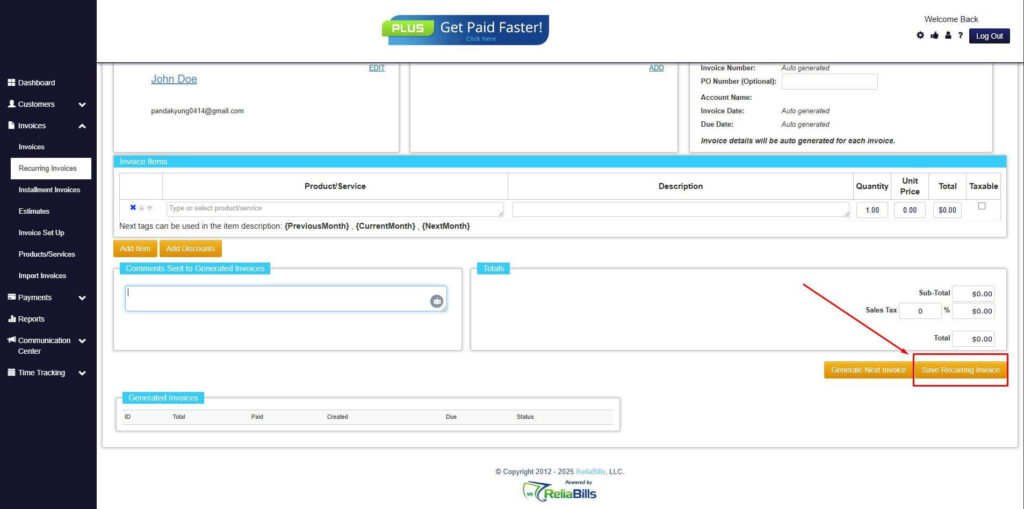
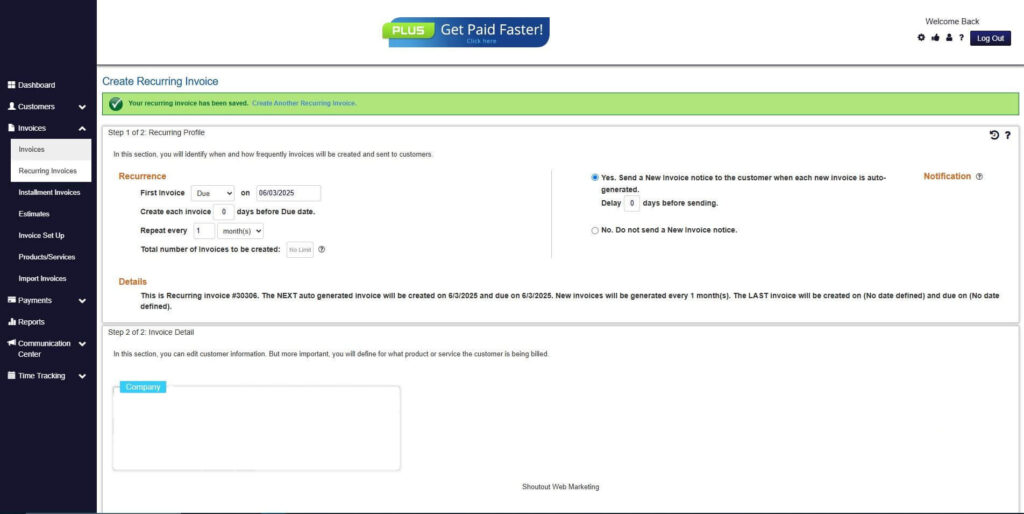
Step 9: Recurring Invoice Created
- Your Recurring Invoice has been created.
Frequently Asked Questions
1. Can automated return invoices handle partial refunds?
Yes, automation calculates partial returns and adjusts invoices accurately, including proration for subscriptions.
2. How does automation affect accounting and tax reporting?
All adjustments are recorded systematically, ensuring accurate tax reporting and reliable financial statements.
3. Is automation suitable for small businesses?
Absolutely. Small businesses benefit from fewer errors, time savings, and streamlined workflows without adding staff.
4. Can return invoices be automated for recurring billing?
Yes. Automated systems manage adjustments for ongoing subscriptions consistently, preventing compounding errors and missed corrections.
Conclusion
Automated return invoice creation transforms billing processes by reducing errors, speeding up corrections, and improving transparency for both finance teams and customers. Businesses gain accurate reporting, faster dispute resolution, and smoother recurring billing management. Adopting automation ensures consistent, reliable, and scalable operations, allowing teams to focus on growth rather than repetitive billing tasks. Platforms like ReliaBills make this process seamless, helping businesses maintain accuracy, efficiency, and customer trust across all transactions.