
Remote work has shifted from a temporary solution to a permanent part of how many businesses operate. As companies hire talent across cities, states, and even countries, payroll responsibilities have become more complex. One of the biggest challenges is understanding payroll taxes for remote employees and how location affects compliance.
Payroll taxes are no longer tied only to where a business is based. Remote employees create new tax obligations depending on where they live and perform their work. This guide explains how payroll taxes apply to remote employees, what businesses need to watch out for, and how to stay compliant while managing a distributed workforce.
What Are Payroll Taxes?
Payroll taxes are taxes withheld from employee wages and taxes paid by employers to fund government programs. These taxes are a shared responsibility between employers and employees, with specific obligations on both sides.
Employers are responsible for withholding federal income tax, Social Security, and Medicare from employee paychecks. They must also contribute their portion of Social Security and Medicare taxes, along with federal and state unemployment taxes where applicable. These obligations exist regardless of whether an employee works in an office or remotely.
Payroll taxes can include federal, state, and local taxes. The complexity increases when employees work in different jurisdictions, which is common with remote teams. Understanding these layers is essential for managing payroll taxes for remote employees correctly.
How Remote Work Changes Payroll Tax Obligations
Remote work shifts payroll tax responsibility from a single location to multiple jurisdictions. Instead of focusing only on the employer’s location, businesses must consider where the employee physically performs their work.
Employee work location often determines state and local tax obligations. When a remote employee works in a different state than the employer, that state may require income tax withholding and employer registration. This is where the concept of nexus becomes important, as employing someone in a state can create a tax presence for the business.
Remote employees also increase the likelihood of multi state payroll requirements. Businesses may need to register with multiple tax agencies, follow different withholding rules, and meet varying filing deadlines. Without proper systems in place, compliance risks grow quickly.
Federal Payroll Taxes for Remote Employees
Federal payroll taxes apply uniformly to remote and on site employees. Location does not change federal tax requirements, but accurate withholding and reporting are still critical.
Social Security and Medicare taxes, often referred to as FICA taxes, are withheld from employee wages and matched by employers. These taxes fund federal benefit programs and apply to most employees regardless of where they work.
Federal income tax withholding is based on the employee’s Form W 4 and applies equally to remote workers. Employers must also pay Federal Unemployment Tax Act obligations, which help fund unemployment benefits at the federal level.
State and Local Payroll Taxes
State and local payroll taxes are where remote work creates the most complexity. Each state sets its own income tax rules, withholding requirements, and employer obligations.
Remote employees are typically subject to state income tax withholding in the state where they work. Some states also impose local or municipal payroll taxes that employers must withhold and remit. This requires accurate tracking of employee work locations.
Some states have reciprocity agreements that allow employees to pay income tax only in their state of residence. However, not all states participate, and rules vary widely. Employees working in multiple states during the year can further complicate withholding and reporting requirements.
Payroll Taxes for Remote Employees Working Across State Lines
When remote employees work across state lines, businesses must determine whether the employee is a resident or non resident for tax purposes. Residency affects how income is taxed and where withholding is required.
Non resident taxation often requires employers to withhold taxes based on where work is performed rather than where the employee lives. Apportionment and sourcing rules determine how income is divided between states if an employee works in multiple locations.
These situations require careful documentation and ongoing monitoring. Without accurate records, businesses risk under withholding, penalties, and compliance issues related to payroll taxes for remote employees.
Independent Contractors vs Remote Employees
Not all remote workers are employees. Independent contractors are subject to different tax rules, and misclassification can lead to serious consequences.
Employees require payroll tax withholding and employer tax contributions. Independent contractors are responsible for their own taxes, and businesses generally issue a Form 1099 rather than running payroll.
Misclassifying a remote employee as a contractor can result in back taxes, penalties, and interest at both the federal and state levels. Clear classification policies are essential when building a remote workforce.
Common Payroll Tax Challenges for Remote Teams
Tracking employee work locations accurately
Remote employees may relocate, travel, or work from multiple states throughout the year. Without clear tracking, businesses can easily withhold taxes for the wrong jurisdiction, leading to compliance issues and corrections later.
Managing multiple state and local tax registrations
Hiring remote employees often requires registering with several state and local tax agencies. Each jurisdiction has its own registration process, reporting requirements, and payment schedules, which increases administrative complexity.
Keeping up with varying tax rules and deadlines
Payroll tax laws, filing frequencies, and due dates differ by state and locality. Missing a deadline or applying the wrong rule can result in penalties, interest, and unnecessary audits.
Handling employee relocations and temporary work arrangements
Employees who move without notifying payroll teams or work temporarily from another state can trigger unexpected tax obligations. These changes often require quick updates to withholding and employer registrations.
Ensuring proper employee classification
Misclassifying remote workers as independent contractors instead of employees can lead to back taxes and penalties. This risk increases when businesses expand remote hiring without clear classification guidelines.
Best Practices for Managing Payroll Taxes for Remote Employees
Maintain up to date employee location records
Require employees to formally report their primary work location and any changes. Regular reviews help ensure payroll tax withholding remains accurate as work arrangements evolve.
Register for required state and local tax accounts early
Before hiring remote employees in new states, businesses should complete all necessary tax registrations. Early registration prevents delays, penalties, and last minute compliance issues.
Use payroll automation and compliance tools
Payroll software that supports multi state tax rules can automate calculations, filings, and payments. Automation reduces manual errors and ensures consistency as remote teams grow.
Standardize payroll tax policies and processes
Clear internal guidelines for onboarding remote employees, handling relocations, and managing tax updates help payroll teams respond quickly and consistently to changes.
Conduct regular payroll tax compliance reviews
Periodic audits of payroll records, filings, and registrations help identify gaps before they become costly problems. This is especially important as tax laws and workforce locations change.
Align payroll planning with predictable cash flow
Stable revenue supports timely payroll tax payments. Using recurring billing and automated invoicing systems allows businesses to better plan for payroll obligations and avoid cash flow disruptions.
How Automation Supports Payroll and Cash Flow Management
Payroll compliance depends heavily on predictable cash flow. When revenue is inconsistent, meeting payroll tax obligations on time becomes more challenging. This is where automation and billing systems play an important role.
Recurring billing helps stabilize incoming revenue, allowing businesses to plan payroll and tax payments with greater confidence. Automated invoicing and consistent payment schedules reduce delays and improve cash availability. This predictability supports timely payroll processing and tax remittance.
Platforms like ReliaBills help businesses manage invoicing and payments in a centralized system. By automating recurring billing, tracking payments, and improving visibility into cash flow, ReliaBills supports payroll funding and helps businesses meet payroll tax obligations without disruption.
How ReliaBills Supports Payroll Tax Planning for Remote Teams
ReliaBills helps businesses create the revenue stability needed to manage payroll taxes for remote employees with confidence. While payroll taxes depend on employee location and regulatory compliance, they ultimately rely on having predictable cash flow to fund wages and tax obligations on time. By streamlining invoicing and payments, ReliaBills gives finance teams clearer visibility into incoming revenue, which supports more accurate payroll and tax planning.
With automated invoicing and built in recurring billing, ReliaBills enables businesses to align revenue cycles with payroll schedules. This is especially important for companies with remote employees across multiple states, where payroll tax deadlines and withholding requirements can vary. Recurring billing helps smooth cash inflows, reducing the risk of delayed payroll tax payments due to inconsistent customer collections.
ReliaBills also centralizes invoice records, payment histories, and customer communication in one platform. These organized billing records support internal financial reviews and provide helpful documentation when reconciling payroll expenses, preparing reports, or coordinating with payroll providers and tax advisors. As remote teams grow, ReliaBills helps businesses maintain the financial consistency needed to stay compliant while scaling responsibly.
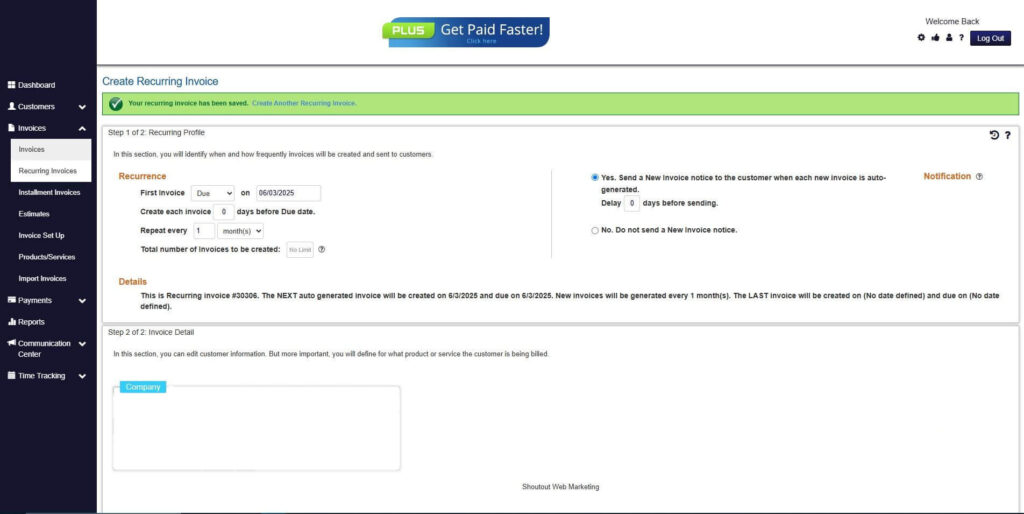
How to Create a New Recurring Invoice Using ReliaBills
Creating a New Recurring Invoice using ReliaBills involves the following steps:
Step 1: Login to ReliaBills
- Access your ReliaBills Account using your login credentials. If you don’t have an account, sign up here.

Step 2: Click on Recurring Invoices
- Navigate to the Invoices Dropdown and click on Recurring Invoices for an overview of the list of your existing customers.
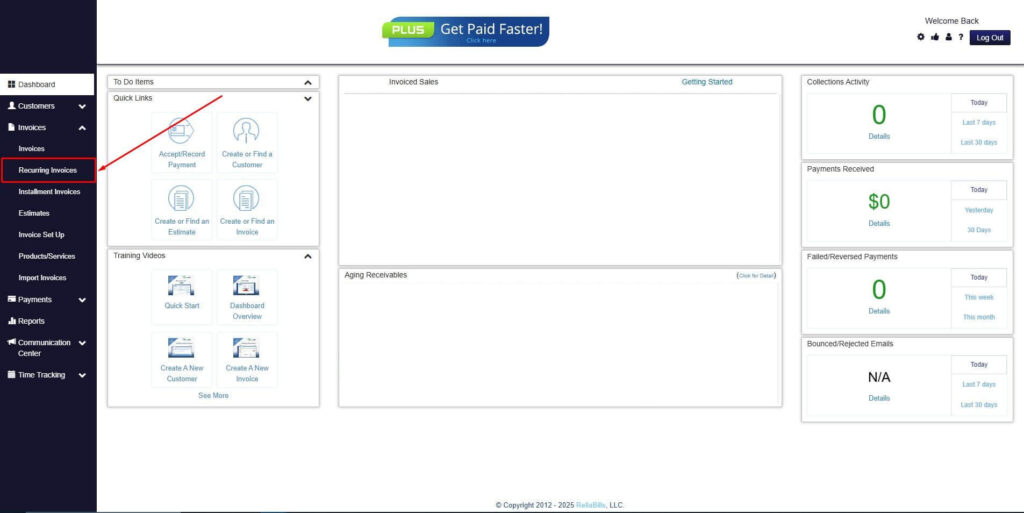
Step 3: Go to the Customers Tab
- If you have already created a customer, search for them in the Customers tab and make sure their status is “Active”.
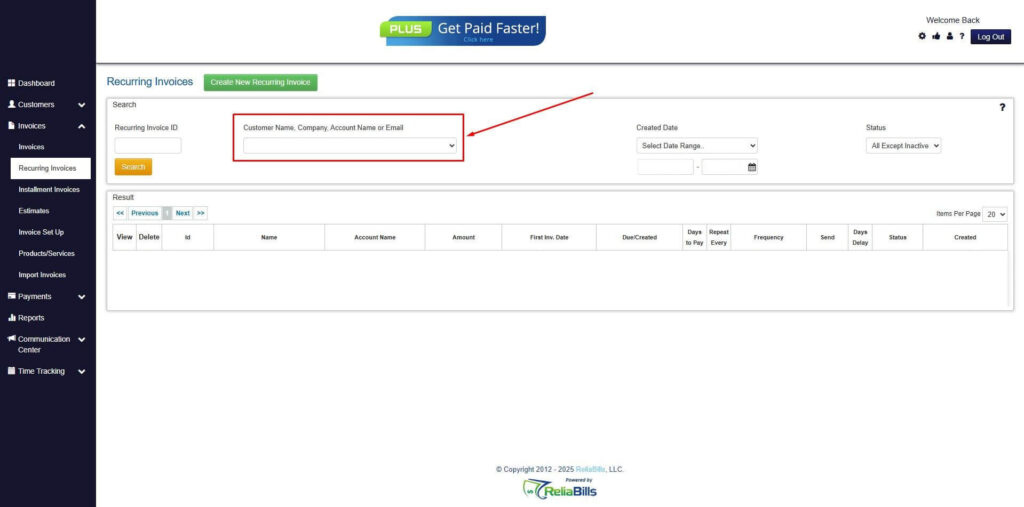
Step 4: Click the Create New Recurring Invoice
- If you haven’t created any customers yet, click the Create New Recurring Invoice to create a new customer.
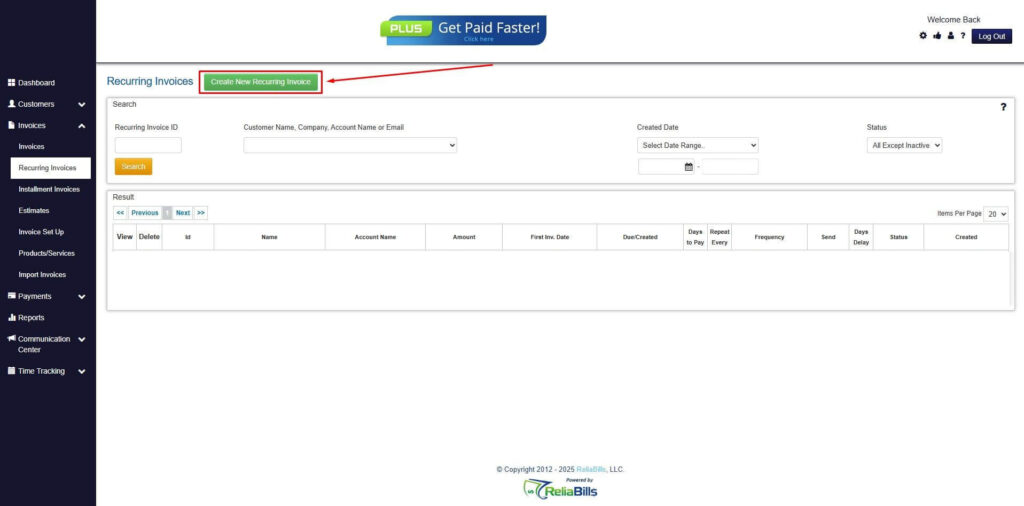
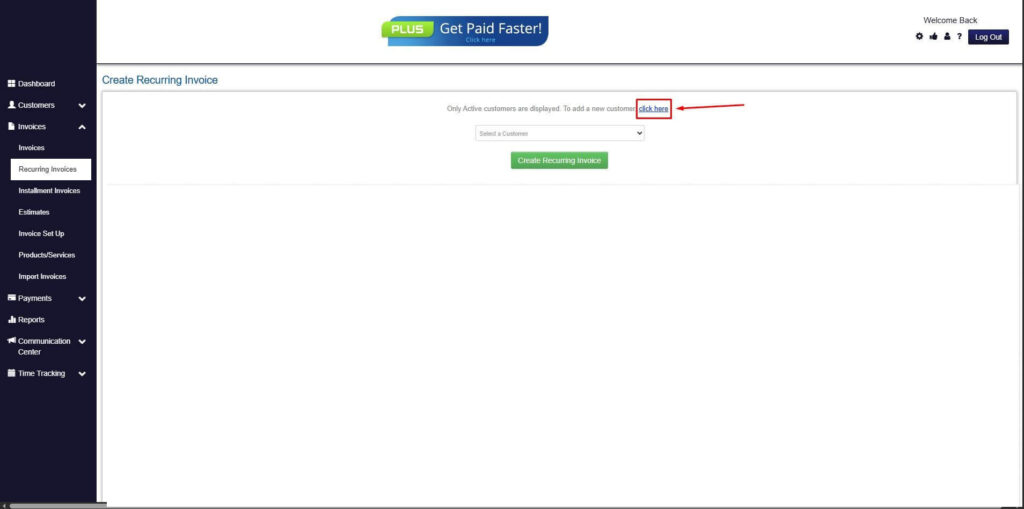
Step 5: Click on the “Click here” Button
- Click on the “Click here” button to proceed with the recurring invoice creation.
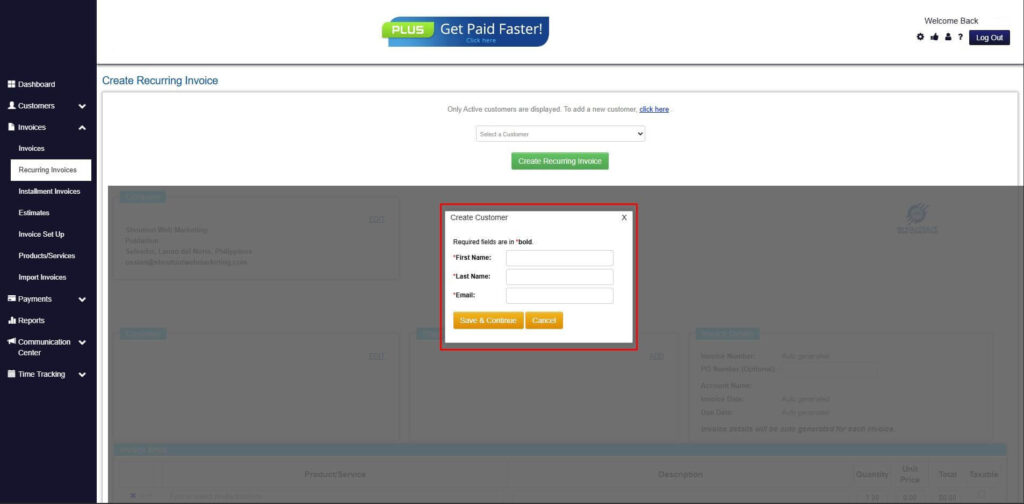
Step 6: Create Customer
- Provide your First Name, Last Name, and Email to proceed.
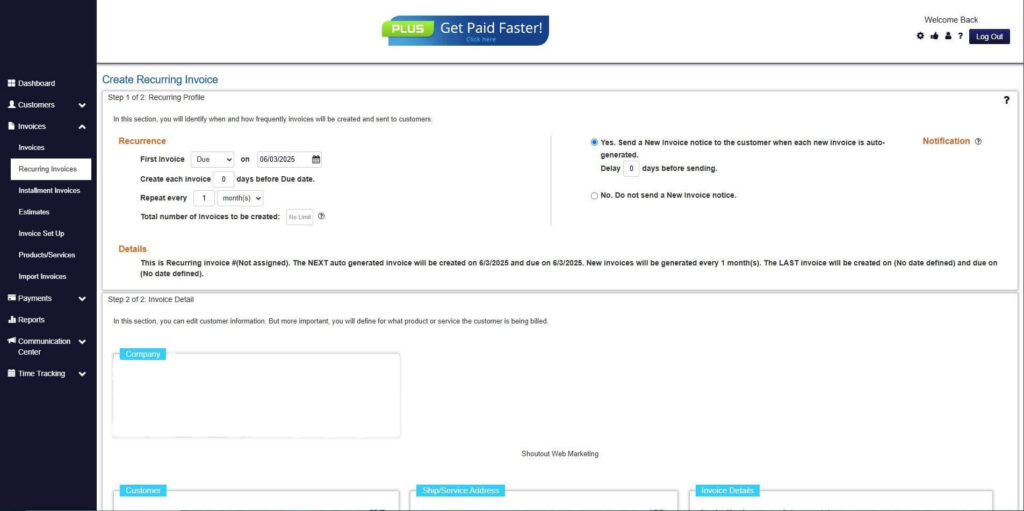
Step 7: Fill in the Create Recurring Invoice Form
- Fill in all the necessary fields.
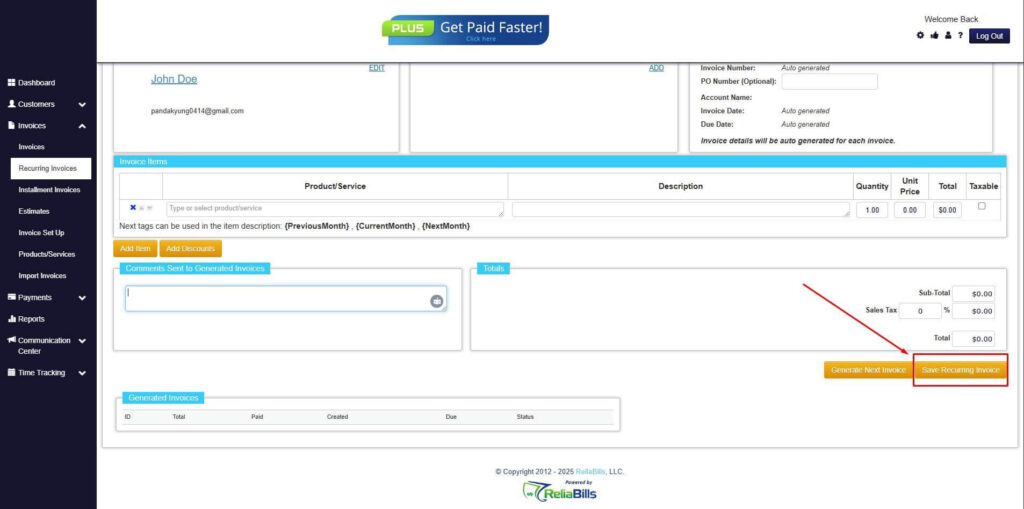
Step 8: Save Recurring Invoice
- After filling up the form, click “Save Recurring Invoice” to continue.
Step 9: Recurring Invoice Created
- Your Recurring Invoice has been created.
Frequently Asked Questions
1. Do remote employees pay taxes where they live or work?
In most cases, remote employees pay state income taxes based on where they physically work. Residency rules and reciprocity agreements may also apply.
2. What happens if an employee moves without notice?
Unreported relocations can create compliance issues, including incorrect withholding and missed state registrations. Businesses should require employees to report location changes promptly.
3. Are international remote employees taxed differently?
Yes. International remote employees are subject to different tax rules depending on treaties, residency status, and local labor laws.
4. Can payroll taxes be automated?
Payroll taxes can be partially automated through payroll and compliance software, but accurate data and oversight are still required.
Conclusion
Payroll taxes for remote employees require careful attention to location, classification, and compliance across multiple jurisdictions. As remote work continues to grow, businesses must adapt their payroll processes to manage increased complexity.
By maintaining accurate employee records, following best practices, and leveraging automation and predictable billing systems, businesses can stay compliant and reduce risk. A well structured approach to payroll taxes allows companies to focus on growth while supporting a flexible, remote workforce.