
Digital transformation has changed how businesses create, send, and manage invoices. Paper invoices and manual payment processes are gradually being replaced by faster, more flexible digital solutions. Businesses now expect invoicing tools to improve speed, accuracy, and customer experience.
One technology gaining traction is the use of QR codes in invoicing. QR codes simplify how customers access invoice details and complete payments. Their ease of use makes them appealing across many industries.
By embedding QR codes into invoices, businesses reduce friction in the payment process. Customers can scan and act instantly without typing long payment details. This convenience directly supports faster collections and fewer errors.
What Are QR Codes and How Do They Work?
QR codes, or Quick Response codes, are two dimensional barcodes that store digital information. When scanned with a smartphone or scanner, they instantly direct users to stored data. This can include links, text, or payment instructions.
QR codes work by encoding information in a grid pattern that devices can read quickly. Most modern smartphones can scan QR codes without additional apps. This accessibility has helped QR codes become widely adopted.
Beyond invoicing, QR codes are used for menus, tickets, authentication, and marketing. Businesses rely on them to share information efficiently. Their flexibility makes them suitable for many digital workflows.
What Is QR Code Invoicing?
QR code invoicing refers to embedding a QR code directly into an invoice. The QR code links to payment pages, invoice details, or customer support information. This allows instant access without manual input.
Businesses integrate QR codes into both digital and printed invoices. The QR code typically appears near the payment section for easy scanning. This placement encourages faster action from customers.
Invoice QR codes may contain payment links, invoice numbers, amounts due, or contact details. Some codes also link to downloadable copies of the invoice. This enhances clarity and accessibility for customers.
Why Businesses Are Using QR Codes in Invoicing
Businesses use QR codes in invoicing to speed up payments. Customers no longer need to enter bank details or invoice numbers manually. This reduces friction and payment delays.
QR codes also minimize payment errors. Manual entry mistakes are common with traditional invoices. Scanning a code ensures accurate payment information every time.
Customer convenience is another major driver. QR codes work well on mobile devices and support contactless interactions. This makes invoicing easier for both businesses and customers.
Key Benefits of QR Codes in Invoicing
- Faster payment processing by allowing customers to scan and pay instantly using their mobile devices.
- Improved cash flow due to reduced payment delays and fewer manual follow-ups.
- Reduced data entry errors since payment details are prefilled through the QR code.
- Contactless and mobile-friendly transactions that enhance customer convenience.
- Better tracking and reconciliation by linking QR payments directly to invoice records.
Common Use Cases for QR Codes in Invoices
- One-time service invoices where quick payment confirmation is needed.
- Retail and point-of-sale transactions that require fast, contactless checkout.
- Subscription and recurring billing invoices for consistent, automated payments.
- International or cross-border payments where QR codes simplify access to digital payment links.
How to Add QR Codes to Your Invoices
When adding QR codes to invoices, businesses should include relevant information only. Payment links, invoice references, and customer support pages work best. Avoid unnecessary data.
Placement is important for scannability. QR codes should be clear, large enough, and not crowded by text. High contrast designs improve scanning success.
Testing is essential before sending invoices. Businesses should scan QR codes across different devices. This ensures reliable performance for customers.
Security and Compliance Considerations
Security is critical when using QR codes in invoicing. Sensitive data should never be stored directly in the QR code. Instead, secure links should be used.
Businesses must protect QR codes from tampering or redirection. Using trusted invoice systems reduces fraud risk. Regular monitoring also helps maintain security.
Compliance with payment and data protection standards is essential. This includes PCI and privacy regulations. Proper safeguards protect both businesses and customers.
Common Mistakes to Avoid
Linking QR codes to outdated payment details is a common mistake. This causes failed payments and customer frustration. Always update links before sending invoices.
Another issue is overloading QR codes with too much data. Large data sets reduce scan reliability. Simple and focused content works best.
Poor placement or low contrast design also affects usability. QR codes should be easy to find and scan. Clear design improves success rates.
How ReliaBills Supports QR Code Invoicing
ReliaBills simplifies QR code invoicing by automatically generating invoices with embedded QR codes. Each QR code is linked directly to accurate payment and invoice data. This reduces manual setup and errors.
For businesses using recurring billing, ReliaBills integrates QR codes into ongoing invoices. Customers can scan and pay recurring charges with ease. This improves consistency and reduces missed payments.
With ReliaBills Plus, the paid pricing tier of ReliaBills, businesses gain enhanced reporting and customization features. QR based payments can be tracked in detail for better insights. ReliaBills Plus supports scaling businesses with higher invoicing volumes.
How to Create a New Recurring Invoice Using ReliaBills
Creating a New Recurring Invoice using ReliaBills involves the following steps:
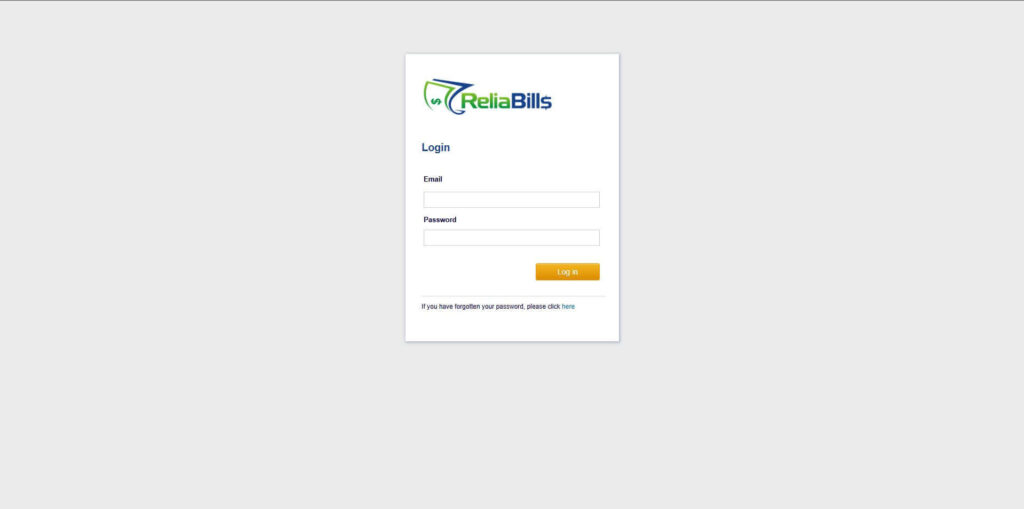
Step 1: Login to ReliaBills
- Access your ReliaBills Account using your login credentials. If you don’t have an account, sign up here.
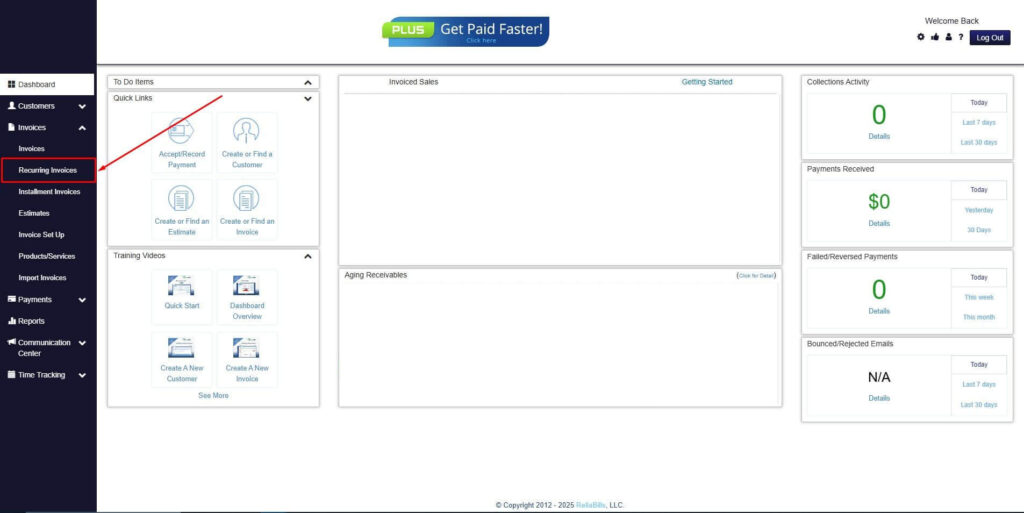
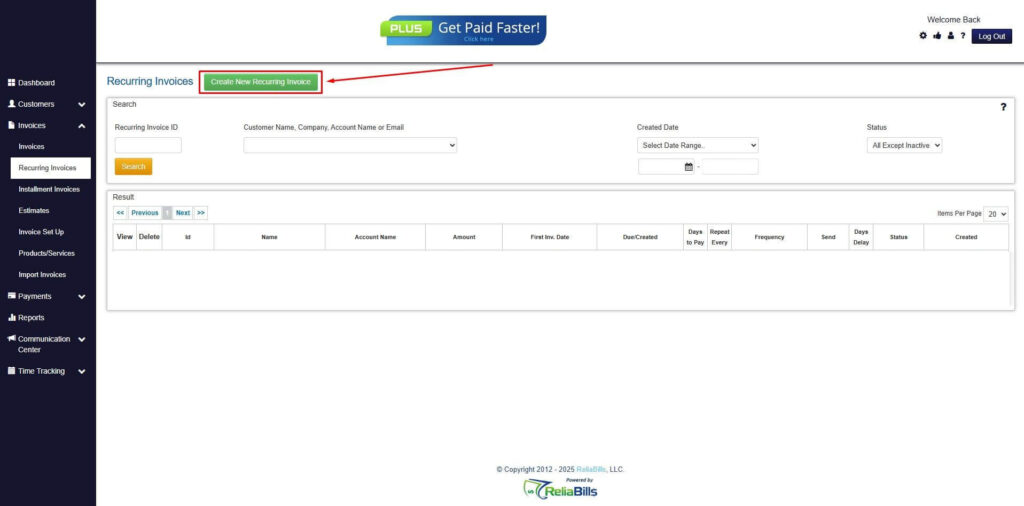
Step 2: Click on Recurring Invoices
- Navigate to the Invoices Dropdown and click on Recurring Invoices for an overview of the list of your existing customers.
Step 3: Go to the Customers Tab
- If you have already created a customer, search for them in the Customers tab and make sure their status is “Active”.
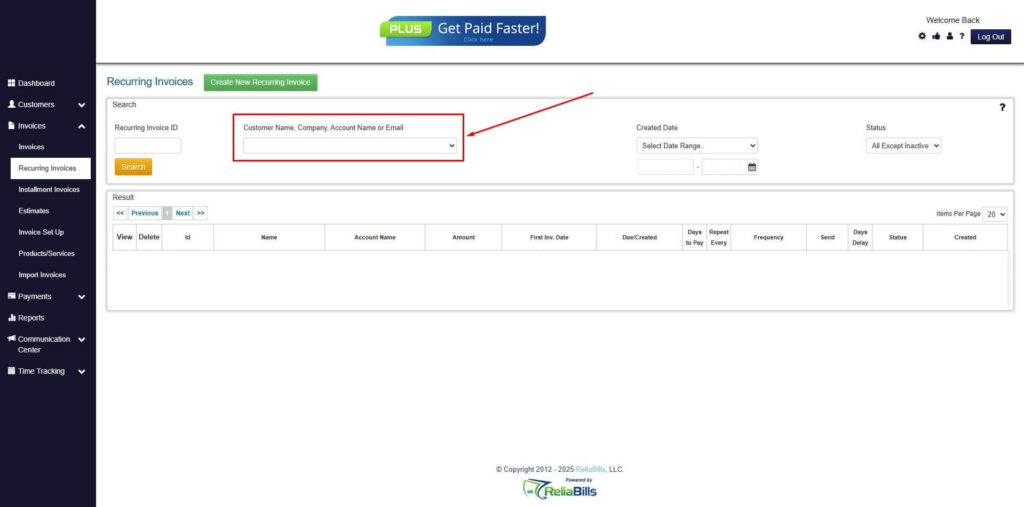
Step 4: Click the Create New Recurring Invoice
- If you haven’t created any customers yet, click the Create New Recurring Invoice to create a new customer.
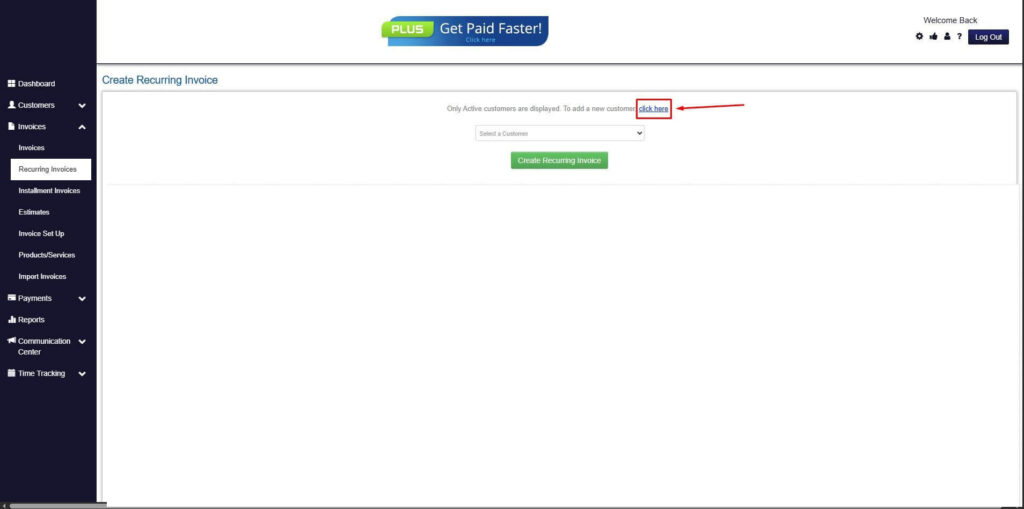
Step 5: Click on the “Click here” Button
- Click on the “Click here” button to proceed with the recurring invoice creation.
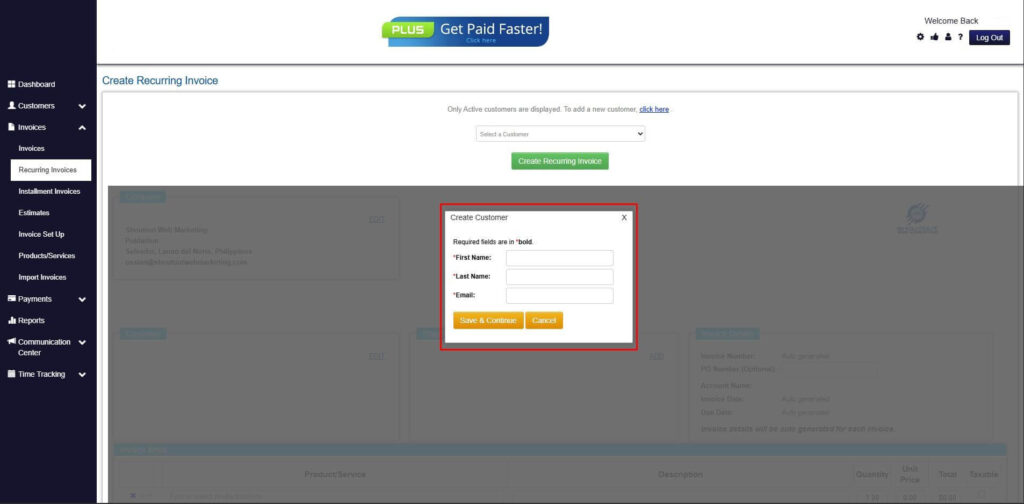
Step 6: Create Customer
- Provide your First Name, Last Name, and Email to proceed.
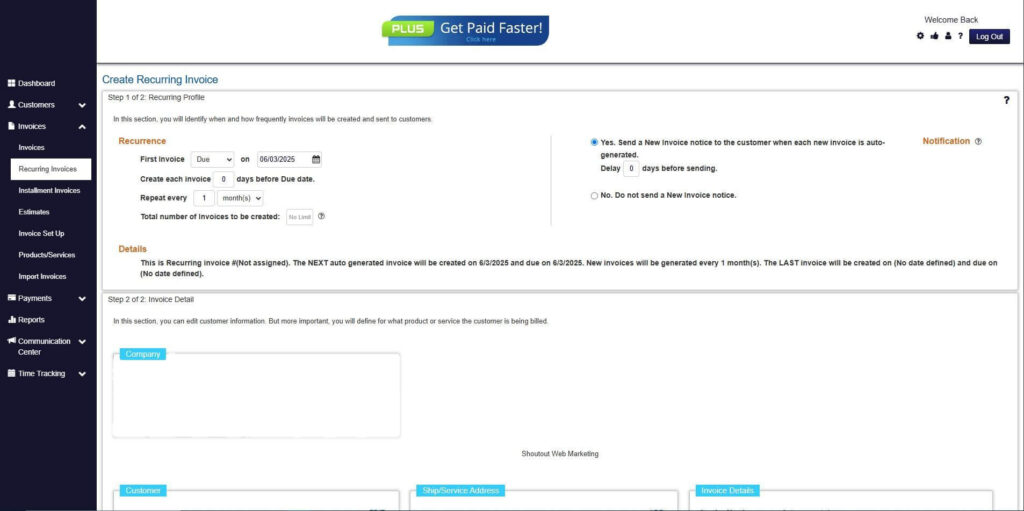
Step 7: Fill in the Create Recurring Invoice Form
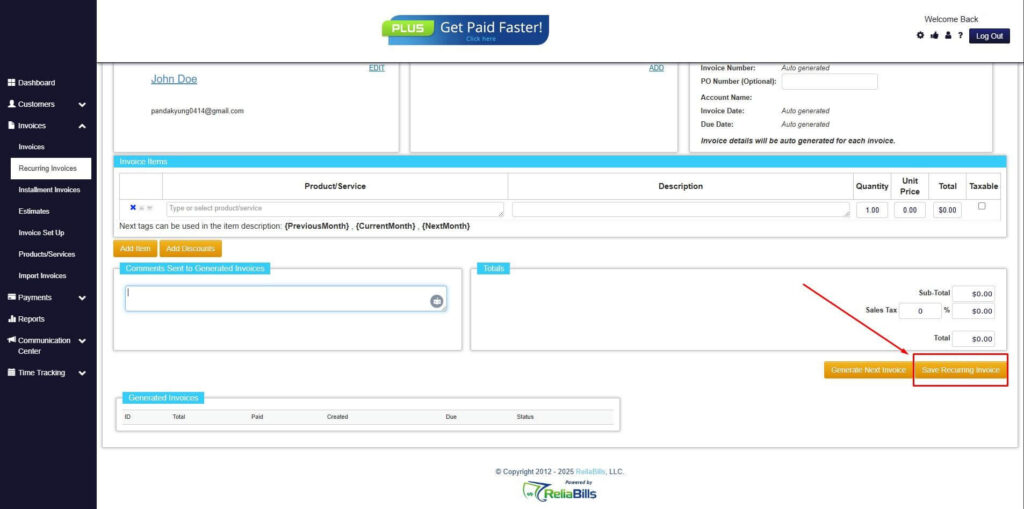
- Fill in all the necessary fields.
Step 8: Save Recurring Invoice
- After filling up the form, click “Save Recurring Invoice” to continue.
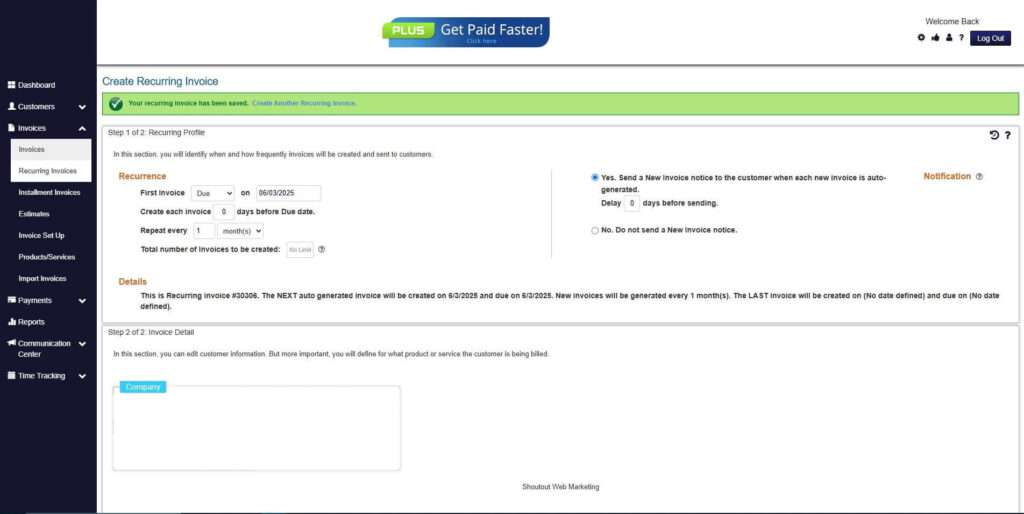
Step 9: Recurring Invoice Created
- Your Recurring Invoice has been created.
Frequently Asked Questions
1. Are QR code invoices legally accepted?
Yes, QR code invoices are legally accepted in most regions as long as the invoice contains all required billing information.
2. Do customers need special apps to scan QR codes?
No, most modern smartphones can scan QR codes directly using the built-in camera.
3. Can QR codes be used for recurring invoices?
Yes, QR codes can link to recurring billing payment portals, making repeat payments faster and easier.
4. How do QR codes reduce payment delays?
QR codes remove extra steps by directing customers straight to the payment page, minimizing friction and missed payments.
Conclusion
QR codes in invoicing offer a practical solution for modern businesses. They simplify payments, reduce errors, and improve customer experience. Adoption continues to grow across industries.
By using QR codes, businesses streamline billing and accelerate cash flow. The technology supports mobile friendly and contactless transactions. This aligns with current customer expectations.
Adopting QR code invoicing helps businesses stay competitive. With tools like ReliaBills, implementation becomes simple and scalable. QR codes represent a smart step toward efficient invoicing.