
A membership invoice template is a reusable billing document that combines a member’s account details, their tier, and the billing period into a single consistent format. Get the fields right once, and the template pays for itself every cycle, whether you send a dozen invoices a month or thousands.
What is a Membership Invoice Template?
A membership invoice template is a pre-built document structure that organizations use to bill members for access to a product, service, or community on a recurring schedule. Unlike a general invoice, it carries fields specific to membership: a member ID, a tier or plan name, a billing period, and often a renewal notice. The template itself never changes. What changes each cycle is the data that fills it.
The Fields Every Membership Invoice Template Needs
A membership invoice is a legal document even when it only asks for $29 a month. The United States does not impose a rigid statutory format, but standard guidance is clear: name and address of both parties, a description of what was provided, the date, the amount, and the currency. Membership invoices add several fields a one-off invoice does not need.
| Field | Why it matters | Required or recommended |
|---|---|---|
| Invoice Number | Sequential numbering is the primary reference for both parties in a dispute or audit. Never reuse numbers. | Required |
| Invoice Date | Sets the legal record of when the billing request was issued. | Required |
| Business Name and Address | Confirms the issuing entity. Must match your legal business registration. | Required |
| Member Name and Address | Identifies the billed party. Use the name on the membership agreement, not a nickname. | Required |
| Member ID or Account Number | Lets the member match the invoice to their account without calling you. Critical when managing more than a handful of members. | Strongly recommended |
| Membership Tier or Plan Name | Prevents disputes when different tiers carry different prices. “Professional – Annual” is unambiguous. “Membership” is not. | Strongly recommended |
| Billing Period | Shows exactly what dates the payment covers. “October 1 to October 31, 2026” eliminates overlap and gap questions. | Strongly recommended |
| Line-item Description | A single-line description of what the member is paying for, matching the language in their agreement. | Required |
| Amount Before Tax | Separates the base charge from any applicable taxes for the member’s own accounting. | Recommended |
| Tax Rate and Amount | Required in states or countries that tax membership dues. Leave off only after confirming your jurisdiction does not. | Jurisdiction-dependent |
| Total Amount Due | The number the member actually pays. Always show this prominently. | Required |
| Payment Due Date | Sets the clock for any late-payment provisions in your agreement. “Net 30” is vague; a specific date is not. | Required |
| Payment Methods Accepted | Reduces friction. If you accept cards, ACH, and wire, list all three. If you take stablecoins, say so explicitly. | Required |
| Next Billing Date | Tells the member when the next charge will arrive. Eliminates “I didn’t know I was still being billed” disputes. | Strongly recommended |
| Payment Link | The single biggest driver of faster payment. Members who can pay in one click do. | Strongly recommended |
A note on member IDs
Most guides list member ID as optional. In practice, it saves more administrative time than any other field. When a member contacts you about an invoice, a shared reference number means the conversation starts at the right point immediately. Keep the format consistent: “MBRS-2026-00144” means something; “144” does not, especially across merged databases.
How a Membership Invoice Template Works in a Recurring System
A template on its own is just a document. The value comes from connecting it to a system that populates it automatically, sends it on a schedule, and follows up when payment does not arrive. The five-step loop below is how a properly set-up membership billing system runs.
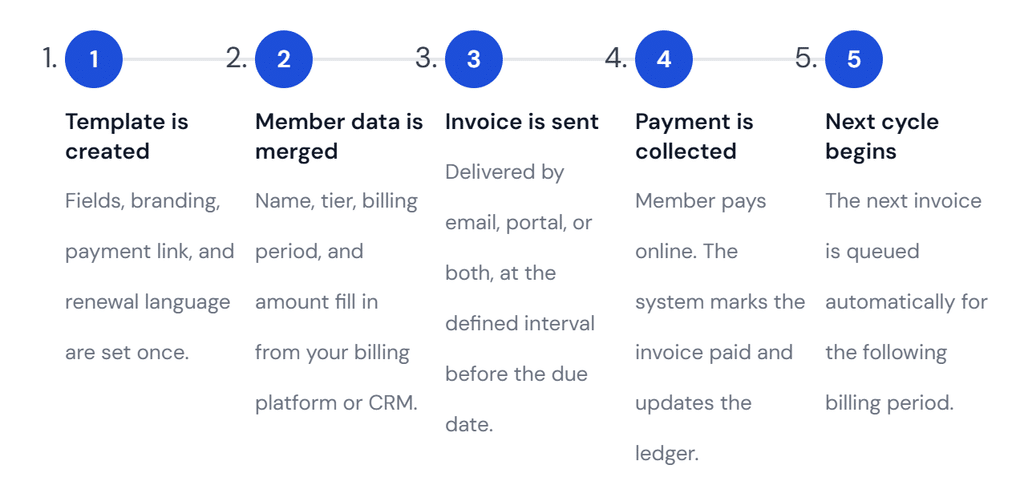
The loop works because the template removes decision-making from each cycle. You confirm the data merge and the payment; everything else runs automatically.
Where proration fits in
Proration is the calculation that adjusts a member’s first or last invoice when their billing period starts or ends mid-cycle. A member who joins on the 15th of a 30-day month owes half the monthly fee for that first period. Most billing software calculates this automatically, but the invoice still needs to show the work: the full rate, the number of days charged, and the resulting amount. Members who can see the calculation almost never dispute it. Members who receive an unexplained number that does not match what they expected call, email, and sometimes charge back.
Annual versus monthly billing periods
Annual memberships need one additional field: a renewal reminder. A member who agreed to a $480 annual fee twelve months ago may not remember that charge is coming. One sentence in the template footer covering the renewal date and a change deadline prevents a disproportionate number of disputes.
What a Professional Membership Invoice Template Looks Like
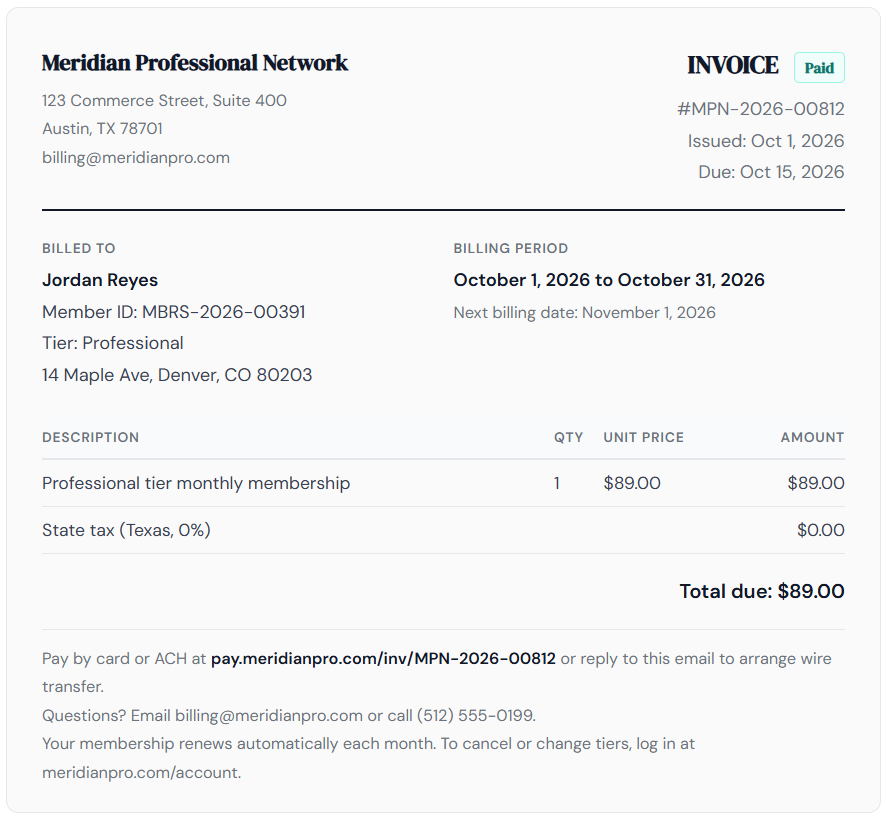
The example below shows a completed template for a mid-tier professional association membership. Every field discussed above is present. The layout is intentionally spare: anything that does not help the member understand what they owe or how to pay it has been removed.
Real-World Examples and Use Cases
Fitness and wellness studios
A boutique gym running monthly memberships at two price points needs one template that handles both tiers cleanly through a tier name field. Where it gets complicated is when the studio adds class packs or personal training add-ons. Each becomes an additional line item, not a separate template: keep the structure the same and let the line items carry the variation.
Professional associations and trade groups
Annual dues billing involves a larger amount collected once a year, while some organizations may offer installment billing to spread payments across multiple billing periods. Many members also need invoices for employer expense reimbursement. The template must include the company name, a description that matches the member’s employer accounting system, and wire transfer instructions directly on the invoice, not in a separate email that gets lost.
SaaS and digital subscription products
A software membership can change based on usage or seat count. If your pricing has any variable component, the invoice template needs a usage summary section, not just a total. Members who can audit the math themselves almost never escalate a billing question into a chargeback.
Key Benefits of a Well-Built Membership Invoice Template
Faster payment, consistently
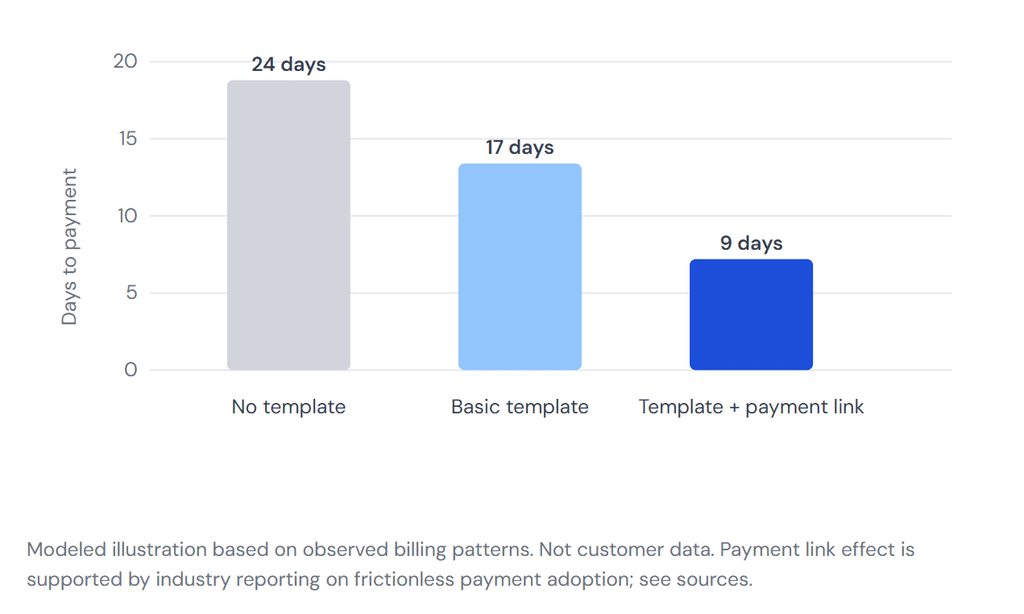
The data on late invoices is clear, and it keeps getting worse. Research from QuickBooks found that 62 percent of UK small businesses were carrying unpaid invoices as of 2025, with an average outstanding balance of over £21,000 per business. The single most effective thing a smaller organization can do is make the act of paying as close to effortless as possible: one payment link, one clear total, and one obvious due date. A template enforces those things on every invoice, not just when someone on your team remembers to include them.
Reduced disputes and administrative overhead
Every field on the invoice is a potential source of dispute if it is wrong or missing. Member ID mismatches, billing period overlaps, and tax line errors all generate support tickets. A tested template eliminates the most common errors by building the correct structure once and replicating it automatically. The time saved shows up in two places: your team spends less time on billing questions, and members spend less time confused about what they owe.
Cleaner records for accounting and audits
Sequential invoice numbers and consistent field names make pulling a year of membership revenue for a tax return or audit straightforward. Invoicing software that stores each issued document automatically gives you a timestamped audit trail, which matters the first time a payment dispute reaches a bank’s resolution team.
Key Risks and Things to Watch for
Tax misconfiguration
Membership dues occupy an unusual corner of state tax law. Some states exempt nonprofit memberships; others tax them on the same basis as digital subscriptions. If you build a tax line in without confirming it applies, you may collect tax you are not required to remit. If you leave it off when you should include it, you are undercharging. Confirm with a tax professional before the template goes live.
Auto-renewal language and consumer protection rules
Several states have automatic renewal laws governing how renewal terms must be disclosed. California’s Business and Professions Code Section 17601 is the most cited. Include clear renewal language on every invoice regardless of your state: the cost of including it unnecessarily is zero, and the cost of omitting it when required can be significant.
Duplicate invoicing from disconnected systems
Organizations that manage membership records, billing, and email in separate tools tend to create duplicate invoices. A member who receives two invoices for the same period disputes both, even if only one is correct. The fix is a single system of record for invoice issuance or a clearly defined handoff between tools that every team member follows.
Proration errors on tier changes
When a member upgrades or downgrades mid-cycle, show the proration calculation before any credit is applied, never as a silent net adjustment. “Credit for unused days on Standard tier (13 days at $1.72/day): -$22.43” is clear. “-$22.43” invites a support ticket.
How a Membership Invoice Template Compares With Related Billing Formats
| Format | Recurs automatically | Carries member-specific fields | Linked to a service agreement | Best used for |
|---|---|---|---|---|
| Membership Invoice Template | Yes, via recurring billing | Yes (member ID, tier, billing period) | Yes | Subscription or dues-based access, billed on a fixed cycle |
| Standard Invoice | No | No | Not necessarily | One-off goods or services |
| Subscription Billing Record | Yes | Partially (account ID, plan) | Yes | SaaS or digital products where the member may not expect a formal invoice each cycle |
| Proforma Invoice | No | No | No | A quote or preview of expected charges before they are incurred |
| Statement of Account | No | Yes | Yes | Summarizing outstanding and settled invoices over a period, not requesting payment for a specific event |
| Receipt | No | Partially | Not necessarily | Confirming payment received. A receipt is what a paid invoice becomes, not a billing request. |
The distinction that matters most day to day is between a membership invoice and a subscription billing record. Many SaaS companies send only a charge notification and a receipt, which works at consumer scale but breaks down when members need expense documentation or when amounts are high enough that members scrutinize every charge.
What Most Guides on This Topic Miss
After looking at the top results for this topic, a pattern shows up. The guides focus on what to include in the template and almost nothing on the system that surrounds it. A beautiful PDF template that someone has to fill in manually, save, and email each month is not much better than no template at all. The leverage is in the automation, not the document.
The second gap is timing. Sending invoices on the due date means many members pay late through no fault of their own. Seven to ten days early is the minimum; 30 days for large annual charges.
The third gap is failed payment handling. Every guide covers what to put on the invoice, but very few address what happens when a charge comes back as a failed card or returned ACH. A complete template system includes a failed payment email series that fires within 24 hours and gives the member a clear link to update their payment details.
The fourth gap is what customer management data tells you over time. Members who start paying later than usual are often early signals of churn, something no individual invoice can show.
Common Mistakes to Avoid
| Mistake | What it causes | Better approach |
|---|---|---|
| Generic Description Line | “Membership fee” tells the member nothing. It does not specify tier, period, or what they get. | Write the description to match the agreement: “Professional Tier Monthly Membership, October 1-31, 2026.” |
| No Payment Link on the Invoice | Forces the member to navigate to your site separately, a friction point that delays payment by days on average. | Include a unique payment link for each invoice. Most billing platforms generate one automatically. |
| Due Date Stated as a Term, Not a Date | “Net 30” requires the member to do math. “Due November 15, 2026” does not. | Always show the explicit calendar date alongside any payment term language. |
| One Template for All Tiers | Amount and description fields get filled incorrectly when a single template serves tiers with very different pricing structures. | Clone the base template for each tier and lock the price and description fields for each version. |
| Proration Shown as a Net Adjustment Only | Members see an unfamiliar number and dispute it, even when the math is correct. | Show the calculation in plain language. Transparency eliminates nearly all proration disputes. |
| No Renewal Notice on Recurring Invoices | Members are surprised by the next charge. Surprise generates chargebacks, not payments. | Add one sentence to the invoice footer showing the next billing date and how to make changes. |
| Building the Template in a Non-connected Tool | A Word or Google Docs template requires manual work each cycle and introduces human error at exactly the wrong moment. | Build the template inside a billing platform that connects to your member records and sends automatically. |
How to Get Started With a Membership Invoice Template
- Audit your current billing documents. Collect every invoice you have sent in the last three months. Look for missing fields, inconsistent descriptions, and any invoices that generated a support email. Those are the gaps your template needs to close.
- Define your tier structure in writing. Before building a template, write out the exact name, price, and description for each tier you offer. The invoice is only as clear as the product it describes.
- Choose your invoice delivery method. Online invoices with payment links outperform PDFs for speed of payment. If members need a PDF for their records, set your billing system to attach one automatically on payment confirmation.
- Set up the template in a connected system. Build the template inside a platform that pulls member data automatically, tracks payment status, and queues the next invoice without manual intervention. Invoicing software connected to recurring billing and customer management handles this in one place. Avoid building in a word processor.
- Write your failed-payment email before you need it. Set it to fire within 24 hours of a failed charge with a direct link to update payment details.
- Test with a real invoice before turning on automation. Pay it yourself, confirm the payment link works, and verify the next invoice queues correctly. Repeat after every template change.
Frequently Asked Questions
1. What should a membership invoice template include?
At minimum: your business name and contact details, the member’s name and account number, invoice number and date, a clear description of the membership tier and billing period, the amount due, applicable taxes, payment due date, and accepted payment methods. For recurring plans, add an auto-renewal notice and a line showing the next billing date.
2. Is a membership invoice different from a regular invoice?
Yes, in a few meaningful ways. A membership invoice from ReliaBills references a specific billing period and tier, carries a member ID rather than an order number, and usually recurs on a fixed cycle. It also often includes proration language for mid-cycle starts or upgrades, which a standard one-off invoice does not need.
3. Can I use the same template for monthly and annual memberships?
You can, as long as the billing period field is clearly labeled and the amount reflects the correct cycle. Most billing platforms let you create one base template and clone it for each tier, changing the period and price. Where it breaks down is proration: an annual template typically needs its own calculation block if you offer mid-year starts.
4. Do I need to include tax on a membership invoice?
It depends on your state and the nature of the membership. Some states tax membership dues; others exempt nonprofit or association memberships. Consult your accountant or a tax professional for the rules that apply to your specific organization before including or omitting a tax line.
5. How do I handle proration on a membership invoice?
Show the calculation in plain language on the invoice itself: full monthly rate divided by the number of days in the month, multiplied by the days remaining. Add a one-line note explaining why the amount differs from the standard rate. Members who can see the math almost never dispute it.
6. What is the best format for a membership invoice: PDF or online?
Online invoices with embedded payment links consistently outperform PDFs for speed of payment. PDF is still appropriate when a member requests a document for their own records or expense reporting. The cleanest approach is to send the online version first and attach a PDF automatically on payment confirmation.
Recent Articles:
- Installment Billing for Security Deposits: Break Up Large Tenant Charges
- How to Automate Collections for Unpaid Digital Marketing Agency Invoices