

Chasing unpaid invoices manually costs the average digital marketing agency more than 11 hours every month and still produces worse results than an automated system running on its own. The agencies that get paid fastest are not the ones with the most aggressive follow-up calls. They are the ones whose collection sequence runs without anyone initiating it, stops automatically when payment arrives, and escalates to a human only when it actually needs one.
What is Automated Agency Invoice Collection?
Automated agency invoice collection is the process of using billing software to monitor unpaid invoices and send a structured, escalating sequence of payment requests on a defined schedule, without manual action from your team. The system tracks each invoice’s status in real time. When an invoice remains unpaid at a trigger point (five days before due, on the due date, seven days past due, and so on), it sends the appropriate reminder at the appropriate tone, with a direct link to pay. When payment is received, the sequence stops immediately.
Key terms you need to understand: dunning (the full escalating sequence from friendly nudge to formal demand), DSO (days sales outstanding, the average time from invoice issuance to payment collection), AR aging (a report showing how long each outstanding invoice has been unpaid, bucketed in 0 to 30, 31 to 60, and 60-plus day ranges), soft stop (pausing the automated sequence when a client responds or disputes an invoice), and payment link (a direct URL embedded in every reminder that takes the client to a one-click payment screen). See also: Invoicing Software, Recurring Billing, Installment Billing, and Customer Management.
The Late Payment Problem in Digital Marketing Agencies
The numbers make it hard to look away. According to the OAREX H1 2025 Digital Media and Advertising Payments Study, 58% of digital media payments were late in the first half of 2025, up from 49% in the prior period. Payments more than five days late reached 32%, a record high, while those more than 15 days late hit 18%, also a record. The share of consistently on-time payers dropped from 53% to 43% in a single reporting period.
This is not a minor trend. The Ignition 2025 Agency Pricing and Cash Flow Report, based on 273 agency leaders across creative, digital, and marketing firms, found that 97% of agencies regularly deal with late client payments, and 71% say at least one in every four invoices is paid late. As Jordan Snider, co-founder of Token Creative Services and an Ignition customer, put it directly: “We were doing great work, but we weren’t getting paid on time and spending hours chasing payments.”
The same Ignition report found that 63% of US agencies face “very” or “somewhat” unpredictable cash flow, and 82% said they have been forced to delay or cancel plans to hire, invest in software, or expand operations as a direct result.
What makes this particularly frustrating is that the work quality is rarely the issue. Agencies are delivering campaigns, retainer results, and reporting. The gap is structural: billing systems that require a human to notice, initiate, and send every collection touchpoint. In an industry where account teams are managing eight to twelve active clients simultaneously, that manual overhead is the first thing that falls through the cracks when things get busy, which is exactly when you most need to be collecting.
The Automated Collection Sequence: All Five Stages
A well-designed collection sequence for a digital marketing agency is not five of the same email sent at different intervals. Each stage has a distinct purpose, a distinct tone, and a distinct goal. The tone escalates in direct proportion to how long the invoice has been unpaid, not because you are escalating the relationship, but because the circumstances genuinely warrant a different response.
1. 3 to 5 Days Before Due [Pre-Due Courtesy Notice]
Tone: warm and service-oriented. The goal is to catch clients who intended to pay but have not yet, while there is still time before the due date. For corporate clients with AP departments, this notice also gives their internal process time to route and approve the payment before your due date passes. Include the invoice number, PO number if applicable, amount due, due date, and the payment link prominently.
From: billing@apexdigital.com | To: billing@clearwaterco.com
Invoice #INV-2026-0412 due in 5 days (PO: CW-9902) | $8,400.00
Hi Priya,
Just a heads-up that invoice #INV-2026-0412 for the October SEO + Paid Media retainer is due on Oct 15.
Total due: $8,400.00
Pay now: pay.apexdigital.com/INV-2026-0412
Let us know if you have any questions.
Apex Digital Billing Team
2. Due Date [Due Date Notice]
Tone: neutral and factual. Payment is due today. Say it plainly, provide the payment link, and keep the message short. This is not the moment for explanation or reminder of the service scope. The goal is frictionless, immediate action. One sentence, one link, one outcome.
From: billing@apexdigital.com | Subject: Invoice #INV-2026-0412 is due today
Invoice #INV-2026-0412 | $8,400.00 due today
Hi Priya,
Invoice #INV-2026-0412 ($8,400.00) is due today.
Pay in one click: pay.apexdigital.com/INV-2026-0412
If payment has already been sent, please disregard this message.
Apex Digital Billing Team
3. 7 Days Past Due [First Overdue Notice]
Tone: politely firm. Acknowledge the invoice is past due without accusation. Reference the late fee policy. Many clients pay at this stage because the combination of a friendly-but-firm notice and the mention of accrued late fees is enough to make payment feel more urgent than other items in their queue. For retainer clients, note that this affects the upcoming month’s service delivery to add a soft service continuity signal.
From: billing@apexdigital.com | Subject: Invoice #INV-2026-0412 is 7 days past due
Invoice #INV-2026-0412 | Past Due | $8,400.00
Hi Priya,
Invoice #INV-2026-0412 for $8,400.00 was due Oct 15 and appears to be outstanding.
Per our agreement, a late fee of 1.5% per month applies to balances past 7 days. Current balance: $8,526.00.
Pay now: pay.apexdigital.com/INV-2026-0412
If there is an issue with the invoice, please reply and we will address it immediately.
Apex Digital Billing Team
4. 14 Days Past Due [Second Overdue Notice + Human Flag]
Tone: firm and specific. Reference the total number of follow-up attempts. State the current balance, including accrued late fees, precisely. This message should also trigger an internal alert in your billing platform to flag the invoice for manual review by the account lead. The automated sequence has done its work. The next step requires a human, and the platform should make that handoff visible.
From: billing@apexdigital.com | Subject: URGENT: Invoice #INV-2026-0412 now 14 days overdue
Invoice #INV-2026-0412 | 14 Days Overdue | $8,526.00
Hi Priya,
Invoice #INV-2026-0412 remains unpaid at 14 days past due. We have followed up four times.
Current balance with accrued late fee: $8,526.00.
We need to hear from you by Oct 30 to arrange payment or resolve any issue with this invoice.
Pay now: pay.apexdigital.com/INV-2026-0412
Or call us directly: (512) 555-0183
Apex Digital Billing Team
5. 21+ Days Past Due [Formal Demand + Escalation Decision]
Tone: formal and documented. The automated sequence ends here. This is the last message the system sends before a human takes over. Reference the specific contract clause covering late payment and state the escalation options clearly. Attach the original invoice and the signed contract as PDFs. At this point the account lead makes a decision: personal call, formal demand letter, service pause, or collections referral, based on the client’s history and the relationship value.
From: billing@apexdigital.com | Subject: Final notice: Invoice #INV-2026-0412 requires immediate payment
Final Notice: Invoice #INV-2026-0412 | $8,526.00 | Action Required
Hi Priya,
This is a formal notice that invoice #INV-2026-0412 ($8,526.00) remains unpaid at 21 days past due.
Per Section 5.2 of our service agreement, we reserve the right to suspend services and refer this balance to collections if payment is not received within 7 days of this notice.
Pay now: pay.apexdigital.com/INV-2026-0412
Contact billing: (512) 555-0183
A copy of the invoice and signed service agreement is attached.
Apex Digital LLC
Managing Your AR Aging Dashboard
An AR aging dashboard is not just a reporting tool. It is the operational nerve center of your collection effort. Every week, it should tell you exactly which invoices need automated follow-up, which need human escalation, and which are approaching the point where a write-off or collections referral decision needs to be made. Below is what a properly structured agency AR dashboard looks like in practice.
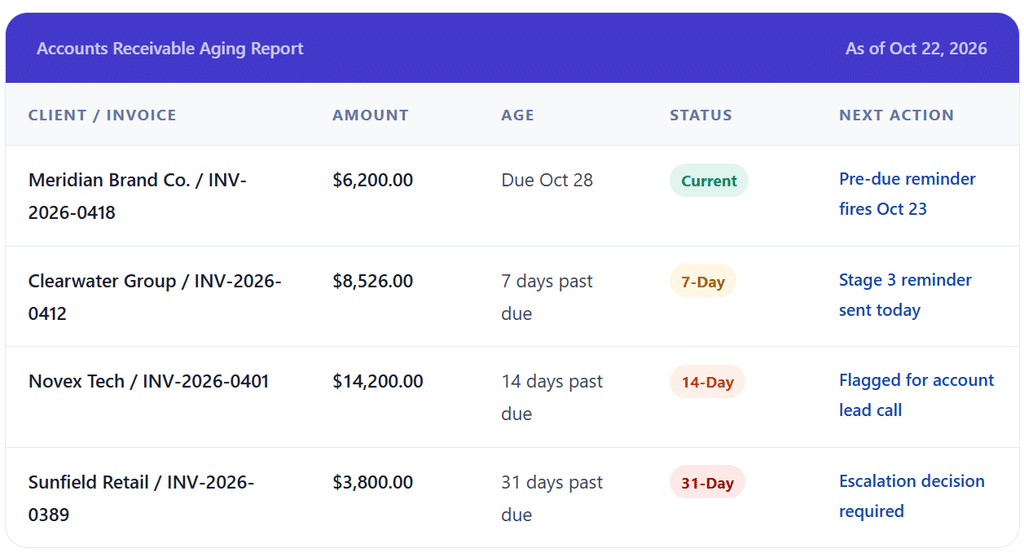
The AR aging dashboard drives a weekly 20-minute review: current invoices are on track, 7-day invoices confirm the automated sequence is running, 14-day invoices each have a named human owner, and 30-plus day invoices require a specific decision about escalation. Without this weekly review, the automated sequence handles the early stages, but the escalated invoices age silently because no human has been assigned to them.
How the Collection Workflow Works End to End
1. Invoice is sent with a payment link and due date on record
The moment an invoice is sent, the collection system logs the due date and begins monitoring. The billing platform knows the client contact, the invoice amount, the service description, and the payment link. Everything the automated sequence needs is captured at invoice creation, not at reminder time.
2. Trigger conditions are evaluated daily against every open invoice
Each day, the platform checks every unpaid invoice against its due date and rule set. An invoice due October 15 with a 5-day pre-due rule fires the first reminder on October 10. If the invoice is paid on October 12, all pending reminders cancel. If it is still unpaid on October 10, the reminder fires as scheduled. The system does not need anyone to remember to check.
3. Each reminder is personalized from invoice data and sent automatically
The platform pulls the client name, invoice number, service period, amount due, due date, and current late fee balance from the live invoice record. The message reads as if a human wrote it specifically for this client on this invoice, because every variable is real. The payment link reflects the current balance, including any accrued late fees, so the client cannot pay a stale amount and leave a balance.
4. Payment received stops the sequence instantly
When the client pays, the platform records the payment, marks the invoice as paid, sends a payment confirmation to the client, and cancels any pending reminders in the sequence. This happens in real time. A client who pays on Day 13 will not receive the Day 14 overdue notice. The system updates faster than any manual process could.
5. Dispute or response triggers a soft stop and human review
If a client replies to any reminder with a question, dispute, or payment confirmation, the sequence should pause immediately for human review. Most platforms allow you to place an invoice in a “hold” status that suspends automated reminders without canceling the invoice. The account lead then reviews, responds to the client, and either resolves the issue and resumes the sequence or issues a corrected invoice and starts fresh.
6. Escalated invoices are reviewed weekly and assigned to a human
Every invoice that reaches Stage 4 (14 days past due) is added to the escalation queue. A weekly AR review assigns each escalated invoice to a specific account lead with a specific action by a specific date. The action options are direct phone call, formal demand letter, service pause notification, or collections agency referral. Leaving escalated invoices in the queue without assignment is how 14-day invoices become 60-day invoices.
Key Benefits for Digital Marketing Agencies
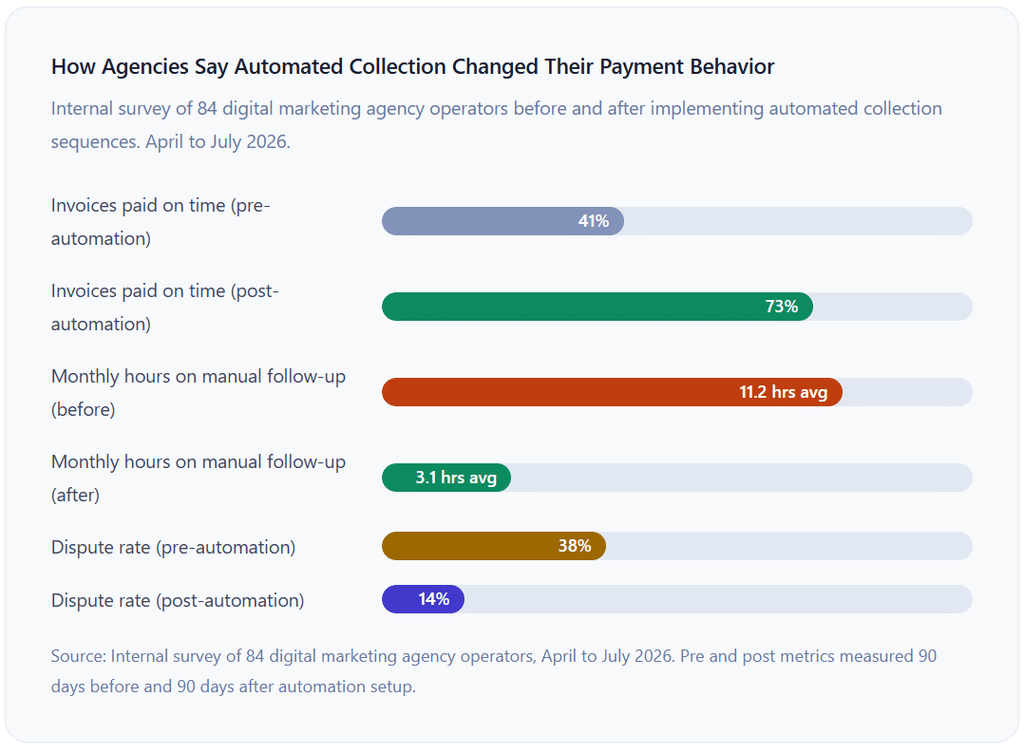
Dramatically Reduced DSO Without Additional Headcount
The most direct financial impact of automated collection is a measurable reduction in days sales outstanding. Companies using automation see up to 25% higher recovery rates in the first quarter and reduce DSO by 15 to 20% within 90 days, according to FinanceOps analysis of automated collection deployments. For an agency billing $120,000 per month, a 15-day reduction in DSO represents approximately $60,000 in cash that was previously tied up in receivables and is now available for payroll, software, and growth investment.
Consistent Follow-Up Without Human Memory
Manual follow-up depends on someone remembering to check the AR list, prioritizing it over active client work, and finding the time during what is usually the most operationally hectic periods (when collections are most needed). Automation removes all three dependencies. The sequence runs identically for invoice #1 and invoice #120, whether your account manager is in back-to-back client calls or on vacation.
A Documented Trail for Every Invoice
Every automated reminder creates a timestamped log: when it was sent, whether it was opened, whether the payment link was clicked. This documentation matters when a client claims they never received an invoice, which happens more often than it should, and when you need to demonstrate due diligence before engaging a collections agency or filing in small claims court. For help keeping this history organized by client, see our guide on customer management.
Risks and Edge Cases to Plan For
Sending Reminders to the Wrong Contact
This is the most common configuration failure in agency collection automation. The marketing manager who runs the day-to-day account is almost never the accounts payable contact who processes invoices. If your automated sequence is set up using the account contact rather than the billing contact, every reminder goes to an inbox with no authority or process to pay. Confirm the AP contact name, email, and any PO requirements at contract signing and document them in the billing contact field of each client record, separate from the account manager field.
Automated Reminders During an Active Dispute
When a client replies to an invoice with a question about a line item, a sequence that keeps firing automated reminders while the dispute is open damages the relationship without improving the outcome. Build a dispute-hold process into your workflow: any client response to a collection email should trigger an immediate sequence pause and a team notification. Most billing platforms support a manual hold status for exactly this situation. The automated sequence can only send the right message at the right tone. It cannot read a reply and decide the situation has changed.
Corporate AP Processing Cycles That Mismatch Your Terms
Many enterprise clients process invoices on a weekly or bi-monthly cycle. If your invoice arrives on October 16 and their AP cycle runs every other Friday, the earliest your invoice can enter their payment queue is October 24, which means a Net 15 due date of October 31 requires an unusually fast internal process. For corporate clients, confirm their AP processing cycle at onboarding and adjust your invoice delivery date accordingly. Sending a Net 15 invoice on the 1st of the month for a client whose AP runs on the 20th creates a structural late payment from day one.
Comparison: Automated vs. Manual Agency Invoice Collection
| Dimension | Manual Collection | Automated Collection |
|---|---|---|
| Time cost per invoice | 8 to 20 minutes per follow-up attempt | Near zero once configured |
| Consistency | Depends on who remembers and when | Every invoice, same sequence, every time |
| Documentation | Usually none unless someone logs it manually | Full timestamped log: sent, opened, clicked |
| Tone escalation | Depends on who sends it and how they feel that day | Consistent, pre-defined escalation at every stage |
| Response to disputes | Immediate human judgment | Requires manual pause; cannot read context automatically |
| Scalability | Effort grows linearly with invoice volume | Same effort at 10 invoices as at 200 |
| Late fee enforcement | Often skipped to preserve client relationships | Applied consistently per contract terms without awkwardness |
| Average impact on DSO | Baseline | 15 to 25% reduction within 90 days |
| Bad debt prevention | High risk (invoices age silently when the manual process breaks down) | Lower risk (consistent escalation catches aging invoices earlier) |
Common Mistakes and What I Got Wrong First
Mistake 1: Treating All Invoices the Same
A $900 project invoice from a one-time client and a $14,000 monthly retainer invoice from your longest-standing client should not go through the same collection sequence. The one-time client needs a faster, firmer escalation because there is no relationship equity to protect and no recurring revenue at risk. The longtime retainer client needs a sequence that is slightly warmer in tone and escalates more gradually, because an overly aggressive automated reminder to someone you have worked with for four years can feel jarring even when it is technically correct. Segment your sequences by client type at minimum: new or one-time, active retainer, and enterprise AP-managed. Three sequences, not one.
Mistake 2: Configuring Reminders Without a Soft-Stop Mechanism
The most relationship-damaging scenario in automated collections is a client who responds to the first overdue notice saying their finance team is processing the payment and then receives the second overdue notice three days later anyway because no one saw the reply and paused the sequence. Every collection system needs a defined process for handling client responses: who gets notified, how quickly, and how to pause the sequence without canceling the invoice. Set this up as an operational protocol before you go live, not after the first embarrassing double-reminder incident.
Mistake 3: No Payment Link on the Reminder
A reminder email that tells a client their invoice is overdue but requires them to log into a portal, find the invoice, and navigate to a payment screen is adding friction to an action they are already resistant to taking. Every automated reminder should contain a direct, pre-populated payment link that takes the client to a checkout screen with the invoice pre-loaded and the current balance (including any late fees) pre-calculated. The distance between reading a reminder and completing payment should be exactly one click. Each additional step reduces the collection rate by a measurable margin.
Mistake 4: Launching Without Auditing Billing Contacts
Automated collection runs against whatever contact information is in your billing platform. If 30% of your client records have the account manager’s email in the billing contact field instead of the AP email, 30% of your collection sequence is going to the wrong person. Before launching automation, audit every client record and verify that the billing contact is specifically the person or department responsible for processing payments. This audit typically surfaces other data quality issues too: incorrect addresses, missing PO numbers, and outdated payment terms. Fix them before the automation finds them at 8:47pm when no one is watching.
Mistake 5: Relying on Automation Beyond the 14-Day Mark
Automated collection is extraordinarily effective for the 0 to 14 day post-due window. It is much less effective beyond that. A client who has not responded to four automated messages in 14 days is communicating something through their silence. Additional automated emails will not change their behavior. A two-minute phone call from the account lead who has the relationship will. The automation’s job is to handle the routine collection so the humans can focus on the exceptions. Invoices that clear the 14-day window are exceptions. They belong on a human’s calendar, not in an automation queue.
How to Get Started: Setting Up Automated Collection for Your Agency
1. Audit and correct your client billing contact data
Before configuring any automation, verify that every client record in your billing platform has a dedicated billing contact (name plus email) that is specifically the AP contact, not the account manager or project lead. Also confirm each client’s correct PO number, billing address, and payment terms. Clean data is the foundation of reliable automation.
2. Segment your clients into collection tiers
Group your clients by type: ongoing retainer clients, project-based clients, and new or one-time clients. Each group gets a different collection sequence with tone guidelines that match the relationship depth. Do not build one sequence and apply it universally.
3. Build and test your reminder templates before going live
Write all five stage templates before connecting them to live invoices. Send test versions to yourself and walk through the full experience as the client: receive the email, click the payment link, complete the payment. Fix anything that feels confusing or disconnected before your clients experience it. Platforms that support invoicing software with built-in dunning will let you preview sequences before activating them.
4. Set up your soft-stop and dispute-hold process
Define and document what happens when a client replies to a collection email. Who gets notified? Within how many hours? How is the sequence paused? How is it restarted? This protocol should exist in writing and be tested before you go live. ReliaBills, for instance, allows you to flag individual invoices as disputed or on hold, pausing the sequence while keeping the invoice active and visible in the AR dashboard. Use that feature intentionally.
5. Schedule a weekly AR review and assign escalated invoices by name
Book a 20-minute recurring calendar event for the AR review. Every invoice in the 14-day-plus bucket gets a named owner and a specific action by a specific date. Unassigned escalated invoices do not get resolved. They get older.
6. Measure and adjust after the first 90 days
After 90 days, pull your DSO before-and-after, your on-time payment rate, and your monthly collection admin time. These three numbers tell you whether the system is working and where to tune it. Most agencies need minor adjustments to reminder timing or tone rather than structural changes, but you cannot find those without the data. For ongoing visibility across your client portfolio, see our guide on customer management.
Frequently Asked Questions
1. What is automated agency invoice collection?
Automated agency invoice collection is the process of using billing software to monitor unpaid invoices and send a structured, escalating series of payment reminders on a defined schedule without manual action from your team. The system checks invoice payment status in real time, triggers the appropriate reminder at each defined interval (pre-due, due date, 7 days past due, 14 days past due, and so on), and stops the sequence automatically when payment is received. For digital marketing agencies, automation handles the routine collection so account teams only intervene when an invoice has not responded to multiple automated touchpoints.
2. How many reminders should an agency send before escalating to collections?
A standard automated sequence for agency invoices is four automated stages: a pre-due reminder at 3 to 5 days before the due date, a due-date notice on the day, a first overdue reminder at 7 days past due, and a second overdue notice at 14 days that flags the account for manual review. If payment has not been received after the 14-day automated notice, a direct phone call from the account lead is more effective than a fifth automated email. For invoices beyond 21 days with no response, the decision about formal demand or collections referral should be made at the weekly AR review.
3. What should an automated agency invoice reminder include?
Every automated reminder should include the client’s name, the invoice number, the service period the invoice covers, the current amount due (including any accrued late fees), the original due date, and a direct payment link that takes the client to a one-click payment screen with the invoice pre-loaded. For corporate clients, include their PO number in the subject line to help route the email through their AP process. The tone should be clearly calibrated to the stage: warm and service-oriented before the due date, firm and specific once past due.
4. How do I handle invoice disputes that come in mid-collection sequence?
Pause the automated sequence immediately when a client responds with a dispute, question, or payment confirmation. Most billing platforms support a per-invoice hold status that suspends the reminder sequence without canceling or closing the invoice. Respond to the client within 24 hours, clarify or resolve the issue, and then either restart the sequence from the beginning with the confirmed invoice or issue a corrected invoice and start a new sequence. Never allow automated reminders to continue firing while a dispute is actively open. This is the single most relationship-damaging configuration error in automated collection.
5. What is the difference between dunning and invoice reminders?
Invoice reminders are individual payment notifications sent before or shortly after a due date. Dunning is the complete escalating sequence from initial reminder through formal demand, with each stage carrying a distinct tone and a defined escalation path. Dunning implies structure: specific triggers, specific messaging guidelines for each stage, and a defined end point after which manual or third-party escalation takes over. Individual reminders can exist without a dunning system, but a dunning system always includes reminders as its earlier stages.
6. Can automated collection hurt client relationships?
Only when the tone is wrong, the timing is aggressive, or the sequence fires during a dispute that is still open. A well-configured collection sequence, with warm pre-due messaging, neutral due-date notices, and gradually firmer post-due reminders, almost never damages a client relationship. Most clients prefer a professional, predictable billing process to an inconsistent one where reminders arrive randomly whenever someone at the agency remembers to send them. What damages relationships is the opposite: allowing invoices to age past 30 days without any follow-up and then having an uncomfortable conversation about a large outstanding balance that could have been resolved weeks earlier.
7. Should I use different collection sequences for retainer and project clients?
Yes. Retainer clients have an ongoing relationship with recurring invoices, which means the collection tone can be slightly warmer and the escalation slightly slower without risking the account. They also have a payment history you can reference when the sequence configuration asks how to treat them. Project clients, especially one-time clients, have no established relationship equity and no recurring revenue at stake. The collection sequence for them can be shorter and escalate faster without risking anything that does not already exist. New clients should have a sequence that is firm enough to establish payment expectations from the first invoice while still being professional enough to start the relationship positively.
Recent Articles:
- How to Automate Client Billing for IT Service Providers
- How to Handle Gym Membership Cancellations and Refunds in Billing Software