
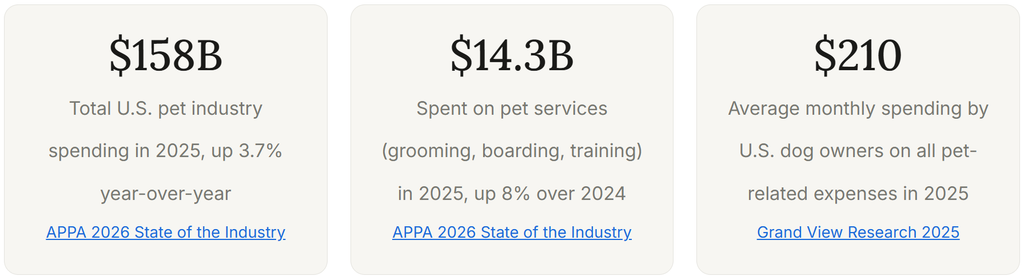
Most pet service businesses track their clients in one place, their pet records in another, and their billing somewhere else entirely. That fragmentation is where revenue gets lost, mistakes get made, and client relationships go stale. Pet customer management software exists to solve this specific problem: it connects the owner, the pet, the service history, and the billing record into a single view that every team member can access without searching through notebooks, spreadsheets, or three separate apps. The businesses that build this connection early grow faster, retain clients longer, and spend significantly less time on administrative recovery when something goes wrong.
What Is Pet Customer Management Software?
Pet customer management software is a platform that stores, organizes, and connects owner contact details, pet health and behavior profiles, service history, and billing records in a single system accessible to everyone working in the business. Unlike a general CRM built for sales teams, pet customer management tools are designed for service businesses where the client is not the service recipient: the owner pays, but the pet receives the service, and the records for both need to be linked and immediately retrievable.
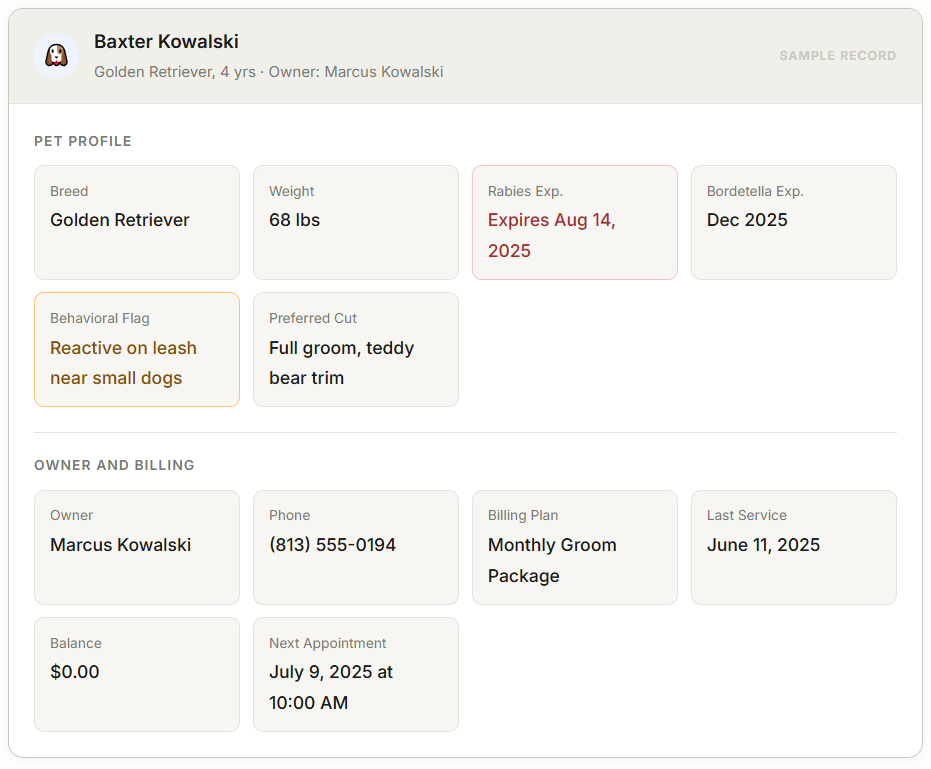
The core capability is the dual-record structure: an owner profile linked to one or more pet profiles. An owner with three dogs should have one contact record and three separate pet records, each containing the vaccination history, behavioral notes, grooming preferences, and service log specific to that individual animal. When any team member opens the account before an appointment, they should see everything relevant to that specific pet on that specific day without asking the owner to repeat information they have already provided.
Pet customer management connects directly to customer management principles, recurring billing for membership and subscription clients, and invoicing software for one-time service charges. Together, these components form a billing and client management system that reduces the administrative burden that currently consumes hours every week at most pet service businesses.
What Records Pet Service Businesses Actually Need to Track
The top-ranking guides on pet business software focus on booking and scheduling. They list feature checkboxes and pricing tables. Almost none of them address the specific question of what data belongs in which record and why that structure matters. That is the gap this section fills.
A complete pet customer record has four distinct layers, each serving a different function and needing to be accessible in a different context.
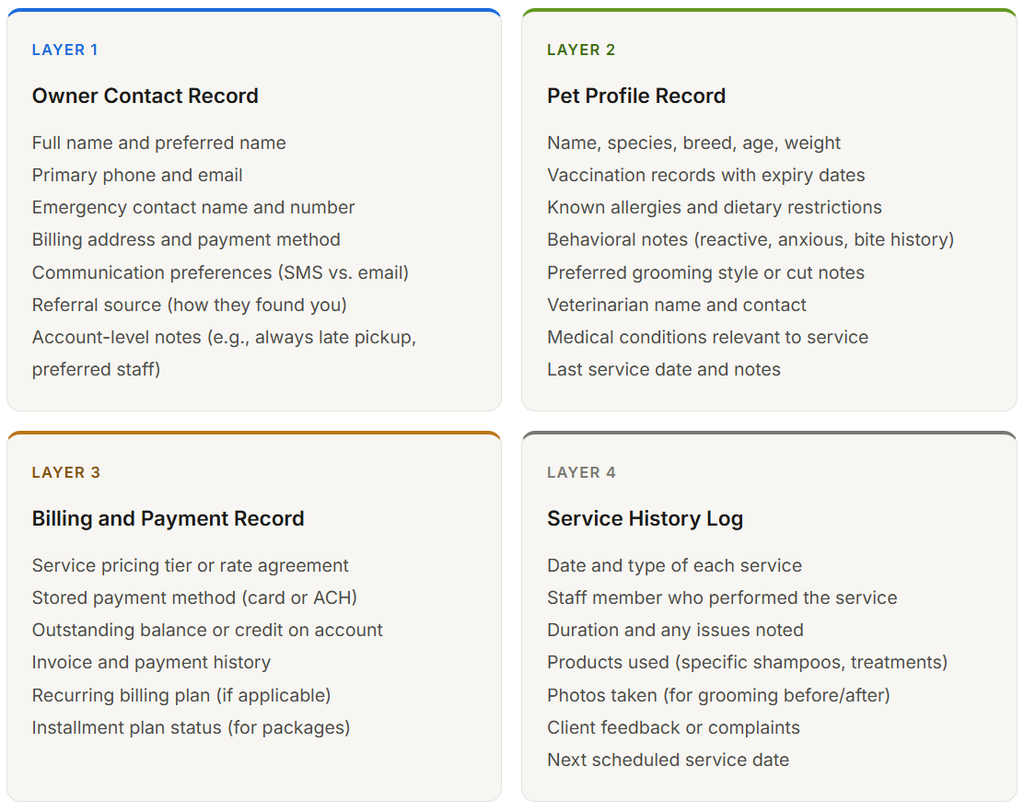
The structural principle here is that Layers 1 and 3 belong to the owner, while Layers 2 and 4 belong to the pet. A client with two pets needs one owner record, two pet profiles, and a service history log per pet. When the billing record is linked to the owner but the service record is linked to the pet, you can see what each pet has received, what the owner has been charged, and whether those two things reconcile correctly, all from the same account view.
The vaccination record deserves special attention. It is the most frequently searched field in any pet service business’s records, because it determines whether a pet can be admitted on any given day. A vaccination expiry that is not in the system is a liability and a client experience problem: the dog arrives at the boarding facility, and the staff has to call the owner to confirm the rabies vaccination status before they can check the dog in. That call could have been a pre-appointment text sent three days earlier if the expiry date was in the system.
How the System Works: The Connected Record Structure
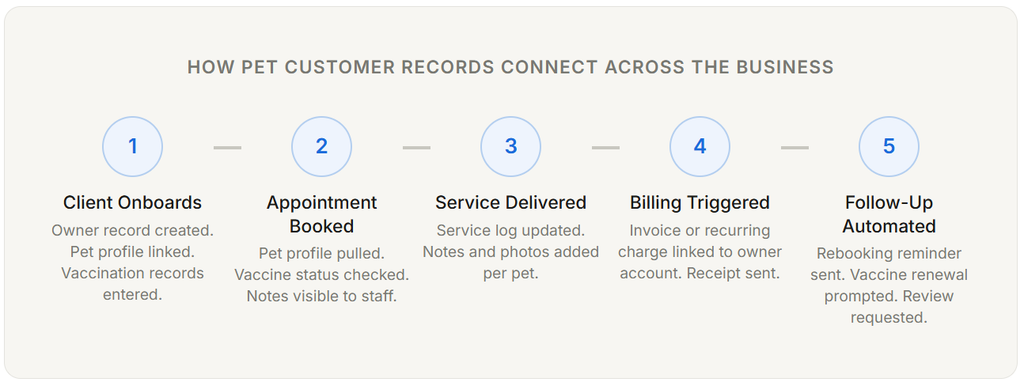
The connected record structure is what separates pet customer management software from a contact list or a booking calendar. It is not about storing more data. It is about making the right data available at the right moment in the workflow, without requiring anyone to search for it.
Why the Billing Connection Matters as Much as the Pet Profile
Pet service businesses typically invest effort in building detailed pet profiles and then store billing information in a completely separate system: an invoicing tool, a spreadsheet, or a payment processor portal. The result is that the person checking a dog in for grooming cannot see whether that owner has an outstanding balance, and the person sending invoices cannot see what services were actually delivered last week. These two gaps drive the most common billing disputes in pet service businesses.
When the service record and the billing record live in the same system, the invoice is generated from the service log rather than recreated manually. The groomer notes the services delivered, the system creates the corresponding charge, and the invoice goes out without anyone having to remember what was done or re-enter the details. That connection alone eliminates a category of billing errors that every pet business running separate systems encounters regularly.
For businesses with recurring clients, recurring billing adds another layer: the monthly grooming client or the boarding membership client is charged automatically from a stored payment method without generating a manual invoice at all. The billing event is visible in the client record alongside the service history, so any team member can answer “Is this client paid up?” in seconds rather than by checking a separate system.
Real-World Use Cases by Pet Service Type
The records structure above applies across pet service categories, but the priority fields and the billing integration points differ significantly based on what the business does. Generic software guides miss this entirely.
Dog Grooming Salon
For a grooming business, the most critical pet profile fields are coat type, preferred cut notes, product sensitivities, and behavioral history during grooming. A dog that becomes anxious during blow-drying needs that noted before the appointment, not discovered during it. The service log should capture what was done, how long it took, which specific products were used, and any issues the groomer observed. Before-and-after photos linked to the service record protect the business in the event of a client dispute about the cut while also serving as upsell material for premium grooming packages.
Grooming businesses benefit particularly from linking recurring billing to grooming packages: a client who books monthly full grooms can be on a recurring plan that charges automatically and books the next appointment simultaneously, reducing the administrative loop of rebooking and reinvoicing after every visit.
Pet Boarding and Daycare Facility
Boarding operations have the strictest record requirements of any pet service category. Every pet that stays overnight must have a current vaccination record on file before arrival. The standard minimum in most facilities is rabies, bordetella, and DHPP, with expiry dates tracked individually. A vaccination record system that flags upcoming expirations automatically, rather than requiring staff to manually check records before each reservation, prevents the most common admission-day problem: a boarding client arriving with an out-of-date vaccine that no one caught in advance.
The service log for a boarding facility needs to capture feeding schedule, medication administration (for pets on prescription diets or medications), behavioral observations during the stay, and any incidents. This log is not just good client service. It is the documentation that protects the facility if a pet is injured or becomes ill during a stay and the owner questions what happened.
Dog Training and Behavior Business
Training businesses have a unique record structure requirement: the service history needs to capture training goals, methods used, progress milestones, and homework assignments per session. A behavior log that tracks what the dog knew at session one versus session six is a client retention tool. Trainers who show concrete progress documentation at each appointment generate significantly more package renewals than those who summarize progress verbally.
Training package billing fits naturally into an installment billing structure: a 12-session package paid in three installments, with the service log tracking session delivery against the payment schedule. The billing system should know how many sessions remain so that the rebooking conversation happens at the natural transition point rather than after the package has run out.
Mobile Groomer or Pet Sitter
Mobile operators have a record management challenge that stationary businesses do not: every appointment happens at a different location, and the client record needs to include address and access information (gate codes, building entry instructions, and which door to use) alongside the standard pet profile. Route efficiency depends on having accurate address data in the system. Billing on the road requires the ability to generate and send an invoice or charge a stored card immediately after service, which is only possible when the billing record is accessible on mobile and connected to the service record being completed.
Key Benefits of Centralized Pet Customer Management
Fewer Errors at the Service Delivery Moment
The most common service errors in pet businesses, applying the wrong shampoo to an allergic dog, serving food a pet cannot eat during boarding, and not knowing about a behavioral trigger before a training session, all trace back to the same root cause: the person delivering the service did not have access to the relevant information at the right moment. Centralized records eliminate this by making the complete pet profile available at the point of appointment, on any device, to any authorized team member.
Higher Client Retention Through Personalized Service
A groomer who references specific notes from a previous appointment, “We used the hydrating treatment on Bella last time because her coat was dry; do you want me to do that again?” delivers a qualitatively different experience than one who starts fresh each visit. That level of personalization requires a service history log that is actually reviewed before appointments, not just a notebook that sits in the back office. Pet businesses that use service history to inform each appointment consistently report higher rebooking rates than those that do not.
Faster Billing with Fewer Disputes
When the service record and the billing record are connected, invoices are generated from the service log rather than recreated from memory or notes. The client receives an invoice that matches exactly what was done during their pet’s appointment, which reduces the most common source of billing disputes in pet service businesses: the invoice that describes something different from what the client remembers happening. For recurring clients on automated billing, the payment happens without any invoice at all, which eliminates the entire dispute category for those accounts.
Vaccination Compliance Without Manual Tracking
Tracking vaccination expiry dates manually across 200 active client pets is a genuine compliance risk. An automated system that flags upcoming expirations 30 days in advance and sends the owner a reminder email prevents admission-day problems without requiring anyone to audit records before every appointment. This is the feature that pet boarding and daycare operators identify most consistently as the one that pays for the software investment within the first month of use.
Comparison: Spreadsheet vs. Booking App vs. Dedicated Pet CRM
Most pet service businesses start with spreadsheets or a basic booking app and gradually discover the gaps as the business grows. Understanding where each approach breaks down prevents the need to migrate client data and rebuild workflows at the worst possible moment.
| Capability | Spreadsheet | Booking App Only | Pet CRM + Billing |
|---|---|---|---|
| Owner and pet records linked | Manual only. Prone to version errors. | Usually yes, but data is shallow. | Yes. One owner, multiple linked pet profiles. |
| Vaccination expiry tracking | No. Manual check required before every visit. | Some platforms. Rarely automated alerts. | Automated expiry tracking with owner notification. |
| Service history per pet | Possible but requires manual maintenance and is rarely complete. | Appointment history visible. Grooming notes often missing. | Complete log per pet with staff notes, products, and photos. |
| Billing connected to service record | Separate tool required. Manual reconciliation monthly. | Usually not. Invoice sent from separate system. | Invoice generated from service log. Automatic for recurring clients. |
| Recurring billing for packages | No. Each invoice created manually. | Limited. Some platforms include basic subscriptions. | Full recurring and installment billing support. |
| Mobile access for solo operators | Via Google Sheets or similar. Clunky in practice. | Usually yes. Core strength of booking apps. | Yes. Record access and billing from mobile. |
| Scales with business growth | Breaks down above 50 to 75 active clients. | Scheduling scales. Records and billing do not. | Designed to scale. No rebuild required as client base grows. |
The booking app scenario is where most growing pet businesses get stuck. A basic booking tool handles appointments adequately, which creates the impression that client management is solved. The gaps only become visible when a dog has a reaction and no allergy information is on file, when a billing dispute requires pulling six months of service history from a separate spreadsheet, or when a new hire cannot find the grooming notes for a repeat client and has to call the owner to ask what was done last time.
Key Risks and What to Watch For
Data Privacy and Client Information Security
Owner contact details, payment methods, emergency contacts, and veterinarian information are personal data. Storing this information in a shared spreadsheet, an unsecured notebook, or a personal email account creates risks that most pet business owners do not think about until a device is lost or an employee departs with access to client records. Purpose-built software with role-based access controls, encrypted data storage, and audit logs is not just a convenience upgrade. For any business managing payment information, it is a data security baseline.
Records That Do Not Travel with the Pet
One of the most common operational gaps in multi-staff pet businesses is the service record that exists only in one person’s head or personal notebook. When the groomer who knows exactly how to handle a nervous Doberman takes a day off, and no record of that behavioral history exists in the system, the substitute groomer either has to wing it or call the owner. That call signals to the owner that the business does not know their pet, which erodes confidence in the relationship. Every service-specific note that is not in the system is institutional knowledge at risk of disappearing when the staff member who holds it leaves.
Over-Collecting Data That Is Never Used
There is a practical risk on the opposite end of the spectrum: collecting so many data fields at intake that clients find the onboarding process burdensome, or staff never refers to the records because they are too complex to scan quickly. The most effective pet client records are specific and minimal. The behavioral note that reads “becomes aggressive when touched near her back left leg, approach cautiously” is more useful than a ten-field health questionnaire that no one reads before an appointment. Prioritize the records that affect what happens during the service, not the records that feel thorough.
Common Mistakes Pet Service Businesses Make with Customer Data
Storing vaccination records separately from the appointment system
The most common structural error in pet business records is keeping vaccination documents in a file cabinet or a separate folder while the appointment system only shows the appointment date. When a client calls to rebook, the person on the phone cannot see whether the pet’s vaccines are current without physically retrieving the paper file or opening a second system. This gap causes missed rebookings and last-minute admission problems. Vaccination records belong in the same system as the appointment calendar, with expiry dates tracked automatically.
Using one record for multi-pet households without linking pets to the owner
A grooming salon that creates a separate client record for each pet in a household ends up with three records for the same owner, each with a different phone number, email address, or billing history depending on who entered the data. When the owner’s contact details change, only one of the three records gets updated. Invoices get split across multiple accounts. Payment history is fragmented. The correct structure is one owner record with multiple pet profiles linked to it. Every client interaction, whether it is about one pet or three, starts from the owner record and navigates to the relevant pet from there.
Not capturing behavioral notes during or immediately after the service
Behavioral information about a pet is at its most accurate and detailed in the hour after a service appointment. Groomers and boarding staff who intend to add notes “later” rarely do, because the next client is already waiting and the moment passes. The notes that do eventually get added are generalized, less specific, and less useful. Building the note-entry step into the service completion workflow, as a required action before the appointment is closed in the system, produces records that are actually useful when the pet’s next visit arrives six weeks later.
Billing from memory rather than from the service record
Pet businesses that generate invoices manually from memory or from handwritten notes consistently produce more billing errors than those that generate invoices from a service log. The memory-based invoice may omit an add-on service, combine services from two different appointments, or simply describe what was done in different terms than the client remembers. When the invoice is generated directly from the service record that was created during the appointment, the description is accurate, the amounts match the delivered services, and disputes drop substantially.
Not connecting client records to automated rebooking and retention workflows
A grooming client who books every 6 to 8 weeks represents a predictable revenue stream that requires no marketing effort to maintain, as long as the rebooking happens reliably. Pet businesses that rely on clients to self-rebook lose a significant share of that revenue to clients who simply forget to call or who book with a competitor when your number is not the first one they reach. A client record system that triggers an automated rebooking reminder 5 weeks after the last grooming appointment, with a direct booking link, converts client inertia into scheduled appointments without requiring anyone on your team to make a follow-up call.
How to Get Started with Pet Customer Management Software
The migration from a fragmented record system to an integrated one is the step most pet businesses delay because it feels like a large project. In practice, the one-time setup investment is smaller than the weekly administrative overhead it eliminates within the first month.
Step 1: Audit Your Current Records for Completeness Before Migrating
Before importing any data into a new system, review your existing client records and identify what is missing, what is out of date, and what exists in more than one place. This audit serves two purposes: it gives you a clean baseline to migrate, and it reveals the specific gaps in your current records that have been causing problems without a clear source. The most common gaps found in this audit are missing vaccination expiry dates, outdated contact numbers, and service history that exists only in a team member’s memory.
Step 2: Build Your Intake Form Around the Four Record Layers
Design a new client intake form that captures all four record layers at onboarding: owner contact and emergency details, pet profile including vaccinations and behavioral notes, billing information and payment method authorization, and any relevant service history from a previous provider. A digital intake form that clients complete before their first appointment is more complete than a paper form filled out in a lobby, and the data goes directly into the record system without requiring manual entry by staff.
Step 3: Set Up Vaccination Expiry Tracking and Automated Alerts
Enter the expiry date for every vaccination in your current client records, and configure automated alerts to notify owners 30 days before expiry. This is the highest-impact configuration change for boarding and daycare businesses. It is also a client experience feature: owners appreciate being reminded proactively, which is a fundamentally different interaction than discovering at drop-off that the vaccine is expired.
Step 4: Connect Your Billing to Your Service Records
Configure your billing system so that invoices are generated from service logs rather than manually. For recurring clients, set up recurring billing with a stored payment method so that the monthly grooming package or boarding membership is charged automatically. ReliaBills supports this connection natively, keeping the service history and payment records in the same client view without requiring a separate integration.
Step 5: Build Rebooking Automation Into the Service Completion Workflow
Configure the system to send a rebooking reminder to the owner a set number of weeks after each service type. For grooming, 5 to 7 weeks. For training packages approaching the final session, a message about continuing to the next phase before the last session rather than after. These automated touchpoints require configuration once and then run without staff involvement, recovering the rebooking revenue that currently slips through when clients simply forget to rebook.
Frequently Asked Questions
1. What records are legally required for a pet boarding or grooming business?
Legal requirements vary by state, but the most common baseline for licensed pet care facilities in the United States includes current vaccination records for rabies (required in virtually every state), bordetella (required by most boarding facilities as a condition of admission, not always legally mandated), and DHPP or FVRCP depending on the species. Many states require facilities to maintain these records for a minimum of two to three years. Beyond vaccinations, a signed acknowledgment of services and terms (often called a service agreement or intake form) creates documentation of what the owner authorized, which is critical in any dispute. Consult your state’s Department of Agriculture or equivalent licensing body for the specific requirements that apply to your facility type and location.
2. Can I manage pet records in a spreadsheet and use separate billing software?
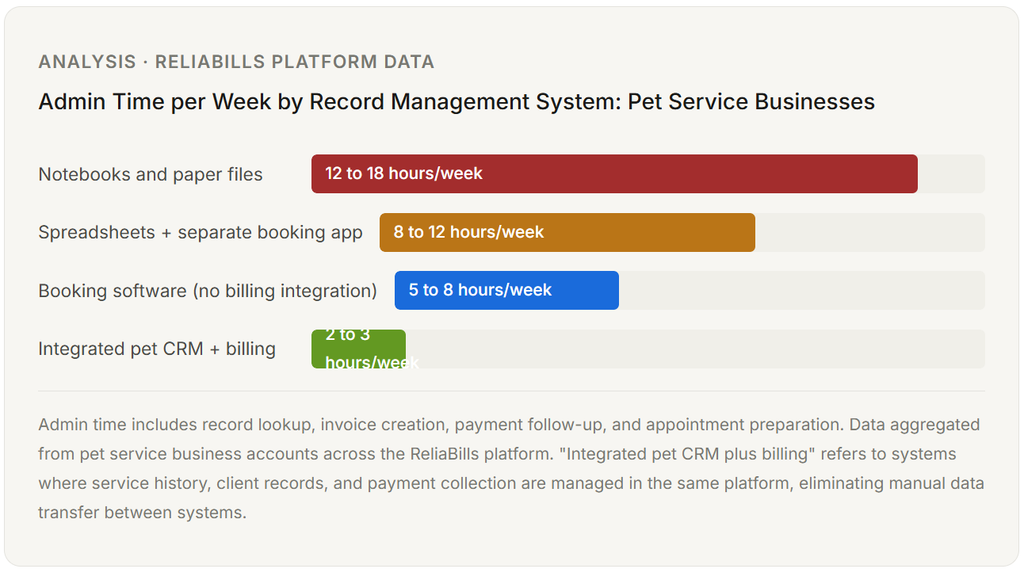
Yes, and many pet businesses start this way. The spreadsheet approach works up to approximately 50 to 75 active clients before the manual maintenance burden becomes significant. The primary problems that emerge at that scale are vaccination tracking that requires manually checking records before every appointment, billing disputes that require cross-referencing service records and invoices stored in different places, and service notes that are inconsistently maintained because entering them requires switching between multiple systems. A dedicated pet customer management system eliminates these problems by connecting all four record types in one place, which typically reduces administrative time by 60 to 70% within the first few months of use.
3. How do I handle a client with multiple pets in the same system?
The correct structure is one owner contact record linked to multiple pet profiles. All billing, communication, and contact information is stored at the owner level. Vaccination records, service history, behavioral notes, and grooming preferences are stored at the individual pet level. When you view the owner’s account, you see all their pets listed and can navigate to each individual pet’s profile. When you generate an invoice after a service, it is linked to both the specific pet and the owner’s billing record. This structure prevents the duplicate contact records and billing confusion that arise when a separate account is created for each pet in a multi-pet household.
4. What should I do when a client brings in a pet’s vaccination records from a previous groomer or vet?
Enter the vaccination dates and expiry dates directly into the pet’s profile at intake and note the source (vet name and date of document). A digital photo or scan of the original document can be attached to the record as supporting documentation. Do not rely on the client to bring the physical records every subsequent visit. Once the dates are in the system, your vaccination tracking and alert configuration handles the monitoring from that point forward. For clients who cannot produce records at intake, contact their veterinarian directly for verification rather than accepting the client’s verbal confirmation of current status.
5. How does pet customer management software connect to billing and payment collection?
In an integrated system, the connection works as follows: the service record created during or after an appointment contains the specific services delivered, the time, the staff member, and any add-on charges. The billing system reads from that service record to generate the invoice, which means the invoice description and amounts match exactly what was documented during the service. For recurring clients on a monthly plan, the billing system charges the stored payment method automatically on the scheduled date without generating a manual invoice at all. The receipt and payment record then appear in the owner’s account alongside the service history, giving any team member a complete view of what was delivered and what was paid in a single record view.
6. Is pet customer management software worth the cost for a solo groomer or pet sitter?
For solo operators, the value calculation depends on client volume and service type. At 20 to 30 active clients, a basic booking app may be sufficient, and a full pet customer management platform is optional. Above 30 clients, the manual record-keeping and billing overhead starts to consume enough time that the software subscription pays for itself in recovered hours within the first one to two months. For solo groomers specifically, the combination of vaccination tracking, service notes, and automated rebooking reminders produces measurable improvements in client retention that typically add up to revenue increases that far exceed the platform cost within the first year. Mobile groomers also benefit from the route address records and mobile billing capabilities that most general software tools do not include.
Recent Articles:
- CPA Invoice Template: What to Include for Professional Client Billing
- How to Reduce Overdue Accounts with Collection Automation for Pool Companies