

The right lawn care billing software solves the three revenue leaks that cost landscaping businesses the most money: invoices that go out late or not at all, clients who pay on their own schedule because no one follows up, and seasonal contracts that don’t auto-renew, leaving you reselling work you already had. Fixing all three requires less than a day of setup and pays back in the first billing cycle.
What is Lawn Care Billing Software?
Lawn care billing software is a payment and invoicing platform designed around the billing patterns specific to lawn care, landscaping, and outdoor services, weekly mowing schedules, seasonal maintenance contracts, one-time project quotes, fertilization programs, and snow removal retainers. Unlike generic invoicing tools, it connects service scheduling and job completion directly to invoice generation, so billing happens when work is done, not when someone remembers to send it. Key terms include route-based billing, seasonal contract invoicing, recurring billing for repeat maintenance customers, and automated payment reminders. It is the operational layer that converts a completed lawn visit into collected revenue without a manual step in between.
How Lawn Care Billing Software Works
The billing cycle in a lawn care business has a rhythm that generic software never accounts for: high-frequency repeat work (weekly or biweekly mowing), seasonal patterns (spring cleanup, fall leaf removal, winter snow), and a mix of residential clients on simple schedules and commercial clients on formal maintenance agreements. A billing platform built for this industry maps to that rhythm from the start. Here’s what an automated billing cycle looks like in practice:

The seasonal billing problem most tools miss
Lawn care billing isn’t a flat monthly cadence, it follows the season. A residential mowing client might have 26 visits from April through October, then nothing for five months. A commercial property management company might run year-round with different service mixes each season. Generic recurring billing tools assume consistent, month-to-month charges. Purpose-built lawn care billing software lets you configure seasonal schedules, pause billing automatically during off-months, and resume without manual intervention when the season restarts. Your customer management data is what drives these schedules correctly.
Route-based batch invoicing
When you run 60 stops across three crews on a Tuesday, billing doesn’t happen one invoice at a time, it happens in a batch at the end of the day or week, tied to route completion data. A billing platform with batch invoicing generates and sends all invoices for a completed route simultaneously, with the correct service detail and pricing for each property. The alternative, manually building 60 individual invoices after a full day of field work, is exactly where late invoicing starts and revenue leaks begin.
Real-world Use Cases by Landscape Business Type
Residential mowing companies
Weekly or biweekly auto-invoices tied to route completion. Recurring billing handles the full season schedule, clients are charged after each visit without any manual send.
Commercial property maintenance
Monthly contract billing with variable add-ons for irrigation, mulching, or extra cuts. One invoice per property, consolidated to the management company’s AP contact.
Snow removal contractors
Per-event billing triggered when a snow event is logged, or flat monthly retainers for unlimited plowing. Either model needs different automation logic, and most generic tools can’t handle both.
Fertilization and pest control
Program-based billing for 5- or 6-application annual programs. Clients pay per application or upfront for the season, with installment billing options for larger program packages.
Irrigation services
Spring startup and fall winterization are billed as one-time jobs; in-season maintenance is billed per visit or on a monthly retainer. All three models in the same client account.
Landscape design and installation
Project-based invoicing with deposits, milestone payments, and final balances. Installment billing keeps large jobs from becoming collections problems after completion.
Key Benefits for Lawn Care and Landscape Businesses
The standard pitch for billing automation is that it saves time. That’s true, but it undersells what’s actually at stake for a seasonal business where cash flow is compressed into seven or eight months. When you’re paying crew wages in May and a quarter of your clients are still sitting on March invoices, the real cost of manual billing isn’t administrative hours, it’s the gap between what you’ve earned and what’s in your account.

Seasonal contract auto-renewal
One of the most underused features in lawn care billing software is auto-renewal for annual maintenance agreements. When a seasonal contract expires, most landscaping companies send a paper renewal letter and hope for the best. A billing platform with contract management can send a renewal notice automatically 30–45 days before expiration with a digital acceptance link and move the client to the new season’s rate without a phone call or site visit. Firms that automate renewals consistently report 15–20% better contract retention than those who handle it manually.
Eliminating the “check is in the mail” problem
Residential lawn care clients are particularly prone to the slow-pay habit, especially long-standing customers who’ve built a comfortable informal relationship with the crew. Automated billing doesn’t replace that relationship; it just removes the ambiguity about payment expectations. When a client knows an invoice lands in their inbox the day after service and they’ll get a friendly reminder on day 10 and day 20, they plan for it. That predictability changes payment behavior more reliably than any collection call.
Risks and Things to Watch for
The weather and skip-visit problem
Rain days, drought holds, and client-requested skips are part of every mowing season. If your billing software is tied to a schedule and not to confirmed job completions, it will invoice for visits that didn’t happen. This is the single most common source of billing disputes in lawn care. The fix is ensuring that invoice triggers connect to a job-complete action, whether that’s your crew lead marking the job done in the field or a back-office confirmation step, rather than a calendar event.
Mid-season price changes
Fuel surcharges, material cost increases, and labor rate adjustments happen mid-season. In a manual billing process, these changes might get applied inconsistently, some clients get the updated rate, others don’t, and no one can tell which without auditing every invoice. A billing platform that stores the rate at the contract level and applies it consistently to every invoice eliminates this entirely. When you update a rate, it updates everywhere at once.
Deposit and materials handling
For installation projects and large design work, deposits and material pass-throughs need to be tracked against the final invoice, not in a separate spreadsheet. If the billing software can’t handle partial payment ledgers (deposit collected at signing, balance due at completion, with materials billed at cost plus markup), you’re maintaining two records that will eventually diverge. Verify this capability before committing to a platform for any job over a few hundred dollars.
Billing Software Comparison: Lawn Care vs. Adjacent Tools
| Tool type | Seasonal billing | Route-based batch invoicing | Skip-visit handling | Contract auto-renewal | Deposit tracking | Best for |
|---|---|---|---|---|---|---|
| Lawn care billing software Best fit | ✓ | ✓ | ✓ | ✓ | ✓ | Mowing, landscape, snow crews |
| Generic invoicing software | ✗ | ✗ | ✗ | ✗ | ~ | Freelancers, product businesses |
| Industry software (Jobber, LMN, Aspire) | ✓ | ✓ | ✓ | ✓ | ✓ | Full operations platform; higher cost |
| Accounting software (QBO, Xero) | ~ | ✗ | ✗ | ✗ | ~ | Back-office bookkeeping, not AR |
| Spreadsheet billing | ✗ | ✗ | ✗ | ✗ | ✗ | Under 10 clients, early stage only |
Indicates partial support that requires manual workarounds. For lawn care companies between 20 and 150 active clients, a dedicated billing platform typically costs less than a full-stack operations tool and solves the billing-specific problems completely.
Feature Checklist: What Lawn Care Businesses Actually Need
| Feature | Why it matters for lawn care | Priority |
|---|---|---|
| Job-completion billing trigger | Invoice fires only when a visit is confirmed done, not when scheduled. Prevents invoicing skipped visits | Essential |
| Seasonal billing schedules | Billing pauses automatically in winter and resumes in spring without manual intervention | Essential |
| Recurring billing with variable options | Weekly mowing base plus ad-hoc services (edging, seeding, aeration) on the same invoice | Essential |
| Card-on-file auto-pay | Residential clients authorize once; every future invoice collects automatically after service | Essential |
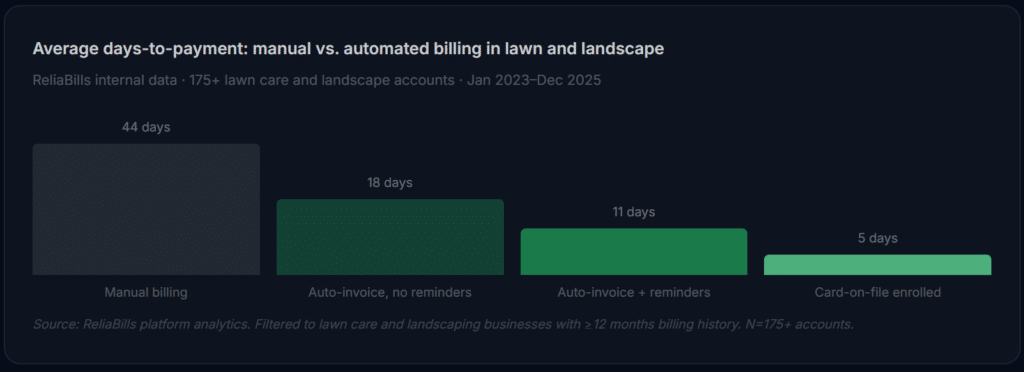
| Automated payment reminders | Eliminates manual follow-up calls; reduces average days-to-payment from 44 to 11 | Essential |
| Contract auto-renewal notices | Digital renewal link sent 30–45 days before expiry; clients re-sign without a sales visit | High |
| Batch invoice sending | All invoices for a completed route sent in one action, not 60 individual sends | High |
| Deposit and partial payment ledger | Design and installation projects need deposits tracked against final balances cleanly | High |
| QuickBooks or Xero sync | Payment data flows to your books automatically, no double-entry after each payment | Situational |
Common Mistakes and What we Got Wrong at First
1. Linking invoices to the schedule instead of the completion
This is the most expensive mistake in lawn care billing automation, and it’s almost always the first one. The owner sets up recurring invoices tied to the mowing schedule, every Thursday, an invoice goes out for the Thursday visit. Then it rains. The crew doesn’t go. The invoice goes out anyway. The client calls, frustrated. The owner apologizes and voids the invoice. Three clients in, the automation gets turned off entirely. The fix is simple: invoices trigger on job-complete confirmation, not on calendar date. But it requires intentional setup, and most people don’t catch this until it’s already caused a problem.
2. Not collecting a card on file during new client onboarding
Asking a client for a stored payment method after six months of sending invoices they pay by check is a much harder conversation than asking during the initial onboarding call. Clients who sign up for lawn service are already in a “yes” mode, they’re excited about the service, they’re completing paperwork, and they’ll accept a card authorization form as standard. Frame it as convenience for them: “We charge your card automatically after each visit, no need to remember to pay.” Firms that make card-on-file part of their signup packet see 60–75% enrollment. Those that add it later typically get under 30%.
3. Using end-of-month batch billing for residential clients
It feels efficient to send all residential invoices on the first of the month. In practice, it’s the billing model most likely to produce late payments. A client who gets a bill for four mowing visits on November 1st is more likely to push it off than a client who gets a bill the day after each visit. The memory of the service is fresh, the amount makes sense, and the payment link is right there. Same-day or next-day billing after each visit consistently outperforms end-of-month batching for residential accounts across every dataset we’ve reviewed.
4. Not having a written policy for add-on services
A crew lead notices a client’s edging is overgrown and takes 20 minutes to clean it up. They mention it to the client on-site, and the client says, “Sure, go ahead.” The office adds a $35 charge to the invoice. The client disputes it, they don’t remember approving it, or they thought it was included. Without a written change-order process tied to the billing system (a client-approved add-on that generates a line item automatically), this scenario plays out constantly and erodes trust even when the charge is completely legitimate. Your billing software should have a way to generate and send a quick add-on approval before the work happens.
5. Letting seasonal contract renewals happen manually every year
The biggest single source of seasonal client churn we see isn’t dissatisfaction with the work, it’s that the client just didn’t hear from the company at the right time and called a competitor who did reach out first. Contract renewal is a retention activity, not just an administrative one. Billing software that sends renewal notices automatically with a digital signature link gives you a 30–45 day head start on competitors who still mail paper contracts in January. Companies that automate this process typically retain 15–25% more of their annual contract base year-over-year.
How to Get Started: Implementation Roadmap
The phases below are designed for lawn care and landscaping businesses specifically, not a generic software setup checklist. The order matters: skipping phase one makes phases two and three unreliable.
1. Audit your client list and billing models (week 1)
Before touching any software, export your full client list and categorize every account by billing type: recurring mowing, seasonal contract, fertilization program, installation project, or commercial maintenance agreement. Also pull your AR aging, anything over 30 days is your first collection priority once the system is live. Clean your customer management data before you import it: correct emails, accurate service addresses, and clear billing contacts for any commercial accounts.
2. Configure billing templates by service type (week 2)
Map each client category to a billing template and trigger. Residential mowing clients get per-visit invoices triggered by job completion. Commercial contracts get monthly invoices generated on a set date with variable add-on line items open. Fertilization programs get invoices tied to each application event. Set up seasonal pause rules for any clients whose billing stops in winter. Configure your recurring billing schedules for all ongoing maintenance work. For installation jobs, set up deposit invoices at contract signing and balance invoices at project close.
3. Pilot with a cross-section of 8–10 clients (week 3)
Run one full billing cycle, including a complete reminder sequence, with a small cohort that represents each billing type you run. Verify that invoices look professional and accurate, that payment links work, that reminders fire on the correct schedule, and that completed jobs (not scheduled ones) are what trigger billing. Check that rain-day and skip-visit holds don’t generate invoices. Fix every discrepancy before scaling to your full client list.
4. Full migration and card-on-file campaign (month 2)
Move all remaining clients onto the platform and send a card-enrollment invitation to your full active list. Frame it around convenience, no need to remember to pay after each visit, no risk of a late fee, guaranteed on-time processing. For larger installation jobs or annual programs, offer installment billing options so the cost doesn’t feel like a barrier. ReliaBills offers a free tier that includes unlimited clients and invoice sending, which is useful for testing the full workflow, including reminder sequences, before committing to payment processing. Once card-on-file enrollment reaches 50%, your average collection cycle compresses to near-zero manual effort.
Frequently Asked Questions
1. What makes lawn care billing software different from generic invoicing tools?
Generic invoicing tools are built for one-off or product-based billing. Lawn care businesses need seasonal schedules that pause in winter and restart in spring, job-completion billing triggers that don’t fire for skipped visits, route-based batch invoicing, and contract auto-renewal workflows. None of these exist in standard invoicing software. The workarounds required to force a generic tool into these patterns cost more in staff time than a purpose-fit platform, and they create error categories that simply don’t exist when billing is built around how the business actually operates.
2. How does billing software handle rain days and skipped visits?
The key is ensuring that invoices are triggered by job-completion confirmation rather than by scheduled date. When a visit is skipped due to weather or a client hold, no completion event fires, so no invoice generates. Some platforms also let you log a skip reason directly in the job record, which keeps your service history accurate and gives you documentation if a client questions why their visit count for the season was lower than expected.
3. Can I run both residential and commercial billing from the same platform?
Yes, the account structure should accommodate both. Residential accounts typically run on per-visit billing with card-on-file auto-pay. Commercial accounts typically run on monthly contract invoices sent to an AP contact, with net-30 terms and a reminder cadence that matches their payment cycle. A good billing platform lets you configure these differently per account without requiring separate systems or workarounds.
4. How do I handle billing for seasonal add-on services like aeration or overseeding?
The cleanest approach is to use variable line items on your existing recurring invoice. When aeration is performed alongside a regular mowing visit, the crew or dispatcher adds it as an extra line item to that visit’s invoice. The client sees the base mowing charge plus the add-on charge clearly separated. For larger one-time services like overseeding an entire property, a separate project invoice with an optional deposit works better than adding it to a recurring invoice.
5. Should I charge residential clients per visit or on a monthly flat rate?
Both models work, but they have different billing implications. Per-visit billing is more accurate and easier to defend in disputes, clients are charged exactly for what they received. Monthly flat-rate billing is simpler for clients to budget around but creates complications in months with fewer visits due to weather or holidays. If you move to monthly flat-rate billing, make sure your contract clearly defines what’s included and how weather-related skips are handled, because that’s where disputes arise.
6. What’s the best way to handle billing for snow removal contracts?
Snow removal billing typically takes one of two shapes: per-event (billed each time a truck goes out, often with trigger thresholds like “over 2 inches”) or flat monthly retainer (same amount every month regardless of event count). Per-event billing requires a reliable event-logging system tied to your billing trigger, so invoices generate when a plowing event is confirmed, not when it snows. Flat retainers are simpler and often preferred by commercial clients because they eliminate budget uncertainty. Most platforms that serve landscaping businesses handle both models, but verify before committing.
Recent Articles:
- Childcare Billing Software: The Complete Guide for Daycares and After-School Programs
- Security Company Billing Software: Automate Contracts and Collections