
The right CPA billing software eliminates the three biggest revenue leaks in accounting firms: slow invoice creation, missed follow-ups, and clients who were never set up on auto-pay. This guide walks you through evaluation, implementation, and the specific mistakes that cost firms the most money.
What is CPA Billing Software?
CPA billing software is a specialized platform that automates the full accounts receivable cycle for certified public accounting practices, from invoice creation through payment collection and reconciliation. Unlike generic tools, it’s built around the billing patterns specific to accounting firms: retainer arrangements, hourly engagements, project-based flat fees, and recurring billing for ongoing clients. Key terms include engagement-based billing, retainer invoicing, ACH payment processing, automated payment reminders, and installment schedules.
How CPA Billing Software Works
Every billing automation platform runs on a five-stage AR loop. Each stage can run manually or automatically depending on configuration. Here’s what that looks like in a working accounting firm:

The retainer model, where most tools fall short
Many CPA firms run a hybrid billing model: a fixed monthly retainer for baseline work like bookkeeping plus variable add-ons when scope changes (audit support, tax amendments, and entity formation). The right platform handles both in the same invoice, drawing on your recurring billing schedule for the base amount while keeping line items open for ad-hoc additions each period. Most general-purpose invoicing tools can’t do this cleanly without workarounds.
Integration with your practice management stack
Billing software rarely operates in isolation. Most firms need it to pull time entries from tools like Clio, Karbon, or TaxDome and push payment confirmations into QuickBooks or Xero. The quality of those integrations, not just their existence, is what separates platforms that genuinely save time from ones that create new manual steps at the seams.
Real-world Use Cases for Accounting Firms
Monthly bookkeeping retainers
Auto-generate and send the same invoice every month. Clients authorize ACH up front; payment clears without anyone touching it.
Tax season surge billing
Variable invoices that pull hourly time logs during 1040 season. Invoice batches go out on filing day without manual assembly.
Multi-entity business clients
A single owner with four LLCs needs four invoices, the same due date, paid from one account. Billing software groups and auto-applies payments.
Installment payment plans
Larger tax bills paid in stages. Installment billing splits an engagement into a schedule the client agrees to upfront.
Client portal self-service
Clients view invoices and payment history and update card details without calling the office. Cuts admin overhead significantly.
Late fee enforcement
Firms that apply late fees consistently see faster payments, but only when the system enforces the policy automatically, without the awkward call.
Key Benefits for CPA Firms
The conversation about billing automation usually starts with “it saves time”, but that framing undersells the real impact. Here are the benefits that specifically move the needle for accounting practices.

Better client relationships, not just faster cash flow
There’s a softer benefit that rarely makes the marketing pages: consistent, professional billing builds client trust. When a client receives the same clean invoice on the same date every month, they perceive your firm as organized, a quality they also want in an accountant. Firms that send irregular invoices or chase payments with personal emails quietly erode confidence over time, even when the actual accounting work is excellent.
Reduction in scope creep disputes
Itemized digital invoices that clearly separate retainer amounts from ad-hoc charges reduce the frequency of “I didn’t know I was being billed for that” conversations. The transparency protects clients from surprise charges and protects your firm from scope creep that goes uncompensated.
Risks That Catch Firms Off Guard
Data residency and client confidentiality. CPA firms operate under strict professional standards (AICPA and state boards) regarding how client data is stored and transmitted. Before signing up for any platform, verify it’s SOC 2 Type II certified and PCI-DSS compliant. This isn’t just best practice, it can affect your professional liability coverage.
Over-automation without client buy-in. Enrolling a client in auto-pay without a clear agreement creates payment disputes and chargebacks. Always collect written authorization before charging a card or bank account automatically.
Silent integration failures. The sync between your billing platform and time-tracking or practice management tool can fail quietly. Hours don’t carry over, invoices go out without line items, and you find out when a client calls. Set up a weekly invoice spot-audit so failures surface before they become billing gaps.
CPA Billing Software vs. Related Tools
The software landscape is confusing because many tools overlap. Here’s how CPA billing software compares to the adjacent categories you’ll encounter during evaluation:
| Tool category | Recurring billing | Client portal | ACH / card | CPA workflows | PM integration | Best for |
|---|---|---|---|---|---|---|
| CPA billing software | ✓ | ✓ | ✓ | ✓ | ✓ | Accounting firms, tax practices |
| Generic invoicing software | ~ | ~ | ✓ | ✗ | ✗ | Freelancers, product businesses |
| Practice management tools | ~ | ✓ | ~ | ✓ | Native | Firms needing end-to-end PM |
| Accounting software (QBO, Xero) | ~ | ✗ | ~ | ✗ | ✓ | Back-office, not AR management |
| Payment processors only | ✗ | ✗ | ✓ | ✗ | ✗ | Point-of-sale, e-commerce |
Feature Checklist: What CPA Firms Actually Need
Use this when evaluating any platform. The features below are the ones that separate billing tools built for professional services from generic invoicing apps:
| Feature | Why it matters for CPA firms | Priority |
|---|---|---|
| Recurring billing with variable line items | Retainer base + ad-hoc services in the same invoice without manual editing each month | Essential |
| ACH and card payment processing | Clients need to pay by bank transfer; card-only platforms exclude a large segment | Essential |
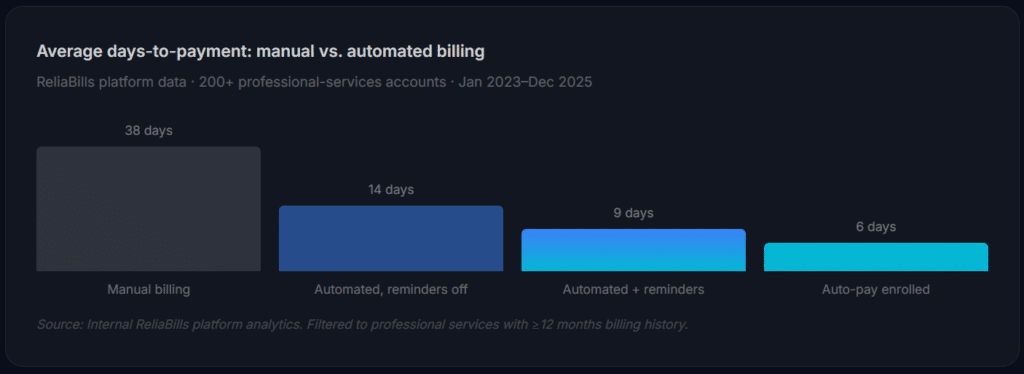
| Automated payment reminders | Eliminates awkward follow-up calls; reduces days-to-payment by 30–60% | Essential |
| Client payment portal | Self-service access to invoices, history, and payment method updates | Essential |
| Installment / payment plan support | Critical for large tax bills; client retention rises when payment flexibility exists | High |
| Failed payment retry logic | Recovers 30–40% of failed ACH/card attempts automatically | High |
| Late fee automation | Consistent enforcement improves collection without requiring personal contact | High |
| QuickBooks / Xero sync | Avoids double-entry; books reflect actual payment status in real time | High |
Common Mistakes, and What We Got Wrong at First
1. Automating before cleaning the client database
Firms would connect a billing tool to their CRM export and immediately enable automated sends before auditing the data. Duplicate records, outdated emails, and mixed billing contacts caused exactly the chaos automation was supposed to prevent. Clean your customer management data first, every time.
2. Choosing a tool based on price alone
The cheapest billing tools have basic reminder logic and no-frills payment processing, fine for a freelancer, not for a CPA firm with 60 clients and mixed billing models. The workarounds required will cost more in staff time than a proper platform would have.
3. Batch-sending invoices without a tested template
We’ve seen firms send 80 invoices on day one of a new platform, only to discover the template had the wrong address, missing payment instructions, or a broken payment link. Pilot with 3–5 clients for a full billing cycle before enabling batch sends.
4. Ignoring failed payment retry logic
An ACH payment fails. What happens next? In many firms, nothing until someone manually checks AR two weeks later. Good billing software retries automatically and notifies both parties. If yours doesn’t have retry logic, your collection rate is lower than you think.
5. Not enrolling clients in auto-pay from day one
The biggest lever for faster collection is auto-pay enrollment. But most firms ask existing clients to enroll after they’ve built a manual-payment habit. Frame auto-pay as the default during new client onboarding, new clients are far more willing to enroll than long-standing ones.
How to Get Started: Implementation Roadmap
The phases below are built around what actually works for small and mid-size CPA firms, not a generic software rollout checklist.
Audit and prepare (weeks 1–2)
Pull your AR aging report and count invoices older than 30 days, that number is your baseline. Export your client list and clean it: email addresses, billing contacts, preferred payment method, and billing model (retainer, project, or hourly). Load that into your customer management system before any billing tool goes live.
Configure billing models (week 3)
Map each client type to a billing template. Recurring monthly clients get invoices on the 1st. Hourly clients get invoices at project close. For payment plans, set up installment billing schedules. This step is where most firms invest too little time, get it right here and the system largely runs itself.
Pilot with a small cohort (week 4)
Select 5–8 clients representing each billing type. Run one full billing cycle manually through the new system while monitoring every step. Verify invoices look right, payment links work, reminders fire on schedule, and payments clear to the right account. Fix what breaks before scaling.
Full migration and auto-pay rollout (month 2)
Move all clients onto the platform. Simultaneously send an auto-pay enrollment email to every active client, including a clear explanation of the benefit to them (no late fees, no missed deadlines) and a single-click enrollment link. Expect 40–60% enrollment in the first 60 days. ReliaBills offers a free-tier entry point for firms that want to test the workflow using its core invoicing software before committing to payment processing.
Frequently Asked Questions
1. What’s the difference between CPA billing software and standard invoicing software?
Standard invoicing tools are built for one-off or product-based transactions. CPA billing software is designed around retainers, hourly engagements, mixed-fee structures, and payment plans, with tighter integration into practice management tools and client portals built specifically for the accounting client relationship.
2. How much does billing automation cost for a small CPA firm?
Entry-level platforms with basic invoicing are often free or under $30/month. Full-featured platforms with ACH processing and automation typically run $50–$150/month, plus payment processing fees (0.8–2.9% per transaction). For a firm collecting $30,000/month in fees, the automation typically pays for itself in recovered receivables within the first billing cycle.
3. Is it safe to store client payment information in billing software?
Yes, provided the platform is PCI-DSS compliant and uses tokenized card storage. No reputable platform stores raw card numbers. For CPA firms, additionally verify the vendor is SOC 2 Type II certified, as this covers the broader data security standards your professional obligations require.
4. Can billing software handle both retainer and hourly clients in the same account?
Yes, most CPA-focused platforms support multiple invoice templates and billing schedules within a single account. The key is ensuring your platform supports variable line items on recurring invoices, not just fixed amounts.
5. What happens if an automated payment fails?
In a well-configured platform, a failed payment triggers an automatic retry (24–48 hours later), a client notification to update their payment method, and an alert to your AR queue. Some platforms apply a returned-payment fee automatically. The invoice moves to a manual follow-up queue only if automated retries are exhausted, which covers the majority of failures without staff involvement.
6. How do I get existing clients to enroll in auto-pay?
Frame enrollment around the client benefit: no missed due dates, no late fees, and no need to remember to pay monthly. Send a dedicated enrollment email with a single-click link. Include an auto-pay prompt at the bottom of every invoice for clients who don’t enroll immediately. Most firms see 50–70% enrollment within 90 days when they make it the path of least resistance.
Recent Articles:
- Pool Service Billing Software: The Complete Guide for Pool Maintenance Companies
- Membership Billing Software: The Complete Guide for Clubs and Organizations