

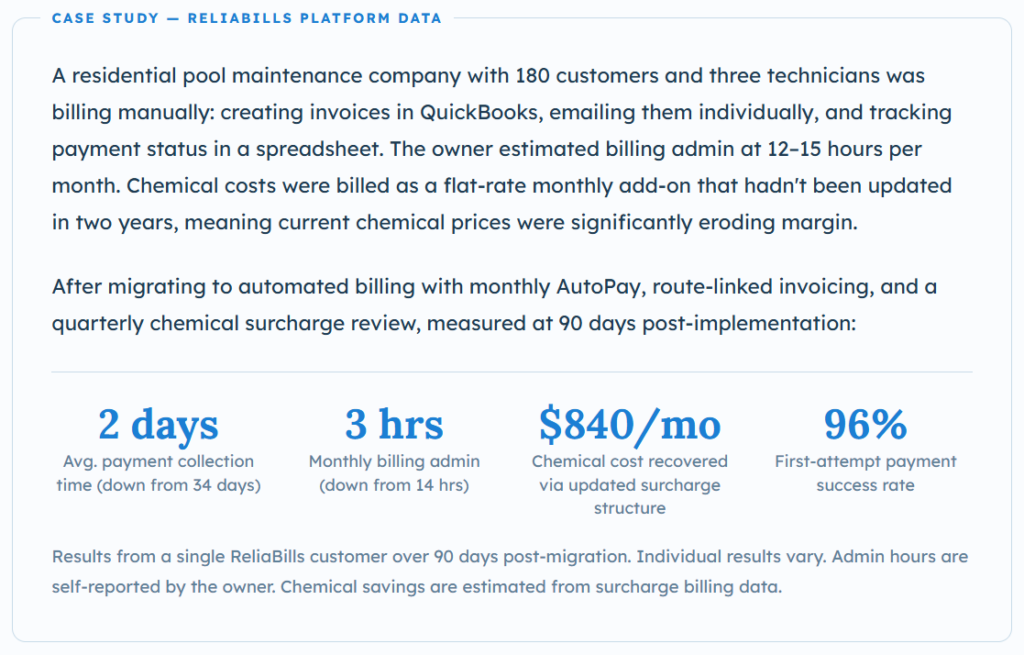
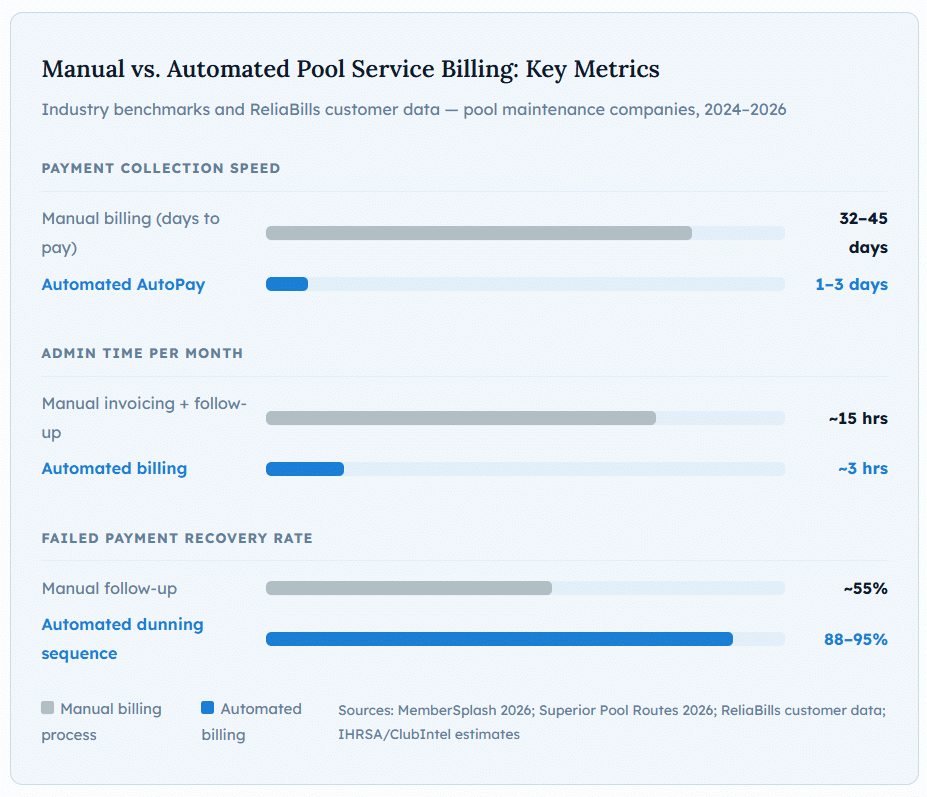
Pool service billing software automates monthly dues collection, handles chemical surcharge calculations, recovers failed payments, and connects field service records to invoices, so your billing doesn’t depend on someone in the office manually processing what your technicians did in the field. The features most buying guides rank last (chemical surcharge automation and payment failure recovery) are the ones that move the most money. A pool company that moves from manual billing to automated monthly collection on the 1st consistently drops payment lag from 32–45 days to 1–3 days. The revenue difference compounds every month.
What Is Pool Service Billing Software?
Pool service billing software is a system that automates the collection of recurring maintenance fees, handles one-time repair invoicing, calculates and bills chemical surcharges, recovers failed payments, and connects field service records to billing records, so the billing process runs independently of whether anyone in the office is actively managing it. For route-based pool maintenance companies, it replaces the manual invoice creation, check-chasing, and spreadsheet tracking that consumes an estimated 7.5 hours of admin time per week for the average pool company.
At its most basic, pool service billing software means setting up recurring billing so monthly maintenance fees are charged to saved cards automatically on the 1st every month without anyone initiating the process. At its most complete, it includes route-linked billing (so completed service stops automatically generate billing records), chemical usage tracking tied to surcharge calculations, repair and equipment invoicing alongside recurring maintenance, customer-facing payment portals, and automated dunning sequences for failed charges that recover payments before members lapse.
The distinction that matters for evaluation: pool service billing software is different from general-purpose field service management (FSM) software in one critical way. Pool Founder’s 2026 industry analysis explains it directly: “Pool maintenance operations are fundamentally different. A pool technician visits the same 20–30 customers every week in an optimized geographic sequence, recording chemical readings and dosing data at every stop.” General FSM tools are built for dispatch-based businesses. Pool companies run route-based businesses. The billing model follows that distinction.
How Pool Service Billing Software Works
Most buying guides focus on the feature checklist and the platform comparison table. What they rarely explain is the operational flow that connects field service to billing, because that connection is where most pool companies either save or lose significant money every month.
Here’s the complete cycle, from route completion to payment received:
1. Customer is onboarded: payment method stored, monthly rate set
When a new maintenance customer is added, their monthly fee, service frequency, and payment method are recorded in the system. Their card is tokenized and stored in a PCI-compliant vault. Their billing date is set, typically the 1st of each month. From this point, billing for recurring service runs without manual action.
2. Technician completes stops: service records logged from the field
As the technician completes each stop, the mobile app logs the visit: arrival time, chemical readings, treatments applied, water test results, photos, and any equipment issues noted. This field data feeds directly into the billing record, no transcription required and no risk of a completed stop being skipped on the invoice.
3. Chemical costs are tracked and surcharge is calculated
If your billing model includes a chemical surcharge, the system uses the chemical log from each visit to calculate the variable component of that month’s charge, either as actual cost-plus or as a flat rate triggered by usage above a threshold. This is the step that most pool companies handle inconsistently when billing manually, resulting in absorbed chemical costs that directly cut margin.
4. Monthly batch billing runs on the 1st
On the configured billing date, the system generates charges for every active customer: the monthly maintenance fee plus any applicable chemical surcharge, one-time repair fees invoiced during the month, or add-on service charges. For customers on AutoPay, charges run immediately. For customers on invoice terms, invoices are generated and delivered automatically.
5. Successful charges post; failed charges trigger recovery sequence
Successful payments are logged, receipts sent, and accounts marked current. Failed charges are classified by decline code and routed accordingly: soft declines trigger an automatic retry within 24–48 hours; hard declines send the customer a secure payment-update link. The dunning sequence escalates over 7 days if the charge remains unresolved.
6. AR dashboard shows real-time collection status
By the morning of the 2nd, your office sees a live view of current billing status: who’s paid, who’s in the dunning sequence, which accounts have an open balance, and how old it is. No manual reconciliation, no spreadsheet update. The AR aging view updates as each payment resolves.
7. One-time and repair invoices generated from field records
When a technician identifies a repair need or completes unscheduled work, the field record triggers an invoice, either sent immediately for customer approval or queued for batch delivery. Customers on a self-service portal can view, approve, and pay repair invoices online without calling the office. See how this integrates with your broader invoicing software setup.
Six Billing Features That Matter Most for Pool Companies
Most platform comparisons evaluate pool service software across dozens of features. From working with pool companies on billing implementations, these six consistently determine whether the billing system pays for itself or creates as much work as it saves.
📍 Feature 01: AutoPay / Monthly Recurring Billing
Charges every customer’s saved card automatically on the 1st. No manual invoice creation. No waiting for checks. And no payment lag. This is the single highest-impact billing change any pool company can make.
📍 Feature 02: Chemical Surcharge Automation
Calculates and bills chemical costs from field records, either as a flat monthly rate or usage-based. Prevents the margin erosion that happens when chemical costs are absorbed rather than passed through consistently.
📍 Feature 03: Route-Linked Invoice Generation
Completed service stops automatically generate billing records. No stop goes unbilled because someone forgot to create an invoice. Particularly critical for skipped-and-rescheduled visits, which commonly disappear in manual billing.
📍 Feature 04: Payment Failure Recovery
Smart retry logic + multi-channel dunning that recovers failed charges before customers churn. The feature that most resembles a revenue recovery engine rather than a billing feature. Platforms that recover 85–90% of failures versus 55% for manual processes generate measurably more revenue from the same customer base.
📍 Feature 05: Customer Self-Service Portal
Customers update payment methods, view service reports, and pay repair invoices online without calling the office. Each self-service action is a phone call your office doesn’t handle. At 200 customers, that compounds significantly.
📍 Feature 06: QuickBooks / Accounting Sync
Billing records flow automatically to your accounting software without manual export and import. Eliminates the reconciliation step that consumes hours after each billing cycle and creates data-entry errors that surface months later.
Real-World Use Cases by Company Profile
Solo Operators and Small Routes (1–2 Technicians)
The billing problem for solo operators isn’t complexity, it’s time. A route of 40–60 residential customers seems small enough to bill manually until you calculate the math: if manual billing takes 10 minutes per customer per month, including invoice creation, sending, tracking, and payment follow-up, that’s 6–10 hours of billing admin every month on top of a full service schedule. Automated batch billing collapses that to a 15-minute review of the batch report on the 2nd of each month. For solo operators, the recovered time is genuinely the headline benefit, hours that go back to selling new accounts, completing additional service work, or not working evenings.
Growing Route Companies (3–10 Technicians)
The billing transition point that catches most growing pool companies off-guard: the billing workflow that managed 50 customers adequately with two technicians can’t manage 150 customers at five without breaking. Manual billing doesn’t scale, it just requires more manual work. The failure mode is predictable: billing cycles slip, missed services go unbilled, chemical surcharges are inconsistently applied, and cash flow becomes ragged in ways that feel like a revenue problem but are actually a process problem. This is the profile where pool service billing software produces the most dramatic before-and-after improvement, because the problem being solved is structural rather than simply making one task faster.
Multi-Location and Commercial Pool Companies
Commercial pool accounts introduce billing complexity that residential companies rarely encounter: multiple billing contacts at the same property, purchase orders required before invoices are paid, net-30 or net-45 payment terms that differ from residential monthly billing, and service agreements with variable scope that generate different charges each visit. The billing software that handles residential monthly billing well often handles commercial invoicing poorly, which is why the installment billing and milestone invoicing capabilities of a platform matter significantly more for commercial operators than for purely residential businesses.
Key Benefits for Pool Maintenance Companies
The time savings are real, but three less-discussed benefits compound over time in ways that matter more for growing pool companies:
Consistent billing protects route valuation when you sell.
Sealey Business Brokers’ 2026 route valuation analysis is direct about this: “Inconsistent billing is a red flag for buyers. It suggests that the revenue isn’t ‘anchored.'” A pool route where every customer is on AutoPay, every charge runs on the 1st, and the billing history is clean and exportable commands a meaningfully higher sale multiple than a route where some customers pay by check, some by Venmo, and the billing history lives in someone’s email inbox. Automated billing is infrastructure that increases enterprise value, not just a time-saving tool.
Chemical surcharge automation stops an invisible margin leak.
Most pool owners know chemical costs have increased. Fewer have tracked exactly how much of that increase is being absorbed rather than passed through to customers. Pool Founder’s invoicing guide flags this directly as one of the most common billing mistakes: “Absorbing chemical costs, many operators eat chemical costs instead of passing them through as surcharges.” For a company using $8,000 per month in chemicals, even a 15% unrecovered cost increase represents $14,400 per year in margin that’s being absorbed rather than billed. Chemical surcharge automation, with quarterly rate reviews, closes that gap systematically.
The route-billing connection prevents unbilled service from disappearing.
In manual billing, a service that was rescheduled due to rain, completed late, or logged inconsistently in the field often falls through the gap between the service record and the invoice. Pool Founder notes this explicitly: “Not billing for skipped-then-rescheduled visits: When a service is skipped due to rain or access issues and rescheduled, the extra visit often goes unbilled.” Route-linked billing closes this gap: if the technician logs the visit, the billing record exists. The work-to-invoice connection is automatic.
Key Risks and What to Watch For
Pool service billing software solves real problems, but there are failure modes that are specific to automation, and most buying guides focus entirely on the upside without addressing these.
Chemical surcharge structures that create customer confusion.
Adding a chemical surcharge is financially correct and professionally appropriate, but the communication matters enormously. Customers who receive a new line item on their statement without prior notice interpret it as an unexplained price increase. The customers most likely to churn over a $25 chemical surcharge are the ones who felt surprised by it. Configure the communication, a brief statement message or pre-billing email explaining the surcharge, before activating it, not after the first complaint comes in.
Migrating customers to AutoPay without a clear process.
The biggest friction point in implementing pool service billing software is transitioning existing customers from check or invoice billing to stored card / AutoPay. Some customers resist stored card billing on principle. Others have a legitimate concern about unexpected charges. The communication and opt-in process matters: customers who understand that AutoPay means consistent billing on the 1st, with a receipt every month and a portal to manage their own payment method, convert smoothly. Customers who feel like they’re being pushed into stored card billing without explanation create disputes and churn.
Platform pricing that scales unexpectedly with route size.
Pool Founder’s 2026 buying guide flags this specifically: “Watch for per-user pricing that makes your software bill jump significantly as you hire.” Pool service software often charges per technician, per customer, or per route, structures that make the initial cost look low but scale steeply as the business grows. Calculate your projected cost at 1.5x and 2x your current route size before committing to any platform’s pricing model.
Pool Service Billing Software vs. Related Tools
| Tool Type | What it covers | Billing automation? | Best fit |
|---|---|---|---|
| Pool Service Billing Software | Recurring billing, chemical surcharges, route-linked invoicing, failed payment recovery, AR reporting | ✓ Core function | Route-based pool maintenance companies prioritizing billing reliability |
| Pool-Specific FSM (Skimmer, GorillaDesk, PoolBrain) | Route management, chemical tracking, tech scheduling, invoicing, customer communication | ✓ Included | Companies that want operations and billing in one pool-specific system |
| General FSM (Jobber, Housecall Pro) | Job scheduling, dispatching, invoicing, customer management | ⚡ Partial | Multi-trade operators; weaker on chemical tracking and route billing specifics |
| Recurring Billing Platform | Automated recurring charges, failed payment recovery, dunning sequences | ✓ Core function | Companies that already have scheduling software and need billing automation added |
| General Invoicing Software | Creating and delivering individual billing records | ⚡ Partial | Supplemental invoicing for repairs and one-time charges; not route billing |
| Accounting Software (QuickBooks, Xero) | Financial recording, reconciliation, tax reporting | ✗ No | The financial record layer that billing software should feed into, not replace |
| Installment Billing | Splitting a larger charge into scheduled partial payments | ⚡ Use case | Large repair projects or commercial service agreements billed in milestones |
What I Got Wrong at First: Common Billing Mistakes
Mistake 1: Running the first automated billing cycle without notifying customers first
The scenario: a pool company migrates to AutoPay, activates billing, and on the 1st the system charges 120 customers’ cards. Nobody told the customers this was happening. The company’s phone rings all day, not because anything went wrong, but because customers saw an unfamiliar charge descriptor on their card statement and had no context. Even customers who were previously on autopay in a different system get confused when the charge descriptor changes. This creates a customer service crisis from a billing improvement.
✓ Fix: Two weeks before the first automated billing cycle, send every customer a brief communication: what’s changing (their monthly fee will now charge automatically on the 1st), what the charge will appear as on their statement, and where they can manage their payment information. Frame it as a convenience improvement. Then send a 3-day reminder. The onboarding communication prevents 90% of the post-billing inquiries.
Mistake 2: Activating chemical surcharges at the same time as implementing AutoPay
Two billing changes at once, switching to AutoPay and adding a new chemical surcharge, creates two separate customer concerns simultaneously. Customers who were already nervous about stored card billing now also see a new line item they don’t recognize. The combined reaction is worse than either change would have generated separately. Both changes are financially correct. The sequence of introducing them is what determines the customer response.
✓ Fix: Sequence your billing changes. Implement AutoPay first, let it run for one or two cycles to establish trust and routine, then introduce the chemical surcharge with a specific communication explaining what it covers and why it’s being added. The two-phase approach separates the customer concerns and gives each change time to normalize before the next one lands.
Mistake 3: Not configuring a flat-rate chemical line to update quarterly
The most common chemical surcharge structure for residential pool companies is a flat monthly rate, say, $25 per month, that’s meant to cover average chemical costs. The mistake is treating that rate as permanent rather than as a quarterly-review line item. Chemical prices fluctuate. The $25 rate that covered costs in 2022 may be covering only 60% of costs in 2025. Without a scheduled quarterly review built into the billing process, the flat rate slowly transforms from a pass-through into a discount that erodes margin year over year.
✓ Fix: Build a quarterly chemical cost review into your calendar as a non-negotiable billing task, same priority as running the monthly cycle. Compare your actual average chemical spend per customer to your current surcharge rate. Adjust where necessary with 30 days’ notice to customers. Automating the billing cycle doesn’t mean setting the rate once and forgetting it.
Mistake 4: Choosing billing software based on the mobile tech app rather than the billing engine
Pool service software demos typically lead with the technician mobile app, the route view, the chemical log, and the photo upload. It’s the most visually compelling part of the demo, and it resonates with owners who spend time in the field. The billing engine, how batch billing actually works, what happens when a payment fails, and how chemical surcharges are calculated and applied get 10 minutes at the end of a 45-minute demo. Owners who evaluate on the tech experience and assume billing “works” are frequently disappointed when the first billing cycle requires manual intervention that shouldn’t be necessary.
✓ Fix: Ask every platform vendor specifically to demo the billing cycle end-to-end during your evaluation, not as a walkthrough of billing settings but as a live simulation: run a batch, fail a payment, show what the dunning sequence looks like, and show how the chemical surcharge appears on the customer statement. If they can’t demo it live, the billing engine probably isn’t as automated as the marketing materials suggest.
How to Get Started with Pool Service Billing Software
The transition that produces the least disruption and the fastest ROI follows a specific sequence. Skipping steps creates the problems in the mistakes section above.
Step 1: Standardize your billing structure before touching software
Before evaluating any platform, document every billing model you run: which customers are on flat monthly maintenance, which have a chemical surcharge, which are billed differently for weekly versus bi-weekly service, and what your current rates are. Identify the grandfathered accounts that are priced below current rates and decide before migration whether to update those rates or maintain the exception, because the billing software will need a rule for each account type.
Step 2: Build your AutoPay onboarding communication plan
Decide how you’ll collect stored payment methods from existing customers: online portal enrollment, in-person card collection at the next service, or a mailed enrollment form. Set a target date for full AutoPay enrollment. Write the customer communication templates before you start the migration, the enrollment invitation, the reminder, and the pre-first-billing notice. These communications are what make the transition smooth. For the customer management side of migration, having clean records with current contact information is the prerequisite.
Step 3: Configure billing before activating service operations
In ReliaBills and most billing platforms, configure your billing tiers, surcharge rates, and payment failure recovery sequence before connecting the field service workflow. Test a complete billing cycle with internal accounts: successful charge, receipt confirmation, payment suppression test, and failed charge dunning test. Confirm every step works correctly before activating live customer billing.
Step 4: Migrate in phases, not all at once
Move your cleanest accounts, customers with current contact information, no billing disputes, and no legacy pricing exceptions, to the new system first. Run one full billing cycle with that cohort. Verify every step. Then migrate the next cohort. Phased migration means problems are discovered in a small group rather than across your entire customer base simultaneously.
Frequently Asked Questions
1. What’s the difference between pool service billing software and pool service management software?
Pool service management software is the broader category covering route scheduling, chemical tracking, technician dispatch, equipment records, customer communication, and billing. Pool service billing software focuses specifically on the financial and payment collection components, recurring billing, chemical surcharges, repair invoicing, failed payment recovery, and AR reporting. Some companies need the full management suite; many benefit most from getting billing automation right first, either through a dedicated billing platform or through the billing module of a pool-specific management tool. The evaluation question is whether you need operations and billing in one system or whether you already have scheduling handled and need billing automation specifically.
2. Should pool companies bill monthly in advance or after service is completed?
Most residential pool maintenance companies bill in advance, charging on the 1st for that month’s service, because it improves cash flow and simplifies accounting. Billing in arrears (after the month’s service is completed) means waiting 30 days longer for payment and tracking which services were actually completed before generating each invoice. The advance billing model works for residential accounts because the service is predictable and recurring. Commercial accounts and repair work are exceptions, commercial clients often require invoicing after delivery, and repair work is always invoiced after completion. The practical answer: put your residential maintenance customers on advance monthly AutoPay and handle commercial and repair invoicing separately on a delivered-then-billed model.
3. How should I handle chemical surcharges in my billing?
The two main options are a flat monthly surcharge (a fixed dollar amount added to each customer’s monthly bill, adjusted quarterly as chemical prices change) and usage-based surcharging (calculated from actual chemical quantities logged per visit). Flat-rate surcharges are simpler to administer and predict; usage-based surcharges are more accurate but require clean field data from every technician stop. Most residential pool companies start with a flat-rate surcharge and move to usage-based billing as their field data logging becomes more consistent. Whichever model you use, communicate the surcharge clearly on the customer statement with a brief description, review the rate quarterly, and give customers 30 days’ notice before any rate change.
4. What happens when a customer’s card fails on the monthly billing run?
The correct response depends on the decline code. Soft declines (temporary issues, insufficient funds, and bank-side holds) should trigger an automatic retry within 24–48 hours, often during business hours when the customer’s bank is more likely to approve. Hard declines (closed account, lost card, fraud alert) should immediately send the customer a secure link to update their payment method. Most pool service billing platforms handle this automatically if the dunning sequence is configured. The critical metric is your first-attempt success rate, platforms that achieve 90%+ first-attempt success through pre-billing notifications and card updater services generate significantly less follow-up work than those that process without these tools and rely on post-failure recovery.
5. Can pool service billing software handle both residential and commercial accounts?
Most platforms handle residential monthly AutoPay well and commercial invoicing adequately, but the two billing models are different enough that few platforms handle both equally well. Residential accounts want AutoPay on the 1st with a clean statement. Commercial accounts often require purchase orders, specific invoice formats, net-30 or net-45 terms, and billing to an AP department rather than a homeowner. If you run a significant commercial book, verify specifically how the platform handles commercial billing workflows, payment terms, invoice format customization, contact routing, and accounts payable approval flows before assuming the residential billing strength extends to commercial.
6. How does pool service billing software affect route valuation when I sell my company?
Significantly and positively. Route buyers are acquiring a cash flow stream, and the quality of that stream is directly reflected in the billing infrastructure. A route where every customer is on AutoPay, billing history is clean and exportable, chemical surcharges are consistently applied, and AR is current commands a higher multiple than a route with mixed billing methods, legacy pricing exceptions, and AR scattered across email threads and spreadsheets. Automated billing isn’t just an operational tool, it’s documentation of a professional, systematized business that a buyer can operate without the seller. That documentation is worth real money in the valuation conversation.
Recent Articles:
- Membership Billing Software: The Complete Guide for Clubs and Organizations
- Property Management Billing Software: The Complete Guide for Landlords