

Membership billing software automates the collection of dues, handles failed payment recovery, manages renewal cycles, and gives your organization real-time visibility into who has paid and who hasn’t, without anyone running manual reports or chasing members by phone. The feature most buying guides rank last (payment failure recovery) is the one that moves the most money. Every other feature on the comparison chart is secondary to whether the platform catches failed payments and gets them resolved before those members quietly lapse. Prioritize that capability first, then evaluate everything else.
What Is Membership Billing Software?
Membership billing software is a system that handles the financial operations of a membership-based organization, automating dues collection, managing renewal cycles, recovering failed payments, and maintaining accurate records of each member’s billing status. Rather than relying on a volunteer treasurer to track who’s paid, send manual reminders, and log each transaction, the software runs those processes on a defined schedule without human intervention at each step.
At its most basic, this means setting up recurring billing so member dues charge automatically each month, quarter, or year. At its most complete, it includes tiered membership pricing, family account management, proration for mid-cycle joins, a member-facing self-service portal for updating payment information, automated dunning sequences for failed charges, and financial reporting that shows your board the state of dues collection at a glance.
The term is used interchangeably with “membership management software” in most buying guides, but the distinction matters: membership management software is the broader category covering member directories, event registration, communication tools, and website builders. Membership billing software is specifically the financial and payment collection component. Some organizations need both. Many smaller clubs and nonprofits need only the billing piece, and buying a full management suite when you only need billing automation is one of the most common over-purchasing mistakes in this category.
How Membership Billing Software Works
The comparison guides published every year tend to focus on feature counts and interface screenshots. What they rarely explain is the operational logic that runs underneath, because understanding that logic is what separates a setup that collects dues reliably from one that creates manual work every billing cycle. Here’s the full billing cycle as it operates in a properly configured membership billing system:
1. Member signs up, and the payment method stored securely
When a new member joins (in person, online, or through a linked signup form), their payment method is tokenized and stored in a PCI-compliant vault. Their membership tier, dues amount, and billing start date are tied to their member record. No card numbers on spreadsheets. No manual data entry each cycle.
2. Pre-renewal reminder goes out automatically
5–7 days before each billing date, the system sends the member a renewal notice, what they’ll be charged, when, and a link to update their payment method if needed. This single step, consistently skipped in manual processes, prevents a significant portion of payment failures before they happen.
3. Dues charge runs automatically on the billing date
The system attempts to charge every active member on their billing date, midnight processing, overnight batches, or real-time depending on platform configuration. Successful payments are logged, receipts sent, and member status confirmed without any staff action.
4. Failed payments are classified and routed
When a charge declines, the platform reads the decline code. Soft declines (temporary issues, insufficient funds, and bank-side holds) trigger an automatic retry within 24–48 hours at an optimal time. Hard declines (closed account, lost card) immediately send the member a secure payment-update link with a clear, non-alarming message.
5. Dunning sequence runs until resolution or escalation
If the first retry and initial communication don’t resolve the payment, the sequence escalates: email on day one, SMS on day three, a final notice on day seven. The member can resolve it at any point via their self-service portal. When payment is received, all future sequence steps stop immediately.
6. Unresolved accounts surface for manual review
Accounts that don’t resolve through the automated sequence, typically a small percentage, are flagged for your treasurer or admin, with a complete outreach history. At this stage, a personal call makes sense. But the automation has already done the high-volume work: your volunteer isn’t calling all 50 failed accounts, just the 3 that didn’t respond to any automated follow-up.
7. Renewals, tier changes, and cancellations execute on rules
Annual renewals, mid-cycle tier upgrades, family account additions, and cancellation requests all run on configured rules, not on whoever remembered to do it. Your member records update automatically, and your financial reports reflect current status without manual reconciliation.
The Six Features That Actually Determine Billing Software ROI
Most buying guides evaluate membership billing software across twenty features and weight them equally. From working through platform implementations with organizations of all sizes, the six below consistently separate high-performing setups from ones that still require significant manual intervention every month. Rank these accordingly when you evaluate.
Priority Feature 01: Payment Failure Recovery
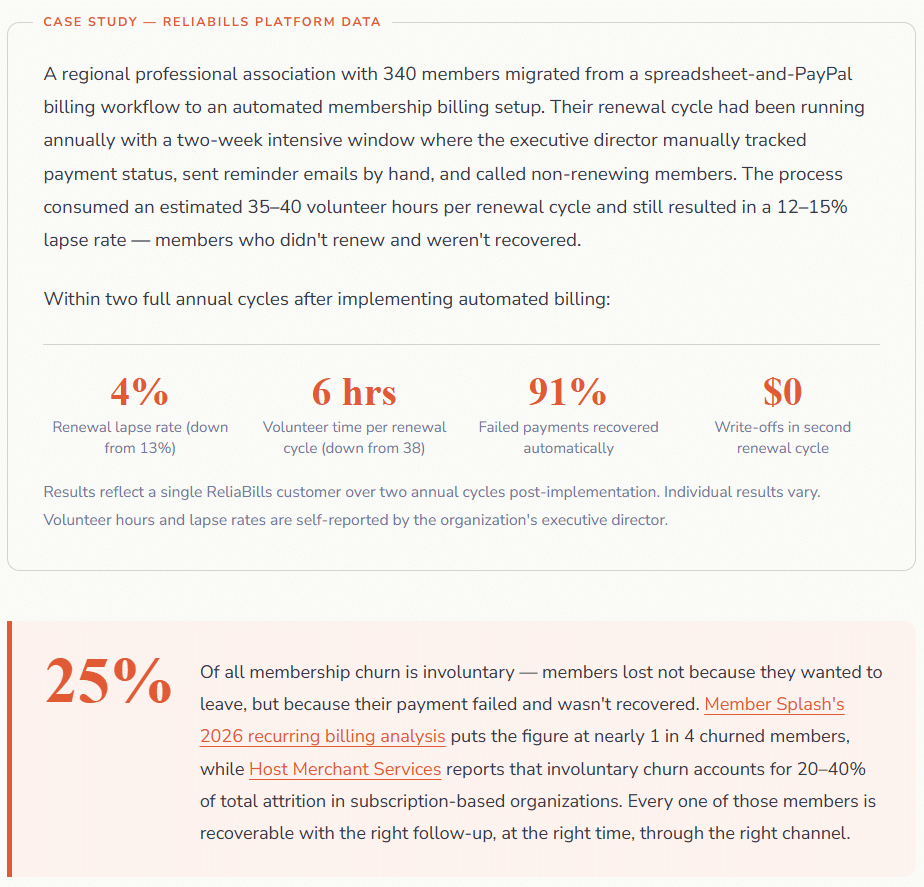
Retry logic, smart timing, decline-code routing, and multi-channel dunning. This is the feature that moves the most money. Platforms that recover 85%+ of failed payments versus 55% for manual-process organizations aren’t doing something exotic, they’re doing consistent, timely follow-up that human volunteers can’t sustain.
Priority Feature 02: Card Account Updater
It automatically refreshes stored card details when a member’s card is reissued, before the charge attempt fails. Visa and Mastercard card lifespans average 14–21 months, meaning every member’s card will eventually expire. Updater services recover 60–80% of those failures automatically.
Priority Feature 03: Member Self-Service Portal
A portal where members update payment methods, download receipts, change tiers, and manage their own account without emailing the treasurer. Each self-service action is one fewer support request your volunteer admin handles. Estimate 3–5 minutes of admin time saved per interaction and multiply that across your membership annually.
Priority Feature 04: Proration Automation
Mid-cycle joins, tier changes, and family additions need to calculate partial charges correctly without manual math. Proration errors are a disproportionate source of member billing disputes, and billing disputes delay payment and erode trust simultaneously. Automated proration eliminates both.
Priority Feature 05: Real-Time AR Dashboard
A live view of current billing status across your membership, who’s paid, who’s overdue, which accounts are in dunning, and how this month’s collection rate compares to prior months. Replaces the manual spreadsheet reconciliation that most treasurers do in the week after billing runs.
Priority Feature 06: ACH / Bank Debit Support
ACH billing costs 0.5–1.5% per transaction versus 2.3–3.2% for card billing. For a 500-member organization at $50/month, the difference is $500–$1,000 per month in processing savings. ACH also has lower failure rates than cards for predictable, recurring charges. Platforms that support both give you flexibility; platforms that support only cards lock you into higher processing costs permanently.
Real-World Use Cases by Organization Type
Nonprofits and Professional Associations
For nonprofits managing annual membership dues, the billing cycle is often the highest-stress operational period of the year, a renewal window when hundreds of members need to be billed, reminded, and followed up with in a compressed timeframe. Organizations that handle this manually report their volunteers spending 15–30 hours in the weeks around renewal season on nothing but billing follow-up. Membership billing software compresses that to a report review and a handful of calls for the accounts that didn’t respond to automated follow-up. The recurring financial reporting also gives boards a cleaner picture of dues revenue than most spreadsheet-based tracking produces, linking naturally to an organization’s broader financial health, where financial reporting practices for service organizations apply directly.
Sports Clubs, Recreational Organizations, and Country Clubs
For organizations with tiered membership structures, individual, couple, family, junior, and senior billing complexity scales directly with tier count. A golf club managing five membership categories with different dues rates, initiation fees, and billing cycles is running a billing operation that manual spreadsheet management handles inconsistently at best. The most common failure mode here is proration: a family that adds a second adult mid-year and gets incorrectly charged the full annual rate, creating a dispute that sours the relationship before it fully forms. Automated proration, configured correctly at onboarding, eliminates this entire class of error.
HOAs and Community Organizations
Homeowner associations have a billing structure that differs meaningfully from most membership organizations: the dues are often legally binding, the member database is tied to property ownership (which changes without notice), and the billing frequency may be monthly, quarterly, or annual depending on the community’s governing documents. HOA billing software specifically addresses property-owner-as-member data management, but the billing fundamentals, automated recurring charges, failed payment recovery, and self-service payment portals are identical to any membership billing setup. The main configuration difference is that cancellation logic is replaced by ownership-change logic.
Key Benefits for Clubs and Organizations
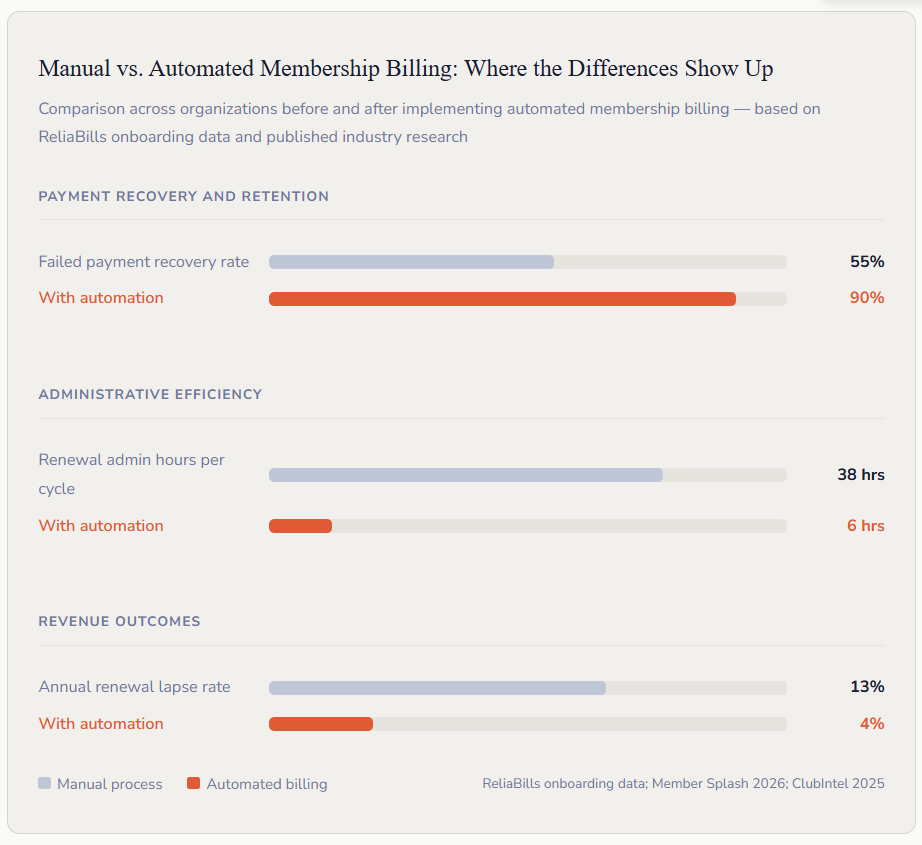
The time savings are the most immediately visible benefit, but they compound in ways that matter beyond the treasurer’s schedule. When your billing runs reliably and your financial reports are current, your board makes better budget decisions. When members can manage their own accounts through a self-service portal, the administrative bottleneck of “email the treasurer” dissolves, and member experience improves alongside it. And when failed payments are recovered automatically, your renewal conversation with a member about their lapsed account happens far less often, which is better for everyone.
For volunteer-led organizations specifically, the consistency benefit is the most underappreciated one. Manual billing depends on the person running it, their availability, their memory, and their willingness to chase members they know personally. Automation applies the same follow-up sequence to every member, every cycle, regardless of personal relationships or volunteer capacity that month. That consistency is what makes the recovery rate climb and stay there.
Key Risks and What to Watch For
Membership billing automation creates failure modes that are specific to automation, and most buying guides skip over them in favor of feature celebration.
Transaction fee structures that erode value at scale.
Some platforms charge a percentage transaction fee on top of your payment processor’s fee. MembershipWorks’ 2026 comparison guide specifically flags this: JoinIt adds a 3% platform fee on its lowest-tier plan; Wild Apricot imposes a 20% subscription price increase if you don’t use their preferred payment gateway. For an organization processing $50,000 per year in dues, a 3% platform fee is $1,500 annually, not visible in the headline subscription price but very visible in your actual net dues collected. Always calculate the total cost including transaction fees before committing to a platform.
Over-purchasing features your organization won’t use.
A hobby club with 80 members and annual flat-rate dues does not need a multi-chapter billing hierarchy, a drag-and-drop website builder, or an AI-assisted member engagement scoring tool. Every feature layer above what you actually need adds configuration complexity, implementation time, and often cost. The right platform for your organization is the simplest one that handles dues collection reliably, recovers failed payments automatically, and produces a clean financial report. Everything else is either a bonus or overhead.
Data migration underestimation.
The software implementation itself is typically fast. Moving your existing member records, contact data, payment method tokens, billing history, and membership tier assignments into the new system is where timelines slip. Organizations that skip a thorough pre-migration data audit import duplicates, stale records, and incorrect tier assignments that create billing errors from day one. Treat data cleanup as phase one of implementation, not a parallel task.
Membership Billing Software vs. Related Platforms
| Platform Type | What it covers | Billing automation included? | Best fit |
|---|---|---|---|
| Membership Billing Software | Dues collection, failed payment recovery, renewal automation, member financial records | ✓ Core function | Organizations that need billing to run itself and produce clean financial reports |
| Full Membership Management Suite | Billing + member directory, events, website, email, communication tools | ✓ Included | Organizations that want one platform for all operations; higher cost and complexity |
| Recurring Billing Platform | Automated scheduled charges, failed payment recovery, dunning sequences | ✓ Core function | Organizations that already have a member database and just need billing automation added |
| Invoicing Software | Creating and delivering billing records for one-time or project-based charges | ⚡ Partial | Supplemental billing for non-dues charges (event fees, merchandise, assessments) |
| General-Purpose CRM | Contact management, pipeline tracking, communication history | ✗ No | Member relationship tracking requires separate billing integration |
| Accounting Software (QuickBooks, Xero) | Financial recording, reconciliation, tax reporting | ✗ No | The financial record layer that billing software should feed into, not replace |
| Installment Billing | Splitting a larger charge (initiation fee, annual dues) into scheduled partial payments | ⚡ Use case | Annual membership programs where a monthly installment option increases conversion |
What I Got Wrong at First, Common Setup Mistakes
Mistake 1: Choosing a platform based on the member directory and website features, not on payment recovery
The most common evaluation mistake is optimizing for the features that appear in demos, the slick member portal, the drag-and-drop event calendar, and the email template builder and treating billing as a checkbox. Payment failure recovery is the feature that most directly determines how much dues revenue your organization collects annually. Ask every platform vendor specifically, “What is your average payment recovery rate?” What retry intervals do you use? What decline codes trigger which responses? If they can’t answer clearly, the billing engine is not a priority for them, which means it shouldn’t be a platform you choose for billing.
✓ Fix: Make payment failure recovery your first evaluation criterion. Request a demo specifically of the dunning sequence, the retry logic, and the card account updater integration. Compare those specifics across shortlisted platforms before looking at anything else.
Mistake 2: Migrating member data without auditing it first
Every organization has member database debt: duplicate records from people who signed up twice, lapsed members who were never removed, contact information that hasn’t been updated in three years, and billing tier assignments that no longer match the current pricing structure. Importing that data directly into a new billing system imports all of those errors too, and the billing system will faithfully execute on them. Members who should have been removed get charged. Former members who moved get dunning emails. Duplicate records produce double billing.
✓ Fix: Allocate a dedicated week before any software configuration to audit and clean your member database. At minimum: remove duplicates, mark lapsed members as inactive, verify contact emails for every active member, and confirm tier assignments. The implementation will be faster and cleaner, and your first billing cycle won’t generate a wave of confused member calls.
Mistake 3: Setting a dunning sequence that mirrors a sales email in tone
The automated follow-up messages that go to members after a failed payment are billing communications, not marketing emails. Organizations that write them in a chipper, sales-forward voice (“We noticed your payment didn’t go through, let’s get you sorted!”) create a tone mismatch that members read as dismissive of a real concern. The opposite problem, an overly formal or threatening tone on a day-one follow-up, creates unnecessary anxiety. Most members whose payment fails had no idea it happened; they’re not avoiding payment. The correct tone for day one is clear, factual, and genuinely neutral: here’s what happened, and here’s the secure link to resolve it.
✓ Fix: Write your dunning sequence messages specifically for the most common real scenario, a long-standing member whose card expired without them realizing it. Friendly and informative on day one. Clear and direct on day three. Firm but professional on the final notice. Have two people outside your organization read each message cold and tell you what they’d feel receiving it. Revise accordingly before going live.
Mistake 4: Not testing the full billing cycle end-to-end before go-live
Most organizations test that invoices generate and that a payment goes through. They don’t test what happens when a payment fails. whether the dunning sequence fires correctly, whether suppression stops it when payment is received, whether the member self-service link actually works, and whether the admin dashboard reflects the correct status. All of those things need to work correctly before your first live billing cycle, not after you discover they don’t via member complaints.
✓ Fix: Before activating any live billing, run a complete cycle test with a real account: successful charge, confirmation of receipt, then a deliberately failed charge, confirmation of dunning trigger, and confirmation that making a payment via the self-service link stops the dunning sequence within the same business day. Document every step. Only go live after every step passes.
How to Choose and Set Up Membership Billing Software
The setup sequence that consistently produces the smoothest outcomes has four phases. The most important rule is that phase one. defining your billing structure. must be completed before any software configuration begins.
Phase 1: Define your billing structure before touching software
Document every membership tier, its dues amount, its billing cycle (monthly, quarterly, or annual), and any discounts, prorations, or family account rules that apply. Define your renewal policy: is it automatic until cancelled, or does it require annual re-enrollment? Define your late fee policy and your default clause for non-payment. Write it out clearly enough that a new volunteer treasurer could administer it without calling anyone. This document becomes the specification for your software configuration.
Phase 2: Audit and clean your member database
Before importing anything, remove duplicate records, mark lapsed members as inactive, verify contact emails against your most recent communication (any undelivered emails are stale contacts), and confirm tier assignments match your current structure. For organizations migrating from spreadsheets, this is the step that takes longest and matters most.
Phase 3: Configure and test the full billing cycle
Set up your billing tiers, dunning sequence, payment suppression rule, and renewal workflow. Run the full cycle test described in Mistake 4 above before activating for any live members. For organizations using ReliaBills for recurring dues collection, the billing configuration includes the tier setup, the dunning sequence timing and channel selection, and the AR dashboard view, all configurable without developer support.
Phase 4: Review and optimize at 90 days
After three full billing cycles, pull your payment recovery rate, your renewal lapse rate, and the percentage of accounts that reached each stage of your dunning sequence. Compare against your pre-automation baseline if you have it. The metrics will tell you whether your dunning sequence is working or needs adjustment, most organizations find the day-one message and timing are the variables most worth optimizing first.
Frequently Asked Questions
1. What’s the difference between membership billing software and membership management software?
Membership billing software handles the financial and payment collection operations of a membership organization, dues automation, failed payment recovery, renewal billing, and financial reporting. Membership management software is the broader category that adds a member directory, event management, website builder, email communication tools, and other operational features. Some organizations need both; many smaller clubs and nonprofits need only the billing component. Buying a full management suite when you need only billing automation means paying for features you won’t use and configuring a system more complex than your operation requires.
2. How much does membership billing software cost?
Pricing varies widely, and the headline subscription price is often misleading. Platforms charge by subscription tier (ranging from free to $200+/month), by member database size, by transaction fee (0% to 3% on top of payment processing), or combinations of all three. The total cost of ownership for a 300-member organization might range from $600 to $3,600 per year depending on platform, billing model, and transaction volume. Always calculate the total annual cost including transaction fees at your expected billing volume, not just the monthly subscription price, before making a final decision. Platforms that appear free often generate revenue through transaction fees that become significant at scale.
3. Can membership billing software handle tiered pricing and family accounts?
Most dedicated membership billing platforms support tiered pricing natively, individual, couple, family, junior, and senior tiers, each with their own rate. Family account management (multiple members billed to a single responsible party) is supported by many platforms but varies in implementation quality. Key features to verify: can you apply different rates to different members within the same family account? Can you handle mid-cycle tier changes with automated proration? Can partial cancellations (one family member leaves, others remain) be processed without rebuilding the account? Get specific answers to each of these before committing to a platform if your organization uses tiered or family billing structures.
4. What’s the best way to handle members who consistently pay late?
Consistent late payment typically has one of three causes: the member’s card has recurring issues (expired or insufficient funds), the member’s payment is a genuine priority decision (they’re cash-constrained around billing dates), or the billing timing conflicts with the member’s own cash flow cycle. For the first, card account updater services and automatic retries solve most of the problems. For the second, offering an installment billing option, annual dues split into monthly payments, can convert a consistently late annual payer into a consistently on-time monthly payer. And for the third, some platforms allow members to shift their billing date within a window, which resolves timing conflicts without requiring any rate negotiation. Configure these options upfront rather than negotiating them individually each cycle.
5. How do I migrate from spreadsheet billing to membership billing software without disrupting members?
The migration that’s invisible to members is possible and should be the goal. Practical steps: time the migration to the end of a billing cycle, not the middle; clean your member database before importing; send members a brief notice that your billing system is being upgraded (framed as an improvement, not a disruption); and confirm that your dunning sequence and payment suppression rules are tested before activating live billing. The most common member-facing friction point is stored payment method re-authorization, some platforms require members to re-enter card details rather than transferring existing payment tokens. Verify your current platform’s token portability policy before choosing a new system, and build a payment re-authorization flow into your migration communications if it’s required.
6. Is membership billing software appropriate for very small clubs with under 50 members?
Yes, in fact, small clubs often get the most relative benefit because their volunteer administrators have the least capacity for manual billing work. The question for small clubs isn’t whether to automate but what level of platform complexity is appropriate. A 40-member club with flat annual dues needs recurring billing, automated renewal reminders, and basic failed payment recovery, not a multi-tier pricing engine or a full website builder. Several platforms offer free or very low-cost tiers designed for small organizations. The critical features at any size remain the same: reliable scheduled billing, automated payment failure recovery, and a self-service portal that reduces admin inquiries. Match the platform’s complexity to your actual membership structure rather than buying features you’re unlikely to configure.
Recent Articles:
- Property Management Billing Software: The Complete Guide for Landlords
- Customer Data Management for Service Businesses: Best Practices Guide

Brant Pallazza is the Founder and President of ReliaBills, an invoicing and recurring billing platform built to help small businesses secure predictable cash flow. With over 20 years of experience in direct response marketing and e-commerce leadership, including a 13-year tenure managing over $500 million in gross sales at Digital River. Brant writes actionable guides on automated billing, payment processing, and scaling SMBs.