

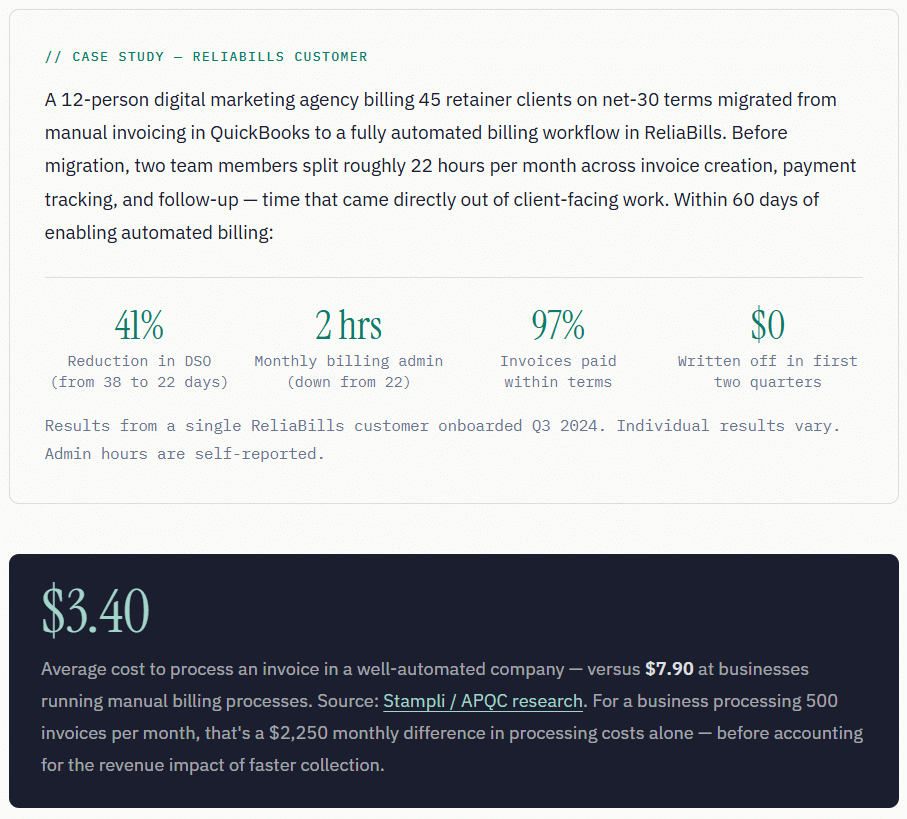
Automated billing software replaces manual invoice creation, payment tracking, and follow-up with rules-based workflows that run without human intervention at each step. The business case is straightforward: automated reminders collect 12–18 days faster than manual processes, bad debt write-offs drop by as much as 29%, and the average cost per invoice falls from $7.90 to $3.40. What most guides don’t tell you: the software isn’t the hard part. Cleaning up your billing process before you automate it is important. Automate a broken process and you get faster, more consistent mistakes.
What Is Automated Billing Software?
Automated billing software is a system that handles the full financial lifecycle of charging customers, from generating and delivering invoices to processing payments, recovering failed charges, and reconciling accounts, without requiring manual action at each step. Instead of a staff member creating each invoice, tracking each payment, and chasing each overdue account by hand, the software executes those tasks based on rules you define once and update as needed.
At its most basic, this means setting up recurring billing so customers are charged automatically on schedule. At its most complete, it includes usage-based billing, multi-currency support, tax compliance automation, intelligent dunning sequences for failed payments, and real-time cash flow reporting, all running without anyone on your team needing to act on individual transactions.
The distinction that matters most in practice: automated billing software is not just invoicing software. Invoicing software creates and delivers billing records. Automated billing software manages what happens before the invoice (pricing rules, contract terms) and after it (payment collection, follow-up, reconciliation). It’s the full revenue collection cycle, not just the document that describes it.
How Automated Billing Software Works
Most guides describe automated billing as a feature list, recurring charges, automated reminders, and payment tracking. What they rarely explain is the underlying logic that connects those features into a system that actually runs itself. Here’s the full invoice-to-cash cycle as it operates inside a properly configured automation setup:
1. Customer data and pricing rules are set once
When a customer is onboarded, their contact details, payment terms, billing cadence, and pricing are entered into the system. From that point forward, the system references these records for every billing cycle, no re-entry is required. For subscription customers, this is where the recurring billing schedule is established.
2. Invoices are generated and delivered automatically
On the scheduled date, the software pulls the relevant line items, applies the correct pricing, taxes, and discounts, and generates a properly formatted invoice. It’s delivered to the customer via email, portal, or EDI, without anyone on your team initiating it. For complex billing models (usage-based, tiered, and milestone), the system calculates charges from integrated data sources.
3. Pre-due reminders go out on a configured schedule
A well-configured billing system sends a reminder 5–7 days before the due date, before the customer has missed anything. Research from Credit Pulse (2025) found that automated reminders outperform manual follow-up by 12–18 days on average DSO. This single step, consistently skipped in manual processes, is often the highest-ROI action in the entire workflow.
4. Payment is processed and matched automatically
Customers who pay online or via stored payment method are charged without staff intervention. The payment is logged, matched to the open invoice, and reconciled in your accounting system. A receipt goes to the customer. The invoice is marked closed. The entire sequence takes seconds and requires zero human action.
5. Failed payments trigger the dunning sequence
When a payment fails, the system classifies the decline (soft vs. hard) and responds accordingly. Soft declines trigger an automatic retry within 24–48 hours. Hard declines immediately send the customer a secure payment-update link. Multi-channel follow-up, email, then SMS, runs on a timed schedule until the account resolves or escalates to manual review.
6. Unresolved accounts surface for human action
Only accounts that don’t resolve through the automated sequence, typically a small percentage of the total, get routed to a staff member, with a complete outreach history attached. This is the model: automation handles the high-volume routine work; your team handles the edge cases that genuinely require judgment.
7. Reporting updates in real time
At any point, your billing dashboard shows current DSO, aging balances, collection rate, and month-over-month trends, without anyone generating a report. This visibility is itself a revenue protection tool: patterns that would have taken weeks to surface in spreadsheets become visible in days, early enough to act on them.
Real-World Use Cases
Professional Services: Agencies, Consultants, Law Firms
For service businesses billing on net-30 or net-45 terms, the problem isn’t non-payment, it’s the compounding effect of late payment across a portfolio of clients. When 30 clients each pay 15 days late, that’s the equivalent of two weeks of revenue perpetually sitting in open invoices. Automated pre-due reminders, consistent follow-up cadences, and a collections workflow that fires without anyone’s involvement compress that lag significantly. For businesses already using invoicing software, the shift to automated billing typically means adding payment collection rules and a dunning sequence on top of the invoicing they already have configured.
SaaS and Subscription Businesses
The defining billing challenge for subscription businesses is failed payment recovery, and it compounds faster than most founders realize. A 5% monthly failure rate on a 1,000-customer base means 50 failed charges every billing cycle. Without automation, recovering those 50 accounts requires 50 individual follow-ups. With a properly configured dunning sequence, research on AR automation (2025) indicates businesses recover significantly more failed payments while cutting bad debt write-offs by as much as 29%. The math compounds over a year in a way that makes billing automation one of the highest-ROI investments a subscription business can make.
B2B Manufacturers and Distributors
High transaction volume, complex pricing tiers, and customers with extended payment terms make manual billing genuinely untenable at any meaningful scale. The hidden cost in these businesses isn’t just admin time, it’s the invoice errors that create disputes, reset payment clocks, and add 5–10 days of DSO per disputed transaction. Credit Pulse’s 2025 DSO benchmarking data shows that a 3–5% invoice error rate adds 5–10 days to per-invoice collection time. Automated billing eliminates that error rate at the source.
Key Benefits of Automated Billing Software
The time savings are real, but they’re also the most frequently overstated benefit. The less-discussed advantages tend to compound in ways that matter more over time:
Faster cash collection, not just faster invoicing.
The reason automated billing shortens DSO isn’t just that invoices go out faster, it’s that the entire sequence from invoice to payment is compressed. Pre-due reminders reach customers before they’ve mentally moved on. On-schedule follow-up keeps overdue accounts from aging into the 60+ day bucket, where collection rates drop sharply. Credit Pulse’s 2025 data puts it directly: first contact within 48 hours of a missed payment achieves a 65% collection success rate. Wait two weeks and that rate drops to 15%.
Error elimination at the source.
Billing errors in manual systems happen during data entry, rate calculation, and discount application. Automated billing doesn’t re-enter data, it reads it from the customer record and applies the contract terms exactly. APQC estimates a 2% annual error rate for manual invoice processing. Every billing dispute that results from an error restarts the payment clock.
Consistency that doesn’t depend on who’s working that day.
In a manual billing process, consistency depends on the person running it, their attention, their memory, and whether they’re covering for a colleague who’s out. Automation applies the same follow-up sequence to every account, every cycle, regardless of team workload. Accounts that would have fallen through the cracks because of a busy month simply don’t.
Scalability without proportional headcount growth.
When your customer base doubles, manual billing headcount typically has to double with it. Automated billing scales without adding staff, the workflow handles more accounts by running more instances of the same process. This is particularly meaningful for businesses in growth phases where adding finance headcount is constrained.
Key Risks and What to Watch For
Automated billing software has a compelling ROI, but it introduces failure modes that are specific to automation, and most onboarding guides skip over them entirely.
Automation amplifies process problems rather than solving them.
If your pricing structure has inconsistencies, if customer records have duplicates, or if your payment terms are applied differently across client types, automation will execute on those inconsistencies at scale. A billing error that happened occasionally in a manual process becomes a billing error that happens to every affected customer, in every cycle, until someone notices and fixes the underlying rule.
Integration failures create billing gaps.
The value of automated billing depends heavily on clean data flow between your CRM or customer management system and your billing platform. If a customer changes their email address in one system but not the other, invoices go to the wrong address, and payment never comes, but your system shows the invoice as delivered. Without periodic data audits, these gaps accumulate silently.
Compliance exposure in consumer billing contexts.
For businesses billing consumers (as opposed to B2B), automated communication frequency, content, and timing are regulated by the Fair Debt Collection Practices Act (FDCPA) and state-level equivalents. Building compliance review into your dunning sequence configuration before launch, not after a complaint, is the correct sequence.
Automated Billing vs. Related Concepts
| Concept | What it covers | Part of billing automation? | When it applies |
|---|---|---|---|
| Automated Billing Software | Full invoice-to-cash cycle: generation, delivery, payment, follow-up, reconciliation | — | Any business with recurring or volume billing |
| Invoicing Software | Creating and delivering invoice documents | ⚡ Component | The generation/delivery layer; billing automation adds collection logic on top |
| Recurring Billing | Automatic charges on a defined schedule (monthly, annual) | ⚡ Component | The scheduling layer; essential for subscription and retainer businesses |
| Installment Billing | Splitting a larger charge into scheduled partial payments | ✓ Use case | Annual contracts, large project fees, high-ticket purchases |
| Dunning Management | Automated recovery sequence for failed or overdue payments | ⚡ Component | Embedded in any complete billing automation, not a separate product |
| Accounts Receivable (AR) Software | Full AR lifecycle: invoicing, collections, dispute resolution, aging reports | ✓ Overlaps broadly | AR automation is the broader category; billing automation is its operational core |
| Payment Gateway | The infrastructure that processes card/ACH transactions | ✓ Infrastructure layer | Sits underneath billing software; billing automation orchestrates it |
What I Got Wrong at First: Common Setup Mistakes
Mistake 1: Automating before standardizing
The most common version of this: a business has three types of net-30 clients, two types of net-45 clients, one grandfathered client on net-60, and a handful using “pay within 30 days of project completion” as an informal term. Each exception requires a separate rule. Every exception that doesn’t get a rule creates an account that either bills incorrectly or doesn’t bill at all until someone notices.
– Fix: Before touching any software settings, consolidate your payment terms to the minimum number of categories your business actually needs. Document every exception explicitly. If an exception doesn’t justify its own rule, it’s probably a legacy artifact that should be resolved with the customer before migration.
Mistake 2: Configuring the dunning sequence before testing payment suppression
The dunning sequence is the part everyone focuses on configuring. Payment suppression, the rule that stops all follow-up the moment a payment is received, is the part everyone forgets to test. The failure mode is predictable: a customer pays, the payment takes 12 hours to process, and the day-one overdue email fires in the gap. The customer calls, annoyed. Someone on your team has to explain it. Trust takes a small hit.
– Fix: Before activating any dunning sequence with real customers, run a live payment through a test account and confirm the sequence stops within the same business day. Document the suppression lag and configure your day-one email trigger to fire at 24 hours past due, not midnight on the due date.
Mistake 3: Applying the same dunning cadence to all customers regardless of relationship
An automated day-after-due-date reminder sent to a client who’s been with you for six years and is two days late because of a bank holiday is a relationship signal. Not a good one. The automation can’t distinguish between that client and a new one with a pattern of late payments unless you configure it to. Most businesses don’t configure it and end up creating friction with their best clients while the problematic ones remain unaffected.
– Fix: Create at minimum two dunning tracks: a standard track for newer or higher-risk accounts, and a “relationship” track for long-tenure or high-value clients where the first automated message is softer in tone and fires later. Flag accounts for the appropriate track during customer setup, not retroactively.
Mistake 4: Treating migration as a technical task rather than a data task
The software implementation itself is usually fast. The data migration, getting accurate customer records, correct payment terms, historical balances, and payment method tokens into the new system, is where projects stall. Businesses that underestimate this either rush it and carry errors forward or delay go-live waiting for data to be “ready” (it’s never fully ready). Both outcomes cost more time than a methodical pre-migration data audit would have.
– Fix: Treat data cleanup as phase one of the implementation, not a parallel task. Dedicate a week before any software configuration to auditing customer records, resolving duplicates, and confirming payment terms. The cleaner your inputs, the less you’ll need to touch the configuration after go-live.
How to Get Started with Automated Billing Software
The right sequence matters more than the right software. Here’s the order that consistently produces the smoothest implementations:
Step 1: Quantify what manual billing is actually costing you
Before evaluating any software, calculate your current DSO, count the hours your team spends on billing-related admin per month, and estimate your failed payment recovery rate. These numbers are your baseline, without them, you can’t measure the impact of whatever you implement, and you’re buying on faith rather than ROI.
Step 2: Standardize your billing structure
Define your payment terms, your membership or service tiers, your late fee policy, and your escalation thresholds before you open the software. The software executes your rules; if the rules aren’t clear, the software can’t help you. This is also the moment to rationalize any legacy exceptions that should have been resolved years ago.
Step 3: Choose your platform based on the collection lifecycle, not the invoice design
Most businesses evaluate billing software on the invoice template, the dashboard design, or the brand they’ve heard of. The questions that actually determine ROI: What does failed payment recovery look like specifically? What’s the dunning sequence logic, and how configurable is it? How does payment suppression work? How does it integrate with your existing customer management system? For small and mid-size businesses that want full billing automation without enterprise complexity, ReliaBills covers the complete invoice-to-cash cycle, including recurring billing, dunning, and reconciliation, without requiring a developer or a finance team to configure it.
Step 4: Configure, test, then go live in phases
Set up your billing rules and dunning sequence. Run a controlled test with 10–15 real accounts for one full billing cycle before activating the system broadly. Specifically test: invoices generating on the correct dates, payment suppression stopping the dunning sequence correctly, failed payment follow-up firing at the right intervals, and all replies routing to a monitored inbox.
Step 5: Measure and optimize at 60 days
After two full billing cycles, pull your DSO, your collection rate, and the percentage of accounts reaching each dunning stage. Compare against your pre-automation baseline. Identify the dunning stage where the most accounts are resolving, that’s typically where message optimization produces the best return. Most businesses find one messaging adjustment in months two or three that cuts resolution time by several days.
Frequently Asked Questions
1. What’s the difference between automated billing software and invoicing software?
Invoicing software creates and delivers billing documents. Automated billing software manages the full revenue collection lifecycle, what happens before the invoice (pricing rules and contract terms), after it (payment collection, dunning, and reconciliation), and the recurring scheduling of future invoices. Think of invoicing software as a component inside automated billing, not a substitute for it. If you’re manually following up on unpaid invoices from your invoicing software, you’re doing billing automation by hand.
2. How quickly will I see results after implementing automated billing?
Most businesses see measurable DSO improvement within the first full billing cycle, typically 30 days. The biggest early gain usually comes from pre-due reminders, which start producing faster payments immediately. Failed payment recovery improvements compound over two to three cycles as the dunning sequence has time to work through the initial backlog of accounts. Admin time reduction is immediate: the hours your team was spending on manual follow-up drop from the first week of operation. At 60 days, you’ll have enough data to identify which parts of your setup are performing and where to optimize.
3. Is automated billing appropriate for small businesses or just enterprises?
Small businesses typically benefit more in relative terms, because the manual billing burden falls directly on the owner or a very small team. The cost per invoice of manual processing ($7.90 vs. $3.40 automated) doesn’t change based on company size, and the time a founder spends on billing admin is time not spent on growth. The practical consideration is choosing a platform that matches your current complexity, not one sized for enterprise workflows you don’t have. A small business with straightforward billing needs doesn’t need a multi-currency, multi-entity billing engine, it needs recurring charges, automated reminders, and a dunning sequence that runs without manual intervention.
4. Will automated billing emails feel impersonal to my customers?
Not if configured correctly. The businesses that create impersonal customer experiences with automated billing are usually those applying the same tone and timing to every customer regardless of relationship history or those sending reminders that arrive after the customer has already paid. Automated billing that uses the customer’s first name, references their specific invoice number and amount, arrives on a reasonable schedule, and stops immediately when payment is received reads as organized and professional,not cold. The relationship risk comes from failing to differentiate high-tenure, high-value clients from the standard sequence, which is a configuration decision, not an inherent limitation of automation.
5. Can automated billing handle variable pricing, usage-based charges, or project milestones?
Yes, though capability varies significantly by platform. Most small-business billing platforms handle recurring fixed-price memberships and simple one-time invoices well. Usage-based billing, where charges depend on consumption data from a product or service, requires a platform that can ingest usage data and apply pricing tiers. Project milestone billing typically works through installment billing configurations, where a larger project fee is split into scheduled partial charges tied to delivery events. See the ReliaBills guide to Installment Billing for more on how milestone-based billing is structured.
6. What happens to customer relationships during a billing platform migration?
Migrations that are invisible to customers are possible and should be the goal. In practice, this means migrating at the end of a billing cycle (not mid-month), sending a brief heads-up communication to customers noting that your billing system is being upgraded, and confirming that invoice formatting and payment processes remain familiar. The most common customer-facing friction point during migrations is stored payment method re-authorization, some platforms require customers to re-enter their payment details rather than transferring tokenized card data. Verify how your current platform handles token portability before committing to a migration timeline.
Recent Articles:
- The Complete Guide to Billing Software for Small Service Businesses
- Top 7 Alternatives to QuickBooks for Recurring Billing

Brant Pallazza is the Founder and President of ReliaBills, an invoicing and recurring billing platform built to help small businesses secure predictable cash flow. With over 20 years of experience in direct response marketing and e-commerce leadership, including a 13-year tenure managing over $500 million in gross sales at Digital River. Brant writes actionable guides on automated billing, payment processing, and scaling SMBs.