
Non-commercial invoices are a critical yet often overlooked part of business operations. They are commonly used for internal billing, product samples, donations, intercompany transfers, and other non-revenue transactions. While they don’t directly generate income, they still require proper documentation, tracking, and compliance.
Managing these invoices manually can create a significant administrative burden. Teams often spend hours on repetitive data entry, approvals, and record-keeping, which diverts attention from more strategic tasks. Over time, these inefficiencies can slow operations and increase the risk of errors.
This is where automation becomes essential. Businesses that automate non commercial invoices can streamline workflows, reduce manual effort, and improve accuracy. By leveraging digital tools and recurring billing systems, organizations can transform a time-consuming process into an efficient, scalable operation.
What Are Non-Commercial Invoices?
Non-commercial invoices are documents used to record transactions that do not involve a direct sale or revenue generation. They serve as a formal record for goods or services exchanged without a financial transaction or for internal accounting purposes. These invoices are still important for tracking inventory, compliance, and auditing.
Unlike commercial invoices, which are issued for customer sales and include payment terms, non-commercial invoices focus on documentation rather than payment collection. They often include details such as product descriptions, quantities, and internal references rather than pricing for external customers.
Examples of non-commercial invoices include sample shipments sent to prospects, warranty replacements for defective products, internal cost allocations between departments, and charitable distributions. Even without revenue, these transactions must be accurately recorded and managed.
Why Non-Commercial Invoices Create Administrative Burden
Manual Data Entry and Repetitive Documentation Tasks
Teams often have to input the same information across multiple systems, such as inventory, accounting, and internal records. This repetitive work consumes significant time and increases the likelihood of inconsistencies. As transaction volumes grow, manual entry becomes unsustainable and slows overall operations.
Lack of Standardized Processes Across Departments
Different teams may follow varying procedures for creating and approving non-commercial invoices. This lack of uniformity leads to confusion, delays, and duplicated efforts. Without standardization, maintaining accuracy and accountability becomes more difficult.
Increased Risk of Errors and Inconsistencies
Manual processes are prone to mistakes such as missing fields, incorrect quantities, or duplicated entries. These errors can lead to discrepancies in financial records and reporting. Resolving these issues requires additional time and can disrupt workflows.
Time-Consuming Approval and Record-Keeping Workflows
Non-commercial invoices often require multiple approvals, which can create bottlenecks. Tracking approvals manually adds complexity and delays completion. Maintaining organized records without automation further increases administrative workload.
Difficulty Tracking and Auditing Non-Revenue Transactions
Without centralized systems, it is challenging to monitor the status of non-commercial invoices in real time. This lack of visibility complicates audits and compliance checks. Businesses may struggle to retrieve accurate records when needed.
How Automation Reduces Administrative Work
Automation transforms how businesses handle non-commercial invoices by eliminating repetitive tasks. Invoices can be generated automatically using predefined templates and rules, ensuring consistency across all transactions. This reduces the need for manual input and speeds up the entire process.
By standardizing workflows, automation ensures that invoices follow the same approval and documentation procedures every time. This consistency minimizes delays and improves collaboration between departments. It also reduces confusion and errors in processing.
When businesses automate non commercial invoices, they gain better visibility into transaction status and records. Real-time tracking allows teams to monitor progress, identify bottlenecks, and ensure compliance. This leads to faster processing and more efficient operations overall.
Key Features of Automated Non-Commercial Invoicing Systems
Customizable Invoice Templates for Non-Commercial Use Cases
Automated systems allow businesses to create templates tailored to specific scenarios such as samples, donations, or internal transfers. This ensures all required fields are consistently included. It also reduces the need to recreate documents from scratch each time.
Workflow Automation and Approval Routing
Invoices can be automatically routed to the correct approvers based on predefined rules. This eliminates manual follow-ups and reduces delays in the approval process. It also ensures accountability and transparency at every stage.
Integration with ERP and Accounting Systems
Seamless integration ensures that invoice data flows directly into financial and inventory systems. This eliminates duplicate data entry and improves overall accuracy. It also enhances visibility across departments.
Real-Time Tracking and Reporting
Businesses can monitor invoice status, approvals, and transaction history instantly. This visibility allows teams to identify bottlenecks and improve efficiency. Real-time reporting also supports better decision-making.
Audit Trails for Compliance and Record-Keeping
Automated systems maintain detailed logs of all actions taken on each invoice. This creates a reliable audit trail for compliance and regulatory purposes. It also simplifies record retrieval during audits.
Bulk Invoice Generation for Recurring Internal Transactions
Organizations can generate multiple invoices simultaneously for recurring processes. This significantly reduces manual workload and ensures consistency. It is especially beneficial for high-volume internal operations.
The Role of Recurring Billing in Non-Commercial Invoicing
Recurring billing is not limited to revenue-generating transactions—it also plays a key role in non-commercial invoicing. Many internal processes, such as cost allocations or intercompany transfers, occur on a regular schedule. Automating these recurring transactions ensures they are processed consistently without manual effort.
By setting up recurring billing rules, businesses can automatically generate invoices at predefined intervals. This eliminates the need for repeated data entry and reduces the risk of missed transactions. It also ensures that all internal activities are properly documented.
When organizations automate non commercial invoices with recurring billing, they reduce oversight requirements and improve operational efficiency. Teams can focus on higher-value tasks while the system handles routine processes reliably.
Best Practices for Automating Non-Commercial Invoices
Standardize Invoice Categories and Documentation Requirements
Clearly defining invoice types ensures consistency across all departments. This reduces confusion and improves accuracy in processing. Standardization also simplifies reporting and compliance efforts.
Set Up Automated Workflows for Approvals and Processing
Establishing predefined approval paths ensures invoices move efficiently through the system. Automation reduces delays and eliminates the need for manual tracking. It also improves accountability and transparency.
Integrate Invoicing with Existing Financial Systems
Connecting invoicing tools with ERP and accounting platforms ensures seamless data flow. This reduces duplication and improves data accuracy. Integration also enhances overall financial visibility.
Regularly Review and Update Automation Rules
Business processes evolve, so automation rules should be reviewed periodically. Updating workflows ensures they remain aligned with current needs. Continuous optimization improves long-term efficiency.
Train Teams to Adopt and Manage Automated Systems Effectively
Proper training ensures employees understand how to use automation tools efficiently. This increases adoption rates and reduces resistance to change. Well-trained teams can fully leverage automation benefits.
How Automation Improves Accuracy and Compliance
Automation significantly reduces human error in invoice creation. By relying on predefined templates and rules, businesses can ensure that all invoices are accurate and consistent. This minimizes discrepancies and improves data reliability.
Compliance is also enhanced through standardized documentation and built-in audit trails. Automated systems ensure that all required information is captured and stored properly. This makes it easier to meet regulatory requirements and avoid penalties.
Additionally, automation simplifies audit preparation by organizing records and providing real-time access to data. Businesses can quickly retrieve information and generate reports when needed. This reduces stress and improves audit readiness.
Key Benefits of Automating Non-Commercial Invoices
Reduces Administrative Workload and Manual Effort
Automation eliminates repetitive tasks, freeing up time for more strategic activities. This improves productivity and reduces employee burnout. Teams can focus on higher-value work instead of routine processes.
Improves Accuracy and Consistency
Standardized templates and automated processes minimize errors. This ensures all invoices are consistent and reliable. Improved accuracy supports better financial reporting and decision-making.
Speeds Up Processing and Approvals
Automated workflows accelerate invoice creation and approval cycles. This reduces delays and improves operational efficiency. Faster processing leads to smoother business operations.
Enhances Visibility and Tracking
Real-time tracking provides insights into invoice status and transaction history. This improves transparency and accountability across departments. It also helps identify and resolve issues quickly.
Strengthens Compliance and Audit Readiness
Automated systems maintain detailed records and audit trails. This ensures compliance with regulations and simplifies audits. Businesses can operate with greater confidence and reduced risk.
Common Use Cases
Internal Cost Allocations Between Departments
Companies often distribute shared costs across departments for accurate accounting. Automating these invoices ensures consistency and reduces manual effort. It also improves transparency in internal financial management.
Sample or Promotional Product Shipments
Businesses send samples to prospects without charging them, requiring proper documentation. Non-commercial invoices track these transactions for inventory and reporting purposes. Automation simplifies this process and ensures accuracy.
Warranty Replacements and Service Adjustments
Replacing defective products or making service adjustments requires clear documentation. Automated invoicing ensures these transactions are recorded correctly. This supports both customer service and compliance.
Intercompany Transfers Within Organizations
Large organizations frequently move goods or services between subsidiaries. Non-commercial invoices help track these transfers accurately. Automation ensures consistency and reduces administrative workload.
Donation or Non-Revenue Distributions
Companies often provide goods or services for charitable purposes. Proper documentation is essential for compliance and reporting. Automated systems make it easier to manage and track these transactions.
How ReliaBills Helps Automate Non-Commercial Invoicing
Managing non-commercial invoices manually can quickly become time-consuming and error-prone, especially when dealing with internal transactions, samples, or intercompany transfers. ReliaBills simplifies this process by automating invoice creation, delivery, and tracking in one centralized platform. This allows businesses to reduce administrative workload, improve accuracy, and maintain consistent documentation across all non-revenue transactions.
Recurring billing plays a critical role in streamlining repeat internal processes, and ReliaBills is designed to handle these efficiently. Businesses can automate scheduled invoicing for recurring non-commercial activities such as cost allocations or internal billing cycles, ensuring nothing is missed. With features like auto-generation, auto-pay configurations (where applicable), and automated reminders, companies can significantly reduce manual input and keep operations running smoothly.
For businesses looking to scale, ReliaBills PLUS offers advanced automation, detailed reporting, and enhanced workflow management tools. These features provide deeper visibility into internal transactions and allow teams to optimize processes continuously. By leveraging ReliaBills, organizations can automate non commercial invoices more effectively while improving efficiency, compliance, and overall operational control.
How to Create a New Recurring Invoice Using ReliaBills
Creating a New Recurring Invoice using ReliaBills involves the following steps:
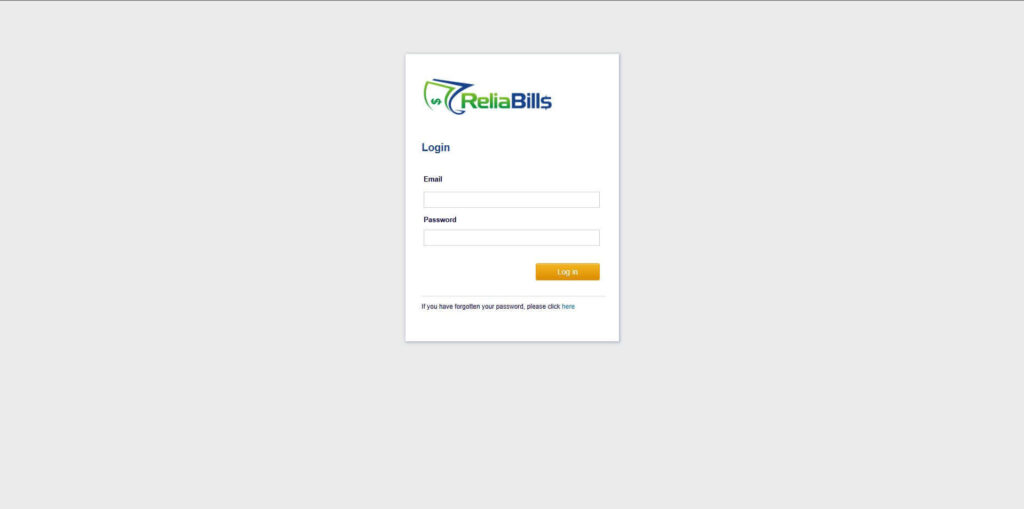
Step 1: Login to ReliaBills
- Access your ReliaBills Account using your login credentials. If you don’t have an account, sign up here.
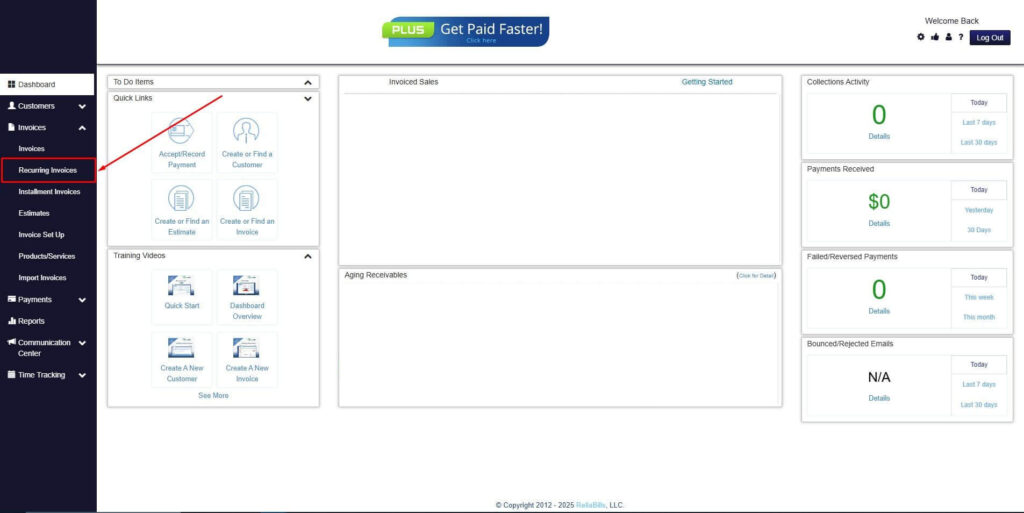
Step 2: Click on Recurring Invoices
- Navigate to the Invoices Dropdown and click on Recurring Invoices for an overview of the list of your existing customers.
Step 3: Go to the Customers Tab
- If you have already created a customer, search for them in the Customers tab and make sure their status is “Active”.
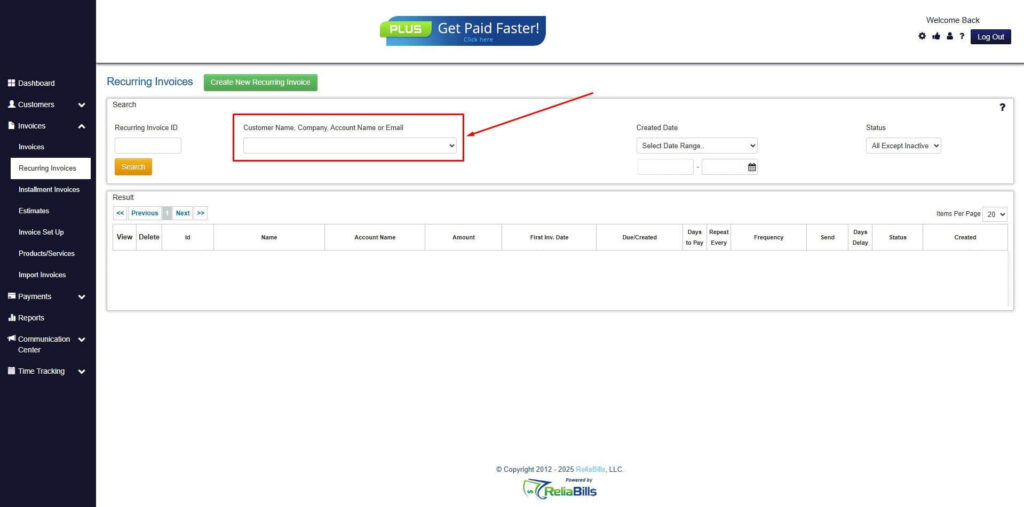
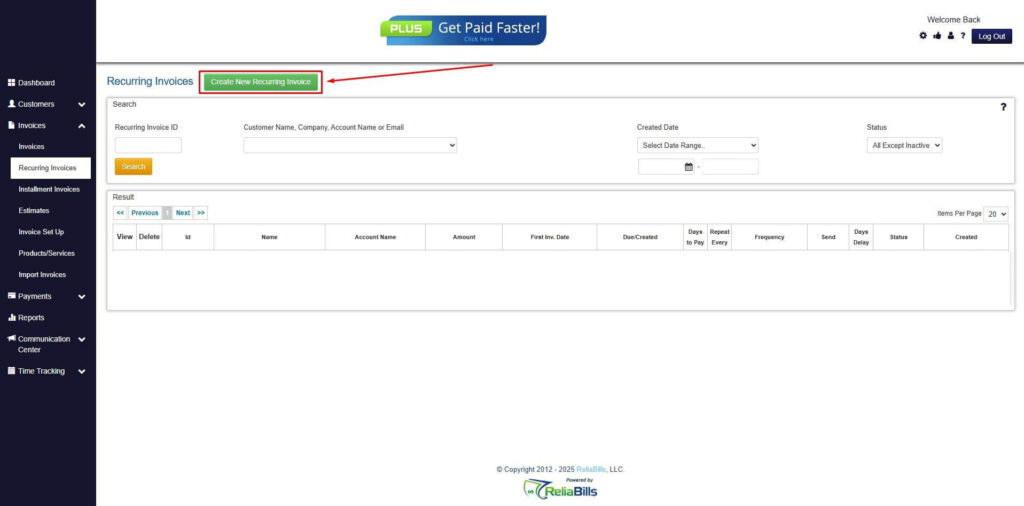
Step 4: Click the Create New Recurring Invoice
- If you haven’t created any customers yet, click the Create New Recurring Invoice to create a new customer.
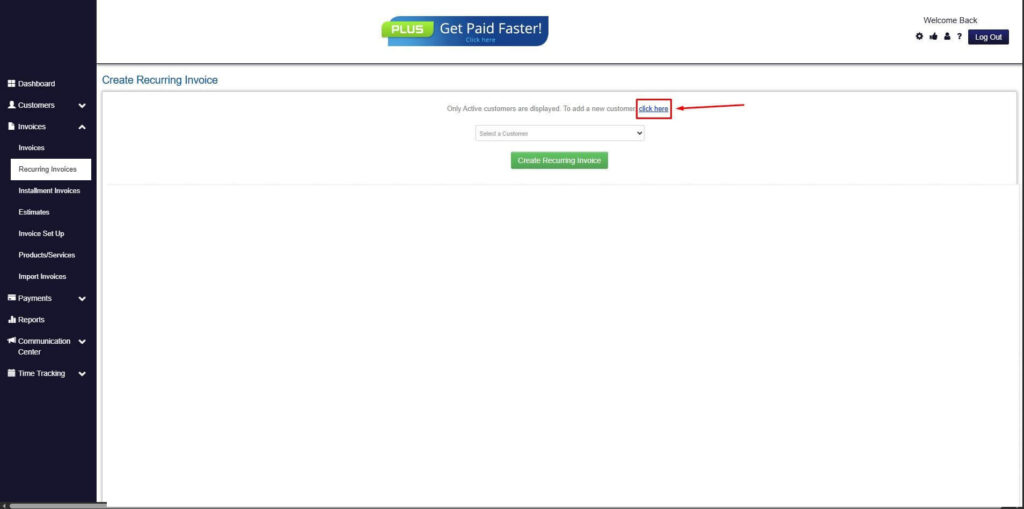
Step 5: Click on the “Click here” Button
- Click on the “Click here” button to proceed with the recurring invoice creation.
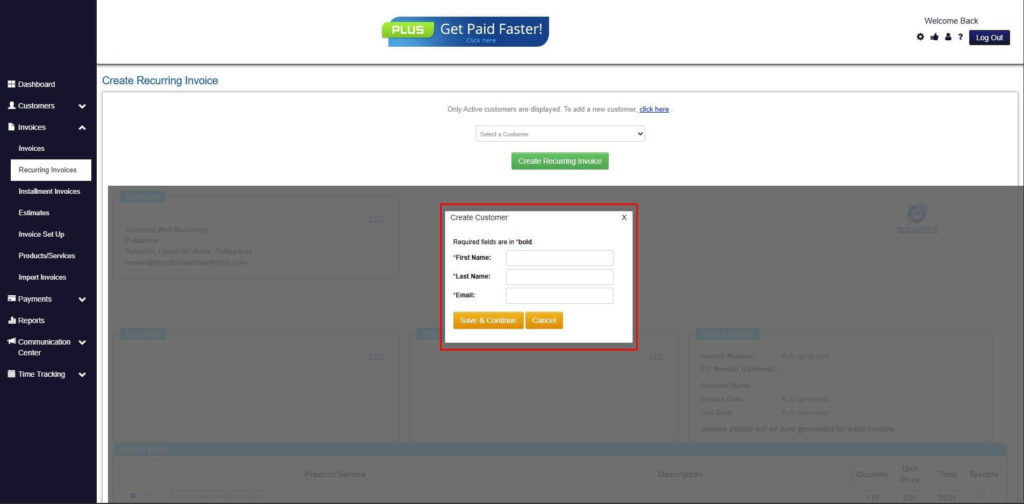
Step 6: Create Customer
- Provide your First Name, Last Name, and Email to proceed.
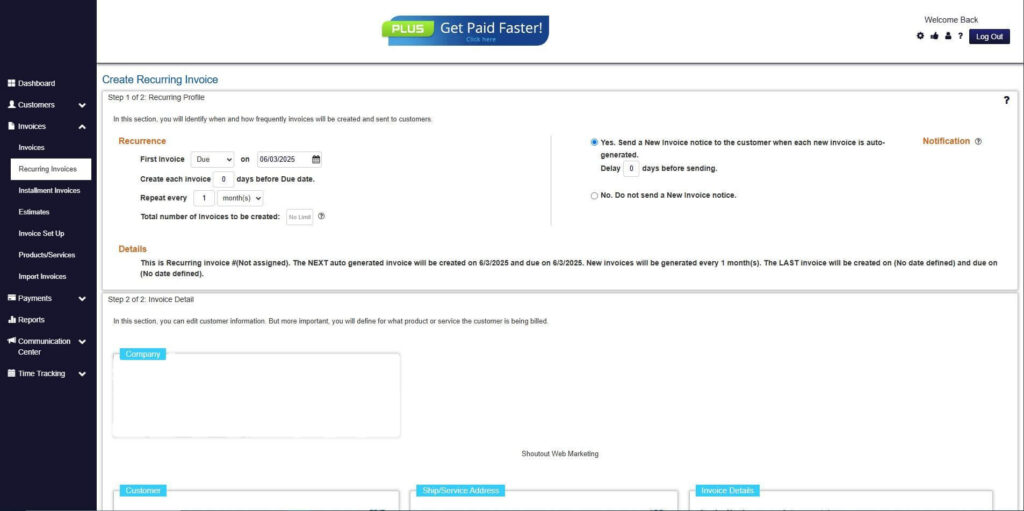
Step 7: Fill in the Create Recurring Invoice Form
- Fill in all the necessary fields.
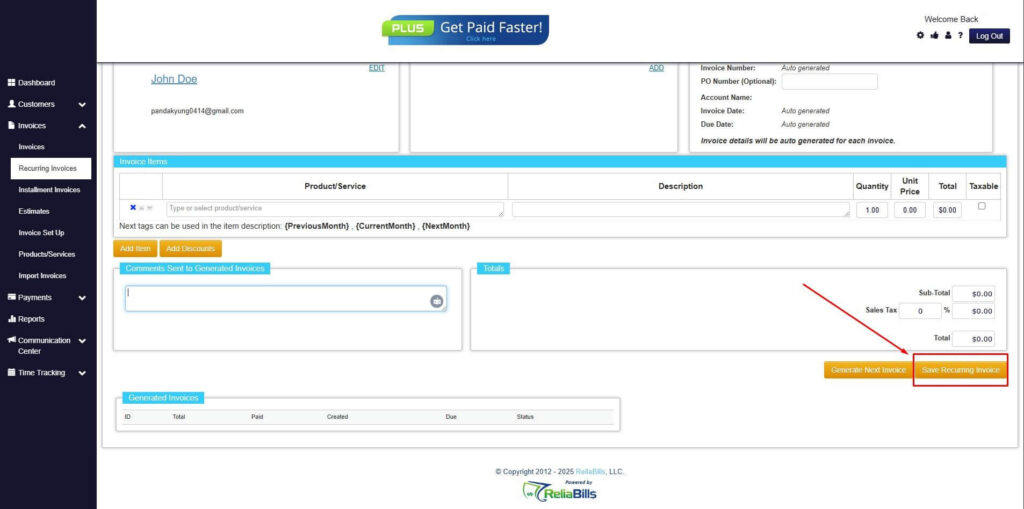
Step 8: Save Recurring Invoice
- After filling up the form, click “Save Recurring Invoice” to continue.
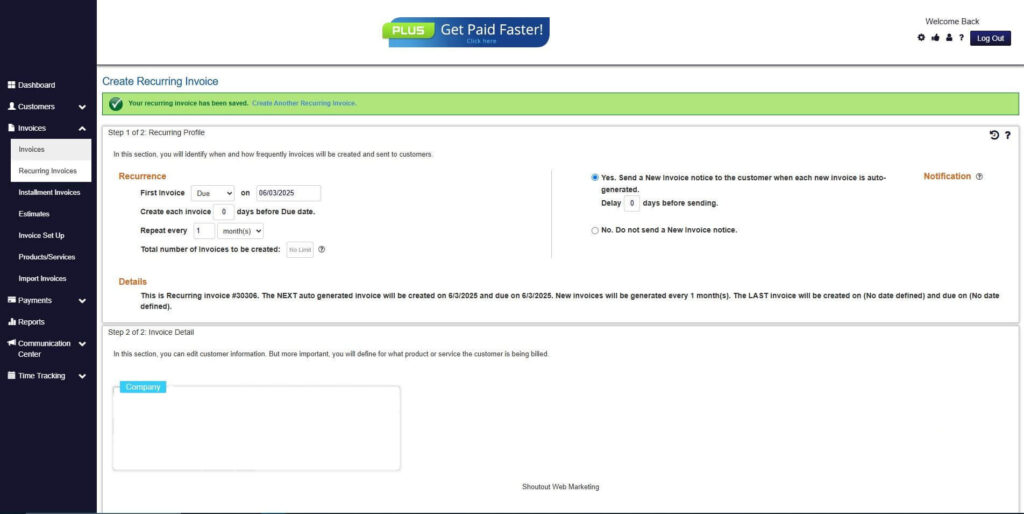
Step 9: Recurring Invoice Created
- Your Recurring Invoice has been created.
Frequently Asked Questions (FAQs)
1. What is a non-commercial invoice?
A non-commercial invoice is a document used to record transactions that do not involve a sale or revenue. It is commonly used for internal transfers, samples, or donations. Despite not generating income, it is essential for tracking and compliance.
2. Can non-commercial invoices be automated?
Yes, businesses can use automation tools to generate and process these invoices efficiently. Automated systems apply predefined rules and templates to ensure consistency. This reduces manual work and improves accuracy.
3. How does automation reduce administrative work?
Automation eliminates repetitive tasks such as data entry and approval tracking. It streamlines workflows and reduces the need for manual intervention. This allows teams to focus on more strategic activities.
4. Are automated invoices compliant with regulations?
Most automated systems include features like audit trails and standardized documentation. These tools help ensure compliance with regulatory requirements. They also simplify audits and reporting processes.
5. Can recurring billing apply to non-commercial transactions?
Yes, recurring billing can be used for regular internal transactions such as cost allocations or intercompany transfers. Automation ensures these invoices are generated consistently on schedule. This reduces oversight and improves operational efficiency.
Conclusion
Automating non-commercial invoices simplifies complex and time-consuming administrative processes. By eliminating manual tasks and standardizing workflows, businesses can significantly improve efficiency and accuracy.
When organizations automate non commercial invoices, they reduce workload, enhance compliance, and gain better visibility into their operations. Automation combined with recurring billing ensures consistent and reliable transaction management.
As businesses continue to scale, adopting automated invoicing solutions becomes essential. Investing in digital tools today will enable organizations to operate more efficiently and stay competitive in the long term.