
Auto pay integration refers to the use of automated systems that process payments on behalf of customers based on predefined schedules, while invoice management involves creating, sending, tracking, and collecting payments for invoices. When these two functions are combined, businesses gain a more streamlined and efficient billing workflow that minimizes manual intervention. This integration is becoming a standard practice for modern businesses looking to optimize their financial operations.
As companies scale, the need for automation in billing processes continues to grow. Manual invoicing can be time-consuming, error-prone, and difficult to manage at volume, especially for businesses handling recurring transactions. Auto pay invoice management addresses these challenges by reducing repetitive tasks and enabling consistent, timely payments.
This article explores how auto pay integration simplifies invoice management, highlighting its core features, benefits, common use cases, and implementation best practices. By understanding these elements, businesses can make informed decisions about adopting automation to improve efficiency and cash flow.
What Is Auto Pay Integration?
Auto pay integration is the process of automatically charging customers for products or services using pre-authorized payment methods. Instead of requiring customers to manually pay each invoice, the system processes payments on scheduled dates, ensuring consistency and reliability. This is a foundational component of modern auto pay invoice management systems.
This integration works by connecting invoicing software with payment gateways and customer billing profiles. When an invoice is generated, the system automatically initiates payment collection using stored payment details. This seamless connection eliminates the need for manual payment handling and significantly accelerates the billing cycle.
Unlike traditional manual billing—where invoices are sent and followed up individually—automated billing ensures that payments are collected without delay. Common payment methods supported include credit cards, ACH transfers, and digital wallets, giving customers flexibility while maintaining automation.
How Does Invoice Management Traditionally Work?
Traditional invoice management involves several manual steps, including invoice creation, distribution, tracking, and follow-up. Businesses typically generate invoices, send them via email or mail, and then monitor payment statuses. If payments are delayed, additional follow-ups such as reminder emails or calls are required.
This process is often inefficient due to delays in communication and reliance on human input. Errors in invoice data, missed follow-ups, and inconsistent tracking can lead to delayed payments or disputes. These inefficiencies become more pronounced as transaction volumes increase.
The impact on cash flow and administrative workload can be significant. Businesses may experience irregular income streams and spend excessive time managing receivables instead of focusing on growth. This is where auto pay invoice management provides a measurable advantage.
Key Features of Auto Pay Integration
Recurring billing and scheduled payments
Businesses can configure billing cycles based on customer agreements—monthly subscriptions, quarterly contracts, or usage-based intervals. This ensures predictable billing without manual oversight and forms the backbone of efficient auto pay invoice management. It also supports proration, upgrades, and downgrades in subscription-based models.
Automated invoice generation and delivery
Invoices are created dynamically using predefined templates and triggers such as service renewals or milestone completions. This eliminates delays caused by manual preparation and ensures customers receive accurate invoices instantly, improving billing consistency.
Payment reminders and notifications
Automated communication workflows send reminders before due dates, confirmations after payments, and alerts for failed transactions. These notifications reduce customer forgetfulness and improve overall collection rates without requiring staff intervention.
Secure payment processing
Advanced encryption, tokenization, and compliance with standards like PCI DSS ensure that sensitive payment information is handled securely. This builds trust with customers and protects businesses from fraud and data breaches.
Real-time payment tracking and reporting
Dashboards provide immediate insights into invoice statuses, payment trends, and outstanding balances. This allows finance teams to make data-driven decisions and proactively address cash flow gaps.
Integration with accounting systems
Seamless syncing with accounting platforms ensures that financial records are automatically updated. This reduces reconciliation time, minimizes discrepancies, and simplifies tax reporting and audits.
Multi-payment method support
Customers can choose from credit cards, debit cards, ACH transfers, bank debits, and digital wallets. Offering multiple options increases payment success rates and enhances customer convenience.
Automatic retry logic for failed payments
When payments fail due to insufficient funds or expired cards, the system automatically retries transactions at optimized intervals. This feature helps recover revenue that might otherwise be lost.
Customer self-service billing portals
Customers can log in to view invoices, update payment details, download receipts, and manage subscriptions. This reduces support requests and empowers users to control their billing experience.
Customizable billing rules and workflows
Businesses can tailor invoicing logic to match complex pricing structures, discounts, taxes, and customer segments. This flexibility is essential for scaling auto pay invoice management across diverse customer bases.
How Does Auto Pay Integration Simplify Invoice Management?
Auto pay integration simplifies invoice management by automating both invoice generation and payment collection. Once billing rules are configured, the system handles the entire process—from creating invoices to charging customers—without requiring manual input. This reduces administrative burden and ensures consistent billing cycles.
Another major advantage is the elimination of manual follow-ups. Automated reminders and scheduled payments significantly reduce the need to chase customers for payments. As a result, businesses experience fewer delays and improved collection rates, making auto pay invoice management a highly efficient solution.
Additionally, automation improves accuracy and record-keeping. Since the system handles calculations and transaction logging, the risk of human error is minimized. Customers also benefit from a more convenient payment experience, which enhances satisfaction and trust in the business.
Key Benefits of Auto Pay Integration
Improved cash flow and faster payments
Payments are processed automatically on due dates, reducing delays and creating a steady revenue stream. This predictability allows businesses to plan expenses and investments more effectively.
Reduced administrative workload
By automating repetitive tasks such as invoice creation, sending reminders, and tracking payments, staff can focus on strategic activities like customer engagement and business growth.
Lower risk of human error
Automation reduces mistakes in calculations, billing schedules, and data entry. This leads to more accurate invoices and fewer disputes with customers.
Better customer retention and experience
Customers appreciate the convenience of not having to remember payment deadlines. A smooth billing experience increases satisfaction and encourages long-term relationships.
Increased operational efficiency
Streamlined processes reduce bottlenecks in the billing cycle, enabling businesses to handle higher transaction volumes without additional resources.
Scalable billing processes
As businesses grow, auto pay invoice management systems can easily accommodate more customers and complex billing scenarios without significant changes to infrastructure.
Enhanced financial visibility
Real-time analytics and reporting tools provide a clear picture of revenue performance, outstanding invoices, and payment behaviors.
Reduced late or missed payments
Automated scheduling ensures payments are collected on time, significantly lowering the rate of overdue invoices.
Stronger compliance and audit readiness
Digital records and automated logs make it easier to comply with financial regulations and prepare for audits.
Cost savings over time
Businesses save on labor, paper, postage, and administrative overhead, resulting in improved profitability.
Common Use Cases Across Industries
SaaS and subscription-based businesses
Auto pay invoice management is essential for handling recurring subscriptions, upgrades, and usage-based billing, ensuring uninterrupted service and consistent revenue.
Utilities and telecom providers
These industries rely on automated billing for high-volume, recurring charges such as electricity, water, internet, and mobile services. Automation reduces billing errors and improves collection rates.
Logistics and transportation companies
Frequent invoicing for shipments, fuel charges, and contracts can be streamlined באמצעות automation, reducing delays and improving cash flow cycles.
Healthcare providers and clinics
Patient billing, installment plans, and recurring treatments benefit from automation, reducing administrative burden and improving payment compliance.
Property management and real estate
Rent collection, maintenance fees, and lease payments can be automated, minimizing late payments and manual tracking.
Education and training institutions
Tuition fees, course subscriptions, and installment plans can be managed efficiently through automated billing systems.
Professional services firms
Law firms, consultants, and accountants can automate retainer billing and recurring service charges, improving efficiency and client satisfaction.
Fitness centers and membership businesses
Membership renewals and recurring charges are handled seamlessly, ensuring uninterrupted access for customers.
E-commerce subscription models
Businesses offering recurring product deliveries can automate billing and improve customer retention.
Nonprofits and membership organizations
Recurring donations and membership fees can be automated, ensuring consistent funding and reducing administrative effort.
What Challenges Should Businesses Consider?
- Customer resistance to automated payments: Some customers may hesitate to authorize automatic charges due to trust or control concerns.
- Integration complexity with existing systems: Legacy software may require customization or middleware for seamless implementation.
- Data security and compliance risks: Handling payment data requires adherence to standards like PCI DSS and local data protection regulations.
- Handling failed or declined payments: Businesses must implement retry logic and communication strategies to recover failed transactions.
- Maintaining transparency with customers: Lack of clear billing communication can lead to disputes or dissatisfaction.
- Initial setup and configuration time: Defining billing rules, workflows, and customer profiles may require upfront effort.
- Dependence on technology and system uptime: Downtime or technical issues can disrupt billing operations.
- Managing customer preferences and exceptions: Some customers may require custom billing arrangements outside standard automation.
- Regulatory and regional compliance differences: Businesses operating across regions must adapt to varying financial regulations.
- Change management within the organization: Teams may need training and process adjustments to adapt to automated systems.
Best Practices for Implementing Auto Pay Integration
Offer flexible payment options
Providing multiple payment methods increases adoption and accommodates diverse customer preferences.
Clearly communicate billing schedules and terms
Transparency builds trust and reduces disputes or confusion about charges.
Use secure and compliant payment gateways
Choose platforms that meet industry standards to protect customer data and maintain credibility.
Set up automated reminders and retry logic
These features improve payment success rates and reduce revenue loss from failed transactions.
Regularly monitor and reconcile transactions
Ongoing oversight ensures accuracy and helps identify issues early.
Provide easy opt-in and opt-out options
Giving customers control over their billing preferences increases trust and satisfaction.
Test the system before full deployment
Running pilot tests helps identify potential issues and ensures smooth implementation.
Segment customers for tailored billing strategies
Different customer groups may require different billing approaches, which can be optimized through segmentation.
Ensure seamless integration with accounting tools
Automated syncing reduces manual work and improves financial accuracy.
Continuously optimize billing workflows
Use data and analytics to refine processes and improve efficiency over time.
How Does ReliaBills Simplify Invoice Management with Auto Pay?
ReliaBills is an advanced automated billing solution designed to simplify invoice management for modern businesses. It streamlines the entire invoicing process by automating invoice creation, delivery, and payment tracking, allowing businesses to reduce manual workload and improve operational efficiency. With its intuitive platform, companies can manage billing tasks more effectively while maintaining accuracy and consistency.
One of the key strengths of ReliaBills is its robust recurring billing functionality. Businesses can set up automated payment schedules that ensure invoices are paid on time without requiring manual intervention. This capability significantly reduces late payments and improves cash flow, making auto pay invoice management more predictable and reliable for growing organizations.
ReliaBills PLUS further enhances these capabilities by offering advanced automation, customization, and reporting features. Businesses can tailor billing workflows, generate detailed financial insights, and scale their operations with ease. This makes ReliaBills an ideal solution for companies looking to optimize their billing systems while supporting long-term growth.
How to Create a New Recurring Invoice Using ReliaBills
Creating a New Recurring Invoice using ReliaBills involves the following steps:
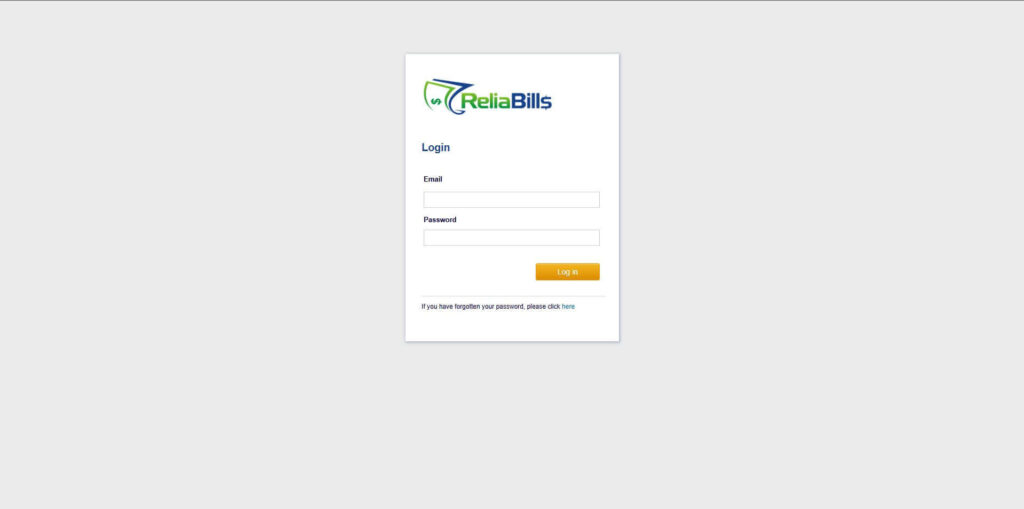
Step 1: Login to ReliaBills
- Access your ReliaBills Account using your login credentials. If you don’t have an account, sign up here.
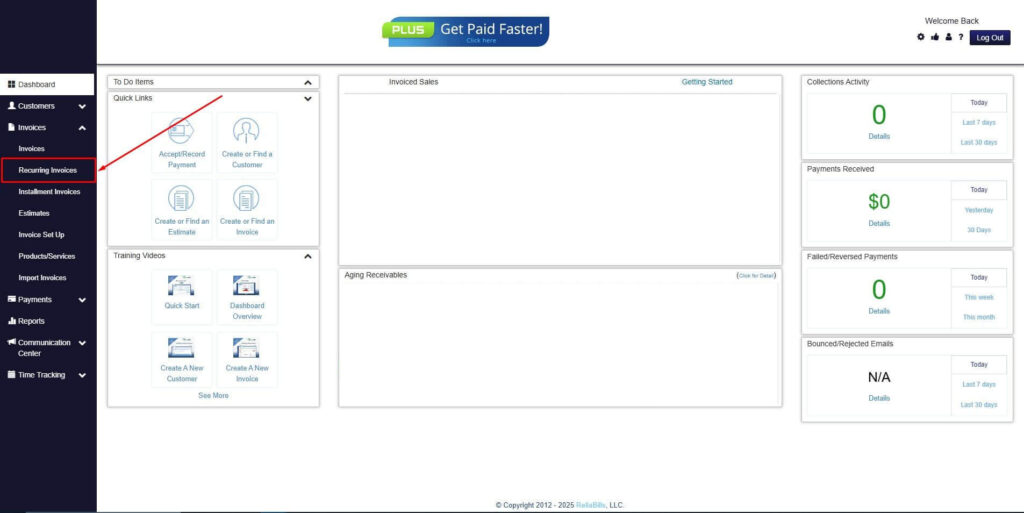
Step 2: Click on Recurring Invoices
- Navigate to the Invoices Dropdown and click on Recurring Invoices for an overview of the list of your existing customers.
Step 3: Go to the Customers Tab
- If you have already created a customer, search for them in the Customers tab and make sure their status is “Active”.
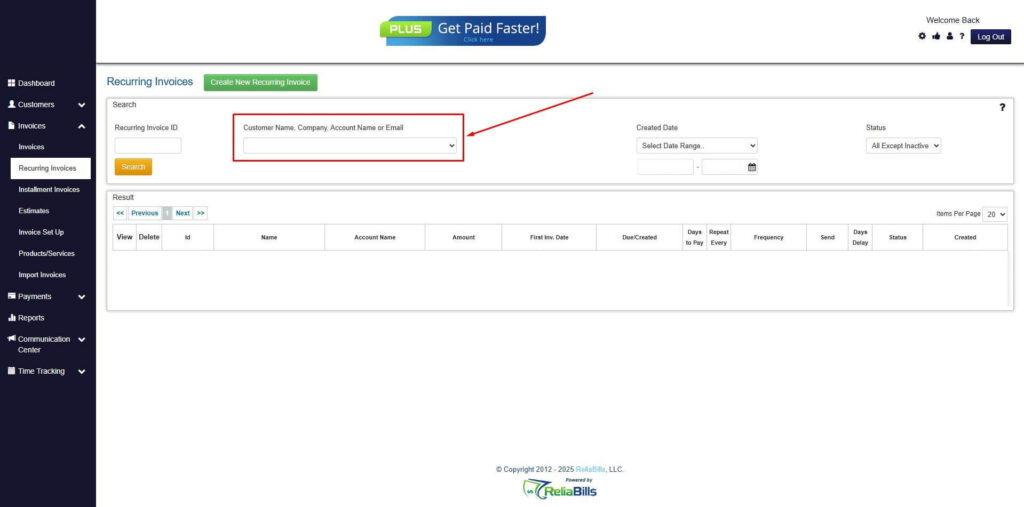
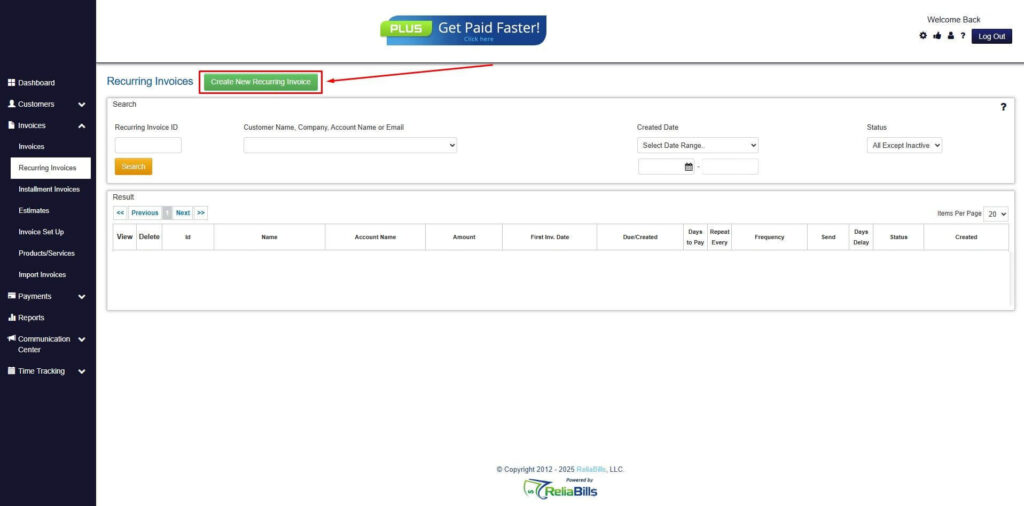
Step 4: Click the Create New Recurring Invoice
- If you haven’t created any customers yet, click the Create New Recurring Invoice to create a new customer.
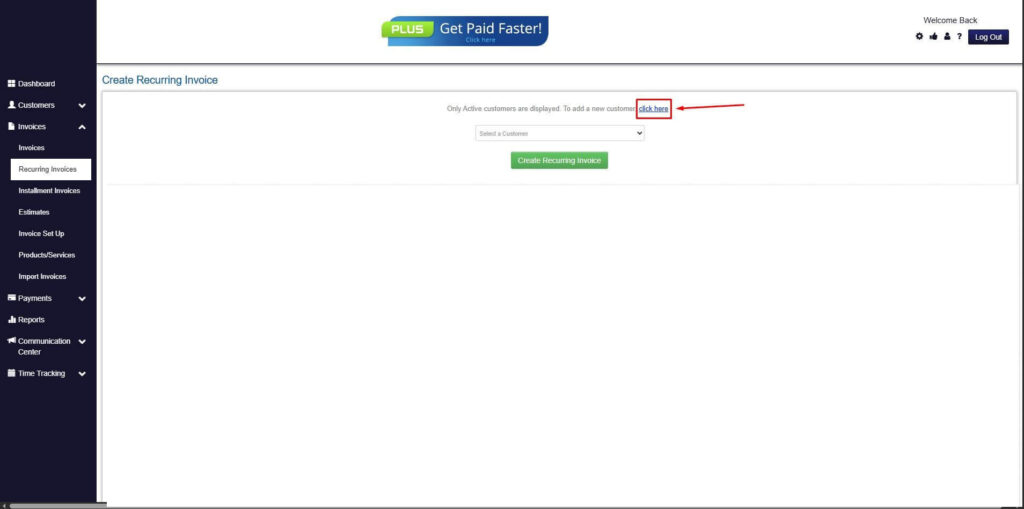
Step 5: Click on the “Click here” Button
- Click on the “Click here” button to proceed with the recurring invoice creation.
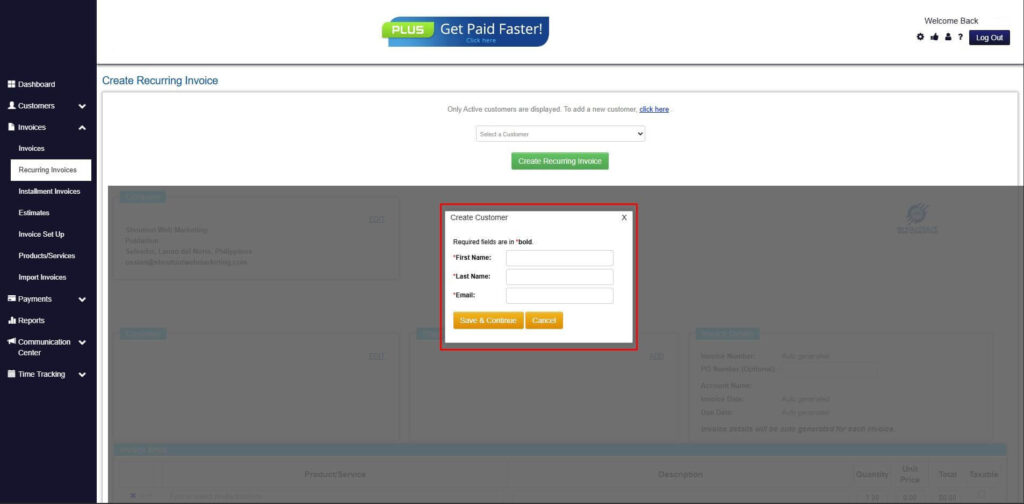
Step 6: Create Customer
- Provide your First Name, Last Name, and Email to proceed.
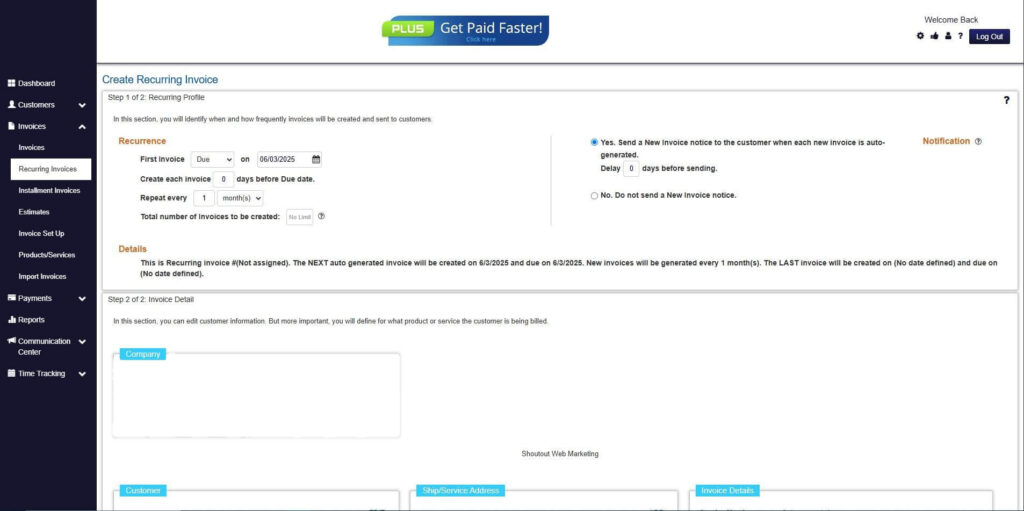
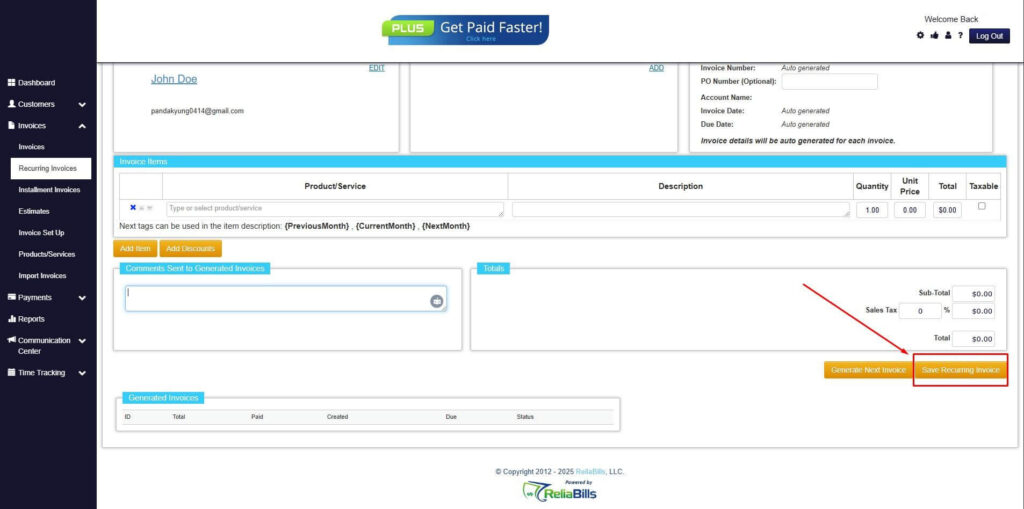
Step 7: Fill in the Create Recurring Invoice Form
- Fill in all the necessary fields.
Step 8: Save Recurring Invoice
- After filling up the form, click “Save Recurring Invoice” to continue.
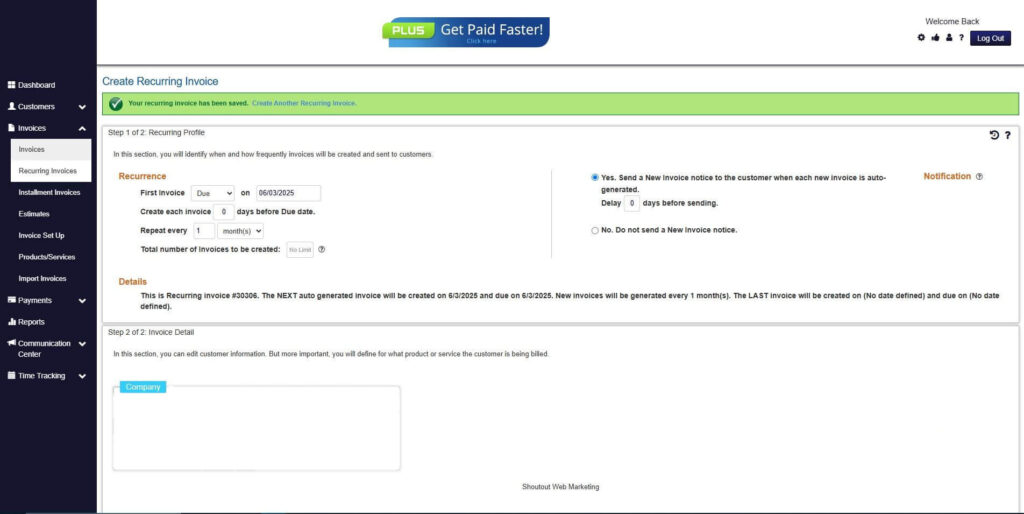
Step 9: Recurring Invoice Created
- Your Recurring Invoice has been created.
Frequently Asked Questions
1. What is auto pay integration in invoicing?
Auto pay integration is the automation of invoice payments using pre-authorized payment methods, forming a key component of auto pay invoice management systems.
2. Is auto pay secure for businesses and customers?
Yes, most platforms use encryption, tokenization, and compliance standards like PCI DSS to ensure secure transactions.
3. Can customers control their auto pay settings?
Customers can typically update payment methods, change billing schedules, or opt out through self-service portals.
4. What happens if an auto payment fails?
The system can automatically retry the payment, notify the customer, and alert the business for further action.
5. How does auto pay improve cash flow?
It ensures timely payments, reduces delays, and creates a predictable and stable revenue stream.
6. Is auto pay suitable for small businesses?
Yes, auto pay invoice management helps small businesses save time, reduce manual work, and scale efficiently.
Conclusion
Auto pay integration fundamentally transforms how businesses handle billing by automating key aspects of invoice management. From invoice generation to payment collection, the process becomes faster, more accurate, and less dependent on manual effort. This makes auto pay invoice management an essential tool for businesses aiming to modernize their financial operations.
By improving efficiency, reducing errors, and ensuring timely payments, auto pay systems provide measurable benefits across industries. Businesses can achieve better cash flow stability while freeing up resources to focus on growth and customer engagement.
Adopting automated billing solutions like ReliaBills is a strategic move for any organization looking to scale efficiently. With the right implementation and best practices, auto pay integration can deliver long-term value and significantly simplify invoice management.