

Subscription-based software businesses frequently deal with billing adjustments. Customers may cancel subscriptions mid-cycle, request refunds after billing errors, or downgrade their plans. In these situations, companies must properly document the financial change to keep accounting records accurate and transparent.
This is where SaaS return invoices for refunds become essential. Instead of simply issuing a refund payment, SaaS companies generate a return invoice that reverses or adjusts a previously issued subscription invoice. This creates a clear financial record showing exactly why the refund occurred.
Without structured documentation, refunds can easily create confusion in financial statements, customer billing histories, and revenue reports. Return invoices help SaaS companies maintain a consistent billing trail that both customers and accounting teams can rely on.
What Is a Return Invoice in SaaS Billing?
A return invoice is a financial document issued to reverse or adjust a previously generated invoice. In SaaS environments, this typically occurs when a subscription payment must be refunded, corrected, or partially credited.
Return invoices are closely connected to refund transactions and credit adjustments. When a SaaS business processes a refund, the return invoice records the negative billing entry that offsets the original charge. This ensures the company’s financial reports reflect the corrected amount of revenue.
For subscription platforms that handle thousands of recurring payments each month, return invoices are critical. They maintain accurate billing histories and allow finance teams to track every adjustment made to a customer’s subscription invoice.
Why Do SaaS Companies Issue Subscription Refunds?
Refunds are a normal part of operating a subscription-based business model. Customers may request billing corrections for many legitimate reasons, and companies must be prepared to handle them efficiently.
One of the most common scenarios is subscription cancellation during an active billing cycle. If a customer cancels a service before the end of a prepaid period, companies may issue a prorated refund depending on their billing policies.
Refunds also occur when billing errors or duplicate charges happen. Payment processing systems can occasionally generate incorrect invoices, and issuing a return invoice helps correct the mistake while maintaining accurate financial records.
Service disruptions can also trigger refund requests. If downtime or technical issues prevent customers from using the service they paid for, SaaS providers may offer compensation in the form of partial refunds or billing credits.
When Should a Return Invoice Be Created for a Subscription Refund?
A return invoice should be generated whenever a refund affects a previously issued subscription invoice. This ensures that the financial correction is documented in the company’s billing system.
The most common trigger is after a refund request has been reviewed and approved by the billing or customer support team. Once the refund is confirmed, the return invoice records the adjustment linked to the original charge.
Return invoices are also necessary when billing corrections must be made. For example, if a customer was charged the wrong subscription plan or amount, the company must reverse the incorrect invoice before issuing the corrected one.
They are also useful during mid-cycle subscription cancellations or service adjustments. When billing periods change due to upgrades or downgrades, a return invoice ensures the financial record reflects the revised subscription terms.
What Information Should Be Included in a Return Invoice?
Accurate documentation is essential when issuing SaaS return invoices for refunds. Each return invoice should contain detailed billing information that clearly explains the adjustment and links it to the original transaction. Key details that should appear in a return invoice include:
Reference to the Original Invoice
A return invoice should always reference the original subscription invoice number. This allows accounting teams and customers to quickly identify which transaction is being corrected. Linking both invoices also helps billing systems maintain a complete financial audit trail.
Refund or Adjustment Amount
The return invoice must clearly state the exact refund amount or credit being applied. This amount may represent a full refund, a prorated credit, or a partial adjustment due to billing corrections. Displaying the adjustment clearly ensures the company’s financial records reflect the correct revenue change.
Reason for the Refund or Adjustment
Providing a short explanation helps customers and finance teams understand why the refund occurred. Common reasons include subscription cancellations, duplicate billing, service interruptions, or plan downgrades. Including this information reduces confusion and improves transparency in the refund process.
Transaction Date and Processing Details
The return invoice should show the date the refund was issued and when the adjustment was processed in the billing system. Accurate timestamps help companies track billing changes and reconcile payment records with bank or payment processor reports.
Customer Account and Subscription Information
To avoid confusion, the document should include the customer’s account details, subscription plan, and billing cycle. This helps support teams quickly review the customer’s subscription history if questions arise later.
Updated Billing Totals
A return invoice should display the revised total after the refund adjustment. This ensures customers understand the updated balance and allows accounting teams to reconcile financial reports more easily.
How Do Return Invoices Affect SaaS Financial Records?
Return invoices directly impact a SaaS company’s financial reporting. Because subscription revenue is often recognized over time, refunds must be recorded accurately to avoid misrepresenting earnings.
When a return invoice is issued, it adjusts the company’s recognized revenue by reversing the portion associated with the refunded subscription. This keeps financial statements aligned with actual earnings.
Return invoices also update accounts receivable balances. If the refund relates to an unpaid invoice, the return invoice may cancel the outstanding balance instead of issuing a cash refund.
Finally, these documents support audit and compliance requirements. Financial auditors expect businesses to maintain clear records for every adjustment made to invoices, especially in subscription-based revenue models.
Why Are Return Invoices Important for Subscription Transparency?
Clear billing documentation plays a major role in building customer trust. When refunds are processed without proper records, customers may become confused about how their payments were adjusted.
Return invoices provide clear documentation that explains the refund transaction. Customers can see exactly which invoice was reversed, how much was refunded, and why the adjustment occurred.
This transparency also helps reduce billing disputes and support requests. When customers receive clear financial documentation, they are less likely to question the accuracy of their refunds.
In addition, transparent billing processes improve communication between customers, support teams, and accounting departments. Everyone involved can review the same documentation and understand the refund process.
How Do SaaS Companies Handle Partial Subscription Refunds?
Not all refunds involve reversing an entire subscription payment. In many cases, SaaS companies must issue partial refunds based on usage or timing.
A common example is prorated billing adjustments. If a customer cancels halfway through a monthly billing cycle, the company may refund the unused portion of the subscription fee.
Partial refunds also occur during plan downgrades. When a customer switches to a lower-priced subscription plan mid-cycle, the difference between the old plan and the new plan may be credited back.
Service disruptions or downtime may also result in partial refunds. In these cases, return invoices document the exact compensation amount given to customers for the interruption.
What Challenges Do SaaS Businesses Face With Manual Refund Processing?
Processing refunds manually can create serious operational inefficiencies for SaaS companies. As subscription businesses grow, the number of billing adjustments increases, making manual workflows harder to manage and more prone to errors. Common challenges include:
Data Entry Errors
Manual refund processing often requires staff to input invoice numbers, refund amounts, and customer details by hand. Even small mistakes can lead to incorrect refund records or mismatched billing entries in accounting systems.
Inconsistent Invoice Documentation
When return invoices are created manually, different team members may follow different documentation practices. This inconsistency can make it difficult to track refunds accurately or maintain standardized financial records.
Delayed Refund Processing
Manual billing workflows slow down the refund process because each adjustment must be reviewed and recorded individually. These delays can frustrate customers who expect fast resolution when billing issues occur.
Difficulty Tracking Subscription Changes
SaaS companies often deal with upgrades, downgrades, and mid-cycle cancellations. Without automated tools, manually calculating prorated refunds and generating return invoices can become complicated and time consuming.
Limited Financial Visibility
Manual refund tracking usually involves spreadsheets or disconnected systems. This makes it harder for finance teams to analyze refund trends, monitor billing performance, or generate accurate reports.
Increased Administrative Workload
Customer support, finance teams, and billing administrators may all spend significant time managing refund requests. As the number of subscriptions grows, this workload can quickly become difficult to scale.
How Can Automation Simplify Return Invoice Creation?
Automation significantly improves how SaaS companies handle return invoices. Modern billing platforms can automatically generate refund documentation as soon as a billing adjustment occurs.
One major benefit is automatic linking between return invoices and the original subscription invoice. This ensures every refund is correctly tied to the transaction it reverses.
Automated systems can also perform real-time billing adjustments. When a refund is processed, the billing platform immediately updates financial records, eliminating the need for manual calculations.
Digital documentation also improves financial reconciliation and reporting. Accounting teams can easily track refund activity across thousands of subscription transactions without relying on spreadsheets or manual records.
How Do Recurring Billing Systems Support Refund Management?
Recurring billing platforms play a critical role in managing SaaS return invoices for refunds. These systems are designed to track subscription changes and automatically adjust invoices when billing events occur.
For example, recurring billing systems can automatically calculate prorated refunds when customers cancel subscriptions mid-cycle. This ensures refund amounts are accurate and consistent.
These platforms also provide centralized billing dashboards where finance teams can review subscription activity, refunds, and invoice adjustments in one place.
Because subscription changes are recorded automatically, recurring billing systems create a reliable record of every billing event. This improves financial visibility and reduces administrative workload.
What Best Practices Help SaaS Companies Manage Subscription Refunds?
Implementing clear processes helps SaaS companies handle refunds efficiently while maintaining accurate financial records. Following proven best practices ensures SaaS return invoices for refunds are documented correctly and processed consistently. Key best practices include:
Establish Clear Refund Policies
SaaS companies should define refund eligibility, billing timelines, and cancellation rules in their subscription agreements. Clearly written policies reduce disputes and help customers understand when refunds are available.
Provide Transparent Billing Communication
Customers should receive clear notifications when refunds are approved and processed. Sending return invoices and billing summaries ensures customers understand how their subscription charges were adjusted.
Use Automated Billing and Invoicing Systems
Automated billing platforms can generate return invoices instantly when refunds occur. This ensures every adjustment is recorded accurately and linked to the original invoice.
Standardize Refund Documentation
Establishing a consistent invoice format helps finance teams maintain organized records. Standardized return invoices also simplify financial reporting and auditing processes.
Monitor Refund Trends and Billing Data
Reviewing refund patterns regularly can help SaaS companies identify billing issues, pricing concerns, or product problems. Analyzing refund data also supports better financial forecasting.
Integrate Billing With Accounting Systems
Connecting subscription billing platforms with accounting software ensures refund transactions are automatically reflected in financial reports. This reduces reconciliation errors and improves financial accuracy.
Train Support and Billing Teams
Customer support and finance staff should understand the company’s refund workflow. Proper training ensures refund requests are processed quickly and documented correctly within the billing system.
How Does ReliaBills Help SaaS Businesses Manage Return Invoices?
Managing subscription refunds becomes significantly easier when SaaS businesses use an automated billing platform like ReliaBills. The system simplifies invoice creation, billing adjustments, and payment tracking through a centralized dashboard designed for recurring billing workflows.
ReliaBills helps companies generate SaaS return invoices for refunds by automatically linking adjustments to the original subscription invoice. This eliminates manual documentation and ensures refund records remain consistent across billing reports. Its recurring billing tools also support prorated billing calculations, making subscription refunds easier to process.
For growing SaaS companies that process large volumes of subscriptions, ReliaBills also provides advanced reporting and automation tools through ReliaBills PLUS. These features allow businesses to track billing adjustments, monitor refunds, and maintain accurate financial records without increasing administrative workload.
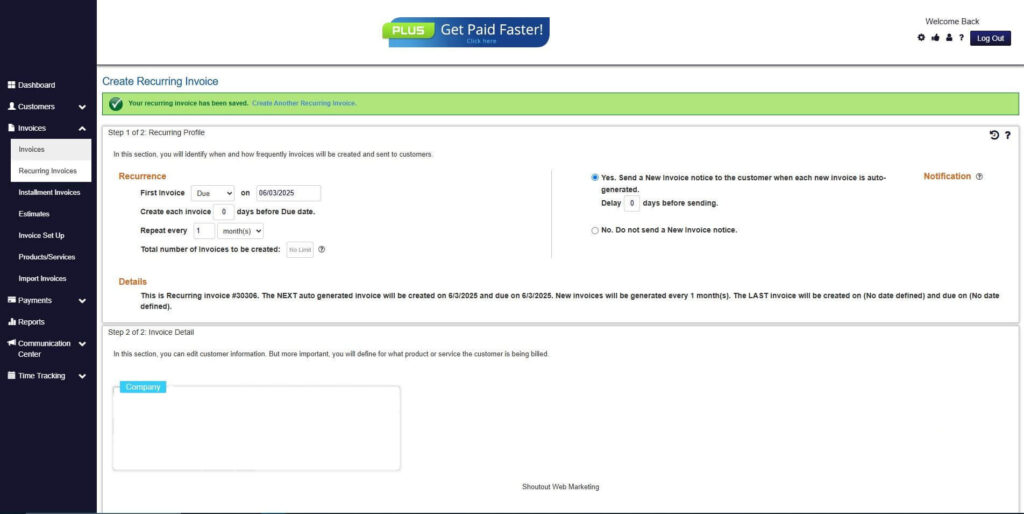
How to Create a New Recurring Invoice Using ReliaBills
Creating a New Recurring Invoice using ReliaBills involves the following steps:
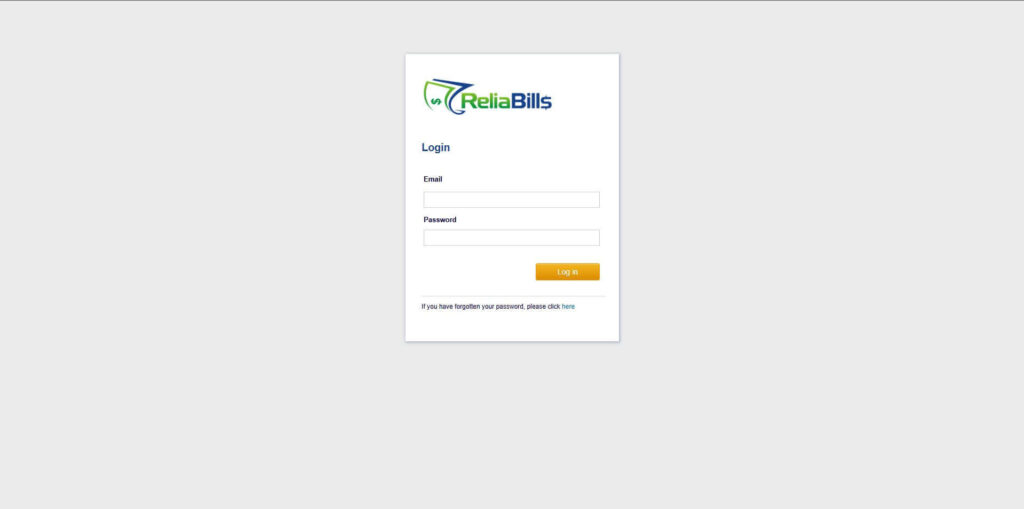
Step 1: Login to ReliaBills
- Access your ReliaBills Account using your login credentials. If you don’t have an account, sign up here.
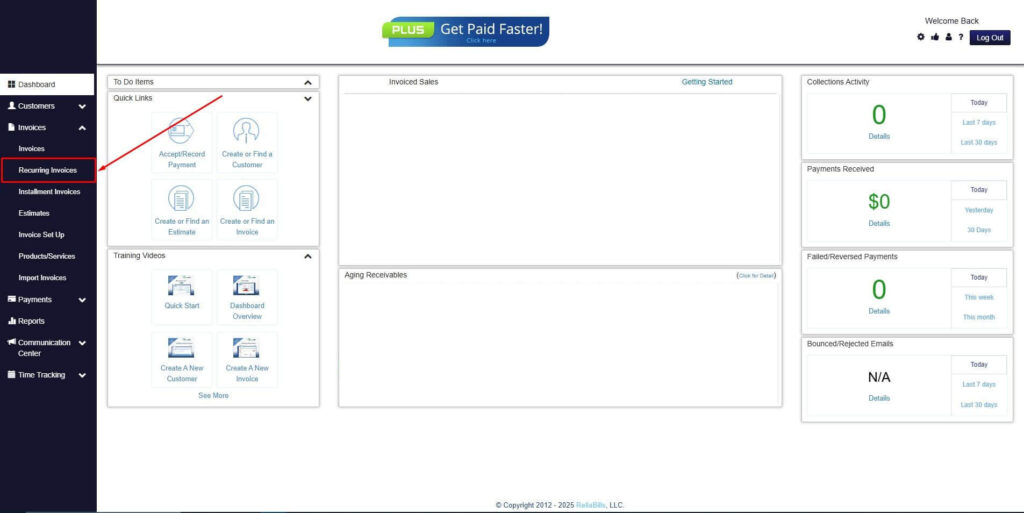
Step 2: Click on Recurring Invoices
- Navigate to the Invoices Dropdown and click on Recurring Invoices for an overview of the list of your existing customers.
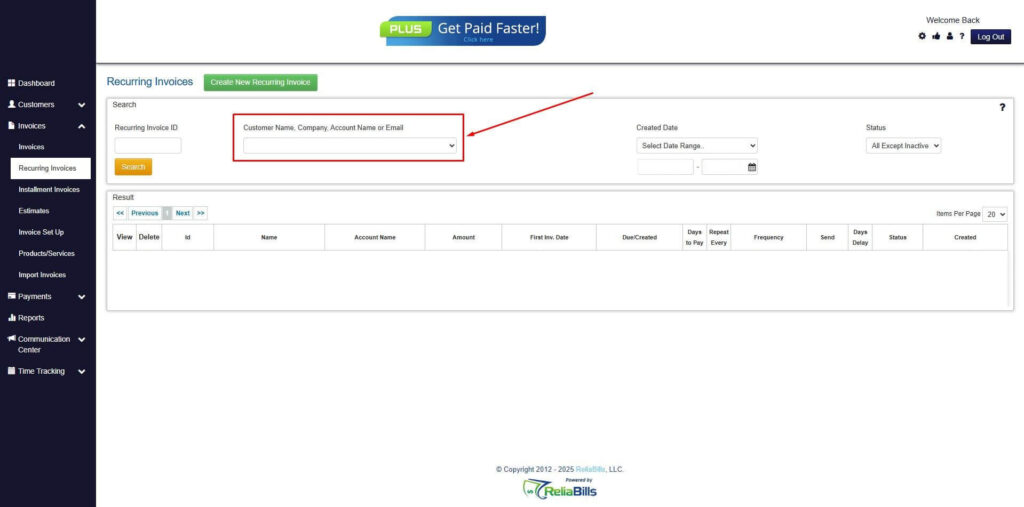
Step 3: Go to the Customers Tab
- If you have already created a customer, search for them in the Customers tab and make sure their status is “Active”.
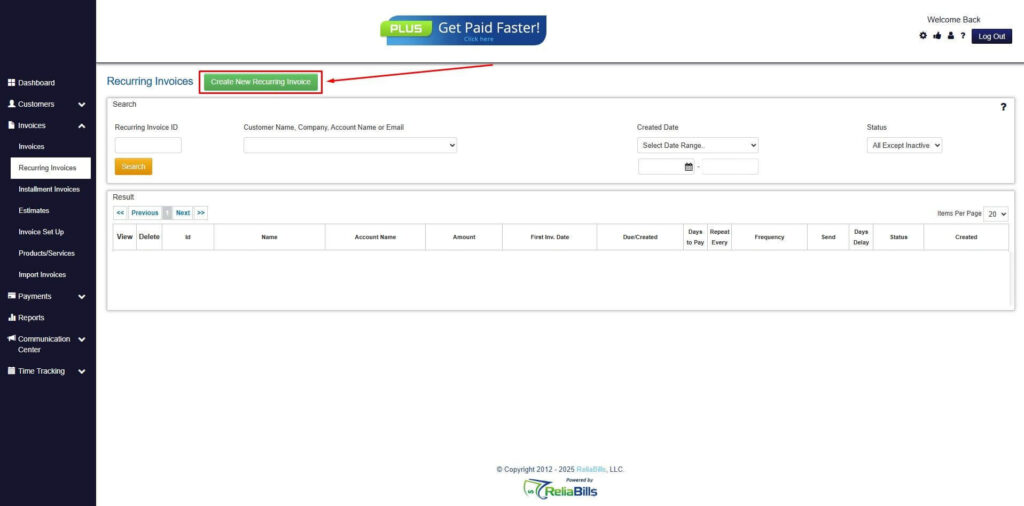
Step 4: Click the Create New Recurring Invoice
- If you haven’t created any customers yet, click the Create New Recurring Invoice to create a new customer.
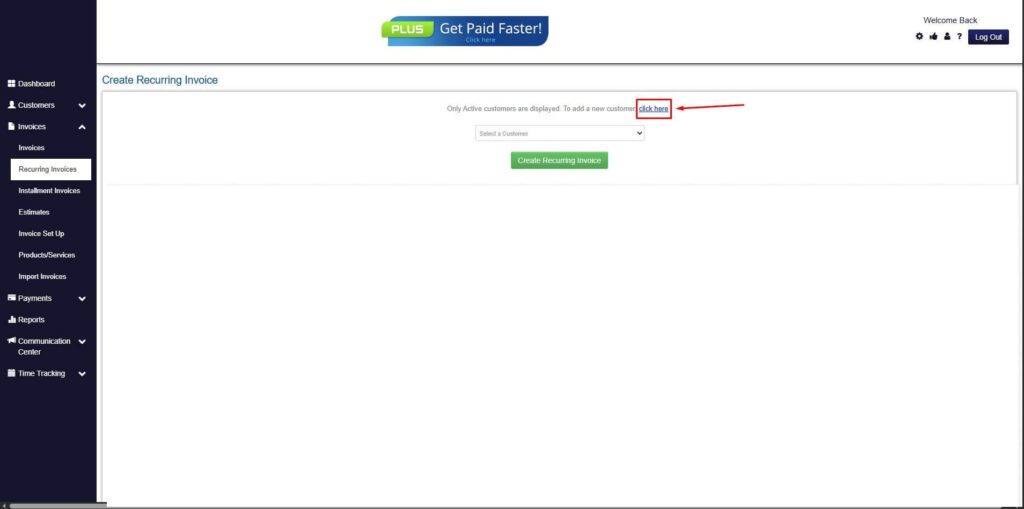
Step 5: Click on the “Click here” Button
- Click on the “Click here” button to proceed with the recurring invoice creation.
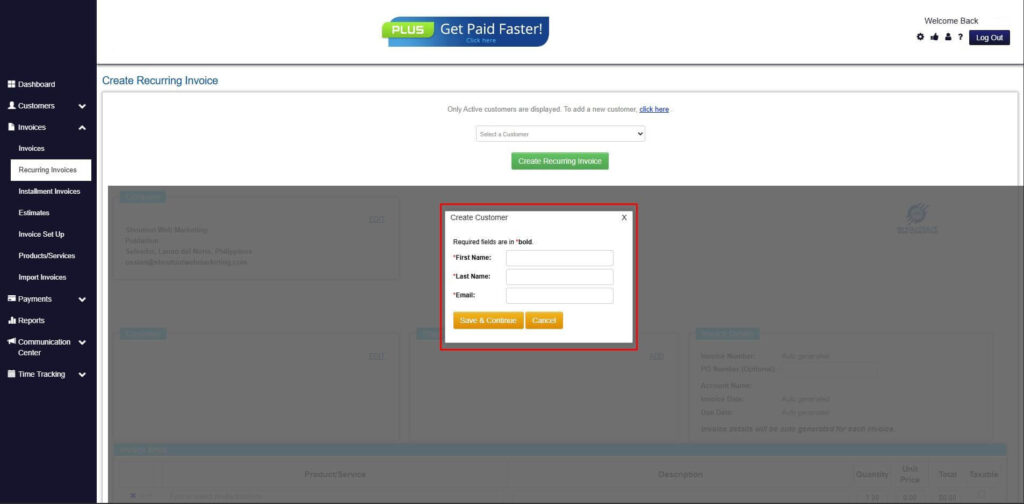
Step 6: Create Customer
- Provide your First Name, Last Name, and Email to proceed.
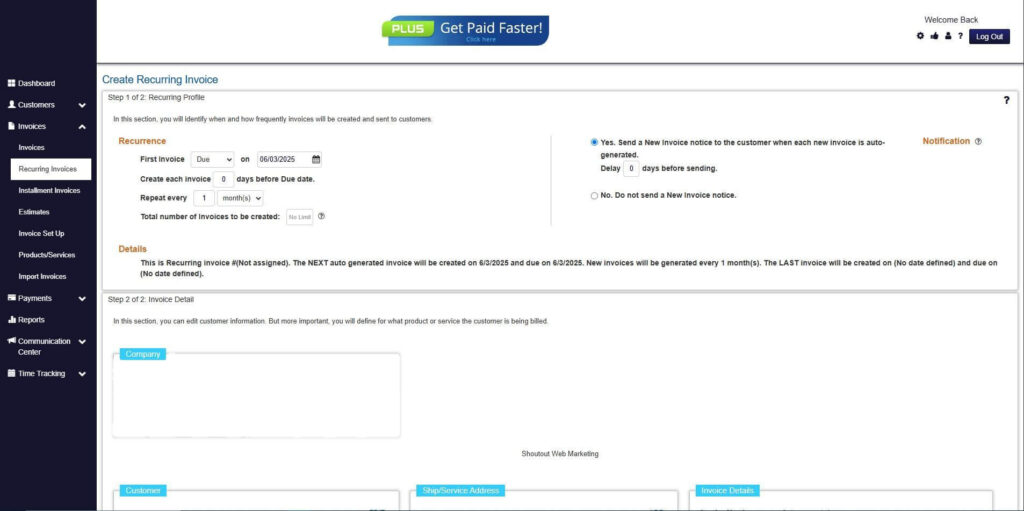
Step 7: Fill in the Create Recurring Invoice Form
- Fill in all the necessary fields.
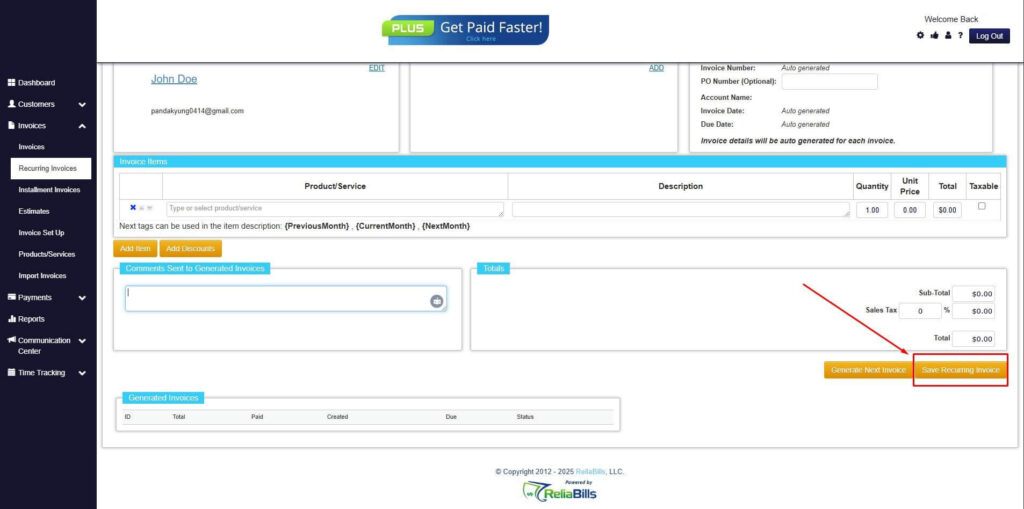
Step 8: Save Recurring Invoice
- After filling up the form, click “Save Recurring Invoice” to continue.
Step 9: Recurring Invoice Created
- Your Recurring Invoice has been created.
Frequently Asked Questions
1. What is the purpose of a return invoice in SaaS billing?
A return invoice documents a refund or billing adjustment related to a previously issued subscription invoice. It ensures that financial records accurately reflect the corrected revenue amount.
2. Are return invoices required for subscription refunds?
While not always legally required, they are considered a best practice because they provide clear documentation for accounting, audits, and customer billing records.
3. Can SaaS companies automate return invoice creation?
Yes. Modern billing platforms can automatically generate return invoices when refunds or billing corrections occur, reducing manual work and improving accuracy.
4. Do return invoices affect revenue recognition?
Yes. Because SaaS revenue is often recognized over time, return invoices adjust the recognized revenue amount associated with refunded subscriptions.
Conclusion
Subscription-based businesses regularly handle billing adjustments caused by cancellations, plan changes, or billing errors. To maintain accurate financial records, SaaS companies rely on return invoices to properly document these refund transactions.
Using SaaS return invoices for refunds ensures every billing correction is clearly recorded and linked to the original subscription invoice. This improves financial transparency, supports accurate accounting reports, and reduces billing disputes.
Automated billing platforms such as ReliaBills further simplify this process by managing recurring billing, refund documentation, and invoice adjustments in one place. With the right systems in place, SaaS companies can handle subscription refunds efficiently while maintaining reliable financial records.