
Managing overdue invoices is a persistent challenge for many businesses. When invoices remain unpaid past their due date, companies often face disruptions in cash flow, delayed financial planning, and additional administrative work. Businesses that rely on traditional billing systems frequently struggle to keep track of payments, reminders, and documentation.
Paper-based invoicing processes can make the situation even worse. Printing, mailing, and manually tracking invoices slows down the billing cycle and increases the likelihood of delays. Paper documents can also be misplaced or overlooked, which may result in missed payments or unresolved disputes.
Digital billing systems help businesses address these issues by automating invoicing and payment tracking. By supporting paperless overdue invoice management, digital platforms enable companies to send invoices instantly, automate reminders, track outstanding balances in real time, and reduce the manual work associated with collecting payments.
What Is Digital Billing?
Digital billing refers to the use of electronic systems to create, send, and manage invoices. Instead of relying on printed documents or manual spreadsheets, businesses can generate invoices through online platforms that automatically deliver them to customers.
These systems replace traditional paper invoices with electronic documents that can be sent through email, customer portals, or integrated billing platforms. Digital invoices are typically stored in centralized databases, making them easier to access and manage.
Many digital billing systems also integrate with accounting software and payment gateways. This integration allows businesses to track payments automatically, update financial records in real time, and simplify the entire billing and collection process.
Why Are Paper-Based Invoice Systems Inefficient?
Paper invoicing systems may seem familiar, but they often create unnecessary inefficiencies that slow down the billing process and increase operational costs.
Manual document handling is one of the biggest drawbacks. Employees must print invoices, prepare envelopes, and manage mailing procedures, which consumes time and resources.
Invoice delivery is also significantly slower when physical mail is used. Customers may not receive invoices for several days, which delays payment timelines and increases the risk of overdue accounts.
Paper documents are also vulnerable to loss or damage. Misplaced invoices or missing records can complicate payment tracking and make it difficult to resolve billing disputes. In addition, businesses incur ongoing costs for paper, printing supplies, and mailing services.
What Causes Invoices to Become Overdue?
Invoices can become overdue for several reasons, many of which are related to inefficient billing practices or communication gaps.
Delayed Invoice Delivery
When invoices are sent through traditional mail or generated late due to manual processes, customers may receive them days or weeks after the transaction. This shortens the available payment window and increases the likelihood of late payments.
Forgotten Payment Deadlines
Without reminders or automated notifications, customers may overlook payment due dates. Busy clients often prioritize invoices that include clear reminders and follow-up messages.
Billing Errors or Disputes
Incorrect invoice amounts, missing service descriptions, or inaccurate billing details can lead to disputes. Customers may delay payments until the issue is resolved.
Lack of Payment Reminders
Businesses that do not send reminders before and after due dates often struggle with overdue invoices. Consistent communication is critical for maintaining timely payments.
How Does Digital Billing Improve Invoice Delivery Speed?
Digital billing significantly accelerates the invoicing process by eliminating manual document preparation and physical delivery.
Invoices can be generated instantly using digital billing platforms. Once created, they can be sent immediately through email or online billing portals.
Automated delivery ensures that customers receive invoices within seconds rather than waiting for postal delivery. This allows customers to review billing details sooner and prepare payments earlier.
Many digital billing systems also include invoice tracking features. Businesses can see when invoices are delivered, opened, or viewed, which provides valuable insight into the payment process.
How Can Automated Payment Reminders Reduce Overdue Invoices?
Automated reminders are one of the most effective tools for reducing overdue invoices. Digital billing systems can schedule reminder notifications based on predefined timelines.
Businesses can send reminders before the invoice due date to ensure that customers are aware of upcoming payments. These early notifications encourage clients to prepare payments ahead of time.
If an invoice remains unpaid, automated systems can send follow-up reminders after the due date. These messages maintain consistent communication without requiring manual intervention.
By automating reminder schedules, businesses can maintain regular contact with customers while reducing the administrative workload involved in payment follow-ups.
What Role Do Online Payment Options Play in Faster Collections?
Online payment options make it easier for customers to settle invoices quickly. When businesses provide convenient digital payment methods, customers can complete transactions immediately after receiving an invoice.
Digital billing systems often support multiple payment methods, including credit cards, bank transfers, and online payment gateways. This flexibility allows customers to choose the payment method that works best for them.
Instant payment processing also reduces delays associated with checks or manual bank transfers. Once a payment is completed, the billing system automatically records the transaction.
Convenient payment options improve the overall customer experience while helping businesses collect payments faster.
Why Is Real-Time Invoice Tracking Important?
Real-time invoice tracking provides businesses with immediate visibility into their accounts receivable. Instead of waiting for manual updates, finance teams can monitor invoice activity as it happens.
This visibility allows businesses to identify outstanding balances and overdue invoices quickly. Early detection helps finance teams take action before payment delays become significant.
Real-time tracking also improves follow-up efficiency. When businesses know exactly which invoices are overdue, they can send targeted reminders or contact customers directly.
Accurate tracking ultimately strengthens accounts receivable management and supports better financial planning.
How Does Digital Billing Improve Recordkeeping and Documentation?
Digital billing systems simplify recordkeeping by storing invoices and related documents electronically. Instead of maintaining physical filing systems, businesses can organize all billing records within a centralized digital platform.
Secure digital storage protects invoices from loss or damage. Documents are preserved in electronic format and backed up to ensure long-term accessibility.
Digital systems also make it easier to search for specific invoices. Businesses can quickly retrieve records using invoice numbers, client names, or transaction dates.
This level of organization improves financial documentation and helps businesses prepare for audits or compliance reviews.
Can Digital Billing Reduce Administrative Workload?
Digital billing significantly reduces the administrative effort required to manage invoices and payments. Many tasks that previously required manual work can now be automated.
Businesses no longer need to print invoices or manage mailing processes. Automated invoice generation and delivery save time and reduce operational costs.
Payment tracking is also simplified through automation. Digital billing systems automatically record payments and update account balances, eliminating manual reconciliation work.
By reducing repetitive administrative tasks, digital billing allows staff to focus on strategic financial activities and customer relationship management.
How Do Paperless Billing Systems Support Environmental Sustainability?
Paperless billing contributes to environmental sustainability by reducing the need for printed documents. Businesses that adopt digital billing systems can significantly decrease paper consumption.
Lower reliance on printing also reduces the use of ink, envelopes, and shipping materials. This helps companies lower operational expenses while minimizing environmental impact.
Digital billing supports green business initiatives by encouraging environmentally responsible practices. Many organizations include paperless billing as part of their corporate sustainability programs.
Adopting paperless systems also enhances a company’s reputation as an environmentally conscious organization.
What Best Practices Help Businesses Manage Overdue Invoices Digitally?
Businesses can improve paperless overdue invoice management by implementing structured billing and payment practices.
Set Clear Payment Terms
Clearly defined payment deadlines, late payment policies, and billing instructions help customers understand their responsibilities and reduce misunderstandings.
Use Automated Reminder Schedules
Sending reminders before and after invoice due dates helps maintain consistent communication and encourages timely payments.
Monitor Aging Reports Regularly
Reviewing accounts receivable aging reports allows businesses to identify overdue invoices early and take proactive collection actions.
Provide Convenient Online Payment Options
Offering multiple digital payment methods makes it easier for customers to complete payments quickly and reduces delays.
Maintain Organized Digital Records
Keeping invoices and payment records in centralized systems improves documentation accuracy and simplifies financial reporting.
How Does ReliaBills Help Businesses Manage Overdue Invoices Digitally?
ReliaBills helps businesses simplify billing operations by providing automated digital invoicing tools that support efficient and paperless workflows. Companies can generate and deliver invoices electronically, eliminating the need for printing, mailing, and manual documentation management.
The platform also includes recurring billing features that automatically generate invoices for ongoing services or subscription-based agreements. This ensures invoices are sent on time and helps businesses maintain consistent billing cycles while reducing the risk of missed or delayed invoices.
ReliaBills also provides built-in payment reminders, online payment options, and real-time receivables tracking. These tools help businesses monitor outstanding balances, follow up on overdue invoices, and maintain organized billing records. By combining automation, digital invoicing, and recurring billing capabilities, ReliaBills supports effective paperless overdue invoice management while reducing administrative workload.
How to Create a New Recurring Invoice Using ReliaBills
Creating a New Recurring Invoice using ReliaBills involves the following steps:
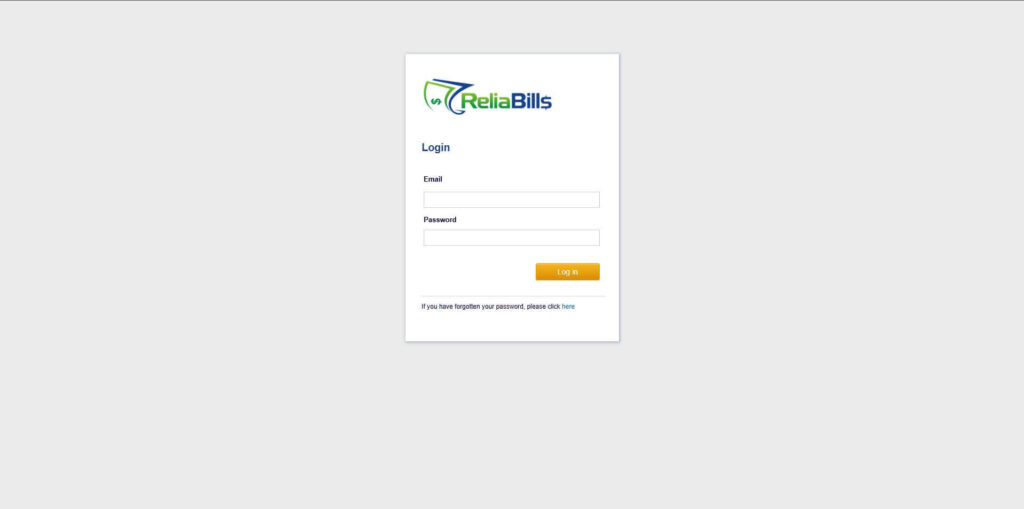
Step 1: Login to ReliaBills
- Access your ReliaBills Account using your login credentials. If you don’t have an account, sign up here.
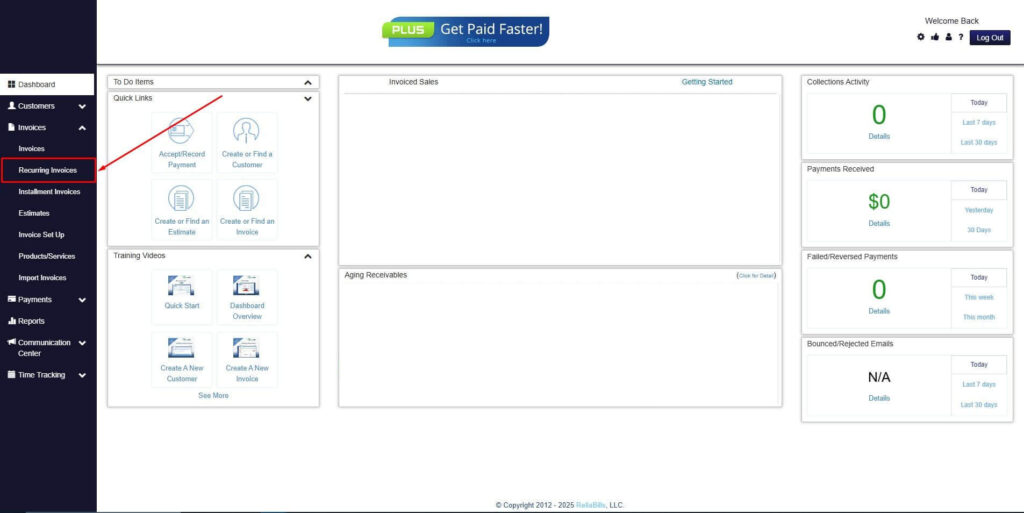
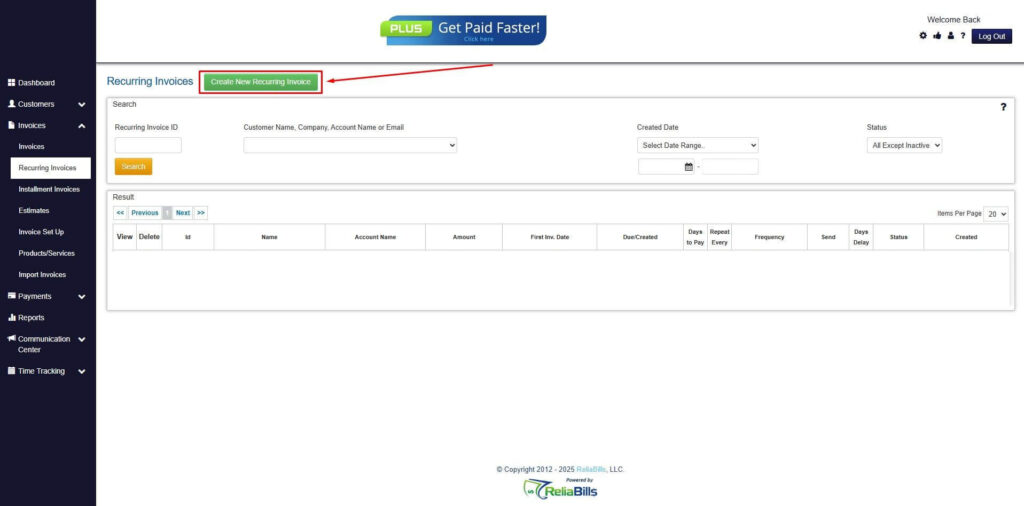
Step 2: Click on Recurring Invoices
- Navigate to the Invoices Dropdown and click on Recurring Invoices for an overview of the list of your existing customers.
Step 3: Go to the Customers Tab
- If you have already created a customer, search for them in the Customers tab and make sure their status is “Active”.
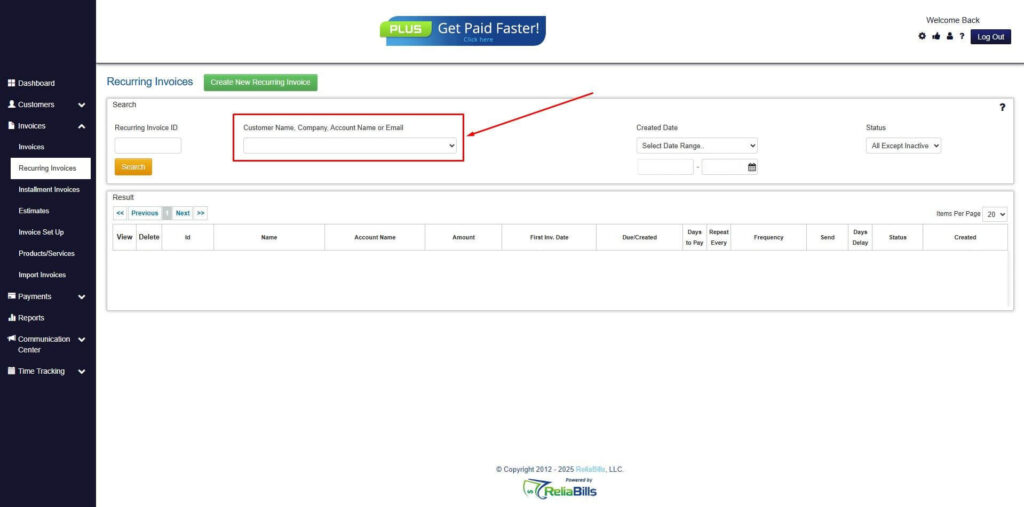
Step 4: Click the Create New Recurring Invoice
- If you haven’t created any customers yet, click the Create New Recurring Invoice to create a new customer.
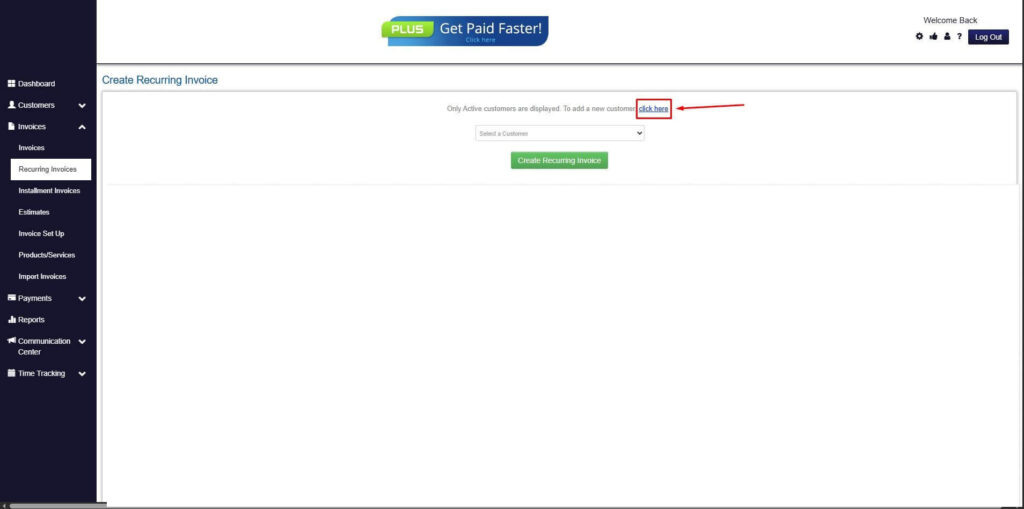
Step 5: Click on the “Click here” Button
- Click on the “Click here” button to proceed with the recurring invoice creation.
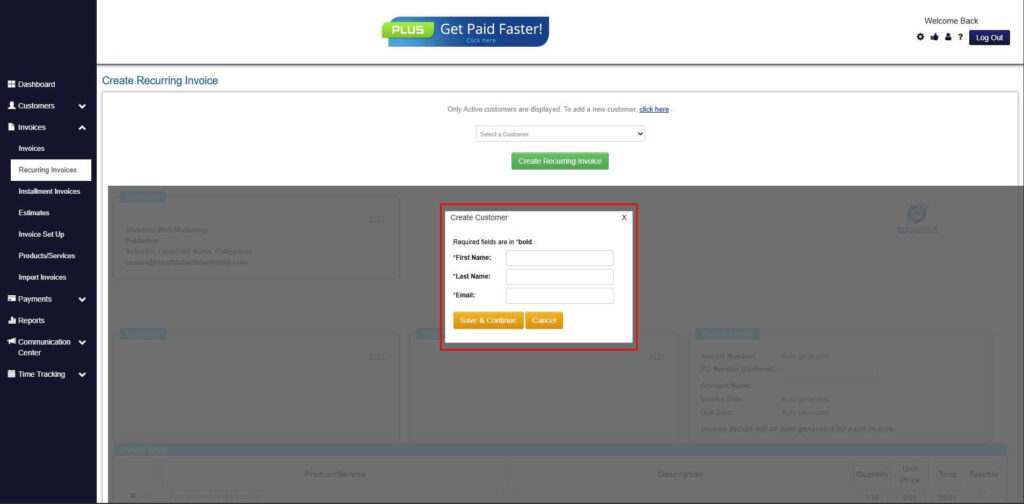
Step 6: Create Customer
- Provide your First Name, Last Name, and Email to proceed.
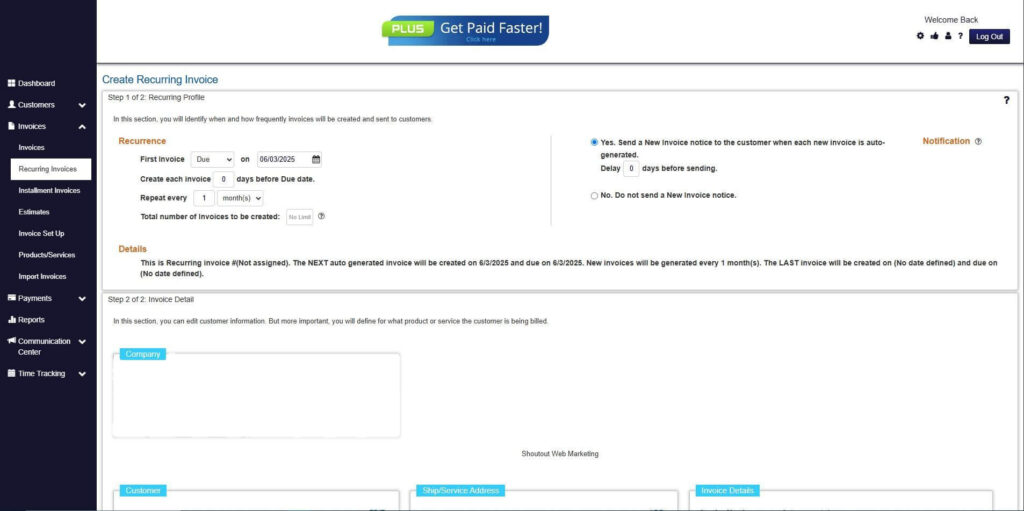
Step 7: Fill in the Create Recurring Invoice Form
- Fill in all the necessary fields.
Step 8: Save Recurring Invoice
- After filling up the form, click “Save Recurring Invoice” to continue.
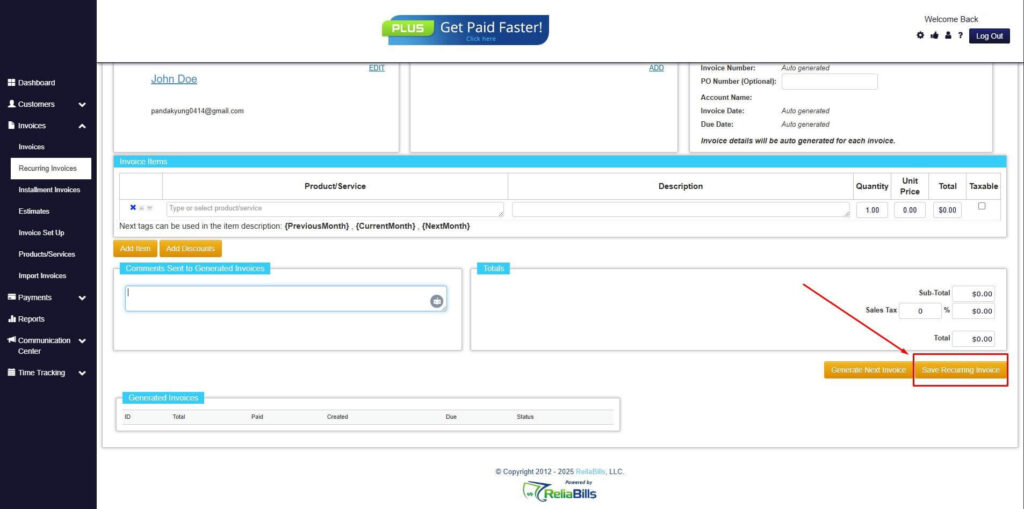
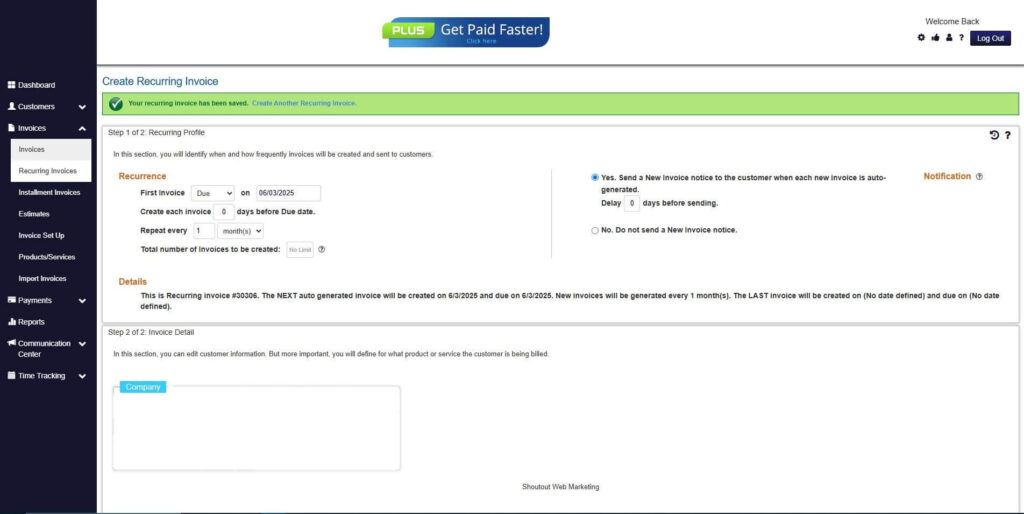
Step 9: Recurring Invoice Created
- Your Recurring Invoice has been created.
Frequently Asked Questions
1. What is paperless overdue invoice management?
Paperless overdue invoice management refers to the use of digital billing systems to track, manage, and collect overdue invoices without relying on printed documents.
2. How does digital billing reduce overdue invoices?
Digital billing improves invoice delivery speed, automates payment reminders, and provides online payment options that make it easier for customers to pay on time.
3. Why are automated reminders important for invoice payments?
Automated reminders notify customers about upcoming or overdue payments, which reduces forgotten invoices and improves collection rates.
4. Can digital billing integrate with accounting software?
Yes. Many digital billing platforms integrate with accounting and payment systems, allowing businesses to track payments and update financial records automatically.
Conclusion
Paper-based billing processes often slow down payment collection and create unnecessary administrative work. Delayed invoice delivery, missing reminders, and inefficient documentation can all contribute to overdue payments.
Digital billing provides a more efficient approach by automating invoicing, reminders, and payment tracking. Businesses can send invoices instantly, monitor payment activity in real time, and maintain organized records without relying on paper documentation.
By adopting digital platforms such as ReliaBills, companies can streamline billing operations, improve collection efficiency, and implement reliable paperless overdue invoice management strategies that support both financial performance and sustainable business practices.